Reading Strategies
for the Digital Age
BELLINGHAM TECHNICAL COLLEGE FACULTY
LEARNING COMMUNITY
Presenters:
Dawn Hawley
Judi Wise
Traci Taylor
Stoo Sepp
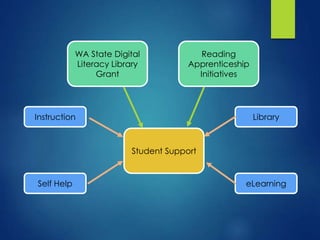
WA State Digital
Literacy Library
Grant
Reading
Apprenticeship
Initiatives
Student Support
Self Help
LibraryInstruction
eLearning
Who we are:
We are a Faculty Learning Community from
Bellingham Technical College with a shared
interest in online reading and comprehension.
What we are doing:
We are exploring online reading strategies, tools
and best practices as teachers, librarians and
eLearning staff.
Our Project Research
Questions
1. How does reading digital text differ from reading
traditional hard copy text?
2. What are the differences in reading hard copy
text, static digital text, and hypertexts?
3. What are the best practices for reading digital
texts?
4. What modifications can we make to our courses,
workshops and trainings that are online, hybrid
and web enhanced in regards to reading?
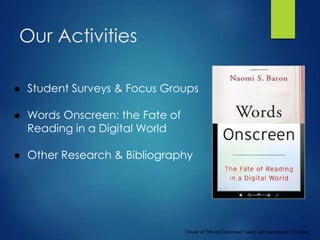
Our Activities
● Student Surveys & Focus Groups
● Words Onscreen: the Fate of
Reading in a Digital World
● Other Research & Bibliography
Cover of “Words Onscreen” used with permission of author.
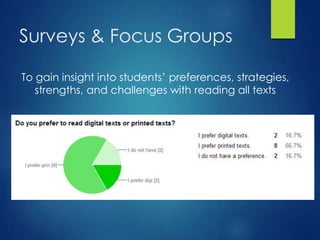
Surveys & Focus Groups
To gain insight into students’ preferences, strategies,
strengths, and challenges with reading all texts
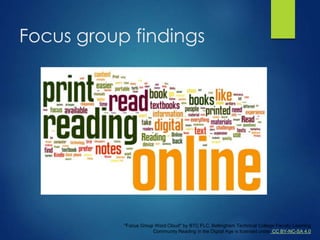
Focus group findings
"Focus Group Word Cloud" by BTC FLC, Bellingham Technical College Faculty Learning
Community Reading in the Digital Age is licensed under CC BY-NC-SA 4.0
Our Themes, Distilled
Common themes that have emerged from our research so far…
● Environments for digital texts are different than for print text
● Academic or deep reading online presents unique
challenges
● Reading comprehension requires different strategies online
● Distraction is an issue for online readers
● Quality & credibility of online material is harder to determine
● The physicality of printed text is still important for many
readers
● Students struggle with how to annotate & take notes
digitally
● Device and internet availability is an issue
"Distilling at MBD" by Mount Baker Distillery is licensed under CC BY-NC-SA 4.0
Findings & Applications
1.For Teachers…
2.For Librarians…
3.For eLearning...
Instruction: Question
How do you teach reading for
your discipline?
(Please type your answer in the chat window)
Instruction
Develop an overall approach to reading onscreen
texts:
● Build curriculum Around Reading Apprenticeship
Dimensions--Personal, Social, Cognitive,
Knowledge-building, Metacognition
● Make It Personal
● Make It Social
● Surface Mental Process
● Make it Known
Link: http://www.losmedanos.edu/deved/documents/RA-2pg.pdf
Instruction
Model to students how find purpose for reading.
If students know their purpose,
they can adjust their behavior
and reading time.
Instruction
Help students to cut out the clutter (Remove
distractions)
Teach specific approaches to reading on the Internet
Example: Colorado State University
Link: http://writing.colostate.edu/guides/page.cfm?pageid=651&guideid=33
Instruction
Help students construct a reading path for nonlinear
textual environments.
● Assessing the credibility of sources
● Reducing to manageable number of texts
● Determining relevance of texts to goals
(Cho & Afflerbach, 2015)
Instruction
Provide a checklist for developing strategic
Internet strategies.
 Explore and select Web sources
 Interconnect and learn from multiple
sources
 Evaluate and critique Web sources
 Monitor and adjust your Internet reading.
(Cho & Afflerbach, 2015)
Instruction
Use Internet Reciprocal Teaching (Hodgson, 2015):
“Scaffolded Inquiry”
1. Teacher-led Modeling
2. Collaborative modeling
3. Inquiry
Instruction
Engage in and encourage mindful practices:
● “Form follows function”
● Quiet and Sustained
● Out of Site(sight) out of Mind
● Honor thy printed text and author
● Offer activities that honor deep reading to counterbalance
the trend in “short reading” online.
● At what cost?
● It’s all about the learning
(Baron, 2015)
Library
1. What can we as librarians do to improve student
online reading skills and comprehension?
2. How do we connect what we have learned with
what we already do?
RESEARCH QUESTIONS
How do you think academic
libraries can help students
navigate the challenges of
reading online?
(Please type your answer in the chat window)
Library: Question
Library: Teaching
● Collaborate with faculty to design targeted instruction
that addresses student barriers to online reading
● Offer more advanced searching & digital resource
evaluation instruction to improve student resource
selection skills
● Introduce note-taking and annotation strategies for
reading digital material
● Help students learn to be mindful when setting up their
physical & digital environments to decrease distraction &
increase self-confidence in reading online
Library: Resources & Access
● Circulation: Acquire & check out equipment that supports
online reading
● Collection Development: Consider interface & ease of use
for new material, in addition to subject and content
appropriateness
● Access: Provide mobile hotspots, as well as print and digital
copies of texts
● Collaboration: Work with campus bookstore to provide print
and digital textbook options & to ensure the accessibility of
OER
Library: Tutorials & Tools
 Develop tutorials for digital reading strategies & tools
 Explore best practices & innovations for developing
online reading skills
 Investigate new digital annotation tools that increase
online reading comprehension
 Introduce software apps to remove distractions from
digital text
eLearning: Question
What do you do (if anything)
to make reading online easier
for yourself?
(Please type your answer in the chat window)
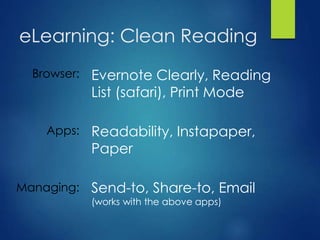
eLearning: Clean Reading
Browser:
Apps:
Managing:
Evernote Clearly, Reading
List (safari), Print Mode
Readability, Instapaper,
Paper
Send-to, Share-to, Email
(works with the above apps)
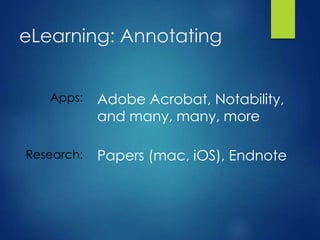
eLearning: Annotating
Apps:
Research:
Adobe Acrobat, Notability,
and many, many, more
Papers (mac, iOS), Endnote
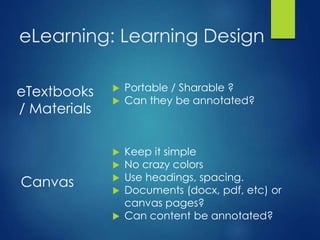
eLearning: Learning Design
Canvas
 Keep it simple
 No crazy colors
 Use headings, spacing.
 Documents (docx, pdf, etc) or
canvas pages?
 Can content be annotated?
eTextbooks
/ Materials
 Portable / Sharable ?
 Can they be annotated?
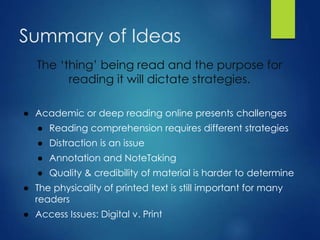
Summary of Ideas
The ‘thing’ being read and the purpose for
reading it will dictate strategies.
● Academic or deep reading online presents challenges
● Reading comprehension requires different strategies
● Distraction is an issue
● Annotation and NoteTaking
● Quality & credibility of material is harder to determine
● The physicality of printed text is still important for many
readers
● Access Issues: Digital v. Print
teaching.btc.ctc.edu/readingonline
 Slides
 Survey Results
 References
Thank you
Bellingham Technical College Learning Community Project
Members
● Judi Wise, Basic Academic Skills/ESL Faculty
● Traci Taylor, Librarian
● Dawn Hawley, eLearning Instructional Technician/Library
Specialist
● Stoo Sepp, Director of eLearning
● Caren Kongshaug, English/Basic Skills/RA Lead
● Jane Blume, Director, Library & Media Services
teaching.btc.ctc.edu/readingonline

2015 IGNIS Webinar: Digital Reading Startegies

  • 1.
    Reading Strategies for theDigital Age BELLINGHAM TECHNICAL COLLEGE FACULTY LEARNING COMMUNITY Presenters: Dawn Hawley Judi Wise Traci Taylor Stoo Sepp
  • 2.
    WA State Digital LiteracyLibrary Grant Reading Apprenticeship Initiatives Student Support Self Help LibraryInstruction eLearning
  • 3.
    Who we are: Weare a Faculty Learning Community from Bellingham Technical College with a shared interest in online reading and comprehension. What we are doing: We are exploring online reading strategies, tools and best practices as teachers, librarians and eLearning staff.
  • 4.
    Our Project Research Questions 1.How does reading digital text differ from reading traditional hard copy text? 2. What are the differences in reading hard copy text, static digital text, and hypertexts? 3. What are the best practices for reading digital texts? 4. What modifications can we make to our courses, workshops and trainings that are online, hybrid and web enhanced in regards to reading?
  • 5.
    Our Activities ● StudentSurveys & Focus Groups ● Words Onscreen: the Fate of Reading in a Digital World ● Other Research & Bibliography Cover of “Words Onscreen” used with permission of author.
  • 6.
    Surveys & FocusGroups To gain insight into students’ preferences, strategies, strengths, and challenges with reading all texts
  • 7.
    Focus group findings "FocusGroup Word Cloud" by BTC FLC, Bellingham Technical College Faculty Learning Community Reading in the Digital Age is licensed under CC BY-NC-SA 4.0
  • 8.
    Our Themes, Distilled Commonthemes that have emerged from our research so far… ● Environments for digital texts are different than for print text ● Academic or deep reading online presents unique challenges ● Reading comprehension requires different strategies online ● Distraction is an issue for online readers ● Quality & credibility of online material is harder to determine ● The physicality of printed text is still important for many readers ● Students struggle with how to annotate & take notes digitally ● Device and internet availability is an issue "Distilling at MBD" by Mount Baker Distillery is licensed under CC BY-NC-SA 4.0
  • 9.
    Findings & Applications 1.ForTeachers… 2.For Librarians… 3.For eLearning...
  • 10.
    Instruction: Question How doyou teach reading for your discipline? (Please type your answer in the chat window)
  • 11.
    Instruction Develop an overallapproach to reading onscreen texts: ● Build curriculum Around Reading Apprenticeship Dimensions--Personal, Social, Cognitive, Knowledge-building, Metacognition ● Make It Personal ● Make It Social ● Surface Mental Process ● Make it Known Link: http://www.losmedanos.edu/deved/documents/RA-2pg.pdf
  • 12.
    Instruction Model to studentshow find purpose for reading. If students know their purpose, they can adjust their behavior and reading time.
  • 13.
    Instruction Help students tocut out the clutter (Remove distractions) Teach specific approaches to reading on the Internet Example: Colorado State University Link: http://writing.colostate.edu/guides/page.cfm?pageid=651&guideid=33
  • 14.
    Instruction Help students constructa reading path for nonlinear textual environments. ● Assessing the credibility of sources ● Reducing to manageable number of texts ● Determining relevance of texts to goals (Cho & Afflerbach, 2015)
  • 15.
    Instruction Provide a checklistfor developing strategic Internet strategies.  Explore and select Web sources  Interconnect and learn from multiple sources  Evaluate and critique Web sources  Monitor and adjust your Internet reading. (Cho & Afflerbach, 2015)
  • 16.
    Instruction Use Internet ReciprocalTeaching (Hodgson, 2015): “Scaffolded Inquiry” 1. Teacher-led Modeling 2. Collaborative modeling 3. Inquiry
  • 17.
    Instruction Engage in andencourage mindful practices: ● “Form follows function” ● Quiet and Sustained ● Out of Site(sight) out of Mind ● Honor thy printed text and author ● Offer activities that honor deep reading to counterbalance the trend in “short reading” online. ● At what cost? ● It’s all about the learning (Baron, 2015)
  • 18.
    Library 1. What canwe as librarians do to improve student online reading skills and comprehension? 2. How do we connect what we have learned with what we already do? RESEARCH QUESTIONS
  • 19.
    How do youthink academic libraries can help students navigate the challenges of reading online? (Please type your answer in the chat window) Library: Question
  • 20.
    Library: Teaching ● Collaboratewith faculty to design targeted instruction that addresses student barriers to online reading ● Offer more advanced searching & digital resource evaluation instruction to improve student resource selection skills ● Introduce note-taking and annotation strategies for reading digital material ● Help students learn to be mindful when setting up their physical & digital environments to decrease distraction & increase self-confidence in reading online
  • 21.
    Library: Resources &Access ● Circulation: Acquire & check out equipment that supports online reading ● Collection Development: Consider interface & ease of use for new material, in addition to subject and content appropriateness ● Access: Provide mobile hotspots, as well as print and digital copies of texts ● Collaboration: Work with campus bookstore to provide print and digital textbook options & to ensure the accessibility of OER
  • 22.
    Library: Tutorials &Tools  Develop tutorials for digital reading strategies & tools  Explore best practices & innovations for developing online reading skills  Investigate new digital annotation tools that increase online reading comprehension  Introduce software apps to remove distractions from digital text
  • 23.
    eLearning: Question What doyou do (if anything) to make reading online easier for yourself? (Please type your answer in the chat window)
  • 24.
    eLearning: Clean Reading Browser: Apps: Managing: EvernoteClearly, Reading List (safari), Print Mode Readability, Instapaper, Paper Send-to, Share-to, Email (works with the above apps)
  • 25.
    eLearning: Annotating Apps: Research: Adobe Acrobat,Notability, and many, many, more Papers (mac, iOS), Endnote
  • 26.
    eLearning: Learning Design Canvas Keep it simple  No crazy colors  Use headings, spacing.  Documents (docx, pdf, etc) or canvas pages?  Can content be annotated? eTextbooks / Materials  Portable / Sharable ?  Can they be annotated?
  • 27.
    Summary of Ideas The‘thing’ being read and the purpose for reading it will dictate strategies. ● Academic or deep reading online presents challenges ● Reading comprehension requires different strategies ● Distraction is an issue ● Annotation and NoteTaking ● Quality & credibility of material is harder to determine ● The physicality of printed text is still important for many readers ● Access Issues: Digital v. Print
  • 28.
  • 29.
    Thank you Bellingham TechnicalCollege Learning Community Project Members ● Judi Wise, Basic Academic Skills/ESL Faculty ● Traci Taylor, Librarian ● Dawn Hawley, eLearning Instructional Technician/Library Specialist ● Stoo Sepp, Director of eLearning ● Caren Kongshaug, English/Basic Skills/RA Lead ● Jane Blume, Director, Library & Media Services teaching.btc.ctc.edu/readingonline

Editor's Notes

  • #2 Intro - Dawn
  • #3 Dawn - This diagram shows how our project was formed...
  • #4 Dawn - pretty much “that woman who reads the slide”
  • #5 Dawn - I will paraphrase
  • #6 Dawn - describe briefly our research activities
  • #7 Dawn - Students randomly selected from various programs Survey and Various questions about reading preferences
  • #8 Dawn - we have so far discovered: (What do we know?) Our review of current literature reveals that comprehension is consistently lower for students who read digital text. Our Survey & FG research has so far revealed several barriers to successful online reading for students. What do the students say? Distraction/Environment/Trust, lack of note-taking skill, physicality -
  • #9 Dawn – link to reading environments was added to webpage (oh note from stoo – I didn’t know what you meant by ‘environments’) Love it!
  • #10 Dawn - Or, a review of the research out there……..
  • #11 Judi
  • #12 Judi - Develop an overall approach to reading onscreen texts: Build curriculum around Reading Apprenticeship Dimensions--Personal, Social, Cognitive, Knowledge-building, Metacognition Make it Personal--Help students see themselves as readers by allowing them to explore their preferences between digital texts and print texts. Make it Social--Find ways students can explore the benefits and limitations of onscreen reading through group discussion Surface Strategies--Have students observe and record each other reading a difficult onscreen text. discuss what was done and why. Make it Known--Teach vocabulary on onscreen devices, tools, etc.
  • #13 Judi Model to students how find purpose for reading. If students know their purpose, they can adjust their behavior and reading time. Search for information? (Scan) Remember information? (Study-read/Deep-read) Get a general idea? (Skim)
  • #14 Help students to cut out the clutter (Remove distractions) Remove external distractors (room, etc.) Remove online distractors (Apps and behaviors--Readability.com, adjust settings on screen) Use Ad Blockers for online ads Turn off phone, etc. Teach specific reading strategies: (http://writing.colostate.edu/guides/guide.cfm?guideid=33) Show students how to synthesize online reading into meaningful chunks (Deep read) and scan a web page to focus on what’s important (Scan) Teach students the value of evaluating hyperlink before you click Ask students about different domains (.edu, .org, .gov, .com) Lesson: Draw clear and logical path that reader uses complete and assignment involving online content--map it out
  • #15 To become responsive and sophisticated readers, Students must construct a reading path that reflects their decisions and strategies over the course of the task. These decisions include assessing credibility of the sources, reducing the numerous possibilities to a manageable number of texts, and determining relevance of texts to goals. Examine and select hyperlinks to access useful texts. Build a reading path to achieve reading goals Compare/contrast info from sources. Choose which sources and what order Monitor reading process—plan, reflect on, anticipate options for questioning Construct critical questions Checklist
  • #17 Judi-- Use Internet Reciprocal Teaching (Hodgson, 2015):Judi check reference Teacher-led Modeling of strategies for online learning. Think Aloud process of active reading. Use checklist to offer beginning support to students. Collaborative modeling--Group work on larger projects to solve questions based on research. Inquiry--Students complete larger project based on their own interests.
  • #18 Judi-- Engage in and encourage mindful practices: “Form follows function”--Encourage students to use the form that works best for their purpose. Schedule in the quiet and sustained--Offer opportunities to read without distraction. Out of Site(Sight) out of mind--Model how not to multi-task when in front of students (not texting in meeting, etc.) Honor thy printed text and author--Display respect for print and authorship. Offer activities that honor deep reading to counterbalance the trend in “short reading” online. At what cost?--Ask questions about the environmental impact of digital versus print texts. It’s all about the learning--“Don’t abandon learning outcomes for the sake of costs.”
  • #19 Traci
  • #20 Traci
  • #21 Traci
  • #22 Traci
  • #23 Traci
  • #24 Stoo So much of what we read online is just on websites or blogs? What do you do to make things easier to read online?
  • #25 Stoo Explain what clean reading is. Show screenshots. Can’t show due to copyright – had tough time even finding logos.
  • #26 Stoo
  • #27 StooTextbooks are great! What about eTextbooks though? Are they: portable, annotatable? Building stuff in canvas? - keep it simple No crazy colors, headings, spacing. Documents (docx, pdf, etc) or canvas pages? whichever is easiest on the eyes, can they be annotated?
  • #28 Stoo
  • #29 Stoo