Teaching Reading in a Digital WorldPhiladelphia Reading CouncilEric C. MacDonald, Ed.D.Benchmark SchoolApril 9, 2011
I Need My Teacher to Learn
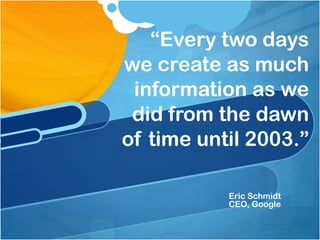
“Every two days we create as much information as we did from the dawn of time until 2003.”Eric SchmidtCEO, Google
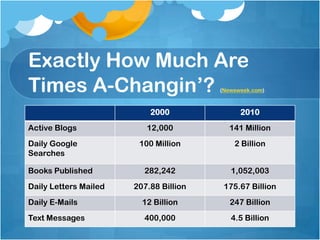
Exactly How Much Are Times A-Changin’? (Newsweek.com)
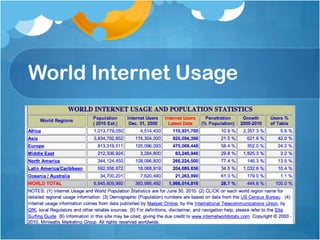
World Internet Usage
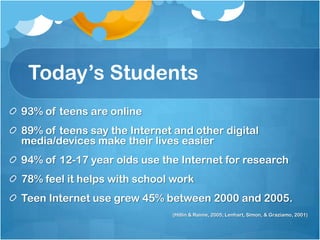
Today’s Students93% of teens are online89% of teens say the Internet and other digital media/devices make their lives easier94% of 12-17 year olds use the Internet for research78% feel it helps with school workTeen Internet use grew 45% between 2000 and 2005.(Hitlin & Rainie, 2005; Lenhart, Simon, & Graziamo, 2001)
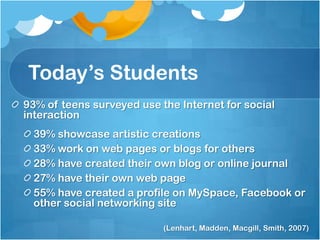
Today’s Students93% of teens surveyed use the Internet for social interaction39% showcase artistic creations33% work on web pages or blogs for others28% have created their own blog or online journal27% have their own web page55% have created a profile on MySpace, Facebook or other social networking site(Lenhart, Madden, Macgill, Smith, 2007)
Students Online	Students spend an average of:			27 hours online at home			15 minutes at school(Miners & Pascopella, 2007)
InfowhelmAre you feeling overwhelmed with information?
Brain Freeze (Newsweek.com)Newsweek Headline:“I Can’t Think! The Twitterization of our culture has revolutionized our lives, but with an unintended consequence – our overloaded brains freeze when we have to make decisions.”
Brain Freeze – ConsequencesOxford English Dictionary“information fatigue”Added in 2009“But as information finds more ways to reach us, more often, more insistently than ever before, another consequence is becoming alarmingly clear: trying to drink from a firehose of information has harmful cognitive effects. And nowhere are those effects more worrying, than in our ability to make smart, creative, successful decisions.” (30)
Brain Freeze – Too Much Information!It is possible to have too much informationWith more information we actually make worse decisions.We tend to give more weight to recent information, even if it is not salient.How do we help our students (and ourselves) manage information to “think smart”?
Brain Freeze – Think TimeWe need time to thinkOur unconscious (think gut feeling) makes an important contribution to good decision-making. “If emotions are shut out of the decision-making process, we’re likely to overthink a decision, and that has been shown to produce worse outcomes on even the simplest tasks.” (33)
Brain Freeze – Step Away“Experts advise dealing with emails and texts in batches, rather than in real time; that should let your unconscious decision-making system kick in. Avoid the trap of thinking that a decision requiring you to assess a lot of complex information is best made methodically and consciously; you will do better, and regret less if you let your unconscious turn it over by removing yourself from the influx. Set priorities; if a choice turns on only a few criteria, focus consciously on those.” (33)
Brain Freeze - StrategiesWe can become more organized in how we access, organize and assess information. We can be more strategic in our approach to information-rich tasks. We can emphasize the importance of prioritizing, synthesizing, and even time-management as important 21st century strategies.
Brain Freeze – Classroom ImplicationsMetacognitionCritical ThinkingStrategic ReadingPrint TextDigital Text
The Internet & ReadingThe Internet is a reading comprehension issue, not a technology issue. - Don Leu
As a field we have been very slow to adopt technology.Michael Kamil, Stanford UniversityThe more new literacy you try to integrate, the more conventional literacy you need.- Michael Kamil, Stanford University
Thinking About Literacy and TechnologyLiteracyIssues in Reading & WritingImportance of “traditional print literacies”Need to adapt, shift, and teach online and Web 2.0 literacies.Teaching & LearningConceptualizing the tools available for teaching & Instruction
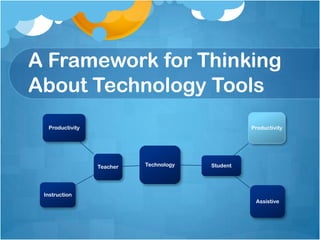
A Framework for Thinking About Technology Tools
Decision Point – Where do you want to go today?What is Web 2.0?Ideas for Teaching Reading in a Web 2.0 WorldTools for Students and TeachersMy favoritesMy “To Do” List
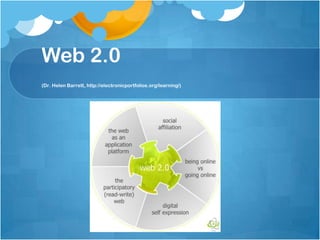
Web 2.0The Read-Write Web
What is Web 2.0?(Solomon & Schrum, 2007)“By the early 2000s, the notion of interactivity went from linking and clicking to creating and sharing. Now individuals not only find and read information but also create and share their own in real time. It is a new Web, known as Web 2.0”“We no longer just find and use information: the Web is now a participatory, interactive place where we create information collaboratively and share the results.”
Web 2.0  (Dr. Helen Barrett, http://electronicportfolios.org/learning/)
Web 2.0 ToolsMany free, open-source Internet applicationsSome share similarities to “regular software.” (For example, Google Docs)Interactivity, easy publishing/idea sharing, and collaboration are hallmarks of Web 2.0 tools
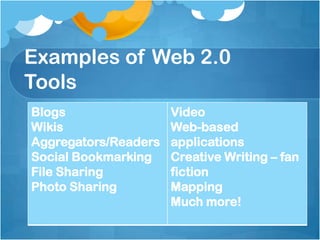
Examples of Web 2.0 Tools
Web 2.0 is often referred to as the Read/Write Web!So, what are we literacy educators waiting for? Web 2.0 has our name written all over it!
“To be literate today involves acquiring new skills, including those of using technology, understanding science, having global awareness, and most important, having the ability to keep learning, which involves gathering, processing, analyzing, synthesizing, and presenting information as well as communicating and collaborating.” (Solomon & Schrum, 2007)
These skills and dispositions should be very familiar to literacy educators. It is what we have been teaching in print text all along. Now we need to be on the forefront of figuring out how to teach these skills online and in providing effective instruction to our students.
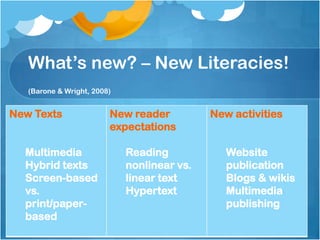
What’s new? – New Literacies!(Barone & Wright, 2008)
Traditional Literacies & New LiteraciesThe Internet and Web 2.0 tools “extend traditional literacy experiences with comprehension of information on the Internet; effective use of search engines to locate information; evaluation of Internet sources; communication using e-mail, texts, and chats; and the use of word processing programs.” (Barone & Wright, 2008)
IRA– Integrating  Literacy and Technology  in the CurriculumThe Internet and other forms of information and communication technology (ICT) are redefining the nature of literacy. To become fully literate in today’s world, students must become proficient in the new literacies of ICT. Therefore, literacy educators have a responsibility to integrate these technologies into their literacy curricula. The Association believes that much can be done to support students in developing all the forms of literacy they will require. We believe that students have the right to
IRA Position Statement (cont’d)The Association believes that much can be done to support students in developing all the forms of literacy they will require. We believe that students have the right to Teachers who are skilled in the effective use of ICT for teaching and learningA literacy curriculum that integrates the new literacies of ICT into instructional programs Instruction that develops the critical literacies essential to effective information use
IRA Position Statement (cont’d)Assessment practices in literacy that include reading and writing with technology tools Opportunities to learn safe and responsible use of information and communication technologies Equal access to ICT
So what do I do?Professional development“Play” with the toolsDetermine how tools can enhance your current objectivesExperiment!
Adapting to Teaching Literacy in the 21st CenturyLiteracy Meets Web 2.0
NAEP Framework for ReadingLocating/RecallingIntegrating/InterpretingCritiquing/EvaluatingHow do we teach these today in print text?How do these apply to reading online?
Reading in a Digital WorldTeaching reading in the 21st century requires a “mind-shift” for non-digital native teachers.Changing our thinking about text and teaching about text can be difficult.
Why teach online reading to digital natives?Science Assignment: Find information about an animal that interests you and create an informational poster.Student searches Google for “octopus” and finds a site that interests him and creates a poster.Among the facts on the “tree octopus” he writes:Found in Washington StateAmphibious, but lives in treesLargest brain-to-body ratio for a mollusk
Why teach online reading to digital natives?You can’t imagine an amphibious octopus living in trees, so you check his bibliography and find the following site:Pacific Northwest Tree Octopus
Why teach online reading to digital natives?24 of 25 students, identified as “good readers” said they would recommend this site to others!“Even after they were let in on the hoax, most of the students had difficulty deciphering the clues that betrayed the site’s fictitiousness. Some still maintained that the octopus really exists.”
Why teach online reading to digital natives?In a related study:57% of students report never checking accuracy of websites59% never check the source of a website4% of students checked the background of the site’s creator.(Bettleheim, 2007)This research was done by the New Literacies Group at The University of Connecticut
Major Skills for Teaching About Online Reading 	(Leu, 2007)Question – Identify important questions and be able to revise questions as needed.Locate – Locate information online.Evaluate – Critically evaluate information.Synthesize – Pull information together to answer questions.Communicate – Communicate your findings with others.
Question – Pre-reading StepsBrainstorm what students knowAssess background knowledge – do I need to do some easy reading? (Internet Bkg. Building)What do I want to learn?
QuestionImportant to know what you are looking for when reading online.Volume of informationMultiple (and multimedia) distractions.  Need to have a plan for research!(Eagleton & Dobler, 2007)
LocateKey skill in effective online reading.Strategies for locating information online should be one of the first things taught.Provide explicit instruction and guided practice in using search engines & directories
Locate: Key Questions/SkillsWhat search engine should I use?Selecting keywordsRefining searchImportance of vocabulary/background knowledgeDirectories vs. search enginesNettrekkerThe “Deep Web” – Access PA
Locate – Reading Web PagesProvide explicit instruction and guided practice in reading websites.Menus Is there an “about?” (Important for evaluation.)Locations for menusDifferences between print text navigation and hypertext navigation.Links – Importance of predicting in hypertextKnowing when you are leaving the site to go to another siteMulti-media
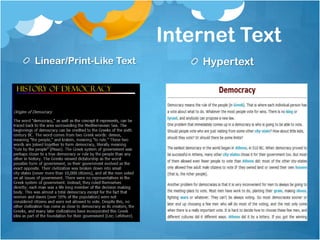
Internet TextLinear/Print-Like TextHypertext
Social Studies EPR – Types of Text on the InternetWhat is hypertext? What is the difference between the text you read on the Internet for homework over the weekend and the text you will read on the Internet for tonight’s homework?  (Hint: What do you have to do to read everything on government in Athens? How do you navigate or find your way around the text?)Why might it be important to be aware of the differences in types of text found on the Internet? (In other words, why might it be useful to know that some sites/pages use text that is more like print text and others use hypertext?)
EvaluateSecond critical strategy set for online reading.Key elements:Reliability – Is the information trustworthy?Bias – Knowing the source of information is important as everyone shapes information.Stance – Importance of being a critical reader or “healthy skeptic.”
Key Strategies for EvaluatingRead the Search ResultsURLRead the descriptionsEvaluate the websiteAuthority – Who wrote it? (Check the “About” page.)Purpose – Should be clear on the homepage.ObjectivityTimeliness – Good websites include a footer with information on when the page was created/updated.(Eagleton & Dobler, 2007)
Synthesize	Pulling information together from multiple sources or across sources.Importance of knowing what to ignore.Knowing when you have answered your research question.
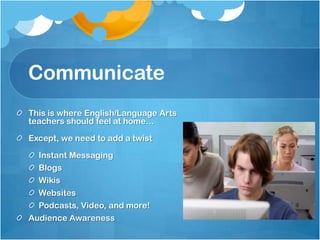
CommunicateThis is where English/Language Arts teachers should feel at home…Except, we need to add a twistInstant MessagingBlogsWikisWebsitesPodcasts, Video, and more!Audience Awareness
My Favorite Tools
Everything GoogleGoogle DocsGoogle ReaderGoogle SitesGoogle Earth & MapsAnd so much more
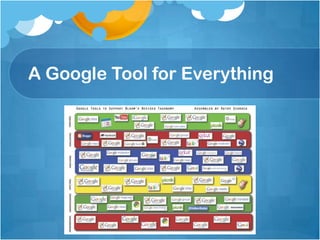
A Google Tool for Everything
Graphic OrganizersWebspiration ClassroomExploratreeBubbl.usThinklinkrCacooAnd many more…
Flash CardsQuizletStudy Stack
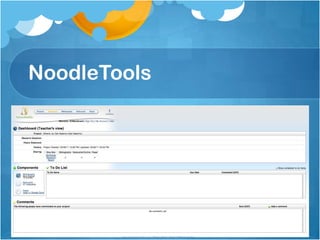
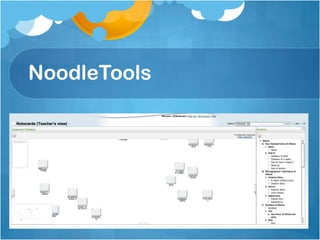
NoodleToolsNote takingOrganizationBibliographyLinks to Google Docs
NoodleTools
NoodleTools
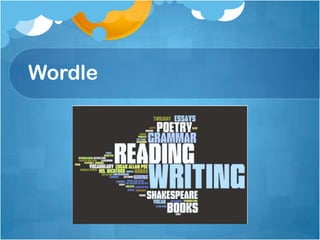
Wordle
My “To Learn” List & More
My “To Explore” ListMuseum BoxDiigoBookmappingor Google Lit Trips
Elementary SitesPrimary Wall – web-based, collaborative sticky note toolFry’s Word List ActivitiesBook Trailers – 30-45 second introductions to books at a variety of levels.
Other “Word” SitesSnappy Words – A visual dictionary/thesaurus.Lexipedia – Another visual dictionary/thesaurus.Wordia – video definitions of words.Write-n-ator – A video clip on a vocabulary word followed by a writing challenge.Save the Words – A cool site that is hard to describe but good for vocabulary building with older students.Wacky Web Tales – Sort of a mad lib type activity with stories for grades 3 and above.
SpellingDictionary.com- Has 6 spelling/word games that might make for constructive reward or free-time activities.Miss Spell's Class - Test spelling skills by catching misspelled words.Adlib - Your little brother has been transformed into an owl by an errant spell. Form words to piece the incantation back together. Master the spellbook to save your brother!Word Machine - Make words starting with a provided letter. Second and third words must also include additional provided letters. The longer the word, the more points you earn. Using the same word twice in the same game gives you less pointsMeaning Fall - Help the warrior cross the watery caverns. Read the word definitions and guess the words that are hidden behind the clouds. Bonus points for getting letter-streaks.Clockwords - You are an inventor who discovers plans for a mysterious word machine. Suddenly, your lab is infiltrated by bugs that want to steal your secrets! Make words that include provided letters to fend off the invaders.Word Kingdom - Build your kingdom by arranging letters to form words. Correctly spelled words can be converted into resources to feed your warriors, fortify your fortress and dominate WordLand.Spelling Match - Spelling games for grades K-8.
Other Sites60 Second Recap – provides short videos related to literature.Readability – Allows you to “cleanup” the screen and only see key text.Free Audio Books – public domain books for students to listen to.
Philadelphia council 4 9-11

Philadelphia council 4 9-11

  • 1.
    Teaching Reading ina Digital WorldPhiladelphia Reading CouncilEric C. MacDonald, Ed.D.Benchmark SchoolApril 9, 2011
  • 2.
    I Need MyTeacher to Learn
  • 3.
    “Every two dayswe create as much information as we did from the dawn of time until 2003.”Eric SchmidtCEO, Google
  • 4.
    Exactly How MuchAre Times A-Changin’? (Newsweek.com)
  • 5.
    Exactly How MuchAre Times A-Changin’? (Newsweek.com)
  • 6.
  • 7.
    Today’s Students93% ofteens are online89% of teens say the Internet and other digital media/devices make their lives easier94% of 12-17 year olds use the Internet for research78% feel it helps with school workTeen Internet use grew 45% between 2000 and 2005.(Hitlin & Rainie, 2005; Lenhart, Simon, & Graziamo, 2001)
  • 8.
    Today’s Students93% ofteens surveyed use the Internet for social interaction39% showcase artistic creations33% work on web pages or blogs for others28% have created their own blog or online journal27% have their own web page55% have created a profile on MySpace, Facebook or other social networking site(Lenhart, Madden, Macgill, Smith, 2007)
  • 9.
    Students Online Students spendan average of: 27 hours online at home 15 minutes at school(Miners & Pascopella, 2007)
  • 10.
    InfowhelmAre you feelingoverwhelmed with information?
  • 11.
    Brain Freeze (Newsweek.com)NewsweekHeadline:“I Can’t Think! The Twitterization of our culture has revolutionized our lives, but with an unintended consequence – our overloaded brains freeze when we have to make decisions.”
  • 12.
    Brain Freeze –ConsequencesOxford English Dictionary“information fatigue”Added in 2009“But as information finds more ways to reach us, more often, more insistently than ever before, another consequence is becoming alarmingly clear: trying to drink from a firehose of information has harmful cognitive effects. And nowhere are those effects more worrying, than in our ability to make smart, creative, successful decisions.” (30)
  • 13.
    Brain Freeze –Too Much Information!It is possible to have too much informationWith more information we actually make worse decisions.We tend to give more weight to recent information, even if it is not salient.How do we help our students (and ourselves) manage information to “think smart”?
  • 14.
    Brain Freeze –Think TimeWe need time to thinkOur unconscious (think gut feeling) makes an important contribution to good decision-making. “If emotions are shut out of the decision-making process, we’re likely to overthink a decision, and that has been shown to produce worse outcomes on even the simplest tasks.” (33)
  • 15.
    Brain Freeze –Step Away“Experts advise dealing with emails and texts in batches, rather than in real time; that should let your unconscious decision-making system kick in. Avoid the trap of thinking that a decision requiring you to assess a lot of complex information is best made methodically and consciously; you will do better, and regret less if you let your unconscious turn it over by removing yourself from the influx. Set priorities; if a choice turns on only a few criteria, focus consciously on those.” (33)
  • 16.
    Brain Freeze -StrategiesWe can become more organized in how we access, organize and assess information. We can be more strategic in our approach to information-rich tasks. We can emphasize the importance of prioritizing, synthesizing, and even time-management as important 21st century strategies.
  • 17.
    Brain Freeze –Classroom ImplicationsMetacognitionCritical ThinkingStrategic ReadingPrint TextDigital Text
  • 18.
    The Internet &ReadingThe Internet is a reading comprehension issue, not a technology issue. - Don Leu
  • 19.
    As a fieldwe have been very slow to adopt technology.Michael Kamil, Stanford UniversityThe more new literacy you try to integrate, the more conventional literacy you need.- Michael Kamil, Stanford University
  • 20.
    Thinking About Literacyand TechnologyLiteracyIssues in Reading & WritingImportance of “traditional print literacies”Need to adapt, shift, and teach online and Web 2.0 literacies.Teaching & LearningConceptualizing the tools available for teaching & Instruction
  • 21.
    A Framework forThinking About Technology Tools
  • 22.
    Decision Point –Where do you want to go today?What is Web 2.0?Ideas for Teaching Reading in a Web 2.0 WorldTools for Students and TeachersMy favoritesMy “To Do” List
  • 23.
  • 24.
    What is Web2.0?(Solomon & Schrum, 2007)“By the early 2000s, the notion of interactivity went from linking and clicking to creating and sharing. Now individuals not only find and read information but also create and share their own in real time. It is a new Web, known as Web 2.0”“We no longer just find and use information: the Web is now a participatory, interactive place where we create information collaboratively and share the results.”
  • 25.
    Web 2.0 (Dr. Helen Barrett, http://electronicportfolios.org/learning/)
  • 26.
    Web 2.0 ToolsManyfree, open-source Internet applicationsSome share similarities to “regular software.” (For example, Google Docs)Interactivity, easy publishing/idea sharing, and collaboration are hallmarks of Web 2.0 tools
  • 27.
  • 28.
    Web 2.0 isoften referred to as the Read/Write Web!So, what are we literacy educators waiting for? Web 2.0 has our name written all over it!
  • 29.
    “To be literatetoday involves acquiring new skills, including those of using technology, understanding science, having global awareness, and most important, having the ability to keep learning, which involves gathering, processing, analyzing, synthesizing, and presenting information as well as communicating and collaborating.” (Solomon & Schrum, 2007)
  • 30.
    These skills anddispositions should be very familiar to literacy educators. It is what we have been teaching in print text all along. Now we need to be on the forefront of figuring out how to teach these skills online and in providing effective instruction to our students.
  • 31.
    What’s new? –New Literacies!(Barone & Wright, 2008)
  • 32.
    Traditional Literacies &New LiteraciesThe Internet and Web 2.0 tools “extend traditional literacy experiences with comprehension of information on the Internet; effective use of search engines to locate information; evaluation of Internet sources; communication using e-mail, texts, and chats; and the use of word processing programs.” (Barone & Wright, 2008)
  • 33.
    IRA– Integrating Literacy and Technology in the CurriculumThe Internet and other forms of information and communication technology (ICT) are redefining the nature of literacy. To become fully literate in today’s world, students must become proficient in the new literacies of ICT. Therefore, literacy educators have a responsibility to integrate these technologies into their literacy curricula. The Association believes that much can be done to support students in developing all the forms of literacy they will require. We believe that students have the right to
  • 34.
    IRA Position Statement(cont’d)The Association believes that much can be done to support students in developing all the forms of literacy they will require. We believe that students have the right to Teachers who are skilled in the effective use of ICT for teaching and learningA literacy curriculum that integrates the new literacies of ICT into instructional programs Instruction that develops the critical literacies essential to effective information use
  • 35.
    IRA Position Statement(cont’d)Assessment practices in literacy that include reading and writing with technology tools Opportunities to learn safe and responsible use of information and communication technologies Equal access to ICT
  • 36.
    So what doI do?Professional development“Play” with the toolsDetermine how tools can enhance your current objectivesExperiment!
  • 37.
    Adapting to TeachingLiteracy in the 21st CenturyLiteracy Meets Web 2.0
  • 38.
    NAEP Framework forReadingLocating/RecallingIntegrating/InterpretingCritiquing/EvaluatingHow do we teach these today in print text?How do these apply to reading online?
  • 39.
    Reading in aDigital WorldTeaching reading in the 21st century requires a “mind-shift” for non-digital native teachers.Changing our thinking about text and teaching about text can be difficult.
  • 40.
    Why teach onlinereading to digital natives?Science Assignment: Find information about an animal that interests you and create an informational poster.Student searches Google for “octopus” and finds a site that interests him and creates a poster.Among the facts on the “tree octopus” he writes:Found in Washington StateAmphibious, but lives in treesLargest brain-to-body ratio for a mollusk
  • 41.
    Why teach onlinereading to digital natives?You can’t imagine an amphibious octopus living in trees, so you check his bibliography and find the following site:Pacific Northwest Tree Octopus
  • 42.
    Why teach onlinereading to digital natives?24 of 25 students, identified as “good readers” said they would recommend this site to others!“Even after they were let in on the hoax, most of the students had difficulty deciphering the clues that betrayed the site’s fictitiousness. Some still maintained that the octopus really exists.”
  • 43.
    Why teach onlinereading to digital natives?In a related study:57% of students report never checking accuracy of websites59% never check the source of a website4% of students checked the background of the site’s creator.(Bettleheim, 2007)This research was done by the New Literacies Group at The University of Connecticut
  • 44.
    Major Skills forTeaching About Online Reading (Leu, 2007)Question – Identify important questions and be able to revise questions as needed.Locate – Locate information online.Evaluate – Critically evaluate information.Synthesize – Pull information together to answer questions.Communicate – Communicate your findings with others.
  • 45.
    Question – Pre-readingStepsBrainstorm what students knowAssess background knowledge – do I need to do some easy reading? (Internet Bkg. Building)What do I want to learn?
  • 46.
    QuestionImportant to knowwhat you are looking for when reading online.Volume of informationMultiple (and multimedia) distractions.  Need to have a plan for research!(Eagleton & Dobler, 2007)
  • 47.
    LocateKey skill ineffective online reading.Strategies for locating information online should be one of the first things taught.Provide explicit instruction and guided practice in using search engines & directories
  • 48.
    Locate: Key Questions/SkillsWhatsearch engine should I use?Selecting keywordsRefining searchImportance of vocabulary/background knowledgeDirectories vs. search enginesNettrekkerThe “Deep Web” – Access PA
  • 49.
    Locate – ReadingWeb PagesProvide explicit instruction and guided practice in reading websites.Menus Is there an “about?” (Important for evaluation.)Locations for menusDifferences between print text navigation and hypertext navigation.Links – Importance of predicting in hypertextKnowing when you are leaving the site to go to another siteMulti-media
  • 50.
  • 51.
    Social Studies EPR– Types of Text on the InternetWhat is hypertext? What is the difference between the text you read on the Internet for homework over the weekend and the text you will read on the Internet for tonight’s homework? (Hint: What do you have to do to read everything on government in Athens? How do you navigate or find your way around the text?)Why might it be important to be aware of the differences in types of text found on the Internet? (In other words, why might it be useful to know that some sites/pages use text that is more like print text and others use hypertext?)
  • 52.
    EvaluateSecond critical strategyset for online reading.Key elements:Reliability – Is the information trustworthy?Bias – Knowing the source of information is important as everyone shapes information.Stance – Importance of being a critical reader or “healthy skeptic.”
  • 53.
    Key Strategies forEvaluatingRead the Search ResultsURLRead the descriptionsEvaluate the websiteAuthority – Who wrote it? (Check the “About” page.)Purpose – Should be clear on the homepage.ObjectivityTimeliness – Good websites include a footer with information on when the page was created/updated.(Eagleton & Dobler, 2007)
  • 54.
    Synthesize Pulling information togetherfrom multiple sources or across sources.Importance of knowing what to ignore.Knowing when you have answered your research question.
  • 55.
    CommunicateThis is whereEnglish/Language Arts teachers should feel at home…Except, we need to add a twistInstant MessagingBlogsWikisWebsitesPodcasts, Video, and more!Audience Awareness
  • 56.
  • 57.
    Everything GoogleGoogle DocsGoogleReaderGoogle SitesGoogle Earth & MapsAnd so much more
  • 58.
    A Google Toolfor Everything
  • 59.
  • 60.
  • 61.
  • 62.
  • 63.
  • 64.
  • 65.
  • 66.
    My “To Explore”ListMuseum BoxDiigoBookmappingor Google Lit Trips
  • 67.
    Elementary SitesPrimary Wall– web-based, collaborative sticky note toolFry’s Word List ActivitiesBook Trailers – 30-45 second introductions to books at a variety of levels.
  • 68.
    Other “Word” SitesSnappyWords – A visual dictionary/thesaurus.Lexipedia – Another visual dictionary/thesaurus.Wordia – video definitions of words.Write-n-ator – A video clip on a vocabulary word followed by a writing challenge.Save the Words – A cool site that is hard to describe but good for vocabulary building with older students.Wacky Web Tales – Sort of a mad lib type activity with stories for grades 3 and above.
  • 69.
    SpellingDictionary.com- Has 6spelling/word games that might make for constructive reward or free-time activities.Miss Spell's Class - Test spelling skills by catching misspelled words.Adlib - Your little brother has been transformed into an owl by an errant spell. Form words to piece the incantation back together. Master the spellbook to save your brother!Word Machine - Make words starting with a provided letter. Second and third words must also include additional provided letters. The longer the word, the more points you earn. Using the same word twice in the same game gives you less pointsMeaning Fall - Help the warrior cross the watery caverns. Read the word definitions and guess the words that are hidden behind the clouds. Bonus points for getting letter-streaks.Clockwords - You are an inventor who discovers plans for a mysterious word machine. Suddenly, your lab is infiltrated by bugs that want to steal your secrets! Make words that include provided letters to fend off the invaders.Word Kingdom - Build your kingdom by arranging letters to form words. Correctly spelled words can be converted into resources to feed your warriors, fortify your fortress and dominate WordLand.Spelling Match - Spelling games for grades K-8.
  • 70.
    Other Sites60 SecondRecap – provides short videos related to literature.Readability – Allows you to “cleanup” the screen and only see key text.Free Audio Books – public domain books for students to listen to.