Challenging Technology Becca Stith Munson NBCT, ECYA/LM 2003 Library Media Specialist Blue Valley West High School [email_address]
Challenges When using technology in my classroom/library/other: I am excited that ___________. I become frustrated when _________. I want to make ________ better.  How?
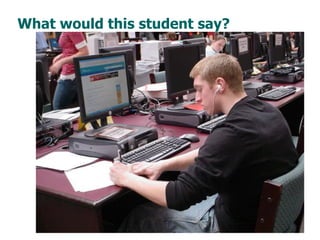
What would this student say?
While we teach whatever we teach at school, the kids go home and learn the skills they need to survive and prosper in an interconnected global economy. Clarence Fisher
 
 
Thoughts… How do you design a lesson involving technology? What are some common elements? What are trends you notice with other teachers designing projects? What are misconceptions/problems with the student work?
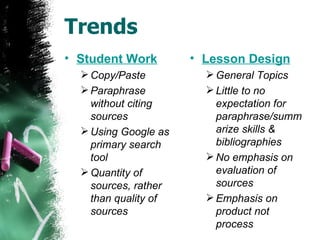
Trends Student Work Copy/Paste Paraphrase without citing sources Using Google as primary search tool Quantity of sources, rather than quality of sources Lesson Design General Topics Little to no expectation for paraphrase/summarize skills & bibliographies No emphasis on evaluation of sources Emphasis on product not process
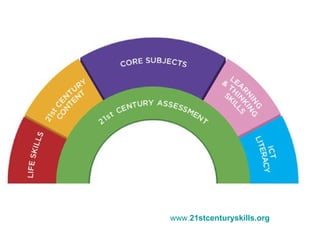
www. 21stcenturyskills .org
PowerPoint  cannot be your only use of technology.
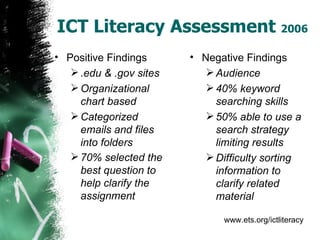
ICT Literacy Assessment  2006 Positive Findings .edu & .gov sites Organizational chart based Categorized emails and files into folders 70% selected the best question to help clarify the assignment   Negative Findings Audience 40% keyword searching skills 50% able to use a search strategy limiting results Difficulty sorting information to clarify related material www.ets.org/ictliteracy
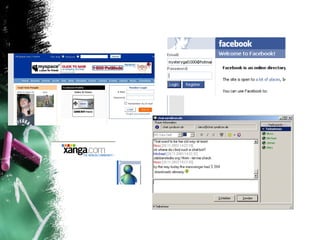
Knowledge of Students Survey your students Where do you go to find information? How do you use the computer? Do you have a blog site (Xanga, Facebook)? etc. Student samples. Talk with your librarian .
Objective Ties Curriculum Connection Avoid General Topics Working Smart One assignment covering many objectives. Assessment Determine how you will assess the  process  and  the product.
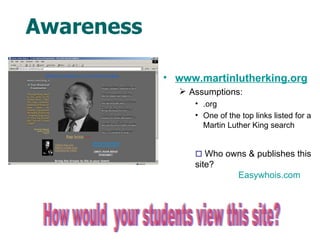
Awareness www.martinlutherking.org Assumptions: .org One of the top links listed for a Martin Luther King search How would  your students view this site?    Who owns & publishes this site? Easywhois.com
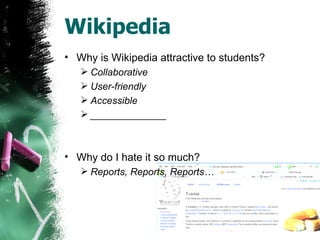
Wikipedia Why is Wikipedia attractive to students? Collaborative User-friendly Accessible ______________ Why do I hate it so much? Reports, Reports, Reports…
How does this fit into their education? Plagiarism Sites School Sucks Other sites to be aware – Scavenger The myth:  If it is on the Internet, it is true!  Right? Response:  Ignore it!  Ban it! Buy products to “catch them”!
Every time I speak to teachers about forming networks with their kids, many of them cringe at the  loss of control  and worry what the  consequences  will be for their classrooms. My experience has found that people who are willing to open the potential for network formation up, will find that students will grow and mature in their  information access, organization, and comprehension skills . Certainly unintended consequences will arise, but they will very, very rarely be negative. These consequences are the ones which will allow students to grow and flourish as information prosumers and to become active citizens. Clarence Fisher
When integrating technology, what important skills get lost?  What skills need to be dropped or added?
Asking a GOOD question
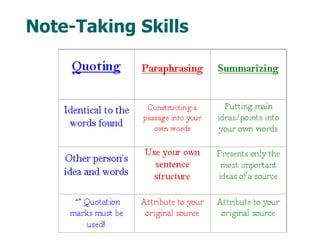
Note-Taking Skills
Ethical Use of Information Copyright Fair Use Plagiarism Citation Maker
Divide and Conquer Method Provides opportunities to emphasize the process. Allows teacher to track the development of each student’s work.
Define the Steps Lessons See lessons.
Essential Questions Should, What if.. etc. If it can be answered in an encyclopedia, why would a student want to rewrite the same information?   Essential Question Guide Guidance  See example of questions form .
Students generate questions…
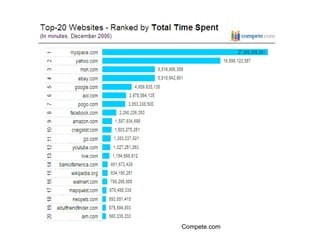
Compete.com
Web 2.0 Dynamic Collaborate Individualize Empower User control (You, me, anyone)
Web 2.0 Blogs (Xanga, Myspace, Edublogs) Wikis Podcasts/Vodcast Flickr Social Bookmarking (Delicious & Furl) Youtube
Other sites Bloglines /Google Reader Google Map
Examples Blogs Edublogs Create a family, fun one Examples –  See Links Podcasts Begin by using others Example -  See Links Wikis Example -  See Links
Examples Windows Movie Maker Mac – iMovie Bloglines See Links
Other Sites Gliffy   Simile   Writely Jump Cut Flickr YouTube 43things.com Library Thing
Becca Stith Munson NBCT, ECYA/LM 2003 Library Media Specialist Blue Valley West High School [email_address] http:// www.bvwlmc.com http:// beccablog.edublogs.org / Links:  http:// del.icio.us/beccamunson/CA

Challenging Technology

  • 1.
    Challenging Technology BeccaStith Munson NBCT, ECYA/LM 2003 Library Media Specialist Blue Valley West High School [email_address]
  • 2.
    Challenges When usingtechnology in my classroom/library/other: I am excited that ___________. I become frustrated when _________. I want to make ________ better. How?
  • 3.
    What would thisstudent say?
  • 4.
    While we teachwhatever we teach at school, the kids go home and learn the skills they need to survive and prosper in an interconnected global economy. Clarence Fisher
  • 5.
  • 6.
  • 7.
    Thoughts… How doyou design a lesson involving technology? What are some common elements? What are trends you notice with other teachers designing projects? What are misconceptions/problems with the student work?
  • 8.
    Trends Student WorkCopy/Paste Paraphrase without citing sources Using Google as primary search tool Quantity of sources, rather than quality of sources Lesson Design General Topics Little to no expectation for paraphrase/summarize skills & bibliographies No emphasis on evaluation of sources Emphasis on product not process
  • 9.
  • 10.
    PowerPoint cannotbe your only use of technology.
  • 11.
    ICT Literacy Assessment 2006 Positive Findings .edu & .gov sites Organizational chart based Categorized emails and files into folders 70% selected the best question to help clarify the assignment Negative Findings Audience 40% keyword searching skills 50% able to use a search strategy limiting results Difficulty sorting information to clarify related material www.ets.org/ictliteracy
  • 12.
    Knowledge of StudentsSurvey your students Where do you go to find information? How do you use the computer? Do you have a blog site (Xanga, Facebook)? etc. Student samples. Talk with your librarian .
  • 13.
    Objective Ties CurriculumConnection Avoid General Topics Working Smart One assignment covering many objectives. Assessment Determine how you will assess the process and the product.
  • 14.
    Awareness www.martinlutherking.org Assumptions:.org One of the top links listed for a Martin Luther King search How would your students view this site?  Who owns & publishes this site? Easywhois.com
  • 15.
    Wikipedia Why isWikipedia attractive to students? Collaborative User-friendly Accessible ______________ Why do I hate it so much? Reports, Reports, Reports…
  • 16.
    How does thisfit into their education? Plagiarism Sites School Sucks Other sites to be aware – Scavenger The myth: If it is on the Internet, it is true! Right? Response: Ignore it! Ban it! Buy products to “catch them”!
  • 17.
    Every time Ispeak to teachers about forming networks with their kids, many of them cringe at the loss of control and worry what the consequences will be for their classrooms. My experience has found that people who are willing to open the potential for network formation up, will find that students will grow and mature in their information access, organization, and comprehension skills . Certainly unintended consequences will arise, but they will very, very rarely be negative. These consequences are the ones which will allow students to grow and flourish as information prosumers and to become active citizens. Clarence Fisher
  • 18.
    When integrating technology,what important skills get lost? What skills need to be dropped or added?
  • 19.
    Asking a GOODquestion
  • 20.
  • 21.
    Ethical Use ofInformation Copyright Fair Use Plagiarism Citation Maker
  • 22.
    Divide and ConquerMethod Provides opportunities to emphasize the process. Allows teacher to track the development of each student’s work.
  • 23.
    Define the StepsLessons See lessons.
  • 24.
    Essential Questions Should,What if.. etc. If it can be answered in an encyclopedia, why would a student want to rewrite the same information? Essential Question Guide Guidance See example of questions form .
  • 25.
  • 26.
  • 27.
    Web 2.0 DynamicCollaborate Individualize Empower User control (You, me, anyone)
  • 28.
    Web 2.0 Blogs(Xanga, Myspace, Edublogs) Wikis Podcasts/Vodcast Flickr Social Bookmarking (Delicious & Furl) Youtube
  • 29.
    Other sites Bloglines/Google Reader Google Map
  • 30.
    Examples Blogs EdublogsCreate a family, fun one Examples – See Links Podcasts Begin by using others Example - See Links Wikis Example - See Links
  • 31.
    Examples Windows MovieMaker Mac – iMovie Bloglines See Links
  • 32.
    Other Sites Gliffy Simile Writely Jump Cut Flickr YouTube 43things.com Library Thing
  • 33.
    Becca Stith MunsonNBCT, ECYA/LM 2003 Library Media Specialist Blue Valley West High School [email_address] http:// www.bvwlmc.com http:// beccablog.edublogs.org / Links: http:// del.icio.us/beccamunson/CA