Faculty PD
Teaching Online Research
& Comprehension Skills
PD Objectives
Discuss CCSS & the changing nature of literacy
Describe what literacy looks like beyond printed text
Learn new strategies for navigating new modes of reading & writing
Apply insights from research to improve instruction and assessment
of new literacies
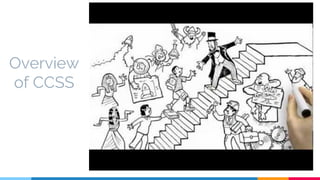
Overview
of CCSS
How do the CCSS impact
21st century literacy
instruction?
““Broadly defined, online reading is a problem-based
learning process, with the Internet as the primary text.
Online readers access the Internet to provide answers
to a variety of questions.”
Action Steps: How can we help
students become online readers?
▷ Study individual state standards
▷ Determine if online literacy is
included
▷ Demand more!
▷ Mindfully integrate online literacy
into CCSS units
Turn & Talk
Proposed Digital Literacy Additions to the Common Core ELA Anchor Standards
1. Critically evaluate a set of search results to locate relevant information related to central questions in
each content area. (Reading: Craft and Structure)
2. Synthesize information and competing points of view from an extensive online search and clearly
communicate reasonable conclusions. (Reading: Integration of Knowledge and Ideas)
3. Write for a variety of purposes using digital media and environments: to communicate and generate new
ideas, products, or processes, to exchange information, and to interact with others. (Writing: Range of
Writing)
4. Create and participate in online and offline literacy communities to exchange ideas, enhance
comprehension of texts and topics, and solve problems of depth and complexity that enhance one’s
community. (Listening and Speaking: Comprehension and Collaboration)
5. Apply knowledge of digital media structures and language to create, critique, and discuss online texts.
(Language: Knowledge of Language)
Navigating New Ways of
Reading and Writing
Action Steps: 4 strategies for
students to navigate new literacies
▷ Give students practice reading screen
based texts
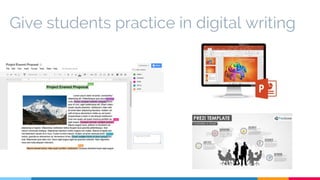
▷ Give students practice in digital writing
▷ Give practice working with informational
texts
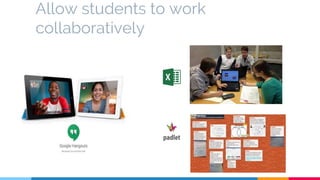
▷ Allow students to work collaboratively
““The four strategies described here
are not difficult to implement and, ironically, can be
attempted with little new technology. More powerful than
a room full of gadgets is a teacher who has a deep
understanding of what the
new forms of reading and writing entail.”
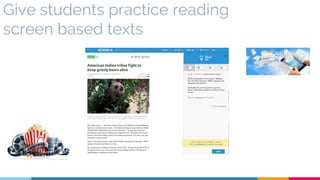
Give students practice reading
screen based texts
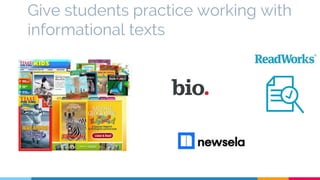
Give students practice working with
informational texts
Give students practice in digital writing
Allow students to work
collaboratively
Brainstorm
● List other examples of activities students can
do to work collaboratively, to write digitally, to
practice reading screen based/informational
texts?
● How can we connect these strategies to
Math, Social Studies, and Science?
Beyond Printed Text
The Potential of Digital Literacies
““Digital tools have the potential to
transform instruction and promote
literacies outlined in the Common
Core State Standards.”
Technology is Integrated Into the
Common Core.
➢ Reading and Writing Multimodal Texts
➢ Collaboration
➢ Collecting Resources
➢ Sharing information and Soliciting Feedback
“Digital Tools Can Be Used to
Address Non-Technology
Specific Standards
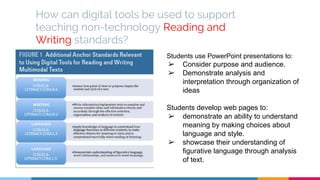
How can digital tools be used to support
teaching non-technology Reading and
Writing standards?
Students use PowerPoint presentations to:
➢ Consider purpose and audience.
➢ Demonstrate analysis and
interpretation through organization of
ideas
Students develop web pages to:
➢ demonstrate an ability to understand
meaning by making choices about
language and style.
➢ showcase their understanding of
figurative language through analysis
of text.
Brainstorm
● Take a few minutes to collaboratively
generate some ideas about how these
digital tools can be used to address
non-technology standards for Reading and
Writing in your classroom.
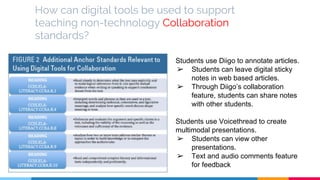
How can digital tools be used to support
teaching non-technology Collaboration
standards?
Students use Diigo to annotate articles.
➢ Students can leave digital sticky
notes in web based articles.
➢ Through Diigo’s collaboration
feature, students can share notes
with other students.
Students use Voicethread to create
multimodal presentations.
➢ Students can view other
presentations.
➢ Text and audio comments feature
for feedback
Brainstorm
● Take a few minutes to collaboratively
generate some ideas about how these
digital tools can be used to address
non-technology standards for
Collaboration in your classroom.
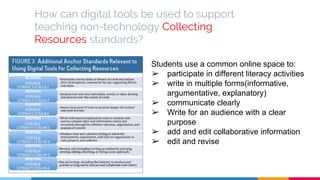
How can digital tools be used to support
teaching non-technology Collecting
Resources standards?
Students use a common online space to:
➢ participate in different literacy activities
➢ write in multiple forms(informative,
argumentative, explanatory)
➢ communicate clearly
➢ Write for an audience with a clear
purpose
➢ add and edit collaborative information
➢ edit and revise
Brainstorm
● Take a few minutes to collaboratively
generate some ideas about how these
digital tools can be used to address
non-technology standards for Collecting
Resources in your classroom.
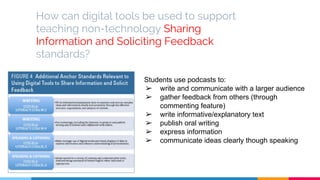
How can digital tools be used to support
teaching non-technology Sharing
Information and Soliciting Feedback
standards?
Students use podcasts to:
➢ write and communicate with a larger audience
➢ gather feedback from others (through
commenting feature)
➢ write informative/explanatory text
➢ publish oral writing
➢ express information
➢ communicate ideas clearly though speaking
Brainstorm
● Take a few minutes to collaboratively
generate some ideas about how these
digital tools can be used to address
non-technology standards for Sharing
Information and Soliciting Feedback in your
classroom.
Action Steps: Immediate Implementation
➢ Evaluate the existing standards and make a plan.
Think about the ways you can implement
technology to address these standards.
➢ Look at what digital tools are available at your
school. How can you use these to teach digital and
non-digital standards?
➢ Try this planning guide to help: Technology
Integration Cycle for Literacy and Language Arts
So...how are we doing?
Insights on new literacies of online
research and comprehension
4 Facts and a Fib - Turn and
Talk
▷ Not a single state in the U.S. measures students’ abilities to read search
engine results during state reading assessments.
▷ There are no international assessments of digital and informational
literacy skills..
▷ Not a single state in the U.S. measures students’ abilities to critically
evaluate information that is found online to determine its reliability.
▷ In the U.S., no state writing assessment measures students’ abilities to
compose effective e-mail messages.
▷ Few, if any, states in the U.S. permit all students to use a word processor
on their state writing assessments.
4 Facts and a Fib - Turn and
Talk
▷ Not a single state in the U.S. measures students’ abilities to read search
engine results during state reading assessments. FACT
▷ There are no international assessments of digital and informational
literacy skills. FIB
▷ Not a single state in the U.S. measures students’ abilities to critically
evaluate information that is found online to determine its reliability. FACT
▷ In the U.S., no state writing assessment measures students’ abilities to
compose effective e-mail messages. FACT
▷ Few, if any, states in the U.S. permit all students to use a word processor
on their state writing assessments. FACT
“How have we been doing with incorporating these
digital and informational literacy skills into our
curriculum? As of now, we are not going very well.
(Leu, et al. 2013)
Moving forward
▷ Use insights from research in online
research and comprehension to guide:
Instruction Assessment
Online vs Offline
▷ Online and offline research
and comprehension are not
the same
○ Additional comprehension skills
are required for online reading
Challenged readers
▷ Challenged offline readers may read better
online.
○ Online research and comprehension skills are the
determining factor
Prior Knowledge
▷ Less important to online
research and reading
comprehension
▷ Gather as they go
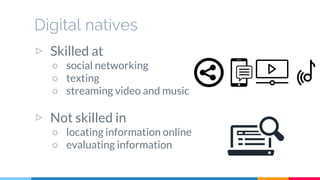
Digital natives
▷ Skilled at
○ social networking
○ texting
○ streaming video and music
▷ Not skilled in
○ locating information online
○ evaluating information
Learning from each other
▷ Design challenging activities
in which students can learn
these skills from each other.
A good start
▷ ORCA
○ Assessment of online research and
comprehension skills
▷ Skills assessed
○ Locate
○ Evaluate
○ Synthesize
○ Communicate
Next steps
● Taking into account the insights from research that
were just described, what are THREE next steps you
can take to help improve your instruction and
assessment of online research and comprehension
skills?
References
Drew, S. V. (2012). Open Up the Ceiling on Common Core State Standards: Preparing Students for
the 21st Century Literacy – Now. Journal of Adolescent and Adult Literacy, 56(4). 321 – 300.
doi:10.1002 / JAAL.00145.
Hutchison, Amy C., and Jamie Colwell. "The Potential of Digital Technologies to Support Literacy
Instruction Relevant to the Common Core State Standards." Journal of Adolescent & Adult
Literacy 58.2 (2014): 147-156.
Kist, W. (2013). New Literacies and the Common Core. Educational Leadership. 76(4), 38 - 43.
Leu, D. J., Forzani, E., Burlingame, C., Kulikowich, J. Sedransk, N., Coiro, J., & Kennedy, C. (2013). The
new literacies of online research and comprehension: Assessing and preparing students for the
21st century with common core state standards. In Neuman, S. B. & Gambrell, L.B. (Eds.),
Massey, C. (Assoc. Ed.). Reading instruction in the age of common core standards. Newark, DE:
International Reading Association.
Neag School of Education ORCA. (n.d.). Retrieved April 16, 2018, from http://www.orca.uconn.edu/

Teaching Online Research & Comprehension Skills

  • 1.
    Faculty PD Teaching OnlineResearch & Comprehension Skills
  • 2.
    PD Objectives Discuss CCSS& the changing nature of literacy Describe what literacy looks like beyond printed text Learn new strategies for navigating new modes of reading & writing Apply insights from research to improve instruction and assessment of new literacies
  • 3.
  • 4.
    How do theCCSS impact 21st century literacy instruction?
  • 5.
    ““Broadly defined, onlinereading is a problem-based learning process, with the Internet as the primary text. Online readers access the Internet to provide answers to a variety of questions.”
  • 6.
    Action Steps: Howcan we help students become online readers? ▷ Study individual state standards ▷ Determine if online literacy is included ▷ Demand more! ▷ Mindfully integrate online literacy into CCSS units
  • 7.
    Turn & Talk ProposedDigital Literacy Additions to the Common Core ELA Anchor Standards 1. Critically evaluate a set of search results to locate relevant information related to central questions in each content area. (Reading: Craft and Structure) 2. Synthesize information and competing points of view from an extensive online search and clearly communicate reasonable conclusions. (Reading: Integration of Knowledge and Ideas) 3. Write for a variety of purposes using digital media and environments: to communicate and generate new ideas, products, or processes, to exchange information, and to interact with others. (Writing: Range of Writing) 4. Create and participate in online and offline literacy communities to exchange ideas, enhance comprehension of texts and topics, and solve problems of depth and complexity that enhance one’s community. (Listening and Speaking: Comprehension and Collaboration) 5. Apply knowledge of digital media structures and language to create, critique, and discuss online texts. (Language: Knowledge of Language)
  • 8.
    Navigating New Waysof Reading and Writing
  • 9.
    Action Steps: 4strategies for students to navigate new literacies ▷ Give students practice reading screen based texts ▷ Give students practice in digital writing ▷ Give practice working with informational texts ▷ Allow students to work collaboratively
  • 10.
    ““The four strategiesdescribed here are not difficult to implement and, ironically, can be attempted with little new technology. More powerful than a room full of gadgets is a teacher who has a deep understanding of what the new forms of reading and writing entail.”
  • 11.
    Give students practicereading screen based texts
  • 12.
    Give students practiceworking with informational texts
  • 13.
    Give students practicein digital writing
  • 14.
    Allow students towork collaboratively
  • 15.
    Brainstorm ● List otherexamples of activities students can do to work collaboratively, to write digitally, to practice reading screen based/informational texts? ● How can we connect these strategies to Math, Social Studies, and Science?
  • 16.
    Beyond Printed Text ThePotential of Digital Literacies
  • 17.
    ““Digital tools havethe potential to transform instruction and promote literacies outlined in the Common Core State Standards.”
  • 18.
    Technology is IntegratedInto the Common Core. ➢ Reading and Writing Multimodal Texts ➢ Collaboration ➢ Collecting Resources ➢ Sharing information and Soliciting Feedback
  • 19.
    “Digital Tools CanBe Used to Address Non-Technology Specific Standards
  • 20.
    How can digitaltools be used to support teaching non-technology Reading and Writing standards? Students use PowerPoint presentations to: ➢ Consider purpose and audience. ➢ Demonstrate analysis and interpretation through organization of ideas Students develop web pages to: ➢ demonstrate an ability to understand meaning by making choices about language and style. ➢ showcase their understanding of figurative language through analysis of text.
  • 21.
    Brainstorm ● Take afew minutes to collaboratively generate some ideas about how these digital tools can be used to address non-technology standards for Reading and Writing in your classroom.
  • 22.
    How can digitaltools be used to support teaching non-technology Collaboration standards? Students use Diigo to annotate articles. ➢ Students can leave digital sticky notes in web based articles. ➢ Through Diigo’s collaboration feature, students can share notes with other students. Students use Voicethread to create multimodal presentations. ➢ Students can view other presentations. ➢ Text and audio comments feature for feedback
  • 23.
    Brainstorm ● Take afew minutes to collaboratively generate some ideas about how these digital tools can be used to address non-technology standards for Collaboration in your classroom.
  • 24.
    How can digitaltools be used to support teaching non-technology Collecting Resources standards? Students use a common online space to: ➢ participate in different literacy activities ➢ write in multiple forms(informative, argumentative, explanatory) ➢ communicate clearly ➢ Write for an audience with a clear purpose ➢ add and edit collaborative information ➢ edit and revise
  • 25.
    Brainstorm ● Take afew minutes to collaboratively generate some ideas about how these digital tools can be used to address non-technology standards for Collecting Resources in your classroom.
  • 26.
    How can digitaltools be used to support teaching non-technology Sharing Information and Soliciting Feedback standards? Students use podcasts to: ➢ write and communicate with a larger audience ➢ gather feedback from others (through commenting feature) ➢ write informative/explanatory text ➢ publish oral writing ➢ express information ➢ communicate ideas clearly though speaking
  • 27.
    Brainstorm ● Take afew minutes to collaboratively generate some ideas about how these digital tools can be used to address non-technology standards for Sharing Information and Soliciting Feedback in your classroom.
  • 28.
    Action Steps: ImmediateImplementation ➢ Evaluate the existing standards and make a plan. Think about the ways you can implement technology to address these standards. ➢ Look at what digital tools are available at your school. How can you use these to teach digital and non-digital standards? ➢ Try this planning guide to help: Technology Integration Cycle for Literacy and Language Arts
  • 29.
    So...how are wedoing? Insights on new literacies of online research and comprehension
  • 30.
    4 Facts anda Fib - Turn and Talk ▷ Not a single state in the U.S. measures students’ abilities to read search engine results during state reading assessments. ▷ There are no international assessments of digital and informational literacy skills.. ▷ Not a single state in the U.S. measures students’ abilities to critically evaluate information that is found online to determine its reliability. ▷ In the U.S., no state writing assessment measures students’ abilities to compose effective e-mail messages. ▷ Few, if any, states in the U.S. permit all students to use a word processor on their state writing assessments.
  • 31.
    4 Facts anda Fib - Turn and Talk ▷ Not a single state in the U.S. measures students’ abilities to read search engine results during state reading assessments. FACT ▷ There are no international assessments of digital and informational literacy skills. FIB ▷ Not a single state in the U.S. measures students’ abilities to critically evaluate information that is found online to determine its reliability. FACT ▷ In the U.S., no state writing assessment measures students’ abilities to compose effective e-mail messages. FACT ▷ Few, if any, states in the U.S. permit all students to use a word processor on their state writing assessments. FACT
  • 32.
    “How have webeen doing with incorporating these digital and informational literacy skills into our curriculum? As of now, we are not going very well. (Leu, et al. 2013)
  • 33.
    Moving forward ▷ Useinsights from research in online research and comprehension to guide: Instruction Assessment
  • 34.
    Online vs Offline ▷Online and offline research and comprehension are not the same ○ Additional comprehension skills are required for online reading
  • 35.
    Challenged readers ▷ Challengedoffline readers may read better online. ○ Online research and comprehension skills are the determining factor
  • 36.
    Prior Knowledge ▷ Lessimportant to online research and reading comprehension ▷ Gather as they go
  • 37.
    Digital natives ▷ Skilledat ○ social networking ○ texting ○ streaming video and music ▷ Not skilled in ○ locating information online ○ evaluating information
  • 38.
    Learning from eachother ▷ Design challenging activities in which students can learn these skills from each other.
  • 39.
    A good start ▷ORCA ○ Assessment of online research and comprehension skills ▷ Skills assessed ○ Locate ○ Evaluate ○ Synthesize ○ Communicate
  • 40.
    Next steps ● Takinginto account the insights from research that were just described, what are THREE next steps you can take to help improve your instruction and assessment of online research and comprehension skills?
  • 41.
    References Drew, S. V.(2012). Open Up the Ceiling on Common Core State Standards: Preparing Students for the 21st Century Literacy – Now. Journal of Adolescent and Adult Literacy, 56(4). 321 – 300. doi:10.1002 / JAAL.00145. Hutchison, Amy C., and Jamie Colwell. "The Potential of Digital Technologies to Support Literacy Instruction Relevant to the Common Core State Standards." Journal of Adolescent & Adult Literacy 58.2 (2014): 147-156. Kist, W. (2013). New Literacies and the Common Core. Educational Leadership. 76(4), 38 - 43. Leu, D. J., Forzani, E., Burlingame, C., Kulikowich, J. Sedransk, N., Coiro, J., & Kennedy, C. (2013). The new literacies of online research and comprehension: Assessing and preparing students for the 21st century with common core state standards. In Neuman, S. B. & Gambrell, L.B. (Eds.), Massey, C. (Assoc. Ed.). Reading instruction in the age of common core standards. Newark, DE: International Reading Association. Neag School of Education ORCA. (n.d.). Retrieved April 16, 2018, from http://www.orca.uconn.edu/