RESPONSIBLE
USE OF ICT 
End‐User Training for Novice ICT Users 
January 18‐20, 2009 
Bataan Peninsula State University 
Balanga, Bataan 
APEC Training Program for Preventive Education on ICT Misuse 
Responsible Use of ICT – End 
User Training 
User Training for Novice ICT Users 
20, 2009 
Bataan Peninsula State University 
Balanga, Bataan 
APEC Training Program for Preventive Education on ICT Misuse 
1
Responsible Use of ICT – End User Training 
ICT BASICS 
2 
ICT BASICS
AN OVERVIEW OF THE
COMPUTER SYSTEM
AN OVERVIEW OF THE
COMPUTER SYSTEM
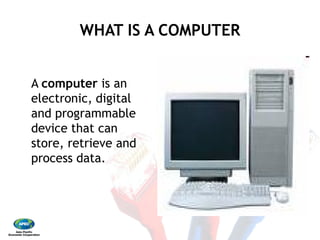
WHAT IS A COMPUTER
A computer is an
electronic, digital
and programmable
device that can
store, retrieve and
process data.
WHAT IS A COMPUTER
The two principal characteristics of a
computer are: 
•  It responds to a specific set of instructions in a
well‐defined manner. 
•  It can execute a prerecorded list of instruction
(a program).
The two principal characteristics of a
It responds to a specific set of instructions in a
It can execute a prerecorded list of instruction
FOUR BASIC FUNCTIONS OF A
COMPUTER 
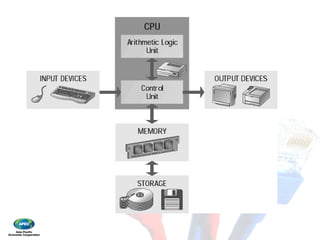
•  INPUT – information entered into the computer
or program for processing, as from any input
device. 
•  PROCESS – the manipulation and transformation
of data into some something useful.
FOUR BASIC FUNCTIONS OF A
COMPUTER
information entered into the computer
or program for processing, as from any input
the manipulation and transformation
of data into some something useful.
FOUR BASIC FUNCTIONS OF A
COMPUTER 
•  OUTPUT – the result of the manipulated and
processed data. 
•  STORAGE – computer can save data so that it
can be used at another time.
FOUR BASIC FUNCTIONS OF A
COMPUTER
the result of the manipulated and
computer can save data so that it
can be used at another time.
A Complete Computer System
Includes Four Distinct Parts: 
•  Hardware 
•  Software 
•  Data 
•  Peopleware
A Complete Computer System
Includes Four Distinct Parts:
Hardware
Software
Peopleware
HARDWARE 
– A computer's hardware consists of electronic
devices; the parts you can see and touch. 
– The term "device" refers to any piece of
hardware used by the computer, such as a
keyboard, monitor, modem, mouse, etc.
HARDWARE
A computer's hardware consists of electronic
devices; the parts you can see and touch.
The term "device" refers to any piece of
hardware used by the computer, such as a
keyboard, monitor, modem, mouse, etc.
INPUT DEVICES
accept data and instructions
from another computer system
mouse are examples of input
INPUT DEVICES
instructions from the user or
system. The keyboard and
input devices.
Two Types of Input Devices 
•  Keyboard Entry – data
computer through a keyboard 
•  Direct Entry – a form
require data to be keyed
a keyboard. Direct‐
machine‐readable data
media or feed it directly
CPU.
Two Types of Input Devices
data is inputted to the
keyboard
form of input that does not
keyed by someone sitting at
‐entry devices create
data on paper or magnetic
directly into the computer’s
Three Categories of Direct Entry
Devices
1. POINTING DEVICES
Mouse
controls
the
display
Three Categories of Direct Entry
Devices
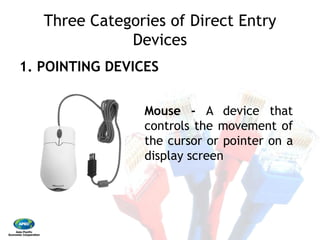
Mouse ‐ A device that
controls the movement of
the cursor or pointer on a
display screen
Three Categories of Direct Entry
Devices 
1. POINTING DEVICES 
Touch
A type of display screen that
has a touch
transparent panel covering
the screen
Three Categories of Direct Entry
Devices
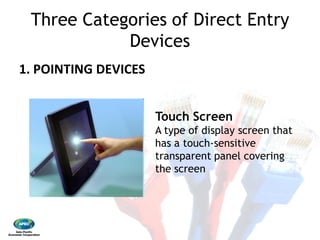
Touch Screen
A type of display screen that
has a touch‐sensitive
transparent panel covering
the screen
Three Categories of Direct Entry
Devices
1. POINTING DEVICES
An input device that utilizes
a light
select objects on a display
screen
Three Categories of Direct Entry
Devices
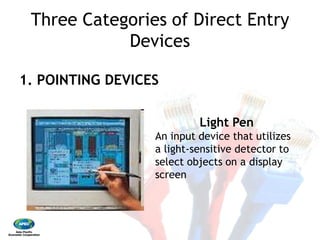
Light Pen
An input device that utilizes
a light‐sensitive detector to
select objects on a display
screen
Three Categories of Direct Entry
Devices
2. SCANNING DEVICES
A device that can read text
or illustrations printed on
paper and translate the
information into a form the
computer can use.
Three Categories of Direct Entry
Devices
2. SCANNING DEVICES
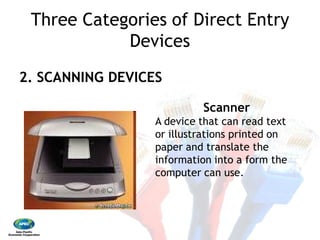
Scanner
A device that can read text
or illustrations printed on
paper and translate the
information into a form the
computer can use.
Three Categories of Direct Entry
Devices 
2. SCANNING DEVICES 
Short for
a device that can send or
receive pictures and text
over a telephone line
Three Categories of Direct Entry
Devices
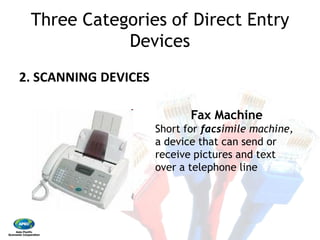
Fax Machine
Short for facsimile machine,
a device that can send or
receive pictures and text
over a telephone line
Three Categories of Direct Entry
Devices
2. SCANNING DEVICES
Three Categories of Direct Entry
Devices
2. SCANNING DEVICES
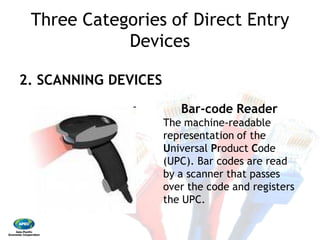
Bar‐code Reader
The machine‐readable
representation of the
Universal Product Code
(UPC). Bar codes are read
by a scanner that passes
over the code and registers
the UPC.
Three Categories of Direct Entry
Devices
2. SCANNING DEVICES
OCR is the mechanical or
electronic translation of
images of handwritten,
typewritten or printed text
(usually captured by a
scanner) into machine
editable text.
Three Categories of Direct Entry
Devices
2. SCANNING DEVICES
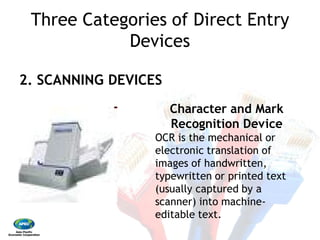
Character and Mark
Recognition Device
OCR is the mechanical or
electronic translation of
images of handwritten,
typewritten or printed text
(usually captured by a
scanner) into machine‐
editable text.
Three Categories of Direct Entry
Devices
3. VOICE RECOGNITION DEVICES
A device with integrated
person’s speech or voice to
Three Categories of Direct Entry
Devices
3. VOICE RECOGNITION DEVICES
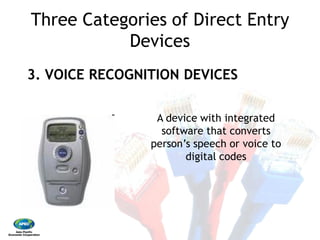
A device with integrated
software that converts
person’s speech or voice to
digital codes
OUTPUT DEVICES
return processed data back to the user or to
another computer system.
OUTPUT DEVICES
return processed data back to the user or to
another computer system.
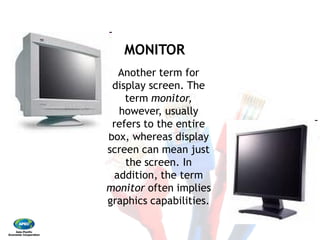
MONITOR
Another term for
display screen. The
term monitor,
however, usually
refers to the entire
box, whereas display
screen can mean just
the screen. In
addition, the term
monitor often implies
graphics capabilities.
MONITOR
Another term for
display screen. The
monitor,
however, usually
refers to the entire
box, whereas display
screen can mean just
the screen. In
addition, the term
often implies
graphics capabilities.
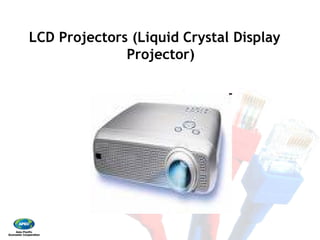
LCD Projectors (Liquid Crystal Display
Projector)
LCD Projectors (Liquid Crystal Display
Projector)
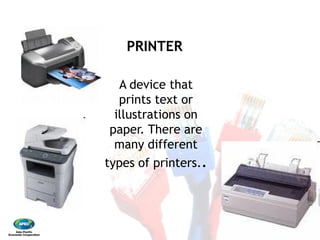
PRINTER
A device that
prints text or
illustrations on
paper. There are
many different
types of printers.
PRINTER
A device that
prints text or
illustrations on
paper. There are
many different
types of printers..
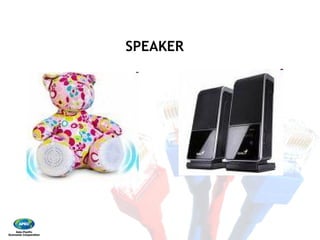
SPEAKERSPEAKER
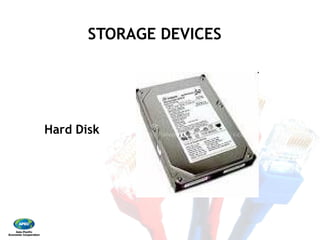
STORAGE DEVICES
Hard Disk
STORAGE DEVICES
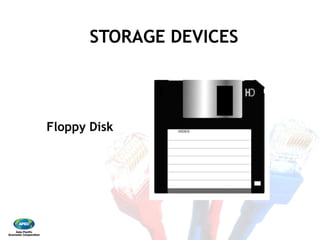
STORAGE DEVICES
Floppy Disk
STORAGE DEVICES
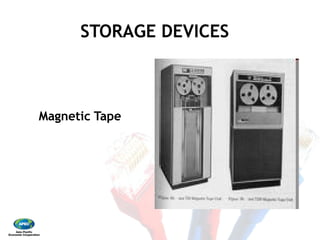
STORAGE DEVICES
Magnetic Tape
STORAGE DEVICES
STORAGE DEVICES
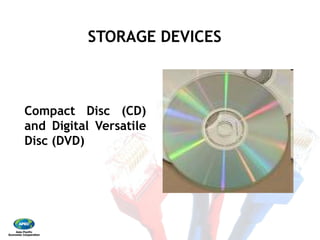
Compact Disc (CD)
and Digital Versatile
Disc (DVD)
STORAGE DEVICES
STORAGE DEVICES
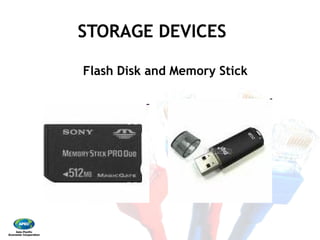
Flash Disk and Memory Stick
STORAGE DEVICES
Flash Disk and Memory Stick
SOFTWARE 
– also called programs
sets of instructions for controlling the
computer. 
– Some programs exist for the computer's use,
to help it manage its own tasks and devices. 
– Other programs exist for the user, and enable
the computer to perform tasks for you, such
as creating documents
SOFTWARE
also called programs – consists of organized
sets of instructions for controlling the
Some programs exist for the computer's use,
to help it manage its own tasks and devices.
Other programs exist for the user, and enable
the computer to perform tasks for you, such
as creating documents
DATA 
– consists of raw facts, which the computer
can manipulate and process into information
that is useful to people. 
– computerized data is digital, meaning that it
has been reduced to digits, or numbers. The
computer stores and reads all data as
numbers. 
– although computers use data in digital form,
they convert data into forms that people can
understand, such as text, numerals, sounds,
and images.
DATA
consists of raw facts, which the computer
can manipulate and process into information
that is useful to people.
computerized data is digital, meaning that it
has been reduced to digits, or numbers. The
computer stores and reads all data as
although computers use data in digital form,
they convert data into forms that people can
understand, such as text, numerals, sounds,
USER 
– 
– 
USER
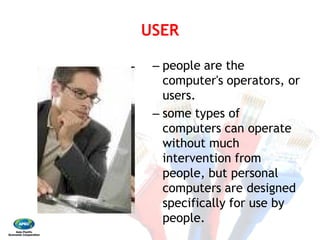
people are the
computer's operators, or
users.
some types of
computers can operate
without much
intervention from
people, but personal
computers are designed
specifically for use by
people.
COMMUNICATION DEVICES
network interface cards) perform both input and
output, allowing computers to share information.
COMMUNICATION DEVICES
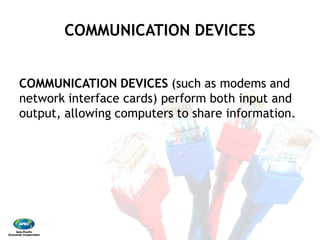
COMMUNICATION DEVICES (such as modems and
network interface cards) perform both input and
output, allowing computers to share information.
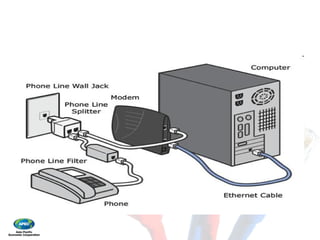
MODEMMODEM 
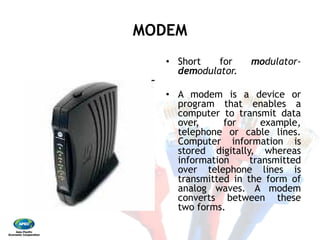
•  Short for modulator‐
demodulator. 
•  A modem is a device or
program that enables a
computer to transmit data
over, for example,
telephone or cable lines.
Computer information is
stored digitally, whereas
information transmitted
over telephone lines is
transmitted in the form of
analog waves. A modem
converts between these
two forms.
LAN CardLAN Card 
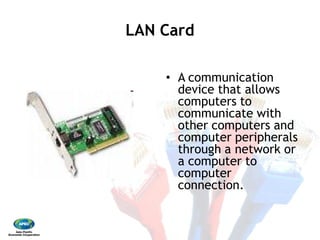
•  A communication
device that allows
computers to
communicate with
other computers and
computer peripherals
through a network or
a computer to
computer
connection.
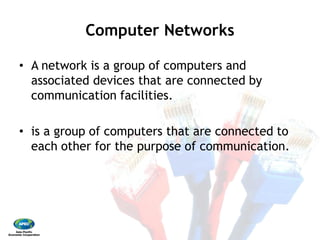
Computer Networks 
•  A network is a group of computers and
associated devices that are connected by
communication facilities. 
•  is a group of computers that are connected to
each other for the purpose of communication.
Computer Networks
A network is a group of computers and
associated devices that are connected by
communication facilities.
is a group of computers that are connected to
each other for the purpose of communication.
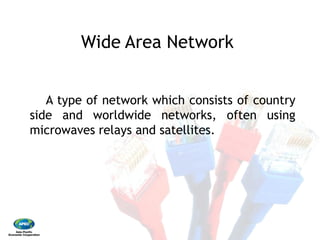
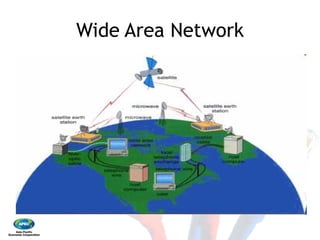
Wide Area Network
A type of network which
side and worldwide
microwaves relays and satellites
Wide Area Network
which consists of country
networks, often using
satellites.
Wide Area NetworkWide Area Network
Let me
check….
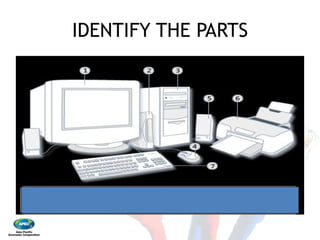
IDENTIFY THE PARTSIDENTIFY THE PARTS

Ict basics

  • 1.
    RESPONSIBLE USE OF ICT  End‐User Training for Novice ICT Users  January 18‐20, 2009  Bataan Peninsula State University  Balanga, Bataan  APEC Training Program for Preventive Education on ICT Misuse  Responsible Use of ICT– End  User Training  User Training for Novice ICT Users  20, 2009  Bataan Peninsula State University  Balanga, Bataan  APEC Training Program for Preventive Education on ICT Misuse  1
  • 2.
  • 3.
    AN OVERVIEW OFTHE COMPUTER SYSTEM AN OVERVIEW OF THE COMPUTER SYSTEM
  • 4.
    WHAT IS ACOMPUTER A computer is an electronic, digital and programmable device that can store, retrieve and process data. WHAT IS A COMPUTER
  • 5.
    The two principalcharacteristics of a computer are:  •  It responds to a specific set of instructions in a well‐defined manner.  •  It can execute a prerecorded list of instruction (a program). The two principal characteristics of a It responds to a specific set of instructions in a It can execute a prerecorded list of instruction
  • 6.
    FOUR BASIC FUNCTIONSOF A COMPUTER  •  INPUT – information entered into the computer or program for processing, as from any input device.  •  PROCESS – the manipulation and transformation of data into some something useful. FOUR BASIC FUNCTIONS OF A COMPUTER information entered into the computer or program for processing, as from any input the manipulation and transformation of data into some something useful.
  • 7.
    FOUR BASIC FUNCTIONSOF A COMPUTER  •  OUTPUT – the result of the manipulated and processed data.  •  STORAGE – computer can save data so that it can be used at another time. FOUR BASIC FUNCTIONS OF A COMPUTER the result of the manipulated and computer can save data so that it can be used at another time.
  • 9.
    A Complete ComputerSystem Includes Four Distinct Parts:  •  Hardware  •  Software  •  Data  •  Peopleware A Complete Computer System Includes Four Distinct Parts: Hardware Software Peopleware
  • 10.
    HARDWARE  – A computer'shardware consists of electronic devices; the parts you can see and touch.  – The term "device" refers to any piece of hardware used by the computer, such as a keyboard, monitor, modem, mouse, etc. HARDWARE A computer's hardware consists of electronic devices; the parts you can see and touch. The term "device" refers to any piece of hardware used by the computer, such as a keyboard, monitor, modem, mouse, etc.
  • 11.
    INPUT DEVICES accept dataand instructions from another computer system mouse are examples of input INPUT DEVICES instructions from the user or system. The keyboard and input devices.
  • 12.
    Two Types ofInput Devices  •  Keyboard Entry – data computer through a keyboard  •  Direct Entry – a form require data to be keyed a keyboard. Direct‐ machine‐readable data media or feed it directly CPU. Two Types of Input Devices data is inputted to the keyboard form of input that does not keyed by someone sitting at ‐entry devices create data on paper or magnetic directly into the computer’s
  • 13.
    Three Categories ofDirect Entry Devices 1. POINTING DEVICES Mouse controls the display Three Categories of Direct Entry Devices Mouse ‐ A device that controls the movement of the cursor or pointer on a display screen
  • 14.
    Three Categories ofDirect Entry Devices  1. POINTING DEVICES  Touch A type of display screen that has a touch transparent panel covering the screen Three Categories of Direct Entry Devices Touch Screen A type of display screen that has a touch‐sensitive transparent panel covering the screen
  • 15.
    Three Categories ofDirect Entry Devices 1. POINTING DEVICES An input device that utilizes a light select objects on a display screen Three Categories of Direct Entry Devices Light Pen An input device that utilizes a light‐sensitive detector to select objects on a display screen
  • 16.
    Three Categories ofDirect Entry Devices 2. SCANNING DEVICES A device that can read text or illustrations printed on paper and translate the information into a form the computer can use. Three Categories of Direct Entry Devices 2. SCANNING DEVICES Scanner A device that can read text or illustrations printed on paper and translate the information into a form the computer can use.
  • 17.
    Three Categories ofDirect Entry Devices  2. SCANNING DEVICES  Short for a device that can send or receive pictures and text over a telephone line Three Categories of Direct Entry Devices Fax Machine Short for facsimile machine, a device that can send or receive pictures and text over a telephone line
  • 18.
    Three Categories ofDirect Entry Devices 2. SCANNING DEVICES Three Categories of Direct Entry Devices 2. SCANNING DEVICES Bar‐code Reader The machine‐readable representation of the Universal Product Code (UPC). Bar codes are read by a scanner that passes over the code and registers the UPC.
  • 19.
    Three Categories ofDirect Entry Devices 2. SCANNING DEVICES OCR is the mechanical or electronic translation of images of handwritten, typewritten or printed text (usually captured by a scanner) into machine editable text. Three Categories of Direct Entry Devices 2. SCANNING DEVICES Character and Mark Recognition Device OCR is the mechanical or electronic translation of images of handwritten, typewritten or printed text (usually captured by a scanner) into machine‐ editable text.
  • 20.
    Three Categories ofDirect Entry Devices 3. VOICE RECOGNITION DEVICES A device with integrated person’s speech or voice to Three Categories of Direct Entry Devices 3. VOICE RECOGNITION DEVICES A device with integrated software that converts person’s speech or voice to digital codes
  • 21.
    OUTPUT DEVICES return processeddata back to the user or to another computer system. OUTPUT DEVICES return processed data back to the user or to another computer system.
  • 22.
    MONITOR Another term for displayscreen. The term monitor, however, usually refers to the entire box, whereas display screen can mean just the screen. In addition, the term monitor often implies graphics capabilities. MONITOR Another term for display screen. The monitor, however, usually refers to the entire box, whereas display screen can mean just the screen. In addition, the term often implies graphics capabilities.
  • 23.
    LCD Projectors (LiquidCrystal Display Projector) LCD Projectors (Liquid Crystal Display Projector)
  • 24.
    PRINTER A device that printstext or illustrations on paper. There are many different types of printers. PRINTER A device that prints text or illustrations on paper. There are many different types of printers..
  • 25.
  • 26.
  • 27.
  • 28.
  • 29.
    STORAGE DEVICES Compact Disc(CD) and Digital Versatile Disc (DVD) STORAGE DEVICES
  • 30.
    STORAGE DEVICES Flash Diskand Memory Stick STORAGE DEVICES Flash Disk and Memory Stick
  • 31.
    SOFTWARE  – also calledprograms sets of instructions for controlling the computer.  – Some programs exist for the computer's use, to help it manage its own tasks and devices.  – Other programs exist for the user, and enable the computer to perform tasks for you, such as creating documents SOFTWARE also called programs – consists of organized sets of instructions for controlling the Some programs exist for the computer's use, to help it manage its own tasks and devices. Other programs exist for the user, and enable the computer to perform tasks for you, such as creating documents
  • 32.
    DATA  – consists ofraw facts, which the computer can manipulate and process into information that is useful to people.  – computerized data is digital, meaning that it has been reduced to digits, or numbers. The computer stores and reads all data as numbers.  – although computers use data in digital form, they convert data into forms that people can understand, such as text, numerals, sounds, and images. DATA consists of raw facts, which the computer can manipulate and process into information that is useful to people. computerized data is digital, meaning that it has been reduced to digits, or numbers. The computer stores and reads all data as although computers use data in digital form, they convert data into forms that people can understand, such as text, numerals, sounds,
  • 33.
    USER  –  –  USER people are the computer'soperators, or users. some types of computers can operate without much intervention from people, but personal computers are designed specifically for use by people.
  • 34.
    COMMUNICATION DEVICES COMMUNICATION DEVICES networkinterface cards) perform both input and output, allowing computers to share information. COMMUNICATION DEVICES COMMUNICATION DEVICES (such as modems and network interface cards) perform both input and output, allowing computers to share information.
  • 35.
    MODEMMODEM  •  Short formodulator‐ demodulator.  •  A modem is a device or program that enables a computer to transmit data over, for example, telephone or cable lines. Computer information is stored digitally, whereas information transmitted over telephone lines is transmitted in the form of analog waves. A modem converts between these two forms.
  • 36.
    LAN CardLAN Card  • A communication device that allows computers to communicate with other computers and computer peripherals through a network or a computer to computer connection.
  • 38.
    Computer Networks  •  Anetwork is a group of computers and associated devices that are connected by communication facilities.  •  is a group of computers that are connected to each other for the purpose of communication. Computer Networks A network is a group of computers and associated devices that are connected by communication facilities. is a group of computers that are connected to each other for the purpose of communication.
  • 40.
    Wide Area Network Atype of network which side and worldwide microwaves relays and satellites Wide Area Network which consists of country networks, often using satellites.
  • 41.
  • 42.
  • 43.