ELEMENTS OF
COMPUTER SYSTEM
AND CATEGORIES OF
COMPUTER
PERIPHERALS
What is a Computer?
• A computer is an electronic device that manipulates information, or
"data." It has the ability to store, retrieve, and process data. You
can use a computer to type documents, send email, and browse the
internet. You can also use it to handle spreadsheets, accounting,
database management, presentations, games, and more.
What is a Computer System?
• It is a system that is consists of hardware, software and people that
are configured to collect, manipulate, store, and process data into
information.
COMPUTER SYSTEM ELEMENTS
 Hardware
These are the physical computer equipment used in computer system.
Categories of Computer Hardware
 An input device is a piece of hardware that is used to enter data into a
computer or a similar processing device such as a smart phone.
Examples are keyboard, mouse, touchpad, joystick, touchscreen, scanner,
microphone, and digital camera
Computer System.ppt
Computer System.ppt
A) KEYING DEVICES
- Are devices used to enter data into the computer using a set of
Keys e.g Keyboard, key-to- storage and keypad.
THE KEYBOARD
Keyboard (like a typewriter) is the main input device of a computer. It contains
three types of keys-- alphanumeric keys, special keys and function keys.
• Alphanumeric keys are used to type all alphabets, numbers and special
symbols like $, %, @, A etc.
• Special keys such as <Shift>, <Ctrl>, <Alt>, <Home>, <Scroll Lock> etc. are
used for special functions.
• Function keys such as <Fl>, <F2>, <F3> etc. are used to give special
commands depending upon the software used e.g.F5 reloads a page of an
internet browser. The function of each key can be well understood only after
working on a PC. When any key is pressed, an electronic signal is produced.
This signal is detected by a keyboard encoder that sends a binary code
corresponding to the key pressed to the CPU. There are many types of
keyboards, but 101 keys keyboard is the most popular one.
Computer System.ppt
B. POINTING DEVICES
- Are devices that enter data and instructions into the computer
using a pointer that appears on the screen. The items to be entered are
selected by either pointing to or clicking on them.e.g mice, joystick, touch
sensitive screen, trackballs.
THE MOUSE
A mouse is a small device used to point to and select items on your
computer screen. Although mice come in many shapes, the typical mouse does
look a bit like an actual mouse. It's small, oblong, and connected to the system
unit by a long wire that resembles a tail and the connector which can either be
PS/2 or USB. Some newer mice are wireless.
A mouse usually has two buttons: a primary button (usually the
left button) and a secondary button.
Computer System.ppt
C) SCANNING DEVICES
- Are devices that capture an object or a document directly from the
source. They are classified according to the technology used to
capture data e.g. Scanners and Document readers.
i) Scanners
- Used to capture a source document and converts it into an
electronic form.
Example are - Flatbed and Handheld scanners.
ii) Document readers
- Are documents that reads data directly from source document and
convey them as input in the form of electronic signal.
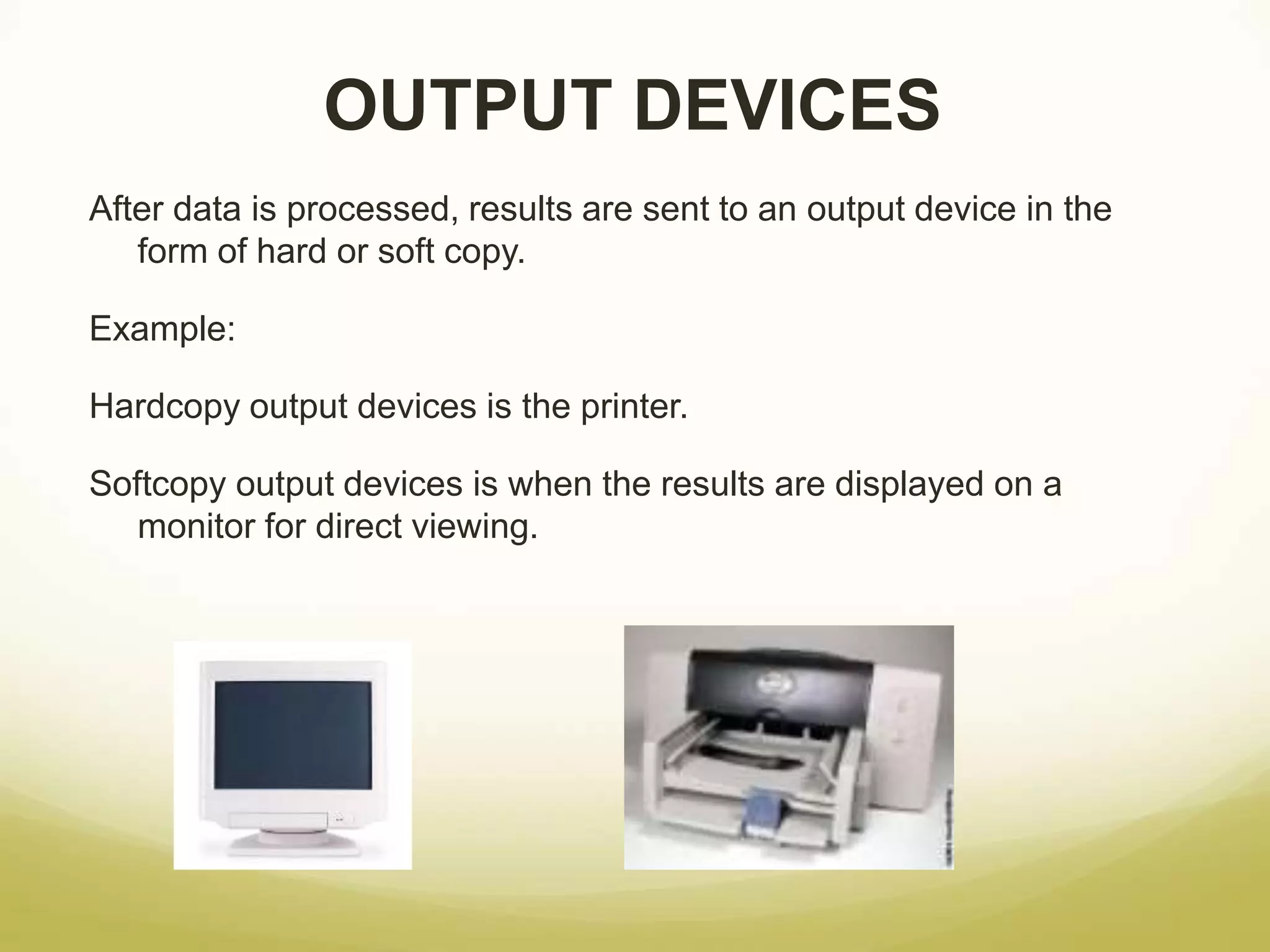
OUTPUT DEVICES
After data is processed, results are sent to an output device in the
form of hard or soft copy.
Example:
Hardcopy output devices is the printer.
Softcopy output devices is when the results are displayed on a
monitor for direct viewing.
Computer System.ppt
2. SOFTWARE
- A computer needs to be told what to do, otherwise it will just sit on your desk collecting
dust and taking up space.
- Software are the applications and programming instructions that tell your computer what
to do. Software enables you to use a computer for things such as playing games, writing
an essay, or listening to music. There are two main types of software. They are systems
software which controls the way the computer works and tells it what to do. Examples
include operating system, utilities, user interface.
- The other type of software is called application software. It is this type of software that
you use to do your work, keep in touch with friends and for entertainment. Some
examples include:
 Word processors such as Word
 E-spreadsheets such as Excel
 Databases such as Access
 Game applications such as Half Life, Call of Duty etc.
 Instant messaging clients
 Video and telephone applications such as Skype
 Web browser
Computer System.ppt
3. PEOPLEWARE
- refers to anything that has to do with the role of people in the
development or use of computer software and hardware systems.
Electronic Data Processing Personnel & Their Responsibilities:
Computer Operators
Computer operators monitor the operation of computers. They start the computer
up and close it down.
They use the computers for specific tasks like creating documents and
spreadsheets. Sometimes called the end users.
System Administrators
The system administrator installs new software and maintains the operating
system. In most businesses the system administrator is the one you call if you
cannot get your desktop computer to work.
Computer Programmers
Programmers encode the instructions that tell the computer what to do. They are
given job instructions in plain English and flowcharts, and they turn these instructions
and descriptions into code that the computer can understand. The position requires
a degree in computer science or other computer courses.
CPU
Small chip found on the motherboard. It is the brain of the
computer; it consists of a control unit that direct the activities of the
machine and an arithmetic-logic unit (ALU) to perform
mathematical calculations and data Processing (transforming data
into information) .
The internal memory or main memory for the permanent storage of software
instructions and data.
Microprocessor
FUNCTIONS OF CENTRAL PROCESSING UNIT
- Process data
- Control sequence of operations within the computers
- It gives command to all parts of a computer
- It control the use of the main memory in storing of data and
instructions
- it provides temporary storage (RAM) and permanent storage(ROM) of
data
Thank you

ELEMENTS-OF-COMPUTER-SYSTEM.pptx

  • 1.
    ELEMENTS OF COMPUTER SYSTEM ANDCATEGORIES OF COMPUTER PERIPHERALS
  • 2.
    What is aComputer? • A computer is an electronic device that manipulates information, or "data." It has the ability to store, retrieve, and process data. You can use a computer to type documents, send email, and browse the internet. You can also use it to handle spreadsheets, accounting, database management, presentations, games, and more. What is a Computer System? • It is a system that is consists of hardware, software and people that are configured to collect, manipulate, store, and process data into information.
  • 3.
    COMPUTER SYSTEM ELEMENTS Hardware These are the physical computer equipment used in computer system. Categories of Computer Hardware  An input device is a piece of hardware that is used to enter data into a computer or a similar processing device such as a smart phone. Examples are keyboard, mouse, touchpad, joystick, touchscreen, scanner, microphone, and digital camera Computer System.ppt
  • 4.
    Computer System.ppt A) KEYINGDEVICES - Are devices used to enter data into the computer using a set of Keys e.g Keyboard, key-to- storage and keypad. THE KEYBOARD Keyboard (like a typewriter) is the main input device of a computer. It contains three types of keys-- alphanumeric keys, special keys and function keys. • Alphanumeric keys are used to type all alphabets, numbers and special symbols like $, %, @, A etc. • Special keys such as <Shift>, <Ctrl>, <Alt>, <Home>, <Scroll Lock> etc. are used for special functions. • Function keys such as <Fl>, <F2>, <F3> etc. are used to give special commands depending upon the software used e.g.F5 reloads a page of an internet browser. The function of each key can be well understood only after working on a PC. When any key is pressed, an electronic signal is produced. This signal is detected by a keyboard encoder that sends a binary code corresponding to the key pressed to the CPU. There are many types of keyboards, but 101 keys keyboard is the most popular one.
  • 5.
    Computer System.ppt B. POINTINGDEVICES - Are devices that enter data and instructions into the computer using a pointer that appears on the screen. The items to be entered are selected by either pointing to or clicking on them.e.g mice, joystick, touch sensitive screen, trackballs. THE MOUSE A mouse is a small device used to point to and select items on your computer screen. Although mice come in many shapes, the typical mouse does look a bit like an actual mouse. It's small, oblong, and connected to the system unit by a long wire that resembles a tail and the connector which can either be PS/2 or USB. Some newer mice are wireless. A mouse usually has two buttons: a primary button (usually the left button) and a secondary button.
  • 6.
    Computer System.ppt C) SCANNINGDEVICES - Are devices that capture an object or a document directly from the source. They are classified according to the technology used to capture data e.g. Scanners and Document readers. i) Scanners - Used to capture a source document and converts it into an electronic form. Example are - Flatbed and Handheld scanners. ii) Document readers - Are documents that reads data directly from source document and convey them as input in the form of electronic signal.
  • 7.
    OUTPUT DEVICES After datais processed, results are sent to an output device in the form of hard or soft copy. Example: Hardcopy output devices is the printer. Softcopy output devices is when the results are displayed on a monitor for direct viewing.
  • 8.
    Computer System.ppt 2. SOFTWARE -A computer needs to be told what to do, otherwise it will just sit on your desk collecting dust and taking up space. - Software are the applications and programming instructions that tell your computer what to do. Software enables you to use a computer for things such as playing games, writing an essay, or listening to music. There are two main types of software. They are systems software which controls the way the computer works and tells it what to do. Examples include operating system, utilities, user interface. - The other type of software is called application software. It is this type of software that you use to do your work, keep in touch with friends and for entertainment. Some examples include:  Word processors such as Word  E-spreadsheets such as Excel  Databases such as Access  Game applications such as Half Life, Call of Duty etc.  Instant messaging clients  Video and telephone applications such as Skype  Web browser
  • 9.
    Computer System.ppt 3. PEOPLEWARE -refers to anything that has to do with the role of people in the development or use of computer software and hardware systems. Electronic Data Processing Personnel & Their Responsibilities: Computer Operators Computer operators monitor the operation of computers. They start the computer up and close it down. They use the computers for specific tasks like creating documents and spreadsheets. Sometimes called the end users. System Administrators The system administrator installs new software and maintains the operating system. In most businesses the system administrator is the one you call if you cannot get your desktop computer to work. Computer Programmers Programmers encode the instructions that tell the computer what to do. They are given job instructions in plain English and flowcharts, and they turn these instructions and descriptions into code that the computer can understand. The position requires a degree in computer science or other computer courses.
  • 10.
    CPU Small chip foundon the motherboard. It is the brain of the computer; it consists of a control unit that direct the activities of the machine and an arithmetic-logic unit (ALU) to perform mathematical calculations and data Processing (transforming data into information) . The internal memory or main memory for the permanent storage of software instructions and data. Microprocessor
  • 11.
    FUNCTIONS OF CENTRALPROCESSING UNIT - Process data - Control sequence of operations within the computers - It gives command to all parts of a computer - It control the use of the main memory in storing of data and instructions - it provides temporary storage (RAM) and permanent storage(ROM) of data
  • 12.