The Computer
Definition
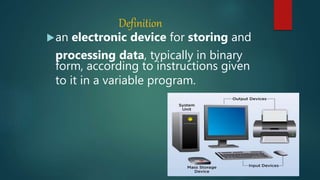
an electronic device for storing and
processing data, typically in binary
form, according to instructions given
to it in a variable program.
Function Of A Computer
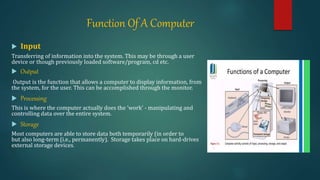
 Input
Transferring of information into the system. This may be through a user
device or though previously loaded software/program, cd etc.
 Output
Output is the function that allows a computer to display information, from
the system, for the user. This can be accomplished through the monitor.
 Processing
This is where the computer actually does the 'work' - manipulating and
controlling data over the entire system.
 Storage
Most computers are able to store data both temporarily (in order to
but also long-term (i.e., permanently). Storage takes place on hard-drives
external storage devices.
Input Devices
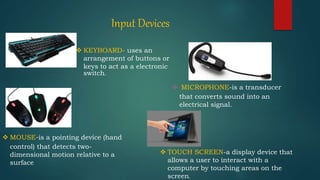
 KEYBOARD- uses an
arrangement of buttons or
keys to act as a electronic
switch.
 MOUSE-is a pointing device (hand
control) that detects two-
dimensional motion relative to a
surface
 MICROPHONE-is a transducer
that converts sound into an
electrical signal.
 TOUCH SCREEN-a display device that
allows a user to interact with a
computer by touching areas on the
screen.
Processing Devices
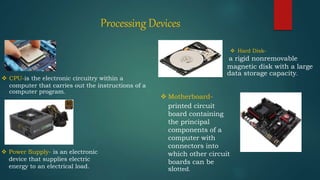
 CPU-is the electronic circuitry within a
computer that carries out the instructions of a
computer program.
 Motherboard-
printed circuit
board containing
the principal
components of a
computer with
connectors into
which other circuit
boards can be
slotted.
a rigid nonremovable
magnetic disk with a large
data storage capacity.
 Hard Disk-
 Power Supply- is an electronic
device that supplies electric
energy to an electrical load.
Storage Devices
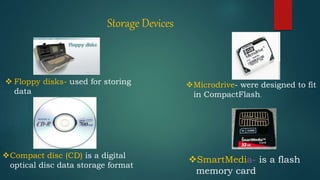
 Floppy disks- used for storing
data
Compact disc (CD) is a digital
optical disc data storage format
Microdrive- were designed to fit
in CompactFlash.
SmartMedia- is a flash
memory card
Output Devices
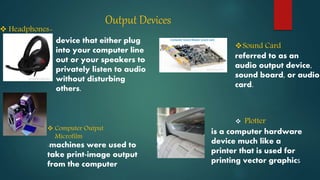
-machines were used to
take print-image output
from the computer
 Computer Output
Microfilm
 Headphones-
device that either plug
into your computer line
out or your speakers to
privately listen to audio
without disturbing
others.
Sound Card
referred to as an
audio output device,
sound board, or audio
card.
 Plotter
is a computer hardware
device much like a
printer that is used for
printing vector graphics
Types of Computers
 Personal Computer (PC)- designed for general use by a single
person.
 Desktop- is not designed for portability desktop systems
are that you will set the computer up in a permanent
location.
 Laptop- portable computers that integrate the display,
keyboard, a pointing device, processor, memory and hard
drive all in a battery-operated package.
 Netbooks- are ultra-portable computers that are even
smaller than traditional laptops.
 Personal Digital Assistants (PDAs)- are tightly integrated
computers that often use flash memory instead of a hard
drive for storage.
Types Of Computers
 Workstation- is simply a desktop computer that
has a more powerful processor.
 Server- optimized to provide services to other
computers over a network.
 Mainframe- huge computers that could fill an
entire room.
 Supercomputer- usually costs hundreds of
thousands or even millions of dollars.
 Wearable Computer- the latest trend in
computing is wearable computers.
 Tower- arranges the internal components
Computer Networks
A computer network or data network
is a telecommunications network
which allows nodes to share resources.
In computer networks, networked
computing devices exchange data with
each other using a data link. The
connections between nodes are
established using either cable media or
wireless media.
Transmission Media
is a pathway that carries the
information from sender to receiver.
use different types of cables or waves to
transmit data. Data is transmitted
normally through electrical or
electromagnetic signals. An electrical
signal is in the form of current.
Types Of Transmission Media
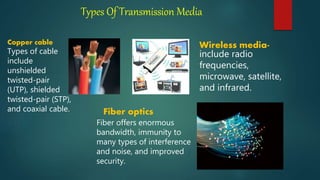
Types of cable
include
unshielded
twisted-pair
(UTP), shielded
twisted-pair (STP),
and coaxial cable.
Copper cable Wireless media-
include radio
frequencies,
microwave, satellite,
and infrared.
Fiber optics
Fiber offers enormous
bandwidth, immunity to
many types of interference
and noise, and improved
security.
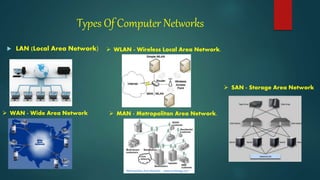
Types Of Computer Networks
 LAN (Local Area Network)
 WAN - Wide Area Network
 WLAN - Wireless Local Area Network.
 MAN - Metropolitan Area Network.
 SAN - Storage Area Network
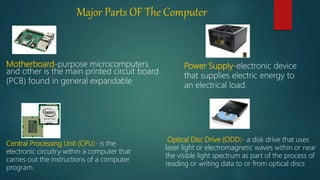
Major Parts OF The Computer
Motherboard-purpose microcomputers
and other is the main printed circuit board
(PCB) found in general expandable
Central Processing Unit (CPU)- is the
electronic circuitry within a computer that
carries out the instructions of a computer
program.
.
.
Optical Disc Drive (ODD)- a disk drive that uses
laser light or electromagnetic waves within or near
the visible light spectrum as part of the process of
reading or writing data to or from optical discs
Power Supply-electronic device
that supplies electric energy to
an electrical load.
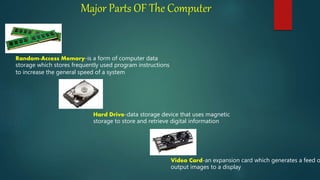
Major Parts OF The Computer
Random-Access Memory-is a form of computer data
storage which stores frequently used program instructions
to increase the general speed of a system
Hard Drive-data storage device that uses magnetic
storage to store and retrieve digital information
Video Card-an expansion card which generates a feed o
output images to a display
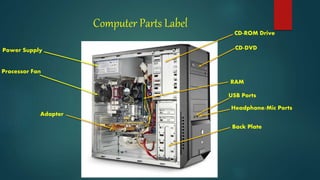
Computer Parts Label
Power Supply
Processor Fan
CD-DVD
USB Ports
Headphone/Mic Ports
CD-ROM Drive
Adapter
RAM
Back Plate
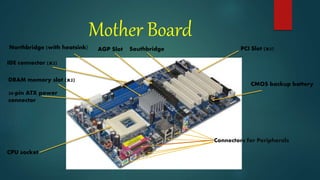
Mother Board
PCI Slot (x5)SouthbridgeAGP SlotNorthbridge (with heatsink)
IDE connector (x2)
CPU socket
Connectors for Peripherals
CMOS backup battery
DRAM memory slot (x2)
20-pin ATX power
connector

My research

  • 1.
  • 2.
    Definition an electronic devicefor storing and processing data, typically in binary form, according to instructions given to it in a variable program.
  • 3.
    Function Of AComputer  Input Transferring of information into the system. This may be through a user device or though previously loaded software/program, cd etc.  Output Output is the function that allows a computer to display information, from the system, for the user. This can be accomplished through the monitor.  Processing This is where the computer actually does the 'work' - manipulating and controlling data over the entire system.  Storage Most computers are able to store data both temporarily (in order to but also long-term (i.e., permanently). Storage takes place on hard-drives external storage devices.
  • 4.
    Input Devices  KEYBOARD-uses an arrangement of buttons or keys to act as a electronic switch.  MOUSE-is a pointing device (hand control) that detects two- dimensional motion relative to a surface  MICROPHONE-is a transducer that converts sound into an electrical signal.  TOUCH SCREEN-a display device that allows a user to interact with a computer by touching areas on the screen.
  • 5.
    Processing Devices  CPU-isthe electronic circuitry within a computer that carries out the instructions of a computer program.  Motherboard- printed circuit board containing the principal components of a computer with connectors into which other circuit boards can be slotted. a rigid nonremovable magnetic disk with a large data storage capacity.  Hard Disk-  Power Supply- is an electronic device that supplies electric energy to an electrical load.
  • 6.
    Storage Devices  Floppydisks- used for storing data Compact disc (CD) is a digital optical disc data storage format Microdrive- were designed to fit in CompactFlash. SmartMedia- is a flash memory card
  • 7.
    Output Devices -machines wereused to take print-image output from the computer  Computer Output Microfilm  Headphones- device that either plug into your computer line out or your speakers to privately listen to audio without disturbing others. Sound Card referred to as an audio output device, sound board, or audio card.  Plotter is a computer hardware device much like a printer that is used for printing vector graphics
  • 8.
    Types of Computers Personal Computer (PC)- designed for general use by a single person.  Desktop- is not designed for portability desktop systems are that you will set the computer up in a permanent location.  Laptop- portable computers that integrate the display, keyboard, a pointing device, processor, memory and hard drive all in a battery-operated package.  Netbooks- are ultra-portable computers that are even smaller than traditional laptops.  Personal Digital Assistants (PDAs)- are tightly integrated computers that often use flash memory instead of a hard drive for storage.
  • 9.
    Types Of Computers Workstation- is simply a desktop computer that has a more powerful processor.  Server- optimized to provide services to other computers over a network.  Mainframe- huge computers that could fill an entire room.  Supercomputer- usually costs hundreds of thousands or even millions of dollars.  Wearable Computer- the latest trend in computing is wearable computers.  Tower- arranges the internal components
  • 10.
    Computer Networks A computernetwork or data network is a telecommunications network which allows nodes to share resources. In computer networks, networked computing devices exchange data with each other using a data link. The connections between nodes are established using either cable media or wireless media.
  • 11.
    Transmission Media is apathway that carries the information from sender to receiver. use different types of cables or waves to transmit data. Data is transmitted normally through electrical or electromagnetic signals. An electrical signal is in the form of current.
  • 12.
    Types Of TransmissionMedia Types of cable include unshielded twisted-pair (UTP), shielded twisted-pair (STP), and coaxial cable. Copper cable Wireless media- include radio frequencies, microwave, satellite, and infrared. Fiber optics Fiber offers enormous bandwidth, immunity to many types of interference and noise, and improved security.
  • 13.
    Types Of ComputerNetworks  LAN (Local Area Network)  WAN - Wide Area Network  WLAN - Wireless Local Area Network.  MAN - Metropolitan Area Network.  SAN - Storage Area Network
  • 14.
    Major Parts OFThe Computer Motherboard-purpose microcomputers and other is the main printed circuit board (PCB) found in general expandable Central Processing Unit (CPU)- is the electronic circuitry within a computer that carries out the instructions of a computer program. . . Optical Disc Drive (ODD)- a disk drive that uses laser light or electromagnetic waves within or near the visible light spectrum as part of the process of reading or writing data to or from optical discs Power Supply-electronic device that supplies electric energy to an electrical load.
  • 15.
    Major Parts OFThe Computer Random-Access Memory-is a form of computer data storage which stores frequently used program instructions to increase the general speed of a system Hard Drive-data storage device that uses magnetic storage to store and retrieve digital information Video Card-an expansion card which generates a feed o output images to a display
  • 16.
    Computer Parts Label PowerSupply Processor Fan CD-DVD USB Ports Headphone/Mic Ports CD-ROM Drive Adapter RAM Back Plate
  • 17.
    Mother Board PCI Slot(x5)SouthbridgeAGP SlotNorthbridge (with heatsink) IDE connector (x2) CPU socket Connectors for Peripherals CMOS backup battery DRAM memory slot (x2) 20-pin ATX power connector