THE COMPUTER
By: Julina E. Gumanit
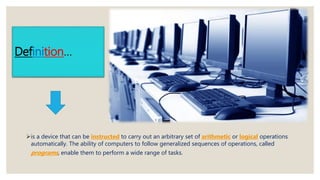
Definition…
is a device that can be instructed to carry out an arbitrary set of arithmetic or logical operations
automatically. The ability of computers to follow generalized sequences of operations, called
programs, enable them to perform a wide range of tasks.
Four Functions of a Computer
◦Input
 the act of entering data into a computer or data processing system
◦ Processing
operate on (computer data) by means of a program.
◦ Output
Any information that has been processed by and sent out from a computer or
device is considered output
◦ Storage
Computer data storage, often called storage or memory, is a technology consisting of
computer components and recording media used to retain digital data. It is a core
function and fundamental component of computers. The central processing unit (CPU)
a computer is what manipulates data by performing computations.
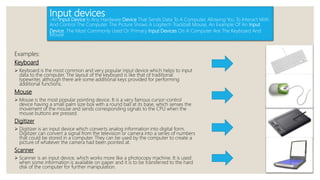
Input devices
-An Input Device Is Any Hardware Device That Sends Data To A Computer, Allowing You To Interact With
And Control The Computer. The Picture Shows A Logitech Trackball Mouse, An Example Of An Input
Device. The Most Commonly Used Or Primary Input Devices On A Computer Are The Keyboard And
Mouse
Examples:
Keyboard
 Keyboard is the most common and very popular input device which helps to input
data to the computer. The layout of the keyboard is like that of traditional
typewriter, although there are some additional keys provided for performing
additional functions.
Mouse
 Mouse is the most popular pointing device. It is a very famous cursor-control
device having a small palm size box with a round ball at its base, which senses the
movement of the mouse and sends corresponding signals to the CPU when the
mouse buttons are pressed.
Digitizer
 Digitizer is an input device which converts analog information into digital form.
Digitizer can convert a signal from the television or camera into a series of numbers
that could be stored in a computer. They can be used by the computer to create a
picture of whatever the camera had been pointed at.
Scanner
 Scanner is an input device, which works more like a photocopy machine. It is used
when some information is available on paper and it is to be transferred to the hard
disk of the computer for further manipulation.
Processing device
-A Processing Device Is Any Device In A Computer That Handles This Intermediate Stage.
Example, In The Diagram Below, The CPU Is The Processing Device. Some Of The Most
Common Processing Devices In A Computer Include The Following: Central Processing Unit
(CPU) Graphics Processing Unit (GPU)
Examples:
Central Processing Unit (CPU)
 A central processing unit (CPU) is the electronic circuitry within a computer that carries out
the instructions of a computer program by performing the basic arithmetic, logical, control
and input/output (I/O) operations specified by the instructions.
Graphics Processing Unit (GPU)
 A graphics processing unit (GPU), occasionally called visual processing unit (VPU), is a
specialized electronic circuit designed to rapidly manipulate and alter memory to accelerate
the creation of images in a frame buffer intended for output to a display device.
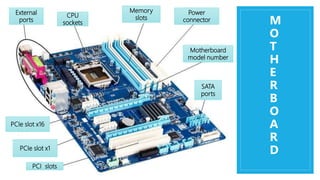
Motherboard
 a printed circuit board containing the principal components of a computer or other device,
with connectors into which other circuit boards can be slotted.
Network Card
 A network interface controller (NIC, also known as a network interface card, network adapter,
LAN adapter or physical network interface,[1] and by similar terms) is a computer hardware
component that connects a computer to a computer network
OUTPUT DEVICES
- An Output Device Is Any Peripheral That Receives Data From A Computer, Usually For
Display, Projection, Or Physical Reproduction. ... Monitors And Printers Are Two Of The Most
Common Output Devices Used With A Computer
Examples:
3D Printer
 3D printing, also known as additive manufacturing (AM), refers to processes used to
create a three-dimensional object[1] in which layers of material are formed under
computer control to create an object.
Braille Embosser
 A braille embosser is an impact printer that renders text as tactile braille cells. Using
braille translation software, a document can be embossed with relative ease, making
braille production efficient and cost-effective.
Braille reader
 A braille reader, also called a braille display, is an electronic device that allows a blind
person to read the text displayed on a computer monitor. The computer sends the text
to the output device, where it is converted to Braille and "displayed" by raising rounded
pins through a flat surface on the machine.
Headphones
 Headphones (or head-phones in the early days of telephony and radio) are a pair of
small loudspeaker drivers that are designed to be worn on or around the head over a
user's ears.
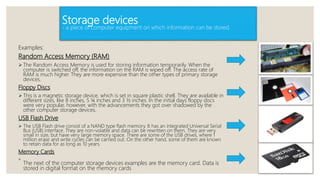
Storage devices
- a piece of computer equipment on which information can be stored.
Examples:
Random Access Memory (RAM)
 The Random Access Memory is used for storing information temporarily. When the
computer is switched off, the information on the RAM is wiped off. The access rate of
RAM is much higher. They are more expensive than the other types of primary storage
devices.
Floppy Discs
 This is a magnetic storage device, which is set in square plastic shell. They are available in
different sizes, like 8 inches, 5 ¼ inches and 3 ½ inches. In the initial days floppy discs
were very popular, however, with the advancements they got over shadowed by the
other computer storage devices.
USB Flash Drive
 The USB Flash drive consist of a NAND type flash memory. It has an integrated Universal Serial
Bus (USB) interface. They are non-volatile and data can be rewritten on them. They are very
small in size, but have very large memory space. There are some of the USB drives, where 1
million erase and write cycles can be carried out. On the other hand, some of them are known
to retain data for as long as 10 years.
Memory Cards

The next of the computer storage devices examples are the memory card. Data is
stored in digital format on the memory cards
Types of Computer
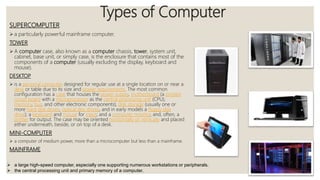
SUPERCOMPUTER
 a particularly powerful mainframe computer.
TOWER
 A computer case, also known as a computer chassis, tower, system unit,
cabinet, base unit, or simply case, is the enclosure that contains most of the
components of a computer (usually excluding the display, keyboard and
mouse).
DESKTOP
 is a personal computer designed for regular use at a single location on or near a
desk or table due to its size and power requirements. The most common
configuration has a case that houses the power supply, motherboard (a printed
circuit board with a microprocessor as the central processing unit (CPU),
memory, bus, and other electronic components), disk storage (usually one or
more hard disk drives, optical disc drives, and in early models a floppy disk
drive); a keyboard and mouse for input; and a computer monitor, and, often, a
printer for output. The case may be oriented horizontally or vertically and placed
either underneath, beside, or on top of a desk.
MINI-COMPUTER
 a computer of medium power, more than a microcomputer but less than a mainframe.
MAINFRAME
 a large high-speed computer, especially one supporting numerous workstations or peripherals.
 the central processing unit and primary memory of a computer.
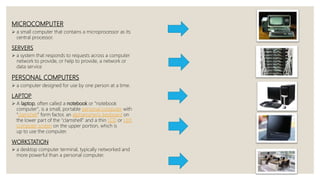
MICROCOMPUTER
 a small computer that contains a microprocessor as its
central processor.
SERVERS
 a system that responds to requests across a computer
network to provide, or help to provide, a network or
data service
PERSONAL COMPUTERS
 a computer designed for use by one person at a time.
LAPTOP
 A laptop, often called a notebook or "notebook
computer", is a small, portable personal computer with
"clamshell" form factor, an alphanumeric keyboard on
the lower part of the "clamshell" and a thin LCD or LED
computer screen on the upper portion, which is
up to use the computer.
WORKSTATION
 a desktop computer terminal, typically networked and
more powerful than a personal computer.
Major Components Of Computer
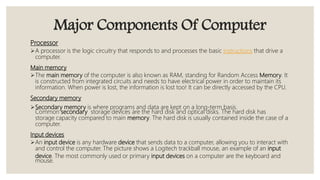
Processor
A processor is the logic circuitry that responds to and processes the basic instructions that drive a
computer.
Main memory
The main memory of the computer is also known as RAM, standing for Random Access Memory. It
is constructed from integrated circuits and needs to have electrical power in order to maintain its
information. When power is lost, the information is lost too! It can be directly accessed by the CPU.
Secondary memory
Secondary memory is where programs and data are kept on a long-term basis.
Common secondary storage devices are the hard disk and optical disks. The hard disk has
storage capacity compared to main memory. The hard disk is usually contained inside the case of a
computer.
Input devices
An input device is any hardware device that sends data to a computer, allowing you to interact with
and control the computer. The picture shows a Logitech trackball mouse, an example of an input
device. The most commonly used or primary input devices on a computer are the keyboard and
mouse.
Major Components Of Computer
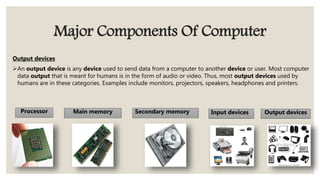
Output devices
An output device is any device used to send data from a computer to another device or user. Most computer
data output that is meant for humans is in the form of audio or video. Thus, most output devices used by
humans are in these categories. Examples include monitors, projectors, speakers, headphones and printers.
Processor Main memory Secondary memory Input devices Output devices
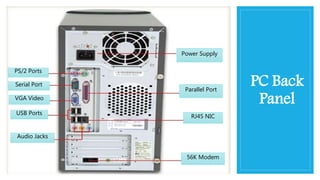
PC Back
Panel
Power Supply
Parallel Port
RJ45 NIC
56K Modem
PS/2 Ports
Serial Port
VGA Video
USB Ports
Audio Jacks
M
O
T
H
E
R
B
O
A
R
D
PCIe slot x16
PCI slots
PCIe slot x1
Memory
slots
Power
connector
SATA
ports
External
ports
CPU
sockets
Motherboard
model number

The Computer

  • 1.
  • 2.
    Definition… is a devicethat can be instructed to carry out an arbitrary set of arithmetic or logical operations automatically. The ability of computers to follow generalized sequences of operations, called programs, enable them to perform a wide range of tasks.
  • 3.
    Four Functions ofa Computer ◦Input  the act of entering data into a computer or data processing system ◦ Processing operate on (computer data) by means of a program. ◦ Output Any information that has been processed by and sent out from a computer or device is considered output ◦ Storage Computer data storage, often called storage or memory, is a technology consisting of computer components and recording media used to retain digital data. It is a core function and fundamental component of computers. The central processing unit (CPU) a computer is what manipulates data by performing computations.
  • 4.
    Input devices -An InputDevice Is Any Hardware Device That Sends Data To A Computer, Allowing You To Interact With And Control The Computer. The Picture Shows A Logitech Trackball Mouse, An Example Of An Input Device. The Most Commonly Used Or Primary Input Devices On A Computer Are The Keyboard And Mouse Examples: Keyboard  Keyboard is the most common and very popular input device which helps to input data to the computer. The layout of the keyboard is like that of traditional typewriter, although there are some additional keys provided for performing additional functions. Mouse  Mouse is the most popular pointing device. It is a very famous cursor-control device having a small palm size box with a round ball at its base, which senses the movement of the mouse and sends corresponding signals to the CPU when the mouse buttons are pressed. Digitizer  Digitizer is an input device which converts analog information into digital form. Digitizer can convert a signal from the television or camera into a series of numbers that could be stored in a computer. They can be used by the computer to create a picture of whatever the camera had been pointed at. Scanner  Scanner is an input device, which works more like a photocopy machine. It is used when some information is available on paper and it is to be transferred to the hard disk of the computer for further manipulation.
  • 5.
    Processing device -A ProcessingDevice Is Any Device In A Computer That Handles This Intermediate Stage. Example, In The Diagram Below, The CPU Is The Processing Device. Some Of The Most Common Processing Devices In A Computer Include The Following: Central Processing Unit (CPU) Graphics Processing Unit (GPU) Examples: Central Processing Unit (CPU)  A central processing unit (CPU) is the electronic circuitry within a computer that carries out the instructions of a computer program by performing the basic arithmetic, logical, control and input/output (I/O) operations specified by the instructions. Graphics Processing Unit (GPU)  A graphics processing unit (GPU), occasionally called visual processing unit (VPU), is a specialized electronic circuit designed to rapidly manipulate and alter memory to accelerate the creation of images in a frame buffer intended for output to a display device. Motherboard  a printed circuit board containing the principal components of a computer or other device, with connectors into which other circuit boards can be slotted. Network Card  A network interface controller (NIC, also known as a network interface card, network adapter, LAN adapter or physical network interface,[1] and by similar terms) is a computer hardware component that connects a computer to a computer network
  • 6.
    OUTPUT DEVICES - AnOutput Device Is Any Peripheral That Receives Data From A Computer, Usually For Display, Projection, Or Physical Reproduction. ... Monitors And Printers Are Two Of The Most Common Output Devices Used With A Computer Examples: 3D Printer  3D printing, also known as additive manufacturing (AM), refers to processes used to create a three-dimensional object[1] in which layers of material are formed under computer control to create an object. Braille Embosser  A braille embosser is an impact printer that renders text as tactile braille cells. Using braille translation software, a document can be embossed with relative ease, making braille production efficient and cost-effective. Braille reader  A braille reader, also called a braille display, is an electronic device that allows a blind person to read the text displayed on a computer monitor. The computer sends the text to the output device, where it is converted to Braille and "displayed" by raising rounded pins through a flat surface on the machine. Headphones  Headphones (or head-phones in the early days of telephony and radio) are a pair of small loudspeaker drivers that are designed to be worn on or around the head over a user's ears.
  • 7.
    Storage devices - apiece of computer equipment on which information can be stored. Examples: Random Access Memory (RAM)  The Random Access Memory is used for storing information temporarily. When the computer is switched off, the information on the RAM is wiped off. The access rate of RAM is much higher. They are more expensive than the other types of primary storage devices. Floppy Discs  This is a magnetic storage device, which is set in square plastic shell. They are available in different sizes, like 8 inches, 5 ¼ inches and 3 ½ inches. In the initial days floppy discs were very popular, however, with the advancements they got over shadowed by the other computer storage devices. USB Flash Drive  The USB Flash drive consist of a NAND type flash memory. It has an integrated Universal Serial Bus (USB) interface. They are non-volatile and data can be rewritten on them. They are very small in size, but have very large memory space. There are some of the USB drives, where 1 million erase and write cycles can be carried out. On the other hand, some of them are known to retain data for as long as 10 years. Memory Cards  The next of the computer storage devices examples are the memory card. Data is stored in digital format on the memory cards
  • 8.
    Types of Computer SUPERCOMPUTER a particularly powerful mainframe computer. TOWER  A computer case, also known as a computer chassis, tower, system unit, cabinet, base unit, or simply case, is the enclosure that contains most of the components of a computer (usually excluding the display, keyboard and mouse). DESKTOP  is a personal computer designed for regular use at a single location on or near a desk or table due to its size and power requirements. The most common configuration has a case that houses the power supply, motherboard (a printed circuit board with a microprocessor as the central processing unit (CPU), memory, bus, and other electronic components), disk storage (usually one or more hard disk drives, optical disc drives, and in early models a floppy disk drive); a keyboard and mouse for input; and a computer monitor, and, often, a printer for output. The case may be oriented horizontally or vertically and placed either underneath, beside, or on top of a desk. MINI-COMPUTER  a computer of medium power, more than a microcomputer but less than a mainframe. MAINFRAME  a large high-speed computer, especially one supporting numerous workstations or peripherals.  the central processing unit and primary memory of a computer.
  • 9.
    MICROCOMPUTER  a smallcomputer that contains a microprocessor as its central processor. SERVERS  a system that responds to requests across a computer network to provide, or help to provide, a network or data service PERSONAL COMPUTERS  a computer designed for use by one person at a time. LAPTOP  A laptop, often called a notebook or "notebook computer", is a small, portable personal computer with "clamshell" form factor, an alphanumeric keyboard on the lower part of the "clamshell" and a thin LCD or LED computer screen on the upper portion, which is up to use the computer. WORKSTATION  a desktop computer terminal, typically networked and more powerful than a personal computer.
  • 10.
    Major Components OfComputer Processor A processor is the logic circuitry that responds to and processes the basic instructions that drive a computer. Main memory The main memory of the computer is also known as RAM, standing for Random Access Memory. It is constructed from integrated circuits and needs to have electrical power in order to maintain its information. When power is lost, the information is lost too! It can be directly accessed by the CPU. Secondary memory Secondary memory is where programs and data are kept on a long-term basis. Common secondary storage devices are the hard disk and optical disks. The hard disk has storage capacity compared to main memory. The hard disk is usually contained inside the case of a computer. Input devices An input device is any hardware device that sends data to a computer, allowing you to interact with and control the computer. The picture shows a Logitech trackball mouse, an example of an input device. The most commonly used or primary input devices on a computer are the keyboard and mouse.
  • 11.
    Major Components OfComputer Output devices An output device is any device used to send data from a computer to another device or user. Most computer data output that is meant for humans is in the form of audio or video. Thus, most output devices used by humans are in these categories. Examples include monitors, projectors, speakers, headphones and printers. Processor Main memory Secondary memory Input devices Output devices
  • 12.
    PC Back Panel Power Supply ParallelPort RJ45 NIC 56K Modem PS/2 Ports Serial Port VGA Video USB Ports Audio Jacks
  • 13.
    M O T H E R B O A R D PCIe slot x16 PCIslots PCIe slot x1 Memory slots Power connector SATA ports External ports CPU sockets Motherboard model number