IA 124:
INTRODUCTION TO IT SECURITY
LECTURE 01
SECURITY CONCEPTS
1 7/27/2021
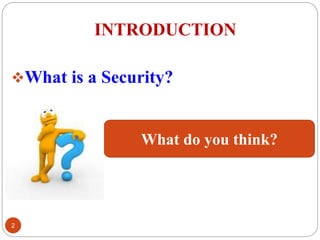
INTRODUCTION
What is a Security?
2
What do you think?
WHAT IS SECURITY?
Security: A state of well-being of
information and infrastructure in which the
possibility of theft, tempering, and
disruption of information and services is
kept low or tolerable.
 “Security” is the quality or state of being
secure--to be free from danger.
3 7/27/2021
Specialized Areas of Security
7/27/2021
4
Physical security: Protect the physical items,
objects, or areas of an organization from
unauthorized access and misuse.
Personal security: Protect the individual or group
of individuals who are authorized to access the
organization and its operations.
Communications security: Protect an
organization’s communications media, technology,
and content.
Specialized Areas of Security
7/27/2021
5
Network Security: Protect the network and the
network-accessible resources from unauthorized
access, consistent and continuous monitoring and
measurement of its effectiveness.
Data security: Data security is the means of
ensuring that data is kept safe from corruption
and that access to it is suitably controlled.
Computer Security
7/27/2021
6
“….Protection of computers hardware,
software, data, information and other related
computer devices, from theft, corruption, or
natural disaster destruction….”.
Computer security is concern with protecting a computer
system’s information assets, as well as the computer
systems themselves.
Asset = item of value
Assets include: Hardware, Software, Data
The Vulnerability – Threat – Control Paradigm
 A major goal of information security as a discipline and as a profession is to
protect valuable assets
 To study methods of asset protection, we use vulnerability – threat – control
framework:
 Vulnerability
 Is a weakness in an information system or its components that might be
exploited to compromise the security of the system.
 Attack is the deliberate act that exploits vulnerability. Is the actual attempt to
violate security.
 Threat
 A set of circumstances or events that has the potential to course loss or harm
an information system by destroying it, disclosing the information stored on
the system, adversely modifying data, or making the system unavailable.
 Control
 An action, device, procedure, or technique that eliminates or reduces a
vulnerability
 Also called a countermeasure 7/27/2021
7
The Vulnerability – Threat – Control Paradigm
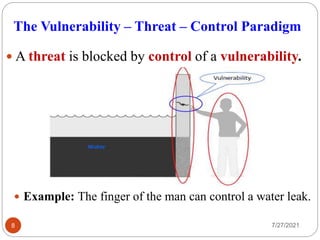
 A threat is blocked by control of a vulnerability.
7/27/2021
8
 Example: The finger of the man can control a water leak.
Security VULNERABILITIES
7/27/2021
9
1. Poor system management: If managers at all levels
don't make security, their number one priority, then the
threats to an information system is easily to become real.
2. Familiarity: Using common, well-known code,
software, operating systems, and/or hardware increases
the probability an attacker to have the tools or
knowledge to exploit the weakness.
3. Poor System Design: If the System Analyst did not
consider the security aspect, during system design
process then creates a loop hole for an attacker to
damage a system.
WHY Information systems are vulnerable?
Security VULNERABILITIES
7/27/2021
10
3. Poor Password management: The computer users
stores the password on the computer or open place
where an attacker can access it.
5. Unchecked user input: The programmers assumes that
all user input is safe, but there programs that do not
check user input which allow unintended direct
execution of commands.
6. Default configuration: of the OS and Network
Operating System (NOS), network devices firewalls and
encryption weaknesses.
WHY Information systems are vulnerable?
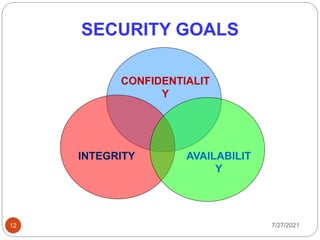
Threats and C-I-A
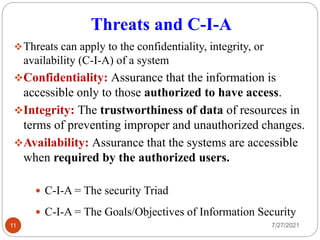
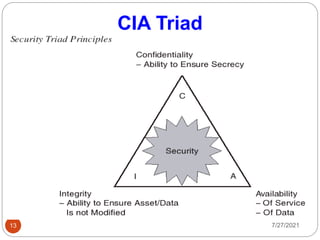
Threats can apply to the confidentiality, integrity, or
availability (C-I-A) of a system
Confidentiality: Assurance that the information is
accessible only to those authorized to have access.
Integrity: The trustworthiness of data of resources in
terms of preventing improper and unauthorized changes.
Availability: Assurance that the systems are accessible
when required by the authorized users.
7/27/2021
11
 C-I-A = The security Triad
 C-I-A = The Goals/Objectives of Information Security
SECURITY GOALS
7/27/2021
12
CONFIDENTIALIT
Y
AVAILABILIT
Y
INTEGRITY
CIA Triad
7/27/2021
13
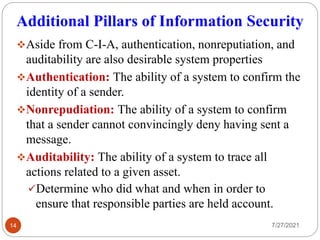
Additional Pillars of Information Security
Aside from C-I-A, authentication, nonreputiation, and
auditability are also desirable system properties
Authentication: The ability of a system to confirm the
identity of a sender.
Nonrepudiation: The ability of a system to confirm
that a sender cannot convincingly deny having sent a
message.
Auditability: The ability of a system to trace all
actions related to a given asset.
Determine who did what and when in order to
ensure that responsible parties are held account.
7/27/2021
14
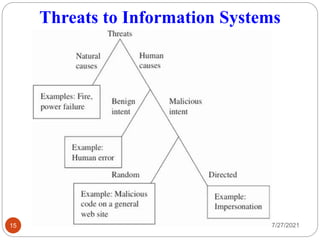
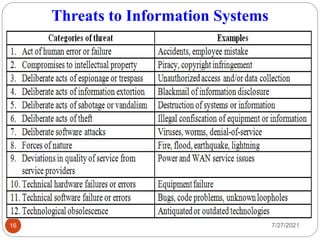
Threats to Information Systems
7/27/2021
15
Threats to Information Systems
7/27/2021
16
Threats to Information Systems
7/27/2021
17
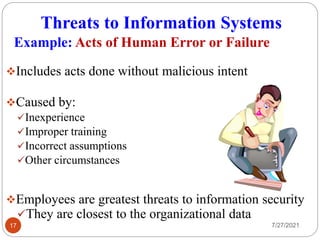
Includes acts done without malicious intent
Caused by:
Inexperience
Improper training
Incorrect assumptions
Other circumstances
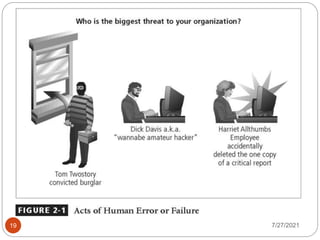
Employees are greatest threats to information security
They are closest to the organizational data
Example: Acts of Human Error or Failure
Threats to Information Systems
7/27/2021
18
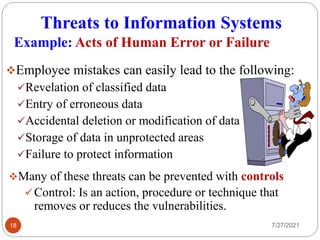
Employee mistakes can easily lead to the following:
Revelation of classified data
Entry of erroneous data
Accidental deletion or modification of data
Storage of data in unprotected areas
Failure to protect information
Example: Acts of Human Error or Failure
Many of these threats can be prevented with controls
Control: Is an action, procedure or technique that
removes or reduces the vulnerabilities.
7/27/2021
19
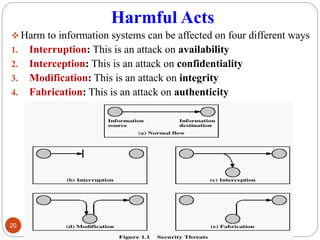
Harmful Acts
 Harm to information systems can be affected on four different ways
1. Interruption: This is an attack on availability
2. Interception: This is an attack on confidentiality
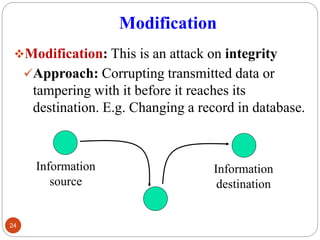
3. Modification: This is an attack on integrity
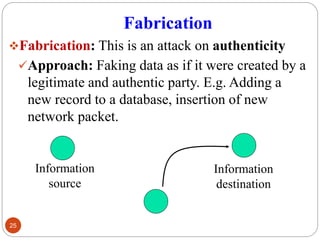
4. Fabrication: This is an attack on authenticity
20
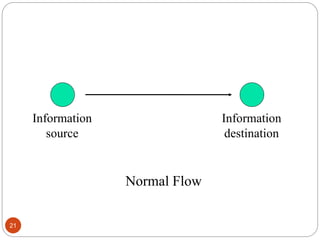
21
Information
source
Information
destination
Normal Flow
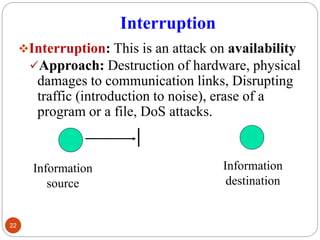
Interruption
Interruption: This is an attack on availability
Approach: Destruction of hardware, physical
damages to communication links, Disrupting
traffic (introduction to noise), erase of a
program or a file, DoS attacks.
22
Information
source
Information
destination
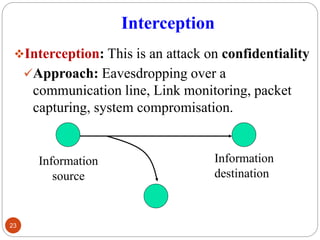
Interception
Interception: This is an attack on confidentiality
Approach: Eavesdropping over a
communication line, Link monitoring, packet
capturing, system compromisation.
23
Information
source
Information
destination
Modification
Modification: This is an attack on integrity
Approach: Corrupting transmitted data or
tampering with it before it reaches its
destination. E.g. Changing a record in database.
24
Information
source
Information
destination
Fabrication
Fabrication: This is an attack on authenticity
Approach: Faking data as if it were created by a
legitimate and authentic party. E.g. Adding a
new record to a database, insertion of new
network packet.
25
Information
source
Information
destination
Types of attackers
Amateurs
Opportunistic attackers
 Use a password that he or she found
 Script kiddies
Hackers: Non-malicious
Crackers: Malicious
Career criminals
Organized crime syndicates
Cyber terrorists
State-supported spies and information warriors
7/27/2021
26
Method – Opportunity - Motive
 Attackers need MOM
Method
Skills, knowledge, tools, etc. with which to
attempt an attack
Opportunity
Time and access to attempt an attack
Motive
A reason to attempt an attack
7/27/2021
27
Method of Defense
 Six approaches to defense of computing systems
1. Prevent attack
 Block attack / close vulnerability
2. Deter attack
 Make attack harder (if we can’t make it impossible)
3. Deflect attack
 Make another target more attractive than this target
4. Mitigate attack
 Make the impact of an attack less severe
5. Detect attack
 during or after
6. Recover from attack
7/27/2021
28
Importance of Computer Security
7/27/2021
29
1. To protect organization's valuable resources,
such as information, hardware, and
software, through the selection of appropriate
techniques.
2. Security helps the organization's mission of
protecting its.
 Physical and financial resources.
 Gaining reputation and legal position from
employees, and customers trust.
Importance of Computer Security
7/27/2021
30
3. Preserving, Integrity, Confidentiality and
Availability of information system resources
that includes.
 Organization’s data.
 Customer’s information.
 Organization’s hardware and software etc.
4. To protect the organizations’ information from
criminal, natural hazards and other threats.
Importance of Computer Security
7/27/2021
31
5. To protect the organization from hackers, crackers
and terrorists.
 Hacker: Intelligent individual with excellent
computer skills, with the ability to create and explore
or exploits weaknesses in computer systems and
network.
 Cracker: System intruder/destroyer who Breaching
security on software or systems.
 Virus: Is a program that reproduces its own code by
attaching itself to other executable files in such a
way that the virus code is executed when the infected
executable file is executed.
 Is a program designed and to cause problems to
computers or computer network systems.
SECURITY MEASURES
7/27/2021
32
The following measures can be used to protect your
computer from security threats and attacks:
1. Locking your computer with a password.
2. Installing Anti-Virus software and ensure it is up-
to-date.
3. Using up-to-date software (operating systems and
user applications)
4. Logging off or shutting down your computer when
going away.
Protecting Computers
SECURITY MEASURES
7/27/2021
33
5. Make a backup of your important documents and
data.
6. Protect your files with passwords
7. Before clicking on any e-mail attachment, make sure
that the attachment is scanned even if you know the
source.
8. Before using media given to you by someone else,
scan it to remove viruses
Protecting Computers…
SECURITY MEASURES
7/27/2021
34
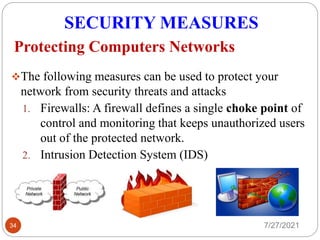
The following measures can be used to protect your
network from security threats and attacks
1. Firewalls: A firewall defines a single choke point of
control and monitoring that keeps unauthorized users
out of the protected network.
2. Intrusion Detection System (IDS)
Protecting Computers Networks
SYMPTOMS OF INFECTED
COMPUTER
7/27/2021
35
It is difficult to prove if your computer has been
affected with a virus. However, one can suspects
that a computer is infected with a virus, by
considering some primary indicators that are;
1. The computer runs slower than usual.
2. The computer stops responding, or it locks up
frequently.
3. The computer crashes, and then it restarts every few
minutes.
4. Your computer has much less memory or hard drive
space is unavailable.
SYMPTOMS OF INFECTED
COMPUTER…
7/27/2021
36
5. Applications programs on the computers do not work
correctly.
6. Disks or flash disk drives are inaccessible.
7. You cannot print soft copy to hardcopy correctly or PC
prints bogus information.
8. You see unusual error messages.
9. There is a double extension on an attachment that you
recently opened, such as a .jpg, .gif, or .exe. extension.
10. An antivirus program is disabled for no reason and
sometimes it cannot be restarted.
SYMPTOMS OF INFECTED
COMPUTER…
7/27/2021
37
11. An antivirus program cannot be installed on the
computer, or the antivirus program will not run.
12. New icons appear on the desktop that you did not put
there, or the icons are not associated with any recently
installed programs.
13. There are error messages popping out on a regular basis.
14. Your files and folders are getting deleted automatically.
15. Abnormal sound.
38
IA 124 LECTURE 01
END
7/27/2021

Ia 124 1621324143 ia_124_lecture_01

  • 1.
    IA 124: INTRODUCTION TOIT SECURITY LECTURE 01 SECURITY CONCEPTS 1 7/27/2021
  • 2.
    INTRODUCTION What is aSecurity? 2 What do you think?
  • 3.
    WHAT IS SECURITY? Security:A state of well-being of information and infrastructure in which the possibility of theft, tempering, and disruption of information and services is kept low or tolerable.  “Security” is the quality or state of being secure--to be free from danger. 3 7/27/2021
  • 4.
    Specialized Areas ofSecurity 7/27/2021 4 Physical security: Protect the physical items, objects, or areas of an organization from unauthorized access and misuse. Personal security: Protect the individual or group of individuals who are authorized to access the organization and its operations. Communications security: Protect an organization’s communications media, technology, and content.
  • 5.
    Specialized Areas ofSecurity 7/27/2021 5 Network Security: Protect the network and the network-accessible resources from unauthorized access, consistent and continuous monitoring and measurement of its effectiveness. Data security: Data security is the means of ensuring that data is kept safe from corruption and that access to it is suitably controlled.
  • 6.
    Computer Security 7/27/2021 6 “….Protection ofcomputers hardware, software, data, information and other related computer devices, from theft, corruption, or natural disaster destruction….”. Computer security is concern with protecting a computer system’s information assets, as well as the computer systems themselves. Asset = item of value Assets include: Hardware, Software, Data
  • 7.
    The Vulnerability –Threat – Control Paradigm  A major goal of information security as a discipline and as a profession is to protect valuable assets  To study methods of asset protection, we use vulnerability – threat – control framework:  Vulnerability  Is a weakness in an information system or its components that might be exploited to compromise the security of the system.  Attack is the deliberate act that exploits vulnerability. Is the actual attempt to violate security.  Threat  A set of circumstances or events that has the potential to course loss or harm an information system by destroying it, disclosing the information stored on the system, adversely modifying data, or making the system unavailable.  Control  An action, device, procedure, or technique that eliminates or reduces a vulnerability  Also called a countermeasure 7/27/2021 7
  • 8.
    The Vulnerability –Threat – Control Paradigm  A threat is blocked by control of a vulnerability. 7/27/2021 8  Example: The finger of the man can control a water leak.
  • 9.
    Security VULNERABILITIES 7/27/2021 9 1. Poorsystem management: If managers at all levels don't make security, their number one priority, then the threats to an information system is easily to become real. 2. Familiarity: Using common, well-known code, software, operating systems, and/or hardware increases the probability an attacker to have the tools or knowledge to exploit the weakness. 3. Poor System Design: If the System Analyst did not consider the security aspect, during system design process then creates a loop hole for an attacker to damage a system. WHY Information systems are vulnerable?
  • 10.
    Security VULNERABILITIES 7/27/2021 10 3. PoorPassword management: The computer users stores the password on the computer or open place where an attacker can access it. 5. Unchecked user input: The programmers assumes that all user input is safe, but there programs that do not check user input which allow unintended direct execution of commands. 6. Default configuration: of the OS and Network Operating System (NOS), network devices firewalls and encryption weaknesses. WHY Information systems are vulnerable?
  • 11.
    Threats and C-I-A Threatscan apply to the confidentiality, integrity, or availability (C-I-A) of a system Confidentiality: Assurance that the information is accessible only to those authorized to have access. Integrity: The trustworthiness of data of resources in terms of preventing improper and unauthorized changes. Availability: Assurance that the systems are accessible when required by the authorized users. 7/27/2021 11  C-I-A = The security Triad  C-I-A = The Goals/Objectives of Information Security
  • 12.
  • 13.
  • 14.
    Additional Pillars ofInformation Security Aside from C-I-A, authentication, nonreputiation, and auditability are also desirable system properties Authentication: The ability of a system to confirm the identity of a sender. Nonrepudiation: The ability of a system to confirm that a sender cannot convincingly deny having sent a message. Auditability: The ability of a system to trace all actions related to a given asset. Determine who did what and when in order to ensure that responsible parties are held account. 7/27/2021 14
  • 15.
    Threats to InformationSystems 7/27/2021 15
  • 16.
    Threats to InformationSystems 7/27/2021 16
  • 17.
    Threats to InformationSystems 7/27/2021 17 Includes acts done without malicious intent Caused by: Inexperience Improper training Incorrect assumptions Other circumstances Employees are greatest threats to information security They are closest to the organizational data Example: Acts of Human Error or Failure
  • 18.
    Threats to InformationSystems 7/27/2021 18 Employee mistakes can easily lead to the following: Revelation of classified data Entry of erroneous data Accidental deletion or modification of data Storage of data in unprotected areas Failure to protect information Example: Acts of Human Error or Failure Many of these threats can be prevented with controls Control: Is an action, procedure or technique that removes or reduces the vulnerabilities.
  • 19.
  • 20.
    Harmful Acts  Harmto information systems can be affected on four different ways 1. Interruption: This is an attack on availability 2. Interception: This is an attack on confidentiality 3. Modification: This is an attack on integrity 4. Fabrication: This is an attack on authenticity 20
  • 21.
  • 22.
    Interruption Interruption: This isan attack on availability Approach: Destruction of hardware, physical damages to communication links, Disrupting traffic (introduction to noise), erase of a program or a file, DoS attacks. 22 Information source Information destination
  • 23.
    Interception Interception: This isan attack on confidentiality Approach: Eavesdropping over a communication line, Link monitoring, packet capturing, system compromisation. 23 Information source Information destination
  • 24.
    Modification Modification: This isan attack on integrity Approach: Corrupting transmitted data or tampering with it before it reaches its destination. E.g. Changing a record in database. 24 Information source Information destination
  • 25.
    Fabrication Fabrication: This isan attack on authenticity Approach: Faking data as if it were created by a legitimate and authentic party. E.g. Adding a new record to a database, insertion of new network packet. 25 Information source Information destination
  • 26.
    Types of attackers Amateurs Opportunisticattackers  Use a password that he or she found  Script kiddies Hackers: Non-malicious Crackers: Malicious Career criminals Organized crime syndicates Cyber terrorists State-supported spies and information warriors 7/27/2021 26
  • 27.
    Method – Opportunity- Motive  Attackers need MOM Method Skills, knowledge, tools, etc. with which to attempt an attack Opportunity Time and access to attempt an attack Motive A reason to attempt an attack 7/27/2021 27
  • 28.
    Method of Defense Six approaches to defense of computing systems 1. Prevent attack  Block attack / close vulnerability 2. Deter attack  Make attack harder (if we can’t make it impossible) 3. Deflect attack  Make another target more attractive than this target 4. Mitigate attack  Make the impact of an attack less severe 5. Detect attack  during or after 6. Recover from attack 7/27/2021 28
  • 29.
    Importance of ComputerSecurity 7/27/2021 29 1. To protect organization's valuable resources, such as information, hardware, and software, through the selection of appropriate techniques. 2. Security helps the organization's mission of protecting its.  Physical and financial resources.  Gaining reputation and legal position from employees, and customers trust.
  • 30.
    Importance of ComputerSecurity 7/27/2021 30 3. Preserving, Integrity, Confidentiality and Availability of information system resources that includes.  Organization’s data.  Customer’s information.  Organization’s hardware and software etc. 4. To protect the organizations’ information from criminal, natural hazards and other threats.
  • 31.
    Importance of ComputerSecurity 7/27/2021 31 5. To protect the organization from hackers, crackers and terrorists.  Hacker: Intelligent individual with excellent computer skills, with the ability to create and explore or exploits weaknesses in computer systems and network.  Cracker: System intruder/destroyer who Breaching security on software or systems.  Virus: Is a program that reproduces its own code by attaching itself to other executable files in such a way that the virus code is executed when the infected executable file is executed.  Is a program designed and to cause problems to computers or computer network systems.
  • 32.
    SECURITY MEASURES 7/27/2021 32 The followingmeasures can be used to protect your computer from security threats and attacks: 1. Locking your computer with a password. 2. Installing Anti-Virus software and ensure it is up- to-date. 3. Using up-to-date software (operating systems and user applications) 4. Logging off or shutting down your computer when going away. Protecting Computers
  • 33.
    SECURITY MEASURES 7/27/2021 33 5. Makea backup of your important documents and data. 6. Protect your files with passwords 7. Before clicking on any e-mail attachment, make sure that the attachment is scanned even if you know the source. 8. Before using media given to you by someone else, scan it to remove viruses Protecting Computers…
  • 34.
    SECURITY MEASURES 7/27/2021 34 The followingmeasures can be used to protect your network from security threats and attacks 1. Firewalls: A firewall defines a single choke point of control and monitoring that keeps unauthorized users out of the protected network. 2. Intrusion Detection System (IDS) Protecting Computers Networks
  • 35.
    SYMPTOMS OF INFECTED COMPUTER 7/27/2021 35 Itis difficult to prove if your computer has been affected with a virus. However, one can suspects that a computer is infected with a virus, by considering some primary indicators that are; 1. The computer runs slower than usual. 2. The computer stops responding, or it locks up frequently. 3. The computer crashes, and then it restarts every few minutes. 4. Your computer has much less memory or hard drive space is unavailable.
  • 36.
    SYMPTOMS OF INFECTED COMPUTER… 7/27/2021 36 5.Applications programs on the computers do not work correctly. 6. Disks or flash disk drives are inaccessible. 7. You cannot print soft copy to hardcopy correctly or PC prints bogus information. 8. You see unusual error messages. 9. There is a double extension on an attachment that you recently opened, such as a .jpg, .gif, or .exe. extension. 10. An antivirus program is disabled for no reason and sometimes it cannot be restarted.
  • 37.
    SYMPTOMS OF INFECTED COMPUTER… 7/27/2021 37 11.An antivirus program cannot be installed on the computer, or the antivirus program will not run. 12. New icons appear on the desktop that you did not put there, or the icons are not associated with any recently installed programs. 13. There are error messages popping out on a regular basis. 14. Your files and folders are getting deleted automatically. 15. Abnormal sound.
  • 38.
    38 IA 124 LECTURE01 END 7/27/2021