CP 121: Introduction to
Database Systems
Lecture 01: Introduction
to Database Systems
Over View of Database
Lecture One
By Christina Muro
Lecturer
CSE-Department
Lecture Objectives
• File based Systems
• Database Approach
• Common Uses of Databases
• Database Users
• Database management Systems(DBMS)
• Components of Database Management Systems(DBMS) Environment
• Functions of DBMS
• Advantages and Disadvantages of DBMS
File based Systems
• A file is a collection of records, which contains logically related data
• A file is a collection of records or documents dealing with one organization,
person, area or subject.
• Manual (paper) files
• Computer files
File based Systems
• A File based system is a collection of related programs that performs services to the end
users such as production of reports.
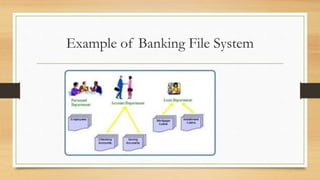
• Example file systems contains student results, receipts, invoices, bank statements and so on.
• What if you what to look something in the file systems?
• Searching through the file system starting from first entry until you find what you want.
Is it easy????
 Think of indexing
File based Systems
• Early attempt to computerize the manual filling systems
• Developed in C, Cobol and other languages
• Each program manages its own data
Example of Banking File System
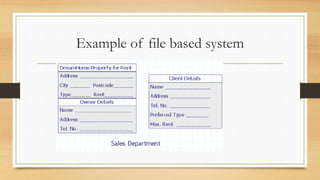
Example of file based system
File based Systems
• Assume you want to know the following information: -
• What is the annual total for staffs salaries?
• What is the average rent for two apartments?
• What is expected monthly net income for the next financial year?
Is it easy????
Why Study File Systems?
 It provides historical perspective.
 It teaches lessons to avoid draw backs of data management.
 Its simple characteristics facilitate understanding of the design complexity of
a database.
 It provides useful knowledge for converting a file system to a database
system
Limitations of File Based Systems
• Separation and isolation of data
• Duplication of data
• Data dependence
• Incompatible file formats
Database Approach
• Database is a shared collection of logically related data and its descriptions, designed
to meet the information needs of an organization.
• A single repository of data that can be used by many departments and users
• Database is no longer holds only data but also the description of the data
• The description of the data is sometimes known as system catalog or data
dictionary or metadata
• Database application can be defined as a program that interacts with the database
Database Approach
DATA
 Data are raw or isolated facts from which the required information is
produced.
 Data are distinct pieces of information, usually formatted in a special
way.
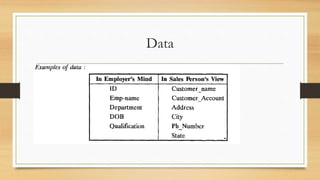
Data
INFORMATION
Data and information are closely related and are often used interchangeably.
Information is a processed, organized or summarized data.
Data are processed to create information, which is meaningful to the
recipient.
For example, from the salesperson's view, we might want to know the
current balance of a customer Mis Waterhouse Ltd. or perhaps we might ask for the
average current balance of all the customers in Tanzania. The answers to such
questions are information.
Common Uses of the Database
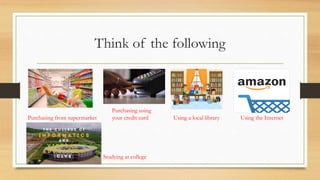
• Database is now an integral part of our day to day life. Probably we don’t
know!
Think of the following
Purchasing from supermarket
Purchasing using
your credit card Using a local library Using the Internet
Studying at college
Database Management Systems(DBMS)
• A software that enables users to define, create, maintain and control access to
the database.
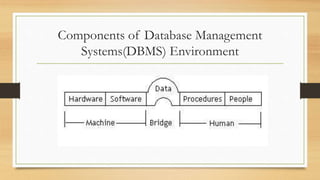
Components of Database Management
Systems(DBMS) Environment
Components of Database Management
Systems(DBMS) Environment
Hardware
 DBMS and the application requires hardware to run.
 The hardware can range from a single personal computer to a network of computers
 The particular hardware depends of organization’s requirements and the DBMS used.
 Some DBMSs run only on particular hardware or Operating Systems while others run on
variety ranges of hardware and Operating System
 DBMS requires a minimum amount of main memory and disk space to run
Components of Database Management
Systems(DBMS) Environment
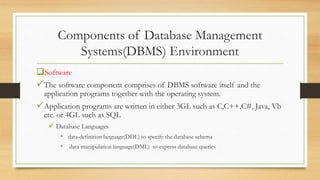
Software
The software component comprises of DBMS software itself and the
application programs together with the operating system.
Application programs are written in either 3GL such as C,C++,C#, Java, Vb
etc. or 4GL such as SQL
 Database Languages
• data-definition language(DDL) to specify the database schema
• data-manipulation language(DML) to express database queries
Components of Database Management
Systems(DBMS) Environment
Data
Probably the most important component of the DBMS environment
It acts like a bridge between the machine component and human component
The structure of the database is called Schema
Components of Database Management
Systems(DBMS) Environment
Procedures
Instructions and rules that govern the design and use of the database
The users of the system who manage the database may require documented
procedures on how to use/run the system. For example
• Log on to the system
• Start and stop DBMS
• Make back up copies of the database
• Handle hardware or software failure
Components of Database Management
Systems(DBMS) Environment
People
Includes database designers,
DBAs
application programmers
 end-users
Functions of DBMS
Data Storage Management:
The DBMS creates the complex structures required for data storage in the
physical database. It provides a mechanism for management of permanent
storage of the data.
Functions of DBMS
Transaction Management:
A transaction is a series of database operations, carried out by a application
program, which access or changes the contents of the database. Therefore, a
DBMS must provide a mechanism to ensure either that all the updates
corresponding to a given transaction are made or that none of them is made.
Functions of DBMS
Integrity Services:
Database integrity refers to the correctness and consistency of stored data and
is specially important in transaction oriented database system. Therefore, a
DBMS must provide to ensure that both the data in database and changes to
the data follow certain rules..
Functions of DBMS
Backup and Recovery Management:
The DBMS provides mechanisms for different types of failures. This prevents
the loss of data. The recovery mechanisms of DBMS, make sure that the
database is returned to a consistent state after a transaction fails or aborts due
to a system crash, media failure, hardware or software errors, power failure, and
so on.
Functions of DBMS
Concurrency Control Services:
Since DBMS support sharing of data among multiple users, they must provide
a mechanism for managing concurrent access to the database. DBMS's ensure
that the database is kept in consistent state and that the integrity of the data is
preserved. It ensures that the database is updated correctly when multiple users
are updating the database concurrently
Functions of DBMS
Data Manipulation Management:
DBMS furnishes users with the ability to retrieve, update and delete existing
data in the database or to add new data to the database. It includes DML
processor component to deal with the data manipulation language (DML).
Functions of DBMS
Authorization /Security Management :
The DBMS protects the database against unauthorized access, either intentional
or accidental. It furnishes mechanism to ensure that only authorized users can
access the database. It creates a security system that enforces user security and
data privacy within the database. Security rules determine which users can
access the database, which data items each user may access and which data
operations (add, delete, and modify) the user may perform.
Functions of DBMS
Utility Services:
The DBMS provides a set of utility services used by the DBA and the database
designer to create, implement, monitor and maintain the database. These utility
services help the DBA to administer the database effectively.
Functions of DBMS
Database Access and Application Programming Interfaces
All DBMSs provides interface to enable applications to use DBMS services.
They provide data access via structured query language (SOL).
Database vs. file systems
A file is a sequence of records.
• All records in a file are of the same record type.
• File-processing system is supported by a conventional operating system. The
system stores permanent records in various files, and it needs different
application program to extract records from the appropriate files and add
record to appropriate files
Database users
Data and Database Administrators
Database and DBMS are corporate resources that must be managed like any other
resources.
Data administrator(DA) is responsible for management of data eg. Database
Planning, development and maintenance of the standards, policies and procedures.
Database Administrator(DBA) is responsible with physical realization of the
database including physical database design and implementation, security and integrity
control. In some organization there is no distinction between the two.
Database users
Database Designers
In a large database projects we can distinguish between logical database
designer and physical database designer.
Logical database designer is responsible in identifying data (entities and
attributes), relationship between the data and constraints on the data that is to
be stored on the database. Logical Database Designer must have a complete
understanding of the organization’s data and any constraints on the data.
Constraints are sometimes known as the business rules
Database users
Examples of the constraints are:-
Staff members cannot manage more than 100 properties
A member staff can not handle the sale or rent of his/her own properties.
Database users
Physical database designer is responsible to decide how the logical database
design is to be physically realized, this includes:-
Mapping the logical database design into a set of tables and integrity
constraints
Selecting the specific storage structures and access methods for the data to
achieve good performance
Designing any security measures required on the data
Database users
Application developers
Once the database has been implemented, application programs that provide
required functionalities to end users must be implemented, this is the
responsibility of the application developers.
Each of these programs contains some statements that request DBMS to
perform some operations of the database such as deleting data, updating data,
retrieving data etc.
Database users
End users
End users are the clients of the database. End users can be categorized into:-
Naïve users are typically unaware of the DBMS, they access the database
through specific written programs that attempts to make the operation as
simple as possible. Eg the checkout assistant at the local supermarket uses a
barcode reader to find out the price of the item in the database, However
there is an application that reads the barcode, look up the price in the
database and display the price of the item on the users screen.
Database users
Sophisticated users, These are the users who are familiar with the database and
the facilities offered by the DBMS. Sophisticated end users may use high level
query languages such as SQL to perform the required operations.
Advantages of Database
• Control of data redundancy
• Data consistency
• Sharing of data
• Improved data integrity
• Improved maintenance through data independence.
Disadvantages of Database
• Complexity
• Size
• Cost of DBMS
• Cost of conversion
• Performance
• Higher impact of a failure
End
Review Questions
• Describe the role of database management systems (DBMS) in the database approach. Discuss why knowledge of DBMS is important for
database administrators
• Describe the main characteristics of the database approach and contrast it with the file-based approach
• Describe the five components of the DBMS environment and discuss how they relate to each other
• Discuss the roles of the following personnel in the database environment:
• data administrator
• database administrator
• logical database designer
• physical database designer
• application developer
• end-users

Cp 121 lecture 01

  • 1.
    CP 121: Introductionto Database Systems Lecture 01: Introduction to Database Systems
  • 2.
    Over View ofDatabase Lecture One By Christina Muro Lecturer CSE-Department
  • 3.
    Lecture Objectives • Filebased Systems • Database Approach • Common Uses of Databases • Database Users • Database management Systems(DBMS) • Components of Database Management Systems(DBMS) Environment • Functions of DBMS • Advantages and Disadvantages of DBMS
  • 4.
    File based Systems •A file is a collection of records, which contains logically related data • A file is a collection of records or documents dealing with one organization, person, area or subject. • Manual (paper) files • Computer files
  • 5.
    File based Systems •A File based system is a collection of related programs that performs services to the end users such as production of reports. • Example file systems contains student results, receipts, invoices, bank statements and so on. • What if you what to look something in the file systems? • Searching through the file system starting from first entry until you find what you want. Is it easy????  Think of indexing
  • 6.
    File based Systems •Early attempt to computerize the manual filling systems • Developed in C, Cobol and other languages • Each program manages its own data
  • 7.
    Example of BankingFile System
  • 8.
    Example of filebased system
  • 9.
    File based Systems •Assume you want to know the following information: - • What is the annual total for staffs salaries? • What is the average rent for two apartments? • What is expected monthly net income for the next financial year? Is it easy????
  • 10.
    Why Study FileSystems?  It provides historical perspective.  It teaches lessons to avoid draw backs of data management.  Its simple characteristics facilitate understanding of the design complexity of a database.  It provides useful knowledge for converting a file system to a database system
  • 11.
    Limitations of FileBased Systems • Separation and isolation of data • Duplication of data • Data dependence • Incompatible file formats
  • 12.
    Database Approach • Databaseis a shared collection of logically related data and its descriptions, designed to meet the information needs of an organization. • A single repository of data that can be used by many departments and users • Database is no longer holds only data but also the description of the data • The description of the data is sometimes known as system catalog or data dictionary or metadata • Database application can be defined as a program that interacts with the database
  • 13.
    Database Approach DATA  Dataare raw or isolated facts from which the required information is produced.  Data are distinct pieces of information, usually formatted in a special way.
  • 14.
  • 15.
    INFORMATION Data and informationare closely related and are often used interchangeably. Information is a processed, organized or summarized data. Data are processed to create information, which is meaningful to the recipient. For example, from the salesperson's view, we might want to know the current balance of a customer Mis Waterhouse Ltd. or perhaps we might ask for the average current balance of all the customers in Tanzania. The answers to such questions are information.
  • 16.
    Common Uses ofthe Database • Database is now an integral part of our day to day life. Probably we don’t know!
  • 17.
    Think of thefollowing Purchasing from supermarket Purchasing using your credit card Using a local library Using the Internet Studying at college
  • 18.
    Database Management Systems(DBMS) •A software that enables users to define, create, maintain and control access to the database.
  • 19.
    Components of DatabaseManagement Systems(DBMS) Environment
  • 20.
    Components of DatabaseManagement Systems(DBMS) Environment Hardware  DBMS and the application requires hardware to run.  The hardware can range from a single personal computer to a network of computers  The particular hardware depends of organization’s requirements and the DBMS used.  Some DBMSs run only on particular hardware or Operating Systems while others run on variety ranges of hardware and Operating System  DBMS requires a minimum amount of main memory and disk space to run
  • 21.
    Components of DatabaseManagement Systems(DBMS) Environment Software The software component comprises of DBMS software itself and the application programs together with the operating system. Application programs are written in either 3GL such as C,C++,C#, Java, Vb etc. or 4GL such as SQL  Database Languages • data-definition language(DDL) to specify the database schema • data-manipulation language(DML) to express database queries
  • 22.
    Components of DatabaseManagement Systems(DBMS) Environment Data Probably the most important component of the DBMS environment It acts like a bridge between the machine component and human component The structure of the database is called Schema
  • 23.
    Components of DatabaseManagement Systems(DBMS) Environment Procedures Instructions and rules that govern the design and use of the database The users of the system who manage the database may require documented procedures on how to use/run the system. For example • Log on to the system • Start and stop DBMS • Make back up copies of the database • Handle hardware or software failure
  • 24.
    Components of DatabaseManagement Systems(DBMS) Environment People Includes database designers, DBAs application programmers  end-users
  • 25.
    Functions of DBMS DataStorage Management: The DBMS creates the complex structures required for data storage in the physical database. It provides a mechanism for management of permanent storage of the data.
  • 26.
    Functions of DBMS TransactionManagement: A transaction is a series of database operations, carried out by a application program, which access or changes the contents of the database. Therefore, a DBMS must provide a mechanism to ensure either that all the updates corresponding to a given transaction are made or that none of them is made.
  • 27.
    Functions of DBMS IntegrityServices: Database integrity refers to the correctness and consistency of stored data and is specially important in transaction oriented database system. Therefore, a DBMS must provide to ensure that both the data in database and changes to the data follow certain rules..
  • 28.
    Functions of DBMS Backupand Recovery Management: The DBMS provides mechanisms for different types of failures. This prevents the loss of data. The recovery mechanisms of DBMS, make sure that the database is returned to a consistent state after a transaction fails or aborts due to a system crash, media failure, hardware or software errors, power failure, and so on.
  • 29.
    Functions of DBMS ConcurrencyControl Services: Since DBMS support sharing of data among multiple users, they must provide a mechanism for managing concurrent access to the database. DBMS's ensure that the database is kept in consistent state and that the integrity of the data is preserved. It ensures that the database is updated correctly when multiple users are updating the database concurrently
  • 30.
    Functions of DBMS DataManipulation Management: DBMS furnishes users with the ability to retrieve, update and delete existing data in the database or to add new data to the database. It includes DML processor component to deal with the data manipulation language (DML).
  • 31.
    Functions of DBMS Authorization/Security Management : The DBMS protects the database against unauthorized access, either intentional or accidental. It furnishes mechanism to ensure that only authorized users can access the database. It creates a security system that enforces user security and data privacy within the database. Security rules determine which users can access the database, which data items each user may access and which data operations (add, delete, and modify) the user may perform.
  • 32.
    Functions of DBMS UtilityServices: The DBMS provides a set of utility services used by the DBA and the database designer to create, implement, monitor and maintain the database. These utility services help the DBA to administer the database effectively.
  • 33.
    Functions of DBMS DatabaseAccess and Application Programming Interfaces All DBMSs provides interface to enable applications to use DBMS services. They provide data access via structured query language (SOL).
  • 34.
    Database vs. filesystems A file is a sequence of records. • All records in a file are of the same record type. • File-processing system is supported by a conventional operating system. The system stores permanent records in various files, and it needs different application program to extract records from the appropriate files and add record to appropriate files
  • 35.
    Database users Data andDatabase Administrators Database and DBMS are corporate resources that must be managed like any other resources. Data administrator(DA) is responsible for management of data eg. Database Planning, development and maintenance of the standards, policies and procedures. Database Administrator(DBA) is responsible with physical realization of the database including physical database design and implementation, security and integrity control. In some organization there is no distinction between the two.
  • 36.
    Database users Database Designers Ina large database projects we can distinguish between logical database designer and physical database designer. Logical database designer is responsible in identifying data (entities and attributes), relationship between the data and constraints on the data that is to be stored on the database. Logical Database Designer must have a complete understanding of the organization’s data and any constraints on the data. Constraints are sometimes known as the business rules
  • 37.
    Database users Examples ofthe constraints are:- Staff members cannot manage more than 100 properties A member staff can not handle the sale or rent of his/her own properties.
  • 38.
    Database users Physical databasedesigner is responsible to decide how the logical database design is to be physically realized, this includes:- Mapping the logical database design into a set of tables and integrity constraints Selecting the specific storage structures and access methods for the data to achieve good performance Designing any security measures required on the data
  • 39.
    Database users Application developers Oncethe database has been implemented, application programs that provide required functionalities to end users must be implemented, this is the responsibility of the application developers. Each of these programs contains some statements that request DBMS to perform some operations of the database such as deleting data, updating data, retrieving data etc.
  • 40.
    Database users End users Endusers are the clients of the database. End users can be categorized into:- Naïve users are typically unaware of the DBMS, they access the database through specific written programs that attempts to make the operation as simple as possible. Eg the checkout assistant at the local supermarket uses a barcode reader to find out the price of the item in the database, However there is an application that reads the barcode, look up the price in the database and display the price of the item on the users screen.
  • 41.
    Database users Sophisticated users,These are the users who are familiar with the database and the facilities offered by the DBMS. Sophisticated end users may use high level query languages such as SQL to perform the required operations.
  • 42.
    Advantages of Database •Control of data redundancy • Data consistency • Sharing of data • Improved data integrity • Improved maintenance through data independence.
  • 43.
    Disadvantages of Database •Complexity • Size • Cost of DBMS • Cost of conversion • Performance • Higher impact of a failure
  • 44.
  • 45.
    Review Questions • Describethe role of database management systems (DBMS) in the database approach. Discuss why knowledge of DBMS is important for database administrators • Describe the main characteristics of the database approach and contrast it with the file-based approach • Describe the five components of the DBMS environment and discuss how they relate to each other • Discuss the roles of the following personnel in the database environment: • data administrator • database administrator • logical database designer • physical database designer • application developer • end-users