SecurityAwarenessTraining
Securityiseveryone’sResponsibility
Denis KISINA
Bsc CS, CompTIA Network+, Security+
Technologydoctor.ug
Agenda
Choosing good passwords
SafeWeb browsing
Email Security
Mobile Devices
Physical Security
Social Engineering
 The behavior of employees and contractors with access to data affects information
systems and assets
 The human factor (what employees do or don’t do) is the biggest threat to
information systems and assets.
IMPORTANTANCEOFSECURITYAWARENESS
1. Use unique passwords for all of your accounts
2. Lengthy
At lest 8, more is better.
3. Complex
Mix upper, lower, numbers, and symbols
4. Do not use common or predictable passwords
Examples of bad passwords: your own birthday, people's names, your phone number
5. Change passwords periodically (90 days)
6. Keep your passwords secret
Do not share with others or write them down.
UseStrong Passwords
 Avoiding common passwords
Word combinations rather than single word
Incorporating Acronyms or non-English language words
Full sentence phrases
 Substitute letters with numbers or symbols
Example: purp!3ClothingDiscOunt
Example: P4sswords@reg00d!
Strategies forCreatingStrong Passwords
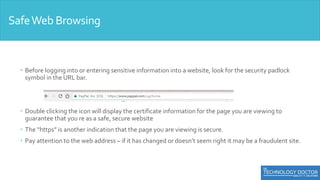
 Before logging into or entering sensitive information into a website, look for the security padlock
symbol in the URL bar.
 Double clicking the icon will display the certificate information for the page you are viewing to
guarantee that you re as a safe, secure website
 The “https” is another indication that the page you are viewing is secure.
 Pay attention to the web address – if it has changed or doesn’t seem right it may be a fraudulent site.
SafeWeb Browsing
SafeWeb Browsing
SafeWeb Browsing
 www.facebook.com
 www.facebook.com
 www.facebook.com
SafeWeb Browsing
 How to safely close Scareware Popups
Hold the Alt+F4 key
 NOTE: Never click on any of these buttons
Don’t use your personal email account for work purposes
Do not open attachment is unfamiliar emails
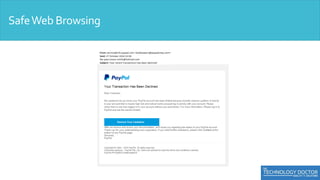
Do not click on suspicious links.
Use secure email encryption whenever sending any
restricted or sensitive information.
EmailSecurity Best Practices
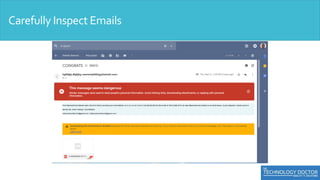
Carefully Inspect Emails
 Protect your devices with a password/PIN (6 Digit recommended
minimum)
 Device encryption, Remote wipe, GPS location, physical security
 Do not download apps from unknown sources.
 Read what others are saying about the app in the review section.
 Avoid using public Wi-Fi hotspots, especially when access any password-
protected sites or where you will enter any personal or confidential
information.
Mobile Devices
Question all Strangers. Alert security guards and/or
management to suspicious individuals.
Be sure authorized visitors/contractors have properly checked
in.
Make sure individuals use their own key fobs/card keys when
entering secure areas.
PhysicalSecurity
Piggy-backing orTail-gating
 Following employees into non-public areas while pretending to be a
vendor, employee, or customer
PhysicalSecurity
 Always lock your computer screen whenever leaving your computer
unattended.
 Secure sensitive paper documents when leaving work areas unattended
and at the end of the day. Understand and comply with your
organization’s end-of-day closing procedures.
 Use secure shred bins for disposing of sensitive paper documents and
electronic media
PhysicalSecurity
Email Phishing
Example:A social engineer sends an email that appears to come
from a fellow employee asking the recipient to download an
attachment or click on link.
Social Engineer
Social Engineer
 Pretext Phone Calls
 Example: A social engineer calls and pretends to be a fellow employee or
a trusted outside authority (such s law enforcement, vendor, or an
auditor).
 Physical Social Engineering
 Example: piggy-backing/Tail-gaiting - Can you hold the door for me? I
don’t have my access card on me.
Social Engineer
1. Follow a clean desk policy
2. Be aware when creating or disposing paper documents.
3. Consider carefully what information you put out there.
4. Prevent unauthorized people accessing your company.
5. Just because they know you, doesn’t mean you know them!
6. Phishing scams: Don’t bite.
7. Prevent damage from malware.
7SecurityTips
Q&A.
You are the key to effective security!

Employee Security Awareness Training

  • 1.
  • 2.
    Agenda Choosing good passwords SafeWebbrowsing Email Security Mobile Devices Physical Security Social Engineering
  • 3.
     The behaviorof employees and contractors with access to data affects information systems and assets  The human factor (what employees do or don’t do) is the biggest threat to information systems and assets. IMPORTANTANCEOFSECURITYAWARENESS
  • 4.
    1. Use uniquepasswords for all of your accounts 2. Lengthy At lest 8, more is better. 3. Complex Mix upper, lower, numbers, and symbols 4. Do not use common or predictable passwords Examples of bad passwords: your own birthday, people's names, your phone number 5. Change passwords periodically (90 days) 6. Keep your passwords secret Do not share with others or write them down. UseStrong Passwords
  • 5.
     Avoiding commonpasswords Word combinations rather than single word Incorporating Acronyms or non-English language words Full sentence phrases  Substitute letters with numbers or symbols Example: purp!3ClothingDiscOunt Example: P4sswords@reg00d! Strategies forCreatingStrong Passwords
  • 6.
     Before logginginto or entering sensitive information into a website, look for the security padlock symbol in the URL bar.  Double clicking the icon will display the certificate information for the page you are viewing to guarantee that you re as a safe, secure website  The “https” is another indication that the page you are viewing is secure.  Pay attention to the web address – if it has changed or doesn’t seem right it may be a fraudulent site. SafeWeb Browsing
  • 7.
  • 8.
    SafeWeb Browsing  www.facebook.com www.facebook.com  www.facebook.com
  • 9.
    SafeWeb Browsing  Howto safely close Scareware Popups Hold the Alt+F4 key  NOTE: Never click on any of these buttons
  • 10.
    Don’t use yourpersonal email account for work purposes Do not open attachment is unfamiliar emails Do not click on suspicious links. Use secure email encryption whenever sending any restricted or sensitive information. EmailSecurity Best Practices
  • 11.
  • 12.
  • 13.
     Protect yourdevices with a password/PIN (6 Digit recommended minimum)  Device encryption, Remote wipe, GPS location, physical security  Do not download apps from unknown sources.  Read what others are saying about the app in the review section.  Avoid using public Wi-Fi hotspots, especially when access any password- protected sites or where you will enter any personal or confidential information. Mobile Devices
  • 14.
    Question all Strangers.Alert security guards and/or management to suspicious individuals. Be sure authorized visitors/contractors have properly checked in. Make sure individuals use their own key fobs/card keys when entering secure areas. PhysicalSecurity
  • 15.
    Piggy-backing orTail-gating  Followingemployees into non-public areas while pretending to be a vendor, employee, or customer PhysicalSecurity
  • 16.
     Always lockyour computer screen whenever leaving your computer unattended.  Secure sensitive paper documents when leaving work areas unattended and at the end of the day. Understand and comply with your organization’s end-of-day closing procedures.  Use secure shred bins for disposing of sensitive paper documents and electronic media PhysicalSecurity
  • 17.
    Email Phishing Example:A socialengineer sends an email that appears to come from a fellow employee asking the recipient to download an attachment or click on link. Social Engineer
  • 18.
  • 19.
     Pretext PhoneCalls  Example: A social engineer calls and pretends to be a fellow employee or a trusted outside authority (such s law enforcement, vendor, or an auditor).  Physical Social Engineering  Example: piggy-backing/Tail-gaiting - Can you hold the door for me? I don’t have my access card on me. Social Engineer
  • 20.
    1. Follow aclean desk policy 2. Be aware when creating or disposing paper documents. 3. Consider carefully what information you put out there. 4. Prevent unauthorized people accessing your company. 5. Just because they know you, doesn’t mean you know them! 6. Phishing scams: Don’t bite. 7. Prevent damage from malware. 7SecurityTips
  • 21.
    Q&A. You are thekey to effective security!