HUMAN COMPUTER INTERACTION
TECHNIQUES
Presenting By
########
12@@@@@@@@
Under the guidance of
###########
ABSTRACT
The objective of this special introductory seminar is to
provide newcomers to Human- Computer Interaction (HCI) with
an introduction and overview of the field. The material will begin
with a brief history of the field, followed by presentation and
discussion of how good application development methods pull on
the interdisciplinary technologies of HCI. The topics will include
the psychology of human- computer interaction, psychologically-
based design methods and tools, user interface media and tools,
and introduction to user interface architecture.
Human Computer Interaction
Techniques
2
INTRODUCTION
The rapid growth of computing has made effective
human-computer interaction essential.It is important for the
growing number of computer users whose professional
schedules will not allow the elaborate training and experience
that was once necessary to take advantage of computing.
Increased attention to usability is also driven by competitive
pressures for greater productivity, the need to reduce
frustration, and to reduce overhead costs such as user training.
Human Computer Interaction
Techniques
3
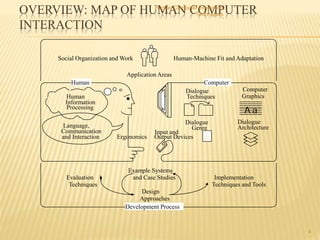
OVERVIEW: MAP OF HUMAN COMPUTER
INTERACTION
Human Computer Interaction
Techniques
4
Input and
Output Devices
Dialogue
Techniques
Dialogue
Genre
Application Areas
Ergonomics
Evaluation
Techniques
Design
Approaches
Implementation
Techniques and Tools
Example Systems
and Case Studies
Human
Language,
Communication
and Interaction
Human
Information
Processing
Human-Machine Fit and AdaptationSocial Organization and Work
Computer
Computer
Graphics
Dialogue
Architecture
Development Process
A a
Human Computer Interaction Techniques
5
Eye Movement-Based Interaction Techniques
Human Computer Interaction Techniques
6
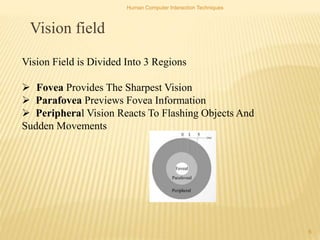
Vision field
Vision Field is Divided Into 3 Regions
 Fovea Provides The Sharpest Vision
 Parafovea Previews Fovea Information
 Peripheral Vision Reacts To Flashing Objects And
Sudden Movements
Human Computer Interaction Techniques
7
Types Of Eye Movements
 Fixation
 Saccade
 Occurs in response to moving object
 Nystagmus
Relative movement of eye with respect to one
another
Human Computer Interaction Techniques
8
Methods For Measuring Eye Movements
 Electronic
 Mechanical
 Optical/video
- Single point
-Two point
CTRONIC METHOD
 The most used method is to place skin electrodes around the eye
and measure the potentioal differences in eye
 Wide range – poor accuracy
 Better for relative than absolute eye movements
 Mainly used in neurological diagnosis
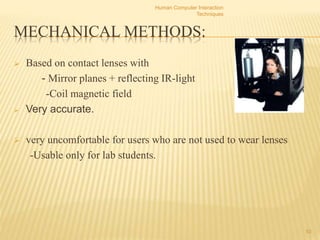
MECHANICAL METHODS:
 Based on contact lenses with
- Mirror planes + reflecting IR-light
-Coil magnetic field
 Very accurate.
 very uncomfortable for users who are not used to wear lenses
-Usable only for lab students.
Human Computer Interaction
Techniques
10
OPTICAL/VIDEO BASED METHOD
SINGLE POINT
 Tracking one visible feature of the eyebal,e.g
oLimbus(boundary of sclera and iris)
oPupil
 A video camera observes one of the users eye
 Image processing software analyzer the video image and traces
the tracked features
 Based on calibration , the system determines where the user is
currently looked
 Head movements not rest is needed
OPTICAL/VIDEO BASED METHOD-
TWO POINT
 The same idea as in the single point method except now two
features of eye are tracked typically
 Uses IR light(invisible to human eye)to
-Produce corneal reflection
-Cause bright or dart pupil ,which helps the system to recognize pupil from video image
ADVANTAGES
 No training or particular coordination is reqired of normal
users
 Can determine where the user interest is focused
automatically
 Helpful for usability studies to understand users interact
with their environments
LIMITATIONS
 some users can’t work with the equipment
 Equipment is expensive
CONCLUSION
Interaction techniques like these, when
applied to the design of specific interfaces, increase the
useful bandwidth between user and computer. This seems to
be the key bottleneck in improving the usefulness of all types
of interactive computer systems , and particularly educational
systems, which depend heavily on dialogues with their users.
REFERENCES
 1. Butler, K. A. (1985) Connecting Theory and Practice: A Case Study of Achieving
Usability Goals. In: Proceedings of CHI'85 Human Factors in Computing Systems (April
14-18, 1985,San Francisco, CA) ACM, pp. 85-88.
 2. Wilkund, M. E. (1994) Usability in Practice: How Companies Develop User-Friendly
Products, Cambridge, MA: Academic Press.
 3. Boff, K. R. and Lincoln, J. E. (1988). Engineering Data Compendium: Human
Perception and Performance vols 1-3. Harry G. Armstrong Aerospace Medical Research
Laboratory, Wright-Patterson Air Force Base, Ohio.
Human Computer Interaction
Techniques
16
THANK YOU

HUMAN COMPUTER INTERACTION TECHNIQUES BY SAIKIRAN PANJALA

  • 1.
    HUMAN COMPUTER INTERACTION TECHNIQUES PresentingBy ######## 12@@@@@@@@ Under the guidance of ###########
  • 2.
    ABSTRACT The objective ofthis special introductory seminar is to provide newcomers to Human- Computer Interaction (HCI) with an introduction and overview of the field. The material will begin with a brief history of the field, followed by presentation and discussion of how good application development methods pull on the interdisciplinary technologies of HCI. The topics will include the psychology of human- computer interaction, psychologically- based design methods and tools, user interface media and tools, and introduction to user interface architecture. Human Computer Interaction Techniques 2
  • 3.
    INTRODUCTION The rapid growthof computing has made effective human-computer interaction essential.It is important for the growing number of computer users whose professional schedules will not allow the elaborate training and experience that was once necessary to take advantage of computing. Increased attention to usability is also driven by competitive pressures for greater productivity, the need to reduce frustration, and to reduce overhead costs such as user training. Human Computer Interaction Techniques 3
  • 4.
    OVERVIEW: MAP OFHUMAN COMPUTER INTERACTION Human Computer Interaction Techniques 4 Input and Output Devices Dialogue Techniques Dialogue Genre Application Areas Ergonomics Evaluation Techniques Design Approaches Implementation Techniques and Tools Example Systems and Case Studies Human Language, Communication and Interaction Human Information Processing Human-Machine Fit and AdaptationSocial Organization and Work Computer Computer Graphics Dialogue Architecture Development Process A a
  • 5.
    Human Computer InteractionTechniques 5 Eye Movement-Based Interaction Techniques
  • 6.
    Human Computer InteractionTechniques 6 Vision field Vision Field is Divided Into 3 Regions  Fovea Provides The Sharpest Vision  Parafovea Previews Fovea Information  Peripheral Vision Reacts To Flashing Objects And Sudden Movements
  • 7.
    Human Computer InteractionTechniques 7 Types Of Eye Movements  Fixation  Saccade  Occurs in response to moving object  Nystagmus Relative movement of eye with respect to one another
  • 8.
    Human Computer InteractionTechniques 8 Methods For Measuring Eye Movements  Electronic  Mechanical  Optical/video - Single point -Two point
  • 9.
    CTRONIC METHOD  Themost used method is to place skin electrodes around the eye and measure the potentioal differences in eye  Wide range – poor accuracy  Better for relative than absolute eye movements  Mainly used in neurological diagnosis
  • 10.
    MECHANICAL METHODS:  Basedon contact lenses with - Mirror planes + reflecting IR-light -Coil magnetic field  Very accurate.  very uncomfortable for users who are not used to wear lenses -Usable only for lab students. Human Computer Interaction Techniques 10
  • 11.
    OPTICAL/VIDEO BASED METHOD SINGLEPOINT  Tracking one visible feature of the eyebal,e.g oLimbus(boundary of sclera and iris) oPupil  A video camera observes one of the users eye  Image processing software analyzer the video image and traces the tracked features  Based on calibration , the system determines where the user is currently looked  Head movements not rest is needed
  • 12.
    OPTICAL/VIDEO BASED METHOD- TWOPOINT  The same idea as in the single point method except now two features of eye are tracked typically  Uses IR light(invisible to human eye)to -Produce corneal reflection -Cause bright or dart pupil ,which helps the system to recognize pupil from video image
  • 13.
    ADVANTAGES  No trainingor particular coordination is reqired of normal users  Can determine where the user interest is focused automatically  Helpful for usability studies to understand users interact with their environments
  • 14.
    LIMITATIONS  some userscan’t work with the equipment  Equipment is expensive
  • 15.
    CONCLUSION Interaction techniques likethese, when applied to the design of specific interfaces, increase the useful bandwidth between user and computer. This seems to be the key bottleneck in improving the usefulness of all types of interactive computer systems , and particularly educational systems, which depend heavily on dialogues with their users.
  • 16.
    REFERENCES  1. Butler,K. A. (1985) Connecting Theory and Practice: A Case Study of Achieving Usability Goals. In: Proceedings of CHI'85 Human Factors in Computing Systems (April 14-18, 1985,San Francisco, CA) ACM, pp. 85-88.  2. Wilkund, M. E. (1994) Usability in Practice: How Companies Develop User-Friendly Products, Cambridge, MA: Academic Press.  3. Boff, K. R. and Lincoln, J. E. (1988). Engineering Data Compendium: Human Perception and Performance vols 1-3. Harry G. Armstrong Aerospace Medical Research Laboratory, Wright-Patterson Air Force Base, Ohio. Human Computer Interaction Techniques 16
  • 17.

Editor's Notes