CHAPTER ONE :INTRODUCTION To HCI
HUMAN COMPUTER INTERACTION
2.
1.1 THE HUMAN
Humans are limited in their capacity to process information. This has
important implications for design.
Information is received and responses given via a number of input and output
channels:
– visual channel
– auditory channel
– haptic channel
– movement.
Information is stored in memory:
– sensory memory
– short-term (working) memory
– long-term memory.
3.
Information isprocessed and applied:
– reasoning
– problem solving
– skill acquisition
– error.
Emotion influences human capabilities.
Users share common capabilities but are individuals with differences, which
should not be ignored.
Cont. …
4.
1.2 What isHuman Computer Interaction HCI ?
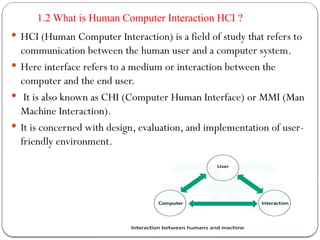
HCI (Human Computer Interaction) is a field of study that refers to
communication between the human user and a computer system.
Here interface refers to a medium or interaction between the
computer and the end user.
It is also known as CHI (Computer Human Interface) or MMI (Man
Machine Interaction).
It is concerned with design, evaluation, and implementation of user-
friendly environment.
5.
Cont. …
Theterm human–computer interaction has only been in widespread use
since the early1980s, but has its roots in more established disciplines.
Systematic study of human performance began in nearest at the beginning of
the last century in factories, with an emphasis on manual tasks and introduce the
information within an organization.
Traditionally concerned itself with the influence of technology in the
workplace, and fitting the technology to the requirements and constraints of the
job. These issues are also the concern of HCI.
HCI involves the design, implementation and evaluation of interactive systems
in the context of the user’s task and work.
6.
1.3 Objective
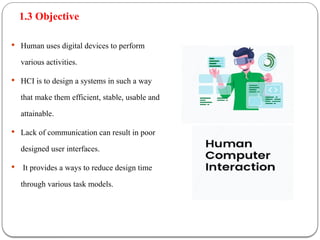
Humanuses digital devices to perform
various activities.
HCI is to design a systems in such a way
that make them efficient, stable, usable and
attainable.
Lack of communication can result in poor
designed user interfaces.
It provides a ways to reduce design time
through various task models.
7.
1.4 Disciplines Contributingto HCI
Computer Science
Computer science is a field of computation and information.
Computer science plays a crucial role in modern development
of HCI. Smart Television, Voice assistant, AR/VR technology
are some of the technology exists in modern world, that are
running our day to day life.
Cognitive Psychology
is a field of HCI which identifies how human interact with systems. It includes Language
based interaction, a set of rules are provided to the system. Based on that rules we create our
model. It also includes Human motor skills, where we identifies physical characteristics of
user and based on that characteristics we create our model.
Fine arts design
An artistic way of thinking always produce creative ideas. E-books and novels, digital
drawings, video games are some of the applications of fine arts contributing to HCI
8.
Early computerswas extremely difficult to use, it was large and expensive. It
was used by specialists or engineers.
ENIAC (Electronic Numerical Integrator And Computer) was released in 1945.
It was the first programmable electronic and general purpose digital computer.
In mid 1960‘s command line interface(CLI) was used to interact with computer.
CLI are light weight and requires few memory consumption.
1980‘s are the booming phase for HCI. Some of the market leaders like Apple
and Microsoft plays a crucial role for the modern development of HCI. GUI
(Graphic User Interface) application was created that was easy to use,
understand and visualize.
XEROX STAR was released in 1981. It had mouse driven graphical user
interface and built-in ethernet network and protocol. It also had laser printer.
1.5 History of HCI
9.
•This was consideredfar ahead of its time. Two years later in 1983 Apple Lisa was
released, it offered document-centered graphical interface based on the metaphor of
desktop.
•In 1984 first Macintosh was release and it was revolutionary. It had good graphic user
interface and a variety of fonts that makes your document more appealing to readers.
•In 1990‘s internet starts it’s journey. Communication between people become very easy
through social networking like Email. The World Wide Web(WWW) was created by Tim
Berners-Lee. It is way for people to share information.
•In 2000 mobile, laptop, tablet was a buzz word in this period. These gadget provides
more flexibility to user. User can connect with anyone at any place. Smart phones comes
into picture. User don’t need any mouse or pointing device to select anything. They can
use their fingers to interact with device. It provides more features like built-in music
player, camera, weather forecast, Internet, GPS, games, video conferencing and many
more.
Cont. …
10.
In 2006NINTENDO released Wii. It was famous for it’s rear remote controller
a handheld pointing device that detects movements in 3D. It enables users to
simulate real world sports and activities through different games. This paved the
way for gaming consoles like XBOX
Windows 10 is a series of operating systems developed by Microsoft released
in 2015. It made user experience more consistent between different classes of
device. The rising popularity and availability of laptops and computer systems,
Microsoft made windows 10 adaptable into different systems.
VR oculus rift was a revolution in virtual reality. It was launched in 2016. The
rift is primarily a gaming device. However it is also capable of viewing
conventional movies and videos from inside the virtual cinema environment. It
is increasingly used in universities and schools as an educational tool.
Cont. …
A person’s interactionwith the outside world occurs through information
being received and sent: input and output.
In an interaction with a computer the user receives information that is
output by the computer, and responds by providing input to the computer –
the user’s output becomes the computer’s input and vice versa.
Input in the human occurs mainly through the senses and output through
the motor control of the effectors. There are five major senses: sight,
hearing, touch, taste and smell. Of these, the first three are the most important
to HCI.
Information input/output
13.
Taste and smelldo not currently play a significant role in HCI. However,
vision, hearing and touch are central.
Similarly there are a number of effectors, including the limbs, fingers, eyes,
head and vocal system.
In the interaction with the computer, the fingers play the primary role,
through typing or mouse control, with some use of voice, and eye, head and
body position
Cont. …
14.
Human visionis a highly complex activity with a range of physical and
perceptual limitations, yet it is the primary source of information for the
average person.
The human eye
Vision begins with light.
The eye is a mechanism for receiving light and transforming it into electrical
energy.
Light is reflected from objects in the world and their image is focused upside
down on the back of the eye.
The receptors in the eye transform it into electrical signals which are passed to
the brain.
2.1Vision
15.
The eye hasa number of important components.
The cornea and lens at the front of the eye focus the light into a sharp image on the
back of the eye, the retina.
The retina is light sensitive and contains two types of photoreceptor: rods and cones.
Rods are highly sensitive to light and therefore allow us to see under a low level
of illumination.
The cones do not operate either as they are suppressed by the rods.
Cones are the second type of receptor in the eye. They are less sensitive to light than
the rods and can therefore tolerate more light.
There are three types of cone, each sensitive to a different wavelength of light.
This allows color vision.
The eye has approximately 6 million cones, mainly concentrated on the fovea, a
small area of the retina on which images are fixated.
Cont. …
16.
Visual perception
The informationreceived by the visual apparatus must be
filtered and passed to processing elements which allow us to
recognize coherent scenes, disambiguate relative distances and
differentiate color.
Perceiving size and depth Imagine you are standing on a hilltop.
Beside you on the summit you can see rocks, sheep and a small tree.
On the hillside is a farmhouse without buildings and farm vehicles.
17.
Even in describingsuch a scene the notions of size and distance
predominate.
Our visual system is easily able to interpret the images which it
receives to take account of these things.
The size of that image is specified as a visual angle.
The visual angle indicates how much of the field of view is
taken by the object.
Visual acuity is the ability of a person to perceive fine detail.
A number of measurements have been established to test
visual acuity, most of which are included in standard eye
tests.
Cont. …
18.
Perceiving brightness
A secondaspect of visual perception is the perception of
brightness.
Brightness is in fact a subjective reaction to levels of light.
It is affected by luminance which is the amount of light emitted
by an object.
The luminance of an object is dependent on the amount of
light falling on the object’s surface and its reflective properties.
Contrast is related to luminance: it is a function of the
luminance of an object and the luminance of its background.
Cont. …
19.
Perceiving color
A thirdfactor that we need to consider is perception of color.
Color is usually regarded as being made up of three
components: hue, intensity and saturation.
Hue is determined by the spectral wavelength of the light.
Color Blue have short wavelengths, greens medium and reds long.
Cont. …
20.
Reading
There areseveral stages in the reading process. First, the visual
pattern of the word on the page is perceived.
It is then decoded with reference to an internal representation of
language.
The final stages of language processing include syntactic and
semantic analysis and operate on phrases or sentences.
.
Cont. …
21.
2.2 Hearing
The senseof hearing is often considered secondary to sight, but we tend to
under estimate the amount of information that we receive through our ears
The human ear
Hearing begins with vibrations in the air or sound waves.
The ear receives these vibrations and transmits them, through various
stages, to the auditory nerves.
The ear comprises three sections, commonly known as the outer ear,
middle ear and
22.
inner ear.
The outerear is the visible part of the ear.
It has two parts: the pinna, which is the structure that is attached
to the sides of the head, and the auditory canal, along which
sound waves are passed to the middle ear.
outer ear serves two purposes.
It protects the sensitive middle ear from damage.
The pinna and auditory canal serve to amplify some sounds.
Cont. …
23.
Processing sound
Soundis changes or vibrations in air pressure.
Pitch is the frequency of the sound.
A low frequency produces a low pitch, a high frequency, a high pitch.
Loudness is proportional to the amplitude of the sound;
The frequency remains constant.
The human ear can hear frequencies from about 20 Hz to 15 kHz.
Uses of non-speech sounds include the following:
Attention – to attract the user’s attention to a critical situation
Status information – continuous background sounds can be used to convey
Status information.
Confirmation – a sound associated with an action to confirm that the action
Has been carried out.
Navigation – using changing sound to indicate where the user is in a
Cont. …
24.
The third andlast of the senses that we will consider is touch or
haptic perception.
Touch provides us with vital information about our environment.
The skin contains three types of sensory receptor:
thermoreceptors respond to heat and cold, nociceptors respond
to intense pressure, heat and pain, and mechanoreceptors
respond to pressure.
It is the last of these that we are concerned with in relation to
human–computer interaction.
2.3 Touch
25.
Movement
A measureof motor skill is accuracy.
One question that we should ask is whether speed of reaction results in reduced ccuracy.
This is dependent on the task and the user.
In some cases, requiring increased reaction time reduces accuracy.
This is the premise behind many arcade and video games where less skilled users fail
at levels of play that require faster responses.
Studies of keyboard operators have shown that, although the faster operators were up
to
twice as fast as the others, the slower ones made 10 times the errors.
Speed and accuracy of movement are important considerations in the design of
interactive systems, primarily in terms of the time taken to move to a particular target
on a screen. The target may be a button, a menu item or an icon.
Cont. …
26.
Human Memory
Memory isthe second part of our model of the human as an information-
processing system.
Memory is associated with each level of processing.
There are three types of memory or memory function:
sensory buffers,
short-term memory or working memory, and
long-term memory.
Cont. …
27.
Sensory memory
The sensorymemories act as buffers for stimuli received through the
senses. A sensory memory exists for each sensory channel:
iconic memory for visual stimuli,
echoic memory for aural stimuli
and haptic memory for touch. These memories are constantly overwritten
by new information coming in on these channels.
Information received by sensory memories is quickly passed into a more
permanent memory store, or overwritten and lost.
Cont. …
28.
Short-term memory
Short-term memoryor working memory acts as a ‘scratch-pad’ for temporary
recall of information.
It is used to store information which is only required fleetingly.
Short-term memory can be accessed rapidly, in the order of 70 ms.
Short-term memory also has a limited capacity.
There are two basic methods form measuring memory capacity.
The first involves determining the length of a sequence which can be remembered in
order.
The second allows items to be freely recalled in any order.
The limited capacity of short-term memory produces a subconscious desire to
create chunks, and so optimize the use of the memory.
The successful formation of a chunk is known as closure.
This process can be generalized to account for the desire to complete or close tasks held
in short-term memory.
Cont. …
29.
Long-term memory
Long-term memoryis our main resource.
Here we store factual information, experiential knowledge, procedural rules of
behavior – in fact, everything that we ‘know’.
First, it has a huge, if not unlimited, capacity.
Secondly, it has a relatively slow access time of approximately a tenth of a
second.
Thirdly, forgetting occurs more slowly in long-term memory, if at all.
Long-term memory is intended for the long-term storage of information.
There are three main activities related to long-term memory: storage or
remembering of information, forgetting and information retrieval.
Cont. …
30.
Long-term memory structure
Thereare two types of long-term memory: episodic memory and semantic
memory.
Episodic memory represents our memory of events and experiences in a serial
form. It is from this memory that we can reconstruct the actual events that
took place at a given point in our lives.
Semantic memory, on the other hand, is a structured record of facts, concepts
and skills that we have acquired. The information in semantic memory is
derived from that in our episodic memory, such that we can learn new facts or
concepts from our experiences.
Cont. …
31.
The process ofmemory: information retrieval.
Here we need to distinguish between two types of information retrieval, recall and
recognition.
In recall the information is reproduced from memory.
In recognition, the presentation of the information provides the knowledge that the
information has been seen before. Recognition is the less complex cognitive activity
since the information is provided as a cue.
Thinking: reasoning and problem solving
Thinking can require different amounts of knowledge. Some thinking activities are
very directed and the knowledge required is constrained. Others require vast amounts of
knowledge from different domains.
Cont. …
32.
Reasoning
Reasoning is theprocess by which we use the knowledge we have to draw conclusions or infer
something new about the domain of interest.
There are a number of different types of reasoning:
deductive,
inductive and
abductive.
Deductive reasoning derives the logically necessary conclusion from the given premises.
For example, If it is raining then the ground is dry It is raining,
Therefore the ground is dry. is a perfectly valid deduction, even though it conflicts with our
knowledge of what is true in the world.
Deductive reasoning is therefore often misapplied. It is at this point, where truth and validity clash,
that human deduction is poorest.
We assume a certain amount of shared knowledge in our dealings with each other, which in turn
allows us to interpret the inferences and deductions implied by others. If validity rather than truth was
preferred, all premises would have to be made explicit.
Cont. …
33.
Inductive reasoning
• Inductionis generalizing from cases we have seen to infer information about cases we
have not seen.
For example, if every elephant we have ever seen has a trunk, we infer that all
elephants have trunks. Of course, this inference is unreliable and can not be proved to be
true; it can only
be proved to be false.
Abductive reasoning
• The third type of reasoning is abduction. Abduction reasons from a fact to the action or
state that caused it. This is the method we use to derive explanations for the events we
observe.
• For example, suppose we know that Sam always drives too fast when she has been
drinking. If we see Sam driving too fast we may infer that she has been drinking. Of
course, this too is unreliable since there may be another reason why she is driving fast:
she may have been called to an emergency.
Cont. …
34.
Problem solving
Problemsolving is the process of finding a solution to an unfamiliar task, using the
knowledge we have.
Human problem solving is characterized by the ability to adapt the information we
have
to deal with new situations. However, often solutions seem to be original and creative.
Problem solving is a matter of reproducing known responses or trial and error.
Problem solving is both productive and reproductive.
Reproductive problem solving draws on previous experience as the behaviorists
claimed, but productive problem solving involves insight and restructuring of the
problem.
Cont. …
35.
Analogy in problemsolving
A third element of problem solving is the use of analogy.
One suggestion is that this is done by mapping knowledge relating to a similar known
domain to the new problem – called analogical mapping.
Similarities between the known domain and the new one are noted and operators from
the known domain are transferred to the new one.
Skill acquisition
All of the problem solving that we have considered so far has concentrated on handling
unfamiliar problems. However, for much of the time, the problems that we face are not
completely new. Instead, we gradually acquire skill in a particular domain area. We can
gain insight into how skilled behavior works, and how skills are acquired, by
considering the difference between novice and expert behavior in given domains.
Cont. …
36.
This behavior isalso seen among skilled computer programmers. They can also
reconstruct programs more effectively than novices since they have the structures available
to build appropriate chunks. They acquire plans representing code to solve particular
problems. When that problem is encountered in a new domain or new program they will
recall that particular plan and reuse it.
Three basic levels of skill:
1.The learner uses general-purpose rules which interpret facts about a problem.
This is slow and demanding on memory access.
2.The learner develops rules specific to the task.
3.The rules are tuned to speed up performance.
Cont. …
37.
Errors and mentalmodels
Human capability for interpreting and manipulating information is quite impressive.
However, we do make mistakes. Some are trivial, resulting in no more than
temporary inconvenience or annoyance. Others may be more serious, requiring substantial
effort to correct. Occasionally an error may have catastrophic effects, as we see when
‘human error’ results in a plane crash or nuclear plant leak.
These have been termed mental models. They have a number of characteristics.
Mental models are often partial: the person does not have a full understanding of the
working of the whole system. They are unstable and are subject to change. They can be
internally inconsistent, since the person may not have worked through the logical
consequences of their beliefs. They are often unscientific and may be based on super station
rather than evidence.
Cont. …
38.
Emotion
Our emotional responseto situations affects how we perform. For example,
positive emotions enable us to think more creatively, to solve complex problems,
whereas negative emotion pushes us into narrow, focussed thinking.
A problem that may be easy to solve when we are relaxed, will become difficult
if we are frustrated or afraid.
Negative affect can make it harder to do even easy tasks; positive affect can make
it easier to do difficult tasks.
Cont. …
39.
Individual Differences
Thepsychological principles and properties that we have discussed apply to the
majority of people.
We should remember that, although we share processes in common, humans, and
therefore users, are not all the same.
We should be aware of individual differences so that we can account for them as far as
possible within our designs.
These differences may be long term, such as sex, physical capabilities and intellectual
capabilities.
Others are shorter term and include the effect of stress or fatigue on the user. Still
others change through time, such as age.
These differences should be taken into account in our designs.
Cont. …
Psychology and thedesign of interactive systems
So far we have looked briefly at the way in which humans receive, process andstore
information, solve problems and acquire skill. But how can we apply what wehave learned to
designing interactive systems?
In order to apply a psychological principle or result properly in design, we need to
understand its context,
Both in terms of where it fits in the wider field of psychology and
In terms of the details of the actual experiments, the measures used and the subjects
involved.
Fortunately, principles and results from research in psychology have been distilled into
guidelines for design, models to support design and techniques for evaluating design.
We have discussed the strengths and weaknesses of human cognitive and perceptual
processes but, for the most part, we have avoided attempting to apply these directly to design.
This is because such an attempt could only be partial and simplistic, and may give the
impression that this is all psychology has to offer.
42.
Models to supportdesign
As guidelines and principles, psychological theory has led to the development of analytic
and predictive models of user behavior.
Some of these include a specific model of human problem solving, others of physical
activity, and others attempt a more comprehensive view of cognition.
Some predict how a typical computer user would behave in a given situation, others
analyze why particular user behavior occurred.
Techniques for evaluation
To providing us with a wealth of theoretical understanding of the human user,
psychology also provides a range of empirical techniques which we can employ to
evaluate our designs and our systems.
In order to use these effectively we need to understand the scope and benefits of each
method.
43.
3.1 The Interaction
Interaction models help us to understand what is going on in
the interaction between user and system.
Ergonomics looks at the physical characteristics of the
interaction and how these influence its effectiveness.
The dialog between user and system is influenced by the style
of the interface.
The interaction takes place within a social and organizational
context that affects both user and system.
43
44.
• Interaction involvesat least two participants: the user and the
system. Both are complex, are very different from each other
in the way that they communicate and view the domain and
the task.
• The interface must therefore effectively translate between
them to allow the interaction to be successful.
44
3.2 Models of Interaction
45.
3.2.1 The termsof interaction
• Traditionally, the purpose of an interactive system is to aid a user in
accomplishing goals from some application domain.
• A domain defines an area of expertise and knowledge in some real-world
activity. Some examples of domains are graphic design, authoring and process
control in a factory.
• In a graphic design domain, some of the important concepts are geometric
shapes, a drawing surface and a drawing utensil.
• Tasks are operations to manipulate the concepts of a domain.
• A goal is the desired output from a performed task. For example, one task within
the graphic design domain is the construction of a specific geometric shape with
particular attributes on the drawing surface.
45
46.
• Task analysisinvolves the identification of the problem space for
the user of an interactive system in terms of the domain, goals,
intentions and tasks.
• The System and User are each described by meansof a language that
can express concepts relevant in the domain of the application.
• The System’s language will refer to as the core language and the
User’s language will refer to as the task language.
• The core language describes computational attributes of the domain
relevant to the System state, whereas the task language describes
psychological attributes of the domain relevant to the User state.
46
47.
3.2.2 The execution–evaluationcycle
• Norman’s model of interaction is perhaps the most influential
in Human–Computer Interaction, possibly because of its
closeness to our intuitive understanding of the interaction
between human user and computer.
• The interactive cycle can be divided into two major phases:
execution and evaluation
47
48.
The stages inNorman’s model of interaction are
as follows:
• 1. Establishing the goal.
• 2. Forming the intention.
• 3. Specifying the action sequence.
• 4. Executing the action.
• 5. Perceiving the system state.
• 6. Interpreting the system state.
• 7. Evaluating the system state with respect to
the goals and intentions.
48
49.
3.2.3 The interactionframework
• The interaction framework attempts a more realistic
description of interaction byincluding the system
explicitly, and breaks it into four main components.
• The nodes represent the four major components in an
interactive system – the System, the User, the Input and
the Output. Each component has its own language.
• Input and Output together form the Interface.
• There are four main translations involved in the
interaction: articulation, performance, presentation
and observation.
49
50.
• Once astate transition has occurred within the
System, the execution phase of the interaction is
complete and the evaluation phase begins.
• The new state of the System must be
communicated to the User, and this begins by
translating the System responses to the transition
into stimuli for the Output component.
• This presentation translation must preserve the
relevant system attributes from the domain in the
limited expressiveness of the output devices.
50
51.
3.3 Frameworks andHCI
• Discussing the details of a particular interaction,
frameworks provide a basis for discussing other
issues that relate to the interaction.
• In particular, the field of ergonomics addresses
issues on the user side of the interface, covering
both input and output, as well as the user’s
immediate context.
• Dialog design and interface styles can be placed
particularly along the input branch of theframework,
addressing both articulation and performance.
51
52.
• However, dialogis mostusually associated with the
computer and so is biased to that side of the framework.
• Presentation and screen design relates to the output
branch of the framework.
• The entire framework can be placed within a social and
organizational context that also affects the interaction.
• Each of these areas has important implications for the
designof interactive systems and the performance of the
user.
52
53.
3.4 Ergonomics
• Ergonomics(or human factors) is traditionally
the study of the physical characteristics of the
interaction: how the controls are designed,
the physical environment in which the
interaction takes place, and the layout and
physical qualities of the screen.
• In seeking to evaluate these aspects of the
interaction, ergonomics will certainly also
touch upon human psychology and system
constraints. 53
54.
3.4.1 Arrangement ofcontrols and displays
• Functional controls and displays are organized so
that those that are functionally related are placed
together;
• Sequential controls and displays are organized to
reflect the order of their use in a typical interaction.
• Frequency controls and displays are organized
according to how frequently they areused, with the
most commonly used controls being the most easily
accessible.
54
55.
• 3.4.2 Thephysical environment of the interaction
• Addressing physical issues in the layout and
arrangement of the machine interface, ergonomics
is concerned with the design of the work
environment itself.
• However, the physical environment in which the
system is used may influence how well it is accepted
and even the health and safety of its users.
• In particular, all users should be comfortably able to
see critical displays. For long periods of use, the user
should be seated for comfort and stability. Seating
should provide back support.
55
56.
3.4.3 Health issues
•The physical environment that directly affect
the quality of the interaction and the user’s
performance:
• Physical position
• Temperature
• Lighting
• Noise
• Time
56
57.
3.5 Interaction Styles
•Interaction can be seen as a dialog between the computer and
the user.
There are a numberof common interface styles including
>> Command line interface
>> Menus
>> Natural language
>> Question/Answer and Query dialog
>> Form-fills and spreadsheets
>>WIMP
>> Point and click
>> Three-dimensional interfaces.
57
58.
3.6 Elements ofthe WIMP interface
• The four key features of the WIMP interface that give it
itsname – windows, icons, pointers and menus.
• There are also many additional interaction objects and
techniques commonly used in WIMP interfaces, some
designed for specific purposes and others more general.
• 3.6.1 Windows
• 3.6.2 Icons
• 3.6.3 Pointers
• 3.6.4 Menus
• 3.6.5 Buttons
• 3.6.6 Toolbars
• 3.6.7 Palettes
• 3.6.8 Dialog boxes
58
59.
3.7 Interactivity
• Itis worth remembering that interactivity is the defining
feature of an interactive system. This can be seen in many
areas of HCI.
• For example, the recognition rate for speech recognition
is too low to allow transcription from tape, but in an
airline reservation system, so long as the system can
reliably recognize yes and no it can reflect back its
understanding of what you said and seek confirmation.
• The major example of this is modal dialog boxes. It is
often the case that when a dialog box appears the
application will not allow you to do anything else until the
dialog box has been completed or cancelled.
59
60.
3.8 The Contextof the Interaction
• In order to perform well, users must be motivated.
There are a number of possible sources of
motivation, as well as those we have already
mentioned, including fear, allegiance, ambition and
self-satisfaction.
• Ifa system makes it difficult for the user to perform
necessary tasks, or is frustrating touse, the user’s
job satisfaction, and consequently performance,
will be reduced.
• The user may also lose motivation if a system is
introduced that does not match the actual
requirements of the job to be done.
60
61.
3.9 Paradigms
• Examplesof effective strategies for building
interactive systems provide paradigms for
designing usable interactive systems.
• The evolution of these usability paradigms also
provides a good perspective on the history of
interactive computing.
• These paradigms range from the introduction of
timesharing computers, through the WIMP and
web, to ubiquitous and context-aware computing.
61
62.
The features ofa direct manipulation interface:
– visibility of the objects of interest
– incremental action at the interface with rapid
feedback on all actions
– reversibility of all actions, so that users are
encouraged to explore without severepenalties
– syntactic correctness of all actions, so that every
user action is a legal operation
– replacement of complex command languages with
actions to manipulate directly the visible objects.
62