Human Computer Interfac
Ch Ramakrishna
16F91A05B0
1
Department:
Computer science Engineering
Presented By:
2
 Introduction
 What is HCI?
 Types of interfaces
 Existing technologies
 Advances in HCI
 Architecture
 Applications
 Advantages and Disadvantages
 Conclusion
Human
 The end-user
•The members of an organization
Computer
 Hardware
 Software
Interface
 A point where two objects meet.
 A point where the human can tell the computer what to do.
 A point where the computer displays the requested information.
3
• A process of information transfer
 User to Machine
 Machine to User
• HCI is also referred to as Man Machine Interaction.
• HCI is what the user sees and includes:
 The physical controls
 What the system looks like?
 How the system accepts input from the user?
 How the system responds to user input?
 How the system outputs the results of processing?
4
• Command Line Interface (CLI)
A CLI displays a prompt, the user types a command on the
keyboard, the computer executes the command and provides
textual output.
• Menu Driven Interface
The user has a list of items to choose from, and can make
selections by highlighting one.
Graphical User Interface (GUI)
Uses windows, icons, menus and pointers (WIMP) which
can be manipulated by a mouse (and often to an extent by a
keyboard as well).
Natural Language Interface
Can range from simple command systems to voice activated
text processing. Commands are spoken in “normal” language.
5
The existing interfaces differ in the degree of complexity both
because of degree of functionality or usability.
The user activity has three different levels:
 Physical
 Cognitive
 Affective
 The existing physical technologies for HCI basically can be
categorized by human senses.
These devices are basically relying on three human senses: vision,
audio, and touch.
6
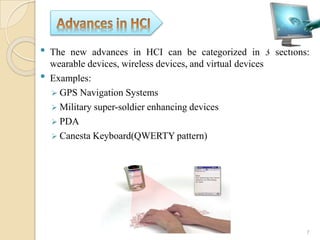
• The new advances in HCI can be categorized in 3 sections:
wearable devices, wireless devices, and virtual devices
• Examples:
 GPS Navigation Systems
 Military super-soldier enhancing devices
 PDA
 Canesta Keyboard(QWERTY pattern)
7
8
9
• Architecture of any HCI systems is identified by:
 Number of inputs and outputs in the system
 Diversity of inputs and outputs in terms of modality
 Workings of these diverse input and output for interaction
purpose
• Based on different configuration and design of interface, HCI
systems can be divided into:
 Unimodal HCI system
 Multimodal HCI system
10
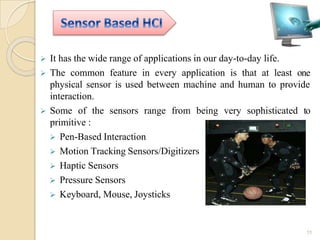
 It has the wide range of applications in our day-to-day life.
 The common feature in every application is that at least one
physical sensor is used between machine and human to provide
interaction.
 Some of the sensors range from being very sophisticated to
primitive :
 Pen-Based Interaction
 Motion Tracking Sensors/Digitizers
 Haptic Sensors
 Pressure Sensors
 Keyboard, Mouse, Joysticks
11
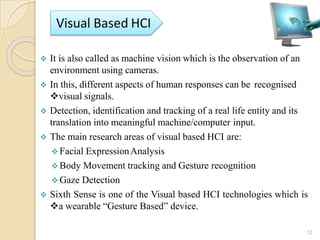
 It is also called as machine vision which is the observation of an
environment using cameras.
 In this, different aspects of human responses can be recognised
visual signals.
 Detection, identification and tracking of a real life entity and its
translation into meaningful machine/computer input.
 The main research areas of visual based HCI are:
 Facial ExpressionAnalysis
 Body Movement tracking and Gesture recognition
 Gaze Detection
 Sixth Sense is one of the Visual based HCI technologies which is
a wearable “Gesture Based” device.
12
 A small projector-a pendant prototype to be worn around the neck
 Connected to the mobile computing device in the user‟s pocket
 Components: Camera, Projector, Mirror, Mobile
Component, Colour Markers
13
 Combination of multiple modalities, or usage of more than one
independent channel signals for the interaction between a user
and a machine is termed as multimodal human computer
interaction system (MMHCI).
 A multimodal interface acts as a facilitator ofhuman-computer
interaction via two or more modes of input.
 It is easy to use by disabled, illiterate people.
 A classic example of a multimodal system is the “Put That There”
demonstration system.
14
 Intelligent Homes/Offices
 Driver Monitoring
 Intelligent Games
 E-Commerce
 Helping People with Disabilities
15
16
 Advantages
Very flexible with the use of “switches” (options)
Good for “expert” users - can quickly access commands
Uses the fewest system resources
 Disadvantages
Requires the user to learn “complex” commands or language
“Hidden” features i.e. if the command is unknown we cannot
make use of that feature
Not very good for novice users
17
Advantages
◦ No need to learn complex commands/language
◦ Easier for a novice to learn/use
◦ Ideal when there are a limited number of options (efficient)
Disadvantages
◦ Can be frustrating for experienced users i.e. the command they
want to use is buried 5 levels deep.
◦ User interface may be limited by screen space and number of
options available.
18
 Advantages
No training required
Can be quicker than keyboard entry
Hands-free
Can be used by the disabled
 Disadvantages
Emerging technology – still contains “bugs”
Difficulty in dealing with homonyms
Difficult to recognise all the different ways of saying things
(and regional dialects)
Artificial languages are often more precise
19
 Quality of system depends on how it is represented and used by
user
 Therefore, enormous amount of attention has been paid to better
designs of HCI.
 Virtual reality can be the common interface in future
 UbiComp is trying to embed the technology in the environment
and make it invisible at the same time.
 Natural and Neural Interfaces are the future of Human-Computer
input interfaces
20
21

HCI

  • 1.
    Human Computer Interfac ChRamakrishna 16F91A05B0 1 Department: Computer science Engineering Presented By:
  • 2.
    2  Introduction  Whatis HCI?  Types of interfaces  Existing technologies  Advances in HCI  Architecture  Applications  Advantages and Disadvantages  Conclusion
  • 3.
    Human  The end-user •Themembers of an organization Computer  Hardware  Software Interface  A point where two objects meet.  A point where the human can tell the computer what to do.  A point where the computer displays the requested information. 3
  • 4.
    • A processof information transfer  User to Machine  Machine to User • HCI is also referred to as Man Machine Interaction. • HCI is what the user sees and includes:  The physical controls  What the system looks like?  How the system accepts input from the user?  How the system responds to user input?  How the system outputs the results of processing? 4
  • 5.
    • Command LineInterface (CLI) A CLI displays a prompt, the user types a command on the keyboard, the computer executes the command and provides textual output. • Menu Driven Interface The user has a list of items to choose from, and can make selections by highlighting one. Graphical User Interface (GUI) Uses windows, icons, menus and pointers (WIMP) which can be manipulated by a mouse (and often to an extent by a keyboard as well). Natural Language Interface Can range from simple command systems to voice activated text processing. Commands are spoken in “normal” language. 5
  • 6.
    The existing interfacesdiffer in the degree of complexity both because of degree of functionality or usability. The user activity has three different levels:  Physical  Cognitive  Affective  The existing physical technologies for HCI basically can be categorized by human senses. These devices are basically relying on three human senses: vision, audio, and touch. 6
  • 7.
    • The newadvances in HCI can be categorized in 3 sections: wearable devices, wireless devices, and virtual devices • Examples:  GPS Navigation Systems  Military super-soldier enhancing devices  PDA  Canesta Keyboard(QWERTY pattern) 7
  • 8.
  • 9.
  • 10.
    • Architecture ofany HCI systems is identified by:  Number of inputs and outputs in the system  Diversity of inputs and outputs in terms of modality  Workings of these diverse input and output for interaction purpose • Based on different configuration and design of interface, HCI systems can be divided into:  Unimodal HCI system  Multimodal HCI system 10
  • 11.
     It hasthe wide range of applications in our day-to-day life.  The common feature in every application is that at least one physical sensor is used between machine and human to provide interaction.  Some of the sensors range from being very sophisticated to primitive :  Pen-Based Interaction  Motion Tracking Sensors/Digitizers  Haptic Sensors  Pressure Sensors  Keyboard, Mouse, Joysticks 11
  • 12.
     It isalso called as machine vision which is the observation of an environment using cameras.  In this, different aspects of human responses can be recognised visual signals.  Detection, identification and tracking of a real life entity and its translation into meaningful machine/computer input.  The main research areas of visual based HCI are:  Facial ExpressionAnalysis  Body Movement tracking and Gesture recognition  Gaze Detection  Sixth Sense is one of the Visual based HCI technologies which is a wearable “Gesture Based” device. 12
  • 13.
     A smallprojector-a pendant prototype to be worn around the neck  Connected to the mobile computing device in the user‟s pocket  Components: Camera, Projector, Mirror, Mobile Component, Colour Markers 13
  • 14.
     Combination ofmultiple modalities, or usage of more than one independent channel signals for the interaction between a user and a machine is termed as multimodal human computer interaction system (MMHCI).  A multimodal interface acts as a facilitator ofhuman-computer interaction via two or more modes of input.  It is easy to use by disabled, illiterate people.  A classic example of a multimodal system is the “Put That There” demonstration system. 14
  • 15.
     Intelligent Homes/Offices Driver Monitoring  Intelligent Games  E-Commerce  Helping People with Disabilities 15
  • 16.
  • 17.
     Advantages Very flexiblewith the use of “switches” (options) Good for “expert” users - can quickly access commands Uses the fewest system resources  Disadvantages Requires the user to learn “complex” commands or language “Hidden” features i.e. if the command is unknown we cannot make use of that feature Not very good for novice users 17
  • 18.
    Advantages ◦ No needto learn complex commands/language ◦ Easier for a novice to learn/use ◦ Ideal when there are a limited number of options (efficient) Disadvantages ◦ Can be frustrating for experienced users i.e. the command they want to use is buried 5 levels deep. ◦ User interface may be limited by screen space and number of options available. 18
  • 19.
     Advantages No trainingrequired Can be quicker than keyboard entry Hands-free Can be used by the disabled  Disadvantages Emerging technology – still contains “bugs” Difficulty in dealing with homonyms Difficult to recognise all the different ways of saying things (and regional dialects) Artificial languages are often more precise 19
  • 20.
     Quality ofsystem depends on how it is represented and used by user  Therefore, enormous amount of attention has been paid to better designs of HCI.  Virtual reality can be the common interface in future  UbiComp is trying to embed the technology in the environment and make it invisible at the same time.  Natural and Neural Interfaces are the future of Human-Computer input interfaces 20
  • 21.