HOW COMPUTER SYSTEM
WORKS
Prepared by:
Jm Ramos
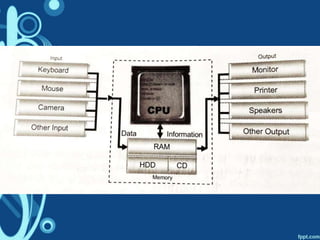
INPUT
• Data and commands in
order to work
–Example:
Letters and Numbers
PROCESS
• Computer works on the data
and command entered into
the computer
OUTPUT
• Result displayed on the
monitor or heard on the
speaker the data is
processed
• Result of data processing
• Processed data now is
called information
PARTS OF THE COMPUTER
TO FUNCTION PROPERLY
CPU
RAM
OUPUT DEVICES
SECONDARY STORAGE
COMMON USES OF
MICROPROCESSORS
• Embedded Micro
Controllers
–Can be found inside many
household electronic
appliances cars calculator
and others
COMMON USES OF
MICROPROCESSORS
• Common Desktop or Laptop
Processor
–Can perform a wide array of
task
–Motherboards, Hard Disk etc.
COMMON USES OF
MICROPROCESSORS
• Powerful Processor
–Most powerful processor for
high – end servers
–Powerful computer
applications
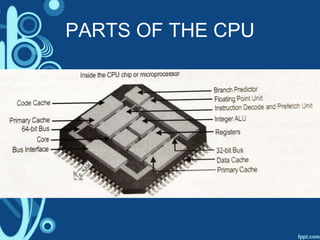
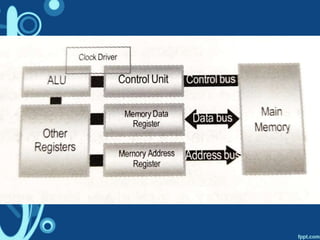
PARTS OF THE CPU
PARTS OF THE CPU
• Control Unit
–Electrical signals that direct
other parts of the system to
do their work
–Read and interpret program
instructions and convert it
PARTS OF THE CPU
• Arithmetic Logic Unit
–Executes the arithmetic and
logical operations like
calculations and comparisons
PARTS OF THE CPU
• Registers
–Small but high – speed data
storage
–Temporary storage areas
that hold data and instruction
temporarily
PARTS OF THE CPU
• Memory or RAM
–Allows fast access
PARTS OF THE CPU
• Cache
–Stores memory data
–Speeds up operations by
making recently accessed
data immediately available to
the processor
PARTS OF THE CPU
• Input/Output
–Allow the processor to
communicate with the RAM,
Hard Disk and other
components inside the
computer
PARTS OF THE CPU
• System Clock
–Provides the fixed sequence
in time that cannot be
changed
–no. of ticks in one cycle is
called the clock rate
PARTS OF THE CPU
• System Clock
–The faster the clock rate, the
faster is the processor in
processing instructions
PARTS OF THE CPU
• Bus
–Three sets of wires used to
connect the CPU or
microprocessor to CPU
cache memory
• Control bus
• Address bus
• Data bus
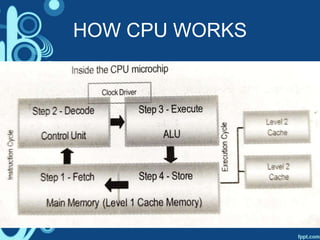
HOW CPU WORKS
THE END !!

How computer system works

  • 1.
  • 2.
    INPUT • Data andcommands in order to work –Example: Letters and Numbers
  • 3.
    PROCESS • Computer workson the data and command entered into the computer
  • 4.
    OUTPUT • Result displayedon the monitor or heard on the speaker the data is processed • Result of data processing • Processed data now is called information
  • 5.
    PARTS OF THECOMPUTER TO FUNCTION PROPERLY
  • 6.
  • 7.
  • 8.
  • 9.
  • 11.
    COMMON USES OF MICROPROCESSORS •Embedded Micro Controllers –Can be found inside many household electronic appliances cars calculator and others
  • 12.
    COMMON USES OF MICROPROCESSORS •Common Desktop or Laptop Processor –Can perform a wide array of task –Motherboards, Hard Disk etc.
  • 13.
    COMMON USES OF MICROPROCESSORS •Powerful Processor –Most powerful processor for high – end servers –Powerful computer applications
  • 14.
  • 15.
    PARTS OF THECPU • Control Unit –Electrical signals that direct other parts of the system to do their work –Read and interpret program instructions and convert it
  • 16.
    PARTS OF THECPU • Arithmetic Logic Unit –Executes the arithmetic and logical operations like calculations and comparisons
  • 17.
    PARTS OF THECPU • Registers –Small but high – speed data storage –Temporary storage areas that hold data and instruction temporarily
  • 18.
    PARTS OF THECPU • Memory or RAM –Allows fast access
  • 19.
    PARTS OF THECPU • Cache –Stores memory data –Speeds up operations by making recently accessed data immediately available to the processor
  • 20.
    PARTS OF THECPU • Input/Output –Allow the processor to communicate with the RAM, Hard Disk and other components inside the computer
  • 21.
    PARTS OF THECPU • System Clock –Provides the fixed sequence in time that cannot be changed –no. of ticks in one cycle is called the clock rate
  • 22.
    PARTS OF THECPU • System Clock –The faster the clock rate, the faster is the processor in processing instructions
  • 23.
    PARTS OF THECPU • Bus –Three sets of wires used to connect the CPU or microprocessor to CPU cache memory • Control bus • Address bus • Data bus
  • 25.
  • 26.