Components of Central
Processing Unit
CPU
DIGITAL DATA REPRESENTATION
Bit: The smallest unit of data that a binary computer can
recognize (a single 1 or 0)
Byte = 8 bits
Byte terminology used to express the size of documents
and other files, programs, etc.
Prefixes are often used to express larger quantities of
bytes: kilobyte (KB), megabyte ( MB), gigabyte (GB),
terabyte (TB), etc.
CODING SYSTEMS FOR TEXT-BASED DATA
ASCII (American Standard Code for Information Interchange): coding system
traditionally used with personal computers
EBCDIC (Extended Binary-Coded Decimal Interchange Code): developed by
IBM, primarily for mainframe use
Unicode: newer code (32 bits per character is common); universal coding
standard designed to represent text-based data written in any ancient or
modern language
Replacing ASCII as the primary text-coding system
REPRESENTING PROGRAMS: MACHINE LANGUAGE
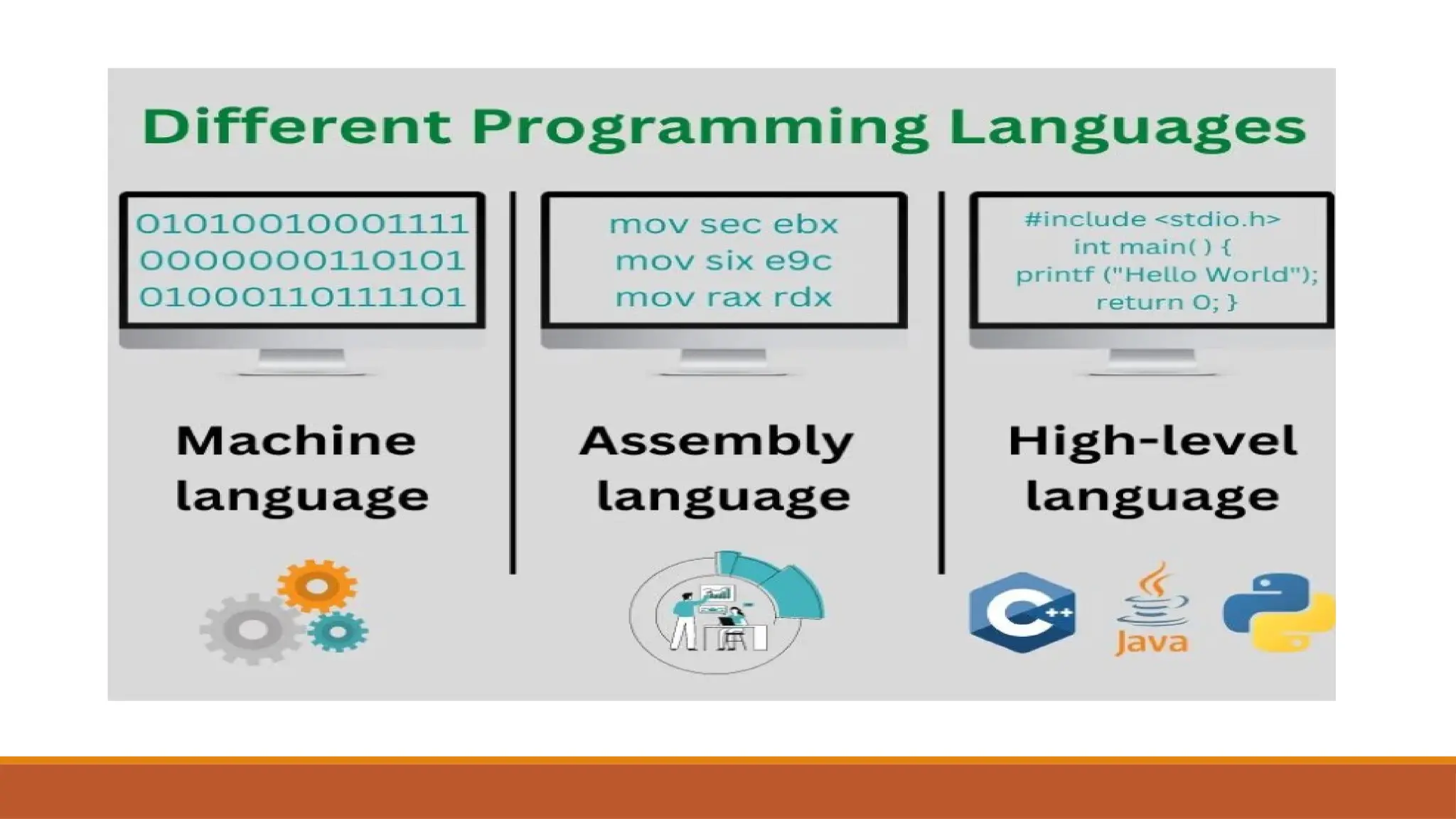
Machine language: Binary-based language for representing computer programs
the computer can execute directly
Early programs were written in machine language.
Today’s programs still need to be translated into machine language in order to
be understood by the computer
Most programs are written in other programming languages
Language translators are used to translate the programs into machine language
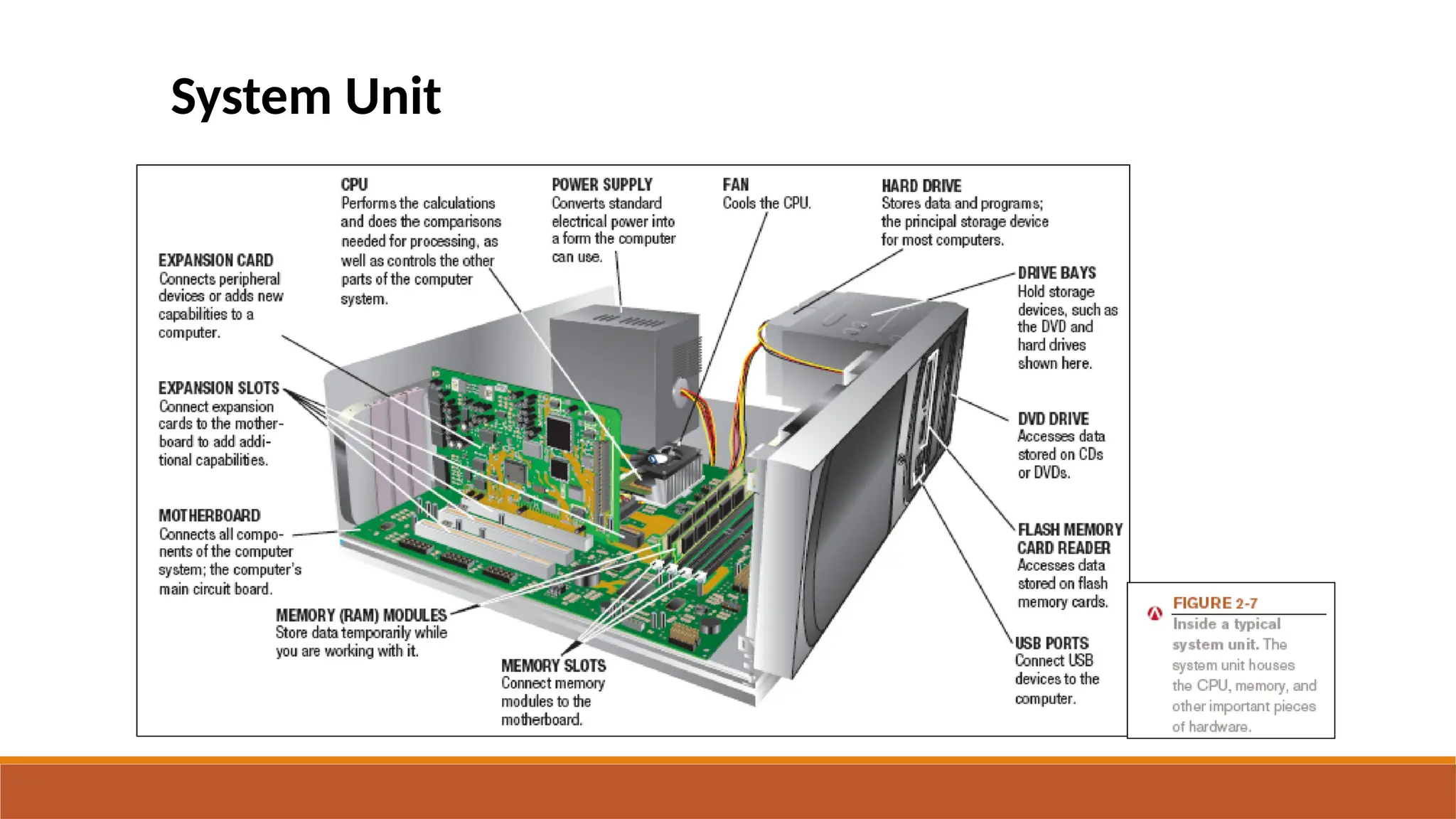
System Unit
System Unit is a box that contains different electronic components of
computer system, it is also called System Cabinet or Chassis.
It protects the internal components from damage.
The electronic components in the system unit are connected to
motherboard.
Mother board is also known as system board or main board.
THE MOTHERBOARD
Computer chip: A very small pieces of silicon or other semi-conducting material
onto which integrated circuits are embedded

Circuit board: A thin board containing computer chips and other electronic
components

Motherboard or system board: The main circuit board inside the system unit

All devices must connect to the motherboard

External devices (monitors, keyboards, mice, printers) typically connect by plugging
into a port
exposed through the exterior of the system unit

Wireless devices connect through a transceiver or wireless networking technology
(like Bluetooth)
Components of System Unit
Important components of system unit are as follows:
Central Processing Unit (CPU): It is also called as Processor, that is
the Brain of the Computer.
It is the most important component of a computer, it interprets and
executes instructions in the computer.
Memory: The hardware component that stores data and instructions
temporarily is called memory, that is also called primary memory or
main memory.
Memory
Memory in computing refers to the hardware that stores data and instructions for
the CPU to access during processing.
Volatile Memory/ Main Memory
•Data and instructions stored temporarily
•It loses its contents when computer turns off. i.g RAM
Non volatile Memory/Secondary memory
•Data and instructions are stored permanently
•Does not lose its content when computer is turned off. i.e ROM
Main memory consists of electronic chips connected to mother board, It is
used to store data before processing.
 It also stores processed data after processing until the data is sent
to output device.
 The main memory is also called volatile because its contents are
lost when the computer is turned off.
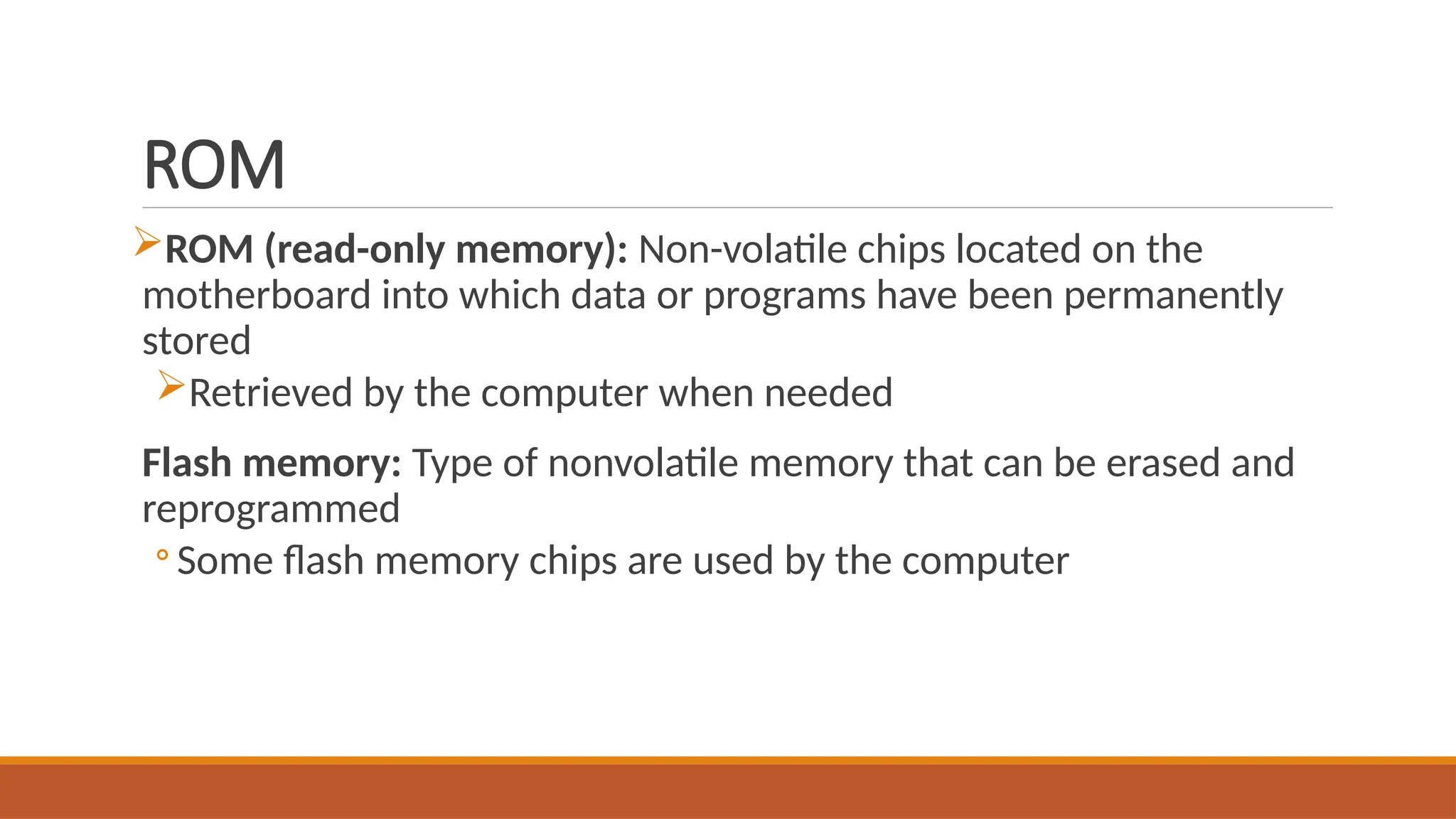
RAM
Stores essential parts of operating system, programs, and data the
computer is currently using
Adequate RAM is needed to run programs
Volatile: Contents of RAM is lost when the computer is shut off
Most personal computers use SD-RAM
MRAM and PRAM
ROM
ROM (read-only memory): Non-volatile chips located on the
motherboard into which data or programs have been permanently
stored
Retrieved by the computer when needed
Flash memory: Type of nonvolatile memory that can be erased and
reprogrammed
◦ Some flash memory chips are used by the computer
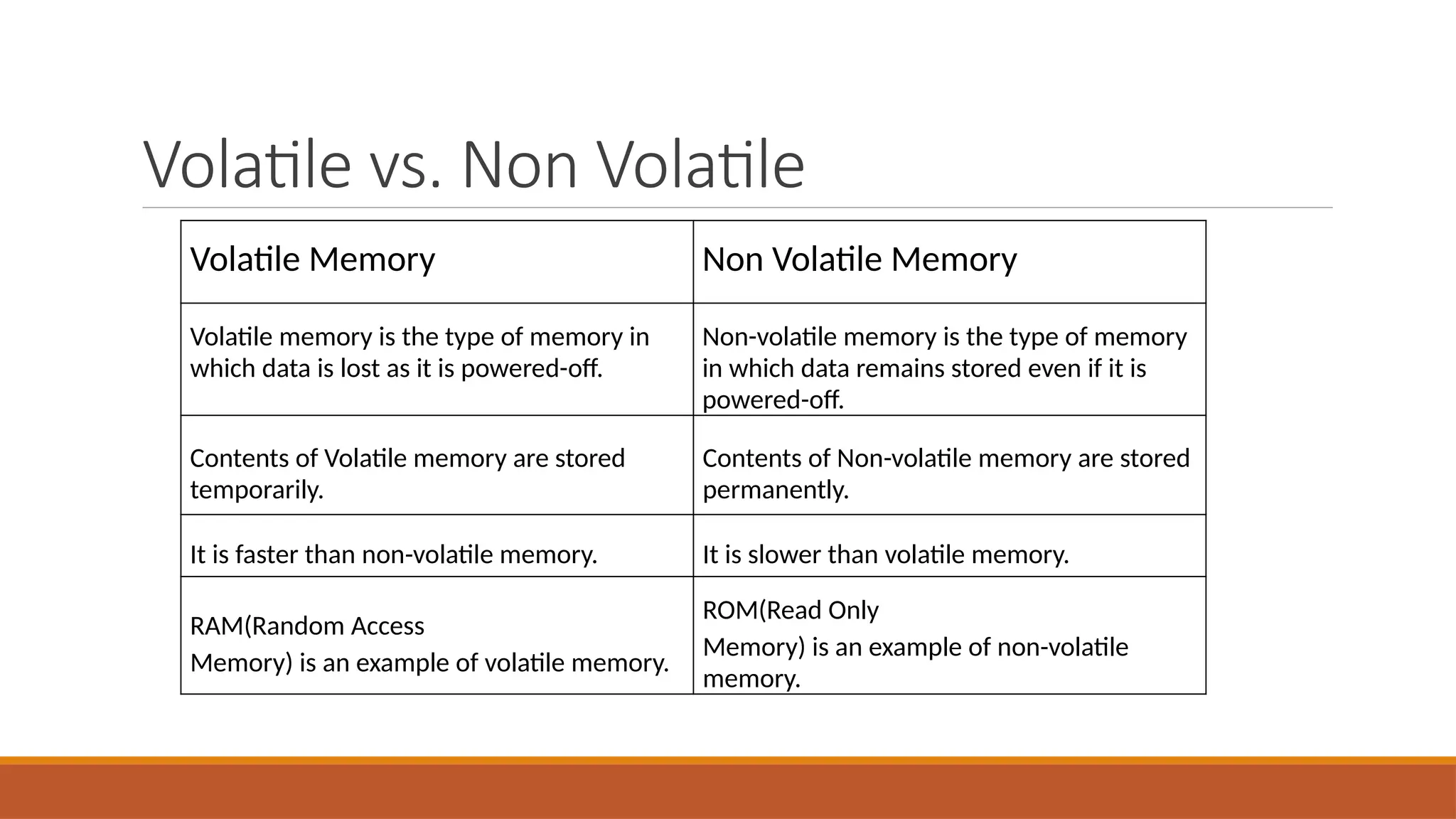
Volatile vs. Non Volatile
Volatile Memory Non Volatile Memory
Volatile memory is the type of memory in
which data is lost as it is powered-off.
Non-volatile memory is the type of memory
in which data remains stored even if it is
powered-off.
Contents of Volatile memory are stored
temporarily.
Contents of Non-volatile memory are stored
permanently.
It is faster than non-volatile memory. It is slower than volatile memory.
RAM(Random Access
Memory) is an example of volatile memory.
ROM(Read Only
Memory) is an example of non-volatile
memory.
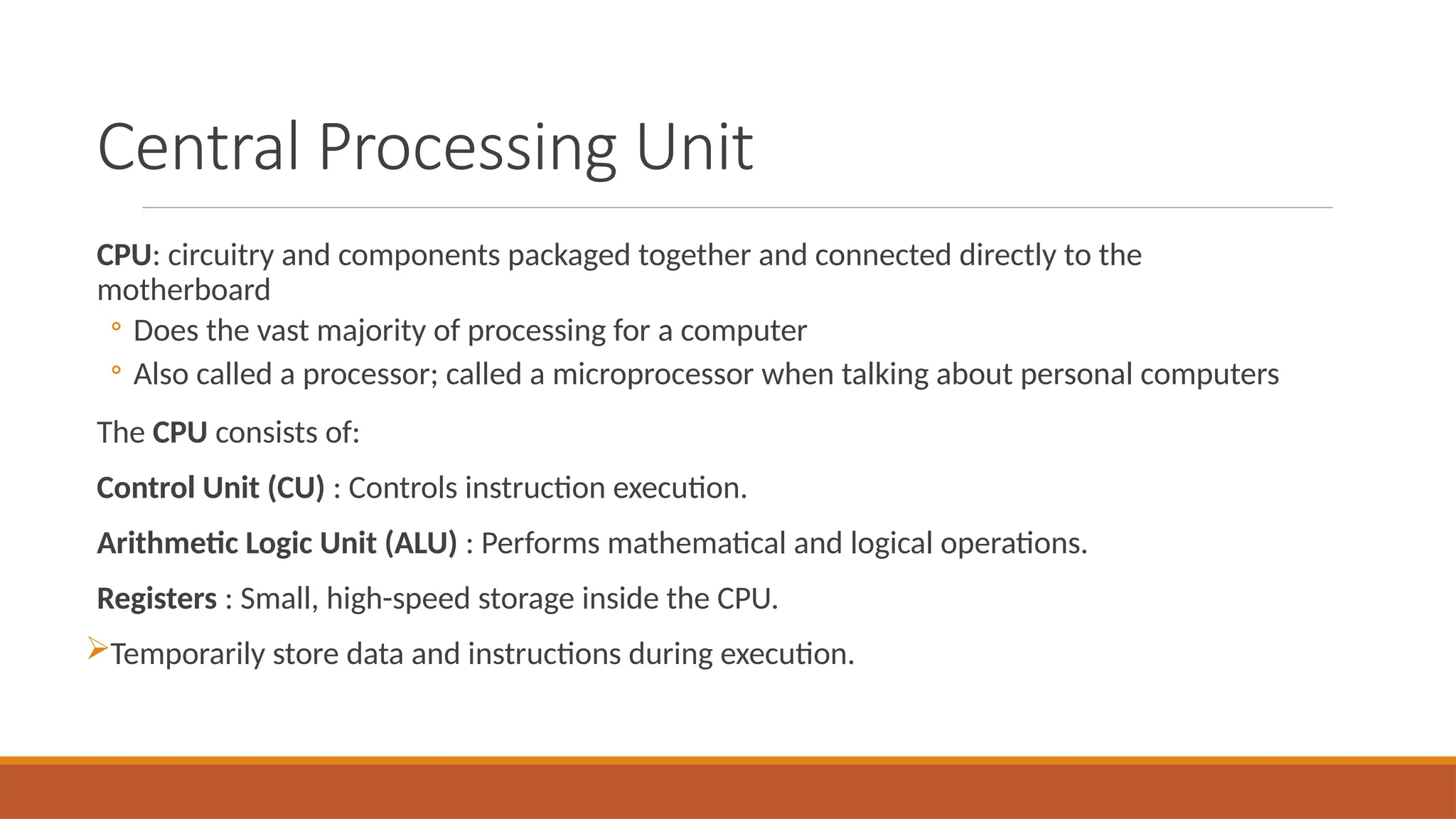
Central Processing Unit
CPU: circuitry and components packaged together and connected directly to the
motherboard
◦ Does the vast majority of processing for a computer
◦ Also called a processor; called a microprocessor when talking about personal computers
The CPU consists of:
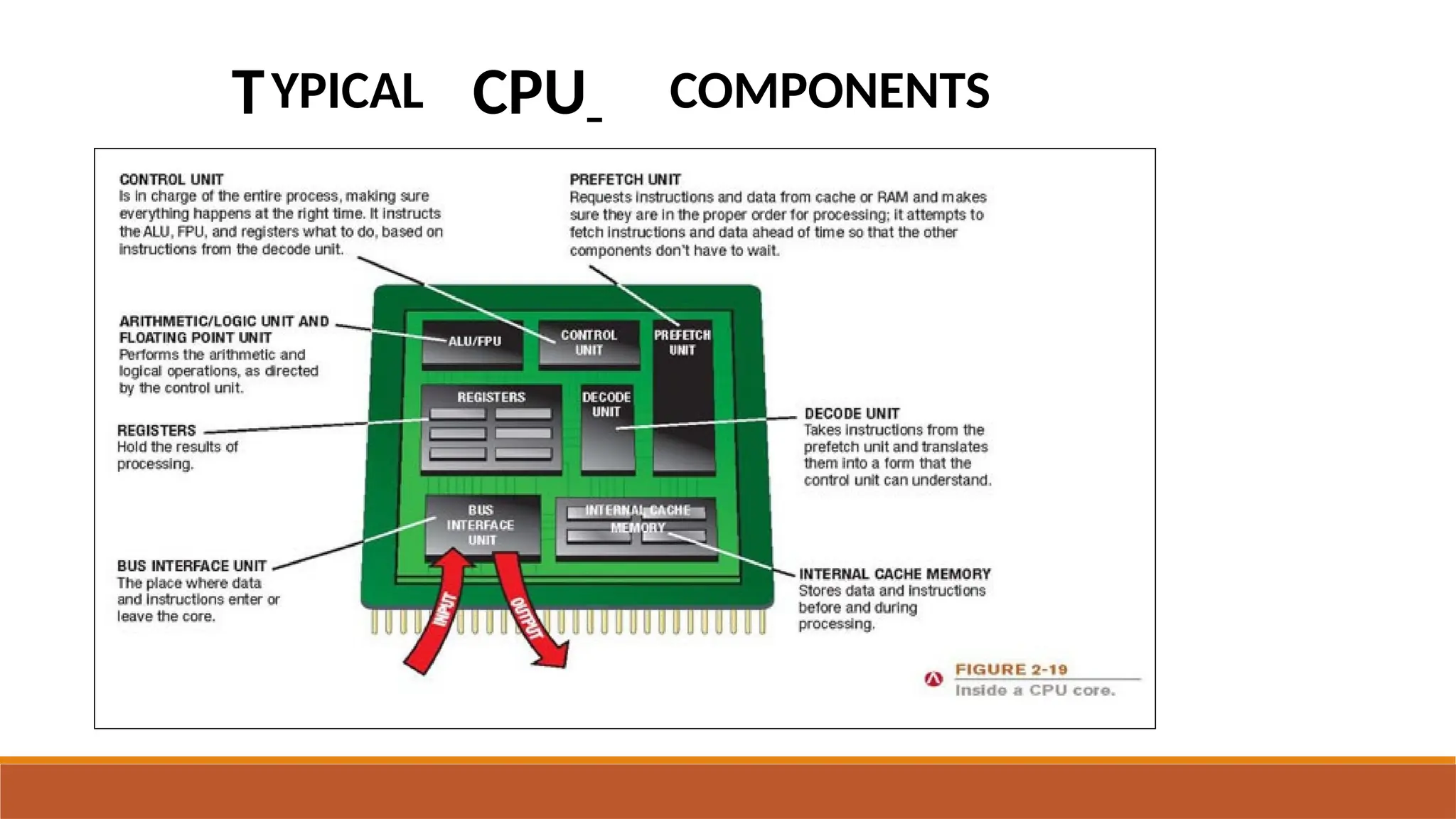
Control Unit (CU) : Controls instruction execution.
Arithmetic Logic Unit (ALU) : Performs mathematical and logical operations.
Registers : Small, high-speed storage inside the CPU.
Temporarily store data and instructions during execution.
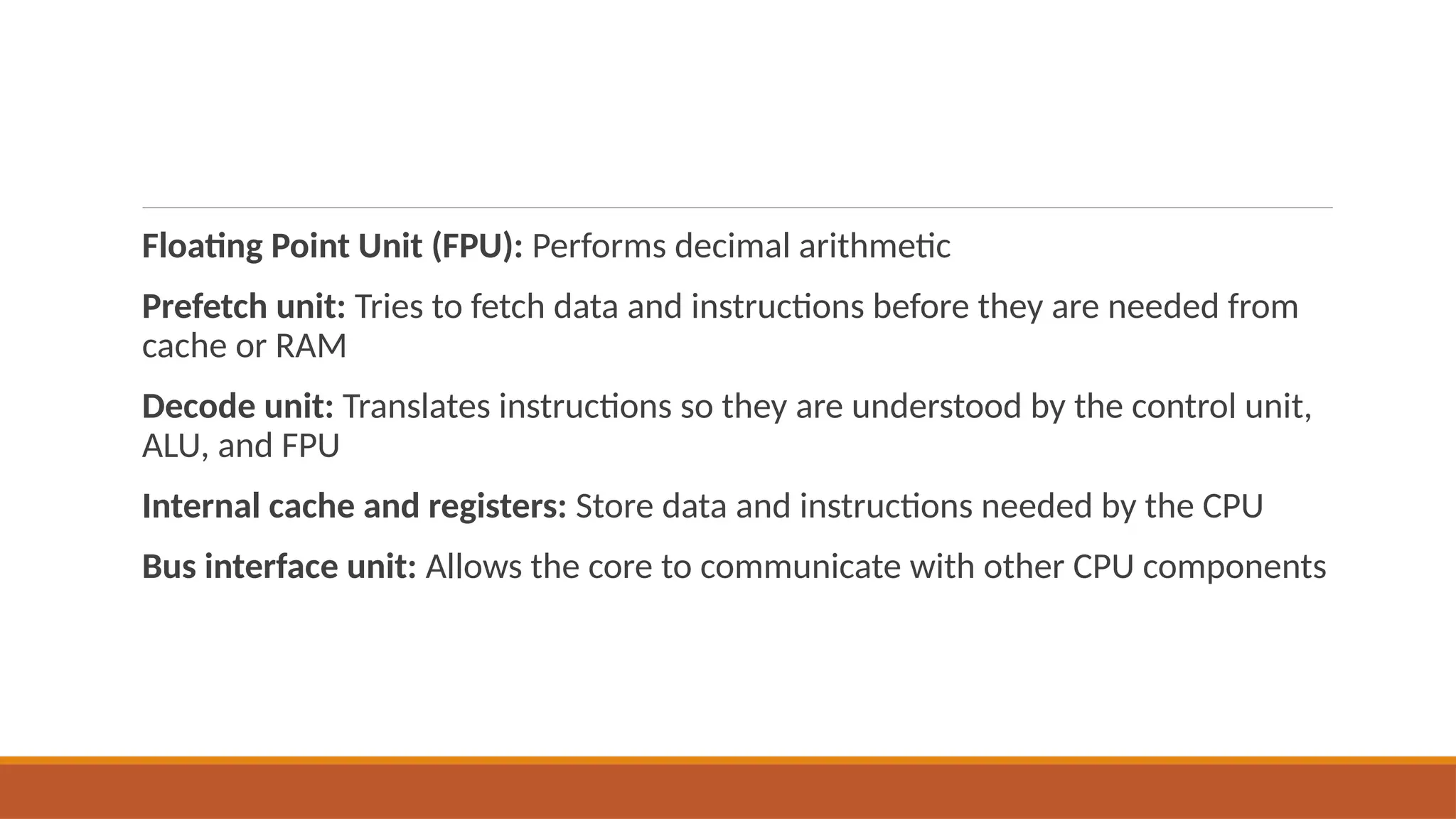
Floating Point Unit (FPU): Performs decimal arithmetic
Prefetch unit: Tries to fetch data and instructions before they are needed from
cache or RAM
Decode unit: Translates instructions so they are understood by the control unit,
ALU, and FPU
Internal cache and registers: Store data and instructions needed by the CPU
Bus interface unit: Allows the core to communicate with other CPU components
TYPICAL CPU COMPONENTS
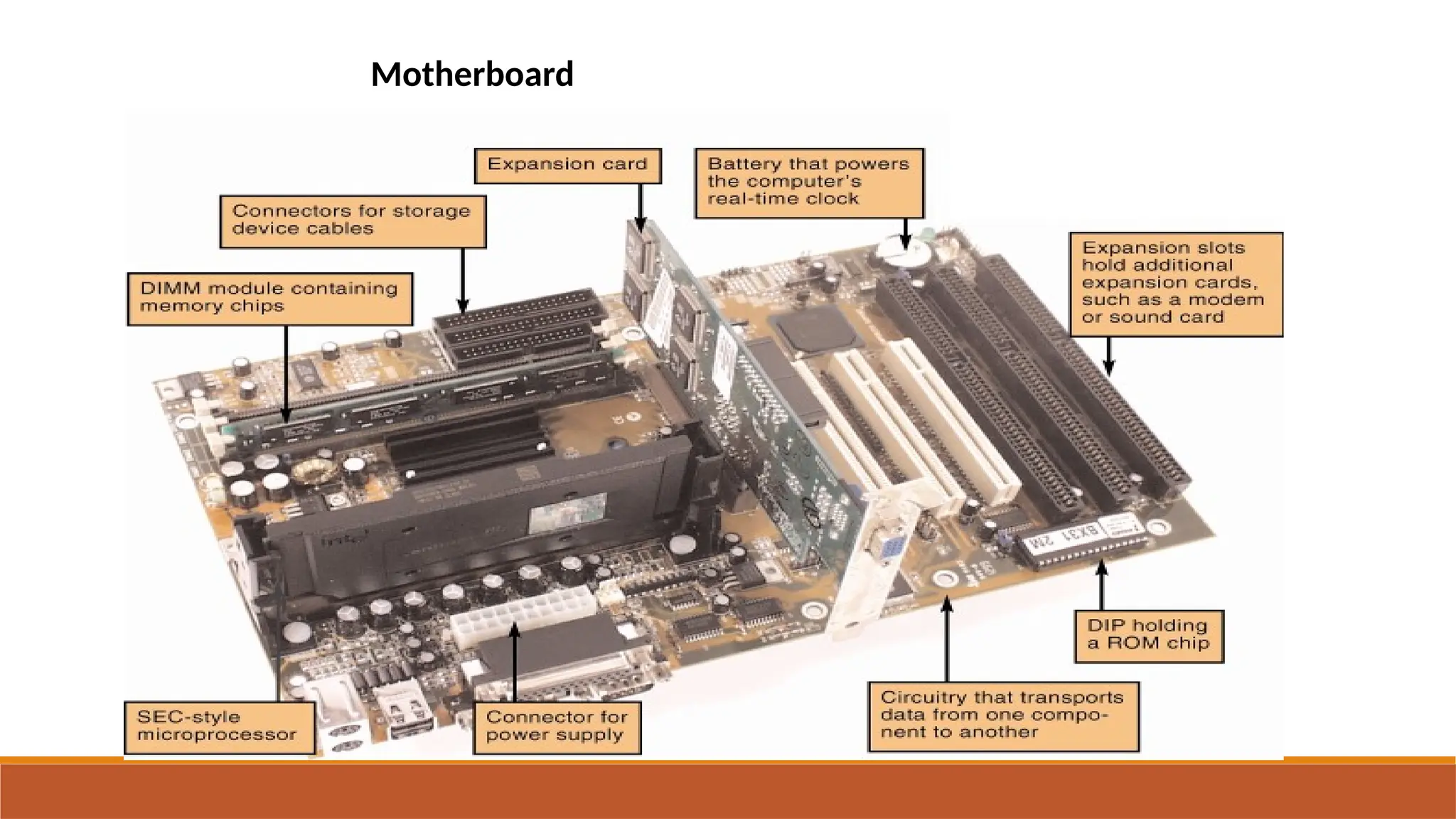
Motherboard
System Unit
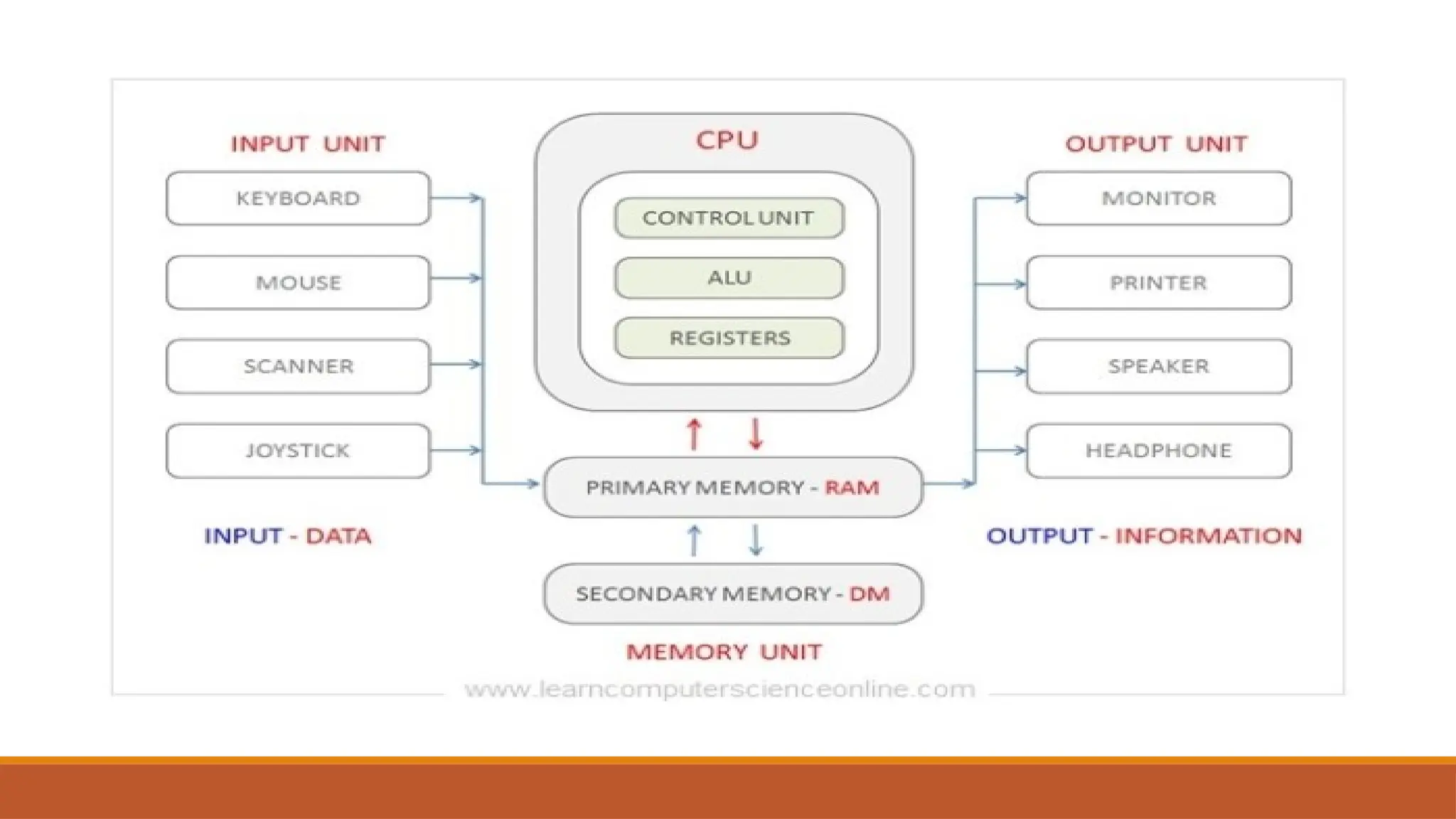
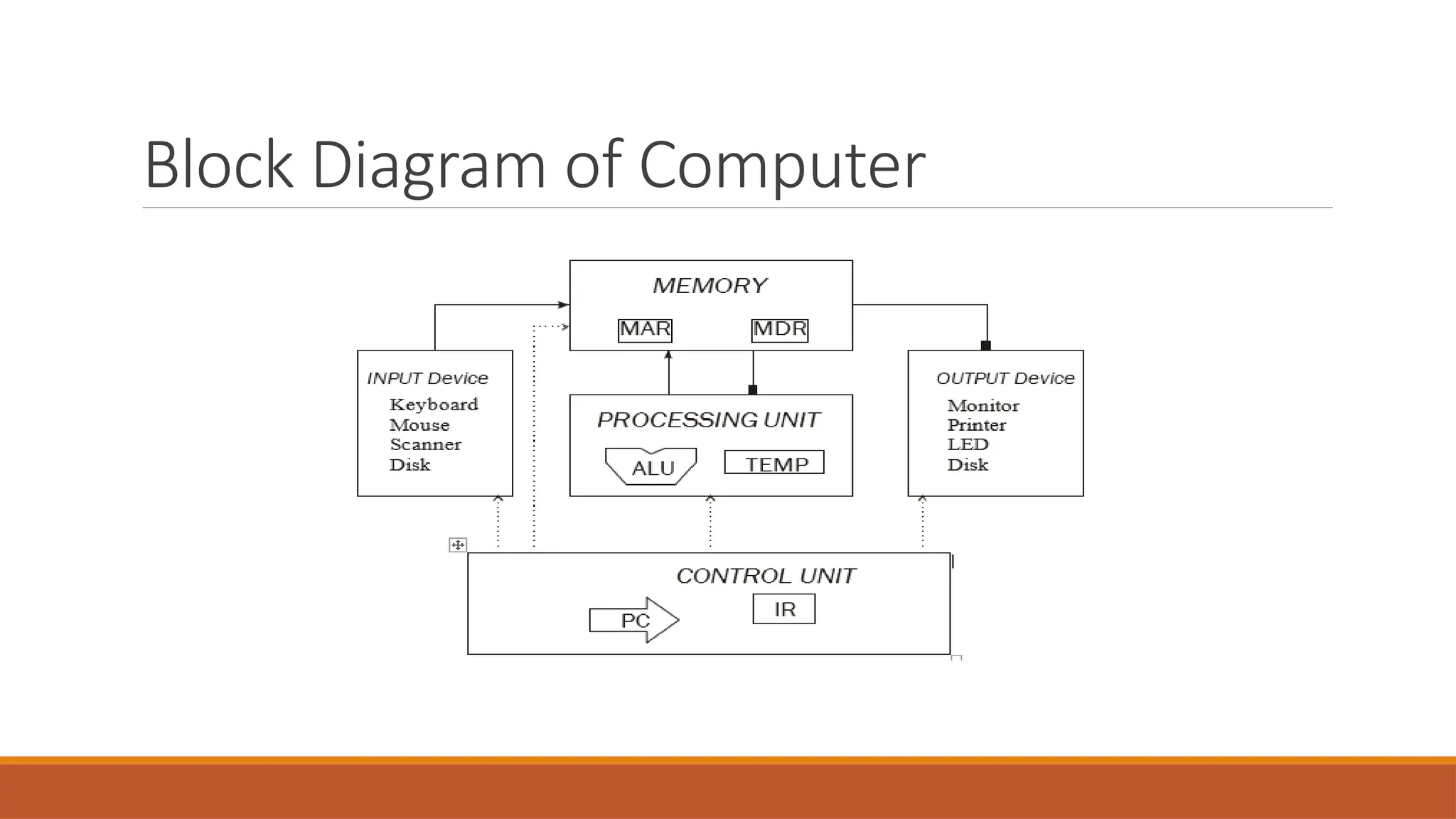
Block Diagram of Computer
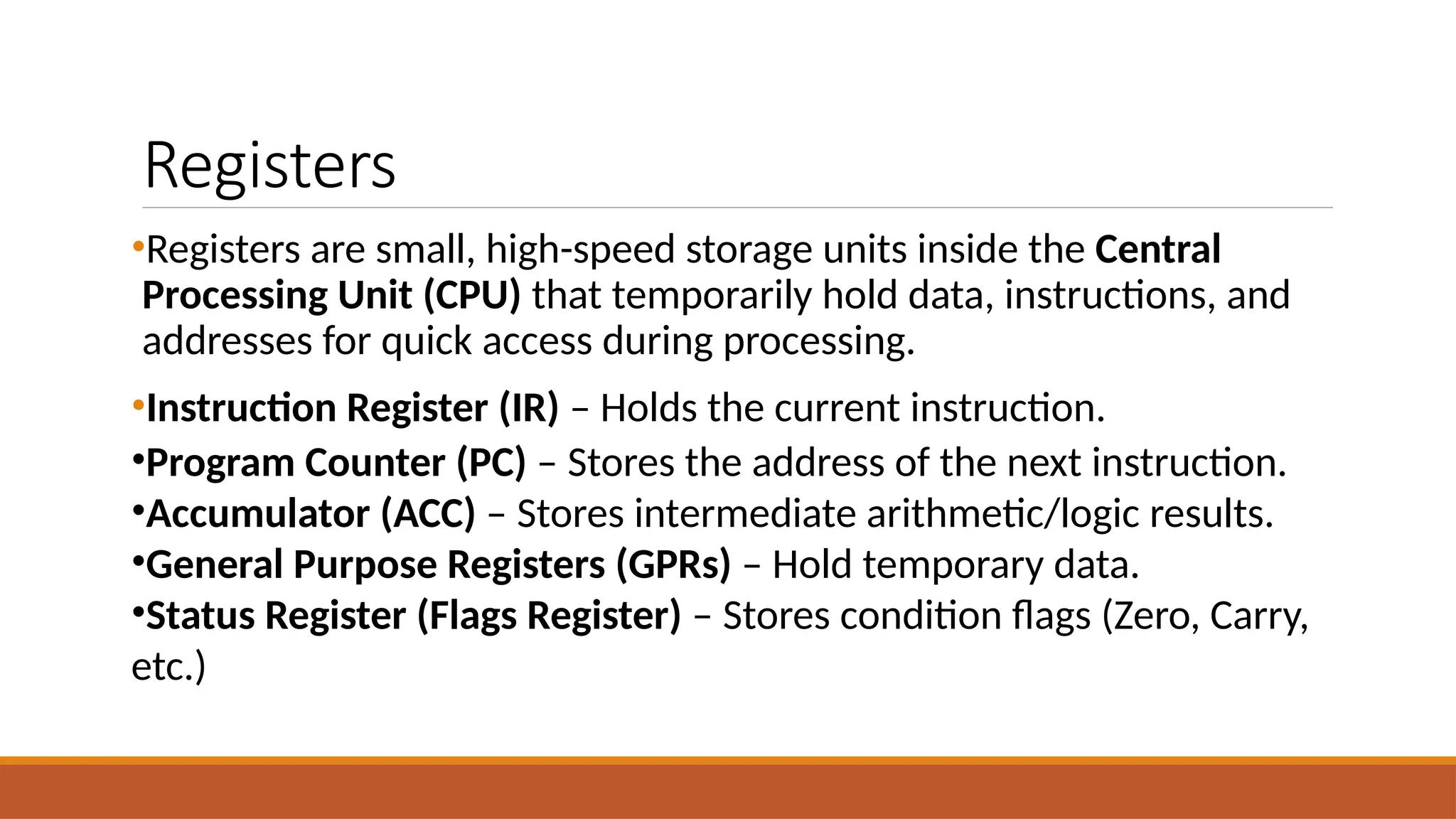
Registers
•Registers are small, high-speed storage units inside the Central
Processing Unit (CPU) that temporarily hold data, instructions, and
addresses for quick access during processing.
•Instruction Register (IR) – Holds the current instruction.
•Program Counter (PC) – Stores the address of the next instruction.
•Accumulator (ACC) – Stores intermediate arithmetic/logic results.
•General Purpose Registers (GPRs) – Hold temporary data.
•Status Register (Flags Register) – Stores condition flags (Zero, Carry,
etc.)
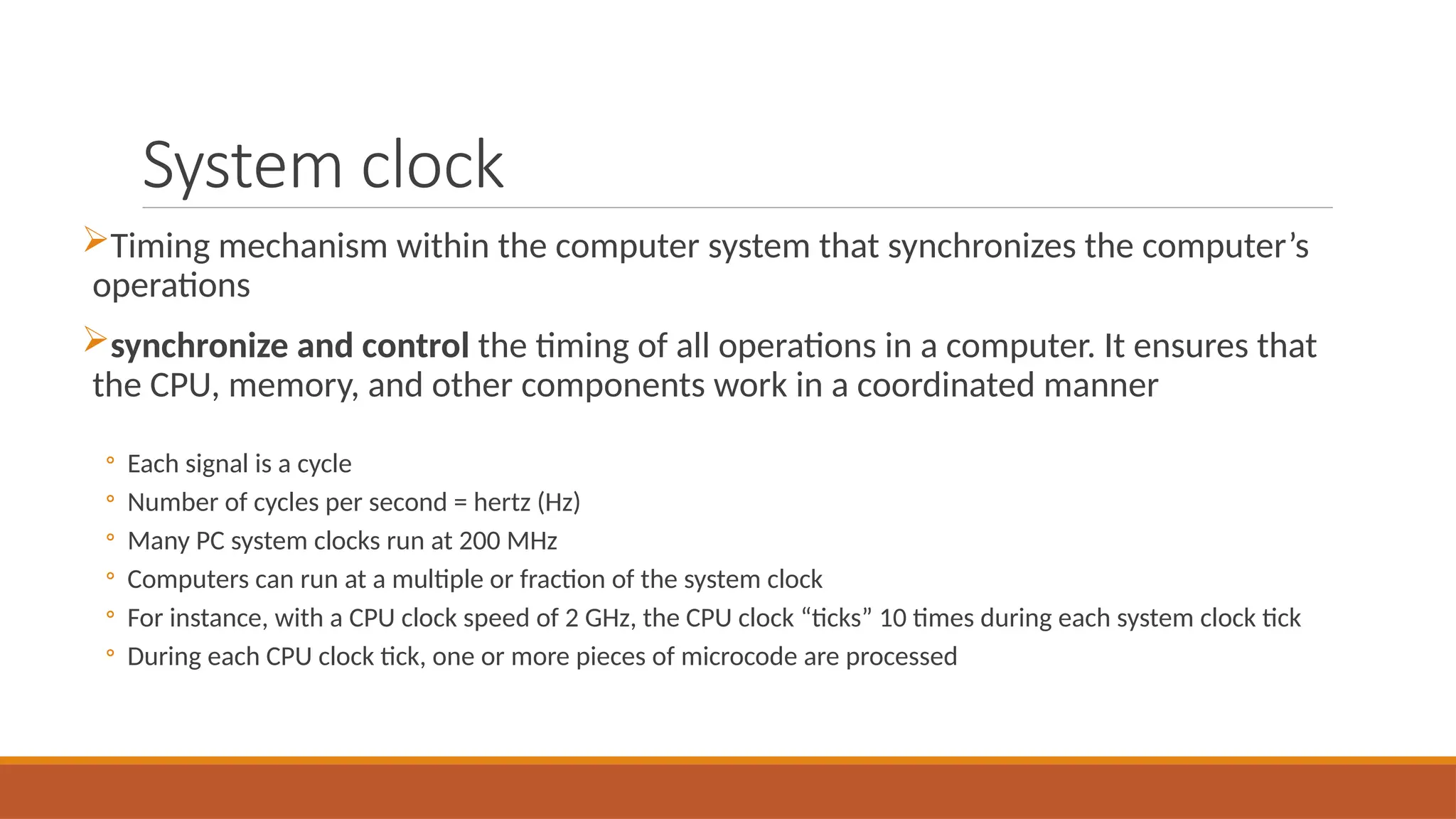
System clock
Timing mechanism within the computer system that synchronizes the computer’s
operations
synchronize and control the timing of all operations in a computer. It ensures that
the CPU, memory, and other components work in a coordinated manner
◦ Each signal is a cycle
◦ Number of cycles per second = hertz (Hz)
◦ Many PC system clocks run at 200 MHz
◦ Computers can run at a multiple or fraction of the system clock
◦ For instance, with a CPU clock speed of 2 GHz, the CPU clock “ticks” 10 times during each system clock tick
◦ During each CPU clock tick, one or more pieces of microcode are processed
System Clock
CPU clock speed: One measurement of processing speed
◦ Measured in megahertz (MHz) or gigahertz (GHz)
◦ Higher CPU clock speed = more instructions processed per second
Alternate measure of processing speed is the number of instructions a CPU can
process per second
◦ Megaflops, gigaflops, teraflops
Other factors (CPU architecture, memory, bus speed, amount of RAM, etc.) also
affect the overall processing speed of a computer
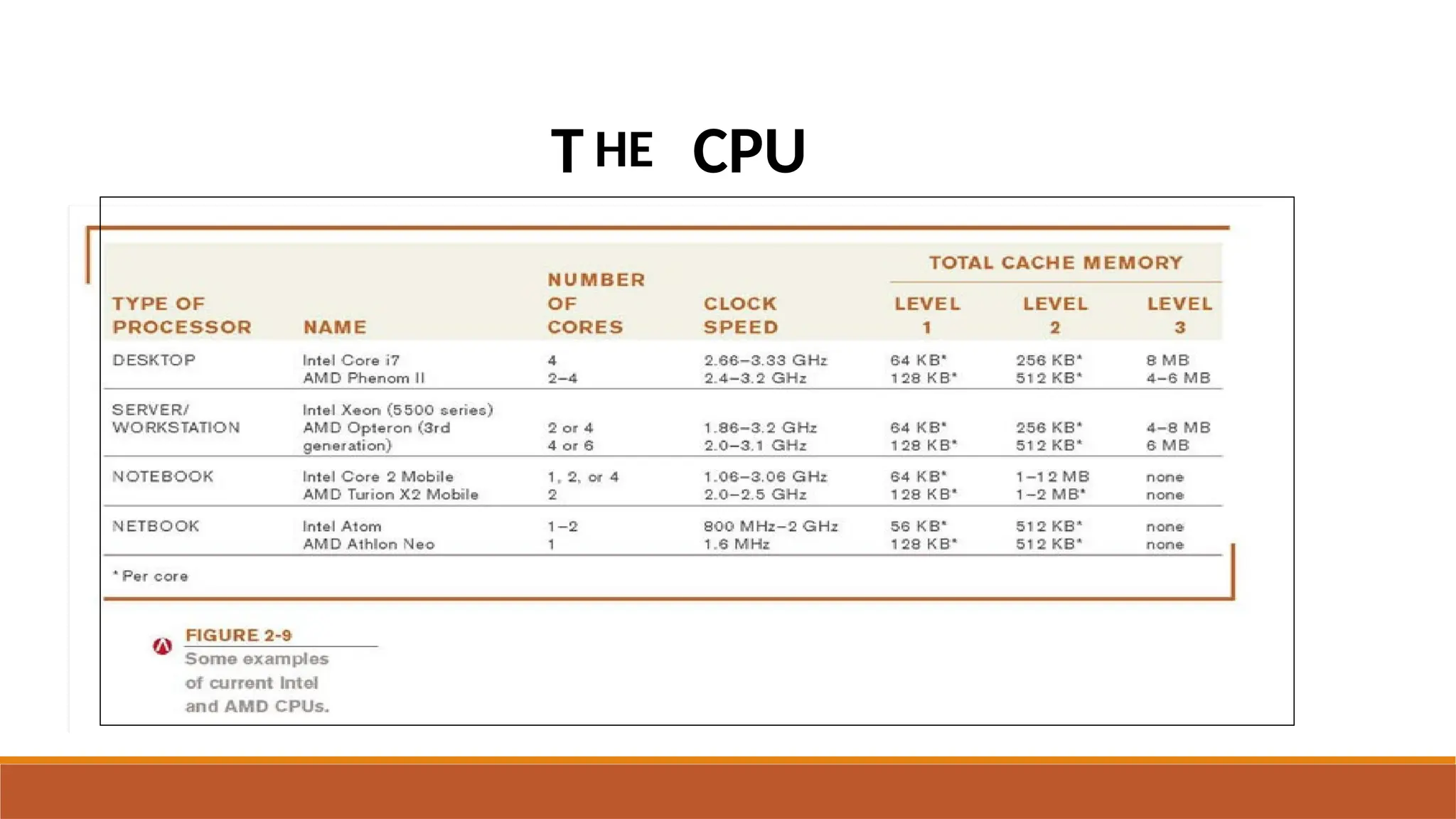
T HE CPU
 Word size: The amount of data that a CPU can manipulate at one
time
 Typically 32 or 64 bits
 Cache memory: Special group of very fast memory chips located
on or close to the CPU
 Level 1 is fastest, then Level 2, then Level 3
 More cache memory typically means faster processing
 Usually internal cache (built into the CPU)
Computer Buses
Bus: An electronic path over which data can travel
Bus width: The number of wires in the bus over which data can
travel
Bus width and speed determine the throughput (or bandwidth) of
the bus
The amount of data that can be transferred by the bus in a given
time period
Computer Buses
◦ Expansion bus: Connects the CPU to peripheral (typically input and output)
devices
◦ Memory bus: connects CPU directly to RAM
◦ Front side bus: connects CPU to I/O bridge
◦ ( PCIe) bus
◦ Universal Serial PCI and PCI Express l Bus ( USB )
◦ FireWire/IEEE 1394 bus (a serial bus for high speed communications)
Instruction Set
A set of instructions that a cpu can execute to perform different
operations on data is known as Instruction set.
Data Transfer Instructions
Arithmetic & Logical Instructions
I/O Instructions
Control Transfer Instructions
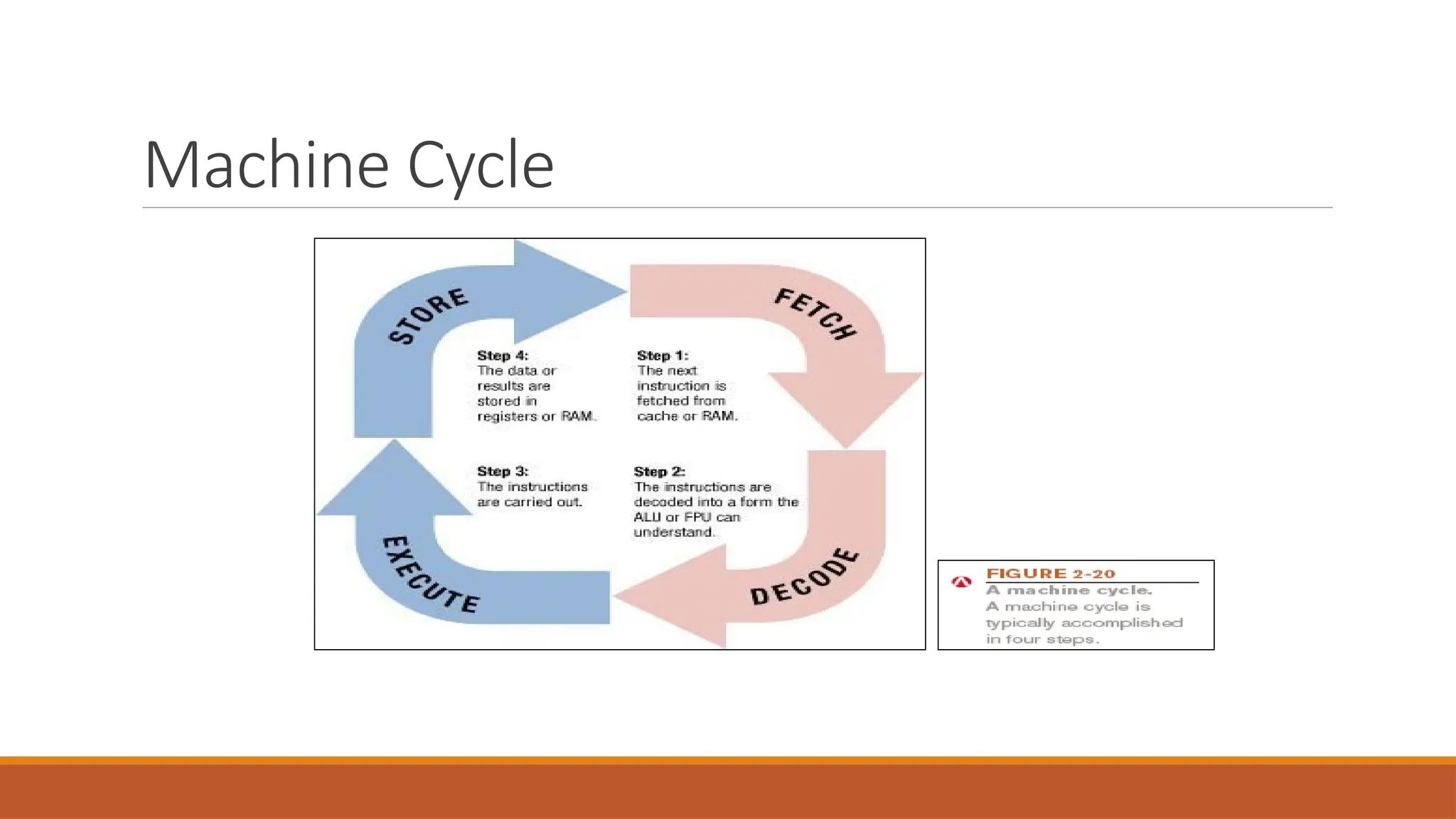
Machine Cycle
Machine cycle: The series of operations involved in the execution of
a single machine level instruction
Fetch: The program instruction is fetched
Decode: The instructions are decoded so the control unit, ALU, and
FPU can understand them
Execute: The instructions are carried out
Store: The original data or the result from the ALU or FPU execution
is stored in the CPU’s registers
Machine Cycle
Parallel Processing
Parallel processing is the simultaneous execution of multiple tasks
(or processes) to speed up computations.
 It can be achieved using multithreading, multiprocessing, or
distributed computing.
E.g. Search engines index billions of web pages using parallel
processing, making search results appear instantly.
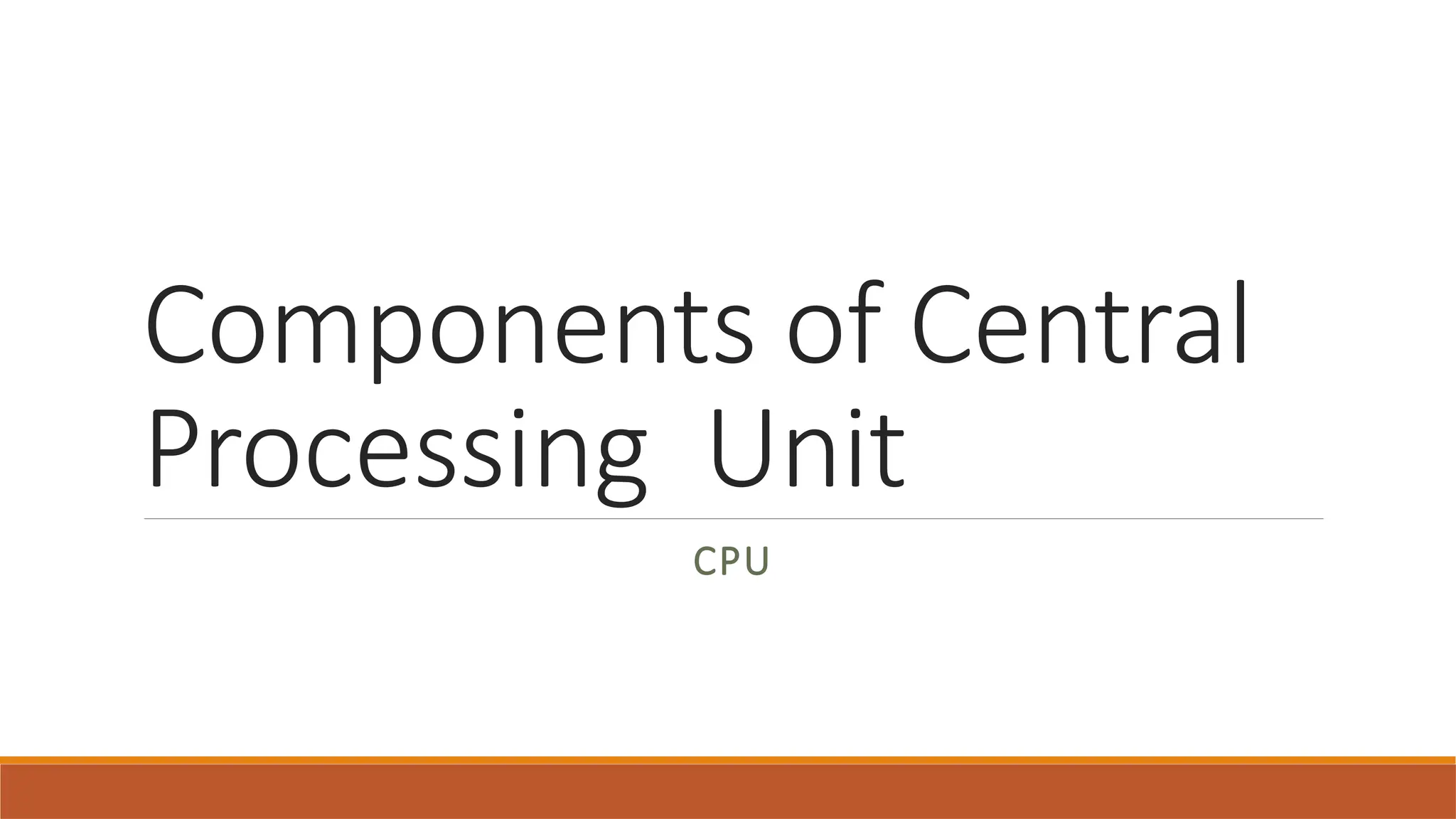
PIPELINING
Pipelining: Allows multiple instructions to be processed at one time

ITC COURSE-Components of System Unit.pptx

  • 1.
  • 2.
    DIGITAL DATA REPRESENTATION Bit:The smallest unit of data that a binary computer can recognize (a single 1 or 0) Byte = 8 bits Byte terminology used to express the size of documents and other files, programs, etc. Prefixes are often used to express larger quantities of bytes: kilobyte (KB), megabyte ( MB), gigabyte (GB), terabyte (TB), etc.
  • 3.
    CODING SYSTEMS FORTEXT-BASED DATA ASCII (American Standard Code for Information Interchange): coding system traditionally used with personal computers EBCDIC (Extended Binary-Coded Decimal Interchange Code): developed by IBM, primarily for mainframe use Unicode: newer code (32 bits per character is common); universal coding standard designed to represent text-based data written in any ancient or modern language Replacing ASCII as the primary text-coding system
  • 4.
    REPRESENTING PROGRAMS: MACHINELANGUAGE Machine language: Binary-based language for representing computer programs the computer can execute directly Early programs were written in machine language. Today’s programs still need to be translated into machine language in order to be understood by the computer Most programs are written in other programming languages Language translators are used to translate the programs into machine language
  • 6.
    System Unit System Unitis a box that contains different electronic components of computer system, it is also called System Cabinet or Chassis. It protects the internal components from damage. The electronic components in the system unit are connected to motherboard. Mother board is also known as system board or main board.
  • 7.
    THE MOTHERBOARD Computer chip:A very small pieces of silicon or other semi-conducting material onto which integrated circuits are embedded  Circuit board: A thin board containing computer chips and other electronic components  Motherboard or system board: The main circuit board inside the system unit  All devices must connect to the motherboard  External devices (monitors, keyboards, mice, printers) typically connect by plugging into a port exposed through the exterior of the system unit  Wireless devices connect through a transceiver or wireless networking technology (like Bluetooth)
  • 8.
    Components of SystemUnit Important components of system unit are as follows: Central Processing Unit (CPU): It is also called as Processor, that is the Brain of the Computer. It is the most important component of a computer, it interprets and executes instructions in the computer. Memory: The hardware component that stores data and instructions temporarily is called memory, that is also called primary memory or main memory.
  • 9.
    Memory Memory in computingrefers to the hardware that stores data and instructions for the CPU to access during processing. Volatile Memory/ Main Memory •Data and instructions stored temporarily •It loses its contents when computer turns off. i.g RAM Non volatile Memory/Secondary memory •Data and instructions are stored permanently •Does not lose its content when computer is turned off. i.e ROM
  • 10.
    Main memory consistsof electronic chips connected to mother board, It is used to store data before processing.  It also stores processed data after processing until the data is sent to output device.  The main memory is also called volatile because its contents are lost when the computer is turned off.
  • 11.
    RAM Stores essential partsof operating system, programs, and data the computer is currently using Adequate RAM is needed to run programs Volatile: Contents of RAM is lost when the computer is shut off Most personal computers use SD-RAM MRAM and PRAM
  • 12.
    ROM ROM (read-only memory):Non-volatile chips located on the motherboard into which data or programs have been permanently stored Retrieved by the computer when needed Flash memory: Type of nonvolatile memory that can be erased and reprogrammed ◦ Some flash memory chips are used by the computer
  • 13.
    Volatile vs. NonVolatile Volatile Memory Non Volatile Memory Volatile memory is the type of memory in which data is lost as it is powered-off. Non-volatile memory is the type of memory in which data remains stored even if it is powered-off. Contents of Volatile memory are stored temporarily. Contents of Non-volatile memory are stored permanently. It is faster than non-volatile memory. It is slower than volatile memory. RAM(Random Access Memory) is an example of volatile memory. ROM(Read Only Memory) is an example of non-volatile memory.
  • 14.
    Central Processing Unit CPU:circuitry and components packaged together and connected directly to the motherboard ◦ Does the vast majority of processing for a computer ◦ Also called a processor; called a microprocessor when talking about personal computers The CPU consists of: Control Unit (CU) : Controls instruction execution. Arithmetic Logic Unit (ALU) : Performs mathematical and logical operations. Registers : Small, high-speed storage inside the CPU. Temporarily store data and instructions during execution.
  • 16.
    Floating Point Unit(FPU): Performs decimal arithmetic Prefetch unit: Tries to fetch data and instructions before they are needed from cache or RAM Decode unit: Translates instructions so they are understood by the control unit, ALU, and FPU Internal cache and registers: Store data and instructions needed by the CPU Bus interface unit: Allows the core to communicate with other CPU components
  • 17.
  • 18.
  • 19.
  • 20.
  • 21.
    Registers •Registers are small,high-speed storage units inside the Central Processing Unit (CPU) that temporarily hold data, instructions, and addresses for quick access during processing. •Instruction Register (IR) – Holds the current instruction. •Program Counter (PC) – Stores the address of the next instruction. •Accumulator (ACC) – Stores intermediate arithmetic/logic results. •General Purpose Registers (GPRs) – Hold temporary data. •Status Register (Flags Register) – Stores condition flags (Zero, Carry, etc.)
  • 22.
    System clock Timing mechanismwithin the computer system that synchronizes the computer’s operations synchronize and control the timing of all operations in a computer. It ensures that the CPU, memory, and other components work in a coordinated manner ◦ Each signal is a cycle ◦ Number of cycles per second = hertz (Hz) ◦ Many PC system clocks run at 200 MHz ◦ Computers can run at a multiple or fraction of the system clock ◦ For instance, with a CPU clock speed of 2 GHz, the CPU clock “ticks” 10 times during each system clock tick ◦ During each CPU clock tick, one or more pieces of microcode are processed
  • 23.
    System Clock CPU clockspeed: One measurement of processing speed ◦ Measured in megahertz (MHz) or gigahertz (GHz) ◦ Higher CPU clock speed = more instructions processed per second Alternate measure of processing speed is the number of instructions a CPU can process per second ◦ Megaflops, gigaflops, teraflops Other factors (CPU architecture, memory, bus speed, amount of RAM, etc.) also affect the overall processing speed of a computer
  • 24.
  • 25.
     Word size:The amount of data that a CPU can manipulate at one time  Typically 32 or 64 bits  Cache memory: Special group of very fast memory chips located on or close to the CPU  Level 1 is fastest, then Level 2, then Level 3  More cache memory typically means faster processing  Usually internal cache (built into the CPU)
  • 26.
    Computer Buses Bus: Anelectronic path over which data can travel Bus width: The number of wires in the bus over which data can travel Bus width and speed determine the throughput (or bandwidth) of the bus The amount of data that can be transferred by the bus in a given time period
  • 27.
    Computer Buses ◦ Expansionbus: Connects the CPU to peripheral (typically input and output) devices ◦ Memory bus: connects CPU directly to RAM ◦ Front side bus: connects CPU to I/O bridge ◦ ( PCIe) bus ◦ Universal Serial PCI and PCI Express l Bus ( USB ) ◦ FireWire/IEEE 1394 bus (a serial bus for high speed communications)
  • 28.
    Instruction Set A setof instructions that a cpu can execute to perform different operations on data is known as Instruction set. Data Transfer Instructions Arithmetic & Logical Instructions I/O Instructions Control Transfer Instructions
  • 29.
    Machine Cycle Machine cycle:The series of operations involved in the execution of a single machine level instruction Fetch: The program instruction is fetched Decode: The instructions are decoded so the control unit, ALU, and FPU can understand them Execute: The instructions are carried out Store: The original data or the result from the ALU or FPU execution is stored in the CPU’s registers
  • 30.
  • 31.
    Parallel Processing Parallel processingis the simultaneous execution of multiple tasks (or processes) to speed up computations.  It can be achieved using multithreading, multiprocessing, or distributed computing. E.g. Search engines index billions of web pages using parallel processing, making search results appear instantly.
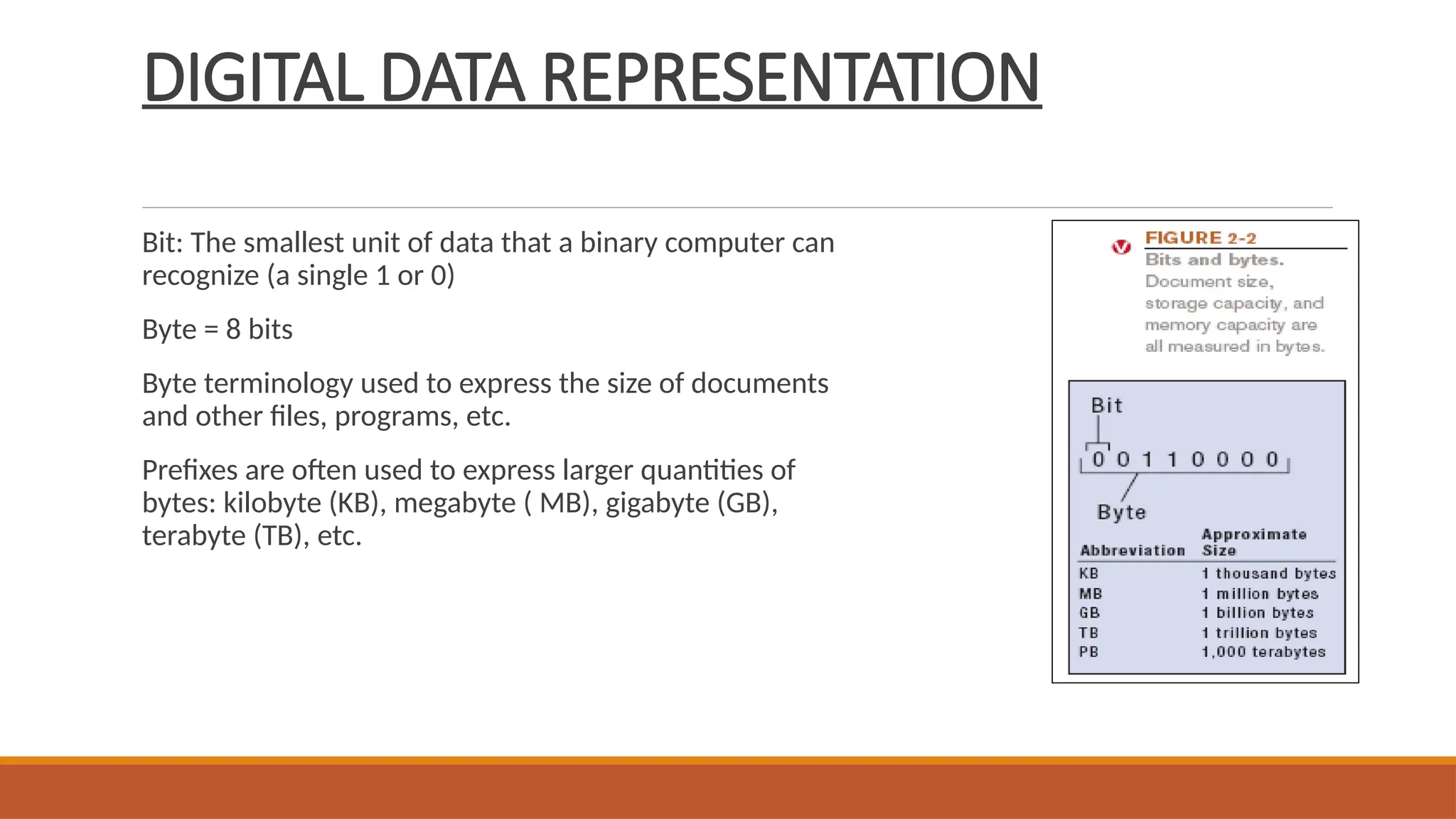
  • 32.
    PIPELINING Pipelining: Allows multipleinstructions to be processed at one time