CPU
(CENTRAL PROCESSING
       UNIT)
INTRODUCTION TO CPU

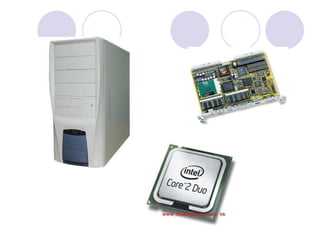
The central processing unit (CPU) is 
the portion of a computer system that 
carries out the instructions of 
a computer program, to perform the 
basic arithmetical, logical, and input 
and output operations of the system. It 
acts as the BRAIN OF COMPUTER.
HI S TORY OF CPU
Early CPUs were custom-designed as a part 
of a larger, sometimes one-of-a-kind, 
computer. However, this method of 
designing custom CPUs for a particular 
application has largely given way to the 
development of mass-produced processors 
that are made for This standardization began 
in the era of discrete transistor 
mainframes and minicomputers and has 
rapidly accelerated with the popularization of 
the integrated circuits (IC). 
The IC has allowed increasingly complex 
CPUs to be designed and manufactured to 
tolerances on the order of nanometres. Both 
the miniaturization and standardization of 
CPUs have increased the presence of digital 
devices in modern life far beyond the limited 
application of dedicated computing 
machines. Modern microprocessors appear 
in everything from 
automobiles to cellphones and children's toy. 
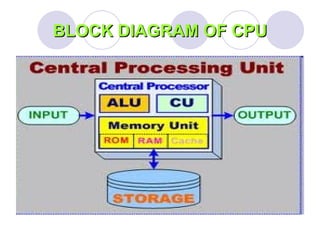
BLOCK DIAGRAM OF CPU
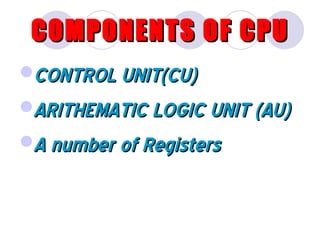
COMPONENTS OF CPU
CONTROL UNIT(CU)
ARITHEMATIC LOGIC UNIT (AU)
A number of Registers
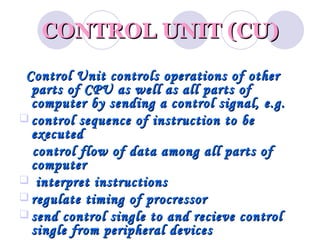
CONTROL UNIT (CU)
 Control Unit controls operations of other
  parts of CPU as well as all parts of
  computer by sending a control signal, e.g.
 control sequence of instruction to be
  executed
  control flow of data among all parts of
  computer
 interpret instructions
 regulate timing of procressor
 send control single to and recieve control
  single from peripheral devices
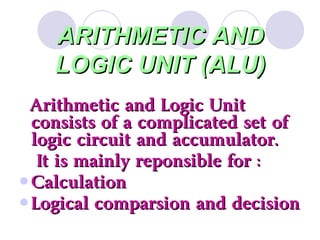
ARITHMETIC AND
    LOGIC UNIT (ALU)
 Arithmetic and Logic Unit
  consists of a complicated set of
  logic circuit and accumulator.
   It is mainly reponsible for :
 Calculation
 Logical comparsion and decision
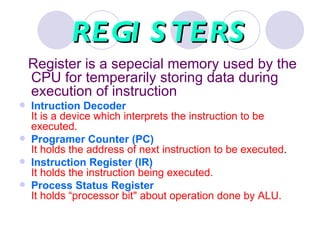
REGI S TERS
    Register is a sepecial memory used by the
    CPU for temperarily storing data during
    execution of instruction
   Intruction Decoder
    It is a device which interprets the instruction to be
    executed.
   Programer Counter (PC)
    It holds the address of next instruction to be executed.
   Instruction Register (IR)
    It holds the instruction being executed.
   Process Status Register
    It holds “processor bit" about operation done by ALU.
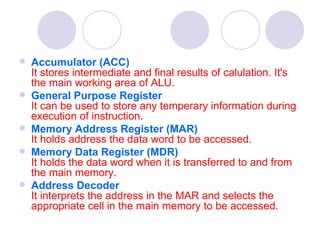
   Accumulator (ACC)
    It stores intermediate and final results of calulation. It's
    the main working area of ALU.
   General Purpose Register
    It can be used to store any temperary information during
    execution of instruction.
   Memory Address Register (MAR)
    It holds address the data word to be accessed.
   Memory Data Register (MDR)                                       
    It holds the data word when it is transferred to and from
    the main memory.
   Address Decoder
    It interprets the address in the MAR and selects the
    appropriate cell in the main memory to be accessed.
How CPU works?
The CPU is centrally located on the
motherboard. Since the CPU carries out a
large share of the work in the computer,
data pass continually through it. The data
come from the RAM and the units
(keyboard, drives, etc.). After processing,
the data is sent back to the RAM and the
units. The CPU continually receives
instructions to be executed. Each
instruction is a data processing order.
MOTHERBOARD
A motherboard is the physical
arrangement in a computer that
contains the computer's basic circuitry
and components. On the typical
motherboard, the circuitry is imprinted
or affixed to the surface of a firm
planar surface and usually
manufactured in a single step. The
computer components included in the
motherboard are: The microprocessor
(Optionally) coprocessors Memory BIOS
Expansion slots Interconnecting
circuitry Additional components can be
added to a motherboard through its
expansion slots.
MICROPROCESSOR
A microprocessor is a computer
processor on a microchip. It's sometimes
called a logic chip. It is the "engine" that
goes into motion when you turn the
computer on. A microprocessor is
designed to perform arithmetic and logic
operations that make use of small
number-holding areas called registers.
Typical microprocessor operations include
adding, subtracting, comparing two
numbers, and fetching numbers from one
area to another.
These operations are the result of a set of
instructions that are part of the microprocessor
design. When the computer is turned on, the
microprocessor is designed to get the first
instruction from the basic input/output system
(BIOS) that comes with the computer as part of
its memory. After that, either the BIOS, or the
operating system that BIOS loads into computer
memory, or an application program is "driving"
the microprocessor, giving it instructions to
perform.
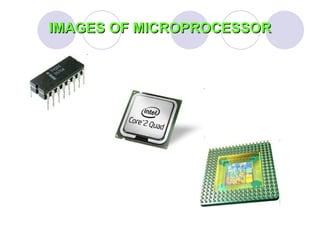
IMAGES OF MICROPROCESSOR
MICROCHIP
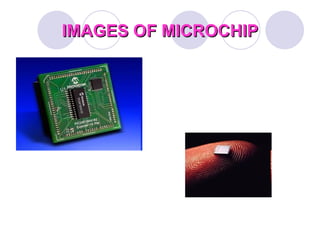
A microchip (sometimes just
called a "chip") is a unit of
packaged computer circuitry
(usually called an integrated
circuit) that is manufactured from
a material such as silicon at a
very small scale. Microchips are
made for program logic (logic or
microprocessor chips) and for
computer memory (memory or
IMAGES OF MICROCHIP
BIOS
BIOS is an integral part of the computer and
comes with it when you bring it home. (In
contrast, the operating system can either be
preinstalled by the manufacturer or vendor or
installed by the user.) BIOS is a program that
is made accessible to the microprocessor on
an eraseable programmable read-only
memory (EPROM) chip. When you turn on the
computer, the microprocessor passes
control to the BIOS program, which is always
located at the same place on EPROM.
When BIOS boots up (starts up) the computer, it first
determines whether all of the attachments are in
place and operational and then it loads the operating
system (or key parts of it) into the computer's
random access memory RAM from the hard disk or
diskette drive. With BIOS, the operating system and
its applications are freed from having to understand
exact details (such as hardware addresses) about
the attached input/output devices. When device
details change, only the BIOS program needs to be
changed. Sometimes this change can be made
during the system setup. In any case, neither the
operating system or any applications you use need
to be changed.
THANKS
     SUBMITTED BY


   MANPREET KAUR

  ROLL NO   115334

Cpu ppt cse

  • 1.
  • 3.
  • 4.
    HI S TORYOF CPU Early CPUs were custom-designed as a part  of a larger, sometimes one-of-a-kind,  computer. However, this method of  designing custom CPUs for a particular  application has largely given way to the  development of mass-produced processors  that are made for This standardization began  in the era of discrete transistor  mainframes and minicomputers and has  rapidly accelerated with the popularization of  the integrated circuits (IC). 
  • 5.
  • 6.
  • 7.
    COMPONENTS OF CPU CONTROLUNIT(CU) ARITHEMATIC LOGIC UNIT (AU) A number of Registers
  • 8.
    CONTROL UNIT (CU) Control Unit controls operations of other parts of CPU as well as all parts of computer by sending a control signal, e.g.  control sequence of instruction to be executed control flow of data among all parts of computer  interpret instructions  regulate timing of procressor  send control single to and recieve control single from peripheral devices
  • 9.
    ARITHMETIC AND LOGIC UNIT (ALU) Arithmetic and Logic Unit consists of a complicated set of logic circuit and accumulator. It is mainly reponsible for :  Calculation  Logical comparsion and decision
  • 10.
    REGI S TERS Register is a sepecial memory used by the CPU for temperarily storing data during execution of instruction  Intruction Decoder It is a device which interprets the instruction to be executed.  Programer Counter (PC) It holds the address of next instruction to be executed.  Instruction Register (IR) It holds the instruction being executed.  Process Status Register It holds “processor bit" about operation done by ALU.
  • 11.
    Accumulator (ACC) It stores intermediate and final results of calulation. It's the main working area of ALU.  General Purpose Register It can be used to store any temperary information during execution of instruction.  Memory Address Register (MAR) It holds address the data word to be accessed.  Memory Data Register (MDR)                                        It holds the data word when it is transferred to and from the main memory.  Address Decoder It interprets the address in the MAR and selects the appropriate cell in the main memory to be accessed.
  • 12.
    How CPU works? TheCPU is centrally located on the motherboard. Since the CPU carries out a large share of the work in the computer, data pass continually through it. The data come from the RAM and the units (keyboard, drives, etc.). After processing, the data is sent back to the RAM and the units. The CPU continually receives instructions to be executed. Each instruction is a data processing order.
  • 13.
    MOTHERBOARD A motherboard isthe physical arrangement in a computer that contains the computer's basic circuitry and components. On the typical motherboard, the circuitry is imprinted or affixed to the surface of a firm planar surface and usually manufactured in a single step. The computer components included in the motherboard are: The microprocessor (Optionally) coprocessors Memory BIOS Expansion slots Interconnecting circuitry Additional components can be added to a motherboard through its expansion slots.
  • 14.
    MICROPROCESSOR A microprocessor isa computer processor on a microchip. It's sometimes called a logic chip. It is the "engine" that goes into motion when you turn the computer on. A microprocessor is designed to perform arithmetic and logic operations that make use of small number-holding areas called registers. Typical microprocessor operations include adding, subtracting, comparing two numbers, and fetching numbers from one area to another.
  • 15.
    These operations arethe result of a set of instructions that are part of the microprocessor design. When the computer is turned on, the microprocessor is designed to get the first instruction from the basic input/output system (BIOS) that comes with the computer as part of its memory. After that, either the BIOS, or the operating system that BIOS loads into computer memory, or an application program is "driving" the microprocessor, giving it instructions to perform.
  • 16.
  • 17.
    MICROCHIP A microchip (sometimesjust called a "chip") is a unit of packaged computer circuitry (usually called an integrated circuit) that is manufactured from a material such as silicon at a very small scale. Microchips are made for program logic (logic or microprocessor chips) and for computer memory (memory or
  • 18.
  • 19.
    BIOS BIOS is anintegral part of the computer and comes with it when you bring it home. (In contrast, the operating system can either be preinstalled by the manufacturer or vendor or installed by the user.) BIOS is a program that is made accessible to the microprocessor on an eraseable programmable read-only memory (EPROM) chip. When you turn on the computer, the microprocessor passes control to the BIOS program, which is always located at the same place on EPROM.
  • 20.
    When BIOS bootsup (starts up) the computer, it first determines whether all of the attachments are in place and operational and then it loads the operating system (or key parts of it) into the computer's random access memory RAM from the hard disk or diskette drive. With BIOS, the operating system and its applications are freed from having to understand exact details (such as hardware addresses) about the attached input/output devices. When device details change, only the BIOS program needs to be changed. Sometimes this change can be made during the system setup. In any case, neither the operating system or any applications you use need to be changed.
  • 21.
    THANKS SUBMITTED BY MANPREET KAUR ROLL NO 115334