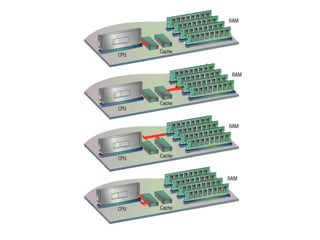
1
Intro to Computer Skills
Lecture 04
Computer Hardware
(Microprocessor and Memory)
TODAY’S LECTURE
• Today we learn about the microprocessor, the
key component, the brain of a computer.
• We will learn about the function/building
blocks of a microprocessor and its various
sub-systems.
• We also familiarize with memory and its
functions.
MICROPROCESSOR
MICROPROCESSOR
• A microprocessor is a computer processor on a microchip.
Its sometime called logic chips or CPU.
• A microprocessor is designed to perform all calculations,
decision making and control functions.
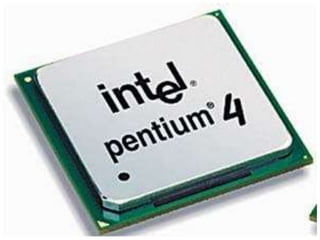
• Today’s state of the art processors including Pentium,
Athalon, powerpc, etc, they are very complex circuits, it
has tens of millions of transistors.
• They work at ultra fast speed, many can perform more
than 1 billions operations per second.
• These all microprocessors are made up of same material,
which is semi-conductor means they are made up of
silicon.
• A microprocessor is designed to perform:
– Arithmetic calculations
– Logic operations
– Use small number-holding areas called registers.
• Microprocessor operations include:
– Adding
– Subtracting
– Comparing two numbers
– Fetching numbers from one area to another.
• When computer in turned on, the microprocessor
is designed to get the first instruction from the
basic input/output system (BIOS) that comes with
the computer as a part of its memory.
• BIOS loads operating system into computer
memory.
• A microprocessor is made from miniaturized
transistors and other circuit elements on a single
semiconductor integrated circuit (IC). These are
made up of semiconductor and silicon.
INTEGRATED CIRCUITS
• A microprocessor is an integrated circuit made
up of silicon.
• A chip is also called IC (aka microchip or just
chip).
• An IC is collection of several electronic
components and these all components are
miniaturized.
• One electronic component is millionth of a
meter, means it is in microns. The thickness of
human hair is 100 um (microns).
these components are…
• The components of IC
– Transistors
– Resistors
– Diodes
– Capacitors
– Wiring
• In any IC the most area covered is by its
wiring(means that part of conductor who carry
signal from one point to another).
TRANSISTORS
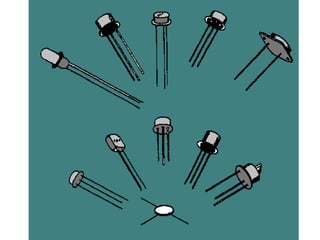
• In digital circuits, transistors are used as very
fast electrical switches, and arrangements of
transistors can function as logic gates.
MATERIALS
• The materials used in IC are:
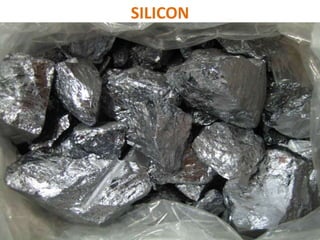
–Silicon – semiconductor
–Copper – conductor (wires, the connecting
path are made up of coppers)
–Silicon Dioxide - insulator
SILICON
MICROPROCESSOR SYSTEM
• Microprocessor System is different then
microprocessor as the body is different then
the brain.
• If we have the brain, but do not have hands,
feet, then what is the benefit of this brain.
• Similarly, if we have microprocessor but do
not have input, output and storage devices
then this microprocessor is useless.
• So in Microprocessor system, the major
component is microprocessor, other
components are input, output, storage and
memory. Collectively it become
Microprocessor system.
• Personal computer is one very popular
example of Microprocessor System, another
example of Microprocessor system is Micro-
controllers.
MICRO-CONTROLLERS
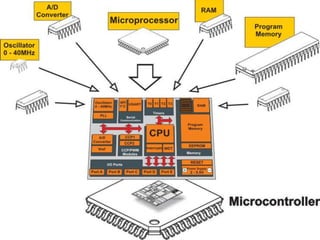
• Micro-controller is a type of microprocessor system.
• The special thing is in micro-controller system these
are all components i.e. microprocessor, memory of the
program (ROM), memory of the data (RAM), I/O lines
to communicate with peripherals & complementary
recourses is on one chip.
• Means a complete computer on a chip.
• Micro-controllers are found in almost any electrical
device e.g. washing machines, microwave ovens and
in toaster etc…
MAIN MEMORY BOTTLENECK
• Microprocessor speed as compare to memory are
quite faster. Today’s microprocessors can perform 1
operation in 1 nanosecond ((10-9) or 1 billionth of
a second), but the memory is respond in 100
nanosecond.
• It means if microprocessor say to memory it needs
data, it can say it in 1 nanosecond, but he will get the
response from memory in 100 nanoseconds or more. It
means today’s slow memory making efficiency of a
microprocessor less.
• It means microprocessor who are capable to perform
at high speed due to slow memory are performing at
low speed.
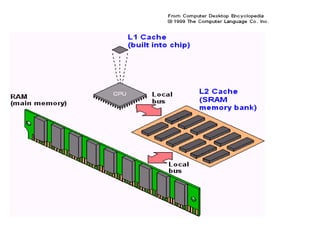
ON-CHIP(L1) CACHE MEMORY
• So, the 90 % of time microprocessor is working at full speed.
• So, this small, super fast memory that we locate on the
same chip is called On-Chip(L1) Cache Memory. The
frequently used data and instructions reside on the on-chip
cache memory.
• So, whenever microprocessor needs data or instructions, its
check in cache memory, if they don’t find those data &
instructions then it checks the main memory.
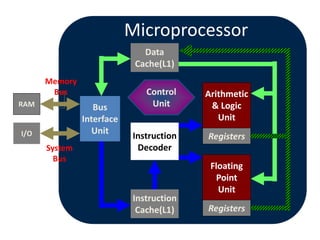
• The size of cache memory is small 8KB to 64KB and its one of
the building blocks that is located on a microprocessor.
Registers
Registers
Microprocessor
Instruction
Cache(L1)
Arithmetic
& Logic
Unit
Control
Unit
Bus
Interface
Unit
Data
Cache(L1)
Instruction
Decoder
I/O
RAM
Memory
Bus
System
Bus
Floating
Point
Unit
CACHE MEMORY
• L2, cache memory, which is on a separate chip
from the microprocessor.
• It is the small size and proximity to the
microprocessor makes access times short,
resulting in a boost in performance.
• It is an extremely fast, small memory between
CPU and MAIN MEMORY whose access time is
closer to the processing speed of the CPU.
• Cache is pronounced as “cash”.
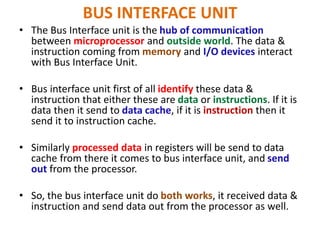
BUS INTERFACE UNIT
• The Bus Interface unit is the hub of communication
between microprocessor and outside world. The data &
instruction coming from memory and I/O devices interact
with Bus Interface Unit.
• Bus interface unit first of all identify these data &
instruction that either these are data or instructions. If it is
data then it send to data cache, if it is instruction then it
send it to instruction cache.
• Similarly processed data in registers will be send to data
cache from there it comes to bus interface unit, and send
out from the processor.
• So, the bus interface unit do both works, it received data &
instruction and send data out from the processor as well.
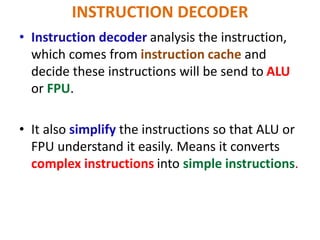
INSTRUCTION DECODER
• Instruction decoder analysis the instruction,
which comes from instruction cache and
decide these instructions will be send to ALU
or FPU.
• It also simplify the instructions so that ALU or
FPU understand it easily. Means it converts
complex instructions into simple instructions.
ARITHMETIC & LOGIC UNIT(ALU)
• Also known as “Integer Unit”.
• In this building block mostly computations of
microprocessor took place for example add,
subtract, divide & multiply.
• Comparison is also took place here for example A
is greater than B or A is less than B.
• Logical operations also took place.
• e.g. A AND B, A OR B.
• Three types of operations took place here:
–Arithmetic
–Logic
–Comparison.
• Modern microprocessors have two and more
ALU, the benefit of it two instructions can
compute simultaneously.
FLOATING POINT UNIT (FPU)
• Another computation unit that found in modern
microprocessor is FPU. Also known as Numeric
Unit. ALU only deals with integers, the FPU deals
with floating point numbers.
• Floating point numbers are those numbers which
involved decimals or fractions.
• Through FPU you can store very very large and
small numbers in compact form.
• So, FPU work is to multiply, divide, subtract or
add fraction numbers.
REGISTERS
• The registers are attached with ALU & FPU, they
are super fast memory like cache.
• When ALU & FPU are doing some calculations,
then they store their intermediate calculations in
registers on a temporary basis. Those calculation,
which results you need after some time.
• When the calculation is finished, then this
processed data from registers goes to data cache
and then to bus interface unit from there either
it goes out to memory or I/O devices.
• Registers are part of the CPU (not main
memory) of a computer.
• The length of a register, sometimes called its
word size, equals the number of bits it can
store.
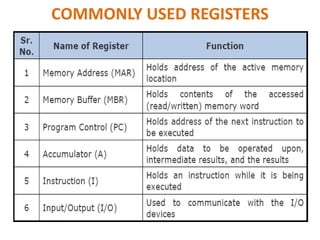
COMMONLY USED REGISTERS
CONTROL UNIT
• Control unit is like a brain or heart of any
microprocessor.
• Its most complex element of any microprocessor.
• Control unit is like, in war a field marshal or
general is.
• If instructions come, the CU generate its order.
• If data have to come, the CU generate its order.
• It manages whole process of microprocessors.
MULTI-CORE PROCESSORS
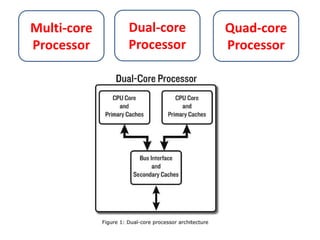
• Dual-core refers to a CPU that includes two
complete execution cores per processor.
• It has combine two processors and their caches
and their controllers onto a single chip.
• They each have their own datapath and logic
units.
• Example: If you are running a virus scan, and a
word processor, you can set the virus scan to only
run through one core, and word processor to
work on the other core.
Multi-core
Processor
Dual-core
Processor
Quad-core
Processor
ENHANCING THE CAPABILITY OF A
MICROPROCESSOR
• The computing capability of a microprocessor
can be enhanced in many different ways:
– By increasing the clock frequency.
– By increasing the word-size.
– Having more effective caching algorithm and right
cache size.
– By increasing the RAM.
– By adding more functional units (e.g. ALU’s, FPU, etc)
– Improving the architecture (e.g. if a task is perform in
3, 4 cycles, it performs in 1 or 2 cycles)
MOORE’S LAW
• Gordon Moore who was the co-founder of
Intel published a paper in 1965.
• Stating in effect that at our rate of
technological development and advancement
in industry the complexity of integrated
circuits double every year.
• Their prediction is still valid.
MEMORY
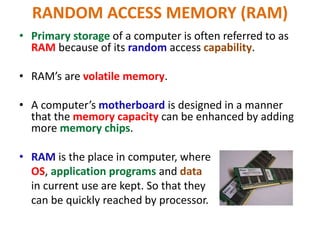
RANDOM ACCESS MEMORY (RAM)
• Primary storage of a computer is often referred to as
RAM because of its random access capability.
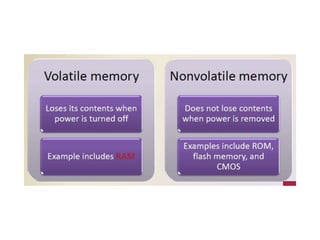
• RAM’s are volatile memory.
• A computer’s motherboard is designed in a manner
that the memory capacity can be enhanced by adding
more memory chips.
• RAM is the place in computer, where
OS, application programs and data
in current use are kept. So that they
can be quickly reached by processor.
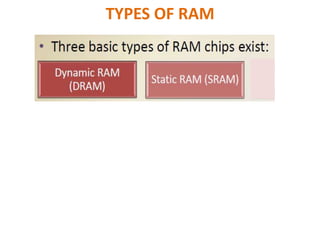
TYPES OF RAM
SRAM
• SRAM is a type of memory that is faster and
more reliable than the common DRAM (Dynamic
RAM).
• The term static is derived from the fact that it
doesn’t need to be refreshed like DRAM.
• Access time is around 10 nanoseconds.
• Both SRAM and DRAM are volatile, means that
they lose their contents when the power is
turned off.
DRAM
• Dynamic RAM needs to be refreshed
thousands of times per second.
• The term dynamic indicates that the memory
must be constantly refreshed.
• Access time is around 60-70 nanoseconds.
• DRAM is slower than SRAM.
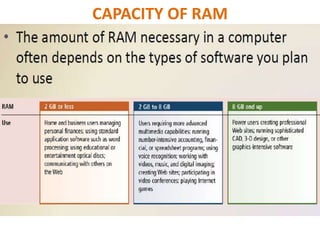
CAPACITY OF RAM
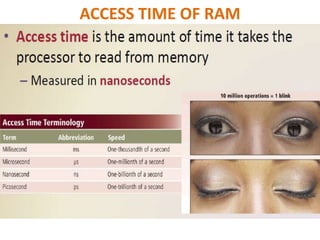
ACCESS TIME OF RAM
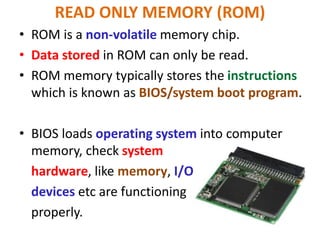
READ ONLY MEMORY (ROM)
• ROM is a non-volatile memory chip.
• Data stored in ROM can only be read.
• ROM memory typically stores the instructions
which is known as BIOS/system boot program.
• BIOS loads operating system into computer
memory, check system
hardware, like memory, I/O
devices etc are functioning
properly.
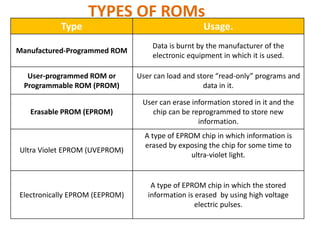
TYPES OF ROMs
Type Usage.
Manufactured-Programmed ROM
Data is burnt by the manufacturer of the
electronic equipment in which it is used.
User-programmed ROM or
Programmable ROM (PROM)
User can load and store “read-only” programs and
data in it.
Erasable PROM (EPROM)
User can erase information stored in it and the
chip can be reprogrammed to store new
information.
Ultra Violet EPROM (UVEPROM)
A type of EPROM chip in which information is
erased by exposing the chip for some time to
ultra-violet light.
Electronically EPROM (EEPROM)
A type of EPROM chip in which the stored
information is erased by using high voltage
electric pulses.

Lec # 04 Computer Hardware (CPU & Memory)-1-1.pptx

  • 1.
    1 Intro to ComputerSkills Lecture 04 Computer Hardware (Microprocessor and Memory)
  • 2.
    TODAY’S LECTURE • Todaywe learn about the microprocessor, the key component, the brain of a computer. • We will learn about the function/building blocks of a microprocessor and its various sub-systems. • We also familiarize with memory and its functions.
  • 3.
  • 4.
    MICROPROCESSOR • A microprocessoris a computer processor on a microchip. Its sometime called logic chips or CPU. • A microprocessor is designed to perform all calculations, decision making and control functions. • Today’s state of the art processors including Pentium, Athalon, powerpc, etc, they are very complex circuits, it has tens of millions of transistors. • They work at ultra fast speed, many can perform more than 1 billions operations per second. • These all microprocessors are made up of same material, which is semi-conductor means they are made up of silicon.
  • 5.
    • A microprocessoris designed to perform: – Arithmetic calculations – Logic operations – Use small number-holding areas called registers. • Microprocessor operations include: – Adding – Subtracting – Comparing two numbers – Fetching numbers from one area to another.
  • 6.
    • When computerin turned on, the microprocessor is designed to get the first instruction from the basic input/output system (BIOS) that comes with the computer as a part of its memory. • BIOS loads operating system into computer memory. • A microprocessor is made from miniaturized transistors and other circuit elements on a single semiconductor integrated circuit (IC). These are made up of semiconductor and silicon.
  • 7.
    INTEGRATED CIRCUITS • Amicroprocessor is an integrated circuit made up of silicon. • A chip is also called IC (aka microchip or just chip). • An IC is collection of several electronic components and these all components are miniaturized. • One electronic component is millionth of a meter, means it is in microns. The thickness of human hair is 100 um (microns).
  • 8.
    these components are… •The components of IC – Transistors – Resistors – Diodes – Capacitors – Wiring • In any IC the most area covered is by its wiring(means that part of conductor who carry signal from one point to another).
  • 9.
    TRANSISTORS • In digitalcircuits, transistors are used as very fast electrical switches, and arrangements of transistors can function as logic gates.
  • 11.
    MATERIALS • The materialsused in IC are: –Silicon – semiconductor –Copper – conductor (wires, the connecting path are made up of coppers) –Silicon Dioxide - insulator
  • 12.
  • 13.
    MICROPROCESSOR SYSTEM • MicroprocessorSystem is different then microprocessor as the body is different then the brain. • If we have the brain, but do not have hands, feet, then what is the benefit of this brain. • Similarly, if we have microprocessor but do not have input, output and storage devices then this microprocessor is useless.
  • 14.
    • So inMicroprocessor system, the major component is microprocessor, other components are input, output, storage and memory. Collectively it become Microprocessor system. • Personal computer is one very popular example of Microprocessor System, another example of Microprocessor system is Micro- controllers.
  • 15.
    MICRO-CONTROLLERS • Micro-controller isa type of microprocessor system. • The special thing is in micro-controller system these are all components i.e. microprocessor, memory of the program (ROM), memory of the data (RAM), I/O lines to communicate with peripherals & complementary recourses is on one chip. • Means a complete computer on a chip. • Micro-controllers are found in almost any electrical device e.g. washing machines, microwave ovens and in toaster etc…
  • 17.
    MAIN MEMORY BOTTLENECK •Microprocessor speed as compare to memory are quite faster. Today’s microprocessors can perform 1 operation in 1 nanosecond ((10-9) or 1 billionth of a second), but the memory is respond in 100 nanosecond. • It means if microprocessor say to memory it needs data, it can say it in 1 nanosecond, but he will get the response from memory in 100 nanoseconds or more. It means today’s slow memory making efficiency of a microprocessor less. • It means microprocessor who are capable to perform at high speed due to slow memory are performing at low speed.
  • 18.
    ON-CHIP(L1) CACHE MEMORY •So, the 90 % of time microprocessor is working at full speed. • So, this small, super fast memory that we locate on the same chip is called On-Chip(L1) Cache Memory. The frequently used data and instructions reside on the on-chip cache memory. • So, whenever microprocessor needs data or instructions, its check in cache memory, if they don’t find those data & instructions then it checks the main memory. • The size of cache memory is small 8KB to 64KB and its one of the building blocks that is located on a microprocessor.
  • 19.
  • 20.
    CACHE MEMORY • L2,cache memory, which is on a separate chip from the microprocessor. • It is the small size and proximity to the microprocessor makes access times short, resulting in a boost in performance. • It is an extremely fast, small memory between CPU and MAIN MEMORY whose access time is closer to the processing speed of the CPU. • Cache is pronounced as “cash”.
  • 23.
    BUS INTERFACE UNIT •The Bus Interface unit is the hub of communication between microprocessor and outside world. The data & instruction coming from memory and I/O devices interact with Bus Interface Unit. • Bus interface unit first of all identify these data & instruction that either these are data or instructions. If it is data then it send to data cache, if it is instruction then it send it to instruction cache. • Similarly processed data in registers will be send to data cache from there it comes to bus interface unit, and send out from the processor. • So, the bus interface unit do both works, it received data & instruction and send data out from the processor as well.
  • 24.
    INSTRUCTION DECODER • Instructiondecoder analysis the instruction, which comes from instruction cache and decide these instructions will be send to ALU or FPU. • It also simplify the instructions so that ALU or FPU understand it easily. Means it converts complex instructions into simple instructions.
  • 25.
    ARITHMETIC & LOGICUNIT(ALU) • Also known as “Integer Unit”. • In this building block mostly computations of microprocessor took place for example add, subtract, divide & multiply. • Comparison is also took place here for example A is greater than B or A is less than B. • Logical operations also took place. • e.g. A AND B, A OR B.
  • 26.
    • Three typesof operations took place here: –Arithmetic –Logic –Comparison. • Modern microprocessors have two and more ALU, the benefit of it two instructions can compute simultaneously.
  • 27.
    FLOATING POINT UNIT(FPU) • Another computation unit that found in modern microprocessor is FPU. Also known as Numeric Unit. ALU only deals with integers, the FPU deals with floating point numbers. • Floating point numbers are those numbers which involved decimals or fractions. • Through FPU you can store very very large and small numbers in compact form. • So, FPU work is to multiply, divide, subtract or add fraction numbers.
  • 28.
    REGISTERS • The registersare attached with ALU & FPU, they are super fast memory like cache. • When ALU & FPU are doing some calculations, then they store their intermediate calculations in registers on a temporary basis. Those calculation, which results you need after some time. • When the calculation is finished, then this processed data from registers goes to data cache and then to bus interface unit from there either it goes out to memory or I/O devices.
  • 29.
    • Registers arepart of the CPU (not main memory) of a computer. • The length of a register, sometimes called its word size, equals the number of bits it can store.
  • 30.
  • 31.
    CONTROL UNIT • Controlunit is like a brain or heart of any microprocessor. • Its most complex element of any microprocessor. • Control unit is like, in war a field marshal or general is. • If instructions come, the CU generate its order. • If data have to come, the CU generate its order. • It manages whole process of microprocessors.
  • 32.
    MULTI-CORE PROCESSORS • Dual-corerefers to a CPU that includes two complete execution cores per processor. • It has combine two processors and their caches and their controllers onto a single chip. • They each have their own datapath and logic units. • Example: If you are running a virus scan, and a word processor, you can set the virus scan to only run through one core, and word processor to work on the other core.
  • 33.
  • 35.
    ENHANCING THE CAPABILITYOF A MICROPROCESSOR • The computing capability of a microprocessor can be enhanced in many different ways: – By increasing the clock frequency. – By increasing the word-size. – Having more effective caching algorithm and right cache size. – By increasing the RAM. – By adding more functional units (e.g. ALU’s, FPU, etc) – Improving the architecture (e.g. if a task is perform in 3, 4 cycles, it performs in 1 or 2 cycles)
  • 36.
    MOORE’S LAW • GordonMoore who was the co-founder of Intel published a paper in 1965. • Stating in effect that at our rate of technological development and advancement in industry the complexity of integrated circuits double every year. • Their prediction is still valid.
  • 37.
  • 39.
    RANDOM ACCESS MEMORY(RAM) • Primary storage of a computer is often referred to as RAM because of its random access capability. • RAM’s are volatile memory. • A computer’s motherboard is designed in a manner that the memory capacity can be enhanced by adding more memory chips. • RAM is the place in computer, where OS, application programs and data in current use are kept. So that they can be quickly reached by processor.
  • 40.
  • 41.
    SRAM • SRAM isa type of memory that is faster and more reliable than the common DRAM (Dynamic RAM). • The term static is derived from the fact that it doesn’t need to be refreshed like DRAM. • Access time is around 10 nanoseconds. • Both SRAM and DRAM are volatile, means that they lose their contents when the power is turned off.
  • 42.
    DRAM • Dynamic RAMneeds to be refreshed thousands of times per second. • The term dynamic indicates that the memory must be constantly refreshed. • Access time is around 60-70 nanoseconds. • DRAM is slower than SRAM.
  • 43.
  • 44.
  • 45.
    READ ONLY MEMORY(ROM) • ROM is a non-volatile memory chip. • Data stored in ROM can only be read. • ROM memory typically stores the instructions which is known as BIOS/system boot program. • BIOS loads operating system into computer memory, check system hardware, like memory, I/O devices etc are functioning properly.
  • 46.
    TYPES OF ROMs TypeUsage. Manufactured-Programmed ROM Data is burnt by the manufacturer of the electronic equipment in which it is used. User-programmed ROM or Programmable ROM (PROM) User can load and store “read-only” programs and data in it. Erasable PROM (EPROM) User can erase information stored in it and the chip can be reprogrammed to store new information. Ultra Violet EPROM (UVEPROM) A type of EPROM chip in which information is erased by exposing the chip for some time to ultra-violet light. Electronically EPROM (EEPROM) A type of EPROM chip in which the stored information is erased by using high voltage electric pulses.

Editor's Notes