COMPUTER ARCHITECTURE
By
S.Asha
Assistant Professor
Dept of Information Technology
S.A.Engineering College
INTRODUCTION
🞆Just as buildings, each computer has a visible structure,
referred to as its architecture.
🞆The internal logic design of the system is known as
architecture. It determines the various operations
performed by the system.
🞆Computer Architecture is concerned with the structure
and behavior of the various function modules of the
computer and how they interact to provide the
processing needs of the user.
Need to study Computer Architecture:
🞆We need to understand computer architecture in order to
structure an internal component of a computer and a
program to realize the logic, so that it runs more efficiently
on a real time machine.
🞆The functional blocks in a computer are of four types:
1. Central Processing Unit
2. Memory
3. Input Unit
4. Output Unit
DATA FLOW BETWEEN CPU,
MEMORY AND I/O DEVICES
Auxilliary Storage
(Backing Storage)
To Supplement main storage
Memory
Input
Unit
Control Unit ALU
Output
Unit
Registers
Processor
Data Path
Control Signals
CENTRAL PROCESSING UNIT (CPU)
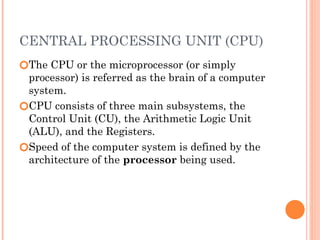
🞆The CPU or the microprocessor (or simply
processor) is referred as the brain of a computer
system.
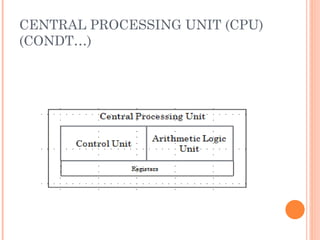
🞆CPU consists of three main subsystems, the
Control Unit (CU), the Arithmetic Logic Unit
(ALU), and the Registers.
🞆Speed of the computer system is defined by the
architecture of the processor being used.
CENTRAL PROCESSING UNIT (CPU)
(CONDT…)
ARITHMETIC LOGIC UNIT
🞆The ALU contains electronic circuits necessary to
perform arithmetic and logical operations.
🞆The arithmetic operations are ADD,
SUBSTRACT, MULTIPLY, DIVIDE, etc.
🞆The logical operations include COMPARE,
SHIFT, ROTATE, AND, OR, etc
CONTROL UNIT
🞆The control unit analyses each instruction in the
program and sends the relevant signals to all
other units – ALU, Memory, Input unit and
Output unit
🞆It is responsible for directing and coordinating
most of the computer system activities.
🞆It does not execute instructions by itself. It tells
other parts of the computer system what to do.
🞆It determines the movement of electronic signals
between the main memory and arithmetic logic
unit as well as the control signals between the
CPU and input/output devices.
COMMUNICATION INSIDE A
COMPUTER..
🞆A computer program consists of both instructions
and data. The program is fed into the computer
through the input unit and stored in the memory.
🞆In order to execute the program, the instructions
have to be fetched from memory one by one.
🞆This fetching of instructions is done by the
control unit.
🞆After an instruction is fetched, the control unit
decodes the instruction.
🞆According to the instruction, the control unit
issues control signals to other units.
COMMUNICATION INSIDE A
COMPUTER..
o After an instruction is executed, the result of the
instruction is stored in memory or stored
temporarily in the control unit or ALU, so that
this can be used by the next instruction.
o The results of a program are taken out of the
computer through the output unit.
o The control unit, ALU and registers are
collectively known as Central Processing Unit
(CPU)
COMMUNICATION INSIDE A
COMPUTER
INTERCONNECTION OF UNITS
🞆A computer program consists of both instructions
and data.
🞆The program is fed into the computer through
the input unit and stored in the memory.
🞆In order to execute the program, the instructions
have to be fetched from memory one by one and
store it into registers (working memory) for
processing.
🞆This fetching of instructions is done by the
control unit.
INSTRUCTION CYCLE
🞆Instruction are fetched and executed by the
control unit one by one. The sequences involved
for the fetch of one instruction and its execution
are known as instruction cycle.
INSTRUCTION CYCLE
INTERCONNECTIONS OF UNITS..
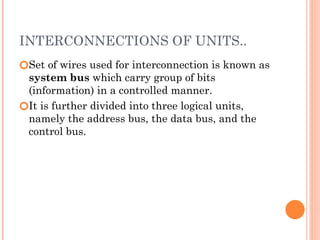
🞆Set of wires used for interconnection is known as
system bus which carry group of bits
(information) in a controlled manner.
🞆It is further divided into three logical units,
namely the address bus, the data bus, and the
control bus.
SYSTEM BUSES TYPES
🞆Data Bus: The data bus is used when any unit is
sending data, instruction or command code to
some other units.
🞆Address Bus: The address bus is used when one
unit is sending an address information i.e.
location of the data residing in the memory to
another unit.
CONTROL BUS
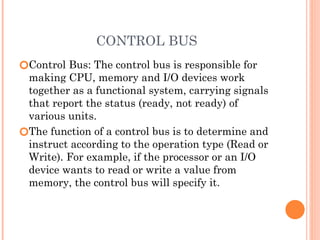
🞆Control Bus: The control bus is responsible for
making CPU, memory and I/O devices work
together as a functional system, carrying signals
that report the status (ready, not ready) of
various units.
🞆The function of a control bus is to determine and
instruct according to the operation type (Read or
Write). For example, if the processor or an I/O
device wants to read or write a value from
memory, the control bus will specify it.
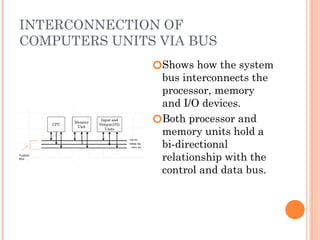
INTERCONNECTION OF
COMPUTERS UNITS VIA BUS
🞆Shows how the system
bus interconnects the
processor, memory
and I/O devices.
🞆Both processor and
memory units hold a
bi-directional
relationship with the
control and data bus.
REGISTERS
🞆 It is a special temporary storage location within the CPU.
🞆 Registers quickly accept, store and transfer data and
instructions that are being used immediately.
🞆 To execute an instruction, the control unit of the CPU
retrieves it from main memory and places it onto a
register.
🞆 The typical operations that take place in the processing of
instruction are part of the instruction cycle or execution
cycle.
🞆 The instruction cycle refers to the retrieval of the
instruction from main memory and its sub sequence at
decoding.
🞆 The time it takes to go through the instruction cycle is
referred to as I-time.
MEMORY
🞆Memory is the computer's electronic scratchpad
or local store in computer terminology.
🞆Used for temporary storage of calculations, data,
and other work in progress.
🞆Two types: Primary and Secondary
🞆Primary memory or the main memory is part of
the main computer system. The primary memory
itself is of two types.
🞆The first is called random access memory (RAM)
and the other is read only memory (ROM).
RANDOM ACCESS MEMORY (RAM)
🞆The processor directly stores and retrieves
information from it.
🞆Memory is organized into locations. Each
memory location is identified by a unique
address. The access time is same for all location.
🞆It is volatile: when turned off, everything in RAM
disappears.
🞆Two types:
TYPES OF RAM
🞆 Dynamic Random Access Memory (DRAM):
This type RAM retain the content of any
location only for a few milliseconds. Within that
period, each location must be written again with
the same contents. This is known as refreshing.
🞆 Static Random Access Memory (SRAM):
This type of RAM preserves the contents of all
the locations as long as the power supply is
present. SRAM is generally included in a
computer system by the name of cache.
READ ONLY MEMORY (ROM)
🞆Data stored in ROM cannot be modified, or can
be modified only slowly or with difficulty, so it is
mainly used to distribute.
🞆The instructions in ROM are built into the
electronic circuits of the chip which is called
firmware.
🞆Random access in nature and non-volatile.
TYPES OF ROM
🞆Programmable read-only memory (PROM), or one-
time programmable ROM can be written to or
programmed via a special device called a PROM
programmer.
🞆Erasable programmable read-only memory (EPROM)
can be erased by exposure to strong ultraviolet light
then rewritten with a process that again needs higher
than usual voltage applied.
🞆Electrically erasable programmable read-only
memory (EEPROM) is based on a similar
semiconductor structure to EPROM, but allows its
entire contents (or selected banks) to be electrically
erased, then rewritten electrically, so that they need
not be removed from the computer
FLASH MEMORY
🞆Modern type of EEPROM invented in 1984.
🞆Random access memories and are non-volatile.
🞆Use one transistor per memory cell and come in
capacities ranging from 1 MB to 32 GB by the
year 2007.
🞆The read time is much smaller (tens of
nanoseconds) compared write time (tens of
microseconds).
VARIETIES OF SEMICONDUCTOR
RANDOM ACCESS MEMORIES
Main memory of
computers
Read Only Memory
(ROM)
Read/Write
memory Factory
Programmed
User
Programmable
PROM
Erasable PROM
SRAM DRAM
Permanent
non-erasable (Non-erasable)
UVEPROM EEPROM
CACHE MEMORY
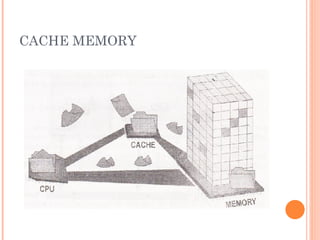
🞆High speed memory kept in between processor
and RAM to increase the data execution speed.
🞆Kept near to the processor.
🞆Major reason for incorporating cache in the
system is that the CPU is much faster than the
DRAM and needs a place to store information
that can be accessed quickly.
🞆Cache fetches the frequently used data from the
DRAM and buffers (stores) it for further
processor usage.
CACHE MEMORY
PROCESSOR SPEED
🞆Speed of a computer system is determined by
several factors, clock speed of the processor and
the speed and size of the data bus.
🞆Clock speed is the rate at which the processor
processes information and this is measured in
millions of cycles per second(Megahertz)
🞆The more the number of hertz, the faster is the
processing speed
🞆The larger the bus width and the faster the bus
speed, the greater the amount of data can travel
on it in a given amount of time.
INPUT DEVICES
🞆Any peripheral used to provide data and control
signals to an information processing system such
as a computer or other information appliance.
🞆Common input devices: Keyboard, Mouse
🞆Other devices: microphone, digital camera,
scanner.
OUTPUT DEVICES
🞆Any piece of computer hardware equipment used
to communicate the results of processed data to
the user.
🞆Examples: Monitors, Printers, Speakers, etc.
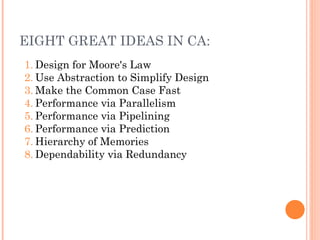
EIGHT GREAT IDEAS IN CA:
1. Design for Moore's Law
2. Use Abstraction to Simplify Design
3. Make the Common Case Fast
4. Performance via Parallelism
5. Performance via Pipelining
6. Performance via Prediction
7. Hierarchy of Memories
8. Dependability via Redundancy
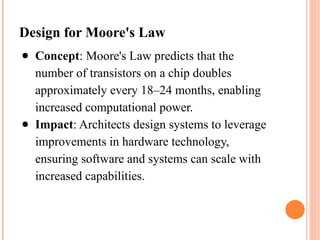
Design for Moore's Law
● Concept: Moore's Law predicts that the
number of transistors on a chip doubles
approximately every 18–24 months, enabling
increased computational power.
● Impact: Architects design systems to leverage
improvements in hardware technology,
ensuring software and systems can scale with
increased capabilities.
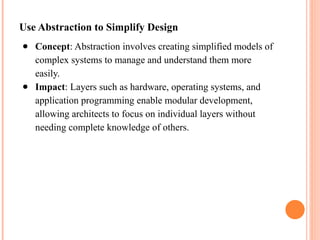
Use Abstraction to Simplify Design
● Concept: Abstraction involves creating simplified models of
complex systems to manage and understand them more
easily.
● Impact: Layers such as hardware, operating systems, and
application programming enable modular development,
allowing architects to focus on individual layers without
needing complete knowledge of others.
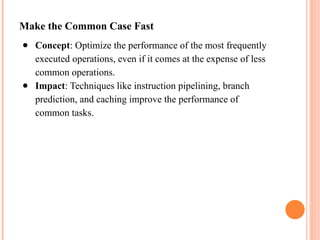
Make the Common Case Fast
● Concept: Optimize the performance of the most frequently
executed operations, even if it comes at the expense of less
common operations.
● Impact: Techniques like instruction pipelining, branch
prediction, and caching improve the performance of
common tasks.
Performance via Parallelism
● Concept: Perform multiple operations simultaneously to
improve throughput.
● Impact: Parallel architectures, such as multi-core
processors, SIMD (Single Instruction, Multiple Data), and
GPUs, enhance computational power by dividing workloads
across multiple processing units.
Performance via Pipelining
● Concept: Overlap the execution of instructions by dividing
them into stages, with each stage operating in parallel.
● Impact: Instruction pipelines in CPUs enable faster execution
by increasing instruction throughput without increasing the
clock speed.
Performance via Prediction
● Concept: Use predictions to guess the outcomes of certain
operations (e.g., branches in a program) and execute
accordingly, correcting if the guess is wrong.
● Impact: Techniques like branch prediction and speculative
execution significantly reduce delays and improve
performance.
Hierarchy of Memories
● Concept: Organize memory into layers (registers, caches, main
memory, and storage) to balance speed, size, and cost.
● Impact: Faster, smaller, and more expensive memory types
(e.g., caches) store frequently accessed data, while larger,
slower, and cheaper memory types store less frequently used
data.
Dependability via Redundancy
● Concept: Increase system reliability by incorporating
redundant components to detect and recover from
failures.
● Impact: Techniques such as error-correcting codes,
redundant arrays of independent disks (RAID), and
failover systems ensure system availability and
correctness.

Computer architecture unit 1 ppt for IT students

  • 1.
    COMPUTER ARCHITECTURE By S.Asha Assistant Professor Deptof Information Technology S.A.Engineering College
  • 2.
    INTRODUCTION 🞆Just as buildings,each computer has a visible structure, referred to as its architecture. 🞆The internal logic design of the system is known as architecture. It determines the various operations performed by the system. 🞆Computer Architecture is concerned with the structure and behavior of the various function modules of the computer and how they interact to provide the processing needs of the user.
  • 3.
    Need to studyComputer Architecture: 🞆We need to understand computer architecture in order to structure an internal component of a computer and a program to realize the logic, so that it runs more efficiently on a real time machine. 🞆The functional blocks in a computer are of four types: 1. Central Processing Unit 2. Memory 3. Input Unit 4. Output Unit
  • 4.
    DATA FLOW BETWEENCPU, MEMORY AND I/O DEVICES Auxilliary Storage (Backing Storage) To Supplement main storage Memory Input Unit Control Unit ALU Output Unit Registers Processor Data Path Control Signals
  • 5.
    CENTRAL PROCESSING UNIT(CPU) 🞆The CPU or the microprocessor (or simply processor) is referred as the brain of a computer system. 🞆CPU consists of three main subsystems, the Control Unit (CU), the Arithmetic Logic Unit (ALU), and the Registers. 🞆Speed of the computer system is defined by the architecture of the processor being used.
  • 6.
    CENTRAL PROCESSING UNIT(CPU) (CONDT…)
  • 7.
    ARITHMETIC LOGIC UNIT 🞆TheALU contains electronic circuits necessary to perform arithmetic and logical operations. 🞆The arithmetic operations are ADD, SUBSTRACT, MULTIPLY, DIVIDE, etc. 🞆The logical operations include COMPARE, SHIFT, ROTATE, AND, OR, etc
  • 8.
    CONTROL UNIT 🞆The controlunit analyses each instruction in the program and sends the relevant signals to all other units – ALU, Memory, Input unit and Output unit 🞆It is responsible for directing and coordinating most of the computer system activities. 🞆It does not execute instructions by itself. It tells other parts of the computer system what to do. 🞆It determines the movement of electronic signals between the main memory and arithmetic logic unit as well as the control signals between the CPU and input/output devices.
  • 9.
    COMMUNICATION INSIDE A COMPUTER.. 🞆Acomputer program consists of both instructions and data. The program is fed into the computer through the input unit and stored in the memory. 🞆In order to execute the program, the instructions have to be fetched from memory one by one. 🞆This fetching of instructions is done by the control unit. 🞆After an instruction is fetched, the control unit decodes the instruction. 🞆According to the instruction, the control unit issues control signals to other units.
  • 10.
    COMMUNICATION INSIDE A COMPUTER.. oAfter an instruction is executed, the result of the instruction is stored in memory or stored temporarily in the control unit or ALU, so that this can be used by the next instruction. o The results of a program are taken out of the computer through the output unit. o The control unit, ALU and registers are collectively known as Central Processing Unit (CPU)
  • 11.
  • 12.
    INTERCONNECTION OF UNITS 🞆Acomputer program consists of both instructions and data. 🞆The program is fed into the computer through the input unit and stored in the memory. 🞆In order to execute the program, the instructions have to be fetched from memory one by one and store it into registers (working memory) for processing. 🞆This fetching of instructions is done by the control unit.
  • 13.
    INSTRUCTION CYCLE 🞆Instruction arefetched and executed by the control unit one by one. The sequences involved for the fetch of one instruction and its execution are known as instruction cycle.
  • 14.
  • 15.
    INTERCONNECTIONS OF UNITS.. 🞆Setof wires used for interconnection is known as system bus which carry group of bits (information) in a controlled manner. 🞆It is further divided into three logical units, namely the address bus, the data bus, and the control bus.
  • 16.
    SYSTEM BUSES TYPES 🞆DataBus: The data bus is used when any unit is sending data, instruction or command code to some other units. 🞆Address Bus: The address bus is used when one unit is sending an address information i.e. location of the data residing in the memory to another unit.
  • 17.
    CONTROL BUS 🞆Control Bus:The control bus is responsible for making CPU, memory and I/O devices work together as a functional system, carrying signals that report the status (ready, not ready) of various units. 🞆The function of a control bus is to determine and instruct according to the operation type (Read or Write). For example, if the processor or an I/O device wants to read or write a value from memory, the control bus will specify it.
  • 18.
    INTERCONNECTION OF COMPUTERS UNITSVIA BUS 🞆Shows how the system bus interconnects the processor, memory and I/O devices. 🞆Both processor and memory units hold a bi-directional relationship with the control and data bus.
  • 19.
    REGISTERS 🞆 It isa special temporary storage location within the CPU. 🞆 Registers quickly accept, store and transfer data and instructions that are being used immediately. 🞆 To execute an instruction, the control unit of the CPU retrieves it from main memory and places it onto a register. 🞆 The typical operations that take place in the processing of instruction are part of the instruction cycle or execution cycle. 🞆 The instruction cycle refers to the retrieval of the instruction from main memory and its sub sequence at decoding. 🞆 The time it takes to go through the instruction cycle is referred to as I-time.
  • 20.
    MEMORY 🞆Memory is thecomputer's electronic scratchpad or local store in computer terminology. 🞆Used for temporary storage of calculations, data, and other work in progress. 🞆Two types: Primary and Secondary 🞆Primary memory or the main memory is part of the main computer system. The primary memory itself is of two types. 🞆The first is called random access memory (RAM) and the other is read only memory (ROM).
  • 21.
    RANDOM ACCESS MEMORY(RAM) 🞆The processor directly stores and retrieves information from it. 🞆Memory is organized into locations. Each memory location is identified by a unique address. The access time is same for all location. 🞆It is volatile: when turned off, everything in RAM disappears. 🞆Two types:
  • 22.
    TYPES OF RAM 🞆Dynamic Random Access Memory (DRAM): This type RAM retain the content of any location only for a few milliseconds. Within that period, each location must be written again with the same contents. This is known as refreshing. 🞆 Static Random Access Memory (SRAM): This type of RAM preserves the contents of all the locations as long as the power supply is present. SRAM is generally included in a computer system by the name of cache.
  • 23.
    READ ONLY MEMORY(ROM) 🞆Data stored in ROM cannot be modified, or can be modified only slowly or with difficulty, so it is mainly used to distribute. 🞆The instructions in ROM are built into the electronic circuits of the chip which is called firmware. 🞆Random access in nature and non-volatile.
  • 24.
    TYPES OF ROM 🞆Programmableread-only memory (PROM), or one- time programmable ROM can be written to or programmed via a special device called a PROM programmer. 🞆Erasable programmable read-only memory (EPROM) can be erased by exposure to strong ultraviolet light then rewritten with a process that again needs higher than usual voltage applied. 🞆Electrically erasable programmable read-only memory (EEPROM) is based on a similar semiconductor structure to EPROM, but allows its entire contents (or selected banks) to be electrically erased, then rewritten electrically, so that they need not be removed from the computer
  • 25.
    FLASH MEMORY 🞆Modern typeof EEPROM invented in 1984. 🞆Random access memories and are non-volatile. 🞆Use one transistor per memory cell and come in capacities ranging from 1 MB to 32 GB by the year 2007. 🞆The read time is much smaller (tens of nanoseconds) compared write time (tens of microseconds).
  • 26.
    VARIETIES OF SEMICONDUCTOR RANDOMACCESS MEMORIES Main memory of computers Read Only Memory (ROM) Read/Write memory Factory Programmed User Programmable PROM Erasable PROM SRAM DRAM Permanent non-erasable (Non-erasable) UVEPROM EEPROM
  • 27.
    CACHE MEMORY 🞆High speedmemory kept in between processor and RAM to increase the data execution speed. 🞆Kept near to the processor. 🞆Major reason for incorporating cache in the system is that the CPU is much faster than the DRAM and needs a place to store information that can be accessed quickly. 🞆Cache fetches the frequently used data from the DRAM and buffers (stores) it for further processor usage.
  • 28.
  • 29.
    PROCESSOR SPEED 🞆Speed ofa computer system is determined by several factors, clock speed of the processor and the speed and size of the data bus. 🞆Clock speed is the rate at which the processor processes information and this is measured in millions of cycles per second(Megahertz) 🞆The more the number of hertz, the faster is the processing speed 🞆The larger the bus width and the faster the bus speed, the greater the amount of data can travel on it in a given amount of time.
  • 30.
    INPUT DEVICES 🞆Any peripheralused to provide data and control signals to an information processing system such as a computer or other information appliance. 🞆Common input devices: Keyboard, Mouse 🞆Other devices: microphone, digital camera, scanner.
  • 31.
    OUTPUT DEVICES 🞆Any pieceof computer hardware equipment used to communicate the results of processed data to the user. 🞆Examples: Monitors, Printers, Speakers, etc.
  • 32.
    EIGHT GREAT IDEASIN CA: 1. Design for Moore's Law 2. Use Abstraction to Simplify Design 3. Make the Common Case Fast 4. Performance via Parallelism 5. Performance via Pipelining 6. Performance via Prediction 7. Hierarchy of Memories 8. Dependability via Redundancy
  • 33.
    Design for Moore'sLaw ● Concept: Moore's Law predicts that the number of transistors on a chip doubles approximately every 18–24 months, enabling increased computational power. ● Impact: Architects design systems to leverage improvements in hardware technology, ensuring software and systems can scale with increased capabilities.
  • 34.
    Use Abstraction toSimplify Design ● Concept: Abstraction involves creating simplified models of complex systems to manage and understand them more easily. ● Impact: Layers such as hardware, operating systems, and application programming enable modular development, allowing architects to focus on individual layers without needing complete knowledge of others.
  • 35.
    Make the CommonCase Fast ● Concept: Optimize the performance of the most frequently executed operations, even if it comes at the expense of less common operations. ● Impact: Techniques like instruction pipelining, branch prediction, and caching improve the performance of common tasks.
  • 36.
    Performance via Parallelism ●Concept: Perform multiple operations simultaneously to improve throughput. ● Impact: Parallel architectures, such as multi-core processors, SIMD (Single Instruction, Multiple Data), and GPUs, enhance computational power by dividing workloads across multiple processing units.
  • 37.
    Performance via Pipelining ●Concept: Overlap the execution of instructions by dividing them into stages, with each stage operating in parallel. ● Impact: Instruction pipelines in CPUs enable faster execution by increasing instruction throughput without increasing the clock speed.
  • 38.
    Performance via Prediction ●Concept: Use predictions to guess the outcomes of certain operations (e.g., branches in a program) and execute accordingly, correcting if the guess is wrong. ● Impact: Techniques like branch prediction and speculative execution significantly reduce delays and improve performance.
  • 39.
    Hierarchy of Memories ●Concept: Organize memory into layers (registers, caches, main memory, and storage) to balance speed, size, and cost. ● Impact: Faster, smaller, and more expensive memory types (e.g., caches) store frequently accessed data, while larger, slower, and cheaper memory types store less frequently used data.
  • 40.
    Dependability via Redundancy ●Concept: Increase system reliability by incorporating redundant components to detect and recover from failures. ● Impact: Techniques such as error-correcting codes, redundant arrays of independent disks (RAID), and failover systems ensure system availability and correctness.

Editor's Notes

  • #13 In all computerIn all computer languagesIn all computer languages, expressions consist of two types of components: operands and operators. Operands are the objects. Operands are the objects that are manipulated and operators are the symbols that represent specific actions. For example, in the expression 5 + x X and 5 are operands and + is an operator. All expressions have at least one operand.
  • #14 In all computerIn all computer languagesIn all computer languages, expressions consist of two types of components: operands and operators. Operands are the objects. Operands are the objects that are manipulated and operators are the symbols that represent specific actions. For example, in the expression 5 + x X and 5 are operands and + is an operator. All expressions have at least one operand.