Graphics www.webstyle guide.com
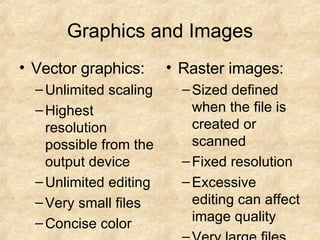
Graphics and Images Vector graphics: Unlimited scaling Highest resolution possible from the output device Unlimited editing Very small files Concise color Raster images: Sized defined when the file is created or scanned  Fixed resolution Excessive editing can affect image quality Very large files Continuous-tone color
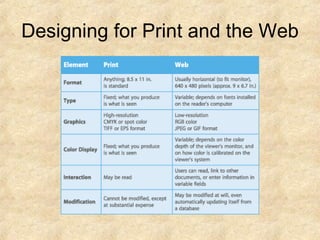
Designing for Print and the Web
3 formats used on the web GIF JPG PNG
GIF Graphic Interchange Format Lossless compression-meaning no color information is discarded when image is compressed Color depth-8 bit or 256 colors Best use for line art or large field of homogeneous color Gifs should not be use used for photographs or graphics with graduations of color
Animation Adds visual interest to a Web page or presentation Create animated GIF files from illustration or image-editing software GIF format results in small file sizes and relatively short download times Can be viewed in most current Web browsers Create animated movies using Macromedia Flash Flash animation provides more options than GIF, but large files require longer download time and Flash Player utility to view the movies
Gif Transparency The background color or pattern will show through the areas that you have designated a transparent
Gif Animation You can build animations consisting of multiple static images that play continuous, creating the illusion of motion You can use the program image ready to create gif animation Some what limited Use restraint when adding animated gifs
JPG Joint Photographic Experts Group Format best used for photographs or continuous tone images. 24-bit images that allow millions of colors Uses lossy compression-when the image is compressed some color information is discarded resulting in in a loss of quality form the original image. Photoshop allow you to manually manipulate the compression of an image by using a slider. The higher the compression the lower the image quality
PNG Portable Network Graphics Royalty-free file format that was intened to replace GIF Compresses images to a smaller file size than GIF Supports transparency and interlacing but not animation
RGB COLOR MODELS Red, Blue and Green RGB mirrors the way the human eye perceives color The RGB model is called "additive" because a combination of the three pure colors red, green, and blue "adds up" to white light  You get secondary colors when you add red and blue to get magenta; green and blue to get cyan and red to green to get yellow http://www.webstyleguide.com/graphics/displays.html
Pixels A pixel is the smallest element in a bit mapped image capture by a digital camera or scanner Photoshop allows you to edit pixels, changing their color, shade and brightness.
Pixel and Color Depth To control the color of each pixel on the screen, the operating system must dedicate a small amount of memory to each pixel.  In the simplest form of black-and-white computer displays, a single bit of memory is assigned to each pixel.  Because each memory bit is either positive or negative (0 or 1), a 1-bit display system can manage only two colors (black or white) for each pixel on the screen:
Pixel and Color Depth If more bits of memory are dedicated to each pixel in the display, more colors can be managed. When 8 bits of memory are dedicated to each pixel, each pixel could be one of 256 colors  If still more memory is dedicated to each pixel, nearly photographic color is achievable on the computer screen. "True-color" or "24-bit" color displays can show millions of unique colors simultaneously on the computer screen.  True-color images are composed by dedicating 24 bits of memory to each pixel; 8 each for the red, green, and blue components (8 + 8 + 8 = 24):
Resolution Pixels can vary in size.  If you have an image with a resolution of 100ppi, each pixel would be 1/100 th  of an inch square
Browser safe colors The browser safe color palette is a solution devised by Netscape to solve the problem of displaying color graphics in a similar way on all kinds of display screens. Browser safe colors is based on an 8 bit 216 color palette (40 colors are reserved by windows operating system The browser-safe color palette is a solution devised by Netscape to solve the problem of displaying color graphics in a similar way on many kinds of display screens, with browsers running under different operating systems
CMYK Is referred to as subtractive color model. Used for printing If you subtract all cyan, magenta and yellow you end up with the absence of color-white
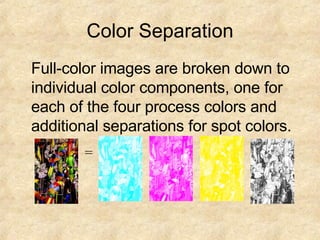
Color Separation Full-color images are broken down to individual color components, one for each of the four process colors and additional separations for spot colors. =
RGB VS CMYK Work with RGB mode if the image is intended for use on the WWW or multimedia project CMYK or RGB if the image is intended to print…just convert RGB to CMYK
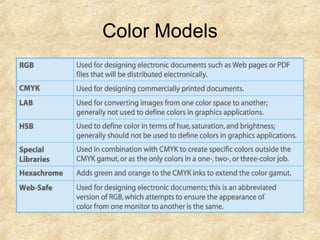
Color Models
Dithering Used to reduce the color range of images down to the 256 or fewer colors seen in 8 bit GIF images. Dithering reduces the overall sharpness of an image and often make the image look grainy.
Screen Resolution Refers to the number of pixels a screen can display with in a given area Resolutions vary from 72-96 pixels per inch When displaying images on the web you should set the resolution to 72 ppi

Graphics

  • 1.
  • 2.
    Graphics and ImagesVector graphics: Unlimited scaling Highest resolution possible from the output device Unlimited editing Very small files Concise color Raster images: Sized defined when the file is created or scanned Fixed resolution Excessive editing can affect image quality Very large files Continuous-tone color
  • 3.
  • 4.
    3 formats usedon the web GIF JPG PNG
  • 5.
    GIF Graphic InterchangeFormat Lossless compression-meaning no color information is discarded when image is compressed Color depth-8 bit or 256 colors Best use for line art or large field of homogeneous color Gifs should not be use used for photographs or graphics with graduations of color
  • 6.
    Animation Adds visualinterest to a Web page or presentation Create animated GIF files from illustration or image-editing software GIF format results in small file sizes and relatively short download times Can be viewed in most current Web browsers Create animated movies using Macromedia Flash Flash animation provides more options than GIF, but large files require longer download time and Flash Player utility to view the movies
  • 7.
    Gif Transparency Thebackground color or pattern will show through the areas that you have designated a transparent
  • 8.
    Gif Animation Youcan build animations consisting of multiple static images that play continuous, creating the illusion of motion You can use the program image ready to create gif animation Some what limited Use restraint when adding animated gifs
  • 9.
    JPG Joint PhotographicExperts Group Format best used for photographs or continuous tone images. 24-bit images that allow millions of colors Uses lossy compression-when the image is compressed some color information is discarded resulting in in a loss of quality form the original image. Photoshop allow you to manually manipulate the compression of an image by using a slider. The higher the compression the lower the image quality
  • 10.
    PNG Portable NetworkGraphics Royalty-free file format that was intened to replace GIF Compresses images to a smaller file size than GIF Supports transparency and interlacing but not animation
  • 11.
    RGB COLOR MODELSRed, Blue and Green RGB mirrors the way the human eye perceives color The RGB model is called "additive" because a combination of the three pure colors red, green, and blue "adds up" to white light You get secondary colors when you add red and blue to get magenta; green and blue to get cyan and red to green to get yellow http://www.webstyleguide.com/graphics/displays.html
  • 12.
    Pixels A pixelis the smallest element in a bit mapped image capture by a digital camera or scanner Photoshop allows you to edit pixels, changing their color, shade and brightness.
  • 13.
    Pixel and ColorDepth To control the color of each pixel on the screen, the operating system must dedicate a small amount of memory to each pixel. In the simplest form of black-and-white computer displays, a single bit of memory is assigned to each pixel. Because each memory bit is either positive or negative (0 or 1), a 1-bit display system can manage only two colors (black or white) for each pixel on the screen:
  • 14.
    Pixel and ColorDepth If more bits of memory are dedicated to each pixel in the display, more colors can be managed. When 8 bits of memory are dedicated to each pixel, each pixel could be one of 256 colors If still more memory is dedicated to each pixel, nearly photographic color is achievable on the computer screen. "True-color" or "24-bit" color displays can show millions of unique colors simultaneously on the computer screen. True-color images are composed by dedicating 24 bits of memory to each pixel; 8 each for the red, green, and blue components (8 + 8 + 8 = 24):
  • 15.
    Resolution Pixels canvary in size. If you have an image with a resolution of 100ppi, each pixel would be 1/100 th of an inch square
  • 16.
    Browser safe colorsThe browser safe color palette is a solution devised by Netscape to solve the problem of displaying color graphics in a similar way on all kinds of display screens. Browser safe colors is based on an 8 bit 216 color palette (40 colors are reserved by windows operating system The browser-safe color palette is a solution devised by Netscape to solve the problem of displaying color graphics in a similar way on many kinds of display screens, with browsers running under different operating systems
  • 17.
    CMYK Is referredto as subtractive color model. Used for printing If you subtract all cyan, magenta and yellow you end up with the absence of color-white
  • 18.
    Color Separation Full-colorimages are broken down to individual color components, one for each of the four process colors and additional separations for spot colors. =
  • 19.
    RGB VS CMYKWork with RGB mode if the image is intended for use on the WWW or multimedia project CMYK or RGB if the image is intended to print…just convert RGB to CMYK
  • 20.
  • 21.
    Dithering Used toreduce the color range of images down to the 256 or fewer colors seen in 8 bit GIF images. Dithering reduces the overall sharpness of an image and often make the image look grainy.
  • 22.
    Screen Resolution Refersto the number of pixels a screen can display with in a given area Resolutions vary from 72-96 pixels per inch When displaying images on the web you should set the resolution to 72 ppi