6th P
   Industry Specific Tools and Equipment.

Note: Content delivered in student presentations not on this presentation
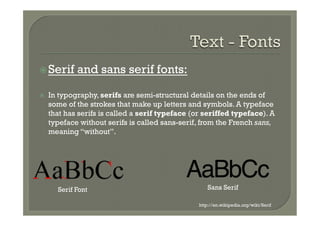
ž Serif      and sans serif fonts:

ž    In typography, serifs are semi-structural details on the ends of
      some of the strokes that make up letters and symbols. A typeface
      that has serifs is called a serif typeface (or seriffed typeface). A
      typeface without serifs is called sans-serif, from the French sans,
      meaning “without”.


        Serif Font                                     Sans Serif

                                                   http://en.wikipedia.org/wiki/Serif
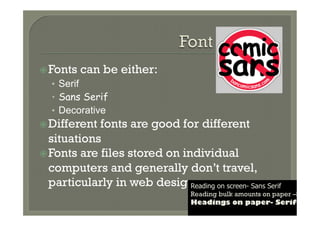
ž Fonts   can be either:
   •  Serif
   •  Sans Serif
   •  Decorative
ž Different fonts are good for different
   situations
ž Fonts are files stored on individual
   computers and generally don’t travel,
   particularly in web design  Reading on screen- Sans Serif
                                     Reading bulk amounts on paper –Serif
                                     Headings on paper- Serif
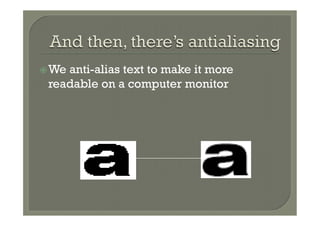
ž We
    anti-alias text to make it more
 readable on a computer monitor
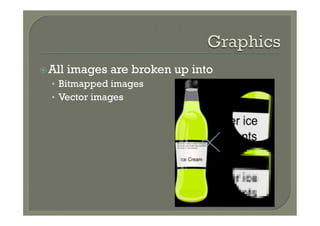
ž All   images are broken up into
  •  Bitmapped images
  •  Vector images
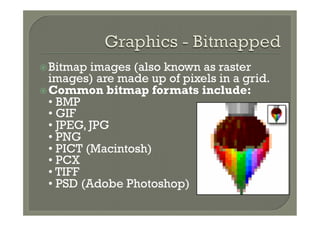
ž Bitmap  images (also known as raster
   images) are made up of pixels in a grid.
ž Common bitmap formats include:
   • BMP
   • GIF
   • JPEG, JPG
   • PNG
   • PICT (Macintosh)
   • PCX
   • TIFF
   • PSD (Adobe Photoshop)
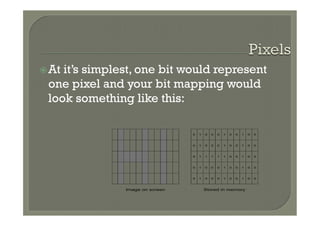
ž Atit’s simplest, one bit would represent
  one pixel and your bit mapping would
  look something like this:

                                  0   1   0   0   0   1   0   0   1   0   0


                                  0   1   0   0   0   1   0   0   1   0   0


                                  0   1   1   1   1   1   0   0   1   0   0


                                  0   1   0   0   0   1   0   0   1   0   0


                                  0   1   0   0   0   1   0   0   1   0   0


                Image on screen           Stored in memory
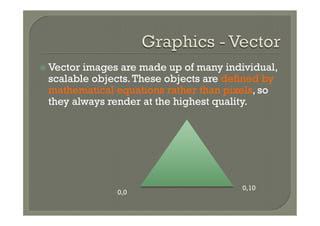
ž  Vector
         images are made up of many individual,
  scalable objects. These objects are defined by
  mathematical equations rather than pixels, so
  they always render at the highest quality.


                                        0,10
               0,0
ž Losslessis a compression format where
 you don’t lose quality because the quality
 is stored for later
  •  Eg, Gif images, lossless WMA
ž Lossy
       is a compression type where you
 do lose quality, the quality is thrown away
 when you compress
  •  Eg, JPEG images, MPEG sound/video
ž Image resolution describes the detail
 an image holds. The term applies equally
 to digital images, film images, and other
 types of images. Higher resolution means
 more image detail.

ž The
     greater the detail in the image, the
 larger the file size. (it is important to think about what type of files you
 would use for different situations i.e. the web)
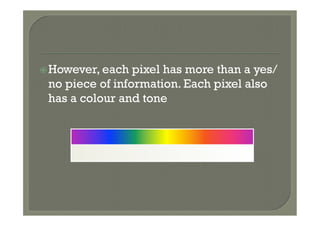
ž However, each pixel has more than a yes/
 no piece of information. Each pixel also
 has a colour and tone
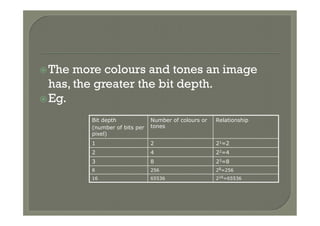
ž The  more colours and tones an image
   has, the greater the bit depth.
ž Eg.

         Bit depth             Number of colours or   Relationship
         (number of bits per   tones
         pixel)
         1                     2                      21=2
         2                     4                      22=4
         3                     8                      23=8
         8                     256                    28=256
         16                    65536                  216=65536
ž Clipart– royalty free images
ž Screencapture (show example)
  •  Software that can be used:
     –  Screengrab (Mozilla add-on)
     –  Capture fox
     –  Fireshot
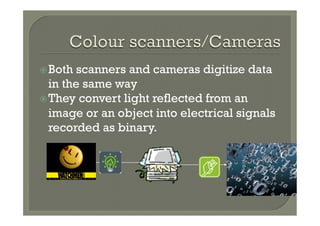
ž Both  scanners and cameras digitize data
   in the same way
ž They convert light reflected from an
   image or an object into electrical signals
   recorded as binary.
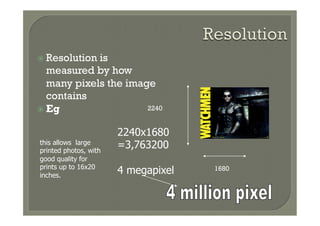
ž  Resolutionis
    measured by how
    many pixels the image
    contains
ž  Eg                  2240


                       2240x1680
this allows large
printed photos, with
                       =3,763200
good quality for
prints up to 16x20
inches.
                       4 megapixel   1680
ž  Stock
        photos (stock     ž Image   Libraries
  photography) are
  professional
  photographs of
  common places,
  landmarks, nature,
  events or people that
  are bought and sold
  on a royalty-free
  basis and can be
  used and reused for
  commercial design
  purposes.
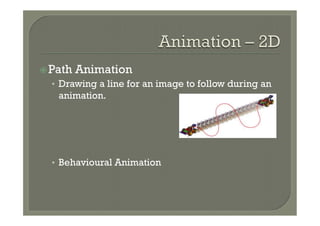
ž Path   Animation
  •  Drawing a line for an image to follow during an
    animation.


  •  Behavioural Animation
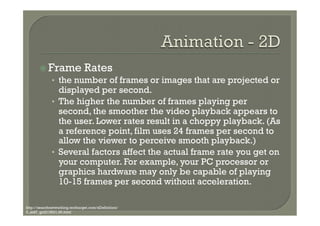
ž  Frame Rates
            •  the number of frames or images that are projected or
                 displayed per second.
              •  The higher the number of frames playing per
                 second, the smoother the video playback appears to
                 the user. Lower rates result in a choppy playback. (As
                 a reference point, film uses 24 frames per second to
                 allow the viewer to perceive smooth playback.)
              •  Several factors affect the actual frame rate you get on
                 your computer. For example, your PC processor or
                 graphics hardware may only be capable of playing
                 10-15 frames per second without acceleration.

http://searchnetworking.techtarget.com/sDefinition/
0,,sid7_gci213531,00.html
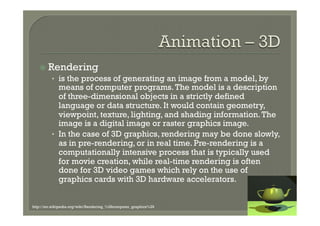
ž  Rendering
         •  is the process of generating an image from a model, by
            means of computer programs. The model is a description
            of three-dimensional objects in a strictly defined
            language or data structure. It would contain geometry,
            viewpoint, texture, lighting, and shading information. The
            image is a digital image or raster graphics image.
         •  In the case of 3D graphics, rendering may be done slowly,
            as in pre-rendering, or in real time. Pre-rendering is a
            computationally intensive process that is typically used
            for movie creation, while real-time rendering is often
            done for 3D video games which rely on the use of
            graphics cards with 3D hardware accelerators.


http://en.wikipedia.org/wiki/Rendering_%28computer_graphics%29
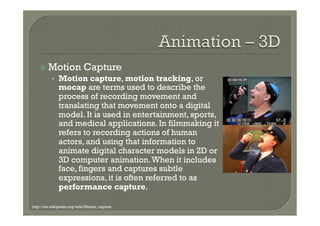
ž  Motion              Capture
          •  Motion capture, motion tracking, or
              mocap are terms used to describe the
              process of recording movement and
              translating that movement onto a digital
              model. It is used in entertainment, sports,
              and medical applications. In filmmaking it
              refers to recording actions of human
              actors, and using that information to
              animate digital character models in 2D or
              3D computer animation. When it includes
              face, fingers and captures subtle
              expressions, it is often referred to as
              performance capture.

http://en.wikipedia.org/wiki/Motion_capture
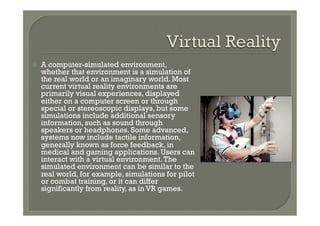
ž    A computer-simulated environment,
      whether that environment is a simulation of
      the real world or an imaginary world. Most
      current virtual reality environments are
      primarily visual experiences, displayed
      either on a computer screen or through
      special or stereoscopic displays, but some
      simulations include additional sensory
      information, such as sound through
      speakers or headphones. Some advanced,
      systems now include tactile information,
      generally known as force feedback, in
      medical and gaming applications. Users can
      interact with a virtual environment. The
      simulated environment can be similar to the
      real world, for example, simulations for pilot
      or combat training, or it can differ
      significantly from reality, as in VR games.
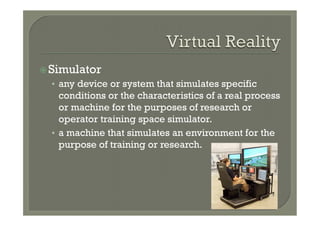
ž Simulator
  •  any device or system that simulates specific
     conditions or the characteristics of a real process
     or machine for the purposes of research or
     operator training space simulator.
  •  a machine that simulates an environment for the
     purpose of training or research.
ž Walkthrough
  •  See historical sites which allow a user to
     ‘walkthrough’ museums and castles without ever
     being there.
  •  Can now also be seen in the housing market.


  •  http://www.realestate.com.au/cgi-bin/rsearch?
   a=o&f=0&p=10&t=res&ty=&c=6547288&s=nsw&
   snf=rbs&tm=1263805478&id=106006416&gts=1
   &gts-suburb=ROSEBERY,ROSE+BAY|nsw,nsw
ž Navigable   Scene
  •  See Google street.
  •  The ability to move in a virtual world.

  •  http://maps.google.com.au/help/maps/
   streetview/
ž  Video   formats are made up of:
   •  the container
   •  the codec(s) used inside that container.

    The container describes the structure of the file: where
    the various pieces are stored, how they are interleaved,
    and which codecs are used by which pieces.  It may
    specify an audio codec as well as video.

    A codec ("coder/decoder") is a way of compressing the
    file to decrease file size, while maintaining quality
ž Video   Formats (Containers)
  •  AVI (.avi)
  •  Quicktime
  •  WMV (.wmv)
ž Video   Codecs
  •  MPEG(Moving Pictures Expert Group)
  •  RM (Real Media)
  •  DivX
ž Analog signals (pictures and audio) are
   converted to digital signals via a video
   capture card
ž A video or animation is made up of
   frames: individual pictures that are put
   together to create the illusion of
   movement.
ž Sound Waves
ž There
       are three major groups of audio file
 formats:
  •  Uncompressed
     –  eg, WAV
  •  Lossless Compression Format
     –  eg, lossless Windows Media Audio (WMA).
  •  Lossy compression
     –  eg,MP3
     –  Vorbis
     –  lossy Windows Media Audio (WMA)
     –  AAC.
ž Losslessis a compression format where
 you don’t lose quality because the quality
 is stored for later
  •  Eg, Gif images, lossless WMA
ž Lossy
       is a compression type where you
 do lose quality, the quality is thrown away
 when you compress
  •  Eg, JPEG images, MPEG sound/video
ž Sound  is analog data: it has continuous
   variable points
ž Audio is sound which has been digitised
   by a computer
ž Sound is converted to audio via the
   sound card which is a dàa and aàd
   converter
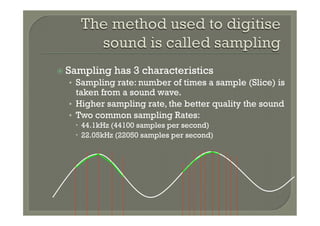
ž  Sampling   has 3 characteristics
  •  Sampling rate: number of times a sample (Slice) is
     taken from a sound wave.
  •  Higher sampling rate, the better quality the sound
  •  Two common sampling Rates:
    –  44.1kHz (44100 samples per second)
    –  22.05kHz (22050 samples per second)
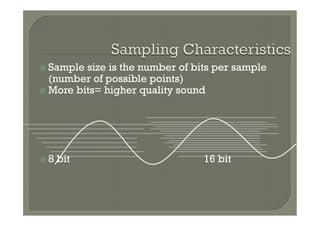
ž  Sample size is the number of bits per sample
    (number of possible points)
ž  More bits= higher quality sound


ž  8   bit                       16 bit
ž    MIDI
ž    MIDI (Musical Instrument Digital Interface), is an industry-standard
      protocol defined in 1982 that enables electronic musical instruments such
      as keyboard controllers, computers, and other electronic equipment to
      communicate, control, and synchronize with each other. MIDI allows
      computers, synthesizers, MIDI controllers, sound cards, samplers and
      drum machines to control one another, and to exchange system data. MIDI
      does not transmit an audio signal or media — it transmits "event
      messages" such as the pitch and intensity of musical notes to play, control
      signals for parameters such as volume, vibrato and panning, cues, and
      clock signals to set the tempo. As an electronic protocol, it is notable for
      its widespread adoption throughout the music industry.
ž    All MIDI compatible controllers, musical instruments, and MIDI-
      compatible software follow the same MIDI 1.0 specification, and thus
      interpret any given MIDI message the same way, and so can communicate
      with and understand each other. Because the music is simply data rather
      than recorded audio waveforms, the data size of the files is quite small by
      comparison.
ž TMBG

6th p Industry Specific Tools and Equipment

  • 1.
    6th P Industry Specific Tools and Equipment. Note: Content delivered in student presentations not on this presentation
  • 2.
    ž Serif and sans serif fonts: ž  In typography, serifs are semi-structural details on the ends of some of the strokes that make up letters and symbols. A typeface that has serifs is called a serif typeface (or seriffed typeface). A typeface without serifs is called sans-serif, from the French sans, meaning “without”. Serif Font Sans Serif http://en.wikipedia.org/wiki/Serif
  • 3.
    ž Fonts can be either: •  Serif •  Sans Serif •  Decorative ž Different fonts are good for different situations ž Fonts are files stored on individual computers and generally don’t travel, particularly in web design Reading on screen- Sans Serif Reading bulk amounts on paper –Serif Headings on paper- Serif
  • 4.
    ž We anti-alias text to make it more readable on a computer monitor
  • 5.
    ž All images are broken up into •  Bitmapped images •  Vector images
  • 6.
    ž Bitmap images(also known as raster images) are made up of pixels in a grid. ž Common bitmap formats include: • BMP • GIF • JPEG, JPG • PNG • PICT (Macintosh) • PCX • TIFF • PSD (Adobe Photoshop)
  • 7.
    ž Atit’s simplest, onebit would represent one pixel and your bit mapping would look something like this: 0 1 0 0 0 1 0 0 1 0 0 0 1 0 0 0 1 0 0 1 0 0 0 1 1 1 1 1 0 0 1 0 0 0 1 0 0 0 1 0 0 1 0 0 0 1 0 0 0 1 0 0 1 0 0 Image on screen Stored in memory
  • 8.
    ž  Vector images are made up of many individual, scalable objects. These objects are defined by mathematical equations rather than pixels, so they always render at the highest quality. 0,10 0,0
  • 9.
    ž Losslessis a compressionformat where you don’t lose quality because the quality is stored for later •  Eg, Gif images, lossless WMA ž Lossy is a compression type where you do lose quality, the quality is thrown away when you compress •  Eg, JPEG images, MPEG sound/video
  • 10.
    ž Image resolution describesthe detail an image holds. The term applies equally to digital images, film images, and other types of images. Higher resolution means more image detail. ž The greater the detail in the image, the larger the file size. (it is important to think about what type of files you would use for different situations i.e. the web)
  • 11.
    ž However, each pixelhas more than a yes/ no piece of information. Each pixel also has a colour and tone
  • 12.
    ž The morecolours and tones an image has, the greater the bit depth. ž Eg. Bit depth Number of colours or Relationship (number of bits per tones pixel) 1 2 21=2 2 4 22=4 3 8 23=8 8 256 28=256 16 65536 216=65536
  • 13.
    ž Clipart– royalty freeimages ž Screencapture (show example) •  Software that can be used: –  Screengrab (Mozilla add-on) –  Capture fox –  Fireshot
  • 14.
    ž Both scannersand cameras digitize data in the same way ž They convert light reflected from an image or an object into electrical signals recorded as binary.
  • 15.
    ž  Resolutionis measured by how many pixels the image contains ž  Eg 2240 2240x1680 this allows large printed photos, with =3,763200 good quality for prints up to 16x20 inches. 4 megapixel 1680
  • 16.
    ž  Stock photos (stock ž Image Libraries photography) are professional photographs of common places, landmarks, nature, events or people that are bought and sold on a royalty-free basis and can be used and reused for commercial design purposes.
  • 17.
    ž Path Animation •  Drawing a line for an image to follow during an animation. •  Behavioural Animation
  • 18.
    ž  Frame Rates •  the number of frames or images that are projected or displayed per second. •  The higher the number of frames playing per second, the smoother the video playback appears to the user. Lower rates result in a choppy playback. (As a reference point, film uses 24 frames per second to allow the viewer to perceive smooth playback.) •  Several factors affect the actual frame rate you get on your computer. For example, your PC processor or graphics hardware may only be capable of playing 10-15 frames per second without acceleration. http://searchnetworking.techtarget.com/sDefinition/ 0,,sid7_gci213531,00.html
  • 19.
    ž  Rendering •  is the process of generating an image from a model, by means of computer programs. The model is a description of three-dimensional objects in a strictly defined language or data structure. It would contain geometry, viewpoint, texture, lighting, and shading information. The image is a digital image or raster graphics image. •  In the case of 3D graphics, rendering may be done slowly, as in pre-rendering, or in real time. Pre-rendering is a computationally intensive process that is typically used for movie creation, while real-time rendering is often done for 3D video games which rely on the use of graphics cards with 3D hardware accelerators. http://en.wikipedia.org/wiki/Rendering_%28computer_graphics%29
  • 20.
    ž  Motion Capture •  Motion capture, motion tracking, or mocap are terms used to describe the process of recording movement and translating that movement onto a digital model. It is used in entertainment, sports, and medical applications. In filmmaking it refers to recording actions of human actors, and using that information to animate digital character models in 2D or 3D computer animation. When it includes face, fingers and captures subtle expressions, it is often referred to as performance capture. http://en.wikipedia.org/wiki/Motion_capture
  • 21.
    ž  A computer-simulated environment, whether that environment is a simulation of the real world or an imaginary world. Most current virtual reality environments are primarily visual experiences, displayed either on a computer screen or through special or stereoscopic displays, but some simulations include additional sensory information, such as sound through speakers or headphones. Some advanced, systems now include tactile information, generally known as force feedback, in medical and gaming applications. Users can interact with a virtual environment. The simulated environment can be similar to the real world, for example, simulations for pilot or combat training, or it can differ significantly from reality, as in VR games.
  • 22.
    ž Simulator • any device or system that simulates specific conditions or the characteristics of a real process or machine for the purposes of research or operator training space simulator. •  a machine that simulates an environment for the purpose of training or research.
  • 23.
    ž Walkthrough • See historical sites which allow a user to ‘walkthrough’ museums and castles without ever being there. •  Can now also be seen in the housing market. •  http://www.realestate.com.au/cgi-bin/rsearch? a=o&f=0&p=10&t=res&ty=&c=6547288&s=nsw& snf=rbs&tm=1263805478&id=106006416&gts=1 &gts-suburb=ROSEBERY,ROSE+BAY|nsw,nsw
  • 24.
    ž Navigable Scene •  See Google street. •  The ability to move in a virtual world. •  http://maps.google.com.au/help/maps/ streetview/
  • 25.
    ž  Video formats are made up of: •  the container •  the codec(s) used inside that container. The container describes the structure of the file: where the various pieces are stored, how they are interleaved, and which codecs are used by which pieces.  It may specify an audio codec as well as video. A codec ("coder/decoder") is a way of compressing the file to decrease file size, while maintaining quality
  • 26.
    ž Video Formats (Containers) •  AVI (.avi) •  Quicktime •  WMV (.wmv) ž Video Codecs •  MPEG(Moving Pictures Expert Group) •  RM (Real Media) •  DivX
  • 27.
    ž Analog signals (picturesand audio) are converted to digital signals via a video capture card ž A video or animation is made up of frames: individual pictures that are put together to create the illusion of movement.
  • 28.
  • 29.
    ž There are three major groups of audio file formats: •  Uncompressed –  eg, WAV •  Lossless Compression Format –  eg, lossless Windows Media Audio (WMA). •  Lossy compression –  eg,MP3 –  Vorbis –  lossy Windows Media Audio (WMA) –  AAC.
  • 30.
    ž Losslessis a compressionformat where you don’t lose quality because the quality is stored for later •  Eg, Gif images, lossless WMA ž Lossy is a compression type where you do lose quality, the quality is thrown away when you compress •  Eg, JPEG images, MPEG sound/video
  • 31.
    ž Sound isanalog data: it has continuous variable points ž Audio is sound which has been digitised by a computer ž Sound is converted to audio via the sound card which is a dàa and aàd converter
  • 32.
    ž  Sampling has 3 characteristics •  Sampling rate: number of times a sample (Slice) is taken from a sound wave. •  Higher sampling rate, the better quality the sound •  Two common sampling Rates: –  44.1kHz (44100 samples per second) –  22.05kHz (22050 samples per second)
  • 33.
    ž  Sample sizeis the number of bits per sample (number of possible points) ž  More bits= higher quality sound ž  8 bit 16 bit
  • 34.
    ž  MIDI ž  MIDI (Musical Instrument Digital Interface), is an industry-standard protocol defined in 1982 that enables electronic musical instruments such as keyboard controllers, computers, and other electronic equipment to communicate, control, and synchronize with each other. MIDI allows computers, synthesizers, MIDI controllers, sound cards, samplers and drum machines to control one another, and to exchange system data. MIDI does not transmit an audio signal or media — it transmits "event messages" such as the pitch and intensity of musical notes to play, control signals for parameters such as volume, vibrato and panning, cues, and clock signals to set the tempo. As an electronic protocol, it is notable for its widespread adoption throughout the music industry. ž  All MIDI compatible controllers, musical instruments, and MIDI- compatible software follow the same MIDI 1.0 specification, and thus interpret any given MIDI message the same way, and so can communicate with and understand each other. Because the music is simply data rather than recorded audio waveforms, the data size of the files is quite small by comparison.
  • 35.