Basics of Google Analytic
Yusuf Chowdhury
yusufchowdhury
Dose Google Analytics Scares you?
What is Google Analytics?
Google Analytic is a free web analytics tool that
is hosted by Google so it can help you create
more effective websites and increase ROI on
your marketing campaigns.
Why it's important?
- How are visitors using my sites?
- How can make my online marketing campaign more
effective?
- How can I create valuable and effective contents?
- Where and why my visitors abandoning my pages?
- How can I improve my site navigation and provide my
visitors best experience?
How to eliminate this fear?
- Understand the basics
- Create a goals-focused
method
- Build a business analytics
system.
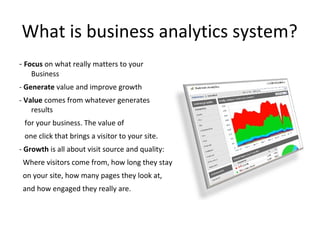
What is business analytics system?
- Focus on what really matters to your
Business
- Generate value and improve growth
- Value comes from whatever generates
results
for your business. The value of
one click that brings a visitor to your site.
- Growth is all about visit source and quality:
Where visitors come from, how long they stay
on your site, how many pages they look at,
and how engaged they really are.
How to Install Google Analytics
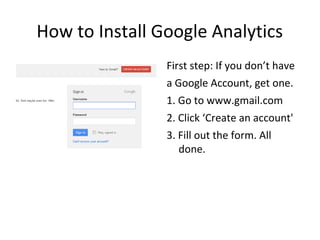
First step: If you don’t have
a Google Account, get one.
1. Go to www.gmail.com
2. Click ‘Create an account'
3. Fill out the form. All
done.
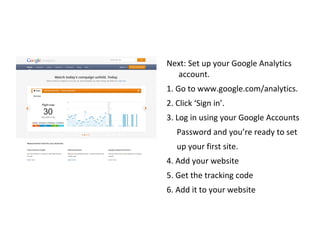
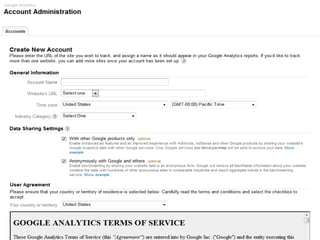
Next: Set up your Google Analytics
account.
1. Go to www.google.com/analytics.
2. Click ‘Sign in’.
3. Log in using your Google Accounts
Password and you’re ready to set
up your first site.
4. Add your website
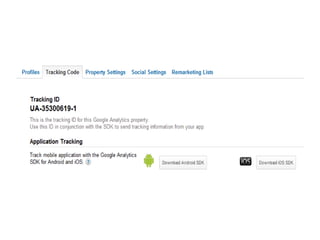
5. Get the tracking code
6. Add it to your website
Setting up and tracking goals
Before you can start applying value and
measuring growth, you have to set up
Google Analytics to measure those
goals.
Once you’ve got your Google Analytics
account and code set up, then you have to
set up tracking goals. You just need to know
your business goals and goal page for each
one.
What is Goal Page?
A goal page is whatever page a visitor lands on after they’ve taken a desired
action.
 If you sell online, your goal is a sale and the goal page is the ‘thank you for
your order’ page at the end of the checkout process.
 If you’re building an e-mail list, your goal is a signup and the goal page is
the
subscription confirmation.
 If you’re generating leads, your goal is a lead and the goal page is whatever
shows up after a visitor clicks ‘submit’ on the sales request form.
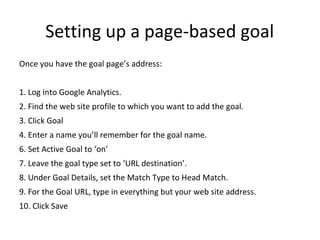
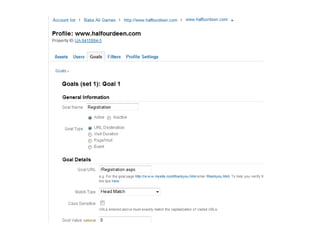
Setting up a page-based goal
Once you have the goal page’s address:
1. Log into Google Analytics.
2. Find the web site profile to which you want to add the goal.
3. Click Goal
4. Enter a name you’ll remember for the goal name.
6. Set Active Goal to ‘on’
7. Leave the goal type set to ‘URL destination’.
8. Under Goal Details, set the Match Type to Head Match.
9. For the Goal URL, type in everything but your web site address.
10. Click Save
Measuring and Building Growth
- Traffic sources
- Best-performing content on your site
- Worst-performing content on your site
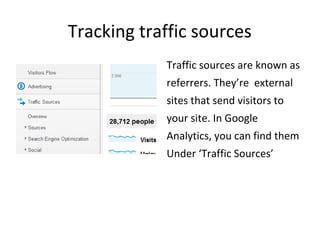
Tracking traffic sources
Traffic sources are known as
referrers. They’re external
sites that send visitors to
your site. In Google
Analytics, you can find them
Under ‘Traffic Sources’
Traffic sources are broken into several
categories and sub-categories.
- Referring Sites: Tells us which sites driving
traffic.
- Keywords: Tells us what search phrases folks
use to find our site via search engines.
- Social Media Sites: Tells us from which social
media platform driving traffic to our site.
Continue-Tracking traffic sources
The Referring Sites report tells you the top web sites that are driving
traffic to you. It’ll show you:
- Total visits from each referring site;
- Page-views/visit for visitors from those sites.
- Average time spent on your site by visitors from those sites.
- The number of new visitors from each site; and
- The bounce rate for those visitors.
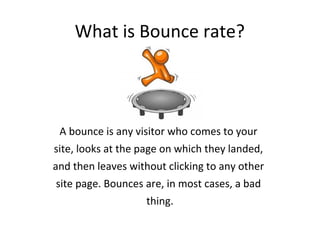
What is Bounce rate?
A bounce is any visitor who comes to your
site, looks at the page on which they landed,
and then leaves without clicking to any other
site page. Bounces are, in most cases, a bad
thing.
Resources
Tool:
http://www.clicktale.com/
http://www.crazyegg.com
http://getclicky.com
http://piwik.org/
Experts:
http://www.google.com/analytics/learn/
http://cutroni.com/blog/
http://www.kaushik.net/avinash/
http://www.seomoz.org/
http://www.portent.com/blog/
Google analytic 101

Google analytic 101

  • 1.
    Basics of GoogleAnalytic Yusuf Chowdhury yusufchowdhury
  • 2.
  • 3.
    What is GoogleAnalytics? Google Analytic is a free web analytics tool that is hosted by Google so it can help you create more effective websites and increase ROI on your marketing campaigns.
  • 4.
    Why it's important? -How are visitors using my sites? - How can make my online marketing campaign more effective? - How can I create valuable and effective contents? - Where and why my visitors abandoning my pages? - How can I improve my site navigation and provide my visitors best experience?
  • 5.
    How to eliminatethis fear? - Understand the basics - Create a goals-focused method - Build a business analytics system.
  • 6.
    What is businessanalytics system? - Focus on what really matters to your Business - Generate value and improve growth - Value comes from whatever generates results for your business. The value of one click that brings a visitor to your site. - Growth is all about visit source and quality: Where visitors come from, how long they stay on your site, how many pages they look at, and how engaged they really are.
  • 7.
    How to InstallGoogle Analytics First step: If you don’t have a Google Account, get one. 1. Go to www.gmail.com 2. Click ‘Create an account' 3. Fill out the form. All done.
  • 8.
    Next: Set upyour Google Analytics account. 1. Go to www.google.com/analytics. 2. Click ‘Sign in’. 3. Log in using your Google Accounts Password and you’re ready to set up your first site. 4. Add your website 5. Get the tracking code 6. Add it to your website
  • 11.
    Setting up andtracking goals Before you can start applying value and measuring growth, you have to set up Google Analytics to measure those goals. Once you’ve got your Google Analytics account and code set up, then you have to set up tracking goals. You just need to know your business goals and goal page for each one.
  • 12.
    What is GoalPage? A goal page is whatever page a visitor lands on after they’ve taken a desired action.  If you sell online, your goal is a sale and the goal page is the ‘thank you for your order’ page at the end of the checkout process.  If you’re building an e-mail list, your goal is a signup and the goal page is the subscription confirmation.  If you’re generating leads, your goal is a lead and the goal page is whatever shows up after a visitor clicks ‘submit’ on the sales request form.
  • 13.
    Setting up apage-based goal Once you have the goal page’s address: 1. Log into Google Analytics. 2. Find the web site profile to which you want to add the goal. 3. Click Goal 4. Enter a name you’ll remember for the goal name. 6. Set Active Goal to ‘on’ 7. Leave the goal type set to ‘URL destination’. 8. Under Goal Details, set the Match Type to Head Match. 9. For the Goal URL, type in everything but your web site address. 10. Click Save
  • 15.
    Measuring and BuildingGrowth - Traffic sources - Best-performing content on your site - Worst-performing content on your site
  • 16.
    Tracking traffic sources Trafficsources are known as referrers. They’re external sites that send visitors to your site. In Google Analytics, you can find them Under ‘Traffic Sources’
  • 17.
    Traffic sources arebroken into several categories and sub-categories. - Referring Sites: Tells us which sites driving traffic. - Keywords: Tells us what search phrases folks use to find our site via search engines. - Social Media Sites: Tells us from which social media platform driving traffic to our site. Continue-Tracking traffic sources
  • 18.
    Continue-Tracking traffic sources TheReferring Sites report tells you the top web sites that are driving traffic to you. It’ll show you: - Total visits from each referring site; - Page-views/visit for visitors from those sites. - Average time spent on your site by visitors from those sites. - The number of new visitors from each site; and - The bounce rate for those visitors.
  • 19.
    What is Bouncerate? A bounce is any visitor who comes to your site, looks at the page on which they landed, and then leaves without clicking to any other site page. Bounces are, in most cases, a bad thing.
  • 20.