Google
Analytics
• Google Analytics is a free service that allows
you to track user behavior on your website.
With a variety of metrics to investigate, you
can begin to build a picture of how people
interact with your website and how you can
make changes to increase sales.
• On a basic level, you can track how many
visitors you have, how they found you, how
many views a page receives, and other
information.
• In many ways, Google Analytics serves as a
portal, providing you with an insider, back-
end, and real-time access to what your users
want.
Why should Google Analytics Need?
What Are the Benefits of Using Google Analytics?
• Google Analytics is the most powerful tool for
tracking website metrics, and it is provided by the
search engine king. It's also completely free.
• Although getting started requires some effort, there are
numerous online tutorials and resources available to guide
you through the process.
• After you've connected Google Analytics to your site, you
can go to the Google Analytics dashboard and start
looking around. It can't, however, go back in time, so you'll
have to wait for data to accumulate.
• Google Analytics can help you avoid relying on gut
instincts and intuition by telling you which pages and
content are successful and which are not. You will be able
to make more informed decisions this way.
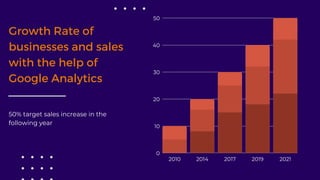
Growth Rate of
businesses and sales
with the help of
Google Analytics
50% target sales increase in the
following year
2010 2014 2017 2019 2021
50
40
30
20
10
0
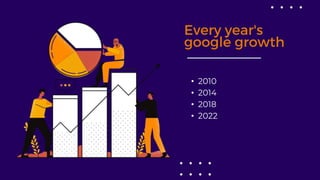
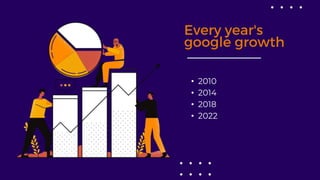
Every year's
google growth
• 2010
• 2014
• 2018
• 2022
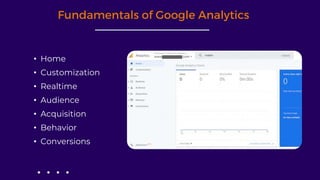
Fundamentals of Google Analytics
• Home
• Customization
• Realtime
• Audience
• Acquisition
• Behavior
• Conversions
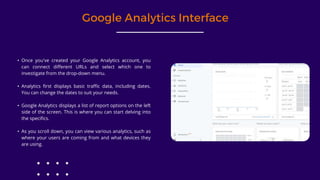
Google Analytics Interface
• Once you've created your Google Analytics account, you
can connect different URLs and select which one to
investigate from the drop-down menu.
• Analytics first displays basic traffic data, including dates.
You can change the dates to suit your needs.
• Google Analytics displays a list of report options on the left
side of the screen. This is where you can start delving into
the specifics.
• As you scroll down, you can view various analytics, such as
where your users are coming from and what devices they
are using.
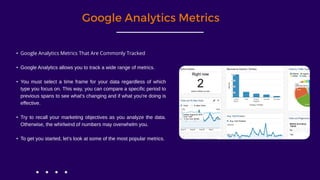
Google Analytics Metrics
• Google Analytics Metrics That Are Commonly Tracked
• Google Analytics allows you to track a wide range of metrics.
• You must select a time frame for your data regardless of which
type you focus on. This way, you can compare a specific period to
previous spans to see what's changing and if what you're doing is
effective.
• Try to recall your marketing objectives as you analyze the data.
Otherwise, the whirlwind of numbers may overwhelm you.
• To get you started, let's look at some of the most popular metrics.
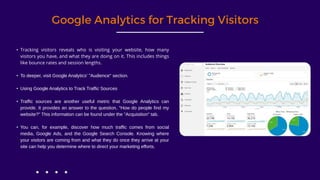
Google Analytics for Tracking Visitors
• Tracking visitors reveals who is visiting your website, how many
visitors you have, and what they are doing on it. This includes things
like bounce rates and session lengths.
• To deeper, visit Google Analytics' "Audience" section.
• Using Google Analytics to Track Traffic Sources
• Traffic sources are another useful metric that Google Analytics can
provide. It provides an answer to the question, "How do people find my
website?" This information can be found under the "Acquisition" tab.
• You can, for example, discover how much traffic comes from social
media, Google Ads, and the Google Search Console. Knowing where
your visitors are coming from and what they do once they arrive at your
site can help you determine where to direct your marketing efforts.
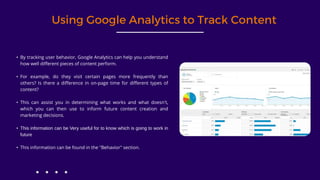
Using Google Analytics to Track Content
• By tracking user behavior, Google Analytics can help you understand
how well different pieces of content perform.
• For example, do they visit certain pages more frequently than
others? Is there a difference in on-page time for different types of
content?
• This can assist you in determining what works and what doesn't,
which you can then use to inform future content creation and
marketing decisions.
• This information can be Very useful for to know which is going to work in
future
• This information can be found in the "Behavior" section.
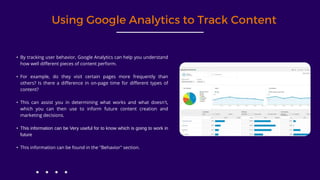
Using Google Analytics to Track Content
• By tracking user behavior, Google Analytics can help you understand
how well different pieces of content perform.
• For example, do they visit certain pages more frequently than
others? Is there a difference in on-page time for different types of
content?
• This can assist you in determining what works and what doesn't,
which you can then use to inform future content creation and
marketing decisions.
• This information can be Very useful for to know which is going to work in
future
• This information can be found in the "Behavior" section.
Every year's
google growth
• 2010
• 2014
• 2018
• 2022
Thank You
Phone: +91-88387 02802
Mail:
info@spectrumdigitalinfocom.com
Site: www.spectrumdigitalinfocom.com

Analytics.pptx

  • 1.
  • 2.
    • Google Analyticsis a free service that allows you to track user behavior on your website. With a variety of metrics to investigate, you can begin to build a picture of how people interact with your website and how you can make changes to increase sales. • On a basic level, you can track how many visitors you have, how they found you, how many views a page receives, and other information. • In many ways, Google Analytics serves as a portal, providing you with an insider, back- end, and real-time access to what your users want. Why should Google Analytics Need?
  • 3.
    What Are theBenefits of Using Google Analytics? • Google Analytics is the most powerful tool for tracking website metrics, and it is provided by the search engine king. It's also completely free. • Although getting started requires some effort, there are numerous online tutorials and resources available to guide you through the process. • After you've connected Google Analytics to your site, you can go to the Google Analytics dashboard and start looking around. It can't, however, go back in time, so you'll have to wait for data to accumulate. • Google Analytics can help you avoid relying on gut instincts and intuition by telling you which pages and content are successful and which are not. You will be able to make more informed decisions this way.
  • 4.
    Growth Rate of businessesand sales with the help of Google Analytics 50% target sales increase in the following year 2010 2014 2017 2019 2021 50 40 30 20 10 0
  • 5.
    Every year's google growth •2010 • 2014 • 2018 • 2022
  • 6.
    Fundamentals of GoogleAnalytics • Home • Customization • Realtime • Audience • Acquisition • Behavior • Conversions
  • 7.
    Google Analytics Interface •Once you've created your Google Analytics account, you can connect different URLs and select which one to investigate from the drop-down menu. • Analytics first displays basic traffic data, including dates. You can change the dates to suit your needs. • Google Analytics displays a list of report options on the left side of the screen. This is where you can start delving into the specifics. • As you scroll down, you can view various analytics, such as where your users are coming from and what devices they are using.
  • 8.
    Google Analytics Metrics •Google Analytics Metrics That Are Commonly Tracked • Google Analytics allows you to track a wide range of metrics. • You must select a time frame for your data regardless of which type you focus on. This way, you can compare a specific period to previous spans to see what's changing and if what you're doing is effective. • Try to recall your marketing objectives as you analyze the data. Otherwise, the whirlwind of numbers may overwhelm you. • To get you started, let's look at some of the most popular metrics.
  • 9.
    Google Analytics forTracking Visitors • Tracking visitors reveals who is visiting your website, how many visitors you have, and what they are doing on it. This includes things like bounce rates and session lengths. • To deeper, visit Google Analytics' "Audience" section. • Using Google Analytics to Track Traffic Sources • Traffic sources are another useful metric that Google Analytics can provide. It provides an answer to the question, "How do people find my website?" This information can be found under the "Acquisition" tab. • You can, for example, discover how much traffic comes from social media, Google Ads, and the Google Search Console. Knowing where your visitors are coming from and what they do once they arrive at your site can help you determine where to direct your marketing efforts.
  • 10.
    Using Google Analyticsto Track Content • By tracking user behavior, Google Analytics can help you understand how well different pieces of content perform. • For example, do they visit certain pages more frequently than others? Is there a difference in on-page time for different types of content? • This can assist you in determining what works and what doesn't, which you can then use to inform future content creation and marketing decisions. • This information can be Very useful for to know which is going to work in future • This information can be found in the "Behavior" section.
  • 11.
    Using Google Analyticsto Track Content • By tracking user behavior, Google Analytics can help you understand how well different pieces of content perform. • For example, do they visit certain pages more frequently than others? Is there a difference in on-page time for different types of content? • This can assist you in determining what works and what doesn't, which you can then use to inform future content creation and marketing decisions. • This information can be Very useful for to know which is going to work in future • This information can be found in the "Behavior" section.
  • 12.
    Every year's google growth •2010 • 2014 • 2018 • 2022
  • 13.
    Thank You Phone: +91-8838702802 Mail: info@spectrumdigitalinfocom.com Site: www.spectrumdigitalinfocom.com