Geographic Information Systems
( GIS)
Moges K.
kidanemoges@gmail.com
Year II, Semester II
Course No:- LaAd2053
ECTS 10
Chapter One
Chapter 1. Introduction To GIS
What?
When?
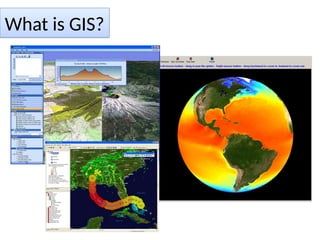
What is GIS?
GIS– What is in G?
 Geographic
 Real World entities.
 refers to the Earth’s surface and near-surface
Geographic/geospatial: synonymous
GIS--what’s in the I?
Information
Information about places on the earth’s surface
Knowledge about “what is where; when”
(Don’t forget time!)
GIS--what’s in the S?
 Systems: the technology/Skill
 Science: the concepts and theory
 Studies: the societal context
Geographic, because data collected is associated
with some location in space.
Information, because attributes, or the
characteristics (data), about the space is what we
want to learn about.
System, because there must be a tie from the
information to the geography in a seamless
operation
Summarized As
GI Systems, Science and Studies
Which will we do?
Systems
– Technology /Skill for the acquisition and
management of spatial information.
Science
– Comprehending the underlying conceptual issues
of representing data and processes in space-time.
– The theory and concepts behind the technology.
Studies
– Understanding the social, legal and ethical issues
associated with the application of GISy and GISc.
GIS is more difficult to define than can be imagined.
The GIS field is characterized by a great diversity of
Applications and
Concepts developed in many areas
(computer science, graphics, database
technology, statistics, mathematics, surveying, and
agriculture etc. ).
Data vs. Information
• Data, by itself, generally differs from
information.
• Data is of little use unless it is
transformed into information.
• Information is an answer to a question
based on raw data.
• We transform data into information
through the use of an Information System.
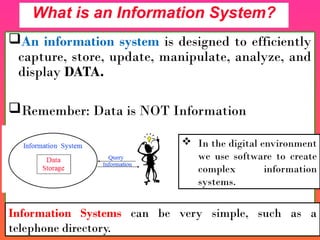
An information system is designed to efficiently
capture, store, update, manipulate, analyze, and
display DATA.
Remember: Data is NOT Information
What is an Information System?
Information Systems can be very simple, such as a
telephone directory.
 In the digital environment
we use software to create
complex information
systems.
A GIS can be best defined by defining the two
parts of the term;
• Geography and
• Information system.
Geography
is a science that deals with the
earth and life on the earth,
while
Information System
is a way to capture, store,
retrieve, sort, and process data to support some
analytic process.
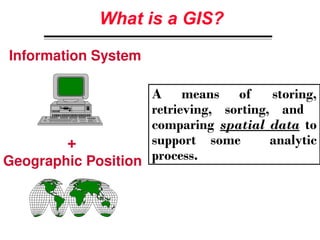
What is a GIS?
A means of storing,
retrieving, sorting, and
comparing spatial data to
support some analytic
process.
+
Information System
Geographic Position
GIS links graphical features (entities) to
tabular data (attributes).
What makes the Information System geographic?
GIS Definition
“…a system of hardware, software, and procedures
designed to support the capture, management,
manipulation, analysis, modeling, and display of
spatially referenced data for solving complex planning
& management problems”
(Rhind, 1989)
“…a computer system capable of assembling,
storing, manipulating, and displaying
geographically referenced information…”
(USGS, 1997)
a computer system that allows the
analysis and display of data with a
spatial component
(Phillips, 2002).
 An information system that is designed to
work with data referenced by spatial or
geographic coordinates.
(Star and Estes, 1990, p. 2).
Overviews on definition of GIS
Different definitions of a GIS have evolved
in different areas and disciplines.
All GIS definitions recognize that spatial
data are unique because they are linked to
maps.
A GIS at least consists of a database, map
information, and a computer-based link
between them.
I. DBMS typical MIS data base contains implicit but not explicit locational
information
– city, county, zip code, etc. but no geographical coordinates
– is 100 N. High around the corner or across town from 200 E Main?
II. Automated Mapping (AM) primarily two-dimensional display devices
– thematic mapping (choropleth,etc such as SAS/GRAPH, DIDS, business
mapping software) unable to relate different geographical layers (e.g zip codes
and counties)
III. Facility Management (FM) systems--
– lack spatial analysis tools
IV. CAD/CAM (computer aided design/drafting)--primarily 3-D graphic
creation (engineering design) & display systems
– don’t reference via geographic location
• CAD sees the world as a 3-D cube, GIS as a 3-D sphere
– limited (if any) database ability (especially for non-spatial data)
How GIS differs from Related Systems
A GIS can be made up of a variety of software
and hardware tools.
The important factor is the level of integration
of these tools to provide a smoothly operating,
fully functional geographic data processing
environment.
 Overall, GIS should be viewed as a
technology, not simply as a computer system.
Data can be:
1. Positioned by its known spatial
coordinates.
2. Input and organized (generally in
layers).
3. Stored and retrieved.
4. Analyzed
5. Modified and displayed
Key Functions of a GIS
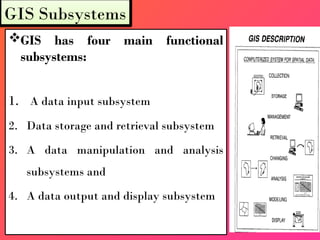
GIS has four main functional
subsystems:
1. A data input subsystem
2. Data storage and retrieval subsystem
3. A data manipulation and analysis
subsystems and
4. A data output and display subsystem
GIS Subsystems
1. Data Input
This system allows the user to capture, collect
and transform spatial and thematic data in to
digital form.
The data inputs are usually derived from a
combination of
 Hard Copy Maps,
 Aerial Photographs,
 Remotely Sensed Images,
 Reports, Survey Documents. Etc….
2. Data Storage and Retrieval
 This subsystem organizes the data (spatial and
attribute),
in a form which permits it to be
quickly retrieved by the user for analysis and permits
rapid and accurate updates to be made to the database.
 This component usually involves use of a database
management system (DBMS) for maintaining attribute
data.
 Spatial data is usually encoded and maintained in
proprietary file format.
3. Data Manipulation and Analysis
This subsystem allows the user to define and
execute spatial and non-spatial procedures to
generate derived information.
This subsystem is commonly thought of as the
heart of a GIS,
and
usually distinguishes it from other database
information systems and computer-aided
drafting (CAD) systems.
4. Data Output
This subsystem allows the user to
generate graphic displays, normally
• maps and
• tabular reports
representing derived
information products.
The critical function for a GIS is
however, by design, the analysis of
spatial data.
 A data input subsystem for collection,
preprocessing and transformation of spatial data.
 A data storage and retrieval subsystem that
organizes data for efficient access, updating and
editing.
 A data manipulation and analysis subsystem that
performs tasks on data and performs modeling
function.
 A reporting/output subsystem that displays all or
part of the database in tabular, graphic or map
form.
Subsystems
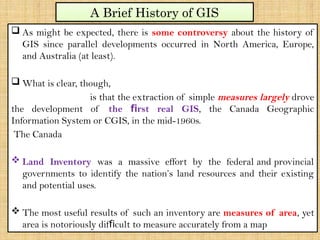
 As might be expected, there is some controversy about the history of
GIS since parallel developments occurred in North America, Europe,
and Australia (at least).
 What is clear, though,
is that the extraction of simple measures largely drove
the development of the rst real GIS
fi , the Canada Geographic
Information System or CGIS, in the mid-1960s.
The Canada
 Land Inventory was a massive effort by the federal and provincial
governments to identify the nation’s land resources and their existing
and potential uses.
 The most useful results of such an inventory are measures of area, yet
area is notoriously dif cult to measure accurately from a map
fi
A Brief History of GIS
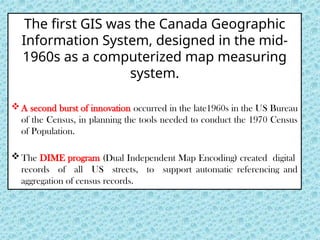
The first GIS was the Canada Geographic
Information System, designed in the mid-
1960s as a computerized map measuring
system.
A second burst of innovation occurred in the late1960s in the US Bureau
of the Census, in planning the tools needed to conduct the 1970 Census
of Population.
The DIME program (Dual Independent Map Encoding) created digital
records of all US streets, to support automatic referencing and
aggregation of census records.
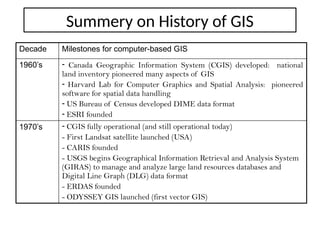
Summery on History of GIS
Decade Milestones for computer-based GIS
1960’s - Canada Geographic Information System (CGIS) developed: national
land inventory pioneered many aspects of GIS
- Harvard Lab for Computer Graphics and Spatial Analysis: pioneered
software for spatial data handling
- US Bureau of Census developed DIME data format
- ESRI founded
1970’s - CGIS fully operational (and still operational today)
- First Landsat satellite launched (USA)
- CARIS founded
- USGS begins Geographical Information Retrieval and Analysis System
(GIRAS) to manage and analyze large land resources databases and
Digital Line Graph (DLG) data format
- ERDAS founded
- ODYSSEY GIS launched (first vector GIS)
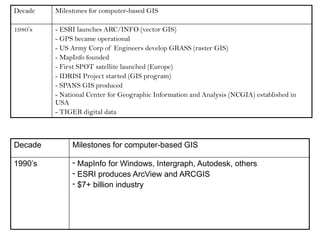
Decade Milestones for computer-based GIS
1980’s - ESRI launches ARC/INFO (vector GIS)
- GPS became operational
- US Army Corp of Engineers develop GRASS (raster GIS)
- MapInfo founded
- First SPOT satellite launched (Europe)
- IDRISI Project started (GIS program)
- SPANS GIS produced
- National Center for Geographic Information and Analysis (NCGIA) established in
USA
- TIGER digital data
Decade Milestones for computer-based GIS
1990’s - MapInfo for Windows, Intergraph, Autodesk, others
- ESRI produces ArcView and ARCGIS
- $7+ billion industry
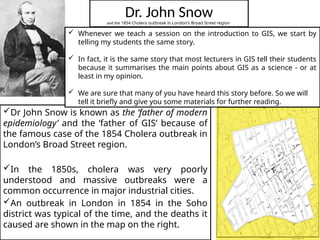
Dr. John Snow
and the 1854 Cholera outbreak in London's Broad Street region
Dr John Snow is known as the ‘father of modern
epidemiology’ and the ‘father of GIS’ because of
the famous case of the 1854 Cholera outbreak in
London’s Broad Street region.
In the 1850s, cholera was very poorly
understood and massive outbreaks were a
common occurrence in major industrial cities.
An outbreak in London in 1854 in the Soho
district was typical of the time, and the deaths it
caused are shown in the map on the right.
 Whenever we teach a session on the introduction to GIS, we start by
telling my students the same story.
 In fact, it is the same story that most lecturers in GIS tell their students
because it summarises the main points about GIS as a science - or at
least in my opinion.
 We are sure that many of you have heard this story before. So we will
tell it briefly and give you some materials for further reading.
 The map was made by Dr John Snow, who has conceived
the hypothesis that cholera was transmitted through the
drinking of polluted water, rather than through the air, as
was commonly believed.
 He noticed that the outbreak appeared to be centred on
a public drinking water pump in Broad Street – and if this
hypothesis was correct, the pattern shown on the map
would reflect the locations of people who drank the
pump’s water.
 There were anomalies, in the sense that deaths had
occurred in households that were located closer to other
sources of water, but he was able to confirm that these
households also drew their water from the Broad Street
pump.
 This Dr John Snow story is about spatial analysis or, in
other words, on how the location in which events take
place can have help us understand better the nature of
phenomenon.
 At the time of the breakout, cholera was not understood
to be geographically related.
 However, as soon as location of deaths was introduced
into the picture it was clear that this was a geographical
problem.
 The most interesting point of this story is that there were
no computers used for the analysis. But we still consider
it to be a story about GIS.
Is GIS about software only?
Chapter Two
Chapter 2. Components of GIS
What?
Why
GIS?
An operational GIS also has a series of
components that combine to make the system
work.
These components are critical to successful
GIS.
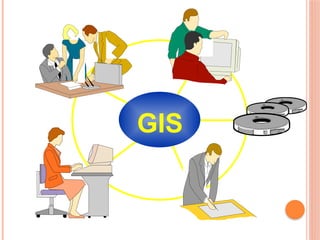
A working GIS integrates five key
components:
Hardware, Software, Data, People, and Methods.
Components of a GIS
GIS
Procedures/Method
Data
Hardware
Software
People
1. Hardware
• Hardware is the computer on which a GIS
operates.
• Today, GIS software runs on a wide range of
hardware types, from centralized computer
servers to desktop computers used in stand-
alone or networked configurations.
2. Software
GIS software provides the functions and tools
needed to store, analyze, and display geographic
information.
Key software components are
 Tools for the input and manipulation of geographic information
 A database management system (DBMS)
 Tools that support geographic query, analysis, and visualization
 A graphical user interface (GUI) for easy access to tools
3. Data
Possibly the most important component of a
GIS is the data.
Geographic data and related tabular data can
be collected in-house or purchased from a
commercial data provider.
A GIS will integrate spatial data with other
data resources and can even use a DBMS, used
by most organizations to organize and maintain
their data, to manage spatial data.
4. People
GIS technology
is of limited value without the people
who manage the system and develop plans for
applying it to real-world problems.
G I S
users range from technical
specialists who design and maintain the system to
those who use it to help them perform their
everyday work.
5. Methods
A successful GIS operates according to a well-
designed plan and business rules, which are the
models and operating practices unique to each
organization.
Failure to implement your GIS without
one of the afore mentioned components
will result in an unsuccessful system.
GIS technology is to geographical analysis
what the microscope, the telescope, and
computers have been to other sciences.
GIS integrates spatial and other kinds of
information within a single system - it offers a
consistent framework for analyzing
geographical data
Why Use a GIS?
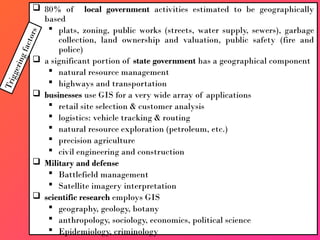
 80% of local government activities estimated to be geographically
based
 plats, zoning, public works (streets, water supply, sewers), garbage
collection, land ownership and valuation, public safety (fire and
police)
 a significant portion of state government has a geographical component
 natural resource management
 highways and transportation
 businesses use GIS for a very wide array of applications
 retail site selection & customer analysis
 logistics: vehicle tracking & routing
 natural resource exploration (petroleum, etc.)
 precision agriculture
 civil engineering and construction
 Military and defense
 Battlefield management
 Satellite imagery interpretation
 scientific research employs GIS
 geography, geology, botany
 anthropology, sociology, economics, political science
 Epidemiology, criminology
T
r
i
g
g
e
r
i
n
g
f
a
c
t
o
r
s
GIS answers the following
• Location: What is at...? Where is it?
• Condition: Status of features?
• Trends: What has changed since...?
• Patterns: What spatial patterns
exist?
• Modeling: What if…?
U Stile ASKING
Why?...This is Why again and again ….
• This all common elements are used in
solving Geographic Problem.
• Problem can be solved by
Data to Information,
Information to Decision making
Decision making to Application
This is Cyclic
Chapter Three
Chapter 2. Data Models
Raster..
Vector..
In GIS use, our interest is to study or
understand Geographical Phenomena.
GIS supports such studies because of its
capability to store digitally such phenomena in
the computer.
Geographic phenomena exist in the real world
and in GIS we represent a model of it.
By way of definition a Geographic phenomenon is something
of interest that:
are the study objects of a GIS.
exist in the real world, everything you see outside is a
Geographic phenomenon.
 Can be named or described
 Can be geo-referenced and
 Can be assigned a time (interval) at which it is/was
present.
It is described as triplets:
I. What is it?
II. Where is it?
III. When was it?
Geographic phenomena can be grouped
in to
I. Field
II. Object
 Geographic field: is a geographic
phenomenon for which, for every point
in the study area, a value can be
determined.
E.g. temperature, rainfall, barometric
pressure and elevation.
 Geographic Objects:
when the geographic
phenomenon is not present everywhere in the
study area, but somehow ‘sparsely’ populates
it , we look at in terms of geographic objects.
 Their position in space is determined by a
combination of one or more of the following
parameters
• Location (where is it?),
• Shape (what form is it?),
• Size(how big is it?), and
• Orientation (in which direction it is facing?)
Generally, the world phenomena can be
natural for instance forest, lake or man made
for example building, road.
 Geographical phenomena sometimes referred
to as spatial phenomena refer to all
phenomena that have:
A spatial (geographic) extent
A temporal extent
Thematic characteristics (attributes or properties)
GIS technology utilizes two basic types of data.
1) Spatial data: Describes the absolute and relative
location of geographic features.
2) Attribute data: It describes the characteristics of the
spatial features.
These characteristics can be quantitative and/or
qualitative in nature.
Attributes data is often referred to as tabular data.
GIS Data Types
• The heart of any GIS is data model, which is set of
constructs for representing objects and processes
in the digital environment of the computer
(Longley et al ., 2004).
 It is impossible to capture everything from reality
inside a computer.
 Instead, GIS users must somehow abstract real-world
phenomena, or entities, into a geometric
representation of those entities.
GIS Data Models
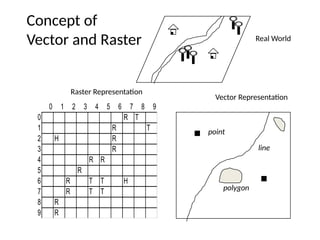
1. Raster Data Model
In a raster model, the world is represented as a
surface that is divided into a regular grid of cells.
The x,y coordinates of at least one corner of the
raster are known, so they can be located in
geographic space.
Raster models are useful for storing and analyzing data
that is continuous across an area.
1. Raster Data Model
2. Vector Data Model
• Each cell contains a value that can represent membership
in a class or category, a measurement, or an interpreted
value.
• Raster data type consists of rows and columns of cells,
with each cell storing a single value.
• Raster data can be images (raster images) with each
pixel (or cell) containing a color value.
• Additional values recorded for each cell may be a
discrete value, such as land use, a continuous value,
such as temperature, or a null value if no data is
available.
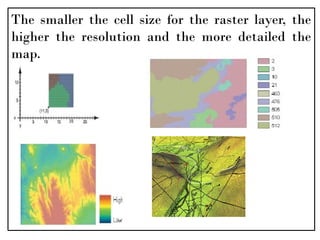
The smaller the cell size for the raster layer, the
higher the resolution and the more detailed the
map.
2. Vector Data Model
One way of representing geographic
phenomena is with points, lines, and
polygons.
This kind of representation of the world is
generically called a vector data model.
Vector models are particularly useful for
representing and storing discrete features such
as buildings, pipes, or parcel boundaries.
I. Points
 Points convey the least amount of information of these file
types.
 Zero-dimensional points are used for geographical features
that can best be expressed by a single point reference; in
other words, simple location.
 Points can also be used to represent areas when displayed at
a small scale.
 For example, cities on a map of the world would be
represented by points rather than polygons.
 No measurements are possible with point features
2. Lines or polylines
One-dimensional lines or polylines are used for
linear features such as rivers, roads, railroads,
trails, and topographic lines.
Again, as with point features, linear features
displayed at a small scale will be represented as
linear features rather than as a polygon.
Line features can measure distance.
3. Polygons
• Two-dimensional polygons are used for
geographical features that cover a particular area
of the earth's surface.
• Such features may include lakes, park boundaries,
buildings, city boundaries, or land uses.
• Polygons convey the most amount of information
of the file types.
• Polygon features can measure perimeter and area.
• Vector data can also be used to represent
continuously varying phenomena.
• Contour lines and triangulated irregular
networks (TIN)
are used to represent elevation or
other continuously changing values.
• TINs record values at point locations, which are
connected by lines to form an irregular mesh of
triangles
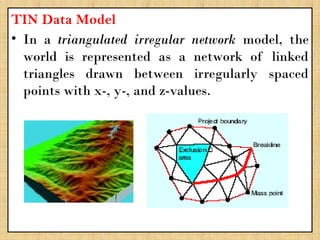
TIN Data Model
• In a triangulated irregular network model, the
world is represented as a network of linked
triangles drawn between irregularly spaced
points with x-, y-, and z-values.
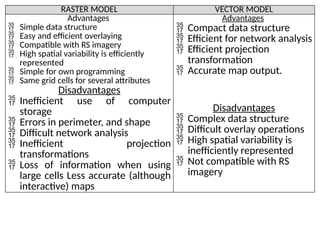
RASTER MODEL VECTOR MODEL
Advantages
 Simple data structure
 Easy and efficient overlaying
 Compatible with RS imagery
 High spatial variability is efficiently
represented
 Simple for own programming
 Same grid cells for several attributes
Disadvantages
 Inefficient use of computer
storage
 Errors in perimeter, and shape
 Difficult network analysis
 Inefficient projection
transformations
 Loss of information when using
large cells Less accurate (although
interactive) maps
Advantages
 Compact data structure
 Efficient for network analysis
 Efficient projection
transformation
 Accurate map output.
Disadvantages
 Complex data structure
 Difficult overlay operations
 High spatial variability is
inefficiently represented
 Not compatible with RS
imagery
0 1 2 3 4 5 6 7 8 9
0 R T
1 R T
2 H R
3 R
4 R R
5 R
6 R T T H
7 R T T
8 R
9 R
Real World
Vector Representation
Raster Representation
Concept of
Vector and Raster
line
polygon
point
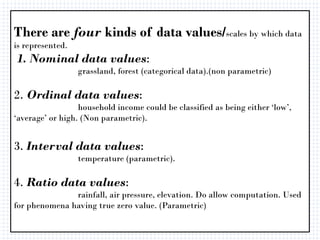
There are four kinds of data values/scales by which data
is represented.
1. Nominal data values:
grassland, forest (categorical data).(non parametric)
2. Ordinal data values:
household income could be classified as being either ‘low’,
‘average’ or high. (Non parametric).
3. Interval data values:
temperature (parametric).
4. Ratio data values:
rainfall, air pressure, elevation. Do allow computation. Used
for phenomena having true zero value. (Parametric)
Chapter Four
• Chapter 4. Coordinate System and Map
Projection
o GCS..
o PCS..
• A coordinate is a number set that denotes a
specific location within a reference system.
• Typical coordinates are
the x-y set ([x, y]), which is used in a two-
dimensional system,
and
the x-y-z set ([x, y, z]), which is used in a three-
dimensional system.
A Coordinate System is
a reference system used to
represent the locations of geographic features,
imagery, and observations such as GPS locations
within a common geographic framework.
Types of coordinate systems
1. Geographic Coordinate Systems
2. Projected Coordinate Systems
Parameters for Mapping
I. A mathematical model of the earth must be
selected. Spheroid and Geiod
II.The mathematical model must be related to
real-world features. Datum
III.Real-world features must be projected with
minimum distortion from a round earth to a flat map;
and given a grid system of coordinates. Projection
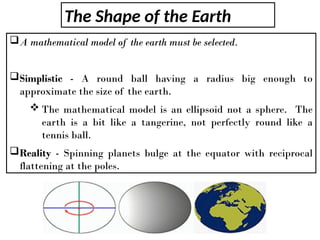
The Shape of the Earth
A mathematical model of the earth must be selected.
Simplistic - A round ball having a radius big enough to
approximate the size of the earth.
 The mathematical model is an ellipsoid not a sphere. The
earth is a bit like a tangerine, not perfectly round like a
tennis ball.
Reality - Spinning planets bulge at the equator with reciprocal
flattening at the poles.
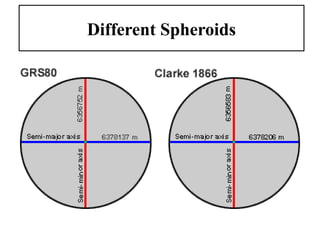
Different Spheroids
Why use different spheroids?
• The earth's surface is not perfectly symmetrical, so the semi-
major and semi-minor axes that fit one geographical region do
not necessarily fit another.
• Satellite technology has revealed several elliptical deviations.
• The earth's spheroid deviates slightly for different regions of
the earth.
• Ignoring deviations and using the same spheroid for all
locations on the earth could lead to errors of several meters, or
in extreme cases hundreds of meters, in measurements on a
regional scale.
• The shape and size of a geographic coordinate system’s
surface is defined by a sphere or spheroid.
• Although the earth is best represented by a spheroid,
the earth is sometimes treated as a sphere to make
mathematical calculations easier.
• The Earth can be assumed to be a sphere at
small scales (i.e. < 1:5,000,000),
• But
• it should be treated as a spheroid (or ellipsoid).
• at larger scales (> 1:1,000,000)
 When treated as a sphere, the radius can be taken as 6,371 km
(or 6,370,997 metres).
 A sphere is based on a circle, while a spheroid (or ellipsoid) is
based on an ellipse.
 The shape of an ellipse is defined by two radii.
 The longer radius is called the semimajor axis, and the shorter
radius is called the semiminor axis.
 At larger scales the Earth is modelled as an oblate spheroid - i.e.
its semi-minor axis b, around which it rotates, is shorter than its
semi-major axis a.
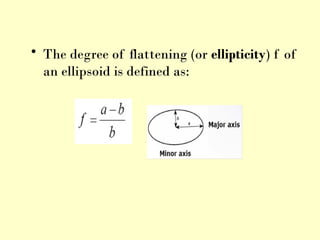
• The degree of flattening (or ellipticity) f of
an ellipsoid is defined as:
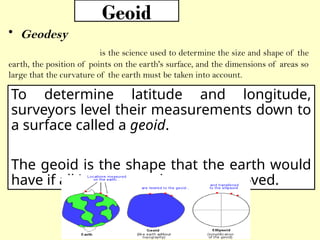
Geoid
• Geodesy
is the science used to determine the size and shape of the
earth, the position of points on the earth's surface, and the dimensions of areas so
large that the curvature of the earth must be taken into account.
To determine latitude and longitude,
surveyors level their measurements down to
a surface called a geoid.
The geoid is the shape that the earth would
have if all its topography were removed.
• Think of the geoid as the surface of the earth
with only the oceans and not the continents.
• The geoid is commonly referred to as the Mean
Sea Level (MSL) surface and serves as a
vertical datum.
• The geoid is an equipotential surface (a surface
on which gravity and centrifugal forces are
balanced.
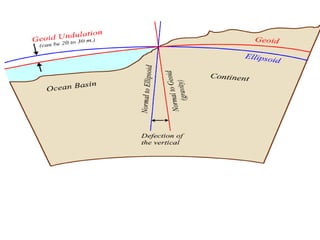
Unfortunately a geoid is an extremely complex surface.
Mathematical models can only provide a best fit to the
surface, not an exact representation.
 However over limited areas and depending on the accuracy
required, geodesists found that a simple ellipsoidal (or spheroidal)
model of the Earth’s gravity fit quite well.
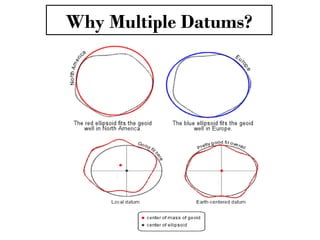
 However, the size and shape of the best fitted ellipsoid, as well as
its location relative to the center of mass of the Earth, differs
from place to place.
 As a result, many ellipsoids have been created to fit the geoid in
different parts of the world.
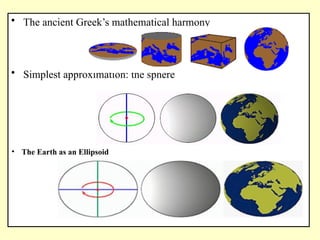
• The ancient Greek’s mathematical harmony
• Simplest approximation: the sphere
• The Earth as an Ellipsoid
Datum
Every map projection and coordinate system
begins with a precisely surveyed starting point.
 This starting is called the datum.
Why Multiple Datums?
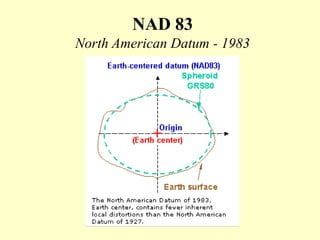
NAD 83
North American Datum - 1983
Horizontal vs Vertical Datums
• Horizontal datums are the reference values for a system
of location measurements.
• Vertical datums are the reference values for a system of
elevation measurements.
– The job of a vertical datum is to define where zero
elevation is,
– this is usually done by determining mean sea level.
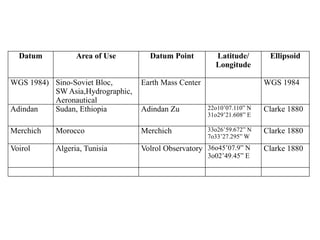
Datum Area of Use Datum Point Latitude/
Longitude
Ellipsoid
WGS 1984) Sino-Soviet Bloc,
SW Asia,Hydrographic,
Aeronautical
Earth Mass Center WGS 1984
Adindan Sudan, Ethiopia Adindan Zu 22o10’07.110” N
31o29’21.608” E
Clarke 1880
Merchich Morocco Merchich 33o26’59.672” N
7o33’27.295” W
Clarke 1880
Voirol Algeria, Tunisia Volrol Observatory 36o45’07.9” N
3o02’49.45” E
Clarke 1880
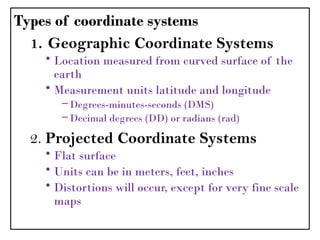
Types of coordinate systems
1. Geographic Coordinate Systems
• Location measured from curved surface of the
earth
• Measurement units latitude and longitude
– Degrees-minutes-seconds (DMS)
– Decimal degrees (DD) or radians (rad)
2. Projected Coordinate Systems
• Flat surface
• Units can be in meters, feet, inches
• Distortions will occur, except for very fine scale
maps
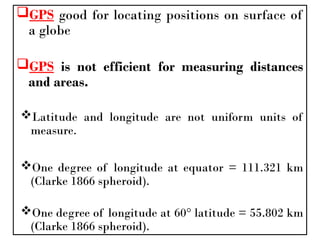
GPS good for locating positions on surface of
a globe
GPS is not efficient for measuring distances
and areas.
Latitude and longitude are not uniform units of
measure.
One degree of longitude at equator = 111.321 km
(Clarke 1866 spheroid).
One degree of longitude at 60° latitude = 55.802 km
(Clarke 1866 spheroid).
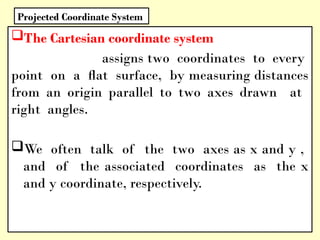
The Cartesian coordinate system
assigns two coordinates to every
point on a flat surface, by measuring distances
from an origin parallel to two axes drawn at
right angles.
We often talk of the two axes as x and y ,
and of the associated coordinates as the x
and y coordinate, respectively.
Projected Coordinate System
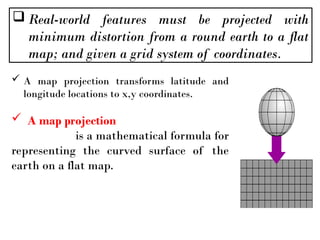
 Real-world features must be projected with
minimum distortion from a round earth to a flat
map; and given a grid system of coordinates.
 A map projection transforms latitude and
longitude locations to x,y coordinates.
 A map projection
is a mathematical formula for
representing the curved surface of the
earth on a flat map.
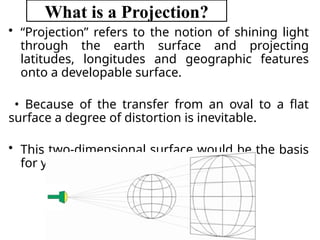
What is a Projection?
• “Projection” refers to the notion of shining light
through the earth surface and projecting
latitudes, longitudes and geographic features
onto a developable surface.
• Because of the transfer from an oval to a flat
surface a degree of distortion is inevitable.
• This two-dimensional surface would be the basis
for your map.
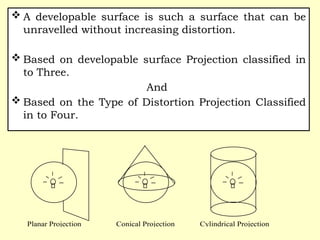
 A developable surface is such a surface that can be
unravelled without increasing distortion.
 Based on developable surface Projection classified in
to Three.
And
 Based on the Type of Distortion Projection Classified
in to Four.
Planar Projection Conical Projection Cylindrical Projection
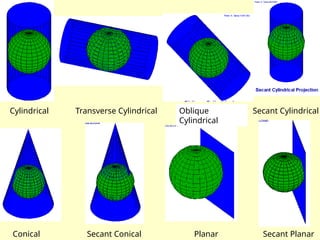
Cylindrical Transverse Cylindrical Oblique
Cylindrical
Secant Cylindrical
Conical Secant Conical Planar Secant Planar
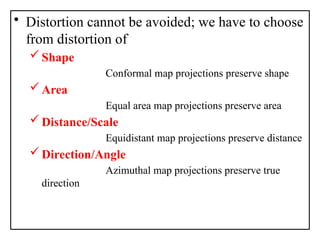
• Distortion cannot be avoided; we have to choose
from distortion of
Shape
Conformal map projections preserve shape
Area
Equal area map projections preserve area
Distance/Scale
Equidistant map projections preserve distance
Direction/Angle
Azimuthal map projections preserve true
direction
What type of map projection should you
choose?
Here are a few things to consider when
choosing a projection.
Which spatial properties do you want to
preserve?
Where is the area you're mapping? Is your
data in a polar region? An equatorial region?
What shape is the area you're mapping? Is it
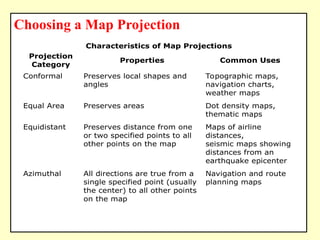
Choosing a Map Projection
Characteristics of Map Projections
Projection
Category
Properties Common Uses
Conformal Preserves local shapes and
angles
Topographic maps,
navigation charts,
weather maps
Equal Area Preserves areas Dot density maps,
thematic maps
Equidistant Preserves distance from one
or two specified points to all
other points on the map
Maps of airline
distances,
seismic maps showing
distances from an
earthquake epicenter
Azimuthal All directions are true from a
single specified point (usually
the center) to all other points
on the map
Navigation and route
planning maps
Compromise No point is completely
distortion free; distortion is
minimized near the center
and along the equator
World maps
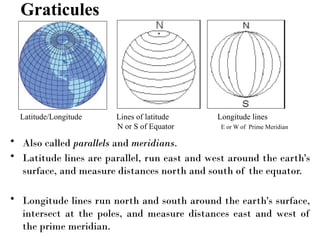
Graticules
• Also called parallels and meridians.
• Latitude lines are parallel, run east and west around the earth's
surface, and measure distances north and south of the equator.
• Longitude lines run north and south around the earth's surface,
intersect at the poles, and measure distances east and west of
the prime meridian.
Latitude/Longitude Lines of latitude Longitude lines
N or S of Equator E or W of Prime Meridian
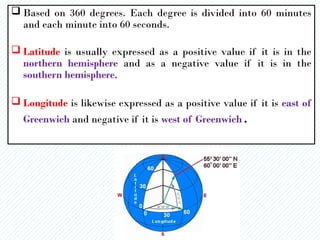
 Based on 360 degrees. Each degree is divided into 60 minutes
and each minute into 60 seconds.
 Latitude is usually expressed as a positive value if it is in the
northern hemisphere and as a negative value if it is in the
southern hemisphere.
 Longitude is likewise expressed as a positive value if it is east of
Greenwich and negative if it is west of Greenwich.
• Computers are not really comfortable handling
minutes and seconds, so decimal degrees (DD) are
more frequently used in GIS.
• These express minutes and seconds as portions of
whole degrees (i.e. 1 minute = 0. 0166667 degrees, 1
second = 0.0002778 degrees).
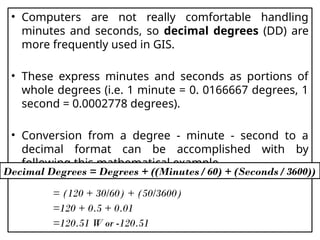
• Conversion from a degree - minute - second to a
decimal format can be accomplished with by
following this mathematical example
= (120 + 30/60) + (50/3600)
=120 + 0.5 + 0.01
=120.51 W or -120.51
Decimal Degrees = Degrees + ((Minutes / 60) + (Seconds / 3600))
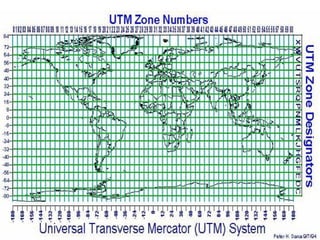
 UTM system is transverse-secant cylindrical projection,
 This divides the world into 60 zones with central meridians
at 6 degree intervals.
 Extending from 80 degrees South latitude to 84 degrees
North latitude.
 UTM is a conformal projection, so small features appear
with the correct shape and scale is the same in all
directions. (all distances, directions, shapes, and areas are
reasonably accurate ).
Universal Transverse Mercator
 UTM coordinates are in meters.
 The zones start at 180 degrees West, and
the zone numbers rise as you travel east.
 Ethiopia is in zone 37.
 Used in USGS topographic map, and digital
elevation models (DEMs)
• UTM coordinates are easily recognized by 6
digit for the x, and 7 digit for the y ( most of
the time at latitudes of 15° and greater in
the Northern Hemisphere).
Chapter Five
Spatial Data Acquisition and
Management
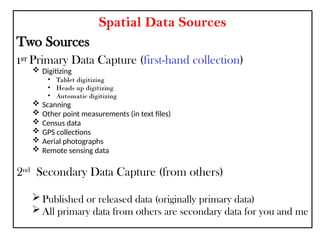
Spatial Data Sources
Two Sources
1ST
Primary Data Capture (first-hand collection)
 Digitizing
• Tablet digitizing
• Heads up digitizing
• Automatic digitizing
 Scanning
 Other point measurements (in text files)
 Census data
 GPS collections
 Aerial photographs
 Remote sensing data
2nd
Secondary Data Capture (from others)
 Published or released data (originally primary data)
 All primary data from others are secondary data for you and me
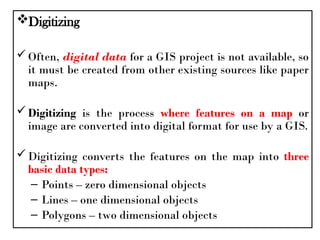
Digitizing
Often, digital data for a GIS project is not available, so
it must be created from other existing sources like paper
maps.
Digitizing is the process where features on a map or
image are converted into digital format for use by a GIS.
Digitizing converts the features on the map into three
basic data types:
– Points – zero dimensional objects
– Lines – one dimensional objects
– Polygons – two dimensional objects
• There are three primary methods for digitizing
spatial information:
– Manual Methods include:
• Tablet Digitizing
• Heads-up Digitizing
– An Automated Method includes:
• Scanning and Vectorization
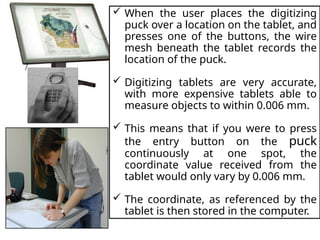
• Tablet digitizing requires a person to enter
coordinate information through the use of a
digitizing tablet and digitizing puck
 A digitizing tablet is a hardened surface
with a fine electrical wire grid under the
surface.
 Digitizing tablets are either hardened,
more stationary tables or rollup boards
designed for portability.
 A digitizing puck is an electrical device
with cross hairs and multiple buttons to
perform data entry operations.
 An operator then enters the information
using the puck.
 When the user places the digitizing
puck over a location on the tablet, and
presses one of the buttons, the wire
mesh beneath the tablet records the
location of the puck.
 Digitizing tablets are very accurate,
with more expensive tablets able to
measure objects to within 0.006 mm.
 This means that if you were to press
the entry button on the puck
continuously at one spot, the
coordinate value received from the
tablet would only vary by 0.006 mm.
 The coordinate, as referenced by the
tablet is then stored in the computer.
• Tools to automatically convert a raster
scan to vector lines.
• Requires a very clean scan.
• Scans can be cleaned using raster
cleanup tools.
• The vector files usually require cleanup
after conversion.
• If you start with a clean image it can save
a lot of time.
• If you image is not clean manual
digitizing may be faster.
Automated Digitizing
Secondary Data
• Large amount of data is now available
• Several groups of data exist
– Free data from the government
– Government data available for a fee
– Internet map servers
– Commercial data
– Data from other GIS users
• Large amounts of data are available from
– USGS
– Census
– NOAA
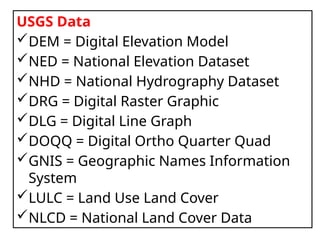
USGS Data
DEM = Digital Elevation Model
NED = National Elevation Dataset
NHD = National Hydrography Dataset
DRG = Digital Raster Graphic
DLG = Digital Line Graph
DOQQ = Digital Ortho Quarter Quad
GNIS = Geographic Names Information
System
LULC = Land Use Land Cover
NLCD = National Land Cover Data
GIS Data Acquisition
o The first step of using a GIS is to provide it with
data.
o The acquisition and preprocessing of spatial data an
expensive and time consuming process.
Data capture;- putting the information into the
system involves
Identifying
I. the objects on the map,
II. their absolute location on the Earth's surface, and
III.their spatial relationships.
The backbone of GIS is good data.
Data, the core of any GIS project, must be accurate
- but accuracy is not enough.
Having the appropriate level of accuracy is vital.
Inaccurate data can result in inaccurate
results and maps, skewing the results of your
analysis and ultimately resulting in poor
decisions.
GIS Data and Databases
Geographic data are organized in a geographic
database.
This database can be considered as a collection
of spatially referenced data that acts as a
model of reality.
There are two important components of this
geographic database:
its geographic position
its attributes or properties.
Spatial Database Management System
 A database is collection of related information
stored in a structured format.
 Spatial Database is a collection of spatially
referenced data that acts as a model of reality.
 To create and maintain a computer database, you
need a database program, often called a
database management system, or DBMS.
 A DBMS is a software application designed to
organize the efficient and effective storage and
access of data (Longley et al., 2004).
• Spatial Database Management System
(SDBMS)
provides the capabilities
of a traditional database management
system (DBMS) while allowing special
storage and handling of spatial data.
• SDBMS:
– Works with an underlying DBMS
– Allows spatial data models and types
– Supports querying language specific to
spatial data types
– Provides handling of spatial data and
SDBMS works with a spatial application at the front end
and a DBMS at the back end.
• SDBMS has three layers:
 Interface to spatial application
 Core spatial functionality
 Interface to DBMS
Fundamental Database Elements
Elements of reality modeled in a GIS database
have two identities:
1. The element in reality - entity
2. The element as it is represented in the
database - object .
Entity: an entity is "a phenomenon of interest in
reality that is not further subdivided into phenomena
of the same kind".
e.g. a city could be considered an entity
Object : an object is "a digital representation of all or
part of an entity" .
The method of digital representation of a
phenomenon varies according to scale, purpose
and other factors.
For example a city could be represented
geographically as a point
The Geodatabase Model
 The geodatabase is a data model for representing
geographic information using standard relational database
technology.
• There are three types:
1. File Geodatabases
 Stored as folders in a file system. Each dataset is held as a
file that can scale up to 1 TB in size.
 This option is recommended over personal geodatabases.
2. Personal Geodatabases
 All datasets are stored within a Microsoft Access data file, which is
limited in size to 2 GB.
3. ArcSDE Geodatabases
Stored in a relational database using
Oracle, Microsoft SQL Server, IBM DB2, or
IBM Informix.
These multiuser geodatabases require
the use of ArcSDE and can be unlimited in
size and numbers of users.
Feature dataset
collection of feature classes
(e.g., transportation contains roads, railroads,
airports) organized into a group,
all of which share a common coordinate system.
Feature class
a collection of features with the same
type of geometry
: point, line, or polygon (e.g., roads).
Chapter Six
Analysis of Geographic
Data
Spatial Analysis
 What distinguish GIS from other types of information systems are its
spatial analysis functions.
 These functions use the spatial and non-spatial attribute data in the
GIS database to answer questions about the real world (Arnoff, 1989).
 The objective of geographic analysis is to transform data into useful
information to satisfy the requirements or objectives of decision
makers at all levels.
 Before starting geographic analysis, one needs to assess the problem and
establish an objective.
 The analysis requires step-by-step procedures to arrive at the
conclusions.
Description
• Most GIS systems are used by governments and private
companies to describe the real world.
• this helps the organization “do its job”
– For example, manage sewer and water networks
– Manage land resources
• Most GIS systems are primarily designed for this purpose
– They are used to develop spatial databases to describe the real world
and help manage it.
Description and Analysis
Analysis
• Tries to understand the processes which cause or
create the patterns in the real world.
• Understanding processes:
Helps the organization do its job better
Make better decisions, for example
Helps us understand the phenomena itself
This is the role of science
• Spatial Analysis is aimed at:
Identifying and describing the pattern
Identifying and understanding the process
• Spatial Analysis: successive levels of sophistication
1. Spatial data description:
– Focus is on describing the world, and representing it
in a digital format
--computer map
--computer database
2. Exploratory Spatial Data Analysis (ESDA):
– searching for patterns and possible explanations
– GeoVisualization through calculation and display of
Centrographic statistics
3. Spatial Statistical Analysis and Hypothesis Testing
Are data “to be expected” or are they “unexpected”
relative to some statistical model, usually of a random
process (pure chance)
4. Spatial Modeling: Prediction
Construct models (of processes) to predict spatial outcomes
(patterns)
Notice how the density of points (number per square km)
decreases as we move away from the highway.
• Which is Spatial Analysis?
I. calculating the average income for a group
of people?
II. calculating the center of the Ethiopia and
each regions?
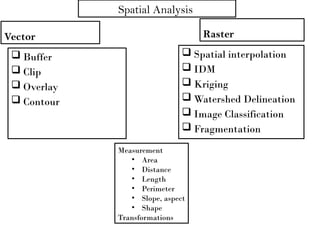
Spatial Analysis
Vector
 Buffer
 Clip
 Overlay
 Contour
Raster
 Spatial interpolation
 IDM
 Kriging
 Watershed Delineation
 Image Classification
 Fragmentation
Measurement
• Area
• Distance
• Length
• Perimeter
• Slope, aspect
• Shape
Transformations
Chapter Eight
Application of GIS
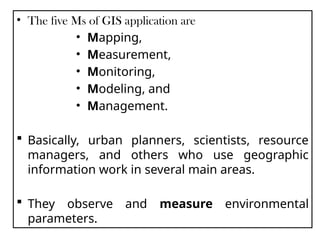
• The five Ms of GIS application are
• Mapping,
• Measurement,
• Monitoring,
• Modeling, and
• Management.
 Basically, urban planners, scientists, resource
managers, and others who use geographic
information work in several main areas.
 They observe and measure environmental
parameters.
They develop maps which portray
characteristics of the earth.
They monitor changes in our surroundings in
space and time.
In addition, they model alternatives of actions
and processes operating in the environment.
In doing so, they manage resources efficiently.
Area of GIS Applications
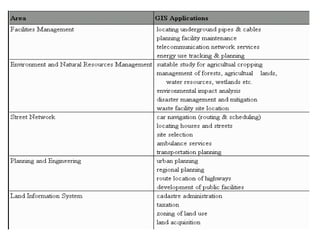
Major areas of GIS application can be grouped into five
categories as follows.
1. Facilities Management
•
Large scale and precise maps and network analysis are used
mainly for utility management.
2. Environment and Natural Resourrces Management
 Medium or small scale maps and overlay techniques in
combination with aerial photographs and satellite images are
used for management of natural resources and environmental
impact analysis.
3. Street Network
 Large or medium scale maps and spatial analysis are
used for vehicle routing, locating house and streets etc.
4. Planning and Engineering
 Large or medium scale maps and engineering models
are used mainly in civil engineering.
5. Land Information System
• Large scale cadastre maps or land parcel maps and
spatial analysis are used for cadastre administration,
taxation etc.
END

Geographic Information Systems ( GIS)-1.pptx

  • 1.
    Geographic Information Systems (GIS) Moges K. kidanemoges@gmail.com Year II, Semester II Course No:- LaAd2053 ECTS 10
  • 2.
    Chapter One Chapter 1.Introduction To GIS What? When?
  • 3.
  • 4.
    GIS– What isin G?  Geographic  Real World entities.  refers to the Earth’s surface and near-surface Geographic/geospatial: synonymous GIS--what’s in the I? Information Information about places on the earth’s surface Knowledge about “what is where; when” (Don’t forget time!)
  • 5.
    GIS--what’s in theS?  Systems: the technology/Skill  Science: the concepts and theory  Studies: the societal context Geographic, because data collected is associated with some location in space. Information, because attributes, or the characteristics (data), about the space is what we want to learn about. System, because there must be a tie from the information to the geography in a seamless operation Summarized As
  • 6.
    GI Systems, Scienceand Studies Which will we do? Systems – Technology /Skill for the acquisition and management of spatial information. Science – Comprehending the underlying conceptual issues of representing data and processes in space-time. – The theory and concepts behind the technology. Studies – Understanding the social, legal and ethical issues associated with the application of GISy and GISc.
  • 7.
    GIS is moredifficult to define than can be imagined. The GIS field is characterized by a great diversity of Applications and Concepts developed in many areas (computer science, graphics, database technology, statistics, mathematics, surveying, and agriculture etc. ).
  • 8.
    Data vs. Information •Data, by itself, generally differs from information. • Data is of little use unless it is transformed into information. • Information is an answer to a question based on raw data. • We transform data into information through the use of an Information System.
  • 9.
    An information systemis designed to efficiently capture, store, update, manipulate, analyze, and display DATA. Remember: Data is NOT Information What is an Information System? Information Systems can be very simple, such as a telephone directory.  In the digital environment we use software to create complex information systems.
  • 10.
    A GIS canbe best defined by defining the two parts of the term; • Geography and • Information system. Geography is a science that deals with the earth and life on the earth, while Information System is a way to capture, store, retrieve, sort, and process data to support some analytic process.
  • 11.
    What is aGIS? A means of storing, retrieving, sorting, and comparing spatial data to support some analytic process. + Information System Geographic Position
  • 12.
    GIS links graphicalfeatures (entities) to tabular data (attributes). What makes the Information System geographic?
  • 13.
    GIS Definition “…a systemof hardware, software, and procedures designed to support the capture, management, manipulation, analysis, modeling, and display of spatially referenced data for solving complex planning & management problems” (Rhind, 1989) “…a computer system capable of assembling, storing, manipulating, and displaying geographically referenced information…” (USGS, 1997)
  • 14.
    a computer systemthat allows the analysis and display of data with a spatial component (Phillips, 2002).  An information system that is designed to work with data referenced by spatial or geographic coordinates. (Star and Estes, 1990, p. 2).
  • 15.
    Overviews on definitionof GIS Different definitions of a GIS have evolved in different areas and disciplines. All GIS definitions recognize that spatial data are unique because they are linked to maps. A GIS at least consists of a database, map information, and a computer-based link between them.
  • 16.
    I. DBMS typicalMIS data base contains implicit but not explicit locational information – city, county, zip code, etc. but no geographical coordinates – is 100 N. High around the corner or across town from 200 E Main? II. Automated Mapping (AM) primarily two-dimensional display devices – thematic mapping (choropleth,etc such as SAS/GRAPH, DIDS, business mapping software) unable to relate different geographical layers (e.g zip codes and counties) III. Facility Management (FM) systems-- – lack spatial analysis tools IV. CAD/CAM (computer aided design/drafting)--primarily 3-D graphic creation (engineering design) & display systems – don’t reference via geographic location • CAD sees the world as a 3-D cube, GIS as a 3-D sphere – limited (if any) database ability (especially for non-spatial data) How GIS differs from Related Systems
  • 17.
    A GIS canbe made up of a variety of software and hardware tools. The important factor is the level of integration of these tools to provide a smoothly operating, fully functional geographic data processing environment.  Overall, GIS should be viewed as a technology, not simply as a computer system.
  • 18.
    Data can be: 1.Positioned by its known spatial coordinates. 2. Input and organized (generally in layers). 3. Stored and retrieved. 4. Analyzed 5. Modified and displayed Key Functions of a GIS
  • 19.
    GIS has fourmain functional subsystems: 1. A data input subsystem 2. Data storage and retrieval subsystem 3. A data manipulation and analysis subsystems and 4. A data output and display subsystem GIS Subsystems
  • 20.
    1. Data Input Thissystem allows the user to capture, collect and transform spatial and thematic data in to digital form. The data inputs are usually derived from a combination of  Hard Copy Maps,  Aerial Photographs,  Remotely Sensed Images,  Reports, Survey Documents. Etc….
  • 21.
    2. Data Storageand Retrieval  This subsystem organizes the data (spatial and attribute), in a form which permits it to be quickly retrieved by the user for analysis and permits rapid and accurate updates to be made to the database.  This component usually involves use of a database management system (DBMS) for maintaining attribute data.  Spatial data is usually encoded and maintained in proprietary file format.
  • 22.
    3. Data Manipulationand Analysis This subsystem allows the user to define and execute spatial and non-spatial procedures to generate derived information. This subsystem is commonly thought of as the heart of a GIS, and usually distinguishes it from other database information systems and computer-aided drafting (CAD) systems.
  • 23.
    4. Data Output Thissubsystem allows the user to generate graphic displays, normally • maps and • tabular reports representing derived information products. The critical function for a GIS is however, by design, the analysis of spatial data.
  • 24.
     A datainput subsystem for collection, preprocessing and transformation of spatial data.  A data storage and retrieval subsystem that organizes data for efficient access, updating and editing.  A data manipulation and analysis subsystem that performs tasks on data and performs modeling function.  A reporting/output subsystem that displays all or part of the database in tabular, graphic or map form. Subsystems
  • 25.
     As mightbe expected, there is some controversy about the history of GIS since parallel developments occurred in North America, Europe, and Australia (at least).  What is clear, though, is that the extraction of simple measures largely drove the development of the rst real GIS fi , the Canada Geographic Information System or CGIS, in the mid-1960s. The Canada  Land Inventory was a massive effort by the federal and provincial governments to identify the nation’s land resources and their existing and potential uses.  The most useful results of such an inventory are measures of area, yet area is notoriously dif cult to measure accurately from a map fi A Brief History of GIS
  • 26.
    The first GISwas the Canada Geographic Information System, designed in the mid- 1960s as a computerized map measuring system. A second burst of innovation occurred in the late1960s in the US Bureau of the Census, in planning the tools needed to conduct the 1970 Census of Population. The DIME program (Dual Independent Map Encoding) created digital records of all US streets, to support automatic referencing and aggregation of census records.
  • 27.
    Summery on Historyof GIS Decade Milestones for computer-based GIS 1960’s - Canada Geographic Information System (CGIS) developed: national land inventory pioneered many aspects of GIS - Harvard Lab for Computer Graphics and Spatial Analysis: pioneered software for spatial data handling - US Bureau of Census developed DIME data format - ESRI founded 1970’s - CGIS fully operational (and still operational today) - First Landsat satellite launched (USA) - CARIS founded - USGS begins Geographical Information Retrieval and Analysis System (GIRAS) to manage and analyze large land resources databases and Digital Line Graph (DLG) data format - ERDAS founded - ODYSSEY GIS launched (first vector GIS)
  • 28.
    Decade Milestones forcomputer-based GIS 1980’s - ESRI launches ARC/INFO (vector GIS) - GPS became operational - US Army Corp of Engineers develop GRASS (raster GIS) - MapInfo founded - First SPOT satellite launched (Europe) - IDRISI Project started (GIS program) - SPANS GIS produced - National Center for Geographic Information and Analysis (NCGIA) established in USA - TIGER digital data Decade Milestones for computer-based GIS 1990’s - MapInfo for Windows, Intergraph, Autodesk, others - ESRI produces ArcView and ARCGIS - $7+ billion industry
  • 29.
    Dr. John Snow andthe 1854 Cholera outbreak in London's Broad Street region Dr John Snow is known as the ‘father of modern epidemiology’ and the ‘father of GIS’ because of the famous case of the 1854 Cholera outbreak in London’s Broad Street region. In the 1850s, cholera was very poorly understood and massive outbreaks were a common occurrence in major industrial cities. An outbreak in London in 1854 in the Soho district was typical of the time, and the deaths it caused are shown in the map on the right.  Whenever we teach a session on the introduction to GIS, we start by telling my students the same story.  In fact, it is the same story that most lecturers in GIS tell their students because it summarises the main points about GIS as a science - or at least in my opinion.  We are sure that many of you have heard this story before. So we will tell it briefly and give you some materials for further reading.
  • 30.
     The mapwas made by Dr John Snow, who has conceived the hypothesis that cholera was transmitted through the drinking of polluted water, rather than through the air, as was commonly believed.  He noticed that the outbreak appeared to be centred on a public drinking water pump in Broad Street – and if this hypothesis was correct, the pattern shown on the map would reflect the locations of people who drank the pump’s water.  There were anomalies, in the sense that deaths had occurred in households that were located closer to other sources of water, but he was able to confirm that these households also drew their water from the Broad Street pump.
  • 31.
     This DrJohn Snow story is about spatial analysis or, in other words, on how the location in which events take place can have help us understand better the nature of phenomenon.  At the time of the breakout, cholera was not understood to be geographically related.  However, as soon as location of deaths was introduced into the picture it was clear that this was a geographical problem.  The most interesting point of this story is that there were no computers used for the analysis. But we still consider it to be a story about GIS. Is GIS about software only?
  • 32.
    Chapter Two Chapter 2.Components of GIS What? Why GIS?
  • 33.
    An operational GISalso has a series of components that combine to make the system work. These components are critical to successful GIS. A working GIS integrates five key components: Hardware, Software, Data, People, and Methods. Components of a GIS
  • 34.
  • 35.
    1. Hardware • Hardwareis the computer on which a GIS operates. • Today, GIS software runs on a wide range of hardware types, from centralized computer servers to desktop computers used in stand- alone or networked configurations.
  • 36.
    2. Software GIS softwareprovides the functions and tools needed to store, analyze, and display geographic information. Key software components are  Tools for the input and manipulation of geographic information  A database management system (DBMS)  Tools that support geographic query, analysis, and visualization  A graphical user interface (GUI) for easy access to tools
  • 37.
    3. Data Possibly themost important component of a GIS is the data. Geographic data and related tabular data can be collected in-house or purchased from a commercial data provider. A GIS will integrate spatial data with other data resources and can even use a DBMS, used by most organizations to organize and maintain their data, to manage spatial data.
  • 38.
    4. People GIS technology isof limited value without the people who manage the system and develop plans for applying it to real-world problems. G I S users range from technical specialists who design and maintain the system to those who use it to help them perform their everyday work.
  • 39.
    5. Methods A successfulGIS operates according to a well- designed plan and business rules, which are the models and operating practices unique to each organization. Failure to implement your GIS without one of the afore mentioned components will result in an unsuccessful system.
  • 40.
    GIS technology isto geographical analysis what the microscope, the telescope, and computers have been to other sciences. GIS integrates spatial and other kinds of information within a single system - it offers a consistent framework for analyzing geographical data Why Use a GIS?
  • 41.
     80% oflocal government activities estimated to be geographically based  plats, zoning, public works (streets, water supply, sewers), garbage collection, land ownership and valuation, public safety (fire and police)  a significant portion of state government has a geographical component  natural resource management  highways and transportation  businesses use GIS for a very wide array of applications  retail site selection & customer analysis  logistics: vehicle tracking & routing  natural resource exploration (petroleum, etc.)  precision agriculture  civil engineering and construction  Military and defense  Battlefield management  Satellite imagery interpretation  scientific research employs GIS  geography, geology, botany  anthropology, sociology, economics, political science  Epidemiology, criminology T r i g g e r i n g f a c t o r s
  • 42.
    GIS answers thefollowing • Location: What is at...? Where is it? • Condition: Status of features? • Trends: What has changed since...? • Patterns: What spatial patterns exist? • Modeling: What if…? U Stile ASKING Why?...This is Why again and again ….
  • 44.
    • This allcommon elements are used in solving Geographic Problem. • Problem can be solved by Data to Information, Information to Decision making Decision making to Application This is Cyclic
  • 45.
    Chapter Three Chapter 2.Data Models Raster.. Vector..
  • 46.
    In GIS use,our interest is to study or understand Geographical Phenomena. GIS supports such studies because of its capability to store digitally such phenomena in the computer. Geographic phenomena exist in the real world and in GIS we represent a model of it.
  • 47.
    By way ofdefinition a Geographic phenomenon is something of interest that: are the study objects of a GIS. exist in the real world, everything you see outside is a Geographic phenomenon.  Can be named or described  Can be geo-referenced and  Can be assigned a time (interval) at which it is/was present. It is described as triplets: I. What is it? II. Where is it? III. When was it?
  • 48.
    Geographic phenomena canbe grouped in to I. Field II. Object  Geographic field: is a geographic phenomenon for which, for every point in the study area, a value can be determined. E.g. temperature, rainfall, barometric pressure and elevation.
  • 49.
     Geographic Objects: whenthe geographic phenomenon is not present everywhere in the study area, but somehow ‘sparsely’ populates it , we look at in terms of geographic objects.  Their position in space is determined by a combination of one or more of the following parameters • Location (where is it?), • Shape (what form is it?), • Size(how big is it?), and • Orientation (in which direction it is facing?)
  • 50.
    Generally, the worldphenomena can be natural for instance forest, lake or man made for example building, road.  Geographical phenomena sometimes referred to as spatial phenomena refer to all phenomena that have: A spatial (geographic) extent A temporal extent Thematic characteristics (attributes or properties)
  • 51.
    GIS technology utilizestwo basic types of data. 1) Spatial data: Describes the absolute and relative location of geographic features. 2) Attribute data: It describes the characteristics of the spatial features. These characteristics can be quantitative and/or qualitative in nature. Attributes data is often referred to as tabular data. GIS Data Types
  • 52.
    • The heartof any GIS is data model, which is set of constructs for representing objects and processes in the digital environment of the computer (Longley et al ., 2004).  It is impossible to capture everything from reality inside a computer.  Instead, GIS users must somehow abstract real-world phenomena, or entities, into a geometric representation of those entities. GIS Data Models
  • 53.
    1. Raster DataModel In a raster model, the world is represented as a surface that is divided into a regular grid of cells. The x,y coordinates of at least one corner of the raster are known, so they can be located in geographic space. Raster models are useful for storing and analyzing data that is continuous across an area. 1. Raster Data Model 2. Vector Data Model
  • 54.
    • Each cellcontains a value that can represent membership in a class or category, a measurement, or an interpreted value. • Raster data type consists of rows and columns of cells, with each cell storing a single value. • Raster data can be images (raster images) with each pixel (or cell) containing a color value. • Additional values recorded for each cell may be a discrete value, such as land use, a continuous value, such as temperature, or a null value if no data is available.
  • 55.
    The smaller thecell size for the raster layer, the higher the resolution and the more detailed the map.
  • 56.
    2. Vector DataModel One way of representing geographic phenomena is with points, lines, and polygons. This kind of representation of the world is generically called a vector data model. Vector models are particularly useful for representing and storing discrete features such as buildings, pipes, or parcel boundaries.
  • 57.
    I. Points  Pointsconvey the least amount of information of these file types.  Zero-dimensional points are used for geographical features that can best be expressed by a single point reference; in other words, simple location.  Points can also be used to represent areas when displayed at a small scale.  For example, cities on a map of the world would be represented by points rather than polygons.  No measurements are possible with point features
  • 58.
    2. Lines orpolylines One-dimensional lines or polylines are used for linear features such as rivers, roads, railroads, trails, and topographic lines. Again, as with point features, linear features displayed at a small scale will be represented as linear features rather than as a polygon. Line features can measure distance.
  • 59.
    3. Polygons • Two-dimensionalpolygons are used for geographical features that cover a particular area of the earth's surface. • Such features may include lakes, park boundaries, buildings, city boundaries, or land uses. • Polygons convey the most amount of information of the file types. • Polygon features can measure perimeter and area.
  • 60.
    • Vector datacan also be used to represent continuously varying phenomena. • Contour lines and triangulated irregular networks (TIN) are used to represent elevation or other continuously changing values. • TINs record values at point locations, which are connected by lines to form an irregular mesh of triangles
  • 61.
    TIN Data Model •In a triangulated irregular network model, the world is represented as a network of linked triangles drawn between irregularly spaced points with x-, y-, and z-values.
  • 62.
    RASTER MODEL VECTORMODEL Advantages  Simple data structure  Easy and efficient overlaying  Compatible with RS imagery  High spatial variability is efficiently represented  Simple for own programming  Same grid cells for several attributes Disadvantages  Inefficient use of computer storage  Errors in perimeter, and shape  Difficult network analysis  Inefficient projection transformations  Loss of information when using large cells Less accurate (although interactive) maps Advantages  Compact data structure  Efficient for network analysis  Efficient projection transformation  Accurate map output. Disadvantages  Complex data structure  Difficult overlay operations  High spatial variability is inefficiently represented  Not compatible with RS imagery
  • 63.
    0 1 23 4 5 6 7 8 9 0 R T 1 R T 2 H R 3 R 4 R R 5 R 6 R T T H 7 R T T 8 R 9 R Real World Vector Representation Raster Representation Concept of Vector and Raster line polygon point
  • 64.
    There are fourkinds of data values/scales by which data is represented. 1. Nominal data values: grassland, forest (categorical data).(non parametric) 2. Ordinal data values: household income could be classified as being either ‘low’, ‘average’ or high. (Non parametric). 3. Interval data values: temperature (parametric). 4. Ratio data values: rainfall, air pressure, elevation. Do allow computation. Used for phenomena having true zero value. (Parametric)
  • 65.
    Chapter Four • Chapter4. Coordinate System and Map Projection o GCS.. o PCS..
  • 66.
    • A coordinateis a number set that denotes a specific location within a reference system. • Typical coordinates are the x-y set ([x, y]), which is used in a two- dimensional system, and the x-y-z set ([x, y, z]), which is used in a three- dimensional system.
  • 67.
    A Coordinate Systemis a reference system used to represent the locations of geographic features, imagery, and observations such as GPS locations within a common geographic framework. Types of coordinate systems 1. Geographic Coordinate Systems 2. Projected Coordinate Systems
  • 68.
    Parameters for Mapping I.A mathematical model of the earth must be selected. Spheroid and Geiod II.The mathematical model must be related to real-world features. Datum III.Real-world features must be projected with minimum distortion from a round earth to a flat map; and given a grid system of coordinates. Projection
  • 69.
    The Shape ofthe Earth A mathematical model of the earth must be selected. Simplistic - A round ball having a radius big enough to approximate the size of the earth.  The mathematical model is an ellipsoid not a sphere. The earth is a bit like a tangerine, not perfectly round like a tennis ball. Reality - Spinning planets bulge at the equator with reciprocal flattening at the poles.
  • 70.
  • 71.
    Why use differentspheroids? • The earth's surface is not perfectly symmetrical, so the semi- major and semi-minor axes that fit one geographical region do not necessarily fit another. • Satellite technology has revealed several elliptical deviations. • The earth's spheroid deviates slightly for different regions of the earth. • Ignoring deviations and using the same spheroid for all locations on the earth could lead to errors of several meters, or in extreme cases hundreds of meters, in measurements on a regional scale.
  • 72.
    • The shapeand size of a geographic coordinate system’s surface is defined by a sphere or spheroid. • Although the earth is best represented by a spheroid, the earth is sometimes treated as a sphere to make mathematical calculations easier. • The Earth can be assumed to be a sphere at small scales (i.e. < 1:5,000,000), • But • it should be treated as a spheroid (or ellipsoid). • at larger scales (> 1:1,000,000)
  • 73.
     When treatedas a sphere, the radius can be taken as 6,371 km (or 6,370,997 metres).  A sphere is based on a circle, while a spheroid (or ellipsoid) is based on an ellipse.  The shape of an ellipse is defined by two radii.  The longer radius is called the semimajor axis, and the shorter radius is called the semiminor axis.  At larger scales the Earth is modelled as an oblate spheroid - i.e. its semi-minor axis b, around which it rotates, is shorter than its semi-major axis a.
  • 74.
    • The degreeof flattening (or ellipticity) f of an ellipsoid is defined as:
  • 75.
    Geoid • Geodesy is thescience used to determine the size and shape of the earth, the position of points on the earth's surface, and the dimensions of areas so large that the curvature of the earth must be taken into account. To determine latitude and longitude, surveyors level their measurements down to a surface called a geoid. The geoid is the shape that the earth would have if all its topography were removed.
  • 76.
    • Think ofthe geoid as the surface of the earth with only the oceans and not the continents. • The geoid is commonly referred to as the Mean Sea Level (MSL) surface and serves as a vertical datum. • The geoid is an equipotential surface (a surface on which gravity and centrifugal forces are balanced.
  • 77.
    Unfortunately a geoidis an extremely complex surface. Mathematical models can only provide a best fit to the surface, not an exact representation.  However over limited areas and depending on the accuracy required, geodesists found that a simple ellipsoidal (or spheroidal) model of the Earth’s gravity fit quite well.  However, the size and shape of the best fitted ellipsoid, as well as its location relative to the center of mass of the Earth, differs from place to place.  As a result, many ellipsoids have been created to fit the geoid in different parts of the world.
  • 79.
    • The ancientGreek’s mathematical harmony • Simplest approximation: the sphere • The Earth as an Ellipsoid
  • 80.
    Datum Every map projectionand coordinate system begins with a precisely surveyed starting point.  This starting is called the datum.
  • 81.
  • 82.
  • 83.
    Horizontal vs VerticalDatums • Horizontal datums are the reference values for a system of location measurements. • Vertical datums are the reference values for a system of elevation measurements. – The job of a vertical datum is to define where zero elevation is, – this is usually done by determining mean sea level.
  • 84.
    Datum Area ofUse Datum Point Latitude/ Longitude Ellipsoid WGS 1984) Sino-Soviet Bloc, SW Asia,Hydrographic, Aeronautical Earth Mass Center WGS 1984 Adindan Sudan, Ethiopia Adindan Zu 22o10’07.110” N 31o29’21.608” E Clarke 1880 Merchich Morocco Merchich 33o26’59.672” N 7o33’27.295” W Clarke 1880 Voirol Algeria, Tunisia Volrol Observatory 36o45’07.9” N 3o02’49.45” E Clarke 1880
  • 85.
    Types of coordinatesystems 1. Geographic Coordinate Systems • Location measured from curved surface of the earth • Measurement units latitude and longitude – Degrees-minutes-seconds (DMS) – Decimal degrees (DD) or radians (rad) 2. Projected Coordinate Systems • Flat surface • Units can be in meters, feet, inches • Distortions will occur, except for very fine scale maps
  • 86.
    GPS good forlocating positions on surface of a globe GPS is not efficient for measuring distances and areas. Latitude and longitude are not uniform units of measure. One degree of longitude at equator = 111.321 km (Clarke 1866 spheroid). One degree of longitude at 60° latitude = 55.802 km (Clarke 1866 spheroid).
  • 87.
    The Cartesian coordinatesystem assigns two coordinates to every point on a flat surface, by measuring distances from an origin parallel to two axes drawn at right angles. We often talk of the two axes as x and y , and of the associated coordinates as the x and y coordinate, respectively. Projected Coordinate System
  • 88.
     Real-world featuresmust be projected with minimum distortion from a round earth to a flat map; and given a grid system of coordinates.  A map projection transforms latitude and longitude locations to x,y coordinates.  A map projection is a mathematical formula for representing the curved surface of the earth on a flat map.
  • 89.
    What is aProjection? • “Projection” refers to the notion of shining light through the earth surface and projecting latitudes, longitudes and geographic features onto a developable surface. • Because of the transfer from an oval to a flat surface a degree of distortion is inevitable. • This two-dimensional surface would be the basis for your map.
  • 90.
     A developablesurface is such a surface that can be unravelled without increasing distortion.  Based on developable surface Projection classified in to Three. And  Based on the Type of Distortion Projection Classified in to Four. Planar Projection Conical Projection Cylindrical Projection
  • 91.
    Cylindrical Transverse CylindricalOblique Cylindrical Secant Cylindrical Conical Secant Conical Planar Secant Planar
  • 92.
    • Distortion cannotbe avoided; we have to choose from distortion of Shape Conformal map projections preserve shape Area Equal area map projections preserve area Distance/Scale Equidistant map projections preserve distance Direction/Angle Azimuthal map projections preserve true direction
  • 93.
    What type ofmap projection should you choose? Here are a few things to consider when choosing a projection. Which spatial properties do you want to preserve? Where is the area you're mapping? Is your data in a polar region? An equatorial region? What shape is the area you're mapping? Is it
  • 94.
    Choosing a MapProjection Characteristics of Map Projections Projection Category Properties Common Uses Conformal Preserves local shapes and angles Topographic maps, navigation charts, weather maps Equal Area Preserves areas Dot density maps, thematic maps Equidistant Preserves distance from one or two specified points to all other points on the map Maps of airline distances, seismic maps showing distances from an earthquake epicenter Azimuthal All directions are true from a single specified point (usually the center) to all other points on the map Navigation and route planning maps Compromise No point is completely distortion free; distortion is minimized near the center and along the equator World maps
  • 95.
    Graticules • Also calledparallels and meridians. • Latitude lines are parallel, run east and west around the earth's surface, and measure distances north and south of the equator. • Longitude lines run north and south around the earth's surface, intersect at the poles, and measure distances east and west of the prime meridian. Latitude/Longitude Lines of latitude Longitude lines N or S of Equator E or W of Prime Meridian
  • 96.
     Based on360 degrees. Each degree is divided into 60 minutes and each minute into 60 seconds.  Latitude is usually expressed as a positive value if it is in the northern hemisphere and as a negative value if it is in the southern hemisphere.  Longitude is likewise expressed as a positive value if it is east of Greenwich and negative if it is west of Greenwich.
  • 97.
    • Computers arenot really comfortable handling minutes and seconds, so decimal degrees (DD) are more frequently used in GIS. • These express minutes and seconds as portions of whole degrees (i.e. 1 minute = 0. 0166667 degrees, 1 second = 0.0002778 degrees). • Conversion from a degree - minute - second to a decimal format can be accomplished with by following this mathematical example = (120 + 30/60) + (50/3600) =120 + 0.5 + 0.01 =120.51 W or -120.51 Decimal Degrees = Degrees + ((Minutes / 60) + (Seconds / 3600))
  • 98.
     UTM systemis transverse-secant cylindrical projection,  This divides the world into 60 zones with central meridians at 6 degree intervals.  Extending from 80 degrees South latitude to 84 degrees North latitude.  UTM is a conformal projection, so small features appear with the correct shape and scale is the same in all directions. (all distances, directions, shapes, and areas are reasonably accurate ). Universal Transverse Mercator
  • 99.
     UTM coordinatesare in meters.  The zones start at 180 degrees West, and the zone numbers rise as you travel east.  Ethiopia is in zone 37.  Used in USGS topographic map, and digital elevation models (DEMs) • UTM coordinates are easily recognized by 6 digit for the x, and 7 digit for the y ( most of the time at latitudes of 15° and greater in the Northern Hemisphere).
  • 101.
    Chapter Five Spatial DataAcquisition and Management
  • 102.
    Spatial Data Sources TwoSources 1ST Primary Data Capture (first-hand collection)  Digitizing • Tablet digitizing • Heads up digitizing • Automatic digitizing  Scanning  Other point measurements (in text files)  Census data  GPS collections  Aerial photographs  Remote sensing data 2nd Secondary Data Capture (from others)  Published or released data (originally primary data)  All primary data from others are secondary data for you and me
  • 103.
    Digitizing Often, digital datafor a GIS project is not available, so it must be created from other existing sources like paper maps. Digitizing is the process where features on a map or image are converted into digital format for use by a GIS. Digitizing converts the features on the map into three basic data types: – Points – zero dimensional objects – Lines – one dimensional objects – Polygons – two dimensional objects
  • 104.
    • There arethree primary methods for digitizing spatial information: – Manual Methods include: • Tablet Digitizing • Heads-up Digitizing – An Automated Method includes: • Scanning and Vectorization • Tablet digitizing requires a person to enter coordinate information through the use of a digitizing tablet and digitizing puck
  • 105.
     A digitizingtablet is a hardened surface with a fine electrical wire grid under the surface.  Digitizing tablets are either hardened, more stationary tables or rollup boards designed for portability.  A digitizing puck is an electrical device with cross hairs and multiple buttons to perform data entry operations.  An operator then enters the information using the puck.
  • 106.
     When theuser places the digitizing puck over a location on the tablet, and presses one of the buttons, the wire mesh beneath the tablet records the location of the puck.  Digitizing tablets are very accurate, with more expensive tablets able to measure objects to within 0.006 mm.  This means that if you were to press the entry button on the puck continuously at one spot, the coordinate value received from the tablet would only vary by 0.006 mm.  The coordinate, as referenced by the tablet is then stored in the computer.
  • 107.
    • Tools toautomatically convert a raster scan to vector lines. • Requires a very clean scan. • Scans can be cleaned using raster cleanup tools. • The vector files usually require cleanup after conversion. • If you start with a clean image it can save a lot of time. • If you image is not clean manual digitizing may be faster. Automated Digitizing
  • 108.
    Secondary Data • Largeamount of data is now available • Several groups of data exist – Free data from the government – Government data available for a fee – Internet map servers – Commercial data – Data from other GIS users • Large amounts of data are available from – USGS – Census – NOAA
  • 109.
    USGS Data DEM =Digital Elevation Model NED = National Elevation Dataset NHD = National Hydrography Dataset DRG = Digital Raster Graphic DLG = Digital Line Graph DOQQ = Digital Ortho Quarter Quad GNIS = Geographic Names Information System LULC = Land Use Land Cover NLCD = National Land Cover Data
  • 110.
    GIS Data Acquisition oThe first step of using a GIS is to provide it with data. o The acquisition and preprocessing of spatial data an expensive and time consuming process. Data capture;- putting the information into the system involves Identifying I. the objects on the map, II. their absolute location on the Earth's surface, and III.their spatial relationships.
  • 111.
    The backbone ofGIS is good data. Data, the core of any GIS project, must be accurate - but accuracy is not enough. Having the appropriate level of accuracy is vital. Inaccurate data can result in inaccurate results and maps, skewing the results of your analysis and ultimately resulting in poor decisions. GIS Data and Databases
  • 112.
    Geographic data areorganized in a geographic database. This database can be considered as a collection of spatially referenced data that acts as a model of reality. There are two important components of this geographic database: its geographic position its attributes or properties.
  • 113.
    Spatial Database ManagementSystem  A database is collection of related information stored in a structured format.  Spatial Database is a collection of spatially referenced data that acts as a model of reality.  To create and maintain a computer database, you need a database program, often called a database management system, or DBMS.  A DBMS is a software application designed to organize the efficient and effective storage and access of data (Longley et al., 2004).
  • 114.
    • Spatial DatabaseManagement System (SDBMS) provides the capabilities of a traditional database management system (DBMS) while allowing special storage and handling of spatial data. • SDBMS: – Works with an underlying DBMS – Allows spatial data models and types – Supports querying language specific to spatial data types – Provides handling of spatial data and
  • 115.
    SDBMS works witha spatial application at the front end and a DBMS at the back end. • SDBMS has three layers:  Interface to spatial application  Core spatial functionality  Interface to DBMS Fundamental Database Elements Elements of reality modeled in a GIS database have two identities: 1. The element in reality - entity 2. The element as it is represented in the database - object .
  • 116.
    Entity: an entityis "a phenomenon of interest in reality that is not further subdivided into phenomena of the same kind". e.g. a city could be considered an entity Object : an object is "a digital representation of all or part of an entity" . The method of digital representation of a phenomenon varies according to scale, purpose and other factors. For example a city could be represented geographically as a point
  • 117.
    The Geodatabase Model The geodatabase is a data model for representing geographic information using standard relational database technology. • There are three types: 1. File Geodatabases  Stored as folders in a file system. Each dataset is held as a file that can scale up to 1 TB in size.  This option is recommended over personal geodatabases. 2. Personal Geodatabases  All datasets are stored within a Microsoft Access data file, which is limited in size to 2 GB.
  • 118.
    3. ArcSDE Geodatabases Storedin a relational database using Oracle, Microsoft SQL Server, IBM DB2, or IBM Informix. These multiuser geodatabases require the use of ArcSDE and can be unlimited in size and numbers of users.
  • 119.
    Feature dataset collection offeature classes (e.g., transportation contains roads, railroads, airports) organized into a group, all of which share a common coordinate system. Feature class a collection of features with the same type of geometry : point, line, or polygon (e.g., roads).
  • 120.
    Chapter Six Analysis ofGeographic Data
  • 121.
    Spatial Analysis  Whatdistinguish GIS from other types of information systems are its spatial analysis functions.  These functions use the spatial and non-spatial attribute data in the GIS database to answer questions about the real world (Arnoff, 1989).  The objective of geographic analysis is to transform data into useful information to satisfy the requirements or objectives of decision makers at all levels.  Before starting geographic analysis, one needs to assess the problem and establish an objective.  The analysis requires step-by-step procedures to arrive at the conclusions.
  • 122.
    Description • Most GISsystems are used by governments and private companies to describe the real world. • this helps the organization “do its job” – For example, manage sewer and water networks – Manage land resources • Most GIS systems are primarily designed for this purpose – They are used to develop spatial databases to describe the real world and help manage it. Description and Analysis
  • 123.
    Analysis • Tries tounderstand the processes which cause or create the patterns in the real world. • Understanding processes: Helps the organization do its job better Make better decisions, for example Helps us understand the phenomena itself This is the role of science • Spatial Analysis is aimed at: Identifying and describing the pattern Identifying and understanding the process
  • 124.
    • Spatial Analysis:successive levels of sophistication 1. Spatial data description: – Focus is on describing the world, and representing it in a digital format --computer map --computer database 2. Exploratory Spatial Data Analysis (ESDA): – searching for patterns and possible explanations – GeoVisualization through calculation and display of Centrographic statistics
  • 125.
    3. Spatial StatisticalAnalysis and Hypothesis Testing Are data “to be expected” or are they “unexpected” relative to some statistical model, usually of a random process (pure chance) 4. Spatial Modeling: Prediction Construct models (of processes) to predict spatial outcomes (patterns) Notice how the density of points (number per square km) decreases as we move away from the highway.
  • 126.
    • Which isSpatial Analysis? I. calculating the average income for a group of people? II. calculating the center of the Ethiopia and each regions?
  • 127.
    Spatial Analysis Vector  Buffer Clip  Overlay  Contour Raster  Spatial interpolation  IDM  Kriging  Watershed Delineation  Image Classification  Fragmentation Measurement • Area • Distance • Length • Perimeter • Slope, aspect • Shape Transformations
  • 128.
  • 129.
    • The fiveMs of GIS application are • Mapping, • Measurement, • Monitoring, • Modeling, and • Management.  Basically, urban planners, scientists, resource managers, and others who use geographic information work in several main areas.  They observe and measure environmental parameters.
  • 130.
    They develop mapswhich portray characteristics of the earth. They monitor changes in our surroundings in space and time. In addition, they model alternatives of actions and processes operating in the environment. In doing so, they manage resources efficiently.
  • 131.
    Area of GISApplications Major areas of GIS application can be grouped into five categories as follows. 1. Facilities Management • Large scale and precise maps and network analysis are used mainly for utility management. 2. Environment and Natural Resourrces Management  Medium or small scale maps and overlay techniques in combination with aerial photographs and satellite images are used for management of natural resources and environmental impact analysis.
  • 132.
    3. Street Network Large or medium scale maps and spatial analysis are used for vehicle routing, locating house and streets etc. 4. Planning and Engineering  Large or medium scale maps and engineering models are used mainly in civil engineering. 5. Land Information System • Large scale cadastre maps or land parcel maps and spatial analysis are used for cadastre administration, taxation etc.
  • 134.

Editor's Notes

  • #11 A GIS can be best defined by defining the two parts of the term; geography and information system. Geography is a science that deals with the earth and life on the earth, while an information system is a way to capture, store, retrieve, sort, and process data to support some analytic process.
  • #18 A geographic information system (GIS) is a computer-based tool for mapping and analyzing things that exist and events that happen on Earth. GIS technology integrates common database operations such as query and statistical analysis with the unique visualization and geographic analysis benefits offered by maps. These abilities distinguish GIS from other information systems and make it valuable to a wide range of public, military and private enterprises for explaining events, predicting outcomes, and planning strategies. Whether siting a military base camp, finding the best soil for a tank to maneuver on, or figuring out the best low level air route for a bombing raid. Map making and geographic analysis are not new, but a GIS performs these tasks better and faster than do the old manual methods. And, before GIS technology, only a few people had the skills necessary to use geographic information to help with decision making and problem solving. Today, GIS is a multi-billion-dollar industry employing hundreds of thousands of people worldwide. GIS is taught in schools, colleges, and universities throughout the world. Professionals in every field are increasingly aware of the advantages of thinking and working geographically.
  • #54 Grids can store continuous values, such as for an elevation surface. They can also store categories, such as for vegetation types.
  • #68 These factors are part of the process in the creation of each projection.
  • #88 You cannot flatten out features on an ellipsoid without distorting them. (Imagine viewing a tennis ball in its natural round state, now imagine putting a slit into it and trying to spread it out flat. It cannot be done without stretching, tearing, and altering its appearance substantially.
  • #91 Cylindrical projections, are analogous to wrapping a cylinder of paper around the earth, projecting the earth’s feature onto it, and then unwarpping the cylinder. Conic projections, are analogous to wrapping a sheet of paper around the Earth in a cone, projecting the earth’s feature onto it, and then unwarpping the cone. Azimuthal or planar projections, are analogous to touching the earth with a sheet of flat paper, Central meridian, standard meridians Central parallel, standard parallels.