DOMAIN NAME SYSTEM (DNS)
 The domain name system (DNS) is the way that internet domain
names are located and translated into internet protocol (IP)
addresses.
 The domain name system maps the name people use to locate a
website to the IP address that a computer uses to locate a website.
 For example, if someone types facebook.com into a web browser, a
server behind the scenes will map that name to the IP address
31.13.72.36.
 Web browsing and most other internet activity depend on DNS to
quickly provide the information necessary to connect users to
remote hosts.
 DNS mapping is distributed throughout the internet in a hierarchy of
authority.
 Access providers and enterprises, as well as governments,
universities and other organizations, typically have their own
assigned ranges of IP addresses and an assigned domain name; they
also typically run DNS servers to manage the mapping of those
names to those addresses.
How does DNS work?
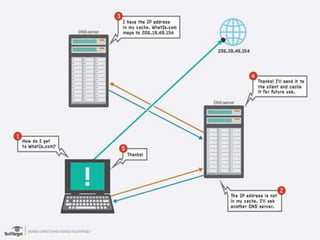
 DNS servers answer questions from both inside and outside their
own domains. When a server receives a request from outside the
domain for information about a name or address inside the domain,
it provides the authoritative answer. When a server receives a
request from inside its own domain for information about a name
or address outside that domain, it passes the request out to
another server -- usually one managed by its internet service
provider. If that server does not know the answer or the
authoritative source for the answer, it will reach out to the DNS
servers for the top-level domain -- e.g., for all of .com or .edu. Then,
it will pass the request down to the authoritative server for the
specific domain -- e.g., techtarget.com or stkate.edu; the answer
flows back along the same path.
How does DNS increase web
performance?
 To promote efficiency, servers can cache the answers they
receive for a set amount of time. This allows them to
respond more quickly the next time a request for the same
lookup comes in.
 For example, if everyone in an office needs to access the
same training video on a particular website on the same
day, the local DNS server will ordinarily only have to resolve
the name once, and then it can serve all the other requests
out of its cache.
 The length of time the record is held -- the time to live -- is
configurable; longer values decrease the load on servers,
shorter values ensure the most accurate responses.
What is Telnet?
 Telnet is a user command and an
underlying TCP/IP protocol for accessing remote
computers. Through Telnet, an administrator or
another user can access someone else's computer
remotely.
 On the Web, HTTP and FTP protocols allow you to
request specific files from remote computers, but not
to actually be logged on as a user of that computer.
 With Telnet, you log on as a regular user with whatever
privileges you may have been granted to the
specific application and data on that computer.
A Telnet command request looks like this (the
computer name is made-up):
telnet the.libraryat.whatis.edu
The result of this request would be an invitation
to log on with a userid and a prompt for a
password. If accepted, you would be logged on
like any user who used this computer every day.
Telnet is most likely to be used by program
developers and anyone who has a need to use
specific applications or data located at a
particular host computer.
File Transfer Protocol (FTP)
 File Transfer Protocol (FTP) is a standard
Internet protocol for transmitting files between computers
on the Internet over TCP/IP connections.
 FTP is a client-server protocol that relies on two
communications channels between client and server: a
command channel for controlling the conversation and a
data channel for transmitting file content.
 Clients initiate conversations with servers by requesting to
download a file. Using FTP, a client can upload, download,
delete, rename, move and copy files on a server.
 A user typically needs to log on to the FTP server, although
some servers make some or all of their content available
without login, also known as anonymous FTP.
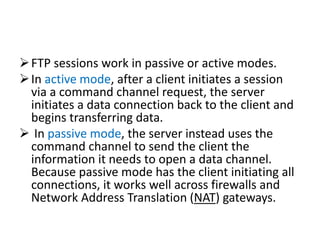
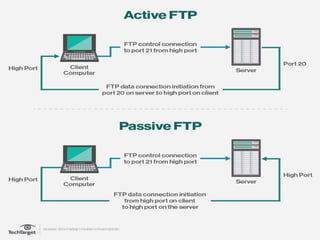
FTP sessions work in passive or active modes.
In active mode, after a client initiates a session
via a command channel request, the server
initiates a data connection back to the client and
begins transferring data.
 In passive mode, the server instead uses the
command channel to send the client the
information it needs to open a data channel.
Because passive mode has the client initiating all
connections, it works well across firewalls and
Network Address Translation (NAT) gateways.
TRIVIAL FILE TRANSFER PROTOCOL
(TFTP)
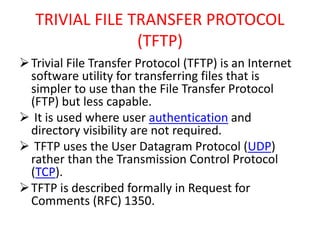
Trivial File Transfer Protocol (TFTP) is an Internet
software utility for transferring files that is
simpler to use than the File Transfer Protocol
(FTP) but less capable.
 It is used where user authentication and
directory visibility are not required.
 TFTP uses the User Datagram Protocol (UDP)
rather than the Transmission Control Protocol
(TCP).
TFTP is described formally in Request for
Comments (RFC) 1350.

Domain name system (dns) , TELNET ,FTP, TFTP

  • 1.
    DOMAIN NAME SYSTEM(DNS)  The domain name system (DNS) is the way that internet domain names are located and translated into internet protocol (IP) addresses.  The domain name system maps the name people use to locate a website to the IP address that a computer uses to locate a website.  For example, if someone types facebook.com into a web browser, a server behind the scenes will map that name to the IP address 31.13.72.36.  Web browsing and most other internet activity depend on DNS to quickly provide the information necessary to connect users to remote hosts.  DNS mapping is distributed throughout the internet in a hierarchy of authority.  Access providers and enterprises, as well as governments, universities and other organizations, typically have their own assigned ranges of IP addresses and an assigned domain name; they also typically run DNS servers to manage the mapping of those names to those addresses.
  • 2.
    How does DNSwork?  DNS servers answer questions from both inside and outside their own domains. When a server receives a request from outside the domain for information about a name or address inside the domain, it provides the authoritative answer. When a server receives a request from inside its own domain for information about a name or address outside that domain, it passes the request out to another server -- usually one managed by its internet service provider. If that server does not know the answer or the authoritative source for the answer, it will reach out to the DNS servers for the top-level domain -- e.g., for all of .com or .edu. Then, it will pass the request down to the authoritative server for the specific domain -- e.g., techtarget.com or stkate.edu; the answer flows back along the same path.
  • 3.
    How does DNSincrease web performance?  To promote efficiency, servers can cache the answers they receive for a set amount of time. This allows them to respond more quickly the next time a request for the same lookup comes in.  For example, if everyone in an office needs to access the same training video on a particular website on the same day, the local DNS server will ordinarily only have to resolve the name once, and then it can serve all the other requests out of its cache.  The length of time the record is held -- the time to live -- is configurable; longer values decrease the load on servers, shorter values ensure the most accurate responses.
  • 5.
    What is Telnet? Telnet is a user command and an underlying TCP/IP protocol for accessing remote computers. Through Telnet, an administrator or another user can access someone else's computer remotely.  On the Web, HTTP and FTP protocols allow you to request specific files from remote computers, but not to actually be logged on as a user of that computer.  With Telnet, you log on as a regular user with whatever privileges you may have been granted to the specific application and data on that computer.
  • 6.
    A Telnet commandrequest looks like this (the computer name is made-up): telnet the.libraryat.whatis.edu The result of this request would be an invitation to log on with a userid and a prompt for a password. If accepted, you would be logged on like any user who used this computer every day. Telnet is most likely to be used by program developers and anyone who has a need to use specific applications or data located at a particular host computer.
  • 7.
    File Transfer Protocol(FTP)  File Transfer Protocol (FTP) is a standard Internet protocol for transmitting files between computers on the Internet over TCP/IP connections.  FTP is a client-server protocol that relies on two communications channels between client and server: a command channel for controlling the conversation and a data channel for transmitting file content.  Clients initiate conversations with servers by requesting to download a file. Using FTP, a client can upload, download, delete, rename, move and copy files on a server.  A user typically needs to log on to the FTP server, although some servers make some or all of their content available without login, also known as anonymous FTP.
  • 8.
    FTP sessions workin passive or active modes. In active mode, after a client initiates a session via a command channel request, the server initiates a data connection back to the client and begins transferring data.  In passive mode, the server instead uses the command channel to send the client the information it needs to open a data channel. Because passive mode has the client initiating all connections, it works well across firewalls and Network Address Translation (NAT) gateways.
  • 10.
    TRIVIAL FILE TRANSFERPROTOCOL (TFTP) Trivial File Transfer Protocol (TFTP) is an Internet software utility for transferring files that is simpler to use than the File Transfer Protocol (FTP) but less capable.  It is used where user authentication and directory visibility are not required.  TFTP uses the User Datagram Protocol (UDP) rather than the Transmission Control Protocol (TCP). TFTP is described formally in Request for Comments (RFC) 1350.