Firewall
Introduction
• In the world of computer networks, a firewall acts like a security
guard. Its job is to watch over the flow of information between your
computer or network and the internet. It’s designed to block
unauthorized access while allowing safe data to pass through.
• Essentially, a firewall helps keep your digital world safe from
unwanted visitors and potential threats, making it an essential part of
today’s connected environment. It monitors both incoming and
outgoing traffic using a predefined set of security to detect and
prevent threats.
What is Firewall?
A firewall is a network security device, either hardware or software-
based, which monitors all incoming and outgoing traffic and based on a
defined set of security rules accepts, rejects, or drops that specific
traffic.
Accept: allow the traffic
Reject: block the traffic but reply with an “unreachable error”
Drop: block the traffic with no reply
• A firewall is a type of network security device that filters incoming and
outgoing network traffic with security policies that have previously
been set up inside an organization. A firewall is essentially the wall
that separates a private internal network from the open Internet at its
very basic level.
History and Need For Firewall
• Before Firewalls, network security was performed by Access Control Lists
(ACLs) residing on routers.
• ACLs are rules that determine whether network access should be granted or
denied to specific IP address. But ACLs cannot determine the nature of the
packet it is blocking. Also, ACL alone does not have the capacity to keep
threats out of the network.
• Hence, the Firewall was introduced. Connectivity to the Internet is no longer
optional for organizations. However, accessing the Internet provides benefits
to the organization; it also enables the outside world to interact with the
internal network of the organization. This creates a threat to the organization.
• In order to secure the internal network from unauthorized traffic, we need a
Firewall.
Working of Firewall
• Firewall match the network traffic against the rule set defined in its
table. Once the rule is matched, associate action is applied to the
network traffic.
• For example, Rules are defined as any employee from Human
Resources department cannot access the data from code server and
at the same time another rule is defined like system administrator can
access the data from both Human Resource and technical
department.
• Rules can be defined on the firewall based on the necessity and
security policies of the organization. From the perspective of a server,
network traffic can be either outgoing or incoming.
• Firewall maintains a distinct set of rules for both the cases.
• Mostly the outgoing traffic, originated from the server itself, allowed
to pass. Still, setting a rule on outgoing traffic is always better in order
to achieve more security and prevent unwanted communication.
• Incoming traffic is treated differently.
• Most traffic which reaches on the firewall is one of these three major
Transport Layer protocols- TCP, UDP or ICMP. All these types have a
source address and destination address. Also, TCP and UDP have port
numbers. ICMP uses type code instead of port number which
identifies purpose of that packet.
• Default policy: It is very difficult to explicitly cover every possible
rule on the firewall. For this reason, the firewall must always have a
default policy. Default policy only consists of action (accept, reject or
drop).
• Suppose no rule is defined about SSH connection to the server on the
firewall. So, it will follow the default policy. If default policy on the
firewall is set to accept, then any computer outside of your office can
establish an SSH connection to the server. Therefore, setting default
policy as drop (or reject) is always a good practice.
Types of Firewall
1. Packet Filtering Firewall
• Packet filtering firewall is used to control network access by monitoring
outgoing and incoming packets and allowing them to pass or stop based on
source and destination IP address, protocols, and ports.
• It analyses traffic at the transport protocol layer (but mainly uses first 3
layers).
• Packet firewalls treat each packet in isolation.
• They have no ability to tell whether a packet is part of an existing stream of
traffic. Only It can allow or deny the packets based on unique packet headers.
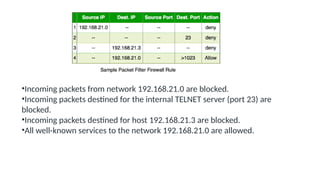
• Packet filtering firewall maintains a filtering table that decides whether the
packet will be forwarded or discarded. From the given filtering table, the
packets will be filtered according to the following rules:
•Incoming packets from network 192.168.21.0 are blocked.
•Incoming packets destined for the internal TELNET server (port 23) are
blocked.
•Incoming packets destined for host 192.168.21.3 are blocked.
•All well-known services to the network 192.168.21.0 are allowed.
2. Stateful Inspection Firewall
• Stateful firewalls (performs Stateful Packet Inspection) are able to determine
the connection state of packet, unlike Packet filtering firewall, which makes it
more efficient. It keeps track of the state of networks connection travelling
across it, such as TCP streams. So the filtering decisions would not only be
based on defined rules, but also on packet’s history in the state table.
3. Software Firewall
• A software firewall is any firewall that is set up locally or on a cloud server.
When it comes to controlling the inflow and outflow of data packets and
limiting the number of networks that can be linked to a single device, they
may be the most advantageous. But the problem with software firewall is
they are time-consuming.
4. Hardware Firewall
• They also go by the name “firewalls based on physical appliances.” It
guarantees that the malicious data is halted before it reaches the network
endpoint that is in danger.
5. Application Layer Firewall
• Application layer firewall can inspect and filter the packets on any OSI layer, up
to the application layer. It has the ability to block specific content, also
recognize when certain application and protocols (like HTTP, FTP) are being
misused. In other words, Application layer firewalls are hosts that run proxy
servers. A proxy firewall prevents the direct connection between either side of
the firewall, each packet has to pass through the proxy.
6. Next Generation Firewalls (NGFW)
• NGFW consists of Deep Packet Inspection, Application Inspection, SSL/SSH
inspection and many functionalities to protect the network from these modern
threats.
7. Proxy Service Firewall
• This kind of firewall filters communications at the application layer, and protects
the network. A proxy firewall acts as a gateway between two networks for a
particular application.
Functions of Firewall
• Every piece of data that enters or leaves a computer network must go via
the firewall.
• If the data packets are safely routed via the firewall, all of the important
data remains intact.
• A firewall logs each data packet that passes through it, enabling the user
to keep track of all network activities.
• Since the data is stored safely inside the data packets, it cannot be altered.
• Every attempt for access to our operating system is examined by our
firewall, which also blocks traffic from unidentified or undesired sources.
What Can Firewalls Protect Against?
• Infiltration by Malicious Actors: Firewalls can block suspicious
connections, preventing eavesdropping and advanced persistent
threats (APTs).
• Parental Controls: Parents can use firewalls to block their children
from accessing explicit web content.
• Workplace Web Browsing Restrictions: Employers can restrict
employees from using the company network to access certain
services and websites, like social media.
• Nationally Controlled Intranet: Governments can block access to
certain web content and services that conflict with national policies or
values.
Securing your computer
Antivirus Software
• Antivirus is one of the fundamental security tools that are recommended for every
computer whether it is connected to the external world through Internet or even it
operates in a stand-alone position.
• Antivirus software is a security software utility that is able to detect different types of
viruses and malware programs on computers. It is also able to remove, delete, and
quarantine a virus that has already affected the computer.
• There are many types of viruses that commonly spread on the Internet at a very high
rate; among such viruses are Trojan horses, worms, viruses, rootkits, and other rogue
programs. These viruses are very dangerous for damaging your valuable data on your
computer.
• Hackers and malicious attackers use different types of viruses for different purposes to
launch some of the lethal cyberattacks on the networks and computers on the
Internet. So, you should always be very well aware of the damage those viruses can
inflict on your computers.
• There are some good antivirus software programs, which are available
in FREE as well as paid versions. You can choose any of those versions
from the reputed antivirus software providers.
• For computers with critical information and personal data, it is NOT
recommended to use free antivirus software because those software
programs offer limited capabilities and features. And, those limited
capabilities are not sufficient for stopping certain viruses that are
more powerful and more dangerous to your computers.
• So, it is always recommended to get a paid version of the top-notch
antivirus software programs on the computers with critical information and
personal data.
• A few names of the top-notch antivirus software programs are mentioned
below:
• Panda Premium Antivirus
• AVG Internet Security
• Microsoft Security Essentials
• McAfee Total Protection
• Comodo Antivirus Software
• Avira Antivirus Pro
• Avast Security Ultimate
• Norton Security
• You should also take of the following important points for keeping
your computer free from viruses.
• Make sure your antivirus software automatically starts with the
starting of your computer.
• Antivirus is always “on” while the computer is on.
• Always download and install the latest updates from the vendors to
update the virus definition database.
• Regularly run quick scans on your computer.
• Run full scans occasionally after a few weeks.
• Always scan the data transfer media before copying any data.
• Take notice of all warnings and alerts generated by the antivirus
software.
Anti-Spyware Software
• Spyware is one of the most critical tools for launching cyberattacks on the targeted
networks, services, or the computer servers. Spywares are the malicious code design
to spy on the activities of the user for getting information about the behavior of the
user or to steal crucial information from the computers and online user accounts.
• The spyware codes are also extensively launched by the black-hat marketers to track
the Internet user’s behavior so that the advertisement campaigns can be started with
proper focus on the targeted market segments suitable for their online marketing
campaigns.
• One form of the dangerous spyware code is known as the keylogger, which is used to
track and record the keys pressed. This software code could become very dangerous
because it records all keystrokes and sends to the command and control center run
by the attacker. By this kind of malicious program, the hackers steal the information
such as usernames, passwords, and other codes or pin numbers used for your
financial activities and other valuable transactions through the Internet.
• Good anti-spyware software can easily detect these nasty codes that
reside on your computer, check for your behavior, and steal your bank
and other critical information. If you have already installed a full
version of any antivirus software on your computer, you might have
purchased the anti-spyware already. Many modern antivirus packages
are also included with the spyware tools. If there is no such security
software on your computer, you may download one from the reputed
companies to secure your computer from malicious spying on your
computer
• Spyware codes normally spread through free downloads, free
websites, and other such free sources available on the Internet. So, it
is highly recommended to use the paid version of the software from
the trusted security companies.
• A few very well-trusted anti-spyware software companies are listed
below; you can choose any one of them to download the anti-
spyware security software.
• SuperAntiSpyware software
• Spybot – Search and Destroy
• Adaware software
• SpywareBlaster
• AVAST Antivirus (embedded)
• AVG Antivirus (embedded)
• MalwareBytes Spyware
• Emsisoft Emergency Kit
• Take the following measures to make your spyware protection more
robust and effective:
• Use reliable and dedicated antispyware software.
• Many anti-spyware software embedded with the antivirus ignore minor
spyware programs.
• Always keep your anti-spyware software up to date.
• Scan your computer regularly for any kind of spyware on your computer.
• Always be vigilant while visiting the unknown websites.
• Major source of spyware spreading is infected websites.
• Deal strictly with the pop-ups and alluring offers by clicking “x” on it.
• Set your browser settings to block pop-up ads.
• Do not open emails from the unknown senders.
Anti-Spam Software
• Spamming is one of the major sources of spreading malware programs
on the Internet. Many spammers send malicious code, such as spyware,
malware, and viruses, through different kinds of unsolicited emails from
different sources.
• The major anti-spamming software and services include the following:
• Hornetsecurity spam filter service
• SpamTitan anti-spam software
• MailCleaner anti-spam software
• SpamPhobia anti-spam
• Spambrella anti-spam service provider
• FireTrust MailWasher Service
• Other than using the anti-spamming email solutions, you should also
take care of the following points while using emails.
• Never open emails from unknown users.
• Never click on the links or attachments of spam emails.
• Always keep the volume of spam emails in mind; if there is any spike
in the emails, consult with your cybersecurity person or service
provider.
Security Updates
• Computers perform different types of functions and activities based on the
software code that runs not only the hardware of the computer, but also the
software utilities that we use. No software code is 100% perfect.
• There may be some flaws, bugs, and other vulnerabilities in all types of
software programs. These bugs or vulnerabilities in the software programs
may be present in the OS, drivers, application software, utility software, and
network software. The vulnerabilities in the websites and web-based
applications can also be a major issue that can pose security threat.
• Hackers and cybercriminals use those vulnerabilities, flaws, bugs, and
obsolete features to attack the computers and the networks. The security
professionals always keep a close eye on the code, features of the code,
bugs, possible vulnerabilities, and 6 • Securing Your Computers 109 other
security-related aspects to make improvements in the system and
application software
• For keeping your computer updated with the security patches, you should need
to install patches and install newer versions of the following applications:
• Use the latest version of the OS of your choice.
• Always install OS software updates regularly without any delay.
• Always use genuine security software programs.
• Avoid using free programs, which may bring some malware accompanied with
them.
• Always put your security applications on auto-updating option.
• Update every software application that you use on your computer.
• Remove all applications that you do not use.
• Always use the latest versions of the software utilities and applications on your
computer.
• Do not use the cracked version of software applications, it may be very dangerous
for your data and computer security.
• Never delay in installing downloaded updates.
Securing browsing Settings
• The vulnerabilities in the browsers are extensively exploited by the hackers and
malicious attackers to intrude into the computer systems for carrying out
cybercrime activities such as data theft, identity theft, data corruption, ransom
attacks, spamming, and other activities.
• Many browsers are used by the Internet users; among such commonly used
browsers, Google Chrome, Windows Explorer, Mozilla Firefox, and Netscape
are a few very important ones to name.
• Every browser has numerous settings that relate performance, security,
privacy, and other plugins and functions.
• You should set the browser to safe browsing mode. Meanwhile, the settings
should also not allow the tracking of the traffic request and turn on the SSL
(Secure Sockets Layer) and HTTPS (Hypertext Transfer Protocol Secure)
certificate settings.
• The main settings of your browser to keep your computer safe from any
malicious attempt to alter your computer resources and settings.
• Set privacy settings to high level.
• Use separate strong password-based user groups.
• Do not save passwords on browsers.
• Do not login as an administrator unless you really need it.
• Activate the safe browsing settings on the browser.
• Your browsing traffic should be attached with “Do Not Track” request.
• Activate SSL and HTTPS settings.
• All pop-ups, plugins, and other activities should be denied or asked to get
permission from the computer admin
• Computer resources and content access settings should be very strong.
• Always check for harmful software installed on your browser or computer
Scan Devices before Data Transfer
• Data traveling and other devices to run or transfer data from one
point to another one have been the major transporters of viruses,
worms, Trojans, and other malicious codes. Among such devices are
flash drives, CDs, DVDs, floppies, external hard drive, and any other
data transferring devices
• All those devices should be properly scanned with the updated
antivirus and antimalware software to detect and kill any malicious
programs attached to the data. After scanning the devices fully, you
can copy or transfer data between the devices; this will reduce the
threat of viruses to infect your computer.
Social Engineering Attack Precautions
• Social engineering is very important source for unleashing a cybercrime on
your data, personal information, and bank account information. In this form
of cyberattack, different media such as text messages, chatting, group
discussion, telephone call, and emails are used to communicate with you to
exploit your innocence or ignorance. This is also a part of cyber frauds
• You might have noticed that you get an email from a legitimate-looking
source that you got a prize through a lucky draw or you got a big job
opportunity in a big organization. That email looks like it has been sent from a
legitimate company and you will be lured by the presentation of the content.
• The hacker on the other end of the communication tries to use the social
behavior to influence your thoughts and asks you to provide your personal
information including the bank account and other information.
• The main objective of such social engineering attacks is to achieve the
financial benefits from the unsuspecting people. They also use the
text messages, phone calls, and other mediums for the same purpose.
• Hackers use the social engineering tactics to spread malware in your
mobile and computer device through emails, attached documents,
and messages. Once you click the emails and its attachments, the
viruses embedded in those emails download and get installed on your
computer or mobile device.
• So, never open emails, text messages, or other messages from
unknown people. If you see any kind of such alluring message from
the unknown, just delete it without any second thoughts!
Miscellaneous tips
• The main tips for keeping your computer free from viruses are listed below:
• Never use the cracked software.
• Never use free software.
• Never save your passwords on your computer or browsers.
• Do not provide critical information on telephone, email, or SMS.
• Do not open files sent by unknown people.
• Do not visit faulty websites.
• Set your browser settings at high security and privacy.
• Always create separate users for a computer.
• Create a guest account with minimum privileges, if required.
• Uninstall all apps that are not in use.
• Do not install unknown applications.
• Always install the plugins that you deem necessary for your use.
• Avoid to use free applications.
• Always update your applications.
• Use latest versions of an OS.
• Use latest versions of applications.
• Never miss a security patch or update at all.
• Daily check for the security updates.
• Turn off your computer if you are not using it.
• Turn off the Internet router, if not used for a certain period of time.
• Take security as a serious matter in your life.
• Regularly check for the security guidelines.
• Always make a copy of your valuable data.
• Create checkpoints on your computer.
• Run scheduled virus scans regularly.
• Always download something from the reliable websites.
• Never try to use the public data sharing websites for exchanging data.
• Use highly secure and reliable data sharing and collaboration platforms for data transfers.
• Use strong passwords.
• Encrypt your important data files.

U-2.pptx............................................

  • 1.
  • 2.
    Introduction • In theworld of computer networks, a firewall acts like a security guard. Its job is to watch over the flow of information between your computer or network and the internet. It’s designed to block unauthorized access while allowing safe data to pass through. • Essentially, a firewall helps keep your digital world safe from unwanted visitors and potential threats, making it an essential part of today’s connected environment. It monitors both incoming and outgoing traffic using a predefined set of security to detect and prevent threats.
  • 3.
    What is Firewall? Afirewall is a network security device, either hardware or software- based, which monitors all incoming and outgoing traffic and based on a defined set of security rules accepts, rejects, or drops that specific traffic. Accept: allow the traffic Reject: block the traffic but reply with an “unreachable error” Drop: block the traffic with no reply
  • 4.
    • A firewallis a type of network security device that filters incoming and outgoing network traffic with security policies that have previously been set up inside an organization. A firewall is essentially the wall that separates a private internal network from the open Internet at its very basic level.
  • 5.
    History and NeedFor Firewall • Before Firewalls, network security was performed by Access Control Lists (ACLs) residing on routers. • ACLs are rules that determine whether network access should be granted or denied to specific IP address. But ACLs cannot determine the nature of the packet it is blocking. Also, ACL alone does not have the capacity to keep threats out of the network. • Hence, the Firewall was introduced. Connectivity to the Internet is no longer optional for organizations. However, accessing the Internet provides benefits to the organization; it also enables the outside world to interact with the internal network of the organization. This creates a threat to the organization. • In order to secure the internal network from unauthorized traffic, we need a Firewall.
  • 6.
    Working of Firewall •Firewall match the network traffic against the rule set defined in its table. Once the rule is matched, associate action is applied to the network traffic. • For example, Rules are defined as any employee from Human Resources department cannot access the data from code server and at the same time another rule is defined like system administrator can access the data from both Human Resource and technical department. • Rules can be defined on the firewall based on the necessity and security policies of the organization. From the perspective of a server, network traffic can be either outgoing or incoming.
  • 7.
    • Firewall maintainsa distinct set of rules for both the cases. • Mostly the outgoing traffic, originated from the server itself, allowed to pass. Still, setting a rule on outgoing traffic is always better in order to achieve more security and prevent unwanted communication. • Incoming traffic is treated differently. • Most traffic which reaches on the firewall is one of these three major Transport Layer protocols- TCP, UDP or ICMP. All these types have a source address and destination address. Also, TCP and UDP have port numbers. ICMP uses type code instead of port number which identifies purpose of that packet.
  • 8.
    • Default policy:It is very difficult to explicitly cover every possible rule on the firewall. For this reason, the firewall must always have a default policy. Default policy only consists of action (accept, reject or drop). • Suppose no rule is defined about SSH connection to the server on the firewall. So, it will follow the default policy. If default policy on the firewall is set to accept, then any computer outside of your office can establish an SSH connection to the server. Therefore, setting default policy as drop (or reject) is always a good practice.
  • 9.
    Types of Firewall 1.Packet Filtering Firewall • Packet filtering firewall is used to control network access by monitoring outgoing and incoming packets and allowing them to pass or stop based on source and destination IP address, protocols, and ports. • It analyses traffic at the transport protocol layer (but mainly uses first 3 layers). • Packet firewalls treat each packet in isolation. • They have no ability to tell whether a packet is part of an existing stream of traffic. Only It can allow or deny the packets based on unique packet headers. • Packet filtering firewall maintains a filtering table that decides whether the packet will be forwarded or discarded. From the given filtering table, the packets will be filtered according to the following rules:
  • 10.
    •Incoming packets fromnetwork 192.168.21.0 are blocked. •Incoming packets destined for the internal TELNET server (port 23) are blocked. •Incoming packets destined for host 192.168.21.3 are blocked. •All well-known services to the network 192.168.21.0 are allowed.
  • 11.
    2. Stateful InspectionFirewall • Stateful firewalls (performs Stateful Packet Inspection) are able to determine the connection state of packet, unlike Packet filtering firewall, which makes it more efficient. It keeps track of the state of networks connection travelling across it, such as TCP streams. So the filtering decisions would not only be based on defined rules, but also on packet’s history in the state table. 3. Software Firewall • A software firewall is any firewall that is set up locally or on a cloud server. When it comes to controlling the inflow and outflow of data packets and limiting the number of networks that can be linked to a single device, they may be the most advantageous. But the problem with software firewall is they are time-consuming. 4. Hardware Firewall • They also go by the name “firewalls based on physical appliances.” It guarantees that the malicious data is halted before it reaches the network endpoint that is in danger.
  • 12.
    5. Application LayerFirewall • Application layer firewall can inspect and filter the packets on any OSI layer, up to the application layer. It has the ability to block specific content, also recognize when certain application and protocols (like HTTP, FTP) are being misused. In other words, Application layer firewalls are hosts that run proxy servers. A proxy firewall prevents the direct connection between either side of the firewall, each packet has to pass through the proxy. 6. Next Generation Firewalls (NGFW) • NGFW consists of Deep Packet Inspection, Application Inspection, SSL/SSH inspection and many functionalities to protect the network from these modern threats. 7. Proxy Service Firewall • This kind of firewall filters communications at the application layer, and protects the network. A proxy firewall acts as a gateway between two networks for a particular application.
  • 13.
    Functions of Firewall •Every piece of data that enters or leaves a computer network must go via the firewall. • If the data packets are safely routed via the firewall, all of the important data remains intact. • A firewall logs each data packet that passes through it, enabling the user to keep track of all network activities. • Since the data is stored safely inside the data packets, it cannot be altered. • Every attempt for access to our operating system is examined by our firewall, which also blocks traffic from unidentified or undesired sources.
  • 14.
    What Can FirewallsProtect Against? • Infiltration by Malicious Actors: Firewalls can block suspicious connections, preventing eavesdropping and advanced persistent threats (APTs). • Parental Controls: Parents can use firewalls to block their children from accessing explicit web content. • Workplace Web Browsing Restrictions: Employers can restrict employees from using the company network to access certain services and websites, like social media. • Nationally Controlled Intranet: Governments can block access to certain web content and services that conflict with national policies or values.
  • 15.
  • 16.
    Antivirus Software • Antivirusis one of the fundamental security tools that are recommended for every computer whether it is connected to the external world through Internet or even it operates in a stand-alone position. • Antivirus software is a security software utility that is able to detect different types of viruses and malware programs on computers. It is also able to remove, delete, and quarantine a virus that has already affected the computer. • There are many types of viruses that commonly spread on the Internet at a very high rate; among such viruses are Trojan horses, worms, viruses, rootkits, and other rogue programs. These viruses are very dangerous for damaging your valuable data on your computer. • Hackers and malicious attackers use different types of viruses for different purposes to launch some of the lethal cyberattacks on the networks and computers on the Internet. So, you should always be very well aware of the damage those viruses can inflict on your computers.
  • 17.
    • There aresome good antivirus software programs, which are available in FREE as well as paid versions. You can choose any of those versions from the reputed antivirus software providers. • For computers with critical information and personal data, it is NOT recommended to use free antivirus software because those software programs offer limited capabilities and features. And, those limited capabilities are not sufficient for stopping certain viruses that are more powerful and more dangerous to your computers.
  • 18.
    • So, itis always recommended to get a paid version of the top-notch antivirus software programs on the computers with critical information and personal data. • A few names of the top-notch antivirus software programs are mentioned below: • Panda Premium Antivirus • AVG Internet Security • Microsoft Security Essentials • McAfee Total Protection • Comodo Antivirus Software • Avira Antivirus Pro • Avast Security Ultimate • Norton Security
  • 19.
    • You shouldalso take of the following important points for keeping your computer free from viruses. • Make sure your antivirus software automatically starts with the starting of your computer. • Antivirus is always “on” while the computer is on. • Always download and install the latest updates from the vendors to update the virus definition database. • Regularly run quick scans on your computer. • Run full scans occasionally after a few weeks. • Always scan the data transfer media before copying any data. • Take notice of all warnings and alerts generated by the antivirus software.
  • 20.
    Anti-Spyware Software • Spywareis one of the most critical tools for launching cyberattacks on the targeted networks, services, or the computer servers. Spywares are the malicious code design to spy on the activities of the user for getting information about the behavior of the user or to steal crucial information from the computers and online user accounts. • The spyware codes are also extensively launched by the black-hat marketers to track the Internet user’s behavior so that the advertisement campaigns can be started with proper focus on the targeted market segments suitable for their online marketing campaigns. • One form of the dangerous spyware code is known as the keylogger, which is used to track and record the keys pressed. This software code could become very dangerous because it records all keystrokes and sends to the command and control center run by the attacker. By this kind of malicious program, the hackers steal the information such as usernames, passwords, and other codes or pin numbers used for your financial activities and other valuable transactions through the Internet.
  • 21.
    • Good anti-spywaresoftware can easily detect these nasty codes that reside on your computer, check for your behavior, and steal your bank and other critical information. If you have already installed a full version of any antivirus software on your computer, you might have purchased the anti-spyware already. Many modern antivirus packages are also included with the spyware tools. If there is no such security software on your computer, you may download one from the reputed companies to secure your computer from malicious spying on your computer • Spyware codes normally spread through free downloads, free websites, and other such free sources available on the Internet. So, it is highly recommended to use the paid version of the software from the trusted security companies.
  • 22.
    • A fewvery well-trusted anti-spyware software companies are listed below; you can choose any one of them to download the anti- spyware security software. • SuperAntiSpyware software • Spybot – Search and Destroy • Adaware software • SpywareBlaster • AVAST Antivirus (embedded) • AVG Antivirus (embedded) • MalwareBytes Spyware • Emsisoft Emergency Kit
  • 23.
    • Take thefollowing measures to make your spyware protection more robust and effective: • Use reliable and dedicated antispyware software. • Many anti-spyware software embedded with the antivirus ignore minor spyware programs. • Always keep your anti-spyware software up to date. • Scan your computer regularly for any kind of spyware on your computer. • Always be vigilant while visiting the unknown websites. • Major source of spyware spreading is infected websites. • Deal strictly with the pop-ups and alluring offers by clicking “x” on it. • Set your browser settings to block pop-up ads. • Do not open emails from the unknown senders.
  • 24.
    Anti-Spam Software • Spammingis one of the major sources of spreading malware programs on the Internet. Many spammers send malicious code, such as spyware, malware, and viruses, through different kinds of unsolicited emails from different sources. • The major anti-spamming software and services include the following: • Hornetsecurity spam filter service • SpamTitan anti-spam software • MailCleaner anti-spam software • SpamPhobia anti-spam • Spambrella anti-spam service provider • FireTrust MailWasher Service
  • 25.
    • Other thanusing the anti-spamming email solutions, you should also take care of the following points while using emails. • Never open emails from unknown users. • Never click on the links or attachments of spam emails. • Always keep the volume of spam emails in mind; if there is any spike in the emails, consult with your cybersecurity person or service provider.
  • 26.
    Security Updates • Computersperform different types of functions and activities based on the software code that runs not only the hardware of the computer, but also the software utilities that we use. No software code is 100% perfect. • There may be some flaws, bugs, and other vulnerabilities in all types of software programs. These bugs or vulnerabilities in the software programs may be present in the OS, drivers, application software, utility software, and network software. The vulnerabilities in the websites and web-based applications can also be a major issue that can pose security threat. • Hackers and cybercriminals use those vulnerabilities, flaws, bugs, and obsolete features to attack the computers and the networks. The security professionals always keep a close eye on the code, features of the code, bugs, possible vulnerabilities, and 6 • Securing Your Computers 109 other security-related aspects to make improvements in the system and application software
  • 27.
    • For keepingyour computer updated with the security patches, you should need to install patches and install newer versions of the following applications: • Use the latest version of the OS of your choice. • Always install OS software updates regularly without any delay. • Always use genuine security software programs. • Avoid using free programs, which may bring some malware accompanied with them. • Always put your security applications on auto-updating option. • Update every software application that you use on your computer. • Remove all applications that you do not use. • Always use the latest versions of the software utilities and applications on your computer. • Do not use the cracked version of software applications, it may be very dangerous for your data and computer security. • Never delay in installing downloaded updates.
  • 28.
    Securing browsing Settings •The vulnerabilities in the browsers are extensively exploited by the hackers and malicious attackers to intrude into the computer systems for carrying out cybercrime activities such as data theft, identity theft, data corruption, ransom attacks, spamming, and other activities. • Many browsers are used by the Internet users; among such commonly used browsers, Google Chrome, Windows Explorer, Mozilla Firefox, and Netscape are a few very important ones to name. • Every browser has numerous settings that relate performance, security, privacy, and other plugins and functions. • You should set the browser to safe browsing mode. Meanwhile, the settings should also not allow the tracking of the traffic request and turn on the SSL (Secure Sockets Layer) and HTTPS (Hypertext Transfer Protocol Secure) certificate settings.
  • 29.
    • The mainsettings of your browser to keep your computer safe from any malicious attempt to alter your computer resources and settings. • Set privacy settings to high level. • Use separate strong password-based user groups. • Do not save passwords on browsers. • Do not login as an administrator unless you really need it. • Activate the safe browsing settings on the browser. • Your browsing traffic should be attached with “Do Not Track” request. • Activate SSL and HTTPS settings. • All pop-ups, plugins, and other activities should be denied or asked to get permission from the computer admin • Computer resources and content access settings should be very strong. • Always check for harmful software installed on your browser or computer
  • 30.
    Scan Devices beforeData Transfer • Data traveling and other devices to run or transfer data from one point to another one have been the major transporters of viruses, worms, Trojans, and other malicious codes. Among such devices are flash drives, CDs, DVDs, floppies, external hard drive, and any other data transferring devices • All those devices should be properly scanned with the updated antivirus and antimalware software to detect and kill any malicious programs attached to the data. After scanning the devices fully, you can copy or transfer data between the devices; this will reduce the threat of viruses to infect your computer.
  • 31.
    Social Engineering AttackPrecautions • Social engineering is very important source for unleashing a cybercrime on your data, personal information, and bank account information. In this form of cyberattack, different media such as text messages, chatting, group discussion, telephone call, and emails are used to communicate with you to exploit your innocence or ignorance. This is also a part of cyber frauds • You might have noticed that you get an email from a legitimate-looking source that you got a prize through a lucky draw or you got a big job opportunity in a big organization. That email looks like it has been sent from a legitimate company and you will be lured by the presentation of the content. • The hacker on the other end of the communication tries to use the social behavior to influence your thoughts and asks you to provide your personal information including the bank account and other information.
  • 32.
    • The mainobjective of such social engineering attacks is to achieve the financial benefits from the unsuspecting people. They also use the text messages, phone calls, and other mediums for the same purpose. • Hackers use the social engineering tactics to spread malware in your mobile and computer device through emails, attached documents, and messages. Once you click the emails and its attachments, the viruses embedded in those emails download and get installed on your computer or mobile device. • So, never open emails, text messages, or other messages from unknown people. If you see any kind of such alluring message from the unknown, just delete it without any second thoughts!
  • 33.
    Miscellaneous tips • Themain tips for keeping your computer free from viruses are listed below: • Never use the cracked software. • Never use free software. • Never save your passwords on your computer or browsers. • Do not provide critical information on telephone, email, or SMS. • Do not open files sent by unknown people. • Do not visit faulty websites. • Set your browser settings at high security and privacy. • Always create separate users for a computer. • Create a guest account with minimum privileges, if required. • Uninstall all apps that are not in use. • Do not install unknown applications. • Always install the plugins that you deem necessary for your use. • Avoid to use free applications. • Always update your applications. • Use latest versions of an OS.
  • 34.
    • Use latestversions of applications. • Never miss a security patch or update at all. • Daily check for the security updates. • Turn off your computer if you are not using it. • Turn off the Internet router, if not used for a certain period of time. • Take security as a serious matter in your life. • Regularly check for the security guidelines. • Always make a copy of your valuable data. • Create checkpoints on your computer. • Run scheduled virus scans regularly. • Always download something from the reliable websites. • Never try to use the public data sharing websites for exchanging data. • Use highly secure and reliable data sharing and collaboration platforms for data transfers. • Use strong passwords. • Encrypt your important data files.