Network Security
Table of content
 Introduction
 Network Security Process
 Network Security Components
 Network Attacks
 Conclusions
 References
Introduction
 Information on networks may get compromised by
 unauthorized access,
 misuse,
 malfunction,
 modification,
 destruction, or improper disclosure.
 To prevent and monitor the unwanted threats policies
and practices are adopted.
 The process of taking physical and software
preventative measures to protect the networking
infrastructure is network security.
Network security process (1)
 Authentication-
1. One-factor authentication-
This requires just one detail, password, to authenticate a
user-name.
2. Two-factor authentication-
Authentication is done with the help of secondary device such
as a mobile phone, ATM card, security token etc.
3. Three-factor authentication-
This authentication procedure is bounded to user’s body
making the authentication unique for each user. Fingerprint
scan, retinal scan are some of the ways to implement this
authentication technique.
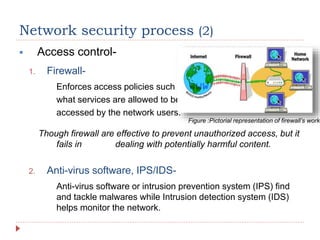
 Access control-
1. Firewall-
Enforces access policies such as
what services are allowed to be
accessed by the network users.
Though firewall are effective to prevent unauthorized access, but it
fails in dealing with potentially harmful content.
2. Anti-virus software, IPS/IDS-
Anti-virus software or intrusion prevention system (IPS) find
and tackle malwares while Intrusion detection system (IDS)
helps monitor the network.
Network security process (2)
Figure :Pictorial representation of firewall’s worki
Network security components (1)
 Encryption-
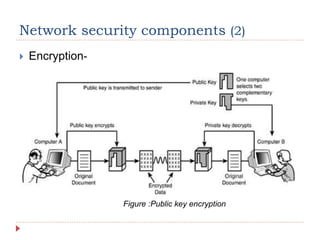
 It is a process in cryptography in which a message or
information is encoded in such a way that only authorized
users (those who have decryption key) can access it.
 Information or message, plaintext, is encrypted using an
encryption algorithm generating cipher-text that can only
be read after decryption, process of decrypting.
 Two types-
 Public key encryption
 Private key encryption
Network security components (2)
 Encryption-
Figure :Public key encryption
Network security components (3)
 Wireless security-
 Prevention of unauthorized access or damage to
computers using wireless networks.
 Types of wireless security-
 Wired Equivalent Privacy (WEP)-
 Introduced to provide data confidentiality comparable to that of wired
networks.
 Succeeded completely by WPA in 2003.
 Wi-Fi Protected Access (WPA)-
 WPA and WPA2 are the two protocols developed by Wi-Fi alliance in
2003.
 WPA3 was launched in Jan 2018 with better security than WPA2
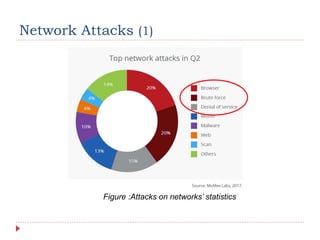
Network Attacks (1)
Figure :Attacks on networks’ statistics
Network Attacks (2)
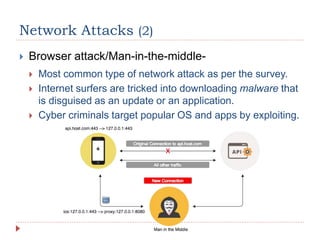
 Browser attack/Man-in-the-middle-
 Most common type of network attack as per the survey.
 Internet surfers are tricked into downloading malware that
is disguised as an update or an application.
 Cyber criminals target popular OS and apps by exploiting.
Network Attacks (3)
 Browser attack/Man-in-the-middle-
 Prevention measures-
“Detecting a MITM attack can be very difficult as user does not realize
about the data traffic interception until data is modified. Taking
precautions in this attack is much better than cure.”- ComputerWeekly
 Setting up an Intrusion detection system that monitors the
network and if someone tries to hijack, it gives immediate
alerts.
 Use of Virtual Private Network (VPN) that creates
encrypted tunnels providing additional security.
Network Attacks (4)
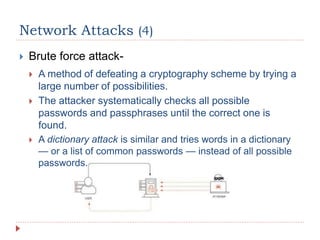
 Brute force attack-
 A method of defeating a cryptography scheme by trying a
large number of possibilities.
 The attacker systematically checks all possible
passwords and passphrases until the correct one is
found.
 A dictionary attack is similar and tries words in a dictionary
— or a list of common passwords — instead of all possible
passwords.
Network Attacks (5)
 Brute force attack-
 Prevention measures-
 Long and secure passwords, containing special
characters, is first and most important prevention measure
to be taken.
 Use of strong encryption algorithms like SHA-512.
 Login limits should be set on the services that accept
login. Server software is generally set to do this out of the
box, as it’s a good security practice.
 Occasionally changing passwords in a period of time.
Network Attacks (6)
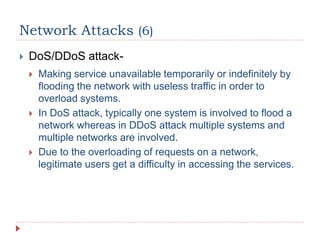
 DoS/DDoS attack-
 Making service unavailable temporarily or indefinitely by
flooding the network with useless traffic in order to
overload systems.
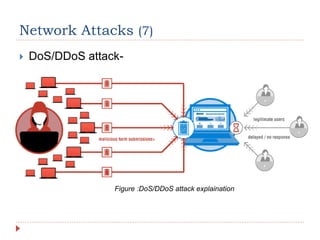
 In DoS attack, typically one system is involved to flood a
network whereas in DDoS attack multiple systems and
multiple networks are involved.
 Due to the overloading of requests on a network,
legitimate users get a difficulty in accessing the services.
Network Attacks (7)
 DoS/DDoS attack-
Figure :DoS/DDoS attack explaination
Network Attacks (6)
 DoS/DDoS attack-
 Prevention measures-
 Limiting traffic by authentication of users, which can be
done by configuring servers.
 Using Firewall or Antivirus programs on the network.
 Keeping a check on the suspicious activities, which may
give a hint on starting stage of the attack.
“With 1.35 terabits per second of traffic hit, Github, on 28 Feb 2018
survived the biggest DDoS attack ever recorded in the history.”
Conclusion
 Procedural steps of network security are discussed,
comprising of authentication followed by access
control.
 Crucial network security components that enforces
and enriches the security over a network help in
protecting a network.
 Network attacks that are common among the
internet world are visited to get a better
understanding of the real world.
“No one connected to a network is safe, literally no one. Knowledge of
getting compromised is way less than compromising a network.”-
Anonymous
References
 https://www.calyptix.com/top-threats/top-7-network-attack-
types-2016/
 https://www.webopedia.com/TERM/N/network_security.html
 http://www.cert.org/encyc_article/tocencyc.html
 https://www.springer.com/computer/communications/book/978
-1-4419-0165-1
 http://www.scmagazine.com/case-study-network-
clarity/article/324988
 https://www.cisco.com/c/en/us/products/security/what-is-
network-security.html
Questions are appreciated…

Network security

  • 1.
  • 2.
    Table of content Introduction  Network Security Process  Network Security Components  Network Attacks  Conclusions  References
  • 3.
    Introduction  Information onnetworks may get compromised by  unauthorized access,  misuse,  malfunction,  modification,  destruction, or improper disclosure.  To prevent and monitor the unwanted threats policies and practices are adopted.  The process of taking physical and software preventative measures to protect the networking infrastructure is network security.
  • 4.
    Network security process(1)  Authentication- 1. One-factor authentication- This requires just one detail, password, to authenticate a user-name. 2. Two-factor authentication- Authentication is done with the help of secondary device such as a mobile phone, ATM card, security token etc. 3. Three-factor authentication- This authentication procedure is bounded to user’s body making the authentication unique for each user. Fingerprint scan, retinal scan are some of the ways to implement this authentication technique.
  • 5.
     Access control- 1.Firewall- Enforces access policies such as what services are allowed to be accessed by the network users. Though firewall are effective to prevent unauthorized access, but it fails in dealing with potentially harmful content. 2. Anti-virus software, IPS/IDS- Anti-virus software or intrusion prevention system (IPS) find and tackle malwares while Intrusion detection system (IDS) helps monitor the network. Network security process (2) Figure :Pictorial representation of firewall’s worki
  • 6.
    Network security components(1)  Encryption-  It is a process in cryptography in which a message or information is encoded in such a way that only authorized users (those who have decryption key) can access it.  Information or message, plaintext, is encrypted using an encryption algorithm generating cipher-text that can only be read after decryption, process of decrypting.  Two types-  Public key encryption  Private key encryption
  • 7.
    Network security components(2)  Encryption- Figure :Public key encryption
  • 8.
    Network security components(3)  Wireless security-  Prevention of unauthorized access or damage to computers using wireless networks.  Types of wireless security-  Wired Equivalent Privacy (WEP)-  Introduced to provide data confidentiality comparable to that of wired networks.  Succeeded completely by WPA in 2003.  Wi-Fi Protected Access (WPA)-  WPA and WPA2 are the two protocols developed by Wi-Fi alliance in 2003.  WPA3 was launched in Jan 2018 with better security than WPA2
  • 9.
    Network Attacks (1) Figure:Attacks on networks’ statistics
  • 10.
    Network Attacks (2) Browser attack/Man-in-the-middle-  Most common type of network attack as per the survey.  Internet surfers are tricked into downloading malware that is disguised as an update or an application.  Cyber criminals target popular OS and apps by exploiting.
  • 11.
    Network Attacks (3) Browser attack/Man-in-the-middle-  Prevention measures- “Detecting a MITM attack can be very difficult as user does not realize about the data traffic interception until data is modified. Taking precautions in this attack is much better than cure.”- ComputerWeekly  Setting up an Intrusion detection system that monitors the network and if someone tries to hijack, it gives immediate alerts.  Use of Virtual Private Network (VPN) that creates encrypted tunnels providing additional security.
  • 12.
    Network Attacks (4) Brute force attack-  A method of defeating a cryptography scheme by trying a large number of possibilities.  The attacker systematically checks all possible passwords and passphrases until the correct one is found.  A dictionary attack is similar and tries words in a dictionary — or a list of common passwords — instead of all possible passwords.
  • 13.
    Network Attacks (5) Brute force attack-  Prevention measures-  Long and secure passwords, containing special characters, is first and most important prevention measure to be taken.  Use of strong encryption algorithms like SHA-512.  Login limits should be set on the services that accept login. Server software is generally set to do this out of the box, as it’s a good security practice.  Occasionally changing passwords in a period of time.
  • 14.
    Network Attacks (6) DoS/DDoS attack-  Making service unavailable temporarily or indefinitely by flooding the network with useless traffic in order to overload systems.  In DoS attack, typically one system is involved to flood a network whereas in DDoS attack multiple systems and multiple networks are involved.  Due to the overloading of requests on a network, legitimate users get a difficulty in accessing the services.
  • 15.
    Network Attacks (7) DoS/DDoS attack- Figure :DoS/DDoS attack explaination
  • 16.
    Network Attacks (6) DoS/DDoS attack-  Prevention measures-  Limiting traffic by authentication of users, which can be done by configuring servers.  Using Firewall or Antivirus programs on the network.  Keeping a check on the suspicious activities, which may give a hint on starting stage of the attack. “With 1.35 terabits per second of traffic hit, Github, on 28 Feb 2018 survived the biggest DDoS attack ever recorded in the history.”
  • 17.
    Conclusion  Procedural stepsof network security are discussed, comprising of authentication followed by access control.  Crucial network security components that enforces and enriches the security over a network help in protecting a network.  Network attacks that are common among the internet world are visited to get a better understanding of the real world. “No one connected to a network is safe, literally no one. Knowledge of getting compromised is way less than compromising a network.”- Anonymous
  • 18.
    References  https://www.calyptix.com/top-threats/top-7-network-attack- types-2016/  https://www.webopedia.com/TERM/N/network_security.html http://www.cert.org/encyc_article/tocencyc.html  https://www.springer.com/computer/communications/book/978 -1-4419-0165-1  http://www.scmagazine.com/case-study-network- clarity/article/324988  https://www.cisco.com/c/en/us/products/security/what-is- network-security.html
  • 19.