DEPARTMENT OF COMPUTER SCIENCE
AND
ENGINEERING
-Tomorrow’s Technology Through Today’s Education
CHAITANYA INSTITUTE OF SCIENCE AND
TECHNOLOGY
EyeRing
Over view
• Introduction
• Touch Pointing Gestures
• Free-air Pointing Gestures
• EyeRing – A Finger Worn Assistant
• Applications
• Future Applications
• Conclusion
Introduction
• Finger-worn interface for interaction.
• For visually impaired people, it opens a world of possibilities.
• Eye Ring, a novel design and concept of a finger-worn device
• Numerous applications for visually impaired people such as
recognizing currency notes and navigating , to tour an unknown city or
translate signage.
• Earlier explorations are divided into a few subspaces according to how
they are operated:
o Pointing
o Tapping/Touching
o Gesturing
o Pressing/Clicking on the device
• This device is based on performing Touch Pointing (TP) gestures, as
well as Free-air Pointing (FP) gestures
Touch Pointing (TP) Gestures
• TP gestures utilize the natural touch sense.
• the action trigger is not based on touch sensitivity of the surface, rather
on an external sensor
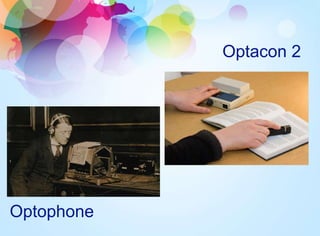
• reading aid for the blind date back to the Optophone and later the
Optacon1
• Other assistive devices that are using imaging technology are Primpo’s
iSONIC2 and the i-Cane3
Optophone
Optacon 2
Free-air Pointing (FP) Gestures
• Human behavior and natural gestural language.
• Previous work revolved around:
o Control
o information retrieval
• Utilize a specialized sensor, between the pointing finger and the target.
• Use a general-purpose camera.
• Desire to replace an impaired human visual sense had a strong
influence on the design.
EyeRing – A Finger Worn
Assistant
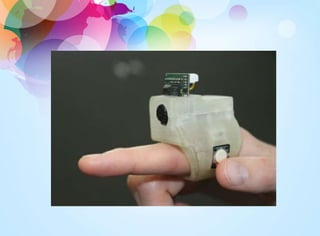
• A finger-worn device with an embedded camera, a computation
element and an earpiece for information loopback.
• Autonomous and wireless, and includes a single button to initiate the
interaction.
• The current implementation of finger-worn device uses :
o TTL Serial JPEG Camera,
o 16 MHz AVR processor,
o a Bluetooth module,
o 3.7V polymer Lithium-ion battery,
o 3.3V regulator,
o a push button switch.
• All the components are packaged into a wearable ABS nylon casing
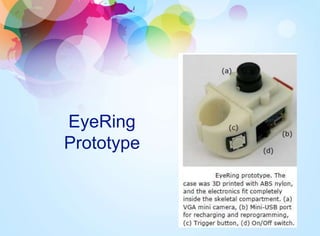
EyeRing
Prototype
Working
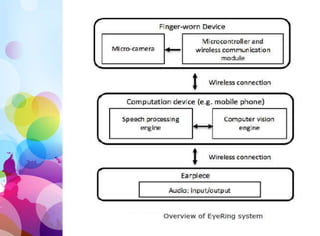
• Speech processing engine and computer vision engine were
implemented on a mobile phone.
• User would single click the pushbutton switch on the side of the ring
using his thumb.
• A snapshot is taken from the camera and the image is transferred via
Bluetooth to the mobile phone.
• Mobile phone then analyzes the image using our computer vision
engine.
• Then the Android application uses a Text-to- Speech module to read
out the information though a headset.
Applications
Virtual Walking Cane:
• Used for navigation is certainly fashionable and appealing.
• Provide an approximate estimation of the clear walking space.
• Users must use FP gestures to take pictures of the space in front of
them, with some motion between the shots.
• Receiving the two images, an algorithm to recover the depth is
performed.
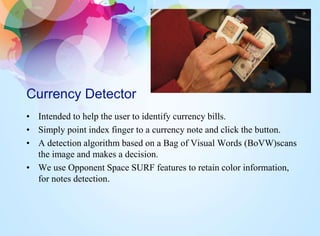
Currency Detector
• Intended to help the user to identify currency bills.
• Simply point index finger to a currency note and click the button.
• A detection algorithm based on a Bag of Visual Words (BoVW)scans
the image and makes a decision.
• We use Opponent Space SURF features to retain color information,
for notes detection.
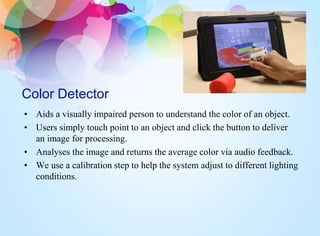
Color Detector
• Aids a visually impaired person to understand the color of an object.
• Users simply touch point to an object and click the button to deliver
an image for processing.
• Analyses the image and returns the average color via audio feedback.
• We use a calibration step to help the system adjust to different lighting
conditions.
Future Applications
Reading Non-Braille:
• Visually impaired people are mostly bound to reading Braille or
listening to audio books but are limited.
• This will allow the user to read regular printed material using EyeRing.
Tourist Helper:
• Tourists visiting a new city often rely on maps and landmarks for
navigation.
• However, even with augmented reality applications such as Layar4,
the UI for on-foot navigation is still cumbersome.
• Our proposed application relies on natural gesture.
Conclusion
• The applications we presented for EyeRing emerge from the current
design.
• One of the biggest challenges is creating the supporting software that
works in unison with this unique design.
• However, we believe that adding more hardware will open up a
multitude of new uses for this specific wearable design.
Thank you…!
Presented by:
Ch.Durga Rao
N.S.Priyadarshini

EyeRing PowerPoint Presentation

  • 1.
    DEPARTMENT OF COMPUTERSCIENCE AND ENGINEERING -Tomorrow’s Technology Through Today’s Education CHAITANYA INSTITUTE OF SCIENCE AND TECHNOLOGY
  • 2.
  • 4.
    Over view • Introduction •Touch Pointing Gestures • Free-air Pointing Gestures • EyeRing – A Finger Worn Assistant • Applications • Future Applications • Conclusion
  • 5.
    Introduction • Finger-worn interfacefor interaction. • For visually impaired people, it opens a world of possibilities. • Eye Ring, a novel design and concept of a finger-worn device • Numerous applications for visually impaired people such as recognizing currency notes and navigating , to tour an unknown city or translate signage.
  • 6.
    • Earlier explorationsare divided into a few subspaces according to how they are operated: o Pointing o Tapping/Touching o Gesturing o Pressing/Clicking on the device • This device is based on performing Touch Pointing (TP) gestures, as well as Free-air Pointing (FP) gestures
  • 7.
    Touch Pointing (TP)Gestures • TP gestures utilize the natural touch sense. • the action trigger is not based on touch sensitivity of the surface, rather on an external sensor • reading aid for the blind date back to the Optophone and later the Optacon1 • Other assistive devices that are using imaging technology are Primpo’s iSONIC2 and the i-Cane3
  • 8.
  • 9.
    Free-air Pointing (FP)Gestures • Human behavior and natural gestural language. • Previous work revolved around: o Control o information retrieval • Utilize a specialized sensor, between the pointing finger and the target. • Use a general-purpose camera. • Desire to replace an impaired human visual sense had a strong influence on the design.
  • 10.
    EyeRing – AFinger Worn Assistant • A finger-worn device with an embedded camera, a computation element and an earpiece for information loopback. • Autonomous and wireless, and includes a single button to initiate the interaction. • The current implementation of finger-worn device uses : o TTL Serial JPEG Camera, o 16 MHz AVR processor, o a Bluetooth module, o 3.7V polymer Lithium-ion battery, o 3.3V regulator, o a push button switch. • All the components are packaged into a wearable ABS nylon casing
  • 11.
  • 12.
    Working • Speech processingengine and computer vision engine were implemented on a mobile phone. • User would single click the pushbutton switch on the side of the ring using his thumb. • A snapshot is taken from the camera and the image is transferred via Bluetooth to the mobile phone. • Mobile phone then analyzes the image using our computer vision engine. • Then the Android application uses a Text-to- Speech module to read out the information though a headset.
  • 14.
    Applications Virtual Walking Cane: •Used for navigation is certainly fashionable and appealing. • Provide an approximate estimation of the clear walking space. • Users must use FP gestures to take pictures of the space in front of them, with some motion between the shots. • Receiving the two images, an algorithm to recover the depth is performed.
  • 15.
    Currency Detector • Intendedto help the user to identify currency bills. • Simply point index finger to a currency note and click the button. • A detection algorithm based on a Bag of Visual Words (BoVW)scans the image and makes a decision. • We use Opponent Space SURF features to retain color information, for notes detection.
  • 16.
    Color Detector • Aidsa visually impaired person to understand the color of an object. • Users simply touch point to an object and click the button to deliver an image for processing. • Analyses the image and returns the average color via audio feedback. • We use a calibration step to help the system adjust to different lighting conditions.
  • 17.
    Future Applications Reading Non-Braille: •Visually impaired people are mostly bound to reading Braille or listening to audio books but are limited. • This will allow the user to read regular printed material using EyeRing. Tourist Helper: • Tourists visiting a new city often rely on maps and landmarks for navigation. • However, even with augmented reality applications such as Layar4, the UI for on-foot navigation is still cumbersome. • Our proposed application relies on natural gesture.
  • 18.
    Conclusion • The applicationswe presented for EyeRing emerge from the current design. • One of the biggest challenges is creating the supporting software that works in unison with this unique design. • However, we believe that adding more hardware will open up a multitude of new uses for this specific wearable design.
  • 19.