EYE MOUSE
CURSOR CONTROL WITH EYE TRACKING
B.SAI SUHAS
13671A046
7
CONTENTS
• INTRODUCTION
• HISTORY
• OBJECTIVE
• WHAT IS EYE MOUSE?
• WORKING PRINCIPLE
• EYE TRACING
• IMAGE BASED EYE TRACKING
• IMAGE BASED HEAD TRACKING
• CONSTRUCTION
• FEATURES
• BENEFITS
• LIMITATIONS
• CONCLUSION
INTRODUCTION
• Pc’s as a huge part in our daily lives, uses mouse or keyboard for input.
• It enables much facilities for a normal person.
• But it acts as a barrier for a disabled person.
HISTORY
• Drawing & Cognition Eye tracker project
• Collaboration with Disability team at Central Student Services of London
Institute
• Sponsorship of Intel, IEEE, MIE, Imagine Cup
OBJECTIVE OF EYE MOUSE
• To offer people with extreme disabilities, an opportunity to control a
computer simply by moving his/her eyes or head.
• To design a low-cost combined eye and head tracking system for persons
with deficiency of their upper limbs.
WHAT IS EYE MOUSE?
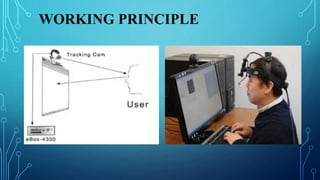
• “Eye mouse” is similar to conventional computer mouse, but entirely
controlled by the eyes.
• A real time “gaze” determination software that controls a computer cursor
by following the user’s gaze.
WORKING PRINCIPLE
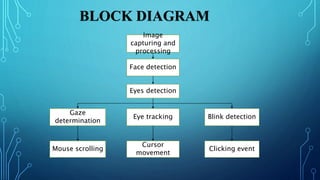
Image
capturing and
processing
Face detection
Eyes detection
Eye tracking Blink detection
Gaze
determination
Mouse scrolling
Cursor
movement
Clicking event
BLOCK DIAGRAM
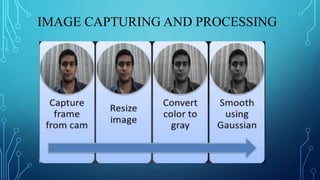
IMAGE CAPTURING AND PROCESSING
Histogram equalization
Binary thresholding
Morphological operations
EYE TRACKING
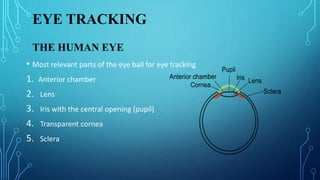
THE HUMAN EYE
• Most relevant parts of the eye ball for eye tracking
1. Anterior chamber
2. Lens
3. Iris with the central opening (pupil)
4. Transparent cornea
5. Sclera
SEARCH COILS
• One wire or two wire coils processed into
contact lens worn by the user.
• Wires serves as coils and ends connected
to voltage-measuring device.
• Magnetic field is induced externally to
measure the gaze detection.
• Voltage is dependent upon the coil-
position in the magnetic field
• One winding: horizontal as well as vertical movements of eye.
• Two windings: horizontal, vertical and rotational movements of eye.
One wire winding Two wire winding
IMAGE BASED EYE TRACKING
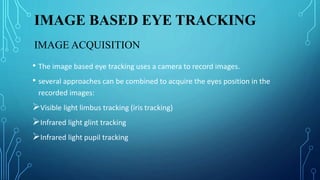
• The image based eye tracking uses a camera to record images.
• several approaches can be combined to acquire the eyes position in the
recorded images:
Visible light limbus tracking (iris tracking)
Infrared light glint tracking
Infrared light pupil tracking
IMAGE ACQUISITION
VISIBLE LIGHT LIMBUS TRACKING
• Aims to detect the boundary between the dark iris and the white sclera.
• boundary is called limbus and it’s easy to detect.
• Suitable for the detection of horizontal eye movements.
• Inaccurate in vertical eye movements.
INFRARED LIGHT GLINT TRACKING
• Purkinje images: Reflections of a light source
on the surface of the cornea and the lens.
• Image -1 and image-2 are used to separate the
translational from the rotational eye
movements.
• Translation: reflected positions remains same.
• Rotational: reflected positions will change with
each other.
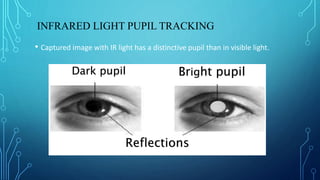
INFRARED LIGHT PUPIL TRACKING
• Captured image with IR light has a distinctive pupil than in visible light.
Dark pupil Bright pupil
Reflections
• Dark pupil: when the light source is not in the axis of camera.
• Bright pupil: when the light source is in the axis of camera.
Setup for dark pupil Setup for bright pupil
IMAGE BASED HEAD TRACKING
• To compensate head movements during eye tracking.
• The 6 relevant degree of freedom(DOF) assigned into two groups.
• Translational movements:
 moving up/down
 moving left/right
 moving forward/backward
• Rotational movements:
 Pitch: tilting forward and backward
 Yaw: turning left and right
 Roll: tilting side to side
CONSTRUCTION
•Requirements:
2 web-cameras
Safety glasses or Spectacles (to mount eye camera)
Head Phone skeleton (to mount head camera)
Cycle Spoke or thick wire (for tying eye camera at a distance from safety
glasses)
Adhesive tape
Strong glue
Making IR camera from a normal webcam
• Sensors of normal cameras are capable of
interpreting IR.
• But a filter prevents IR light from
reaching the sensor.
• Open the camera shell and disassemble
the lens case.
• Look out for red film like covering.
Step 2 : Mounting the IR eye
camera
Step 1 : Mounting the head
camera
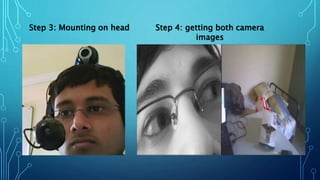
Step 3: Mounting on head Step 4: getting both camera
images
Step 5: Adaptive
thresholding
Step 6: Marking Iris and calculating
BLINK DETECTION
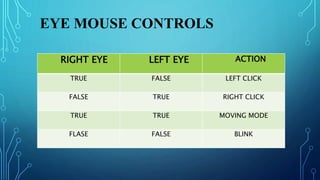
EYE MOUSE CONTROLS
RIGHT EYE LEFT EYE ACTION
TRUE FALSE LEFT CLICK
FALSE TRUE RIGHT CLICK
TRUE TRUE MOVING MODE
FLASE FALSE BLINK
FEATURES
• Simple, Easy to use
• Simple requirements
• No additional Hardware
• Faster capture of frames
• GUI settings
• Multi purpose
BENEFITS
• Easier Computer Control
• Help disabled & handicapped people to use computer
• Helpful in commercial Interactive games and advertisements
LIMITATIONS
• Real time Limitation
• Camera Resolution
• Frames Captured Per Second
• Improper Usage may lead to Eye problems
CONCLUSION
• Eye Mouse is a very helpful tool which can replace a normal mouse device.
• Its simple, multipurpose and helpful in virtual or interactive computer
gaming & advertisement.
• A gift for Physically challenged people.
REFERENCES
• https://www.slideshare.net/meerooahlawy/eye-mouse-4924077
• http://seminarprojecttopics.blogspot.in/2012/07/eye-tracking-technology.html

Eye mouse

  • 1.
    EYE MOUSE CURSOR CONTROLWITH EYE TRACKING B.SAI SUHAS 13671A046 7
  • 2.
    CONTENTS • INTRODUCTION • HISTORY •OBJECTIVE • WHAT IS EYE MOUSE? • WORKING PRINCIPLE • EYE TRACING • IMAGE BASED EYE TRACKING • IMAGE BASED HEAD TRACKING • CONSTRUCTION • FEATURES • BENEFITS • LIMITATIONS • CONCLUSION
  • 3.
    INTRODUCTION • Pc’s asa huge part in our daily lives, uses mouse or keyboard for input. • It enables much facilities for a normal person. • But it acts as a barrier for a disabled person.
  • 4.
    HISTORY • Drawing &Cognition Eye tracker project • Collaboration with Disability team at Central Student Services of London Institute • Sponsorship of Intel, IEEE, MIE, Imagine Cup
  • 5.
    OBJECTIVE OF EYEMOUSE • To offer people with extreme disabilities, an opportunity to control a computer simply by moving his/her eyes or head. • To design a low-cost combined eye and head tracking system for persons with deficiency of their upper limbs.
  • 6.
    WHAT IS EYEMOUSE? • “Eye mouse” is similar to conventional computer mouse, but entirely controlled by the eyes. • A real time “gaze” determination software that controls a computer cursor by following the user’s gaze.
  • 7.
  • 8.
    Image capturing and processing Face detection Eyesdetection Eye tracking Blink detection Gaze determination Mouse scrolling Cursor movement Clicking event BLOCK DIAGRAM
  • 9.
  • 10.
  • 11.
    EYE TRACKING THE HUMANEYE • Most relevant parts of the eye ball for eye tracking 1. Anterior chamber 2. Lens 3. Iris with the central opening (pupil) 4. Transparent cornea 5. Sclera
  • 12.
    SEARCH COILS • Onewire or two wire coils processed into contact lens worn by the user. • Wires serves as coils and ends connected to voltage-measuring device. • Magnetic field is induced externally to measure the gaze detection. • Voltage is dependent upon the coil- position in the magnetic field
  • 13.
    • One winding:horizontal as well as vertical movements of eye. • Two windings: horizontal, vertical and rotational movements of eye. One wire winding Two wire winding
  • 14.
    IMAGE BASED EYETRACKING • The image based eye tracking uses a camera to record images. • several approaches can be combined to acquire the eyes position in the recorded images: Visible light limbus tracking (iris tracking) Infrared light glint tracking Infrared light pupil tracking IMAGE ACQUISITION
  • 15.
    VISIBLE LIGHT LIMBUSTRACKING • Aims to detect the boundary between the dark iris and the white sclera. • boundary is called limbus and it’s easy to detect. • Suitable for the detection of horizontal eye movements. • Inaccurate in vertical eye movements.
  • 16.
    INFRARED LIGHT GLINTTRACKING • Purkinje images: Reflections of a light source on the surface of the cornea and the lens. • Image -1 and image-2 are used to separate the translational from the rotational eye movements. • Translation: reflected positions remains same. • Rotational: reflected positions will change with each other.
  • 17.
    INFRARED LIGHT PUPILTRACKING • Captured image with IR light has a distinctive pupil than in visible light. Dark pupil Bright pupil Reflections
  • 18.
    • Dark pupil:when the light source is not in the axis of camera. • Bright pupil: when the light source is in the axis of camera. Setup for dark pupil Setup for bright pupil
  • 19.
    IMAGE BASED HEADTRACKING • To compensate head movements during eye tracking. • The 6 relevant degree of freedom(DOF) assigned into two groups. • Translational movements:  moving up/down  moving left/right  moving forward/backward • Rotational movements:  Pitch: tilting forward and backward  Yaw: turning left and right  Roll: tilting side to side
  • 20.
    CONSTRUCTION •Requirements: 2 web-cameras Safety glassesor Spectacles (to mount eye camera) Head Phone skeleton (to mount head camera) Cycle Spoke or thick wire (for tying eye camera at a distance from safety glasses) Adhesive tape Strong glue
  • 21.
    Making IR camerafrom a normal webcam • Sensors of normal cameras are capable of interpreting IR. • But a filter prevents IR light from reaching the sensor. • Open the camera shell and disassemble the lens case. • Look out for red film like covering.
  • 22.
    Step 2 :Mounting the IR eye camera Step 1 : Mounting the head camera
  • 23.
    Step 3: Mountingon head Step 4: getting both camera images
  • 24.
    Step 5: Adaptive thresholding Step6: Marking Iris and calculating
  • 25.
  • 26.
    EYE MOUSE CONTROLS RIGHTEYE LEFT EYE ACTION TRUE FALSE LEFT CLICK FALSE TRUE RIGHT CLICK TRUE TRUE MOVING MODE FLASE FALSE BLINK
  • 27.
    FEATURES • Simple, Easyto use • Simple requirements • No additional Hardware • Faster capture of frames • GUI settings • Multi purpose
  • 28.
    BENEFITS • Easier ComputerControl • Help disabled & handicapped people to use computer • Helpful in commercial Interactive games and advertisements
  • 29.
    LIMITATIONS • Real timeLimitation • Camera Resolution • Frames Captured Per Second • Improper Usage may lead to Eye problems
  • 30.
    CONCLUSION • Eye Mouseis a very helpful tool which can replace a normal mouse device. • Its simple, multipurpose and helpful in virtual or interactive computer gaming & advertisement. • A gift for Physically challenged people.
  • 31.