EYE GAZE
COMMUNICATION
CONTENTS
 Introduction
 Working
 Running
 Functions
 Operational environment
 Advancements
 Conclusion
INTRODUCTION
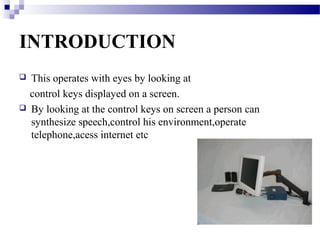
   This operates with eyes by looking at
    control keys displayed on a screen.
   By looking at the control keys on screen a person can
    synthesize speech,control his environment,operate
    telephone,acess internet etc
USERS OF EYE GAZE SYSTEM
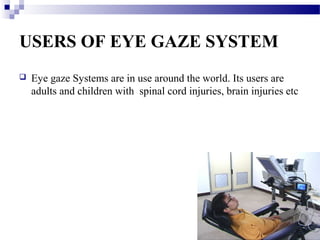
   Eye gaze Systems are in use around the world. Its users are
    adults and children with spinal cord injuries, brain injuries etc
WORKING
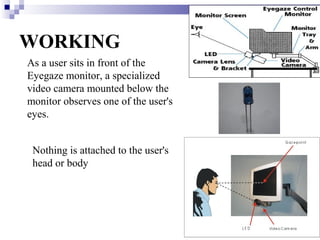
As a user sits in front of the
Eyegaze monitor, a specialized
video camera mounted below the
monitor observes one of the user's
eyes.


 Nothing is attached to the user's
 head or body
Running the system
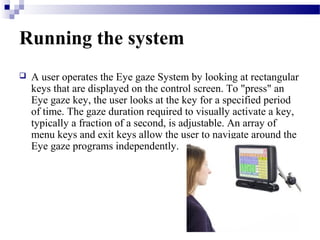
   A user operates the Eye gaze System by looking at rectangular
    keys that are displayed on the control screen. To "press" an
    Eye gaze key, the user looks at the key for a specified period
    of time. The gaze duration required to visually activate a key,
    typically a fraction of a second, is adjustable. An array of
    menu keys and exit keys allow the user to navigate around the
    Eye gaze programs independently.
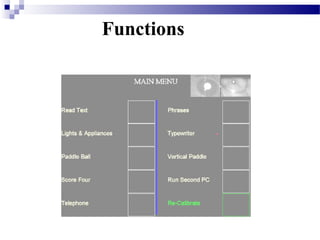
Functions
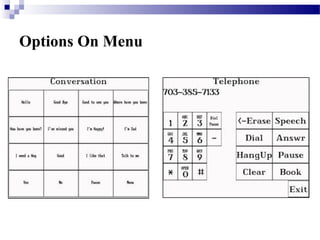
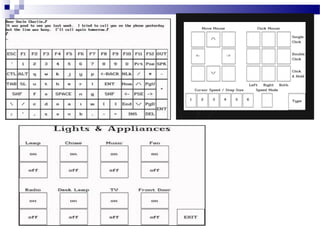
Options On Menu
SKILLS NEEDED BY THE USER

   Good control of an eye
   Ability to read
   To maintain head constantly infront of eye gaze monitor
Operational Environment

   The Eyegaze System must be operated in an environment
    where there is limited of ambient infrared light. Common
    sources of infrared light are sunlight and incandescent light
    bulbs.
Advancements
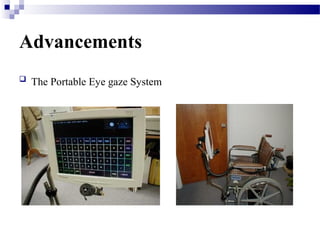
   The Portable Eye gaze System
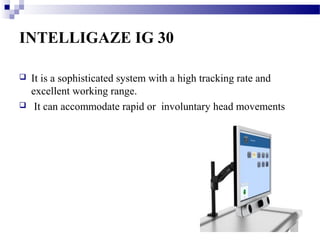
INTELLIGAZE IG 30

   It is a sophisticated system with a high tracking rate and
    excellent working range.
    It can accommodate rapid or involuntary head movements
Conclusion
   The main reason for eye-gaze based user interfaces being
    attractive is that the direction of the eye-gaze can express the
    interests of the user
   But at present this systems are designed for literates only
THANK YOU

Eye gaze communication

  • 1.
  • 2.
    CONTENTS  Introduction  Working Running  Functions  Operational environment  Advancements  Conclusion
  • 3.
    INTRODUCTION  This operates with eyes by looking at control keys displayed on a screen.  By looking at the control keys on screen a person can synthesize speech,control his environment,operate telephone,acess internet etc
  • 4.
    USERS OF EYEGAZE SYSTEM  Eye gaze Systems are in use around the world. Its users are adults and children with spinal cord injuries, brain injuries etc
  • 5.
    WORKING As a usersits in front of the Eyegaze monitor, a specialized video camera mounted below the monitor observes one of the user's eyes. Nothing is attached to the user's head or body
  • 6.
    Running the system  A user operates the Eye gaze System by looking at rectangular keys that are displayed on the control screen. To "press" an Eye gaze key, the user looks at the key for a specified period of time. The gaze duration required to visually activate a key, typically a fraction of a second, is adjustable. An array of menu keys and exit keys allow the user to navigate around the Eye gaze programs independently.
  • 7.
  • 8.
  • 10.
    SKILLS NEEDED BYTHE USER  Good control of an eye  Ability to read  To maintain head constantly infront of eye gaze monitor
  • 11.
    Operational Environment  The Eyegaze System must be operated in an environment where there is limited of ambient infrared light. Common sources of infrared light are sunlight and incandescent light bulbs.
  • 12.
    Advancements  The Portable Eye gaze System
  • 13.
    INTELLIGAZE IG 30  It is a sophisticated system with a high tracking rate and excellent working range.  It can accommodate rapid or involuntary head movements
  • 14.
    Conclusion  The main reason for eye-gaze based user interfaces being attractive is that the direction of the eye-gaze can express the interests of the user  But at present this systems are designed for literates only
  • 15.