
REAL TIME EYE GAZE TRACKING
Submitted in partial fulfilment of the requirements
for the award of the degree of
Bachelor’s of Technology
Electronics and Communication
Guide: Mrs. Amber Khan Submitted by:
Assistant Professor Love Kumar Tyagi 06-
ECS-27
Electronics and Communication Saalis Umer 06-
ECS-54
Soumya Bhatia 06-
ECS-61
Faculty of Engineering and Technology
Jamia Millia Islamia
(2006-2010)
ACKNOWLEDGMENTS
We would like to express our sincere gratitude to my term paper in charge
Mrs. Amber Khan for her support and encouragement in the preparation and
development of this project. The project has been completed under her
valuable supervision, guidance and support. This project would not have been
successful without her guidance and patience.
We also would like to thank to Prof. Naseem Ahmad especially for
encouraging us to work on this interesting project.
The completion of this project would not have been feasible without the
cooperation of Laboratory and Housekeeping staff.
Finally we are grateful to our parents and colleagues at work for their
continuous encouragement and support without which the project would not
have been possible.
Submitted by
Love Kumar Tyagi (27)
Saalis Umer (54)
Soumya Bhatia (61)
8th
Semester
Certificate
This is to certify that the dissertation/project report (Course code) entitled “Real
Time Eye Gaze Tracking” done by Mr. Love Kumar Tyagi (06ECS27), Mr. Saalis
Umer (06ECS54) and Ms. Soumya Bhatia (06ECS61), B.Tech (ECE) – 8th
semester, is an authentic work carried out by her at Electronics and
Communications Deptt. Of Faculty of Engineering and Technology, Jamia Millia
Islamia, under my guidance. The matter embodied in this project work has not
been submitted earlier for the award of any degree or diploma to the best of my
knowledge and belief.
Date: Signature
_________________
Mrs. Amber Khan
Assistant Professor,
Faculty of Engineering & Tech, Jamia Millia Islamia
Real Time Eye Gaze Tracking
4
TABLE OF CONTENTS
1 INTRODUCTION 7
Real Time Eye Gaze Tracking
5
1.1 HCI AND EYE GAZE TRACKING 7
1.2 HISTORY OF EYE TRACKING 7
1.3 EVOLUTION 9
2 MODERN METHODS FOR MEASURING EYE GAZE 10
2.1 INVASIVE TECHNIQUES 11
2.2 VIDEO BASED TECHNIQUES 11
2.2.1 HEAD MOUNTED 12
2.2.2 TABLE MOUNTED/REMOTE 12
3 GENERAL CONCEPTS AND TOOLS USED 14
3.1 STRUCTURE OF HUMAN EYE 14
3.2 PURKINJE IMAGE 15
3.2.1 Pupil Tracking 15
3.2.2 Corneal and Pupil Reflection Relationship 16
3.3 IR AND VISIBLE LIGHT FILTERING 16
3.4 CHARGED COUPLE DEVICE (WEBCAM) 17
3.5 IR SOURCES 18
3.6 UNIVERSAL SERIAL BUS (USB) 19
3.7 MATLAB 19
3.8 COLOR SPACES 20
VI. CMYK COLORSPACE 23
4 IMPLEMENTATION 24
4.1 INFRA RED CAMERA AND FLITER 24
4.2 EXPERIMENTAL SET UP 26
4.3 GRAPHICAL USER INTERFACE 26
5 APPLICATIONS 28
6 RESULTS AND COMMENTS 30
6.1 PERFORMANCE 30
6.2 LIMITATIONS 30
6.3 FUTURE IDEAS FOR IMPROVEMENT 30
7 APPENDIX 32
7.1 MATLAB CODING 32
7.2 MATLAB COMMANDS USED 47
7.3 FIGURES USED 49
REFERENCES 51
Real Time Eye Gaze Tracking
6
Shreya Bhatia Page 7 4/12/2017
1 INTRODUCTION
1.1 HCI and Eye Gaze Tracking
Human–Computer Interaction (HCI) is the study of interaction between users and
computers. Interaction between users and computers occurs at the user interface (or
simply interface), which includes both software and hardware; for example, characters
or objects displayed by software on a personal computer's monitor, input received
from users via hardware peripherals such as keyboards and mice, and other user
interactions with large-scale computerized systems such as aircraft and power plants.
One of the most researched fields of Human Computer Interaction has been “Eye
Gaze”.
Eye Gaze means the point at which user is looking. Scientists and researchers are
trying different algorithms and their different implementations to find out the gaze
point of human eye. This process of locating the point gaze of human eye is called
Eye Gaze Tracking. Usually the gaze point is found out on a computer screen. The
system or device used to track the eye movement or gaze movement is called Eye
Gaze Tracker.
Eye trackers are used in research on the visual system, in psychology, in cognitive
linguistics and in product design. Knowing the user’s point of gaze has significant
potential to enhance current human-computer interfaces, given that eye movements
can be used as an indicator of the attention state of a user.
Although, various eye gaze detection techniques and instruments have been developed
to harness this potential but their use are limited due to the high cost or non-
availability in the market. This project implements an eye gaze tracking algorithm that
can be implemented with the help of a low-cost USB webcam (hardware) and
MATLAB based program (software). The Eye Gaze Tracker developed in this project
tracks the movement of pupil in human eye with respect to the corneal reflection and
thus plots the point of gaze on a computer screen.
1.2 History of Eye Tracking
In 1879 in Paris, Louis Émile Javal observed that reading does not involve a smooth
sweeping of the eyes along the text, as previously assumed, but a series of short stops
(called fixations) and quick saccades. This observation raised important questions
about reading.
Shreya Bhatia Page 8 4/12/2017
This is the typical pattern of eye movement during reading. The eyes never move
smoothly over still text.
Edmund Huey built an early eye
tracker, using a sort of contact
lens with a hole for the pupil. The
lens
was connected to an aluminum
pointer that moved in response to
the movement of the eye. Huey
studied and quantified regressions
(only a small proportion of
saccades are regressions), and
show that some words in a
sentence are not fixated.
An example of fixations and
saccades over text.
The first non-intrusive eye trackers were built by Guy Thomas Buswell in Chicago,
using beams of light that were reflected on the eye and then recording them on film.
Buswell made systematic studies into reading and picture viewing.[
This study by Hunziker (1970) on eye tracking in problem solving used simple 8 mm
film to track eye movement by filming the subject through a glass plate on which the
visual problem was displayed.
In the 1970s, eye tracking research expanded rapidly, particularly reading research. A
good overview of the research in this period is given by Rayner.
In 1980, Just and Carpenter formulated
the influential Strong eye-mind
Hypothesis, the hypothesis that "there is
no appreciable lag between what is
fixated and what is processed". If this
hypothesis is correct, then when a
subject looks at a word or object, he or
she also thinks about (process
cognitively), and for exactly as long as
the recorded fixation. The hypothesis is
too often today taken for granted by
beginning eye tracker researchers.
During the 1980s, the eye-mind
hypothesis was often questioned in light of covert attention, the attention to something
that one is not looking at, which people often do. If covert attention is common during
Shreya Bhatia Page 9 4/12/2017
eye tracking recordings, the resulting scan path and fixation patterns would often
show not where our attention has been, but only where the eye has been looking, and
so eye tracking would not indicate cognitive processing.
1.3 Evolution
Although numerous eye-tracking technologies including electrooculography,
magnetic eye-coil tracking and video-based tracking, have been available for many
years, these techniques have all been limited in a number of important ways. The
primary limitation, especially relevant for application in consumer products, is the
invasiveness of eye-tracking systems. Some techniques require equipment such as
special contact lenses, electrodes, chin rests, bite bars or other components that must
be physically attached to the user. These invasive techniques can quickly become
tiresome or uncomfortable for the user. Video-based techniques have minimized this
invasiveness to some degree. Video based techniques capture an image of the eye
from a camera either mounted on head gear worn by the user or mounted remotely.
The recent miniaturization of video equipment has greatly minimized the
intrusiveness of head-mounted video-based eye trackers. Furthermore, remotely
located video-based eye-tracking systems can be completely unobtrusive at some cost
to the robustness and quality of the eye tracking.
2
Shreya Bhatia Page 10 4/12/2017
MODERN METHODS FOR MEASURING EYE GAZE
The modern eye gaze tracking employs a number of methods which can be broadly
classified according to the infrastructural differences as follows:
INFRASTRUCTURAL CLASSIFICATION
2.1 Invasive Techniques
Shreya Bhatia Page 11 4/12/2017
This category uses electric potentials measured with electrodes placed around the
eyes. The eyes are the origin of a steady electric potential field, which can also be
detected in total darkness and if the eyes are closed. It can be modeled to be generated
by a dipole with its positive pole at the cornea and its negative pole at the retina. As
an example, Electrooculography (EOG/E.O.G.) is a technique for measuring the
resting potential of the retina.
The electric signal that can be derived using two pairs of contact electrodes placed on
the skin around one eye is called Electrooculogram (EOG). If the eyes move from the
centre position towards the periphery, the retina approaches one electrode while the
cornea approaches the opposing one. This change in the orientation of the dipole and
consequently the electric potential field results in a change in the measured EOG
signal. Inversely, by analyzing these changes in eye movement can be tracked. Due to
the discretisation given by the common electrode setup two separate movement
components – a horizontal and a vertical – can be identified. The potential difference
is not constant and its variations make it challenging to use EOG for measuring slow
eye movement and detecting gaze direction. EOG is, however, a very robust technique
for measuring saccadic eye movement associated with gaze shifts and
detecting blinks. It is a very light-weight approach that, in contrast to current video-
based eye trackers, only requires very low computational power, works under
different lighting conditions and can be implemented as an embedded, self-contained
wearable system. It is thus the method of choice for measuring eye movement in
mobile daily-life situations and REM phases during sleep.
2.2 Video Based Techniques
The most widely used current designs are video-based eye trackers. A camera focuses
on one or both eyes and records their movement as the viewer looks at some kind of
stimulus. Most modern eye-trackers use contrast to locate the center of the pupil and
use infra red non-collimated light to create a corneal reflection (CR). The vector
between these two features can be used to compute gaze intersection with a surface
after a simple calibration for an individual.
Two general types of eye tracking techniques are used: Bright Pupil and Dark Pupil.
Their difference is based on the location of the illumination source with respect to the
optics. If the illumination is coaxial with the optical path, then the eye acts as
a retroreflector as the light reflects off the retina creating a bright pupil effect similar
to red eye. If the illumination source is offset from the optical path, then the pupil
appears dark because the retroreflection from the retina is directed away from the
camera.
Shreya Bhatia Page 12 4/12/2017
2.2.1 Head Mounted
Head mounted systems are designed to accurately track pupil size, eye movement and
eye point-of-regard data from subjects while allowing complete freedom of head
movement. If the measuring system is head mounted, as with EOG, then eye-in-head
angles are measured. In many applications, the head position is fixed using a bite bar,
a forehead support or something similar, so that eye position and gaze are the same.
For head-mounted trackers, head position and direction are added to eye-in-head
direction to determine gaze direction.
2.2.2 Table Mounted/Remote
Recent years have seen rapid developments in the field of remote eye tracking.
Whereas only a few years ago the standard in eye tracking was for systems to be
intrusive, i.e. they either required the user’s head to be fixated or equipment to be
mounted on the user’s head, systems have now evolved to the point where the user
can move freely in front of the system (within certain limits), and good accuracy (1
degree or better) is achieved throughout the whole working range.
The single most attractive reason for using a remote eye tracking system is that its use
can be completely unobtrusive. A limitation of a remote system is that it can only
track eye movements when the user is within a relatively confined area of operation.
The design of remote eye-tracking systems must consider the three way trade-off
between cost, flexibility and quality. If the measuring system is table mounted, as
with scleral search coils or table mounted camera (“remote”) systems, then gaze
angles are measured while the head is free to move, and head movement is measured
with systems such as magnetic or video based head trackers. For table-mounted
systems, such as search coils, head direction is subtracted from gaze direction to
determine eye-in-head position.
So called “remote” eye tracking systems, which allow the user to move their head
freely within certain limits, have been available for a while. Traditionally, these
systems have used cameras with long focal lengths to obtain a sufficiently high
resolution image of the eye. Because of the narrow field of view, the user's head
movements must be compensated for, either by panning and tilting the camera itself
or by using a movable mirror. This means that the head movement speed is limited by
the speed with which the mechanical system can track the eye. Furthermore, once
tracking is lost, reacquiring the eye is difficult because the camera has only a narrow
field of view.
Shreya Bhatia Page 13 4/12/2017
3 GENERAL CONCEPTS AND TOOLS USED
3.1 Structure of Human Eye
Shreya Bhatia Page 14 4/12/2017
The image shows the overall structure of the human eye. The three most relevant
features of the eye are the pupil - the aperture that lets light into the eye, the iris
- the colored muscle group that controls the diameter of the pupil, and the sclera, the
white protective tissue that covers the remainder
of the eye. The parts of the eye relevant to the functioning of the project are described
below:
Cornea: The cornea is the transparent front part of the eye that covers the iris, pupil,
and anterior chamber. Together with the lens, the cornea refracts light, accounting for
approximately two-thirds of the eye's total optical power. When (infrared) light is
shone into the user's eye, several reflections occur on the boundaries of the lens and
cornea.
Pupil: The pupil is an opening located in the center of the iris of the eye that allows
light to enter the retina. It appears black because most of the light entering the pupil is
absorbed by the tissues inside the eye. In humans the pupil is round.
Iris: The iris is a thin, circular structure in the eye, responsible for controlling the
diameter and size of the pupils and the amount of light reaching the pupil. "Eye color"
is the color of the iris, which can be green, blue, or brown. In some cases it can be
hazel (light brown). In response to the amount of light entering the eye, muscles
attached to the iris expand or contract the aperture at the center of the iris, known as
the pupil. The larger the pupil, the more light can enter.
Sclera: The sclera, also known as the white part of the eye, is the opaque fibrous,
protective, outer layer of the eye containing collagen and elastic fiber.
Shreya Bhatia Page 15 4/12/2017
Limbus: The limbus is the boundary between the white sclera and the dark iris of the
eye. Due to the fact that the sclera is (normally) white and the iris is darker, this
boundary can easily be optically detected and tracked. This technique is based on the
position and shape of the limbus relative to the head, so either the head must be held
quite still or the apparatus must be fixed to the user's head. Due to the more or less
occasional covering of the top and bottom of the limbus by the eyelids, it is probably
fair to regard limbus tracking as suitable for precise horizontal tracking only.
3.2 Purkinje Image
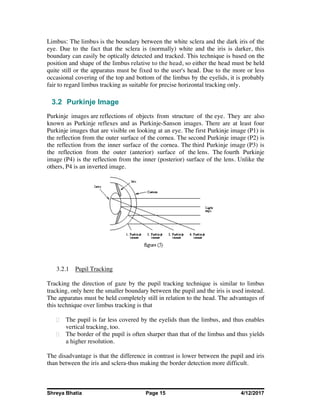
Purkinje images are reflections of objects from structure of the eye. They are also
known as Purkinje reflexes and as Purkinje-Sanson images. There are at least four
Purkinje images that are visible on looking at an eye. The first Purkinje image (P1) is
the reflection from the outer surface of the cornea. The second Purkinje image (P2) is
the reflection from the inner surface of the cornea. The third Purkinje image (P3) is
the reflection from the outer (anterior) surface of the lens. The fourth Purkinje
image (P4) is the reflection from the inner (posterior) surface of the lens. Unlike the
others, P4 is an inverted image.
3.2.1 Pupil Tracking
Tracking the direction of gaze by the pupil tracking technique is similar to limbus
tracking, only here the smaller boundary between the pupil and the iris is used instead.
The apparatus must be held completely still in relation to the head. The advantages of
this technique over limbus tracking is that
The pupil is far less covered by the eyelids than the limbus, and thus enables
vertical tracking, too.
The border of the pupil is often sharper than that of the limbus and thus yields
a higher resolution.
The disadvantage is that the difference in contrast is lower between the pupil and iris
than between the iris and sclera-thus making the border detection more difficult.
Shreya Bhatia Page 16 4/12/2017
3.2.2 Corneal and Pupil Reflection Relationship
When (infrared) light is shone into the user's eye, several reflections occur on the
boundaries of the lens and cornea, the so-called Purkinje images. The first Purkinje
image is also called the glint, and this together with the reflection of light off the
retina-the so-called bright-eye-can be video-recorded using an infrared sensitive
camera as a very bright spot and a less bright disc, respectively. When the eye is
panned horizontally or vertically, the relative positioning of the glint and the centre of
the bright-eye change accordingly, and the direction of gaze can be calculated from
these relative positions.
The problems associated with this technique are primarily those of getting a good
view of the eye; lateral head movement can put the video image of the eye out of
focus, or even make the image of the eye fall out of view of the camera, due to the
fact that further eye movement will render the glint outside the spherical part of the
cornea, thus requiring more complex calculations to perform the necessary
geometrical corrections
3.3 IR and Visible Light Filtering
Two types of imaging approaches are commonly used in eye tracking, visible and
infrared spectrum imaging.
Visible spectrum imaging is a passive approach that captures ambient light reflected
from the eye. In these images, it is often the case that the best feature to track is the
contour between the iris and the sclera known as the limbus. Visible spectrum eye
tracking is complicated by the fact that uncontrolled ambient light is used as the
source, which can contain multiple specular and diffuse components. Infrared imaging
eliminates uncontrolled specular reflection by actively illuminating the eye with a
uniform and controlled infrared light not perceivable by the user. A further benefit of
infrared imaging is that the pupil, rather than the limbus, is the strongest feature
contour in the image . Both the sclera and the iris strongly reflect infrared light while
only the sclera strongly reflects visible light. Tracking the pupil contour is preferable
given that the pupil contour is smaller and more sharply defined than the limbus.
Furthermore, due to its size, the pupil is less likely to be occluded by the eye lids. The
primary disadvantage of infrared imaging techniques is that they cannot be used
outdoors during daytime due to the ambient infrared illumination.
Shreya Bhatia Page 17 4/12/2017
Response Curve of IR Filter Used(Exposed Camera Negative)
Infrared eye tracking typically utilizes either a bright-pupil or dark pupil technique.
The bright pupil technique illuminates the eye with a source that is on or very near the
axis of the camera. The result of such illumination is that the pupil is clearly
demarcated as a bright region due to the photore reflective nature of the back of the
eye. Dark-pupil techniques illuminate the eye with an off-axis source such that the
pupil is the darkest region in the image as the sclera, iris and eye lids all reflect
relatively more illumination.
For implementing the infra red radiation technique, the in built infra red block filter of
the CCD webcam has been replaced with an IR transmission filter. For the purpose of
low cost implementation of this project, photographic negatives that have been
exposed have been used as an IR pass filter.
3.4 Charged Couple Device (Webcam)
The most common technique used in
webcam and digital camera today is
that of Charged Coupled
Device(CCD). In a CCD for
capturing images, there is a
photoactive region (an epitaxial layer
of silicon), and a transmission region
made out of a shift register.
Shreya Bhatia Page 18 4/12/2017
An image is projected through a lens onto the capacitor array (the photoactive region),
causing each capacitor to accumulate an electric charge proportional to the light
intensity at that location. A one-dimensional array, used in line-scan cameras,
captures a single slice of the image, while a two-dimensional array, used in video and
still cameras, captures a two-dimensional picture corresponding to the scene projected
onto the focal plane of the sensor. Once the array has been exposed to the image, a
control circuit causes each capacitor to transfer its contents to its neighbor (operating
as a shift register). The last capacitor in the array dumps its charge into a charge
amplifier, which converts the charge into a voltage. By repeating this process, the
controlling circuit converts the entire contents of the array in the semiconductor to a
sequence of voltages. In a digital device, these voltages are then sampled, digitized,
and usually stored in memory; in an analog device (such as an analog video camera),
they are processed into a continuous analog signal (e.g. by feeding the output of the
charge amplifier into a low-pass filter) which is then processed and fed out to other
circuits for
transmission, recording,
or other processing.
The charge packets (electrons, blue) are collected in potential wells (yellow) created
by applying positive voltage at the gate electrodes (G). Applying positive voltage to
the gate electrode in the correct sequence transfers the charge packets.
3.5 IR Sources
An integral part of the design process, is to determine the optimum camera settings
and light source positions to produce a clear image.
The sun provides an excellent source of infrared radiation, however, it also of course
provides a very bright visible light. This causes the pupil to be much smaller than with
the other sources. The sun is also much less directional since the energy is scattered
by earth’s atmosphere, so the glint would also be much smaller. The infrared LED
lighting to be used in the final eye-tracker system should provide a very thin
spectrum, centered in the near infrared. Thus for this project, a normal household
infrared heat lamp was used as a source. The heat lamp is primarily designed to output
mid- to far infrared, but also outputs a significant amount of near infrared light
detectable by the CCDs in the video camera and webcam. The heat lamp bulb used in
these experiments was a 200W bulb.
Shreya Bhatia Page 19 4/12/2017
3.6 Universal Serial Bus (USB)
USB (Universal Serial Bus) is a specification to establish communication between
devices and a host controller (usually personal computers). USB can
connect computer peripherals such as mice, keyboards, digital cameras, printers,
personal media players, flash drives, and external hard drives. For many of those
devices, USB has become the standard connection method. Our project uses USB for
transferring real time video of the human eye to the MATLB workspace in the PC via
a CCD webcam. The USB is the effective substitution for the hardware-software
interfacing as shown in the Systems Overview block diagram.
3.7 MATLAB
MATLAB stands for "MATrix LABoratory" and is a numerical
computing environment and fourth-generation programming language. Developed
by The MathWorks, MATLAB allows matrix manipulations, plotting of functions and
data, implementation of algorithms, creation of user interfaces, and interfacing with
programs written in other languages, including C, C++, and Fortran.
.
IMAGE PROCESSING TOOLBOX
Image Processing Toolbox™ software provides a comprehensive set of reference-
standard algorithms and graphical tools for image processing, analysis, visualization,
and algorithm development. You can restore noisy or degraded images, enhance
images for improved intelligibility, extract features, analyze shapes and textures, and
register two images. Most toolbox functions are written in the open MATLAB®
language, giving you the ability to inspect the algorithms, modify the source code, and
create your own custom functions.
GRAPHICAL USER INTERFACE TOOLBOX
A graphical user interface (GUI) is a pictorial interface to a program. A good GUI can
make programs easier to use by providing them with a consistent appearance and with
intuitive controls like pushbuttons, list boxes, sliders, menus, and so forth. The GUI
should behave in an understandable and predictable manner, so that a user knows
what to expect when he or she performs an action.
MATLAB GUIs are created using a tool called guide, the GUI Development
Environment. This tool allows a programmer to layout the GUI, selecting and aligning
the GUI components to be placed in it. Once the components are in place, the
Shreya Bhatia Page 20 4/12/2017
programmer can edit their properties: name, color, size, font, text to display, and so
forth. When guide saves the GUI, it creates working program including skeleton
functions that the programmer can modify to implement the behavior of the GUI.
When guide is executed, it creates the Layout Editor, shown in Figure 1.2. The large
white area with grid lines is the layout area, where a programmer can layout the GUI.
The Layout Editor window has a palate of GUI components along the left side of the
layout area. A user can create any number of GUI components by first clicking on the
desired component, and then dragging its outline in the layout area. The top of the
window has a toolbar with a series of useful tools that allow the user to distribute and
align GUI components, modify the properties of GUI components, add menus to
GUIs, and so on.
3.8 Color Spaces
A color model is an abstract mathematical model describing the way colors can be
represented as tuples of numbers; typically as three or four values or color
components(e.g. and CMYK are color models). Adding a certain mapping function
between the color model and a certain reference color space results in a definite
"footprint" within the reference color space. This "footprint" is known as a gamut,
and, in combination with the color model, defines a new color space.
i. GRAY Color Space
A grayscale or grayscale digital image is an image in which the value of each pixel is
a single sample, that is, it carries only intensity information. Images of this sort, also
known as black-and-white, are composed exclusively of shades of gray, varying from
black at the weakest intensity to white at the strongest.
Grayscale images are distinct from one-bit black-and-white images, which in the
context of computer imaging are images with only the two colors, black,
and white (also called bi-level ordinary images). Grayscale images have many shades
of gray in between. Grayscale images are also called monochromatic, denoting the
absence of any chromatic variation.
ii. RGB Color Space
Shreya Bhatia Page 21 4/12/2017
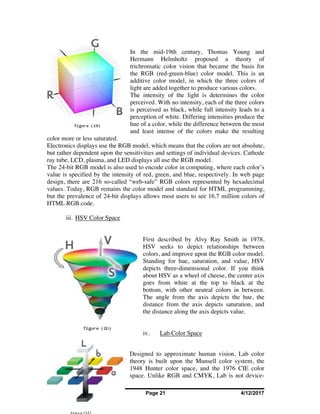
In the mid-19th century, Thomas Young and
Hermann Helmholtz proposed a theory of
trichromatic color vision that became the basis for
the RGB (red-green-blue) color model. This is an
additive color model, in which the three colors of
light are added together to produce various colors.
The intensity of the light is determines the color
perceived. With no intensity, each of the three colors
is perceived as black, while full intensity leads to a
perception of white. Differing intensities produce the
hue of a color, while the difference between the most
and least intense of the colors make the resulting
color more or less saturated.
Electronics displays use the RGB model, which means that the colors are not absolute,
but rather dependent upon the sensitivities and settings of individual devices. Cathode
ray tube, LCD, plasma, and LED displays all use the RGB model.
The 24-bit RGB model is also used to encode color in computing, where each color’s
value is specified by the intensity of red, green, and blue, respectively. In web page
design, there are 216 so-called “web-safe” RGB colors represented by hexadecimal
values. Today, RGB remains the color model and standard for HTML programming,
but the prevalence of 24-bit displays allows most users to see 16.7 million colors of
HTML RGB code.
iii. HSV Color Space
First described by Alvy Ray Smith in 1978,
HSV seeks to depict relationships between
colors, and improve upon the RGB color model.
Standing for hue, saturation, and value, HSV
depicts three-dimensional color. If you think
about HSV as a wheel of cheese, the center axis
goes from white at the top to black at the
bottom, with other neutral colors in between.
The angle from the axis depicts the hue, the
distance from the axis depicts saturation, and
the distance along the axis depicts value.
iv. Lab Color Space
Designed to approximate human vision, Lab color
theory is built upon the Munsell color system, the
1948 Hunter color space, and the 1976 CIE color
space. Unlike RGB and CMYK, Lab is not device-
Shreya Bhatia Page 22 4/12/2017
dependent. Today, software applications use CIELAB or CIELAB D50. In this three-
dimensional model, the L stands for the lightness of the color, with 0 producing black
and 100 producing a diffuse white. The “a” is the redness vs. greenness, while the “b”
is the yellowness vs. blueness.
v. HLS Color Space
Like HSV, HSL is a 3D representation of color.
HSL stands for hue, saturation, and lightness.
The HSL color model has distinct advantages
over the HSV model, in that the saturation and
lightness components span the entire range of
values.
The HSL color model contains all the hues at
different levels of saturation along its
horizontal plane and with variant intensity
along its vertical plane.
For example, by using the “Hue” mode, you
can position colors on opposite edges of the
diamond to correspond to complementary
colors. Or you can arrange the colors so their
hues are triangularly positioned relative to each
other for a triadic color scheme. And, by using three dimensions when you edit colors
or palettes of colors, you can intuitively understand which colors are similar, and
which are more contrasting.
On the horizontal equatorial plane, pure saturated hues are along the equatorial
perimeter. Similar to traditional color wheel and color sphere representations,
contrasting hues are located opposite each other. As you move towards the center of
the color disc (on the same plane) the color saturation decreases toward the center,
where all the colors merge into a single gray. Moving vertically along this center, the
color gradually becomes lighter towards the top (ending in white), and darker towards
the bottom (ending in black). The hues vary in intensity and saturation as you moves
vertically up or down, or inwards in the diamond. Any given hue can be varied in
saturation by moving inwards or intensity (tint) by moving vertically up or down.
vi. CMYK Color Space
Unlike RGB, which is an additive color model, CMYK is a subtractive color model.
Typically used in printing, CMYK assumes that the background is white, and thus
subtracts the assumed brightness of the white background from four colors: cyan,
magenta, yellow, and black (called “key”). Black is used because the combination of
the three primary colors (CMY) doesn’t produce a fully saturated black.
Shreya Bhatia Page 23 4/12/2017
CMYK can produce the whole spectrum of visible colors thanks to the process of
half-toning, whereby each color is assigned a saturation level and miniscule dots of
each of the three colors are printed in tiny patterns so that the human eye perceives a
certain color.
4 IMPLEMENTATION
Shreya Bhatia Page 24 4/12/2017
4.1 Infra Red Camera and Fliter
IR Camera or FLIR camera or thermographic camera forms an image using
infrared radiation, similar to a common camera that forms an image using visible
light. Instead of the 450–750 nanometer range of the visible light camera, infrared
cameras operate in wavelengths as long as 14,000 nm (14 µm).
Though different IR cameras are available in the market, but they are either cheap
or too complex to use in this project. So, a simple low-cost webcam has been
converted to an IR webcam. Quantum QHM480LM webcam has been used that
consists of a charged couple device to capture video and images. It supports
resolution up to 640X480.
In a any digital camera or webcam, there is a charged coupled device which is
sensitive to radiation of any kind. Generally an IR filter is placed just above the
CCD to filter out the infra red radiations. This is done because solid state (CCD or
CMOS) video cameras are highly sensitive to near-infrared light.
In this implementation, the webcam was
opened and the IR filter was clearly visible
due to its reddish glow. The IR filter was
taken out carefully without damaging the
CCD.
Shreya Bhatia Page 25 4/12/2017
Now another filter that can block all the visible light and allow only the near IR
wavelength to pass through it was needed. There are various commercially
available IR pass filter options are available.
A very cheap and efficient method is the
use of dark black sections of processed
film. It is a very good alternative to
expensive glass filters.
So, the exposed dark black part of film
negative equal to the size of filter was cut
and placed just above the CCD. And then
the web camera was packed as before.
The IR camera was ready. The images
captured by IR camera have slightly
bluish or greenish hue.
4.2 Experimental Set up
Shreya Bhatia Page 26 4/12/2017
The IR camera has been fixed
to the frame of a goggle.
The camera is fixed in a way to
focus just on the eye of the
user.
In this way a head-mounted
eye tracking system is
achieved where the relative
motion of head and camera is
zero.
4.3 Graphical User Interface
The graphical user interface has been developed in MATLAB using
GUIDE tool.
There are axes1 and axes2 in the GUI.
Axes1 contains a grid that indicates the user’s point of gaze.
Axes2 shows the live image of user’s eye.
There is a command button SPECIFY EYE SIZE to specify eye size in the
image manually.
Shreya Bhatia Page 27 4/12/2017
On pressing the command button GLINT COORDINATES, the coordinate
of glint is calculated by adaptive threshold operation.
Then calibration is done for CENTER, UP, LEFT, DOWN AND RIGHT
black dots in axes1 using respective command buttons. This is also done
by using adaptive threshold operation on the negative of the eye image.
The center of the pupil coordinate is thus found.
Then user needs to click on start to start the eye gaze tracking.
If the calibration is proper and user’s head position is absolutely fixed with
respect to IR source as well as the computer screen, the software will
detect the point of gaze on axes1 by placing a red marker there.
5 APPLICATIONS
Shreya Bhatia Page 28 4/12/2017
Much research has indicated the potential of eye tracking to enhance the quality of
everyday human-computer interfaces. For example, eye-tracking interfaces have been
implemented that allow users to directly control a computer using only eye
movements. In one such application, eye typing, users with movement disabilities can
type by looking at keys on a virtual keyboard instead of providing manual input.
Similarly, systems have been designed that allow users to control the mouse pointer
with their eyes. Besides this application which is addressed by our project, there can
be various collateral applications of eye tracking in various commercial endeavors.
EYE-TRACKING COMMERCIAL APPLICATIONS
In recent years, the increased sophistication and accessibility of eye tracking
technologies have generated a great deal of interest in the commercial sector.
Applications include web usability, advertising, sponsorship, package design and
automotive engineering. In general, commercial eye tracking studies function by
presenting a target stimulus to a sample of consumers while an eye tracker is used to
record the activity of the eye. Examples of target stimuli may include websites,
television programs, sporting events, films, commercials, magazines, newspapers,
packages, shelf Displays, consumer systems (ATMs, checkout systems, kiosks), and
software. The resulting data can be statistically analyzed and graphically rendered to
provide evidence of specific visual patterns. By examining fixations, saccades, pupil
dilation, blinks and a variety of other behaviors researchers can determine a great deal
about the effectiveness of a given medium or product. While some companies
complete this type of research internally, there are many private companies that offer
eye tracking services and analysis.
The most prominent field of commercial eye tracking research is web usability.
While traditional usability techniques are often quite powerful in providing
information on clicking and scrolling patterns, eye tracking offers the ability to
analyze user interaction between the clicks. This provides valuable insight into which
features are the most eye-catching, which features cause confusion and which ones are
ignored altogether. Specifically, eye tracking can be used to assess search efficiency,
branding, online advertisements, navigation usability, overall design and many other
site components. Analyses may target a prototype or competitor site in addition to the
main client site.
Eye tracking is commonly used in a variety of different advertising media.
Commercials, print ads, online ads and sponsored programs are all conducive to
analysis with current eye tracking technology. Analyses focus on visibility of a target
product or logo in the context of a magazine, newspaper, website, or televised event.
This allows researchers to assess in great detail how often a sample of consumers
fixates on the target logo, product or ad. In this way, an advertiser can quantify the
success of a given campaign in terms of actual visual attention.
Eye tracking provides package designers with the opportunity to examine the visual
behavior of a consumer while interacting with a target package. This may be used to
analyze distinctiveness, attractiveness and the tendency of the package to be chosen
for purchase. Eye tracking is often utilized while the target product is in the prototype
Shreya Bhatia Page 29 4/12/2017
stage. Prototypes are tested against each other and competitors to examine which
specific elements are associated with high visibility and appeal.
One of the most promising applications of eye tracking research is in the field of
automotive design. Research is currently underway to integrate eye tracking cameras
into automobiles. The goal of this endeavor is to provide the vehicle with the capacity
to assess in real-time the visual behavior of the driver. The National Highway Traffic
Safety Administration (NHTSA) estimates that drowsiness is the primary causal
factor in 100,000 police-reported accidents per year. Another NHTSA study suggests
that 80% of collisions occur within three seconds of a distraction. By equipping
automobiles with the ability to monitor drowsiness, inattention, and cognitive
engagement driving safety could be dramatically enhanced. Lexus claims to have
equipped its LS 460 with the first driver monitor system in 2006, providing a warning
if the driver takes his or her eye off the road.
Since 2005, eye tracking is used in communication systems for disabled persons:
allowing the user to speak, send e-mail, browse the Internet and perform other such
activities, using only their eyes. Eye control works even when the user has involuntary
movement as a result of Cerebral palsy or other disabilities, and for those who have
glasses or other physical interference which would limit the effectiveness of older eye
control systems. Several applications have been developed for controlling software or
attached hardware devices with the eyes. These applications are in use by many
people with motor disabilities. They can write texts, convert texts to speech, control
the environment or surf the web.
Eye tracking has also seen minute use in auto focus still camera equipment, where
users can focus on a subject simply by looking at it through the viewfinder.
Eye tracking has also found its application in Surgical Training. An ultra-lightweight
headgear incorporates a field-of-view scene camera; it is an ideal tool to transmit
images to a large format video display. The system not only transmits the scene video,
but places a cross-hair over the image where the subject is looking. This makes it
ideal for an instructor to highlight exactly where his surgical tool is and what their
technique is trying to accomplish. The video is recorded with time stamp for quick
frame access. This system allows full freedom of head movement while collecting
quick and accurate data analysis. External sync capability is standard.
6 RESULTS AND COMMENTS
6.1 Performance
The head-mounted IR Eye Gaze Tracker that has been built is able to detect the glint and
the centre of pupil during calibration quite precisely.
Shreya Bhatia Page 30 4/12/2017
During real time tracking also, the system is quite efficient in determining the centre of
pupil.
The system is not accurate in determining the point of gaze due to limitations mentioned
further.
6.2 Limitations
The eye gaze tracker can only work in an environment where no other source of Infra Red
is present. It can also not work in daylight. In room conditions its performance is better.
The head needs to be kept absolutely still during the calibration as well as tracking, which
is quite difficult to achieve. A slight head movement reduces the accuracy of EGT by a
great extent.
The position of IR source and fixation of IR camera with the goggle frame should be such
that there is no shadow on the eye that is being tracked.
The eye size should be specified by the user in such a way that the full pupil motion can be
covered with the constraint that dark shadows due to eye lid or frame and eye brow are not
included in the image.
6.3 Future Ideas for Improvement
For best results, the IR source should be fixed along with the camera and goggle frame.
This makes the position of glint absolutely fixed. Due to non-availability of small sized IR
source, this could not be achieved in time.
Significant improvement in the performance can be achieved if another camera is fixed in
the goggle frame facing the computer. By using this video, we can determine the portion of
the vision that constitutes computer and hence slight head motion can be allowed.
The present system needs the user to enter the eye size manually. Some technique like
hough transform or eigen eyes can be used in future to filter out the portion of image that
constitutes eye automatically.
Shreya Bhatia Page 31 4/12/2017
7 APPENDIX
7.1 MATLAB Coding
%%%%%%%%%%%%%%%%%%%% EYE GAZE TRACKER
%%%%%%%%%%%%%%%%%%% FINAL YEAR PROJECT
%%%%%%%%%%%%%%%%%%%%%% SUBMITTED BY
%%%%%%%%%%%%%%%%%% SAALIS UMER(06ECS54)
%%%%%%%%%%%%%%%%%%% LOVE KUMAR(06ECS27)
%%%%%%%%%%%%%%%%% SOUMYA BHATIA(06ECS61)
%FUNCTION EGT LAUNCHES GRAPHICAL USER INTERFACE EGT.FIG
Shreya Bhatia Page 32 4/12/2017
function varargout = EGT(varargin)
%GUI INITIALIAZATION
gui_Singleton = 1;
gui_State = struct('gui_Name', mfilename, ...
'gui_Singleton', gui_Singleton, ...
'gui_OpeningFcn', @EGT_OpeningFcn, ...
'gui_OutputFcn', @EGT_OutputFcn, ...
'gui_LayoutFcn', [] , ...
'gui_Callback', []);
if nargin && ischar(varargin{1})
gui_State.gui_Callback = str2func(varargin{1});
end
if nargout
[varargout{1:nargout}] = gui_mainfcn(gui_State, varargin{:});
else
gui_mainfcn(gui_State, varargin{:});
end
% --- Executes just before EGT is made visible.
function EGT_OpeningFcn(hObject, eventdata, handles, varargin)
% This function has no output args, see OutputFcn.
% hObject handle to figure
% eventdata reserved - to be defined in a future version of MATLAB
% handles structure with handles and user data (see GUIDATA)
% varargin command line arguments to EGT (see VARARGIN)
% Choose default command line output for EGT
handles.output = hObject;
% Update handles structure
guidata(hObject, handles);
% UIWAIT makes EGT wait for user response (see UIRESUME)
% uiwait(handles.figure1);
Shreya Bhatia Page 33 4/12/2017
%%%%%%%%%%%%%%%%%%%%%%%%%%%%%%%%%%%%%%%%%%%%%%%%%%%%%%%%%%%%%%%%%%%%%
%%%%%%%%%%%%%%%%
for i=-2:1:2;
y=-2:1:2;
axes(handles.axes1)
grid on
plot(i,y,'mo','MarkerEdgeColor','k','MarkerFaceColor',[0 0 0],'MarkerSize',30);
hold on
plot(0,0,'mo','MarkerEdgeColor','k','MarkerFaceColor',[1 0 0],'MarkerSize',30);
end
%%%%%%%%%%%%%%%%%%%%%%%%%%%%%%%%%%%%%%%%%%%%%%%%%%%%%%%%%%%%%%%%%%%%%%%%%%%%%
% --- Outputs from this function are returned to the command line.
function varargout = EGT_OutputFcn(hObject, eventdata, handles)
% varargout cell array for returning output args (see VARARGOUT);
% hObject handle to figure
% eventdata reserved - to be defined in a future version of MATLAB
% handles structure with handles and user data (see GUIDATA)
% Get default command line output from handles structure
varargout{1} = handles.output;
%%%%%%%%%%%%%%%%%%%%%%%%%%%%%%%%%%%%%%%%%%%%%%%%%%%%%%%%%%%%%%%%%%%%%%%%%%%%%
% FUNCTION EYESIZE: IT ASKS USER TO SPECIFY THE EYE SIZE.
function EYESIZE_Callback(hObject, eventdata, handles)
% calibrate
vid=videoinput('winvideo',2,'YUY2_640x480');
triggerconfig(vid,'manual');
set(vid,'FramesPerTrigger',1);
set(vid,'TriggerRepeat',1);
start(vid);
trigger(vid);
im=getdata(vid,1);
im=ycbcr2rgb(im);
im=rgb2gray(im);
size(im);
imwrite(im,'beta.jpg');
Shreya Bhatia Page 34 4/12/2017
figure, imshow(im);
hold off
stop(vid);
delete(vid);
%%%%%%%%%%%%%%%%%%%%%%%%%%%%%%%%%%%%%%%%%%%%%%%%%%%%%%%%%%%%%%%%%%%%%%%%%%%%%
%FUNCTION START: STARTS EYE GAZE TRACKING
function pushbutton_START_Callback(hObject, eventdata, handles)
% Dot plots
% for i=0:1:3;
% y=0:1:3;
% axes(handles.axes1)
% grid on
% plot(i,y,'mo','MarkerEdgeColor','k','MarkerFaceColor',[0 0
0],'MarkerSize',30);
% hold on
% end
hold off
% getting eye size
Left=str2double(get(handles.edit_left,'string'));
Right=str2double(get(handles.edit_right,'string'));
Up=str2double(get(handles.edit_up,'string'));
Down=str2double(get(handles.edit_down,'string'));
wx=str2double(get(handles.edit_X,'string'));
wy=str2double(get(handles.edit_Y,'string'));
cc=handles.CENTRE_callback
cu=handles.UP_callback
cl=handles.LEFT_callback
cd=handles.DOWN_callback
cr=handles.RIGHT_callback
NP_PX=cr(1)-cc(1);
NP_NX=cl(1)-cc(1);
NP_PY=cu(2)-cc(2);
NP_NY=cd(2)-cc(2);
xnorm=NP_NX -NP_PX
ynorm=NP_NY-NP_PY
Shreya Bhatia Page 35 4/12/2017
% Read the video & store current pictures
vid=videoinput('winvideo',2,'YUY2_640x480');
triggerconfig(vid,'manual');
set(vid,'FramesPerTrigger',1);
set(vid,'FrameGrabInterval',10);
set(vid,'TriggerRepeat',inf);
start(vid);
for i=1:inf
trigger(vid);
im=getdata(vid,1);
axes(handles.axes2)
im=ycbcr2rgb(im);
imshow(fliplr(rgb2gray(im)));
imwrite(im,'alpha.jpg');
% Convert to grayscale to do morphological processing.
i=imread('alpha.jpg');
im=rgb2gray(i);
im=im(Up:Down,Left:Right);
im=255-im;
a=size(im);
J=im2double(max(im(:)-20));
im=im2bw(im,J);
im=bwlabel(im);
stats = regionprops(im, {'Centroid','Area'});
if ~isempty([stats.Area])
areaArray = [stats.Area];
[junk,idx] = max(areaArray);
c = stats(idx).Centroid;
c = floor(fliplr(c))
row1= (c(1)-cr(1))/xnorm
col1=(c(2)-cu(2))/ynorm
Shreya Bhatia Page 36 4/12/2017
row2=4*row1-2;
col2=4*col1-2;
row2= row1-wy;
col2=col1-wx;
row2=2/(200)*row2;
col2=2/(200)*col2;
% NUMBER OF pIXELS IN X & Y DIRECTION
nx=-(Right-Left)
ny=-(Down-Up)
for i=-2:1:2;
y=-2:1:2;
axes(handles.axes1)
grid on
hold on
plot(i,y,'mo','MarkerEdgeColor','k','MarkerFaceColor',[0 0
0],'MarkerSize',30);
hold off
end
axes(handles.axes1)
plot(row2,col2,'mo','MarkerEdgeColor','k','MarkerFaceColor',[1 0
0],'MarkerSize',30);
axis([-2,2,-2,2])
end
end
stop(vid);
delete(vid)
% FUNCTION STOP: STOPS EYE GAZE TRACKER
function pushbutton_STOP_Callback(hObject, eventdata, handles)
Shreya Bhatia Page 37 4/12/2017
stop(vid);
% FUNCTION EXIT: EXITS MATLAB
function pushbutton_EXIT_Callback(hObject, eventdata, handles)
exit
function edit_left_Callback(hObject, eventdata, handles)
function edit_left_CreateFcn(hObject, eventdata, handles)
if ispc
set(hObject,'BackgroundColor','white');
else
set(hObject,'BackgroundColor',get(0,'defaultUicontrolBackgroundColor'));
end
function edit_right_Callback(hObject, eventdata, handles)
function edit_right_CreateFcn(hObject, eventdata, handles)
if ispc
set(hObject,'BackgroundColor','white');
else
set(hObject,'BackgroundColor',get(0,'defaultUicontrolBackgroundColor'));
end
function edit_up_Callback(hObject, eventdata, handles)
function edit_up_CreateFcn(hObject, eventdata, handles)
if ispc
set(hObject,'BackgroundColor','white');
else
set(hObject,'BackgroundColor',get(0,'defaultUicontrolBackgroundColor'));
end
function edit_down_Callback(hObject, eventdata, handles)
function edit_down_CreateFcn(hObject, eventdata, handles)
Shreya Bhatia Page 38 4/12/2017
if ispc
set(hObject,'BackgroundColor','white');
else
set(hObject,'BackgroundColor',get(0,'defaultUicontrolBackgroundColor'));
end
function edit_X_Callback(hObject, eventdata, handles)
function edit_X_CreateFcn(hObject, eventdata, handles)
if ispc
set(hObject,'BackgroundColor','white');
else
set(hObject,'BackgroundColor',get(0,'defaultUicontrolBackgroundColor'));
end
function edit_Y_Callback(hObject, eventdata, handles)
function edit_Y_CreateFcn(hObject, eventdata, handles)
if ispc
set(hObject,'BackgroundColor','white');
else
set(hObject,'BackgroundColor',get(0,'defaultUicontrolBackgroundColor'));
end
function GLINTCOORDINATES_Callback(hObject, eventdata, handles)
vid=videoinput('winvideo',2,'YUY2_640x480');
triggerconfig(vid,'manual');
set(vid,'FramesPerTrigger',1);
set(vid,'TriggerRepeat',1);
start(vid);
trigger(vid);
im=getdata(vid,1);
Left=str2double(get(handles.edit_left,'string'))
Shreya Bhatia Page 39 4/12/2017
Right=str2double(get(handles.edit_right,'string'));
Up=str2double(get(handles.edit_up,'string'));
Down=str2double(get(handles.edit_down,'string'));
im=ycbcr2rgb(im);
im=rgb2gray(im);
size(im);
im=im(Up:Down,Left:Right);
figure, imshow(im);
size(im);
stop(vid);
delete(vid);
J=im2double(max(im(:))-5);
im=im2bw(im,J);
noSmallStructures= bwlabel(im);
stats = regionprops(noSmallStructures, {'Centroid','Area'});
if ~isempty([stats.Area])
areaArray = [stats.Area];
[junk,idx] = max(areaArray);
glintcenter = cat(1, stats(idx).Centroid);
set(handles.edit_X,'string',num2str(floor(glintcenter(:,1))));
set(handles.edit_Y,'string',num2str(floor(glintcenter(:,2))));
hold on
plot(glintcenter(:,1), glintcenter(:,2), 'r*')
hold off
end
function pushbutton_CENTRE_Callback(hObject, eventdata, handles)
plot(0,2,'mo','MarkerEdgeColor','k','MarkerFaceColor',[1 0
0],'MarkerSize',30);
vid=videoinput('winvideo',2,'YUY2_640x480');
triggerconfig(vid,'manual');
set(vid,'FramesPerTrigger',1);
set(vid,'TriggerRepeat',1);
Shreya Bhatia Page 40 4/12/2017
start(vid);
trigger(vid);
im=getdata(vid,1);
size(im);
im=ycbcr2rgb(im);
imwrite(im,'beta_CTP.jpg');
stop(vid);
delete(vid);
Left=str2double(get(handles.edit_left,'string'));
Right=str2double(get(handles.edit_right,'string'));
Up=str2double(get(handles.edit_up,'string'));
Down=str2double(get(handles.edit_down,'string'));
i=imread('beta_CTP.jpg');
im=rgb2gray(i);
im=im(Up:Down,Left:Right);
im=255-im;
J=im2double(max(im(:)-20));
im=im2bw(im,J);
figure, imshow(im);
im=bwlabel(im);
stats = regionprops(im, {'Centroid','Area'});
if ~isempty([stats.Area])
areaArray = [stats.Area];
[junk,idx] = max(areaArray);
c = stats(idx).Centroid
hold on
plot(c(1),c(2),'g*')
hold off
cc = floor(fliplr(c));
handles.CENTRE_callback=cc;
guidata(hObject,handles);
end
Shreya Bhatia Page 41 4/12/2017
function pushbutton_UP_Callback(hObject, eventdata, handles)
plot(-2,0,'mo','MarkerEdgeColor','k','MarkerFaceColor',[1 0
0],'MarkerSize',30);
vid=videoinput('winvideo',2,'YUY2_640x480');
triggerconfig(vid,'manual');
set(vid,'FramesPerTrigger',1);
set(vid,'TriggerRepeat',1);
start(vid);
trigger(vid);
im=getdata(vid,1);
size(im);
im=ycbcr2rgb(im);
imwrite(im,'beta_UTP.jpg');
stop(vid);
delete(vid);
Left=str2double(get(handles.edit_left,'string'));
Right=str2double(get(handles.edit_right,'string'));
Up=str2double(get(handles.edit_up,'string'));
Down=str2double(get(handles.edit_down,'string'));
i=imread('beta_UTP.jpg');
im=rgb2gray(i);
im=im(Up:Down,Left:Right);
im=255-im;
J=im2double(max(im(:)-20));
im=im2bw(im,J);
figure, imshow(im);
im=bwlabel(im);
stats = regionprops(im, {'Centroid','Area'});
if ~isempty([stats.Area])
areaArray = [stats.Area];
[junk,idx] = max(areaArray);
c = stats(idx).Centroid;
hold on
plot(c(1),c(2),'g*')
hold off
cu = floor(fliplr(c));
handles.UP_callback=cu;
Shreya Bhatia Page 42 4/12/2017
guidata(hObject,handles);
end
function pushbutton_LEFT_Callback(hObject, eventdata, handles)
plot(0,-2,'mo','MarkerEdgeColor','k','MarkerFaceColor',[1 0
0],'MarkerSize',30);
vid=videoinput('winvideo',2,'YUY2_640x480');
triggerconfig(vid,'manual');
set(vid,'FramesPerTrigger',1);
set(vid,'TriggerRepeat',1);
start(vid);
trigger(vid);
im=getdata(vid,1);
size(im);
im=ycbcr2rgb(im);
imwrite(im,'beta_LTP.jpg');
stop(vid);
delete(vid);
Left=str2double(get(handles.edit_left,'string'));
Right=str2double(get(handles.edit_right,'string'));
Up=str2double(get(handles.edit_up,'string'));
Down=str2double(get(handles.edit_down,'string'));
i=imread('beta_LTP.jpg');
im=rgb2gray(i);
im=im(Up:Down,Left:Right);
im=255-im;
J=im2double(max(im(:)-20));
im=im2bw(im,J);
figure, imshow(im);
im=bwlabel(im);
stats = regionprops(im, {'Centroid','Area'});
if ~isempty([stats.Area])
areaArray = [stats.Area];
[junk,idx] = max(areaArray);
c = stats(idx).Centroid;
hold on
plot(c(1),c(2),'g*')
Shreya Bhatia Page 43 4/12/2017
hold off
cl = floor(fliplr(c));
handles.LEFT_callback=cl;
guidata(hObject,handles);
end
function pushbutton_DOWN_Callback(hObject, eventdata, handles)
plot(2,0,'mo','MarkerEdgeColor','k','MarkerFaceColor',[1 0
0],'MarkerSize',30);
vid=videoinput('winvideo',2,'YUY2_640x480');
triggerconfig(vid,'manual');
set(vid,'FramesPerTrigger',1);
set(vid,'TriggerRepeat',1);
start(vid);
trigger(vid);
im=getdata(vid,1);
size(im);
im=ycbcr2rgb(im);
imwrite(im,'beta_DTP.jpg');
stop(vid);
delete(vid);
Left=str2double(get(handles.edit_left,'string'));
Right=str2double(get(handles.edit_right,'string'));
Up=str2double(get(handles.edit_up,'string'));
Down=str2double(get(handles.edit_down,'string'));
i=imread('beta_DTP.jpg');
im=rgb2gray(i);
im=im(Up:Down,Left:Right);
im=255-im;
J=im2double(max(im(:)-20));
im=im2bw(im,J);
figure, imshow(im);
im=bwlabel(im);
stats = regionprops(im, {'Centroid','Area'});
if ~isempty([stats.Area])
areaArray = [stats.Area];
[junk,idx] = max(areaArray);
Shreya Bhatia Page 44 4/12/2017
c = stats(idx).Centroid;
hold on
plot(c(1),c(2),'g*')
hold off
cd = floor(fliplr(c));
handles.DOWN_callback=cd;
guidata(hObject,handles);
end
function pushbutton_RIGHT_Callback(hObject, eventdata, handles)
vid=videoinput('winvideo',2,'YUY2_640x480');
triggerconfig(vid,'manual');
set(vid,'FramesPerTrigger',1);
set(vid,'TriggerRepeat',1);
start(vid);
trigger(vid);
im=getdata(vid,1);
size(im);
im=ycbcr2rgb(im);
imwrite(im,'beta_RTP.jpg');
stop(vid);
delete(vid);
Left=str2double(get(handles.edit_left,'string'));
Right=str2double(get(handles.edit_right,'string'));
Up=str2double(get(handles.edit_up,'string'));
Down=str2double(get(handles.edit_down,'string'));
i=imread('beta_RTP.jpg');
im=rgb2gray(i);
im=im(Up:Down,Left:Right);
im=255-im;
J=im2double(max(im(:)-20));
im=im2bw(im,J);
figure, imshow(im);
im=bwlabel(im);
stats = regionprops(im, {'Centroid','Area'});
Shreya Bhatia Page 45 4/12/2017
if ~isempty([stats.Area])
areaArray = [stats.Area];
[junk,idx] = max(areaArray);
c = stats(idx).Centroid;
hold on
plot(c(1),c(2),'g*')
hold off
cr = floor(fliplr(c));
handles.RIGHT_callback=cr;
guidata(hObject,handles);
end
function edit8_Callback(hObject, eventdata, handles)
function edit8_CreateFcn(hObject, eventdata, handles)
if ispc && isequal(get(hObject,'BackgroundColor'),
get(0,'defaultUicontrolBackgroundColor'))
set(hObject,'BackgroundColor','white');
end
function EYESIZE_Callback(hObject, eventdata, handles)
Shreya Bhatia Page 46 4/12/2017
7.2 MATLAB Commands Used
COMMAND FUNCTION PERFORMED
Struct STRUCT create or convert to structure array.
Plot Linear Plot
videoinput VIDEOINPUT Create video input object.
Trigger TRIGGER Manually initiate logging/sending for running
object.
triggerconfig TRIGGERCONFIG Configure video input object trigger
settings.
Getdata GETDATA Return acquired data samples from engine to
MATLAB workspace.
ycbcr2rgb YCBCR2RGB Convert YCbCr color values to RGB color
space.
rgb2gray RGB2GRAY Convert RGB image or colormap to grayscale.
Size SIZE Size of array.
Imwrite IMWRITE Write image to graphics file.
Imshow IMSHOW Display image in Handle Graphics figure.
Imread IMREAD Read image from graphics file.
str2double STR2DOUBLE Convert string to double precision value.
Fliplr FLIPLR Flip matrix in left/right direction.
im2bw IM2BW Convert image to binary image by thresholding.
Bwlabel BWLABEL Label connected components in 2-D binary
image.
RegionpropS REGIONPROPS Measure properties of image regions (blob
Shreya Bhatia Page 47 4/12/2017
analysis).
Floor FLOOR Round towards minus infinity.
im2double IM2DOUBLE Convert image to double precision.
Cat CAT Concatenate arrays.
Shreya Bhatia Page 48 4/12/2017
7.3 Figures used
FIGURE NO DETAILS
1 AN EXAMPLE OF FIXATION AND SACCADES OVER TEXT
2 EYE TRACKER USED BY JUST AND CARPENTER
3 CLASSIFICATION OF MODERN EYE GAZE TRACKERS
4 STRUCTURE OF HUMAN EYE
5 PURKINJE IMAGE
6 RESPONSE CURVE OF IR FILTER USED
7 CHARGE COUPLED DEVICE
8 CCD WORKING
9 GRAY COLOR SPACE
10 RGB COLOR SPACE
11 HSV COLOR SPACE
12 LAB COLOR SPACE
13 HLS COLOR SPACE
14 BLOCK DIAGRAM REPRESENTATION OF THE SYSTEM
15 QUANTUM QHM480LM WEBCAM
16 IR BLOCK FILTER USED IN DIGITAL CAMERA/WEBCAM
17 IR PASS/VISIBLE BLOCK FILTER USED(NEGATIVE FILM)
18 IMAGE CAPTURED USING INFRA RED CAMERA
19 EXPERIMENTAL SETUP
20 GRAPHICAL USER INTERFACE
Shreya Bhatia Page 49 4/12/2017
REFERENCES
1. Building a Low-Cost Device to Track Eye Movement, Ritchie Argue, Matthew
Boardman, Jonathan Doyle, Glenn Hickey, Faculty of Computer Science,
Dalhousie University, December 2004
2. Improved Video-Based Eye-Gaze Detection Method, Yoshinobu Ebisawa, IEEE
Transactions on Instrumentation and Measurement, VOL. 47, No.4, August 1998
3. A-Bright Inc., Infrared LED bulb: Part No. AL-30-01IRC-850-70[http://www.a-
bright.com.tw/infrared-led.htm]
4. Real Time Eye Tracking For Human Computer Interface, Subramanya Amarnag,
Raghunandan S. Kumaran and John N. Gowd,MHMII-P1: Multimedia Human-
Machine Interface and Interaction
5. Eye Gaze Tracking Using an Active Stereo Head, David Beymer and Myron
Flickner, IEEE Computer Society Conference on Computer Vision and Pattern
Recognition, 2003
6. Gaze Tracking Based Pointer:Eye Click, Sang-Gyu Cho, Kyung-Sik Jin and Jae-
Jeong Hwang, IEEE Xplore, 2004
7. Eye Gaze Tracking Using an Active Stereo Head, David Beymer and Myron
Flickner, IEEE Computer Society Conference on Computer Vision and Pattern
Recognition, 2003
8. Passive Driver Gaze Tracking With Active Appearance Models, Takahiro
Ishikawa, Japan
9. Just Blink Your Eyes: A Head-Free Gaze Tracking System, Takehiko Ohno,
Naoki Mukawa and Shinjiro Kawato, ACM 1-58113-630-7/03/0004
10. Open Eyes – A freeware Eye Gaze Tracker
[www.openeyes.com]
11. ITU Gaze Tracker
[http://www.gazegroup.org/forum/viewforum.php?f=6&sid=2bbd936d3561db1f1189
29f4f00605da]
12. Identifying Round Objects
[http://www.mathworks.com/products/demos/image/round_objects/ipexroundness.ht
ml]
Shreya Bhatia Page 50 4/12/2017
13. Image Capture using webcam in MATLAB
[http://madan.wordpress.com/2007/03/23/image-capture-using-webcam-in-
matlab/]
14. How to turn a digital camera into an IR Camera
[http://geektechnique.org/projectlab/254/how-to-turn-a-digital-camera-into-an-
ir-camera]
15. Digital Image Processing, Rafael Gonzalez, Richard E. Woods, Steven L.
Eddins
16. Digital Image Processing Using MATLAB, Rafael Gonzalez, Richard E.
Woods, Steven L. Eddins
17. www.wikipedia.com

Real Time Eye Gaze Tracking

  • 1.
    REAL TIME EYEGAZE TRACKING Submitted in partial fulfilment of the requirements for the award of the degree of Bachelor’s of Technology Electronics and Communication Guide: Mrs. Amber Khan Submitted by: Assistant Professor Love Kumar Tyagi 06- ECS-27 Electronics and Communication Saalis Umer 06- ECS-54 Soumya Bhatia 06- ECS-61 Faculty of Engineering and Technology Jamia Millia Islamia
  • 2.
    (2006-2010) ACKNOWLEDGMENTS We would liketo express our sincere gratitude to my term paper in charge Mrs. Amber Khan for her support and encouragement in the preparation and development of this project. The project has been completed under her valuable supervision, guidance and support. This project would not have been successful without her guidance and patience. We also would like to thank to Prof. Naseem Ahmad especially for encouraging us to work on this interesting project. The completion of this project would not have been feasible without the cooperation of Laboratory and Housekeeping staff. Finally we are grateful to our parents and colleagues at work for their continuous encouragement and support without which the project would not have been possible. Submitted by Love Kumar Tyagi (27) Saalis Umer (54) Soumya Bhatia (61) 8th Semester
  • 3.
    Certificate This is tocertify that the dissertation/project report (Course code) entitled “Real Time Eye Gaze Tracking” done by Mr. Love Kumar Tyagi (06ECS27), Mr. Saalis Umer (06ECS54) and Ms. Soumya Bhatia (06ECS61), B.Tech (ECE) – 8th semester, is an authentic work carried out by her at Electronics and Communications Deptt. Of Faculty of Engineering and Technology, Jamia Millia Islamia, under my guidance. The matter embodied in this project work has not been submitted earlier for the award of any degree or diploma to the best of my knowledge and belief. Date: Signature _________________ Mrs. Amber Khan Assistant Professor, Faculty of Engineering & Tech, Jamia Millia Islamia
  • 4.
    Real Time EyeGaze Tracking 4 TABLE OF CONTENTS 1 INTRODUCTION 7
  • 5.
    Real Time EyeGaze Tracking 5 1.1 HCI AND EYE GAZE TRACKING 7 1.2 HISTORY OF EYE TRACKING 7 1.3 EVOLUTION 9 2 MODERN METHODS FOR MEASURING EYE GAZE 10 2.1 INVASIVE TECHNIQUES 11 2.2 VIDEO BASED TECHNIQUES 11 2.2.1 HEAD MOUNTED 12 2.2.2 TABLE MOUNTED/REMOTE 12 3 GENERAL CONCEPTS AND TOOLS USED 14 3.1 STRUCTURE OF HUMAN EYE 14 3.2 PURKINJE IMAGE 15 3.2.1 Pupil Tracking 15 3.2.2 Corneal and Pupil Reflection Relationship 16 3.3 IR AND VISIBLE LIGHT FILTERING 16 3.4 CHARGED COUPLE DEVICE (WEBCAM) 17 3.5 IR SOURCES 18 3.6 UNIVERSAL SERIAL BUS (USB) 19 3.7 MATLAB 19 3.8 COLOR SPACES 20 VI. CMYK COLORSPACE 23 4 IMPLEMENTATION 24 4.1 INFRA RED CAMERA AND FLITER 24 4.2 EXPERIMENTAL SET UP 26 4.3 GRAPHICAL USER INTERFACE 26 5 APPLICATIONS 28 6 RESULTS AND COMMENTS 30 6.1 PERFORMANCE 30 6.2 LIMITATIONS 30 6.3 FUTURE IDEAS FOR IMPROVEMENT 30 7 APPENDIX 32 7.1 MATLAB CODING 32 7.2 MATLAB COMMANDS USED 47 7.3 FIGURES USED 49 REFERENCES 51
  • 6.
    Real Time EyeGaze Tracking 6
  • 7.
    Shreya Bhatia Page7 4/12/2017 1 INTRODUCTION 1.1 HCI and Eye Gaze Tracking Human–Computer Interaction (HCI) is the study of interaction between users and computers. Interaction between users and computers occurs at the user interface (or simply interface), which includes both software and hardware; for example, characters or objects displayed by software on a personal computer's monitor, input received from users via hardware peripherals such as keyboards and mice, and other user interactions with large-scale computerized systems such as aircraft and power plants. One of the most researched fields of Human Computer Interaction has been “Eye Gaze”. Eye Gaze means the point at which user is looking. Scientists and researchers are trying different algorithms and their different implementations to find out the gaze point of human eye. This process of locating the point gaze of human eye is called Eye Gaze Tracking. Usually the gaze point is found out on a computer screen. The system or device used to track the eye movement or gaze movement is called Eye Gaze Tracker. Eye trackers are used in research on the visual system, in psychology, in cognitive linguistics and in product design. Knowing the user’s point of gaze has significant potential to enhance current human-computer interfaces, given that eye movements can be used as an indicator of the attention state of a user. Although, various eye gaze detection techniques and instruments have been developed to harness this potential but their use are limited due to the high cost or non- availability in the market. This project implements an eye gaze tracking algorithm that can be implemented with the help of a low-cost USB webcam (hardware) and MATLAB based program (software). The Eye Gaze Tracker developed in this project tracks the movement of pupil in human eye with respect to the corneal reflection and thus plots the point of gaze on a computer screen. 1.2 History of Eye Tracking In 1879 in Paris, Louis Émile Javal observed that reading does not involve a smooth sweeping of the eyes along the text, as previously assumed, but a series of short stops (called fixations) and quick saccades. This observation raised important questions about reading.
  • 8.
    Shreya Bhatia Page8 4/12/2017 This is the typical pattern of eye movement during reading. The eyes never move smoothly over still text. Edmund Huey built an early eye tracker, using a sort of contact lens with a hole for the pupil. The lens was connected to an aluminum pointer that moved in response to the movement of the eye. Huey studied and quantified regressions (only a small proportion of saccades are regressions), and show that some words in a sentence are not fixated. An example of fixations and saccades over text. The first non-intrusive eye trackers were built by Guy Thomas Buswell in Chicago, using beams of light that were reflected on the eye and then recording them on film. Buswell made systematic studies into reading and picture viewing.[ This study by Hunziker (1970) on eye tracking in problem solving used simple 8 mm film to track eye movement by filming the subject through a glass plate on which the visual problem was displayed. In the 1970s, eye tracking research expanded rapidly, particularly reading research. A good overview of the research in this period is given by Rayner. In 1980, Just and Carpenter formulated the influential Strong eye-mind Hypothesis, the hypothesis that "there is no appreciable lag between what is fixated and what is processed". If this hypothesis is correct, then when a subject looks at a word or object, he or she also thinks about (process cognitively), and for exactly as long as the recorded fixation. The hypothesis is too often today taken for granted by beginning eye tracker researchers. During the 1980s, the eye-mind hypothesis was often questioned in light of covert attention, the attention to something that one is not looking at, which people often do. If covert attention is common during
  • 9.
    Shreya Bhatia Page9 4/12/2017 eye tracking recordings, the resulting scan path and fixation patterns would often show not where our attention has been, but only where the eye has been looking, and so eye tracking would not indicate cognitive processing. 1.3 Evolution Although numerous eye-tracking technologies including electrooculography, magnetic eye-coil tracking and video-based tracking, have been available for many years, these techniques have all been limited in a number of important ways. The primary limitation, especially relevant for application in consumer products, is the invasiveness of eye-tracking systems. Some techniques require equipment such as special contact lenses, electrodes, chin rests, bite bars or other components that must be physically attached to the user. These invasive techniques can quickly become tiresome or uncomfortable for the user. Video-based techniques have minimized this invasiveness to some degree. Video based techniques capture an image of the eye from a camera either mounted on head gear worn by the user or mounted remotely. The recent miniaturization of video equipment has greatly minimized the intrusiveness of head-mounted video-based eye trackers. Furthermore, remotely located video-based eye-tracking systems can be completely unobtrusive at some cost to the robustness and quality of the eye tracking. 2
  • 10.
    Shreya Bhatia Page10 4/12/2017 MODERN METHODS FOR MEASURING EYE GAZE The modern eye gaze tracking employs a number of methods which can be broadly classified according to the infrastructural differences as follows: INFRASTRUCTURAL CLASSIFICATION 2.1 Invasive Techniques
  • 11.
    Shreya Bhatia Page11 4/12/2017 This category uses electric potentials measured with electrodes placed around the eyes. The eyes are the origin of a steady electric potential field, which can also be detected in total darkness and if the eyes are closed. It can be modeled to be generated by a dipole with its positive pole at the cornea and its negative pole at the retina. As an example, Electrooculography (EOG/E.O.G.) is a technique for measuring the resting potential of the retina. The electric signal that can be derived using two pairs of contact electrodes placed on the skin around one eye is called Electrooculogram (EOG). If the eyes move from the centre position towards the periphery, the retina approaches one electrode while the cornea approaches the opposing one. This change in the orientation of the dipole and consequently the electric potential field results in a change in the measured EOG signal. Inversely, by analyzing these changes in eye movement can be tracked. Due to the discretisation given by the common electrode setup two separate movement components – a horizontal and a vertical – can be identified. The potential difference is not constant and its variations make it challenging to use EOG for measuring slow eye movement and detecting gaze direction. EOG is, however, a very robust technique for measuring saccadic eye movement associated with gaze shifts and detecting blinks. It is a very light-weight approach that, in contrast to current video- based eye trackers, only requires very low computational power, works under different lighting conditions and can be implemented as an embedded, self-contained wearable system. It is thus the method of choice for measuring eye movement in mobile daily-life situations and REM phases during sleep. 2.2 Video Based Techniques The most widely used current designs are video-based eye trackers. A camera focuses on one or both eyes and records their movement as the viewer looks at some kind of stimulus. Most modern eye-trackers use contrast to locate the center of the pupil and use infra red non-collimated light to create a corneal reflection (CR). The vector between these two features can be used to compute gaze intersection with a surface after a simple calibration for an individual. Two general types of eye tracking techniques are used: Bright Pupil and Dark Pupil. Their difference is based on the location of the illumination source with respect to the optics. If the illumination is coaxial with the optical path, then the eye acts as a retroreflector as the light reflects off the retina creating a bright pupil effect similar to red eye. If the illumination source is offset from the optical path, then the pupil appears dark because the retroreflection from the retina is directed away from the camera.
  • 12.
    Shreya Bhatia Page12 4/12/2017 2.2.1 Head Mounted Head mounted systems are designed to accurately track pupil size, eye movement and eye point-of-regard data from subjects while allowing complete freedom of head movement. If the measuring system is head mounted, as with EOG, then eye-in-head angles are measured. In many applications, the head position is fixed using a bite bar, a forehead support or something similar, so that eye position and gaze are the same. For head-mounted trackers, head position and direction are added to eye-in-head direction to determine gaze direction. 2.2.2 Table Mounted/Remote Recent years have seen rapid developments in the field of remote eye tracking. Whereas only a few years ago the standard in eye tracking was for systems to be intrusive, i.e. they either required the user’s head to be fixated or equipment to be mounted on the user’s head, systems have now evolved to the point where the user can move freely in front of the system (within certain limits), and good accuracy (1 degree or better) is achieved throughout the whole working range. The single most attractive reason for using a remote eye tracking system is that its use can be completely unobtrusive. A limitation of a remote system is that it can only track eye movements when the user is within a relatively confined area of operation. The design of remote eye-tracking systems must consider the three way trade-off between cost, flexibility and quality. If the measuring system is table mounted, as with scleral search coils or table mounted camera (“remote”) systems, then gaze angles are measured while the head is free to move, and head movement is measured with systems such as magnetic or video based head trackers. For table-mounted systems, such as search coils, head direction is subtracted from gaze direction to determine eye-in-head position. So called “remote” eye tracking systems, which allow the user to move their head freely within certain limits, have been available for a while. Traditionally, these systems have used cameras with long focal lengths to obtain a sufficiently high resolution image of the eye. Because of the narrow field of view, the user's head movements must be compensated for, either by panning and tilting the camera itself or by using a movable mirror. This means that the head movement speed is limited by the speed with which the mechanical system can track the eye. Furthermore, once tracking is lost, reacquiring the eye is difficult because the camera has only a narrow field of view.
  • 13.
    Shreya Bhatia Page13 4/12/2017 3 GENERAL CONCEPTS AND TOOLS USED 3.1 Structure of Human Eye
  • 14.
    Shreya Bhatia Page14 4/12/2017 The image shows the overall structure of the human eye. The three most relevant features of the eye are the pupil - the aperture that lets light into the eye, the iris - the colored muscle group that controls the diameter of the pupil, and the sclera, the white protective tissue that covers the remainder of the eye. The parts of the eye relevant to the functioning of the project are described below: Cornea: The cornea is the transparent front part of the eye that covers the iris, pupil, and anterior chamber. Together with the lens, the cornea refracts light, accounting for approximately two-thirds of the eye's total optical power. When (infrared) light is shone into the user's eye, several reflections occur on the boundaries of the lens and cornea. Pupil: The pupil is an opening located in the center of the iris of the eye that allows light to enter the retina. It appears black because most of the light entering the pupil is absorbed by the tissues inside the eye. In humans the pupil is round. Iris: The iris is a thin, circular structure in the eye, responsible for controlling the diameter and size of the pupils and the amount of light reaching the pupil. "Eye color" is the color of the iris, which can be green, blue, or brown. In some cases it can be hazel (light brown). In response to the amount of light entering the eye, muscles attached to the iris expand or contract the aperture at the center of the iris, known as the pupil. The larger the pupil, the more light can enter. Sclera: The sclera, also known as the white part of the eye, is the opaque fibrous, protective, outer layer of the eye containing collagen and elastic fiber.
  • 15.
    Shreya Bhatia Page15 4/12/2017 Limbus: The limbus is the boundary between the white sclera and the dark iris of the eye. Due to the fact that the sclera is (normally) white and the iris is darker, this boundary can easily be optically detected and tracked. This technique is based on the position and shape of the limbus relative to the head, so either the head must be held quite still or the apparatus must be fixed to the user's head. Due to the more or less occasional covering of the top and bottom of the limbus by the eyelids, it is probably fair to regard limbus tracking as suitable for precise horizontal tracking only. 3.2 Purkinje Image Purkinje images are reflections of objects from structure of the eye. They are also known as Purkinje reflexes and as Purkinje-Sanson images. There are at least four Purkinje images that are visible on looking at an eye. The first Purkinje image (P1) is the reflection from the outer surface of the cornea. The second Purkinje image (P2) is the reflection from the inner surface of the cornea. The third Purkinje image (P3) is the reflection from the outer (anterior) surface of the lens. The fourth Purkinje image (P4) is the reflection from the inner (posterior) surface of the lens. Unlike the others, P4 is an inverted image. 3.2.1 Pupil Tracking Tracking the direction of gaze by the pupil tracking technique is similar to limbus tracking, only here the smaller boundary between the pupil and the iris is used instead. The apparatus must be held completely still in relation to the head. The advantages of this technique over limbus tracking is that The pupil is far less covered by the eyelids than the limbus, and thus enables vertical tracking, too. The border of the pupil is often sharper than that of the limbus and thus yields a higher resolution. The disadvantage is that the difference in contrast is lower between the pupil and iris than between the iris and sclera-thus making the border detection more difficult.
  • 16.
    Shreya Bhatia Page16 4/12/2017 3.2.2 Corneal and Pupil Reflection Relationship When (infrared) light is shone into the user's eye, several reflections occur on the boundaries of the lens and cornea, the so-called Purkinje images. The first Purkinje image is also called the glint, and this together with the reflection of light off the retina-the so-called bright-eye-can be video-recorded using an infrared sensitive camera as a very bright spot and a less bright disc, respectively. When the eye is panned horizontally or vertically, the relative positioning of the glint and the centre of the bright-eye change accordingly, and the direction of gaze can be calculated from these relative positions. The problems associated with this technique are primarily those of getting a good view of the eye; lateral head movement can put the video image of the eye out of focus, or even make the image of the eye fall out of view of the camera, due to the fact that further eye movement will render the glint outside the spherical part of the cornea, thus requiring more complex calculations to perform the necessary geometrical corrections 3.3 IR and Visible Light Filtering Two types of imaging approaches are commonly used in eye tracking, visible and infrared spectrum imaging. Visible spectrum imaging is a passive approach that captures ambient light reflected from the eye. In these images, it is often the case that the best feature to track is the contour between the iris and the sclera known as the limbus. Visible spectrum eye tracking is complicated by the fact that uncontrolled ambient light is used as the source, which can contain multiple specular and diffuse components. Infrared imaging eliminates uncontrolled specular reflection by actively illuminating the eye with a uniform and controlled infrared light not perceivable by the user. A further benefit of infrared imaging is that the pupil, rather than the limbus, is the strongest feature contour in the image . Both the sclera and the iris strongly reflect infrared light while only the sclera strongly reflects visible light. Tracking the pupil contour is preferable given that the pupil contour is smaller and more sharply defined than the limbus. Furthermore, due to its size, the pupil is less likely to be occluded by the eye lids. The primary disadvantage of infrared imaging techniques is that they cannot be used outdoors during daytime due to the ambient infrared illumination.
  • 17.
    Shreya Bhatia Page17 4/12/2017 Response Curve of IR Filter Used(Exposed Camera Negative) Infrared eye tracking typically utilizes either a bright-pupil or dark pupil technique. The bright pupil technique illuminates the eye with a source that is on or very near the axis of the camera. The result of such illumination is that the pupil is clearly demarcated as a bright region due to the photore reflective nature of the back of the eye. Dark-pupil techniques illuminate the eye with an off-axis source such that the pupil is the darkest region in the image as the sclera, iris and eye lids all reflect relatively more illumination. For implementing the infra red radiation technique, the in built infra red block filter of the CCD webcam has been replaced with an IR transmission filter. For the purpose of low cost implementation of this project, photographic negatives that have been exposed have been used as an IR pass filter. 3.4 Charged Couple Device (Webcam) The most common technique used in webcam and digital camera today is that of Charged Coupled Device(CCD). In a CCD for capturing images, there is a photoactive region (an epitaxial layer of silicon), and a transmission region made out of a shift register.
  • 18.
    Shreya Bhatia Page18 4/12/2017 An image is projected through a lens onto the capacitor array (the photoactive region), causing each capacitor to accumulate an electric charge proportional to the light intensity at that location. A one-dimensional array, used in line-scan cameras, captures a single slice of the image, while a two-dimensional array, used in video and still cameras, captures a two-dimensional picture corresponding to the scene projected onto the focal plane of the sensor. Once the array has been exposed to the image, a control circuit causes each capacitor to transfer its contents to its neighbor (operating as a shift register). The last capacitor in the array dumps its charge into a charge amplifier, which converts the charge into a voltage. By repeating this process, the controlling circuit converts the entire contents of the array in the semiconductor to a sequence of voltages. In a digital device, these voltages are then sampled, digitized, and usually stored in memory; in an analog device (such as an analog video camera), they are processed into a continuous analog signal (e.g. by feeding the output of the charge amplifier into a low-pass filter) which is then processed and fed out to other circuits for transmission, recording, or other processing. The charge packets (electrons, blue) are collected in potential wells (yellow) created by applying positive voltage at the gate electrodes (G). Applying positive voltage to the gate electrode in the correct sequence transfers the charge packets. 3.5 IR Sources An integral part of the design process, is to determine the optimum camera settings and light source positions to produce a clear image. The sun provides an excellent source of infrared radiation, however, it also of course provides a very bright visible light. This causes the pupil to be much smaller than with the other sources. The sun is also much less directional since the energy is scattered by earth’s atmosphere, so the glint would also be much smaller. The infrared LED lighting to be used in the final eye-tracker system should provide a very thin spectrum, centered in the near infrared. Thus for this project, a normal household infrared heat lamp was used as a source. The heat lamp is primarily designed to output mid- to far infrared, but also outputs a significant amount of near infrared light detectable by the CCDs in the video camera and webcam. The heat lamp bulb used in these experiments was a 200W bulb.
  • 19.
    Shreya Bhatia Page19 4/12/2017 3.6 Universal Serial Bus (USB) USB (Universal Serial Bus) is a specification to establish communication between devices and a host controller (usually personal computers). USB can connect computer peripherals such as mice, keyboards, digital cameras, printers, personal media players, flash drives, and external hard drives. For many of those devices, USB has become the standard connection method. Our project uses USB for transferring real time video of the human eye to the MATLB workspace in the PC via a CCD webcam. The USB is the effective substitution for the hardware-software interfacing as shown in the Systems Overview block diagram. 3.7 MATLAB MATLAB stands for "MATrix LABoratory" and is a numerical computing environment and fourth-generation programming language. Developed by The MathWorks, MATLAB allows matrix manipulations, plotting of functions and data, implementation of algorithms, creation of user interfaces, and interfacing with programs written in other languages, including C, C++, and Fortran. . IMAGE PROCESSING TOOLBOX Image Processing Toolbox™ software provides a comprehensive set of reference- standard algorithms and graphical tools for image processing, analysis, visualization, and algorithm development. You can restore noisy or degraded images, enhance images for improved intelligibility, extract features, analyze shapes and textures, and register two images. Most toolbox functions are written in the open MATLAB® language, giving you the ability to inspect the algorithms, modify the source code, and create your own custom functions. GRAPHICAL USER INTERFACE TOOLBOX A graphical user interface (GUI) is a pictorial interface to a program. A good GUI can make programs easier to use by providing them with a consistent appearance and with intuitive controls like pushbuttons, list boxes, sliders, menus, and so forth. The GUI should behave in an understandable and predictable manner, so that a user knows what to expect when he or she performs an action. MATLAB GUIs are created using a tool called guide, the GUI Development Environment. This tool allows a programmer to layout the GUI, selecting and aligning the GUI components to be placed in it. Once the components are in place, the
  • 20.
    Shreya Bhatia Page20 4/12/2017 programmer can edit their properties: name, color, size, font, text to display, and so forth. When guide saves the GUI, it creates working program including skeleton functions that the programmer can modify to implement the behavior of the GUI. When guide is executed, it creates the Layout Editor, shown in Figure 1.2. The large white area with grid lines is the layout area, where a programmer can layout the GUI. The Layout Editor window has a palate of GUI components along the left side of the layout area. A user can create any number of GUI components by first clicking on the desired component, and then dragging its outline in the layout area. The top of the window has a toolbar with a series of useful tools that allow the user to distribute and align GUI components, modify the properties of GUI components, add menus to GUIs, and so on. 3.8 Color Spaces A color model is an abstract mathematical model describing the way colors can be represented as tuples of numbers; typically as three or four values or color components(e.g. and CMYK are color models). Adding a certain mapping function between the color model and a certain reference color space results in a definite "footprint" within the reference color space. This "footprint" is known as a gamut, and, in combination with the color model, defines a new color space. i. GRAY Color Space A grayscale or grayscale digital image is an image in which the value of each pixel is a single sample, that is, it carries only intensity information. Images of this sort, also known as black-and-white, are composed exclusively of shades of gray, varying from black at the weakest intensity to white at the strongest. Grayscale images are distinct from one-bit black-and-white images, which in the context of computer imaging are images with only the two colors, black, and white (also called bi-level ordinary images). Grayscale images have many shades of gray in between. Grayscale images are also called monochromatic, denoting the absence of any chromatic variation. ii. RGB Color Space
  • 21.
    Shreya Bhatia Page21 4/12/2017 In the mid-19th century, Thomas Young and Hermann Helmholtz proposed a theory of trichromatic color vision that became the basis for the RGB (red-green-blue) color model. This is an additive color model, in which the three colors of light are added together to produce various colors. The intensity of the light is determines the color perceived. With no intensity, each of the three colors is perceived as black, while full intensity leads to a perception of white. Differing intensities produce the hue of a color, while the difference between the most and least intense of the colors make the resulting color more or less saturated. Electronics displays use the RGB model, which means that the colors are not absolute, but rather dependent upon the sensitivities and settings of individual devices. Cathode ray tube, LCD, plasma, and LED displays all use the RGB model. The 24-bit RGB model is also used to encode color in computing, where each color’s value is specified by the intensity of red, green, and blue, respectively. In web page design, there are 216 so-called “web-safe” RGB colors represented by hexadecimal values. Today, RGB remains the color model and standard for HTML programming, but the prevalence of 24-bit displays allows most users to see 16.7 million colors of HTML RGB code. iii. HSV Color Space First described by Alvy Ray Smith in 1978, HSV seeks to depict relationships between colors, and improve upon the RGB color model. Standing for hue, saturation, and value, HSV depicts three-dimensional color. If you think about HSV as a wheel of cheese, the center axis goes from white at the top to black at the bottom, with other neutral colors in between. The angle from the axis depicts the hue, the distance from the axis depicts saturation, and the distance along the axis depicts value. iv. Lab Color Space Designed to approximate human vision, Lab color theory is built upon the Munsell color system, the 1948 Hunter color space, and the 1976 CIE color space. Unlike RGB and CMYK, Lab is not device-
  • 22.
    Shreya Bhatia Page22 4/12/2017 dependent. Today, software applications use CIELAB or CIELAB D50. In this three- dimensional model, the L stands for the lightness of the color, with 0 producing black and 100 producing a diffuse white. The “a” is the redness vs. greenness, while the “b” is the yellowness vs. blueness. v. HLS Color Space Like HSV, HSL is a 3D representation of color. HSL stands for hue, saturation, and lightness. The HSL color model has distinct advantages over the HSV model, in that the saturation and lightness components span the entire range of values. The HSL color model contains all the hues at different levels of saturation along its horizontal plane and with variant intensity along its vertical plane. For example, by using the “Hue” mode, you can position colors on opposite edges of the diamond to correspond to complementary colors. Or you can arrange the colors so their hues are triangularly positioned relative to each other for a triadic color scheme. And, by using three dimensions when you edit colors or palettes of colors, you can intuitively understand which colors are similar, and which are more contrasting. On the horizontal equatorial plane, pure saturated hues are along the equatorial perimeter. Similar to traditional color wheel and color sphere representations, contrasting hues are located opposite each other. As you move towards the center of the color disc (on the same plane) the color saturation decreases toward the center, where all the colors merge into a single gray. Moving vertically along this center, the color gradually becomes lighter towards the top (ending in white), and darker towards the bottom (ending in black). The hues vary in intensity and saturation as you moves vertically up or down, or inwards in the diamond. Any given hue can be varied in saturation by moving inwards or intensity (tint) by moving vertically up or down. vi. CMYK Color Space Unlike RGB, which is an additive color model, CMYK is a subtractive color model. Typically used in printing, CMYK assumes that the background is white, and thus subtracts the assumed brightness of the white background from four colors: cyan, magenta, yellow, and black (called “key”). Black is used because the combination of the three primary colors (CMY) doesn’t produce a fully saturated black.
  • 23.
    Shreya Bhatia Page23 4/12/2017 CMYK can produce the whole spectrum of visible colors thanks to the process of half-toning, whereby each color is assigned a saturation level and miniscule dots of each of the three colors are printed in tiny patterns so that the human eye perceives a certain color. 4 IMPLEMENTATION
  • 24.
    Shreya Bhatia Page24 4/12/2017 4.1 Infra Red Camera and Fliter IR Camera or FLIR camera or thermographic camera forms an image using infrared radiation, similar to a common camera that forms an image using visible light. Instead of the 450–750 nanometer range of the visible light camera, infrared cameras operate in wavelengths as long as 14,000 nm (14 µm). Though different IR cameras are available in the market, but they are either cheap or too complex to use in this project. So, a simple low-cost webcam has been converted to an IR webcam. Quantum QHM480LM webcam has been used that consists of a charged couple device to capture video and images. It supports resolution up to 640X480. In a any digital camera or webcam, there is a charged coupled device which is sensitive to radiation of any kind. Generally an IR filter is placed just above the CCD to filter out the infra red radiations. This is done because solid state (CCD or CMOS) video cameras are highly sensitive to near-infrared light. In this implementation, the webcam was opened and the IR filter was clearly visible due to its reddish glow. The IR filter was taken out carefully without damaging the CCD.
  • 25.
    Shreya Bhatia Page25 4/12/2017 Now another filter that can block all the visible light and allow only the near IR wavelength to pass through it was needed. There are various commercially available IR pass filter options are available. A very cheap and efficient method is the use of dark black sections of processed film. It is a very good alternative to expensive glass filters. So, the exposed dark black part of film negative equal to the size of filter was cut and placed just above the CCD. And then the web camera was packed as before. The IR camera was ready. The images captured by IR camera have slightly bluish or greenish hue. 4.2 Experimental Set up
  • 26.
    Shreya Bhatia Page26 4/12/2017 The IR camera has been fixed to the frame of a goggle. The camera is fixed in a way to focus just on the eye of the user. In this way a head-mounted eye tracking system is achieved where the relative motion of head and camera is zero. 4.3 Graphical User Interface The graphical user interface has been developed in MATLAB using GUIDE tool. There are axes1 and axes2 in the GUI. Axes1 contains a grid that indicates the user’s point of gaze. Axes2 shows the live image of user’s eye. There is a command button SPECIFY EYE SIZE to specify eye size in the image manually.
  • 27.
    Shreya Bhatia Page27 4/12/2017 On pressing the command button GLINT COORDINATES, the coordinate of glint is calculated by adaptive threshold operation. Then calibration is done for CENTER, UP, LEFT, DOWN AND RIGHT black dots in axes1 using respective command buttons. This is also done by using adaptive threshold operation on the negative of the eye image. The center of the pupil coordinate is thus found. Then user needs to click on start to start the eye gaze tracking. If the calibration is proper and user’s head position is absolutely fixed with respect to IR source as well as the computer screen, the software will detect the point of gaze on axes1 by placing a red marker there. 5 APPLICATIONS
  • 28.
    Shreya Bhatia Page28 4/12/2017 Much research has indicated the potential of eye tracking to enhance the quality of everyday human-computer interfaces. For example, eye-tracking interfaces have been implemented that allow users to directly control a computer using only eye movements. In one such application, eye typing, users with movement disabilities can type by looking at keys on a virtual keyboard instead of providing manual input. Similarly, systems have been designed that allow users to control the mouse pointer with their eyes. Besides this application which is addressed by our project, there can be various collateral applications of eye tracking in various commercial endeavors. EYE-TRACKING COMMERCIAL APPLICATIONS In recent years, the increased sophistication and accessibility of eye tracking technologies have generated a great deal of interest in the commercial sector. Applications include web usability, advertising, sponsorship, package design and automotive engineering. In general, commercial eye tracking studies function by presenting a target stimulus to a sample of consumers while an eye tracker is used to record the activity of the eye. Examples of target stimuli may include websites, television programs, sporting events, films, commercials, magazines, newspapers, packages, shelf Displays, consumer systems (ATMs, checkout systems, kiosks), and software. The resulting data can be statistically analyzed and graphically rendered to provide evidence of specific visual patterns. By examining fixations, saccades, pupil dilation, blinks and a variety of other behaviors researchers can determine a great deal about the effectiveness of a given medium or product. While some companies complete this type of research internally, there are many private companies that offer eye tracking services and analysis. The most prominent field of commercial eye tracking research is web usability. While traditional usability techniques are often quite powerful in providing information on clicking and scrolling patterns, eye tracking offers the ability to analyze user interaction between the clicks. This provides valuable insight into which features are the most eye-catching, which features cause confusion and which ones are ignored altogether. Specifically, eye tracking can be used to assess search efficiency, branding, online advertisements, navigation usability, overall design and many other site components. Analyses may target a prototype or competitor site in addition to the main client site. Eye tracking is commonly used in a variety of different advertising media. Commercials, print ads, online ads and sponsored programs are all conducive to analysis with current eye tracking technology. Analyses focus on visibility of a target product or logo in the context of a magazine, newspaper, website, or televised event. This allows researchers to assess in great detail how often a sample of consumers fixates on the target logo, product or ad. In this way, an advertiser can quantify the success of a given campaign in terms of actual visual attention. Eye tracking provides package designers with the opportunity to examine the visual behavior of a consumer while interacting with a target package. This may be used to analyze distinctiveness, attractiveness and the tendency of the package to be chosen for purchase. Eye tracking is often utilized while the target product is in the prototype
  • 29.
    Shreya Bhatia Page29 4/12/2017 stage. Prototypes are tested against each other and competitors to examine which specific elements are associated with high visibility and appeal. One of the most promising applications of eye tracking research is in the field of automotive design. Research is currently underway to integrate eye tracking cameras into automobiles. The goal of this endeavor is to provide the vehicle with the capacity to assess in real-time the visual behavior of the driver. The National Highway Traffic Safety Administration (NHTSA) estimates that drowsiness is the primary causal factor in 100,000 police-reported accidents per year. Another NHTSA study suggests that 80% of collisions occur within three seconds of a distraction. By equipping automobiles with the ability to monitor drowsiness, inattention, and cognitive engagement driving safety could be dramatically enhanced. Lexus claims to have equipped its LS 460 with the first driver monitor system in 2006, providing a warning if the driver takes his or her eye off the road. Since 2005, eye tracking is used in communication systems for disabled persons: allowing the user to speak, send e-mail, browse the Internet and perform other such activities, using only their eyes. Eye control works even when the user has involuntary movement as a result of Cerebral palsy or other disabilities, and for those who have glasses or other physical interference which would limit the effectiveness of older eye control systems. Several applications have been developed for controlling software or attached hardware devices with the eyes. These applications are in use by many people with motor disabilities. They can write texts, convert texts to speech, control the environment or surf the web. Eye tracking has also seen minute use in auto focus still camera equipment, where users can focus on a subject simply by looking at it through the viewfinder. Eye tracking has also found its application in Surgical Training. An ultra-lightweight headgear incorporates a field-of-view scene camera; it is an ideal tool to transmit images to a large format video display. The system not only transmits the scene video, but places a cross-hair over the image where the subject is looking. This makes it ideal for an instructor to highlight exactly where his surgical tool is and what their technique is trying to accomplish. The video is recorded with time stamp for quick frame access. This system allows full freedom of head movement while collecting quick and accurate data analysis. External sync capability is standard. 6 RESULTS AND COMMENTS 6.1 Performance The head-mounted IR Eye Gaze Tracker that has been built is able to detect the glint and the centre of pupil during calibration quite precisely.
  • 30.
    Shreya Bhatia Page30 4/12/2017 During real time tracking also, the system is quite efficient in determining the centre of pupil. The system is not accurate in determining the point of gaze due to limitations mentioned further. 6.2 Limitations The eye gaze tracker can only work in an environment where no other source of Infra Red is present. It can also not work in daylight. In room conditions its performance is better. The head needs to be kept absolutely still during the calibration as well as tracking, which is quite difficult to achieve. A slight head movement reduces the accuracy of EGT by a great extent. The position of IR source and fixation of IR camera with the goggle frame should be such that there is no shadow on the eye that is being tracked. The eye size should be specified by the user in such a way that the full pupil motion can be covered with the constraint that dark shadows due to eye lid or frame and eye brow are not included in the image. 6.3 Future Ideas for Improvement For best results, the IR source should be fixed along with the camera and goggle frame. This makes the position of glint absolutely fixed. Due to non-availability of small sized IR source, this could not be achieved in time. Significant improvement in the performance can be achieved if another camera is fixed in the goggle frame facing the computer. By using this video, we can determine the portion of the vision that constitutes computer and hence slight head motion can be allowed. The present system needs the user to enter the eye size manually. Some technique like hough transform or eigen eyes can be used in future to filter out the portion of image that constitutes eye automatically.
  • 31.
    Shreya Bhatia Page31 4/12/2017 7 APPENDIX 7.1 MATLAB Coding %%%%%%%%%%%%%%%%%%%% EYE GAZE TRACKER %%%%%%%%%%%%%%%%%%% FINAL YEAR PROJECT %%%%%%%%%%%%%%%%%%%%%% SUBMITTED BY %%%%%%%%%%%%%%%%%% SAALIS UMER(06ECS54) %%%%%%%%%%%%%%%%%%% LOVE KUMAR(06ECS27) %%%%%%%%%%%%%%%%% SOUMYA BHATIA(06ECS61) %FUNCTION EGT LAUNCHES GRAPHICAL USER INTERFACE EGT.FIG
  • 32.
    Shreya Bhatia Page32 4/12/2017 function varargout = EGT(varargin) %GUI INITIALIAZATION gui_Singleton = 1; gui_State = struct('gui_Name', mfilename, ... 'gui_Singleton', gui_Singleton, ... 'gui_OpeningFcn', @EGT_OpeningFcn, ... 'gui_OutputFcn', @EGT_OutputFcn, ... 'gui_LayoutFcn', [] , ... 'gui_Callback', []); if nargin && ischar(varargin{1}) gui_State.gui_Callback = str2func(varargin{1}); end if nargout [varargout{1:nargout}] = gui_mainfcn(gui_State, varargin{:}); else gui_mainfcn(gui_State, varargin{:}); end % --- Executes just before EGT is made visible. function EGT_OpeningFcn(hObject, eventdata, handles, varargin) % This function has no output args, see OutputFcn. % hObject handle to figure % eventdata reserved - to be defined in a future version of MATLAB % handles structure with handles and user data (see GUIDATA) % varargin command line arguments to EGT (see VARARGIN) % Choose default command line output for EGT handles.output = hObject; % Update handles structure guidata(hObject, handles); % UIWAIT makes EGT wait for user response (see UIRESUME) % uiwait(handles.figure1);
  • 33.
    Shreya Bhatia Page33 4/12/2017 %%%%%%%%%%%%%%%%%%%%%%%%%%%%%%%%%%%%%%%%%%%%%%%%%%%%%%%%%%%%%%%%%%%%% %%%%%%%%%%%%%%%% for i=-2:1:2; y=-2:1:2; axes(handles.axes1) grid on plot(i,y,'mo','MarkerEdgeColor','k','MarkerFaceColor',[0 0 0],'MarkerSize',30); hold on plot(0,0,'mo','MarkerEdgeColor','k','MarkerFaceColor',[1 0 0],'MarkerSize',30); end %%%%%%%%%%%%%%%%%%%%%%%%%%%%%%%%%%%%%%%%%%%%%%%%%%%%%%%%%%%%%%%%%%%%%%%%%%%%% % --- Outputs from this function are returned to the command line. function varargout = EGT_OutputFcn(hObject, eventdata, handles) % varargout cell array for returning output args (see VARARGOUT); % hObject handle to figure % eventdata reserved - to be defined in a future version of MATLAB % handles structure with handles and user data (see GUIDATA) % Get default command line output from handles structure varargout{1} = handles.output; %%%%%%%%%%%%%%%%%%%%%%%%%%%%%%%%%%%%%%%%%%%%%%%%%%%%%%%%%%%%%%%%%%%%%%%%%%%%% % FUNCTION EYESIZE: IT ASKS USER TO SPECIFY THE EYE SIZE. function EYESIZE_Callback(hObject, eventdata, handles) % calibrate vid=videoinput('winvideo',2,'YUY2_640x480'); triggerconfig(vid,'manual'); set(vid,'FramesPerTrigger',1); set(vid,'TriggerRepeat',1); start(vid); trigger(vid); im=getdata(vid,1); im=ycbcr2rgb(im); im=rgb2gray(im); size(im); imwrite(im,'beta.jpg');
  • 34.
    Shreya Bhatia Page34 4/12/2017 figure, imshow(im); hold off stop(vid); delete(vid); %%%%%%%%%%%%%%%%%%%%%%%%%%%%%%%%%%%%%%%%%%%%%%%%%%%%%%%%%%%%%%%%%%%%%%%%%%%%% %FUNCTION START: STARTS EYE GAZE TRACKING function pushbutton_START_Callback(hObject, eventdata, handles) % Dot plots % for i=0:1:3; % y=0:1:3; % axes(handles.axes1) % grid on % plot(i,y,'mo','MarkerEdgeColor','k','MarkerFaceColor',[0 0 0],'MarkerSize',30); % hold on % end hold off % getting eye size Left=str2double(get(handles.edit_left,'string')); Right=str2double(get(handles.edit_right,'string')); Up=str2double(get(handles.edit_up,'string')); Down=str2double(get(handles.edit_down,'string')); wx=str2double(get(handles.edit_X,'string')); wy=str2double(get(handles.edit_Y,'string')); cc=handles.CENTRE_callback cu=handles.UP_callback cl=handles.LEFT_callback cd=handles.DOWN_callback cr=handles.RIGHT_callback NP_PX=cr(1)-cc(1); NP_NX=cl(1)-cc(1); NP_PY=cu(2)-cc(2); NP_NY=cd(2)-cc(2); xnorm=NP_NX -NP_PX ynorm=NP_NY-NP_PY
  • 35.
    Shreya Bhatia Page35 4/12/2017 % Read the video & store current pictures vid=videoinput('winvideo',2,'YUY2_640x480'); triggerconfig(vid,'manual'); set(vid,'FramesPerTrigger',1); set(vid,'FrameGrabInterval',10); set(vid,'TriggerRepeat',inf); start(vid); for i=1:inf trigger(vid); im=getdata(vid,1); axes(handles.axes2) im=ycbcr2rgb(im); imshow(fliplr(rgb2gray(im))); imwrite(im,'alpha.jpg'); % Convert to grayscale to do morphological processing. i=imread('alpha.jpg'); im=rgb2gray(i); im=im(Up:Down,Left:Right); im=255-im; a=size(im); J=im2double(max(im(:)-20)); im=im2bw(im,J); im=bwlabel(im); stats = regionprops(im, {'Centroid','Area'}); if ~isempty([stats.Area]) areaArray = [stats.Area]; [junk,idx] = max(areaArray); c = stats(idx).Centroid; c = floor(fliplr(c)) row1= (c(1)-cr(1))/xnorm col1=(c(2)-cu(2))/ynorm
  • 36.
    Shreya Bhatia Page36 4/12/2017 row2=4*row1-2; col2=4*col1-2; row2= row1-wy; col2=col1-wx; row2=2/(200)*row2; col2=2/(200)*col2; % NUMBER OF pIXELS IN X & Y DIRECTION nx=-(Right-Left) ny=-(Down-Up) for i=-2:1:2; y=-2:1:2; axes(handles.axes1) grid on hold on plot(i,y,'mo','MarkerEdgeColor','k','MarkerFaceColor',[0 0 0],'MarkerSize',30); hold off end axes(handles.axes1) plot(row2,col2,'mo','MarkerEdgeColor','k','MarkerFaceColor',[1 0 0],'MarkerSize',30); axis([-2,2,-2,2]) end end stop(vid); delete(vid) % FUNCTION STOP: STOPS EYE GAZE TRACKER function pushbutton_STOP_Callback(hObject, eventdata, handles)
  • 37.
    Shreya Bhatia Page37 4/12/2017 stop(vid); % FUNCTION EXIT: EXITS MATLAB function pushbutton_EXIT_Callback(hObject, eventdata, handles) exit function edit_left_Callback(hObject, eventdata, handles) function edit_left_CreateFcn(hObject, eventdata, handles) if ispc set(hObject,'BackgroundColor','white'); else set(hObject,'BackgroundColor',get(0,'defaultUicontrolBackgroundColor')); end function edit_right_Callback(hObject, eventdata, handles) function edit_right_CreateFcn(hObject, eventdata, handles) if ispc set(hObject,'BackgroundColor','white'); else set(hObject,'BackgroundColor',get(0,'defaultUicontrolBackgroundColor')); end function edit_up_Callback(hObject, eventdata, handles) function edit_up_CreateFcn(hObject, eventdata, handles) if ispc set(hObject,'BackgroundColor','white'); else set(hObject,'BackgroundColor',get(0,'defaultUicontrolBackgroundColor')); end function edit_down_Callback(hObject, eventdata, handles) function edit_down_CreateFcn(hObject, eventdata, handles)
  • 38.
    Shreya Bhatia Page38 4/12/2017 if ispc set(hObject,'BackgroundColor','white'); else set(hObject,'BackgroundColor',get(0,'defaultUicontrolBackgroundColor')); end function edit_X_Callback(hObject, eventdata, handles) function edit_X_CreateFcn(hObject, eventdata, handles) if ispc set(hObject,'BackgroundColor','white'); else set(hObject,'BackgroundColor',get(0,'defaultUicontrolBackgroundColor')); end function edit_Y_Callback(hObject, eventdata, handles) function edit_Y_CreateFcn(hObject, eventdata, handles) if ispc set(hObject,'BackgroundColor','white'); else set(hObject,'BackgroundColor',get(0,'defaultUicontrolBackgroundColor')); end function GLINTCOORDINATES_Callback(hObject, eventdata, handles) vid=videoinput('winvideo',2,'YUY2_640x480'); triggerconfig(vid,'manual'); set(vid,'FramesPerTrigger',1); set(vid,'TriggerRepeat',1); start(vid); trigger(vid); im=getdata(vid,1); Left=str2double(get(handles.edit_left,'string'))
  • 39.
    Shreya Bhatia Page39 4/12/2017 Right=str2double(get(handles.edit_right,'string')); Up=str2double(get(handles.edit_up,'string')); Down=str2double(get(handles.edit_down,'string')); im=ycbcr2rgb(im); im=rgb2gray(im); size(im); im=im(Up:Down,Left:Right); figure, imshow(im); size(im); stop(vid); delete(vid); J=im2double(max(im(:))-5); im=im2bw(im,J); noSmallStructures= bwlabel(im); stats = regionprops(noSmallStructures, {'Centroid','Area'}); if ~isempty([stats.Area]) areaArray = [stats.Area]; [junk,idx] = max(areaArray); glintcenter = cat(1, stats(idx).Centroid); set(handles.edit_X,'string',num2str(floor(glintcenter(:,1)))); set(handles.edit_Y,'string',num2str(floor(glintcenter(:,2)))); hold on plot(glintcenter(:,1), glintcenter(:,2), 'r*') hold off end function pushbutton_CENTRE_Callback(hObject, eventdata, handles) plot(0,2,'mo','MarkerEdgeColor','k','MarkerFaceColor',[1 0 0],'MarkerSize',30); vid=videoinput('winvideo',2,'YUY2_640x480'); triggerconfig(vid,'manual'); set(vid,'FramesPerTrigger',1); set(vid,'TriggerRepeat',1);
  • 40.
    Shreya Bhatia Page40 4/12/2017 start(vid); trigger(vid); im=getdata(vid,1); size(im); im=ycbcr2rgb(im); imwrite(im,'beta_CTP.jpg'); stop(vid); delete(vid); Left=str2double(get(handles.edit_left,'string')); Right=str2double(get(handles.edit_right,'string')); Up=str2double(get(handles.edit_up,'string')); Down=str2double(get(handles.edit_down,'string')); i=imread('beta_CTP.jpg'); im=rgb2gray(i); im=im(Up:Down,Left:Right); im=255-im; J=im2double(max(im(:)-20)); im=im2bw(im,J); figure, imshow(im); im=bwlabel(im); stats = regionprops(im, {'Centroid','Area'}); if ~isempty([stats.Area]) areaArray = [stats.Area]; [junk,idx] = max(areaArray); c = stats(idx).Centroid hold on plot(c(1),c(2),'g*') hold off cc = floor(fliplr(c)); handles.CENTRE_callback=cc; guidata(hObject,handles); end
  • 41.
    Shreya Bhatia Page41 4/12/2017 function pushbutton_UP_Callback(hObject, eventdata, handles) plot(-2,0,'mo','MarkerEdgeColor','k','MarkerFaceColor',[1 0 0],'MarkerSize',30); vid=videoinput('winvideo',2,'YUY2_640x480'); triggerconfig(vid,'manual'); set(vid,'FramesPerTrigger',1); set(vid,'TriggerRepeat',1); start(vid); trigger(vid); im=getdata(vid,1); size(im); im=ycbcr2rgb(im); imwrite(im,'beta_UTP.jpg'); stop(vid); delete(vid); Left=str2double(get(handles.edit_left,'string')); Right=str2double(get(handles.edit_right,'string')); Up=str2double(get(handles.edit_up,'string')); Down=str2double(get(handles.edit_down,'string')); i=imread('beta_UTP.jpg'); im=rgb2gray(i); im=im(Up:Down,Left:Right); im=255-im; J=im2double(max(im(:)-20)); im=im2bw(im,J); figure, imshow(im); im=bwlabel(im); stats = regionprops(im, {'Centroid','Area'}); if ~isempty([stats.Area]) areaArray = [stats.Area]; [junk,idx] = max(areaArray); c = stats(idx).Centroid; hold on plot(c(1),c(2),'g*') hold off cu = floor(fliplr(c)); handles.UP_callback=cu;
  • 42.
    Shreya Bhatia Page42 4/12/2017 guidata(hObject,handles); end function pushbutton_LEFT_Callback(hObject, eventdata, handles) plot(0,-2,'mo','MarkerEdgeColor','k','MarkerFaceColor',[1 0 0],'MarkerSize',30); vid=videoinput('winvideo',2,'YUY2_640x480'); triggerconfig(vid,'manual'); set(vid,'FramesPerTrigger',1); set(vid,'TriggerRepeat',1); start(vid); trigger(vid); im=getdata(vid,1); size(im); im=ycbcr2rgb(im); imwrite(im,'beta_LTP.jpg'); stop(vid); delete(vid); Left=str2double(get(handles.edit_left,'string')); Right=str2double(get(handles.edit_right,'string')); Up=str2double(get(handles.edit_up,'string')); Down=str2double(get(handles.edit_down,'string')); i=imread('beta_LTP.jpg'); im=rgb2gray(i); im=im(Up:Down,Left:Right); im=255-im; J=im2double(max(im(:)-20)); im=im2bw(im,J); figure, imshow(im); im=bwlabel(im); stats = regionprops(im, {'Centroid','Area'}); if ~isempty([stats.Area]) areaArray = [stats.Area]; [junk,idx] = max(areaArray); c = stats(idx).Centroid; hold on plot(c(1),c(2),'g*')
  • 43.
    Shreya Bhatia Page43 4/12/2017 hold off cl = floor(fliplr(c)); handles.LEFT_callback=cl; guidata(hObject,handles); end function pushbutton_DOWN_Callback(hObject, eventdata, handles) plot(2,0,'mo','MarkerEdgeColor','k','MarkerFaceColor',[1 0 0],'MarkerSize',30); vid=videoinput('winvideo',2,'YUY2_640x480'); triggerconfig(vid,'manual'); set(vid,'FramesPerTrigger',1); set(vid,'TriggerRepeat',1); start(vid); trigger(vid); im=getdata(vid,1); size(im); im=ycbcr2rgb(im); imwrite(im,'beta_DTP.jpg'); stop(vid); delete(vid); Left=str2double(get(handles.edit_left,'string')); Right=str2double(get(handles.edit_right,'string')); Up=str2double(get(handles.edit_up,'string')); Down=str2double(get(handles.edit_down,'string')); i=imread('beta_DTP.jpg'); im=rgb2gray(i); im=im(Up:Down,Left:Right); im=255-im; J=im2double(max(im(:)-20)); im=im2bw(im,J); figure, imshow(im); im=bwlabel(im); stats = regionprops(im, {'Centroid','Area'}); if ~isempty([stats.Area]) areaArray = [stats.Area]; [junk,idx] = max(areaArray);
  • 44.
    Shreya Bhatia Page44 4/12/2017 c = stats(idx).Centroid; hold on plot(c(1),c(2),'g*') hold off cd = floor(fliplr(c)); handles.DOWN_callback=cd; guidata(hObject,handles); end function pushbutton_RIGHT_Callback(hObject, eventdata, handles) vid=videoinput('winvideo',2,'YUY2_640x480'); triggerconfig(vid,'manual'); set(vid,'FramesPerTrigger',1); set(vid,'TriggerRepeat',1); start(vid); trigger(vid); im=getdata(vid,1); size(im); im=ycbcr2rgb(im); imwrite(im,'beta_RTP.jpg'); stop(vid); delete(vid); Left=str2double(get(handles.edit_left,'string')); Right=str2double(get(handles.edit_right,'string')); Up=str2double(get(handles.edit_up,'string')); Down=str2double(get(handles.edit_down,'string')); i=imread('beta_RTP.jpg'); im=rgb2gray(i); im=im(Up:Down,Left:Right); im=255-im; J=im2double(max(im(:)-20)); im=im2bw(im,J); figure, imshow(im); im=bwlabel(im); stats = regionprops(im, {'Centroid','Area'});
  • 45.
    Shreya Bhatia Page45 4/12/2017 if ~isempty([stats.Area]) areaArray = [stats.Area]; [junk,idx] = max(areaArray); c = stats(idx).Centroid; hold on plot(c(1),c(2),'g*') hold off cr = floor(fliplr(c)); handles.RIGHT_callback=cr; guidata(hObject,handles); end function edit8_Callback(hObject, eventdata, handles) function edit8_CreateFcn(hObject, eventdata, handles) if ispc && isequal(get(hObject,'BackgroundColor'), get(0,'defaultUicontrolBackgroundColor')) set(hObject,'BackgroundColor','white'); end function EYESIZE_Callback(hObject, eventdata, handles)
  • 46.
    Shreya Bhatia Page46 4/12/2017 7.2 MATLAB Commands Used COMMAND FUNCTION PERFORMED Struct STRUCT create or convert to structure array. Plot Linear Plot videoinput VIDEOINPUT Create video input object. Trigger TRIGGER Manually initiate logging/sending for running object. triggerconfig TRIGGERCONFIG Configure video input object trigger settings. Getdata GETDATA Return acquired data samples from engine to MATLAB workspace. ycbcr2rgb YCBCR2RGB Convert YCbCr color values to RGB color space. rgb2gray RGB2GRAY Convert RGB image or colormap to grayscale. Size SIZE Size of array. Imwrite IMWRITE Write image to graphics file. Imshow IMSHOW Display image in Handle Graphics figure. Imread IMREAD Read image from graphics file. str2double STR2DOUBLE Convert string to double precision value. Fliplr FLIPLR Flip matrix in left/right direction. im2bw IM2BW Convert image to binary image by thresholding. Bwlabel BWLABEL Label connected components in 2-D binary image. RegionpropS REGIONPROPS Measure properties of image regions (blob
  • 47.
    Shreya Bhatia Page47 4/12/2017 analysis). Floor FLOOR Round towards minus infinity. im2double IM2DOUBLE Convert image to double precision. Cat CAT Concatenate arrays.
  • 48.
    Shreya Bhatia Page48 4/12/2017 7.3 Figures used FIGURE NO DETAILS 1 AN EXAMPLE OF FIXATION AND SACCADES OVER TEXT 2 EYE TRACKER USED BY JUST AND CARPENTER 3 CLASSIFICATION OF MODERN EYE GAZE TRACKERS 4 STRUCTURE OF HUMAN EYE 5 PURKINJE IMAGE 6 RESPONSE CURVE OF IR FILTER USED 7 CHARGE COUPLED DEVICE 8 CCD WORKING 9 GRAY COLOR SPACE 10 RGB COLOR SPACE 11 HSV COLOR SPACE 12 LAB COLOR SPACE 13 HLS COLOR SPACE 14 BLOCK DIAGRAM REPRESENTATION OF THE SYSTEM 15 QUANTUM QHM480LM WEBCAM 16 IR BLOCK FILTER USED IN DIGITAL CAMERA/WEBCAM 17 IR PASS/VISIBLE BLOCK FILTER USED(NEGATIVE FILM) 18 IMAGE CAPTURED USING INFRA RED CAMERA 19 EXPERIMENTAL SETUP 20 GRAPHICAL USER INTERFACE
  • 49.
    Shreya Bhatia Page49 4/12/2017 REFERENCES 1. Building a Low-Cost Device to Track Eye Movement, Ritchie Argue, Matthew Boardman, Jonathan Doyle, Glenn Hickey, Faculty of Computer Science, Dalhousie University, December 2004 2. Improved Video-Based Eye-Gaze Detection Method, Yoshinobu Ebisawa, IEEE Transactions on Instrumentation and Measurement, VOL. 47, No.4, August 1998 3. A-Bright Inc., Infrared LED bulb: Part No. AL-30-01IRC-850-70[http://www.a- bright.com.tw/infrared-led.htm] 4. Real Time Eye Tracking For Human Computer Interface, Subramanya Amarnag, Raghunandan S. Kumaran and John N. Gowd,MHMII-P1: Multimedia Human- Machine Interface and Interaction 5. Eye Gaze Tracking Using an Active Stereo Head, David Beymer and Myron Flickner, IEEE Computer Society Conference on Computer Vision and Pattern Recognition, 2003 6. Gaze Tracking Based Pointer:Eye Click, Sang-Gyu Cho, Kyung-Sik Jin and Jae- Jeong Hwang, IEEE Xplore, 2004 7. Eye Gaze Tracking Using an Active Stereo Head, David Beymer and Myron Flickner, IEEE Computer Society Conference on Computer Vision and Pattern Recognition, 2003 8. Passive Driver Gaze Tracking With Active Appearance Models, Takahiro Ishikawa, Japan 9. Just Blink Your Eyes: A Head-Free Gaze Tracking System, Takehiko Ohno, Naoki Mukawa and Shinjiro Kawato, ACM 1-58113-630-7/03/0004 10. Open Eyes – A freeware Eye Gaze Tracker [www.openeyes.com] 11. ITU Gaze Tracker [http://www.gazegroup.org/forum/viewforum.php?f=6&sid=2bbd936d3561db1f1189 29f4f00605da] 12. Identifying Round Objects [http://www.mathworks.com/products/demos/image/round_objects/ipexroundness.ht ml]
  • 50.
    Shreya Bhatia Page50 4/12/2017 13. Image Capture using webcam in MATLAB [http://madan.wordpress.com/2007/03/23/image-capture-using-webcam-in- matlab/] 14. How to turn a digital camera into an IR Camera [http://geektechnique.org/projectlab/254/how-to-turn-a-digital-camera-into-an- ir-camera] 15. Digital Image Processing, Rafael Gonzalez, Richard E. Woods, Steven L. Eddins 16. Digital Image Processing Using MATLAB, Rafael Gonzalez, Richard E. Woods, Steven L. Eddins 17. www.wikipedia.com