iMouse Integrated Mobile surveillance & Wireless Sensor System
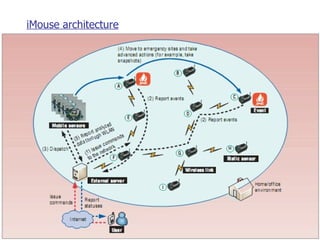
Introduction Incorporating the environment sensing capability of wireless sensor networks into video based  surveillance systems can provide advanced services at a lower cost than traditional surveillance systems . The integrated mobile surveillance and wireless sensor system (iMouse)use static and mobile wireless sensors to detect and then analyze unusual events in the environment.
  Static Sensors Static sensors forms a WSN to monitor and notify to server of unusual events.The sensing board can collect three types  of data: light,sound,temperature. An event occurs when the sensor input is higher or lower than  a predefined threshold.  Sensors can combine inputs to define a new event.  For example, a sensor can interpret a combination of light and temperature readings as a potential fire emergency. To detect an explosion, a sensor can use a combination of temperature and sound readings.
  Mobile Sensors   Mobile sensors can move to event locations, exchange messages with other sensors, take snapshots of event  scenes and transmit images to the server. Each mobile sensor can connect to the following equipment a  Lego car to support mobility  a  mote, to communicate with the static sensors a  webcam, to take snapshots To support high-speed, long-distance communications, such as transmitting images.
iMouse architecture
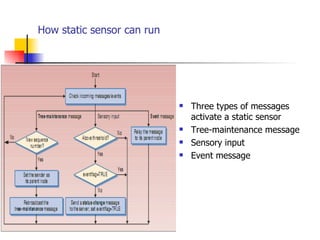
How static sensor can run Three types of messages activate a static sensor Tree-maintenance message Sensory input  Event message
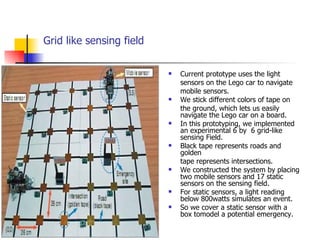
Grid like sensing field Current prototype uses the light sensors on the Lego car to navigate mobile sensors. We stick different colors of tape on the ground, which lets us easily navigate the Lego car on a board. In this prototyping, we implemented an experimental 6 by  6 grid-like sensing Field.  Black tape represents roads and golden  tape represents intersections. We constructed the system by placing two mobile sensors and 17 static sensors on the sensing field. For static sensors, a light reading below 800watts simulates an event. So we cover a static sensor with a box tomodel a potential emergency.
Benefits of iMouse It provides online real time monitoring. It’s event-driven. The more expensive mobile sensors are dispatched to the event locations.  They don’t need to cover the whole sensing field, so only a small number of them are required. It’s both modular and scalable.  Recent advances in wireless communications and MEMS technologies have made WSN possible.
Existing sysytem Traditional visual surveillance systems continuously videotape scenes to capture transient or suspicious objects. Researchers in robotics have also discussed the surveillance issue. Robots or cameras installed on walls identify obstacles or humans in the environment  Some researchers use static WSNs for object tracking. These systems assume that objects can emit signals that sensors can track.  Researchers have also proposed mobilizers to move sensors to enhance coverage of the sensing field and to strengthen the network connectivity.
Proposed system The proposed iMouse system combines two areas, WSN and surveillance technology, to support intelligent mobile surveillance services. On one hand, the mobile sensors can help improve the weakness of traditional WSN. On the other hand, the WSN provides context awareness and intelligence to the surveillance system.  WSN’s status and control includes Config, Command, Status, Control, Monitoring and Log areas. The Config area is to input configuration information, such as mobile sensors’ IP addresses, ports, sensors’ positions,etc.
Implementation iMouse is implemented in Java and Java Script .  We use java script to provide authentication and redirection. iMouse is developed with the following java script pages. 1. Login Page (Authetication page – index.html)‏ 2.Redirecting/Home Page (connecting to iMouse –  author.html )‏ The core of iMouse is simulated using Java. The iMouse simulation contains the following modules . 1. User Interface Design( iMouse.java)‏ 2. Simulation of Static sensors(SSensor.java)‏ 3. Design of Wireless Sensor Networks(WSN – Wsn.java)
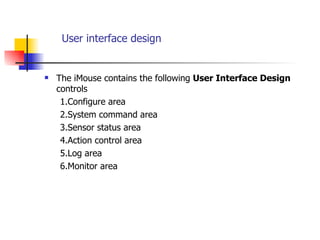
User interface design The iMouse contains the following  User Interface Design  controls 1.Configure area 2.System command area 3.Sensor status area 4.Action control area 5.Log area 6.Monitor area
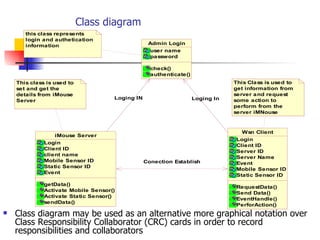
Class diagram Class diagram may be used as an alternative more graphical notation over Class Responsibility Collaborator (CRC) cards in order to record responsibilities and collaborators
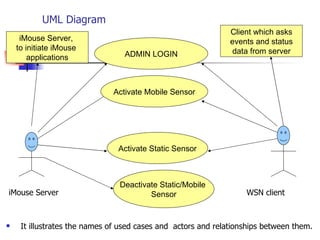
UML Diagram iMouse Server  WSN client It illustrates the names of used cases and  actors and relationships between them. ADMIN LOGIN Activate Mobile Sensor Activate Static Sensor Deactivate Static/Mobile  Sensor iMouse Server,  to initiate iMouse  applications Client which asks events and status  data from server
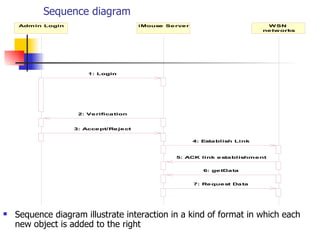
Sequence diagram Sequence diagram illustrate interaction in a kind of format in which each new object is added to the right
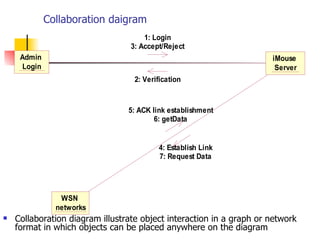
Collaboration daigram Collaboration diagram illustrate object interaction in a graph or network format in which objects can be placed anywhere on the diagram
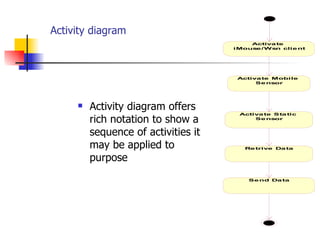
Activity diagram Activity diagram offers rich notation to show a sequence of activities it may be applied to purpose
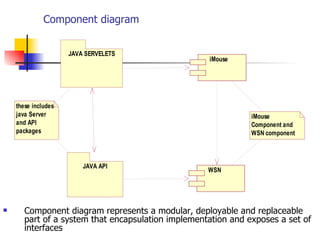
Component diagram Component diagram represents a modular, deployable and replaceable part of a system that encapsulation implementation and exposes a set of interfaces
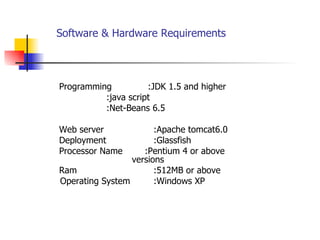
Software & Hardware Requirements   Programming  :JDK 1.5 and higher :java script :Net-Beans 6.5 Web server  :Apache tomcat6.0 Deployment  :Glassfish  Processor Name  :Pentium 4 or above  versions Ram  :512MB or above Operating System  :Windows XP
Conclusion With iMouse we can implement WSN which can detect any event at a desired position in sensing field without human interaction directly. By this project we can implement low cost based surveillance system which is user friendly and easily recognises places in any real world system.

iMouse

  • 1.
    iMouse Integrated Mobilesurveillance & Wireless Sensor System
  • 2.
    Introduction Incorporating theenvironment sensing capability of wireless sensor networks into video based surveillance systems can provide advanced services at a lower cost than traditional surveillance systems . The integrated mobile surveillance and wireless sensor system (iMouse)use static and mobile wireless sensors to detect and then analyze unusual events in the environment.
  • 3.
    StaticSensors Static sensors forms a WSN to monitor and notify to server of unusual events.The sensing board can collect three types of data: light,sound,temperature. An event occurs when the sensor input is higher or lower than a predefined threshold. Sensors can combine inputs to define a new event. For example, a sensor can interpret a combination of light and temperature readings as a potential fire emergency. To detect an explosion, a sensor can use a combination of temperature and sound readings.
  • 4.
    MobileSensors Mobile sensors can move to event locations, exchange messages with other sensors, take snapshots of event scenes and transmit images to the server. Each mobile sensor can connect to the following equipment a Lego car to support mobility a mote, to communicate with the static sensors a webcam, to take snapshots To support high-speed, long-distance communications, such as transmitting images.
  • 5.
  • 6.
    How static sensorcan run Three types of messages activate a static sensor Tree-maintenance message Sensory input Event message
  • 7.
    Grid like sensingfield Current prototype uses the light sensors on the Lego car to navigate mobile sensors. We stick different colors of tape on the ground, which lets us easily navigate the Lego car on a board. In this prototyping, we implemented an experimental 6 by 6 grid-like sensing Field. Black tape represents roads and golden tape represents intersections. We constructed the system by placing two mobile sensors and 17 static sensors on the sensing field. For static sensors, a light reading below 800watts simulates an event. So we cover a static sensor with a box tomodel a potential emergency.
  • 8.
    Benefits of iMouseIt provides online real time monitoring. It’s event-driven. The more expensive mobile sensors are dispatched to the event locations. They don’t need to cover the whole sensing field, so only a small number of them are required. It’s both modular and scalable. Recent advances in wireless communications and MEMS technologies have made WSN possible.
  • 9.
    Existing sysytem Traditionalvisual surveillance systems continuously videotape scenes to capture transient or suspicious objects. Researchers in robotics have also discussed the surveillance issue. Robots or cameras installed on walls identify obstacles or humans in the environment Some researchers use static WSNs for object tracking. These systems assume that objects can emit signals that sensors can track. Researchers have also proposed mobilizers to move sensors to enhance coverage of the sensing field and to strengthen the network connectivity.
  • 10.
    Proposed system Theproposed iMouse system combines two areas, WSN and surveillance technology, to support intelligent mobile surveillance services. On one hand, the mobile sensors can help improve the weakness of traditional WSN. On the other hand, the WSN provides context awareness and intelligence to the surveillance system. WSN’s status and control includes Config, Command, Status, Control, Monitoring and Log areas. The Config area is to input configuration information, such as mobile sensors’ IP addresses, ports, sensors’ positions,etc.
  • 11.
    Implementation iMouse isimplemented in Java and Java Script . We use java script to provide authentication and redirection. iMouse is developed with the following java script pages. 1. Login Page (Authetication page – index.html)‏ 2.Redirecting/Home Page (connecting to iMouse – author.html )‏ The core of iMouse is simulated using Java. The iMouse simulation contains the following modules . 1. User Interface Design( iMouse.java)‏ 2. Simulation of Static sensors(SSensor.java)‏ 3. Design of Wireless Sensor Networks(WSN – Wsn.java)
  • 12.
    User interface designThe iMouse contains the following User Interface Design controls 1.Configure area 2.System command area 3.Sensor status area 4.Action control area 5.Log area 6.Monitor area
  • 13.
    Class diagram Classdiagram may be used as an alternative more graphical notation over Class Responsibility Collaborator (CRC) cards in order to record responsibilities and collaborators
  • 14.
    UML Diagram iMouseServer WSN client It illustrates the names of used cases and actors and relationships between them. ADMIN LOGIN Activate Mobile Sensor Activate Static Sensor Deactivate Static/Mobile Sensor iMouse Server, to initiate iMouse applications Client which asks events and status data from server
  • 15.
    Sequence diagram Sequencediagram illustrate interaction in a kind of format in which each new object is added to the right
  • 16.
    Collaboration daigram Collaborationdiagram illustrate object interaction in a graph or network format in which objects can be placed anywhere on the diagram
  • 17.
    Activity diagram Activitydiagram offers rich notation to show a sequence of activities it may be applied to purpose
  • 18.
    Component diagram Componentdiagram represents a modular, deployable and replaceable part of a system that encapsulation implementation and exposes a set of interfaces
  • 19.
    Software & HardwareRequirements Programming :JDK 1.5 and higher :java script :Net-Beans 6.5 Web server :Apache tomcat6.0 Deployment :Glassfish Processor Name :Pentium 4 or above versions Ram :512MB or above Operating System :Windows XP
  • 20.
    Conclusion With iMousewe can implement WSN which can detect any event at a desired position in sensing field without human interaction directly. By this project we can implement low cost based surveillance system which is user friendly and easily recognises places in any real world system.