Evaluation of computer based tools for research --- SPSS The Best Group http://mite6025hku.blogspot.com MITE6025
Contents Introduction of SPSS Strength Weaknesses Summary Further improvement Reference
What is SPSS Statistical Package for the Social Sciences Data management and analysis  Presentation functions, including statistical analyses and graphical presentation of data Uncover key facts, patterns and trends Help for decisions making http://www.spss.com/
Use SPSS in different areas Survey and market research and direct marketing  Academia  Administrative research, human resources, and resource planning  Medical, scientific, clinical, and social science research  Planning and forecasting  Quality improvement  Reporting and ad hoc decision making  Enterprise-level analytic application development
SPSS is a modular product Base System module  Other modules (typically Advanced Statistics and Professional Statistics) http://www.spss.com/spss/family.cfm
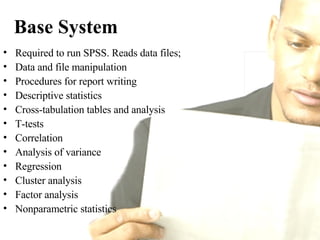
Base System Required to run SPSS. Reads data files;  Data and file manipulation Procedures for report writing Descriptive statistics Cross-tabulation tables and analysis T-tests Correlation Analysis of variance Regression Cluster analysis Factor analysis Nonparametric statistics
Add-on Modules Professional Statistics Advanced Statistics  Categories  Tables Trends Reports etc.
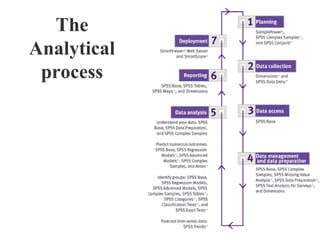
The Analytical process
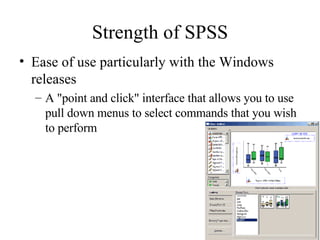
Strength of SPSS Ease of use particularly with the Windows releases  A "point and click" interface that allows you to use pull down menus to select commands that you wish to perform
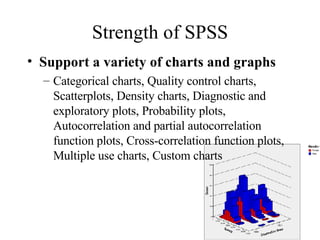
Strength of SPSS Support a variety of charts and graphs   Categorical charts, Quality control charts, Scatterplots, Density charts, Diagnostic and exploratory plots, Probability plots, Autocorrelation and partial autocorrelation function plots, Cross-correlation function plots, Multiple use charts, Custom charts
Strength of SPSS The ability to manage a complex data set To create new variables from existing information To  provide many types of analysis which are not available in other package programs
Strength of SPSS Data Management  SPSS has a friendly data editor that resembles Excel that allows you to enter your data and attributes of your data (missing values, value labels, etc.)
Strength of SPSS Analysis of variance (SPSS allows you to perform many kinds of tests of specific effects) and  multivariate analysis (e.g. manova, factor analysis, discriminant analysis) and  SPSS 11 has added some capabilities for analyzing mixed models
Strength of SPSS Rich resources of reference  on web or training course is available at any time when compared with say, SAS
Strength of SPSS Data manipulation  data input with 5-point Likert Scale can be changed to 3-point scale when needed.
Weaknesses  Problems in positioning graphics precisely on the pages, difficulties in editing graphs, limited graphical capabilities in early releases.
Weaknesses Need to have some of the newer graphs - dot plots, mosaic plots, comparative bar charts with central base line
Weaknesses The graphic editor is not very versatile.
Weaknesses Automatic scaling: makes it difficult to present different charts using the same scale for comparisons.  Need for fast processor for work with charts  Lacks many regression analysis techniques.  Difficult to edit output.
Weaknesses Problems with importing and exporting data in a variety of formats,  Poor error messages on occasion - not always easy to associate with correction needed to the code.  Limited functionality for complex analysis  In batch mode one error holts the whole file running.
Weakness Can be slow at times if not using the latest hardware  Difficulties running SPSS across the networks in relation to the large temporary data files it creates  You need a knowledge of statistical terminology to operate the software, some of the language is specific to SPSS
Weakness All standard release versions of SPSS for microcomputers require an IBM-compatible microcomputer with at least one diskette drive and a hard disk, preferably of large capacity  SPSS does not have very strong data management tools
Weakness The absence of robust methods, it is unable to perform robust regression or to obtain robust standard errors.  All data must be entered at one time, otherwise ‘Recode’ is unable to update the latest data with the previously entered data.
Weakness It is good for ‘Exploratory Factor Analysis’, whilst it is unable to perform ‘Confirmatory Factor Analysis’ which is good to identify the validity of the model.  No indication for significant figures for partial correlation.
Summary SPSS focuses on ease of use (their motto is "real stats, real easy"), and it succeeds in this area. But if you intend to use SPSS as a power user, you may outgrow it over time. SPSS is strong in the area of graphics, but weak in more cutting edge statistical procedures lacking in robust methods and survey methods.
Summary If you were performing analyses using mixed models you might choose SAS,  but if you were doing logistic regression you might choose Stata,  and if you were doing analysis of variance you might choose SPSS.
Further development More flexible editing of graphs including the ability to click and drag graph elements.  Enhanced graphical capability would be an advantage to many  More graph types and specifically better Stem and leaf charts  Improved export facilities.
Further development Manuals could be much more user friendly  Improvements to syntax window  Easier repeat procedures for analysis are required. Maybe some macro or learn feature, so that new data can easily be processed quickly using the same sequence of analysis commands applied to previous data sets.
References  http://www.qub.ac.uk/cdda/visual/spss.html   http://www.bioon.com/biology/sas82/85874.shtml http://demography.anu.edu.au/Publications/SDA-course-notes/secc.htm  (A good link to set up SPSS)  http://www.bioon.com/biology/sas82/85874.shtml

Evaluation Spss

  • 1.
    Evaluation of computerbased tools for research --- SPSS The Best Group http://mite6025hku.blogspot.com MITE6025
  • 2.
    Contents Introduction ofSPSS Strength Weaknesses Summary Further improvement Reference
  • 3.
    What is SPSSStatistical Package for the Social Sciences Data management and analysis Presentation functions, including statistical analyses and graphical presentation of data Uncover key facts, patterns and trends Help for decisions making http://www.spss.com/
  • 4.
    Use SPSS indifferent areas Survey and market research and direct marketing Academia Administrative research, human resources, and resource planning Medical, scientific, clinical, and social science research Planning and forecasting Quality improvement Reporting and ad hoc decision making Enterprise-level analytic application development
  • 5.
    SPSS is amodular product Base System module Other modules (typically Advanced Statistics and Professional Statistics) http://www.spss.com/spss/family.cfm
  • 6.
    Base System Requiredto run SPSS. Reads data files; Data and file manipulation Procedures for report writing Descriptive statistics Cross-tabulation tables and analysis T-tests Correlation Analysis of variance Regression Cluster analysis Factor analysis Nonparametric statistics
  • 7.
    Add-on Modules ProfessionalStatistics Advanced Statistics Categories Tables Trends Reports etc.
  • 8.
  • 9.
    Strength of SPSSEase of use particularly with the Windows releases A "point and click" interface that allows you to use pull down menus to select commands that you wish to perform
  • 10.
    Strength of SPSSSupport a variety of charts and graphs Categorical charts, Quality control charts, Scatterplots, Density charts, Diagnostic and exploratory plots, Probability plots, Autocorrelation and partial autocorrelation function plots, Cross-correlation function plots, Multiple use charts, Custom charts
  • 11.
    Strength of SPSSThe ability to manage a complex data set To create new variables from existing information To provide many types of analysis which are not available in other package programs
  • 12.
    Strength of SPSSData Management SPSS has a friendly data editor that resembles Excel that allows you to enter your data and attributes of your data (missing values, value labels, etc.)
  • 13.
    Strength of SPSSAnalysis of variance (SPSS allows you to perform many kinds of tests of specific effects) and multivariate analysis (e.g. manova, factor analysis, discriminant analysis) and SPSS 11 has added some capabilities for analyzing mixed models
  • 14.
    Strength of SPSSRich resources of reference on web or training course is available at any time when compared with say, SAS
  • 15.
    Strength of SPSSData manipulation data input with 5-point Likert Scale can be changed to 3-point scale when needed.
  • 16.
    Weaknesses Problemsin positioning graphics precisely on the pages, difficulties in editing graphs, limited graphical capabilities in early releases.
  • 17.
    Weaknesses Need tohave some of the newer graphs - dot plots, mosaic plots, comparative bar charts with central base line
  • 18.
    Weaknesses The graphiceditor is not very versatile.
  • 19.
    Weaknesses Automatic scaling:makes it difficult to present different charts using the same scale for comparisons. Need for fast processor for work with charts Lacks many regression analysis techniques. Difficult to edit output.
  • 20.
    Weaknesses Problems withimporting and exporting data in a variety of formats, Poor error messages on occasion - not always easy to associate with correction needed to the code. Limited functionality for complex analysis In batch mode one error holts the whole file running.
  • 21.
    Weakness Can beslow at times if not using the latest hardware Difficulties running SPSS across the networks in relation to the large temporary data files it creates You need a knowledge of statistical terminology to operate the software, some of the language is specific to SPSS
  • 22.
    Weakness All standardrelease versions of SPSS for microcomputers require an IBM-compatible microcomputer with at least one diskette drive and a hard disk, preferably of large capacity SPSS does not have very strong data management tools
  • 23.
    Weakness The absenceof robust methods, it is unable to perform robust regression or to obtain robust standard errors. All data must be entered at one time, otherwise ‘Recode’ is unable to update the latest data with the previously entered data.
  • 24.
    Weakness It isgood for ‘Exploratory Factor Analysis’, whilst it is unable to perform ‘Confirmatory Factor Analysis’ which is good to identify the validity of the model. No indication for significant figures for partial correlation.
  • 25.
    Summary SPSS focuseson ease of use (their motto is "real stats, real easy"), and it succeeds in this area. But if you intend to use SPSS as a power user, you may outgrow it over time. SPSS is strong in the area of graphics, but weak in more cutting edge statistical procedures lacking in robust methods and survey methods.
  • 26.
    Summary If youwere performing analyses using mixed models you might choose SAS, but if you were doing logistic regression you might choose Stata, and if you were doing analysis of variance you might choose SPSS.
  • 27.
    Further development Moreflexible editing of graphs including the ability to click and drag graph elements. Enhanced graphical capability would be an advantage to many More graph types and specifically better Stem and leaf charts Improved export facilities.
  • 28.
    Further development Manualscould be much more user friendly Improvements to syntax window Easier repeat procedures for analysis are required. Maybe some macro or learn feature, so that new data can easily be processed quickly using the same sequence of analysis commands applied to previous data sets.
  • 29.
    References http://www.qub.ac.uk/cdda/visual/spss.html http://www.bioon.com/biology/sas82/85874.shtml http://demography.anu.edu.au/Publications/SDA-course-notes/secc.htm (A good link to set up SPSS) http://www.bioon.com/biology/sas82/85874.shtml