ENTERPRISE COMMUNICATION Work Smarter...
What is it? Set of products that provides a consistent unified user interface and user experience across multiple devices and media types. Sharing of information or documents to specific individuals within the enterprise or anywhere in the world.  Tools include e-mail, videoconferencing, collaborative document sharing, project management tools and others.
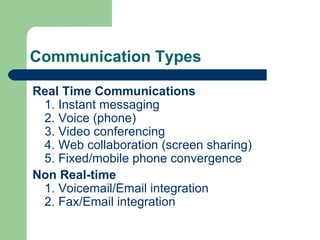
Communication Types Real Time Communications 1. Instant messaging 2. Voice (phone) 3. Video conferencing 4. Web collaboration (screen sharing) 5. Fixed/mobile phone convergence Non Real-time 1. Voicemail/Email integration 2. Fax/Email integration
Advantages Facilitates on-the-go, always-available style of communication.  Can be tailored to each person’s specific job or to a particular section of a company
Advantages Helps businesses, small and large alike, to streamline information delivery and ensure ease of use  Human delays are minimized or eliminated, resulting in better, faster interaction and service-delivery for the customer, and cost savings for the business
Enterprise Communication Solutions WebEx DimDim Skype Google Chat
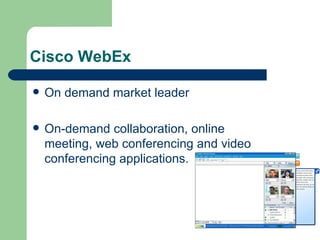
Cisco WebEx On demand market leader On-demand collaboration, online meeting, web conferencing and video conferencing applications.
Application suite  WebEx Application Suite  WebEx provides a suite of applications specifically designed for business processes such as sales, support, training and marketing processes. WebEx Meeting Center  - Recreates face-to-face meetings with real-time data, application, voice and video sharing capabilities. WebEx Sales Center  - Features automatic attention notification to alert sales professionals when they are losing a prospect’s attention, branded prospect portals to provide a secure location in which to share information and real-time sales analytics and reporting. WebEx Training Center  - Designed for trainers, includes breakout session support and learner testing, tracking and reporting. Recently added on-demand LMS module. A component of the overall E-learning Suite.
Application suite WebEx Support Center  - Allows support agents to identify, resolve and track customer issues within a secure, online support session. WebEx Event Center  - Specifically designed for web seminars and events; WebEx Event Center includes automated lead scoring, email invitation management and an event producer dashboard. WebEx LiveStream  - Specifically designed for large events (100 - 200,000 attendees) which require onsite production, TV quality video, voice and powerpoint. WebEx Consulting Services  - Expert Teams which can provide education, content, and/or delivery as it pertains to building Online Sales Teams, Universities, Marketing Programs, etc.
DimDim Compared to the WebEx 2.0 web conferencing solution. Provides web-based platform for real-time, rich media collaboration and meetings.  Dimdim provides free web conferencing service where users can share desktops, show slides, collaborate, chat, talk and broadcast via webcam.
Other features Free meetings are available for up to 20 users. Pro meetings with collaboration tools for up to 50 users are available for $19/mo, and Webinar hosting for up to 100 users or 1000 event attendees are available for $75/mo.
Skype Allows users to make voice calls over internet.  Calls to other users of the service and, in some countries, to free-of-charge numbers, are free.  Calls to other landlines and mobile phones can be made for a fee.
Features Voice chat allows both calling a single user and conference calling.  Uses a proprietary codec.  Skype's text chat client allows group chats, emoticons, storing chat history, offline messaging and editing of previous messages.  Features familiar to instant messaging users - such as user profiles, online status indicators, and so on - is also included.
Additional features Instant messaging File transfer Video conferencing  Registered users are identified by a unique  Skype Name . Users may be listed in the Skype directory
Google Chat Windows and web-based application for instant messaging and voice over internet protocol (VOIP) offered by Google Inc. Available for Microsoft Windows (2000, XP, Vista, Windows 7)
Features Voicemail  File Transfer Video Chat Instant Messaging Offline Messaging
New features  Google Buzz: Share updates, photos, videos and more, and start conversations about the things you find interesting.  Google chat Lab: It features rounded alerts for new email. It can have multiple tabs with group chat, private chat and the regular screen open at once. Voice chat, Video conferencing, file sharing are missing
Conclusion  Enterprise communication makes it easier for your workforce to connect, communicate and collaborate with each other, customers and suppliers. It is a presence-enabled communications and collaboration system featuring integrated IP telephony, instant messaging (IM), audio, video, and web conferencing Provides a consistent, unified user quality of experience over any device, anywhere, anytime - whether fixed or mobile - and through multimedia applications for a richer collaborative experience.

Enterprise Communication

  • 1.
  • 2.
    What is it?Set of products that provides a consistent unified user interface and user experience across multiple devices and media types. Sharing of information or documents to specific individuals within the enterprise or anywhere in the world. Tools include e-mail, videoconferencing, collaborative document sharing, project management tools and others.
  • 3.
    Communication Types RealTime Communications 1. Instant messaging 2. Voice (phone) 3. Video conferencing 4. Web collaboration (screen sharing) 5. Fixed/mobile phone convergence Non Real-time 1. Voicemail/Email integration 2. Fax/Email integration
  • 4.
    Advantages Facilitates on-the-go,always-available style of communication. Can be tailored to each person’s specific job or to a particular section of a company
  • 5.
    Advantages Helps businesses,small and large alike, to streamline information delivery and ensure ease of use Human delays are minimized or eliminated, resulting in better, faster interaction and service-delivery for the customer, and cost savings for the business
  • 6.
    Enterprise Communication SolutionsWebEx DimDim Skype Google Chat
  • 7.
    Cisco WebEx Ondemand market leader On-demand collaboration, online meeting, web conferencing and video conferencing applications.
  • 8.
    Application suite WebEx Application Suite  WebEx provides a suite of applications specifically designed for business processes such as sales, support, training and marketing processes. WebEx Meeting Center  - Recreates face-to-face meetings with real-time data, application, voice and video sharing capabilities. WebEx Sales Center  - Features automatic attention notification to alert sales professionals when they are losing a prospect’s attention, branded prospect portals to provide a secure location in which to share information and real-time sales analytics and reporting. WebEx Training Center  - Designed for trainers, includes breakout session support and learner testing, tracking and reporting. Recently added on-demand LMS module. A component of the overall E-learning Suite.
  • 9.
    Application suite WebExSupport Center  - Allows support agents to identify, resolve and track customer issues within a secure, online support session. WebEx Event Center  - Specifically designed for web seminars and events; WebEx Event Center includes automated lead scoring, email invitation management and an event producer dashboard. WebEx LiveStream  - Specifically designed for large events (100 - 200,000 attendees) which require onsite production, TV quality video, voice and powerpoint. WebEx Consulting Services  - Expert Teams which can provide education, content, and/or delivery as it pertains to building Online Sales Teams, Universities, Marketing Programs, etc.
  • 10.
    DimDim Compared tothe WebEx 2.0 web conferencing solution. Provides web-based platform for real-time, rich media collaboration and meetings. Dimdim provides free web conferencing service where users can share desktops, show slides, collaborate, chat, talk and broadcast via webcam.
  • 11.
    Other features Freemeetings are available for up to 20 users. Pro meetings with collaboration tools for up to 50 users are available for $19/mo, and Webinar hosting for up to 100 users or 1000 event attendees are available for $75/mo.
  • 12.
    Skype Allows usersto make voice calls over internet. Calls to other users of the service and, in some countries, to free-of-charge numbers, are free. Calls to other landlines and mobile phones can be made for a fee.
  • 13.
    Features Voice chatallows both calling a single user and conference calling. Uses a proprietary codec. Skype's text chat client allows group chats, emoticons, storing chat history, offline messaging and editing of previous messages. Features familiar to instant messaging users - such as user profiles, online status indicators, and so on - is also included.
  • 14.
    Additional features Instantmessaging File transfer Video conferencing Registered users are identified by a unique  Skype Name . Users may be listed in the Skype directory
  • 15.
    Google Chat Windowsand web-based application for instant messaging and voice over internet protocol (VOIP) offered by Google Inc. Available for Microsoft Windows (2000, XP, Vista, Windows 7)
  • 16.
    Features Voicemail File Transfer Video Chat Instant Messaging Offline Messaging
  • 17.
    New features Google Buzz: Share updates, photos, videos and more, and start conversations about the things you find interesting. Google chat Lab: It features rounded alerts for new email. It can have multiple tabs with group chat, private chat and the regular screen open at once. Voice chat, Video conferencing, file sharing are missing
  • 18.
    Conclusion Enterprisecommunication makes it easier for your workforce to connect, communicate and collaborate with each other, customers and suppliers. It is a presence-enabled communications and collaboration system featuring integrated IP telephony, instant messaging (IM), audio, video, and web conferencing Provides a consistent, unified user quality of experience over any device, anywhere, anytime - whether fixed or mobile - and through multimedia applications for a richer collaborative experience.