Enterprise Mobility Management


                       webinars.plantemoran.com
Presenters
       Marv Sauer, Consulting Manager – Plante Moran, Technology Consulting & Solutions
       Marv has more than 25 years taking clients from initial strategic planning through the successful
       implementation of a variety of proven and leading edge technologies. He is a talented facilitator of small to
       large groups working with personnel ranging from end users to executive management. Marv has given
       presentations at local and national conferences on topics such as Building the Network of Tomorrow, Today
       and With Strategic Planning First, Successful Implementation Follows. Marv holds a Master of Business
       Administration in Finance from the University of Michigan and a Bachelor of Science in Math and Computer
       Science from the University of California, Los Angeles (UCLA).


       Karl Zager, Consulting Manager- Plante Moran, Technology Consulting & Solutions
       Karl specializes in the transition of IT for mergers and acquisitions. His work with both U.S. and non U.S.
       investors has included IT due diligence prior to the acquisition and post-acquisition, the development of a
       new IT organization structure, global infrastructure design, and project management of the entire IT
       transition. Karl has spent more than 25 years designing, implementing, and supporting IT infrastructure from
       the high level global network planning to router configuration and packet analysis. His projects have included
       Michigan’s two largest counties, school districts, leading hospitals, and the U.S. Military. Karl has received a
       Network Architect certification from Pine Mountain Group. Karl has a Bachelor of Science in Electronic
       Engineering Technology from Lawrence Technological University.


       Kurt VanderWal, Senior Consultant – Plante Moran, Technology Consulting & Solutions
       Kurt has spent more than 16 years in the information technology field specializing in PCI compliance,
       network security, local area networks, and file servers. Over the past seven years, Kurt has been
       performing PCI DSS assessments and network security assessments for financial, education, and
       government institutions. Kurt holds a Bachelor of Science in Information Systems and has acquired
       multiple certifications over his tenure.


                                                                                                           webinars.plantemoran.com
Administration
 Slides are available for download from your webcast console.
   A recording of today’s webinar will be added to our website in
   a few days.
 We will allow time at the end of the presentation to respond to
   your questions, but please feel free to submit questions at any
   time.
 This is a CPE-eligible webinar. Throughout the webcast,
   participation pop-ups will appear.
 Participants must respond to at least 75% of these pop-ups in
   order to receive CPE credit.


                                                              webinars.plantemoran.com
Overview

Organizations adopting an enterprise mobility management mindset
and strategic approach to their mobile environments are
transforming the way they do business, leading to innovation and
growth. In today's competitive marketplace, achieving greater
information access, enhanced collaboration, increased productivity,
improved customer service, and lower TCO (total cost of ownership)
can put you miles ahead of your competition.
At the completion of this webinar, participants will understand:
   The mobility environment and transformational impact
   The importance of mobilization planning and strategy
   Key factors to consider in managing devices, applications, and
     services
   Security and compliance best practices

                                                               webinars.plantemoran.com
Mobility background
 Proliferation of mobile devices including tablets and smartphones
 Innovative designs, intuitive, and better access to high speed networks
 Integral to staying competitive
 Web based applications and services are moving people to the cloud
 Dealing with a younger generation of workers
 Provides a ‘role model’ for innovation
 Greater connection to and engagement with the customer
 Improves integration with social networking/media sites


                                                        5          webinars.plantemoran.com
Reasons to go mobile
 Increased information access and sharing
 Better response times
 Improved customer service
 Increased productivity and satisfaction
 Enhanced collaboration
 Increased efficiencies
 Reduced costs
 Better recruitment of top talent
 Greater innovation


                                             6   webinars.plantemoran.com
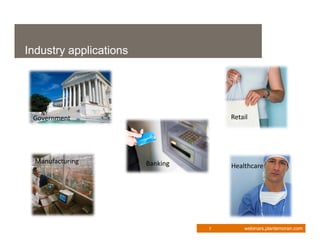
Industry applications


 Government                           Retail


  Manufacturing         Banking       Healthcare


                                  7       webinars.plantemoran.com
Strategy is key
 Key considerations
     Device ownership
     Applications
     Platforms
 Cloud is about enabling and leveraging technology, but mobility
  is about enabling and leveraging the business
 Focus on the business aspects centered around:
     Access
     Management
     Balance


                                                  8         webinars.plantemoran.com
Advantages of a sound strategy
 A sound strategy
    Increases the impact and results
    Ensures that delivery is cost effective and efficient
    Provides a means to stay competitive


                                                    9        webinars.plantemoran.com
IT concerns

 How do we support the          How do we stop data
  devices?                        leakage?
 What if the user jailbreaks    Do they want it for more
  the device?                     than email?
 Do we need to develop          Who gets them and how
  apps?                           do we pay for them?
 How do we secure the device    How do we maintain the
  and data?                       service expectation?
 Do we need to support every    What about compatibility?
  device?


                                             10          webinars.plantemoran.com
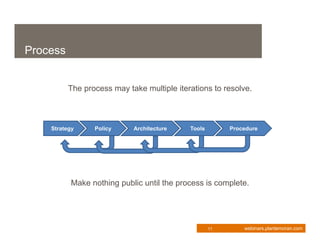
Process


          The process may take multiple iterations to resolve.


    Strategy     Policy     Architecture    Tools        Procedure


          Make nothing public until the process is complete.


                                                    11       webinars.plantemoran.com
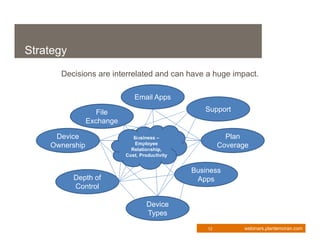
Strategy
      Decisions are interrelated and can have a huge impact.

                              Email Apps

                   File                            Support
                Exchange

     Device                   Business –                   Plan
    Ownership                 Employee                   Coverage
                             Relationship,
                           Cost, Productivity


                                                Business
           Depth of                              Apps
           Control

                                    Device
                                    Types

                                                    12         webinars.plantemoran.com
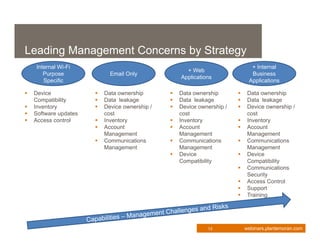
Leading Management Concerns by Strategy
    Internal Wi-Fi                                                             + Internal
                                                      + Web
       Purpose               Email Only                                        Business
                                                    Applications
       Specific                                                               Applications

   Device                Data ownership          Data ownership           Data ownership
    Compatibility         Data leakage            Data leakage             Data leakage
   Inventory             Device ownership /      Device ownership /       Device ownership /
   Software updates       cost                     cost                      cost
   Access control        Inventory               Inventory                Inventory
                          Account                 Account                  Account
                           Management               Management                Management
                          Communications          Communications           Communications
                           Management               Management                Management
                                                   Device                   Device
                                                    Compatibility             Compatibility
                                                                             Communications
                                                                              Security
                                                                             Access Control
                                                                             Support
                                                                             Training


                                                              13             webinars.plantemoran.com
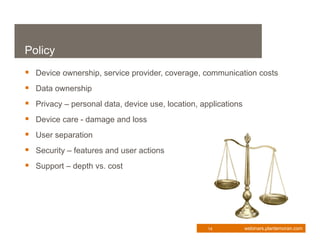
Policy
 Device ownership, service provider, coverage, communication costs
 Data ownership
 Privacy – personal data, device use, location, applications
 Device care - damage and loss
 User separation
 Security – features and user actions
 Support – depth vs. cost


                                                   14           webinars.plantemoran.com
Architecture Components
 Device type considerations – environment, capabilities
 Access to data – messages (includes calendar and contacts) only
   apps, synchronization, remote VPN, remote desktop

 Data storage and backup
 Policy enforcement – security, application restrictions, data
   leakage

 Lockdown – recovery, wipe
 Software and configuration distribution
 Support – recovery, configuration, backups, updates, applications
 Administration – inventory, IDs, rights, monitoring
 Device management depth – light, heavy, containerized
                                                    15        webinars.plantemoran.com
Management Tools
 Mail Synchronization Servers (BES, MS Sync, Notes Traveler)
 Mobile Device Management Software (Airwatch, Fiberlink, Zenprise,
  Excitor, MobileIron, Sybase, Good)

 Antivirus software (AVG, Kaspersky, ESET)
 Mobile VPN clients (most major firewall vendors)
 Remote control / Virtual PC (Citrix, VMware, Microsoft, VNC)
 Training


                                                 16        webinars.plantemoran.com
Procedures
  Request process
      Policy acceptance
  Acquisition
  Initial setup
        Apps
        Accounts
        Configuration
        Training
  Management
  Updates
  Enforcement

                           17   webinars.plantemoran.com
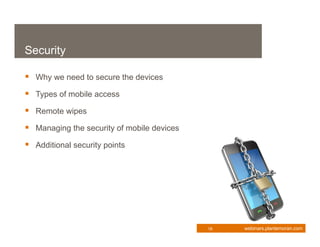
Security

 Why we need to secure the devices
 Types of mobile access
 Remote wipes
 Managing the security of mobile devices
 Additional security points


                                            18   webinars.plantemoran.com
Why we need to secure the devices

 It is estimated that by 2013
     There will be 1.2 billion mobile workers worldwide
     75% of all U.S. workers will be mobile at least 20% of the time
 Another estimate shows that
     36% of cell phone owners have lost a phone or had one stolen
        •   Of these, almost 90% had no way to remotely lock or wipe the data from
            them
        •   Over 50% did not use password protection on their phones

 In the U.S., 113 cell phones are lost every minute


                                                            19          webinars.plantemoran.com
Why we need to secure the devices
 While mobility is a top security concern to business, few have
   addressed these concerns. Why?
     Businesses and employees are seeing the advantages and pushing
       IT to “make it work”
     There are many different types of mobile devices
     These devices can be both business owned or employee owned
     Ability for users to install new, untested applications is too easy
 Too many variables


                                                         20          webinars.plantemoran.com
Types of mobile access
 Multiple ways mobile devices attach to the corporate network
    Internet Access Only (Internal)
    Remote Access to Email
    Remote Access to Network Resources and Data
 Regardless of the method, both the mobile device and the
  corporate network need to be protected


                                                   21        webinars.plantemoran.com
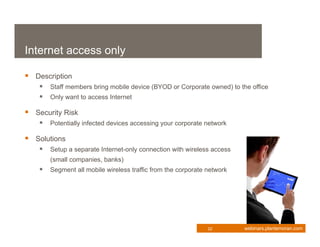
Internet access only

 Description
     Staff members bring mobile device (BYOD or Corporate owned) to the office
     Only want to access Internet

 Security Risk
     Potentially infected devices accessing your corporate network

 Solutions
     Setup a separate Internet-only connection with wireless access
       (small companies, banks)
     Segment all mobile wireless traffic from the corporate network


                                                             22        webinars.plantemoran.com
Remote access to corporate email
 Description
     Staff members accessing corporate email from remote locations

 Security Risks
     Data now resides on mobile device
         • Lost data due to stolen/lost device
         • Via OWA or other client software
       User credentials are now sent to/from the mobile device to the corporate network
         • If insecure, credentials could be stolen

 Solutions
     Restrict the download of documents to mobile devices (OWA)
     Require the use of a SECURE third party application to access the email (Good,
        Sync)
     Ensure remote locking and remote wiping is enabled and configured properly


                                                              23           webinars.plantemoran.com
Remote access to corporate network
 Description
     Staff members accessing corporate network and resources from remote locations

 Security Risks
     Devices are accessing an internal corporate resource
     Spread of viruses/malware across corporate network
     Data now resides on mobile device
          • Lost data due to stolen/lost device
       User credentials are now sent to/from the mobile device to the corporate network
          • If insecure, credentials could be stolen
       Insecure mobile devices (screen locks, passwords) lead to compromise of
        corporate network
     Ensure remote locking and wipe are enabled


                                                              24           webinars.plantemoran.com
Remote access to corporate network
 Solutions
    Require all remote devices go through a NAC prior to accessing the
      network
    Require that communications to the corporate network occur through a
      secure VPN or secure portal (i.e. Terminal Services) where data is
      Read-Only
    Ensure that the devices/removable cards are encrypted
    Ensure strong policies are established and adhered to
    Ensure remote wipe is enabled


                                                             25            webinars.plantemoran.com
Remote wipes
 What is a Remote Wipe?
     Erasing the contents of the mobile devices from a remote location (full
       or partial)

 How is it done?
     Depending on the device and OS, it typically deletes either the
       encryption key OR writes a series of 1’s over the entire phone

 Is it effective?
     Yes
 Notes
     Must be setup and configured prior to device being ‘lost’
     If device is being sent in for repairs, a backup should be performed
       and then a wipe

                                                        26         webinars.plantemoran.com
Managing the security

 Managing the security of the mobile devices
    Implement firewall/NAC technologies which support the mobile
      operating systems
    Limit the types of devices/OS versions allowed to attach
    Inventory/Manage the devices – Mobile Device Management
    Ensure that users agree to the corporate policy prior to accessing the
      network
       •   Defines ownership of data
       •   Defines required configurations
       •   Prohibits “jail-broken” devices on the network
    Security test these devices/apps
    Provide end user training


                                                            27    webinars.plantemoran.com
Additional security points
 Configuring the devices
      Enable remote wipes
      Ensure screen lock passwords are set
      Ensure screen lock passwords are strong
      Ensure key pad lock is enabled after a period of inactivity
      Require Anti-virus and Malware detection software

 Act Now!


                                                         28          webinars.plantemoran.com
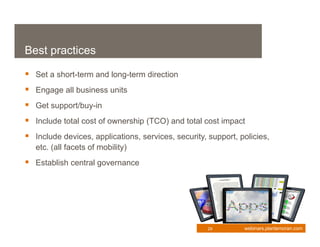
Best practices

 Set a short-term and long-term direction
 Engage all business units
 Get support/buy-in
 Include total cost of ownership (TCO) and total cost impact
 Include devices, applications, services, security, support, policies,
   etc. (all facets of mobility)
 Establish central governance


                                                     29        webinars.plantemoran.com
Q&A


      Q&A

            webinars.plantemoran.com
Thank you for attending

         Marv Sauer
         248.223.3120
         Marvin.Sauer@plantemoran.com


         Karl Zager
         248.223.3241
         Karl.Zager@plantemoran.com


         Kurt VanderWal
         248.223.3119
         Kurtis.VanderWal@plantemoran.com

     To view a complete calendar of upcoming Plante Moran webinars, visit webinars.plantemoran.com


                                                                                        webinars.plantemoran.com

Enterprise Mobility Management

  • 1.
    Enterprise Mobility Management webinars.plantemoran.com
  • 2.
    Presenters Marv Sauer, Consulting Manager – Plante Moran, Technology Consulting & Solutions Marv has more than 25 years taking clients from initial strategic planning through the successful implementation of a variety of proven and leading edge technologies. He is a talented facilitator of small to large groups working with personnel ranging from end users to executive management. Marv has given presentations at local and national conferences on topics such as Building the Network of Tomorrow, Today and With Strategic Planning First, Successful Implementation Follows. Marv holds a Master of Business Administration in Finance from the University of Michigan and a Bachelor of Science in Math and Computer Science from the University of California, Los Angeles (UCLA). Karl Zager, Consulting Manager- Plante Moran, Technology Consulting & Solutions Karl specializes in the transition of IT for mergers and acquisitions. His work with both U.S. and non U.S. investors has included IT due diligence prior to the acquisition and post-acquisition, the development of a new IT organization structure, global infrastructure design, and project management of the entire IT transition. Karl has spent more than 25 years designing, implementing, and supporting IT infrastructure from the high level global network planning to router configuration and packet analysis. His projects have included Michigan’s two largest counties, school districts, leading hospitals, and the U.S. Military. Karl has received a Network Architect certification from Pine Mountain Group. Karl has a Bachelor of Science in Electronic Engineering Technology from Lawrence Technological University. Kurt VanderWal, Senior Consultant – Plante Moran, Technology Consulting & Solutions Kurt has spent more than 16 years in the information technology field specializing in PCI compliance, network security, local area networks, and file servers. Over the past seven years, Kurt has been performing PCI DSS assessments and network security assessments for financial, education, and government institutions. Kurt holds a Bachelor of Science in Information Systems and has acquired multiple certifications over his tenure. webinars.plantemoran.com
  • 3.
    Administration  Slides areavailable for download from your webcast console. A recording of today’s webinar will be added to our website in a few days.  We will allow time at the end of the presentation to respond to your questions, but please feel free to submit questions at any time.  This is a CPE-eligible webinar. Throughout the webcast, participation pop-ups will appear.  Participants must respond to at least 75% of these pop-ups in order to receive CPE credit. webinars.plantemoran.com
  • 4.
    Overview Organizations adopting anenterprise mobility management mindset and strategic approach to their mobile environments are transforming the way they do business, leading to innovation and growth. In today's competitive marketplace, achieving greater information access, enhanced collaboration, increased productivity, improved customer service, and lower TCO (total cost of ownership) can put you miles ahead of your competition. At the completion of this webinar, participants will understand:  The mobility environment and transformational impact  The importance of mobilization planning and strategy  Key factors to consider in managing devices, applications, and services  Security and compliance best practices webinars.plantemoran.com
  • 5.
    Mobility background  Proliferationof mobile devices including tablets and smartphones  Innovative designs, intuitive, and better access to high speed networks  Integral to staying competitive  Web based applications and services are moving people to the cloud  Dealing with a younger generation of workers  Provides a ‘role model’ for innovation  Greater connection to and engagement with the customer  Improves integration with social networking/media sites 5 webinars.plantemoran.com
  • 6.
    Reasons to gomobile  Increased information access and sharing  Better response times  Improved customer service  Increased productivity and satisfaction  Enhanced collaboration  Increased efficiencies  Reduced costs  Better recruitment of top talent  Greater innovation 6 webinars.plantemoran.com
  • 7.
    Industry applications Government Retail Manufacturing Banking Healthcare 7 webinars.plantemoran.com
  • 8.
    Strategy is key Key considerations  Device ownership  Applications  Platforms  Cloud is about enabling and leveraging technology, but mobility is about enabling and leveraging the business  Focus on the business aspects centered around:  Access  Management  Balance 8 webinars.plantemoran.com
  • 9.
    Advantages of asound strategy  A sound strategy  Increases the impact and results  Ensures that delivery is cost effective and efficient  Provides a means to stay competitive 9 webinars.plantemoran.com
  • 10.
    IT concerns  Howdo we support the  How do we stop data devices? leakage?  What if the user jailbreaks  Do they want it for more the device? than email?  Do we need to develop  Who gets them and how apps? do we pay for them?  How do we secure the device  How do we maintain the and data? service expectation?  Do we need to support every  What about compatibility? device? 10 webinars.plantemoran.com
  • 11.
    Process The process may take multiple iterations to resolve. Strategy Policy Architecture Tools Procedure Make nothing public until the process is complete. 11 webinars.plantemoran.com
  • 12.
    Strategy Decisions are interrelated and can have a huge impact. Email Apps File Support Exchange Device Business – Plan Ownership Employee Coverage Relationship, Cost, Productivity Business Depth of Apps Control Device Types 12 webinars.plantemoran.com
  • 13.
    Leading Management Concernsby Strategy Internal Wi-Fi + Internal + Web Purpose Email Only Business Applications Specific Applications  Device  Data ownership  Data ownership  Data ownership Compatibility  Data leakage  Data leakage  Data leakage  Inventory  Device ownership /  Device ownership /  Device ownership /  Software updates cost cost cost  Access control  Inventory  Inventory  Inventory  Account  Account  Account Management Management Management  Communications  Communications  Communications Management Management Management  Device  Device Compatibility Compatibility  Communications Security  Access Control  Support  Training 13 webinars.plantemoran.com
  • 14.
    Policy  Device ownership,service provider, coverage, communication costs  Data ownership  Privacy – personal data, device use, location, applications  Device care - damage and loss  User separation  Security – features and user actions  Support – depth vs. cost 14 webinars.plantemoran.com
  • 15.
    Architecture Components  Devicetype considerations – environment, capabilities  Access to data – messages (includes calendar and contacts) only apps, synchronization, remote VPN, remote desktop  Data storage and backup  Policy enforcement – security, application restrictions, data leakage  Lockdown – recovery, wipe  Software and configuration distribution  Support – recovery, configuration, backups, updates, applications  Administration – inventory, IDs, rights, monitoring  Device management depth – light, heavy, containerized 15 webinars.plantemoran.com
  • 16.
    Management Tools  MailSynchronization Servers (BES, MS Sync, Notes Traveler)  Mobile Device Management Software (Airwatch, Fiberlink, Zenprise, Excitor, MobileIron, Sybase, Good)  Antivirus software (AVG, Kaspersky, ESET)  Mobile VPN clients (most major firewall vendors)  Remote control / Virtual PC (Citrix, VMware, Microsoft, VNC)  Training 16 webinars.plantemoran.com
  • 17.
    Procedures  Requestprocess  Policy acceptance  Acquisition  Initial setup  Apps  Accounts  Configuration  Training  Management  Updates  Enforcement 17 webinars.plantemoran.com
  • 18.
    Security  Why weneed to secure the devices  Types of mobile access  Remote wipes  Managing the security of mobile devices  Additional security points 18 webinars.plantemoran.com
  • 19.
    Why we needto secure the devices  It is estimated that by 2013  There will be 1.2 billion mobile workers worldwide  75% of all U.S. workers will be mobile at least 20% of the time  Another estimate shows that  36% of cell phone owners have lost a phone or had one stolen • Of these, almost 90% had no way to remotely lock or wipe the data from them • Over 50% did not use password protection on their phones  In the U.S., 113 cell phones are lost every minute 19 webinars.plantemoran.com
  • 20.
    Why we needto secure the devices  While mobility is a top security concern to business, few have addressed these concerns. Why?  Businesses and employees are seeing the advantages and pushing IT to “make it work”  There are many different types of mobile devices  These devices can be both business owned or employee owned  Ability for users to install new, untested applications is too easy  Too many variables 20 webinars.plantemoran.com
  • 21.
    Types of mobileaccess  Multiple ways mobile devices attach to the corporate network  Internet Access Only (Internal)  Remote Access to Email  Remote Access to Network Resources and Data  Regardless of the method, both the mobile device and the corporate network need to be protected 21 webinars.plantemoran.com
  • 22.
    Internet access only Description  Staff members bring mobile device (BYOD or Corporate owned) to the office  Only want to access Internet  Security Risk  Potentially infected devices accessing your corporate network  Solutions  Setup a separate Internet-only connection with wireless access (small companies, banks)  Segment all mobile wireless traffic from the corporate network 22 webinars.plantemoran.com
  • 23.
    Remote access tocorporate email  Description  Staff members accessing corporate email from remote locations  Security Risks  Data now resides on mobile device • Lost data due to stolen/lost device • Via OWA or other client software  User credentials are now sent to/from the mobile device to the corporate network • If insecure, credentials could be stolen  Solutions  Restrict the download of documents to mobile devices (OWA)  Require the use of a SECURE third party application to access the email (Good, Sync)  Ensure remote locking and remote wiping is enabled and configured properly 23 webinars.plantemoran.com
  • 24.
    Remote access tocorporate network  Description  Staff members accessing corporate network and resources from remote locations  Security Risks  Devices are accessing an internal corporate resource  Spread of viruses/malware across corporate network  Data now resides on mobile device • Lost data due to stolen/lost device  User credentials are now sent to/from the mobile device to the corporate network • If insecure, credentials could be stolen  Insecure mobile devices (screen locks, passwords) lead to compromise of corporate network  Ensure remote locking and wipe are enabled 24 webinars.plantemoran.com
  • 25.
    Remote access tocorporate network  Solutions  Require all remote devices go through a NAC prior to accessing the network  Require that communications to the corporate network occur through a secure VPN or secure portal (i.e. Terminal Services) where data is Read-Only  Ensure that the devices/removable cards are encrypted  Ensure strong policies are established and adhered to  Ensure remote wipe is enabled 25 webinars.plantemoran.com
  • 26.
    Remote wipes  Whatis a Remote Wipe?  Erasing the contents of the mobile devices from a remote location (full or partial)  How is it done?  Depending on the device and OS, it typically deletes either the encryption key OR writes a series of 1’s over the entire phone  Is it effective?  Yes  Notes  Must be setup and configured prior to device being ‘lost’  If device is being sent in for repairs, a backup should be performed and then a wipe 26 webinars.plantemoran.com
  • 27.
    Managing the security Managing the security of the mobile devices  Implement firewall/NAC technologies which support the mobile operating systems  Limit the types of devices/OS versions allowed to attach  Inventory/Manage the devices – Mobile Device Management  Ensure that users agree to the corporate policy prior to accessing the network • Defines ownership of data • Defines required configurations • Prohibits “jail-broken” devices on the network  Security test these devices/apps  Provide end user training 27 webinars.plantemoran.com
  • 28.
    Additional security points Configuring the devices  Enable remote wipes  Ensure screen lock passwords are set  Ensure screen lock passwords are strong  Ensure key pad lock is enabled after a period of inactivity  Require Anti-virus and Malware detection software  Act Now! 28 webinars.plantemoran.com
  • 29.
    Best practices  Seta short-term and long-term direction  Engage all business units  Get support/buy-in  Include total cost of ownership (TCO) and total cost impact  Include devices, applications, services, security, support, policies, etc. (all facets of mobility)  Establish central governance 29 webinars.plantemoran.com
  • 30.
    Q&A Q&A webinars.plantemoran.com
  • 31.
    Thank you forattending Marv Sauer 248.223.3120 Marvin.Sauer@plantemoran.com Karl Zager 248.223.3241 Karl.Zager@plantemoran.com Kurt VanderWal 248.223.3119 Kurtis.VanderWal@plantemoran.com To view a complete calendar of upcoming Plante Moran webinars, visit webinars.plantemoran.com webinars.plantemoran.com