Welcome to our presentation
Topics Name : Microsoft Teams
Represent By:
Md. Alamgir Hossain
Dept. of Computer Science & Engineering
Jessore University of Science & Technology
Facebook
Youtube
 Flow of Presentation
 Introduction
 Features
 Channels
 Tabs
 Connectors
 Bots
 Mobile App
 Flow of Presentation
 Facilities
 Teams
 Messaging
 Calling
 Meeting
 Voicemail
 Usages
 Advantages
 Limitations
 Conclusion
 Introduction
 A platform that combines workplace chat, meetings, notes, and attachments.
 A hub for teamwork and is extensible and customizable for the information.
 Flexible for file storage, calls, private and group messages.
 Reliable on the same security, privacy, transparency and support that comes
with Office 365.
 Ensure privacy for most sensitive collaboration.
 Channel
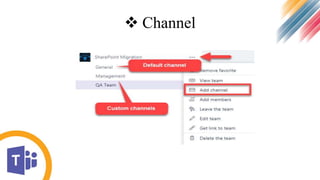
 Dedicated distribution list for a subset of members within a team.
 All channels share same security as the team.
 Private channels (with unique security) could be there in not too distant future.
 Can minimize silos within team communication as well as improve transparency.
 By default, each Team has one Channel called General.
 We can create additional channels as you wish.
 Channel
 Tab
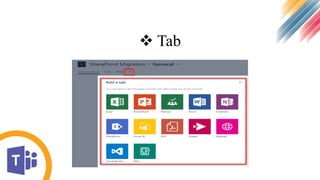
 Teams allow to add Tabs to other properties and URLs.
 Different channels have different navigation/tabs.
 Tab
 Connectors
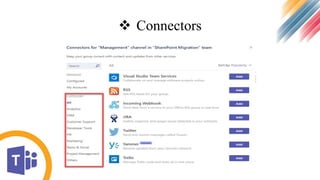
 Connectors can submit information to the channel.
 provides a flexible layout with multiple sections, fields, images, and actions.
 Connectors
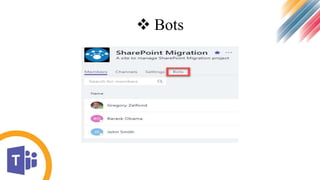
 Bots
 Bots are artificial intelligence applications which can complete tasks using chat-
based commands.
 Bots
Mobile app
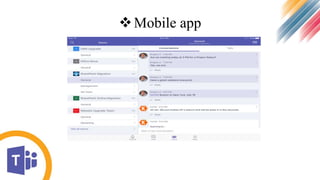
 Teams has its own Mobile App.
Mobile app
 Teams
 Allowing communities, groups, or teams to join through a specific URL.
 Allowing admins and teachers to set up specific teams for Education.
 Messaging
 Within a team, members can set up channels.
 Reply to posts with images, GIFs and custom made memes.
 Direct messages allow to send private messages to a specific user.
 Connectors can submit information to the channel.
 Calling
 Instant messaging
 Voice over IP (VoIP)
 Video conferencing inside the client software
 Meetings
 Meetings can be scheduled or created.
 Channel visiting user will be able to see that meeting is currently in progress.
 Usages
Working like a group text-message chain, with messages displayed in
chronological order as people type them.
Microsoft Teams supports rich formatting, so you can format your chat messages
the same way you would an email.
There are facebook-style chat stickers, too. But Microsoft takes it a step further
and adds a meme generator.
Directly launch a Skype video or voice call with the participants.
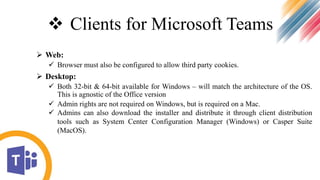
 Clients for Microsoft Teams
 Web:
 Browser must also be configured to allow third party cookies.
 Desktop:
 Both 32-bit & 64-bit available for Windows – will match the architecture of the OS.
This is agnostic of the Office version
 Admin rights are not required on Windows, but is required on a Mac.
 Admins can also download the installer and distribute it through client distribution
tools such as System Center Configuration Manager (Windows) or Casper Suite
(MacOS).
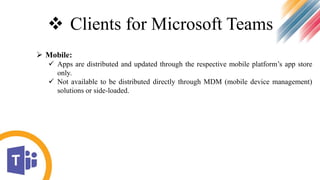
 Clients for Microsoft Teams
 Mobile:
 Apps are distributed and updated through the respective mobile platform’s app store
only.
 Not available to be distributed directly through MDM (mobile device management)
solutions or side-loaded.
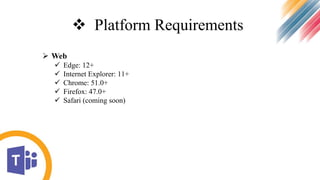
 Platform Requirements
 Web
 Edge: 12+
 Internet Explorer: 11+
 Chrome: 51.0+
 Firefox: 47.0+
 Safari (coming soon)
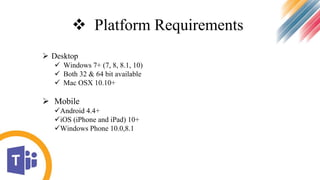
 Platform Requirements
 Desktop
 Windows 7+ (7, 8, 8.1, 10)
 Both 32 & 64 bit available
 Mac OSX 10.10+
 Mobile
Android 4.4+
iOS (iPhone and iPad) 10+
Windows Phone 10.0,8.1
 Advantages
 Communicate in the moment and keep everyone in the know.
 Stay connected with chat, calls, and meetings within our team and in private or small
group conversations.
 Schedule and join online Skype meetings with HD video, VoIP, and dial-in audio
conferencing options.
 Share files, apps or desktop in online meetings and review the important moments
later with transcriptions of recorded content.
 Dedicated phone number for placing and receiving domestic and international phone
calls, with advances features including voicemail, transfer, delegation and emergency
calling (e911).
Advantages
supports Public switched telephone network (PSTN) conferencing allowing users
to call phone numbers from the client.
Everything is Brought Together.
Communicate in Real Time.
 Limitations
Customer can’t purchase Microsoft Teams as a standalone service.
External access is not available.
 Conclusion
Microsoft Teams is very powerful, with a lot of killer features.
Integrations with the rest of the Office suite.
Included with Office 365 business subscriptions is going to win over a lot of converts.
Any Question???
Thank You

Microsoft Teams

  • 1.
    Welcome to ourpresentation
  • 2.
    Topics Name :Microsoft Teams
  • 3.
    Represent By: Md. AlamgirHossain Dept. of Computer Science & Engineering Jessore University of Science & Technology Facebook Youtube
  • 4.
     Flow ofPresentation  Introduction  Features  Channels  Tabs  Connectors  Bots  Mobile App
  • 5.
     Flow ofPresentation  Facilities  Teams  Messaging  Calling  Meeting  Voicemail  Usages  Advantages  Limitations  Conclusion
  • 6.
     Introduction  Aplatform that combines workplace chat, meetings, notes, and attachments.  A hub for teamwork and is extensible and customizable for the information.  Flexible for file storage, calls, private and group messages.  Reliable on the same security, privacy, transparency and support that comes with Office 365.  Ensure privacy for most sensitive collaboration.
  • 7.
     Channel  Dedicateddistribution list for a subset of members within a team.  All channels share same security as the team.  Private channels (with unique security) could be there in not too distant future.  Can minimize silos within team communication as well as improve transparency.  By default, each Team has one Channel called General.  We can create additional channels as you wish.
  • 8.
  • 9.
     Tab  Teamsallow to add Tabs to other properties and URLs.  Different channels have different navigation/tabs.
  • 10.
  • 11.
     Connectors  Connectorscan submit information to the channel.  provides a flexible layout with multiple sections, fields, images, and actions.
  • 12.
  • 13.
     Bots  Botsare artificial intelligence applications which can complete tasks using chat- based commands.
  • 14.
  • 15.
    Mobile app  Teamshas its own Mobile App.
  • 16.
  • 17.
     Teams  Allowingcommunities, groups, or teams to join through a specific URL.  Allowing admins and teachers to set up specific teams for Education.
  • 18.
     Messaging  Withina team, members can set up channels.  Reply to posts with images, GIFs and custom made memes.  Direct messages allow to send private messages to a specific user.  Connectors can submit information to the channel.
  • 19.
     Calling  Instantmessaging  Voice over IP (VoIP)  Video conferencing inside the client software
  • 20.
     Meetings  Meetingscan be scheduled or created.  Channel visiting user will be able to see that meeting is currently in progress.
  • 21.
     Usages Working likea group text-message chain, with messages displayed in chronological order as people type them. Microsoft Teams supports rich formatting, so you can format your chat messages the same way you would an email. There are facebook-style chat stickers, too. But Microsoft takes it a step further and adds a meme generator. Directly launch a Skype video or voice call with the participants.
  • 22.
     Clients forMicrosoft Teams  Web:  Browser must also be configured to allow third party cookies.  Desktop:  Both 32-bit & 64-bit available for Windows – will match the architecture of the OS. This is agnostic of the Office version  Admin rights are not required on Windows, but is required on a Mac.  Admins can also download the installer and distribute it through client distribution tools such as System Center Configuration Manager (Windows) or Casper Suite (MacOS).
  • 23.
     Clients forMicrosoft Teams  Mobile:  Apps are distributed and updated through the respective mobile platform’s app store only.  Not available to be distributed directly through MDM (mobile device management) solutions or side-loaded.
  • 24.
     Platform Requirements Web  Edge: 12+  Internet Explorer: 11+  Chrome: 51.0+  Firefox: 47.0+  Safari (coming soon)
  • 25.
     Platform Requirements Desktop  Windows 7+ (7, 8, 8.1, 10)  Both 32 & 64 bit available  Mac OSX 10.10+  Mobile Android 4.4+ iOS (iPhone and iPad) 10+ Windows Phone 10.0,8.1
  • 26.
     Advantages  Communicatein the moment and keep everyone in the know.  Stay connected with chat, calls, and meetings within our team and in private or small group conversations.  Schedule and join online Skype meetings with HD video, VoIP, and dial-in audio conferencing options.  Share files, apps or desktop in online meetings and review the important moments later with transcriptions of recorded content.  Dedicated phone number for placing and receiving domestic and international phone calls, with advances features including voicemail, transfer, delegation and emergency calling (e911).
  • 27.
    Advantages supports Public switchedtelephone network (PSTN) conferencing allowing users to call phone numbers from the client. Everything is Brought Together. Communicate in Real Time.
  • 28.
     Limitations Customer can’tpurchase Microsoft Teams as a standalone service. External access is not available.
  • 29.
     Conclusion Microsoft Teamsis very powerful, with a lot of killer features. Integrations with the rest of the Office suite. Included with Office 365 business subscriptions is going to win over a lot of converts.
  • 30.
  • 31.