Electronic Security
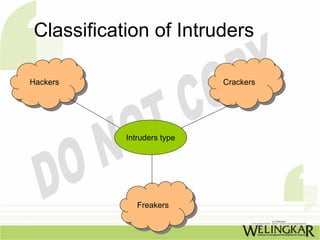
Classification of Intruders

Hackers
Hackers                     Crackers
                            Crackers


           Intruders type


              Freakers
               Freakers
Victimised Firms
• Banks                      •   Government contractors
• Financial companies        •   Government agencies
• Insurance companies        •   Hospitals
• Brokerage houses           •   Medical laboratories
• Consultants                •   Utility companies
• Network Service            •   Universities
  Providers
• Textile Business
• Wholesale/Retail traders
Attacking Methods
•   Gaining access to user’s
    account
•   Gaining privileged access
•   Using the victim‘s system as a
    platform for attacks on other         •   A significant loss of credibility or
    sites.                                    market opportunity.
•   Duration of the accomplishment :      •   A buisness no longer able to
•   Manually in less than 45 seconds          complete.
•   With automation, the time is still    •   Legal liability and
    less.                                 •   Loss of life
•   By the attack varies :
•   A minnor loss of time in recovering
    from the problem .
•   A decrease in productivity.
Three basic security concepts

• Confidentiality
• Integrity and
• Availability
Concepts relating to the people who
    use the information are :

• Authentication

• Authorisation
• Non-repudiation
Classification of Incidents
•   Probe                • Exploitation of trust
•   Scan                 • Root compromise
•   Account compromise   • Destruction or
•   Packet sniffer         Alteration of
•   Denial of service      configuration
                           information
                         • Malicious code
                         • Internet infrastructure
                           attack
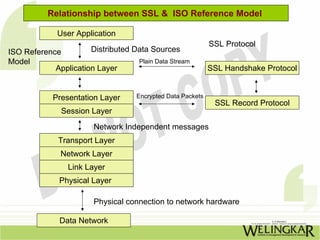
Relationship between SSL & ISO Reference Model

             User Application
                                                           SSL Protocol
ISO Reference         Distributed Data Sources
Model                             Plain Data Stream
            Application Layer                              SSL Handshake Protocol


           Presentation Layer     Encrypted Data Packets
                                                            SSL Record Protocol
              Session Layer
                      Network Independent messages
             Transport Layer
             Network Layer
               Link Layer
             Physical Layer

                      Physical connection to network hardware

             Data Network
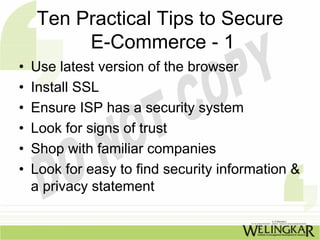
Ten Practical Tips to Secure
         E-Commerce - 1
•   Use latest version of the browser
•   Install SSL
•   Ensure ISP has a security system
•   Look for signs of trust
•   Shop with familiar companies
•   Look for easy to find security information &
    a privacy statement
Ten Practical Tips to Secure
          E-Commerce - 2
•   Pay by credit card
•   Keep a record
•   Look for information about ‘cookies’ and
•   Find out what information the site collects
    you
Security Tools - 1
• Secure transport
  stacks
• Kerberos
• Secure transactions
  over the Internet
• UNIX Security
• Password Security
  Systems
Security Tools - 2

• Electronic Mail
  SMTP
  PEM
  PGP
• Server security
• Trusting Binaries
Kerberos Authentication
         Process -1
  Credentials

A Ticket for the
server
A temporary
encryption key
The session key
Kerebos - 2
  Limitations
Vulnerability of
passwords
Need for
synchronised clocks
Weak assurances
against repudiation
UNIX Security
•   User passwords
•   File access
•   Directory access
•   File encryption and
•   Security on passwords files
Biometrics


•   Fingerprints
•   Signature Dynamics
•   Voice verification
•   Keystroke Dynamics
•   Facial Features
E- MAIL
    Advantages

o Send message in no time anywhere in the world
o For getting on & staying on the Internet
o Can be handled by a variety of programs
o Easy and inexpensive
o Increasingly used for both internal & external
  corporates
o E-mail to fax & fax to e-mail is possible
“Like” us on Facebook: 
   p //                 /
http://www.facebook.com/welearnindia 

“Follow” us on Twitter:
http://twitter.com/WeLearnIndia
http://twitter com/WeLearnIndia

Watch informative videos on Youtube: 
http://www.youtube.com/WelingkarDLP

Electronic Security

  • 1.
  • 2.
    Classification of Intruders Hackers Hackers Crackers Crackers Intruders type Freakers Freakers
  • 3.
    Victimised Firms • Banks • Government contractors • Financial companies • Government agencies • Insurance companies • Hospitals • Brokerage houses • Medical laboratories • Consultants • Utility companies • Network Service • Universities Providers • Textile Business • Wholesale/Retail traders
  • 4.
    Attacking Methods • Gaining access to user’s account • Gaining privileged access • Using the victim‘s system as a platform for attacks on other • A significant loss of credibility or sites. market opportunity. • Duration of the accomplishment : • A buisness no longer able to • Manually in less than 45 seconds complete. • With automation, the time is still • Legal liability and less. • Loss of life • By the attack varies : • A minnor loss of time in recovering from the problem . • A decrease in productivity.
  • 5.
    Three basic securityconcepts • Confidentiality • Integrity and • Availability
  • 6.
    Concepts relating tothe people who use the information are : • Authentication • Authorisation • Non-repudiation
  • 7.
    Classification of Incidents • Probe • Exploitation of trust • Scan • Root compromise • Account compromise • Destruction or • Packet sniffer Alteration of • Denial of service configuration information • Malicious code • Internet infrastructure attack
  • 8.
    Relationship between SSL& ISO Reference Model User Application SSL Protocol ISO Reference Distributed Data Sources Model Plain Data Stream Application Layer SSL Handshake Protocol Presentation Layer Encrypted Data Packets SSL Record Protocol Session Layer Network Independent messages Transport Layer Network Layer Link Layer Physical Layer Physical connection to network hardware Data Network
  • 9.
    Ten Practical Tipsto Secure E-Commerce - 1 • Use latest version of the browser • Install SSL • Ensure ISP has a security system • Look for signs of trust • Shop with familiar companies • Look for easy to find security information & a privacy statement
  • 10.
    Ten Practical Tipsto Secure E-Commerce - 2 • Pay by credit card • Keep a record • Look for information about ‘cookies’ and • Find out what information the site collects you
  • 11.
    Security Tools -1 • Secure transport stacks • Kerberos • Secure transactions over the Internet • UNIX Security • Password Security Systems
  • 12.
    Security Tools -2 • Electronic Mail SMTP PEM PGP • Server security • Trusting Binaries
  • 13.
    Kerberos Authentication Process -1 Credentials A Ticket for the server A temporary encryption key The session key
  • 14.
    Kerebos - 2 Limitations Vulnerability of passwords Need for synchronised clocks Weak assurances against repudiation
  • 15.
    UNIX Security • User passwords • File access • Directory access • File encryption and • Security on passwords files
  • 16.
    Biometrics • Fingerprints • Signature Dynamics • Voice verification • Keystroke Dynamics • Facial Features
  • 17.
    E- MAIL Advantages o Send message in no time anywhere in the world o For getting on & staying on the Internet o Can be handled by a variety of programs o Easy and inexpensive o Increasingly used for both internal & external corporates o E-mail to fax & fax to e-mail is possible
  • 18.
    “Like” us on Facebook:  p // / http://www.facebook.com/welearnindia  “Follow” us on Twitter: http://twitter.com/WeLearnIndia http://twitter com/WeLearnIndia Watch informative videos on Youtube:  http://www.youtube.com/WelingkarDLP