Easy, Scalable, Fault-tolerant
Stream Processing with
Structured Streaming
Spark Summit Europe 2017
25th October, Dublin
Tathagata โ€œTDโ€ Das
@tathadas
About Me
Started Spark Streaming project in AMPLab, UC Berkeley
Currently focused on building Structured Streaming
Member of the Apache Spark PMC
Software Engineer at Databricks
building robust
stream processing
apps is hard
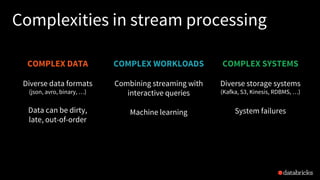
Complexities in stream processing
COMPLEX DATA
Diverse data formats
(json, avro, binary, โ€ฆ)
Data can be dirty,
late, out-of-order
COMPLEX SYSTEMS
Diverse storage systems
(Kafka, S3, Kinesis, RDBMS, โ€ฆ)
System failures
COMPLEX WORKLOADS
Combining streaming with
interactive queries
Machine learning
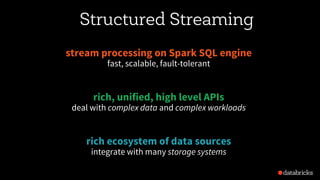
Structured Streaming
stream processing on Spark SQL engine
fast, scalable, fault-tolerant
rich, unified, high level APIs
deal with complex data and complex workloads
rich ecosystem of data sources
integrate with many storage systems
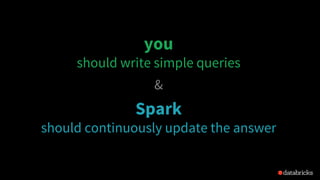
you
should not have to
reason about streaming
you
should write simple queries
&
Spark
should continuously update the answer
Streaming word count
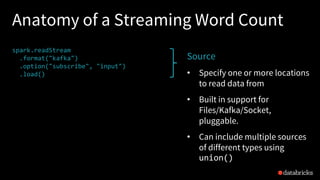
Anatomy of a Streaming Word Count
spark.readStream
.format("kafka")
.option("subscribe", "input")
.load()
.groupBy($"value".cast("string"))
.count()
.writeStream
.format("kafka")
.option("topic", "output")
.trigger("1 minute")
.outputMode(OutputMode.Complete())
.option("checkpointLocation", "โ€ฆ")
.start()
Source
โ€ข Specify one or more locations
to read data from
โ€ข Built in support for
Files/Kafka/Socket,
pluggable.
โ€ข Can include multiple sources
of different types using
union()
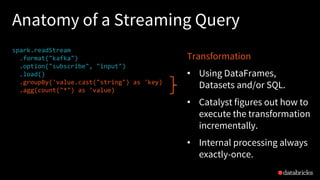
Anatomy of a Streaming Query
spark.readStream
.format("kafka")
.option("subscribe", "input")
.load()
.groupBy('value.cast("string") as 'key)
.agg(count("*") as 'value)
.writeStream
.format("kafka")
.option("topic", "output")
.trigger("1 minute")
.outputMode(OutputMode.Complete())
.option("checkpointLocation", "โ€ฆ")
.start()
Transformation
โ€ข Using DataFrames,
Datasets and/or SQL.
โ€ข Catalyst figures out how to
execute the transformation
incrementally.
โ€ข Internal processing always
exactly-once.
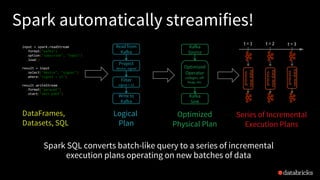
DataFrames,
Datasets, SQL
input = spark.readStream
.format("kafka")
.option("subscribe", "topic")
.load()
result = input
.select("device", "signal")
.where("signal > 15")
result.writeStream
.format("parquet")
.start("dest-path")
Logical
Plan
Read from
Kafka
Project
device, signal
Filter
signal > 15
Write to
Kafka
Spark automatically streamifies!
Spark SQL converts batch-like query to a series of incremental
execution plans operating on new batches of data
Series of Incremental
Execution Plans
Kafka
Source
Optimized
Operator
codegen, off-
heap, etc.
Kafka
Sink
Optimized
Physical Plan
process
newdata
t = 1 t = 2 t = 3
process
newdata
process
newdata
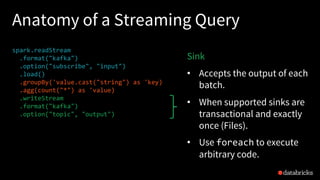
Anatomy of a Streaming Query
spark.readStream
.format("kafka")
.option("subscribe", "input")
.load()
.groupBy('value.cast("string") as 'key)
.agg(count("*") as 'value)
.writeStream
.format("kafka")
.option("topic", "output")
.trigger("1 minute")
.outputMode(OutputMode.Complete())
.option("checkpointLocation", "โ€ฆ")
.start()
Sink
โ€ข Accepts the output of each
batch.
โ€ข When supported sinks are
transactional and exactly
once (Files).
โ€ข Use foreach to execute
arbitrary code.
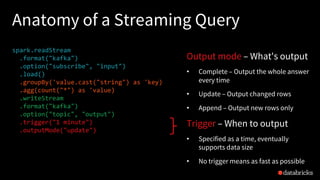
Anatomy of a Streaming Query
spark.readStream
.format("kafka")
.option("subscribe", "input")
.load()
.groupBy('value.cast("string") as 'key)
.agg(count("*") as 'value)
.writeStream
.format("kafka")
.option("topic", "output")
.trigger("1 minute")
.outputMode("update")
.option("checkpointLocation", "โ€ฆ")
.start()
Output mode โ€“ What's output
โ€ข Complete โ€“ Output the whole answer
every time
โ€ข Update โ€“ Output changed rows
โ€ข Append โ€“ Output new rows only
Trigger โ€“ When to output
โ€ข Specified as a time, eventually
supports data size
โ€ข No trigger means as fast as possible
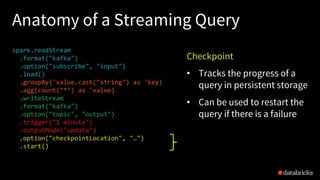
Anatomy of a Streaming Query
spark.readStream
.format("kafka")
.option("subscribe", "input")
.load()
.groupBy('value.cast("string") as 'key)
.agg(count("*") as 'value)
.writeStream
.format("kafka")
.option("topic", "output")
.trigger("1 minute")
.outputMode("update")
.option("checkpointLocation", "โ€ฆ")
.start()
Checkpoint
โ€ข Tracks the progress of a
query in persistent storage
โ€ข Can be used to restart the
query if there is a failure
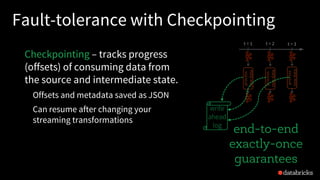
Fault-tolerance with Checkpointing
Checkpointing โ€“ tracks progress
(offsets) of consuming data from
the source and intermediate state.
Offsets and metadata saved as JSON
Can resume after changing your
streaming transformations
end-to-end
exactly-once
guarantees
process
newdata
t = 1 t = 2 t = 3
process
newdata
process
newdata
write
ahead
log
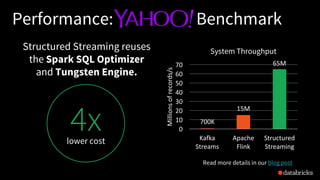
4xlower cost
Structured Streaming reuses
the Spark SQL Optimizer
and Tungsten Engine.
Performance: Benchmark
System Throughput
700K
15M
65M
0
10
20
30
40
50
60
70
Kafka	
Streams
Apache	
Flink
Structured	
Streaming
Millions	of	records/s
Read more details in our blog post
Complex Streaming ETL
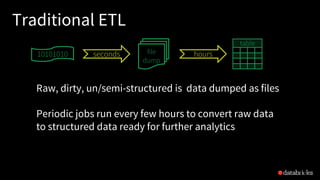
Traditional ETL
Raw, dirty, un/semi-structured is data dumped as files
Periodic jobs run every few hours to convert raw data
to structured data ready for further analytics
18
file
dump
seconds hours
table
10101010
Traditional ETL
Hours of delay before taking decisions on latest data
Unacceptable when time is of essence
[intrusion detection, anomaly detection, etc.]
file
dump
seconds hours
table
10101010
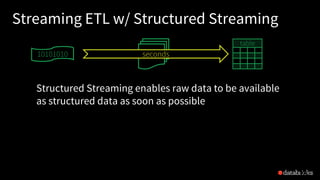
Streaming ETL w/ Structured Streaming
Structured Streaming enables raw data to be available
as structured data as soon as possible
20
seconds
table
10101010
Streaming ETL w/ Structured Streaming
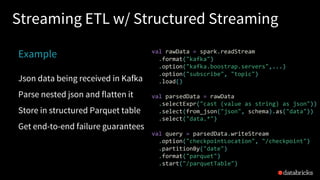
Example
Json data being received in Kafka
Parse nested json and flatten it
Store in structured Parquet table
Get end-to-end failure guarantees
val rawData = spark.readStream
.format("kafka")
.option("kafka.boostrap.servers",...)
.option("subscribe", "topic")
.load()
val parsedData = rawData
.selectExpr("cast (value as string) as json"))
.select(from_json("json", schema).as("data"))
.select("data.*")
val query = parsedData.writeStream
.option("checkpointLocation", "/checkpoint")
.partitionBy("date")
.format("parquet")
.start("/parquetTable")
Reading from Kafka
Specify options to configure
How?
kafka.boostrap.servers => broker1,broker2
What?
subscribe => topic1,topic2,topic3 // fixed list of topics
subscribePattern => topic* // dynamic list of topics
assign => {"topicA":[0,1] } // specific partitions
Where?
startingOffsets => latest(default) / earliest / {"topicA":{"0":23,"1":345} }
val rawData = spark.readStream
.format("kafka")
.option("kafka.boostrap.servers",...)
.option("subscribe", "topic")
.load()
Reading from Kafka
val rawData = spark.readStream
.format("kafka")
.option("kafka.boostrap.servers",...)
.option("subscribe", "topic")
.load()
rawData dataframe has
the following columns
key value topic partition offset timestamp
[binary] [binary] "topicA" 0 345 1486087873
[binary] [binary] "topicB" 3 2890 1486086721
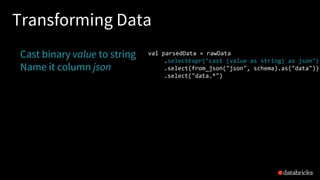
Transforming Data
Cast binary value to string
Name it column json
val parsedData = rawData
.selectExpr("cast (value as string) as json")
.select(from_json("json", schema).as("data"))
.select("data.*")
Transforming Data
Cast binary value to string
Name it column json
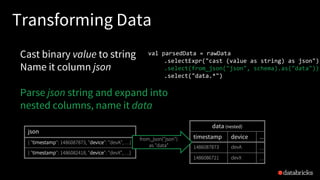
Parse json string and expand into
nested columns, name it data
val parsedData = rawData
.selectExpr("cast (value as string) as json")
.select(from_json("json", schema).as("data"))
.select("data.*")
json
{ "timestamp": 1486087873, "device": "devA", โ€ฆ}
{ "timestamp": 1486082418, "device": "devX", โ€ฆ}
data (nested)
timestamp device โ€ฆ
1486087873 devA โ€ฆ
1486086721 devX โ€ฆ
from_json("json")
as "data"
Transforming Data
Cast binary value to string
Name it column json
Parse json string and expand into
nested columns, name it data
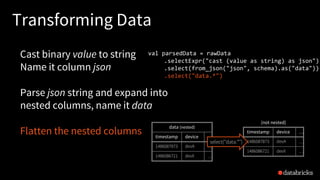
Flatten the nested columns
val parsedData = rawData
.selectExpr("cast (value as string) as json")
.select(from_json("json", schema).as("data"))
.select("data.*")
data (nested)
timestamp device โ€ฆ
1486087873 devA โ€ฆ
1486086721 devX โ€ฆ
timestamp device โ€ฆ
1486087873 devA โ€ฆ
1486086721 devX โ€ฆ
select("data.*")
(not nested)
Transforming Data
Cast binary value to string
Name it column json
Parse json string and expand into
nested columns, name it data
Flatten the nested columns
val parsedData = rawData
.selectExpr("cast (value as string) as json")
.select(from_json("json", schema).as("data"))
.select("data.*")
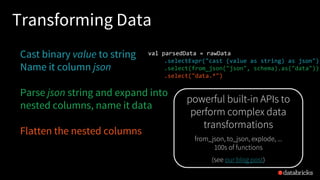
powerful built-in APIs to
perform complex data
transformations
from_json, to_json, explode, ...
100s of functions
(see our blog post)
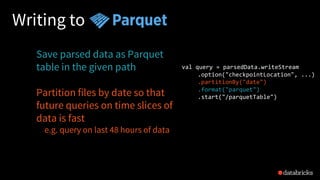
Writing to
Save parsed data as Parquet
table in the given path
Partition files by date so that
future queries on time slices of
data is fast
e.g. query on last 48 hours of data
val query = parsedData.writeStream
.option("checkpointLocation", ...)
.partitionBy("date")
.format("parquet")
.start("/parquetTable")
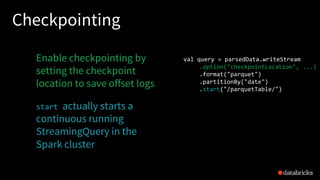
Checkpointing
Enable checkpointing by
setting the checkpoint
location to save offset logs
start actually starts a
continuous running
StreamingQuery in the
Spark cluster
val query = parsedData.writeStream
.option("checkpointLocation", ...)
.format("parquet")
.partitionBy("date")
.start("/parquetTable/")
Streaming Query
query is a handle to the continuously
running StreamingQuery
Used to monitor and manage the
execution
val query = parsedData.writeStream
.option("checkpointLocation", ...)
.format("parquet")
.partitionBy("date")
.start("/parquetTable")/")
process
newdata
t = 1 t = 2 t = 3
process
newdata
process
newdata
StreamingQuery
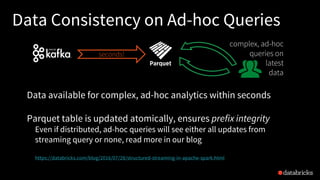
Data Consistency on Ad-hoc Queries
Data available for complex, ad-hoc analytics within seconds
Parquet table is updated atomically, ensures prefix integrity
Even if distributed, ad-hoc queries will see either all updates from
streaming query or none, read more in our blog
https://databricks.com/blog/2016/07/28/structured-streaming-in-apache-spark.html
complex, ad-hoc
queries on
latest
data
seconds!
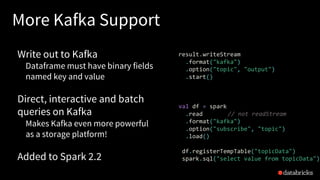
More Kafka Support
Write out to Kafka
Dataframe must have binary fields
named key and value
Direct, interactive and batch
queries on Kafka
Makes Kafka even more powerful
as a storage platform!
Added to Spark 2.2
result.writeStream
.format("kafka")
.option("topic", "output")
.start()
val df = spark
.read // not readStream
.format("kafka")
.option("subscribe", "topic")
.load()
df.registerTempTable("topicData")
spark.sql("select value from topicData")
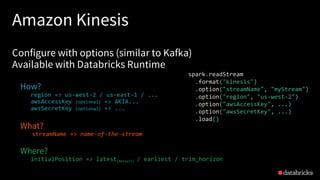
Amazon Kinesis
Configure with options (similar to Kafka)
Available with Databricks Runtime
How?
region => us-west-2 / us-east-1 / ...
awsAccessKey (optional) => AKIA...
awsSecretKey (optional) => ...
What?
streamName => name-of-the-stream
Where?
initialPosition => latest(default) / earliest / trim_horizon
spark.readStream
.format("kinesis")
.option("streamName", "myStream")
.option("region", "us-west-2")
.option("awsAccessKey", ...)
.option("awsSecretKey", ...)
.load()
Working With Time
Event Time
Many use cases require aggregate statistics by event time
E.g. what's the #errors in each system in the 1 hour windows?
Many challenges
Extracting event time from data, handling late, out-of-order data
DStream APIs were insufficient for event-time stuff
Event time Aggregations
Windowing is just another type of grouping in Struct.
Streaming
number of records every hour
Support UDAFs!
parsedData
.groupBy(window("timestamp","1 hour"))
.count()
parsedData
.groupBy(
"device",
window("timestamp","10 mins"))
.avg("signal")
avg signal strength of each
device every 10 mins
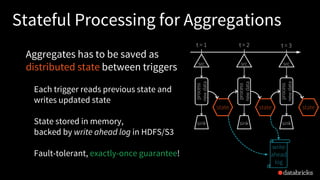
Stateful Processing for Aggregations
Aggregates has to be saved as
distributed state between triggers
Each trigger reads previous state and
writes updated state
State stored in memory,
backed by write ahead log in HDFS/S3
Fault-tolerant, exactly-once guarantee!
process
newdata
t = 1
sink
src
t = 2
process
newdata
sink
src
t = 3
process
newdata
sink
src
state state
write
ahead
log
state updates
are written to
log for checkpointing
state
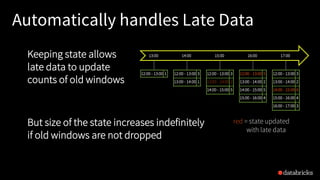
Automatically handles Late Data
12:00 - 13:00 1 12:00 - 13:00 3
13:00 - 14:00 1
12:00 - 13:00 3
13:00 - 14:00 2
14:00 - 15:00 5
12:00 - 13:00 5
13:00 - 14:00 2
14:00 - 15:00 5
15:00 - 16:00 4
12:00 - 13:00 3
13:00 - 14:00 2
14:00 - 15:00 6
15:00 - 16:00 4
16:00 - 17:00 3
13:00 14:00 15:00 16:00 17:00Keeping state allows
late data to update
counts of old windows
red = state updated
with late data
But size of the state increases indefinitely
if old windows are not dropped
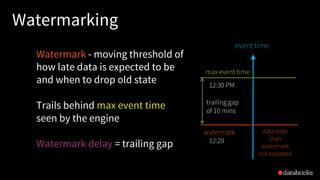
Watermarking
Watermark - moving threshold of
how late data is expected to be
and when to drop old state
Trails behind max event time
seen by the engine
Watermark delay = trailing gap
event time
max event time
watermark data older
than
watermark
not expected
12:30 PM
12:20 PM
trailing gap
of 10 mins
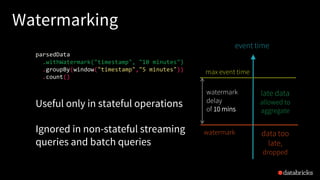
Watermarking
Data newer than watermark may
be late, but allowed to aggregate
Data older than watermark is
"too late" and dropped
Windows older than watermark
automatically deleted to limit the
amount of intermediate state
max event time
event time
watermark
late data
allowed to
aggregate
data too
late,
dropped
watermark
delay
of 10 mins
Watermarking
max event time
event time
watermark
parsedData
.withWatermark("timestamp", "10 minutes")
.groupBy(window("timestamp","5 minutes"))
.count()
late data
allowed to
aggregate
data too
late,
dropped
Useful only in stateful operations
Ignored in non-stateful streaming
queries and batch queries
watermark
delay
of 10 mins
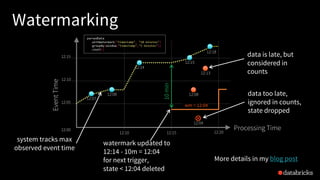
Watermarking
data too late,
ignored in counts,
state dropped
Processing Time12:00
12:05
12:10
12:15
12:10 12:15 12:20
12:07
12:13
12:08
EventTime
12:15
12:18
12:04
watermark updated to
12:14 - 10m = 12:04
for next trigger,
state < 12:04 deleted
data is late, but
considered in
counts
system tracks max
observed event time
12:08
wm = 12:04
10min
12:14
More details in my blog post
parsedData
.withWatermark("timestamp", "10 minutes")
.groupBy(window("timestamp","5 minutes"))
.count()
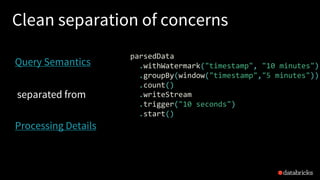
Clean separation of concerns
parsedData
.withWatermark("timestamp", "10 minutes")
.groupBy(window("timestamp","5 minutes"))
.count()
.writeStream
.trigger("10 seconds")
.start()
Query Semantics
Processing Details
separated from
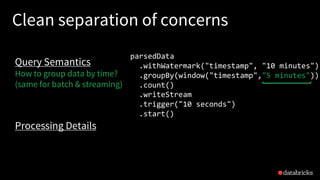
Clean separation of concerns
parsedData
.withWatermark("timestamp", "10 minutes")
.groupBy(window("timestamp","5 minutes"))
.count()
.writeStream
.trigger("10 seconds")
.start()
Query Semantics
How to group data by time?
(same for batch & streaming)
Processing Details
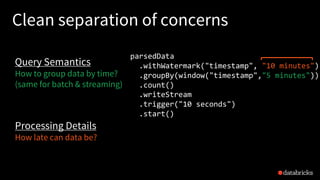
Clean separation of concerns
parsedData
.withWatermark("timestamp", "10 minutes")
.groupBy(window("timestamp","5 minutes"))
.count()
.writeStream
.trigger("10 seconds")
.start()
Query Semantics
How to group data by time?
(same for batch & streaming)
Processing Details
How late can data be?
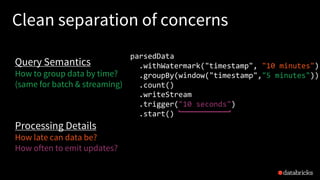
Clean separation of concerns
parsedData
.withWatermark("timestamp", "10 minutes")
.groupBy(window("timestamp","5 minutes"))
.count()
.writeStream
.trigger("10 seconds")
.start()
Query Semantics
How to group data by time?
(same for batch & streaming)
Processing Details
How late can data be?
How often to emit updates?
Other Interesting Operations
Streaming Deduplication
Watermarks to limit state
Joins
Stream-batch joins supported,
stream-stream joins coming in 2.3
Arbitrary Stateful Processing
[map|flatMap]GroupsWithState
parsedData.join(batchData, "device")
parsedData.dropDuplicates("eventId")
[See	my	other	talk at	4:20	PM,	today	for	a	deep	dive	into	stateful ops]
ds.groupByKey(_.id)
.mapGroupsWithState
(timeoutConf)
(mappingWithStateFunc)
Monitoring Streaming Queries
Get last progress of the
streaming query
Current input and processing rates
Current processed offsets
Current state metrics
Get progress asynchronously
through by registering your own
StreamingQueryListener
new StreamingQueryListener {
def onQueryStart(...)
def onQueryProgress(...)
def onQueryTermination(...)
}
streamingQuery.lastProgress()
{ ...
"inputRowsPerSecond" : 10024.225210926405,
"processedRowsPerSecond" : 10063.737001006373,
"durationMs" : { ... },
"sources" : [ ... ],
"sink" : { ... }
...
}
Dropwizard Metrics
Metrics into Ganglia, Graphite, etc.
Enabled using SQL configuration
spark.conf.set("spark.sql.streaming.metricsEnabled", "true")
Building Complex
Continuous Apps
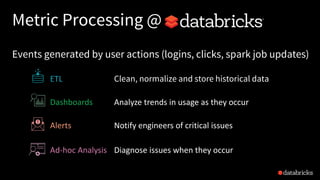
Metric Processing @
Dashboards Analyze	trends	in	usage	as	they	occur
Alerts Notify	engineers	of	critical	issues
Ad-hoc	Analysis Diagnose	issues	when	they	occur
ETL Clean, normalize and store historical data
Events generated by user actions (logins, clicks, spark job updates)
Metric Processing @
Dashboards
Alerts
Ad-hoc	Analysis
ETL
Difficult with only streaming frameworks
Limited retention in
streaming storage
Inefficient for ad-hoc queries
Hard for novice users
(limited SQL support)
Metric Processing @
=
Metrics
Filter
ETL
Dashboards
Ad-hoc
Analysis
Alerts
Databricks	Delta
+
Read from
rawLogs = spark.readStream
.format("kafka")
.option("kafka.bootstrap.servers", ...)
.option("subscribe", "rawLogs")
.load()
augmentedLogs = rawLogs
.withColumn("msg",
from_json($"value".cast("string"),
schema))
.select("timestamp", "msg.*")
.join(table("customers"), ["customer_id"])
DataFrames can be
reused for multiple
streams
Can build libraries of
useful DataFrames and
share code between
applications
JSON ETL
Write to
augmentedLogs
.repartition(1)
.writeStream
.format("delta")
.option("path", "/data/metrics")
.trigger("1 minute")
.start()
Store augmented stream as efficient
columnar data for later processing
Latency: ~1 minute
Buffer data and
write one large file
every minute for
efficient reads
ETL
Databricks	Delta
+
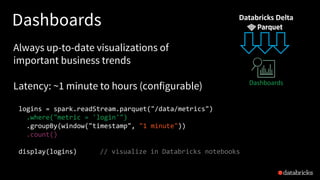
Dashboards
logins = spark.readStream.parquet("/data/metrics")
.where("metric = 'login'")
.groupBy(window("timestamp", "1 minute"))
.count()
display(logins) // visualize in Databricks notebooks
Always up-to-date visualizations of
important business trends
Latency: ~1 minute to hours (configurable) Dashboards
Databricks	Delta
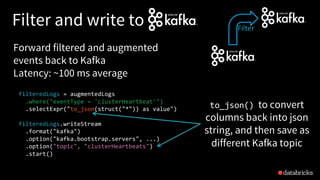
Filter and write to
filteredLogs = augmentedLogs
.where("eventType = 'clusterHeartbeat'")
.selectExpr("to_json(struct("*")) as value")
filteredLogs.writeStream
.format("kafka")
.option("kafka.bootstrap.servers", ...)
.option("topic", "clusterHeartbeats")
.start()
Forward filtered and augmented
events back to Kafka
Latency: ~100 ms average
Filter
to_json() to convert
columns back into json
string, and then save as
different Kafka topic
Simple Alerts
sparkErrors
.as[ClusterHeartBeat]
.filter(_.load > 99)
.writeStream
.foreach(new PagerdutySink(credentials))
E.g. Alert when Spark cluster load > threshold
Latency: ~100 ms
Alerts
notify PagerDuty
Complex Alerts
sparkErrors
.as[ClusterHeartBeat]
.groupBy(_.id)
.flatMapGroupsWithState(Update, EventTimeTimeout) {
(id: Int, events: Iterator[ClusterHeartBeat], state: GroupState[ClusterState]) =>
... // check if cluster non-responsive for a while
}
E.g. Monitor health of Spark clusters
using custom stateful logic
Latency: ~10 seconds
Alerts
react if no heartbeat
from cluster for 1 min
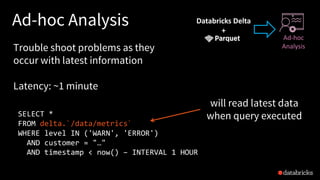
Ad-hoc Analysis
SELECT *
FROM delta.`/data/metrics`
WHERE level IN ('WARN', 'ERROR')
AND customer = "โ€ฆ"
AND timestamp < now() โ€“ INTERVAL 1 HOUR
Trouble shoot problems as they
occur with latest information
Latency: ~1 minute
Ad-hoc
Analysis
will read latest data
when query executed
Databricks	Delta
+
Metric Processing @
=
Metrics
Filter
ETL
Dashboards
Ad-hoc
Analysis
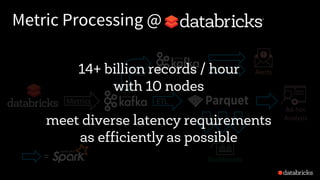
Alerts14+ billion records / hour
with 10 nodes
meet diverse latency requirements
as efficiently as possible
Structured Streaming @
100s of customer streaming apps
in production on Databricks
Largest app process 10s of trillions
of records per month
Future Direction: Continuous Processing
Continuous processing mode to run without micro-batches
<1 ms latency (same as per-record streaming systems)
No changes to user code
Proposal in SPARK-20928, expected in Spark 2.3
More Info
Structured Streaming Programming Guide
http://spark.apache.org/docs/latest/structured-streaming-programming-guide.html
Databricks blog posts for more focused discussions
https://databricks.com/blog/2016/07/28/structured-streaming-in-apache-spark.html
https://databricks.com/blog/2017/01/19/real-time-streaming-etl-structured-streaming-apache-spark-2-1.html
https://databricks.com/blog/2017/02/23/working-complex-data-formats-structured-streaming-apache-spark-2-1.html
https://databricks.com/blog/2017/04/26/processing-data-in-apache-kafka-with-structured-streaming-in-apache-spark-2-2.html
https://databricks.com/blog/2017/05/08/event-time-aggregation-watermarking-apache-sparks-structured-streaming.html
https://databricks.com/blog/2017/10/11/benchmarking-structured-streaming-on-databricks-runtime-against-state-of-the-art-streaming-systems.html
and more to come, stay tuned!!
UNIFIED ANALYTICS PLATFORM
Try Apache Spark in Databricks!
โ€ข Collaborative cloud environment
โ€ข Free version (community edition)
DATABRICKS RUNTIME 3.0
โ€ข Apache Spark - optimized for the cloud
โ€ข Caching and optimization layer - DBIO
โ€ข Enterprise security - DBES
Try for free today
databricks.com

Easy, scalable, fault tolerant stream processing with structured streaming - with Tathagata Das

  • 1.
    Easy, Scalable, Fault-tolerant StreamProcessing with Structured Streaming Spark Summit Europe 2017 25th October, Dublin Tathagata โ€œTDโ€ Das @tathadas
  • 2.
    About Me Started SparkStreaming project in AMPLab, UC Berkeley Currently focused on building Structured Streaming Member of the Apache Spark PMC Software Engineer at Databricks
  • 3.
  • 4.
    Complexities in streamprocessing COMPLEX DATA Diverse data formats (json, avro, binary, โ€ฆ) Data can be dirty, late, out-of-order COMPLEX SYSTEMS Diverse storage systems (Kafka, S3, Kinesis, RDBMS, โ€ฆ) System failures COMPLEX WORKLOADS Combining streaming with interactive queries Machine learning
  • 5.
    Structured Streaming stream processingon Spark SQL engine fast, scalable, fault-tolerant rich, unified, high level APIs deal with complex data and complex workloads rich ecosystem of data sources integrate with many storage systems
  • 6.
    you should not haveto reason about streaming
  • 7.
    you should write simplequeries & Spark should continuously update the answer
  • 8.
  • 9.
    Anatomy of aStreaming Word Count spark.readStream .format("kafka") .option("subscribe", "input") .load() .groupBy($"value".cast("string")) .count() .writeStream .format("kafka") .option("topic", "output") .trigger("1 minute") .outputMode(OutputMode.Complete()) .option("checkpointLocation", "โ€ฆ") .start() Source โ€ข Specify one or more locations to read data from โ€ข Built in support for Files/Kafka/Socket, pluggable. โ€ข Can include multiple sources of different types using union()
  • 10.
    Anatomy of aStreaming Query spark.readStream .format("kafka") .option("subscribe", "input") .load() .groupBy('value.cast("string") as 'key) .agg(count("*") as 'value) .writeStream .format("kafka") .option("topic", "output") .trigger("1 minute") .outputMode(OutputMode.Complete()) .option("checkpointLocation", "โ€ฆ") .start() Transformation โ€ข Using DataFrames, Datasets and/or SQL. โ€ข Catalyst figures out how to execute the transformation incrementally. โ€ข Internal processing always exactly-once.
  • 11.
    DataFrames, Datasets, SQL input =spark.readStream .format("kafka") .option("subscribe", "topic") .load() result = input .select("device", "signal") .where("signal > 15") result.writeStream .format("parquet") .start("dest-path") Logical Plan Read from Kafka Project device, signal Filter signal > 15 Write to Kafka Spark automatically streamifies! Spark SQL converts batch-like query to a series of incremental execution plans operating on new batches of data Series of Incremental Execution Plans Kafka Source Optimized Operator codegen, off- heap, etc. Kafka Sink Optimized Physical Plan process newdata t = 1 t = 2 t = 3 process newdata process newdata
  • 12.
    Anatomy of aStreaming Query spark.readStream .format("kafka") .option("subscribe", "input") .load() .groupBy('value.cast("string") as 'key) .agg(count("*") as 'value) .writeStream .format("kafka") .option("topic", "output") .trigger("1 minute") .outputMode(OutputMode.Complete()) .option("checkpointLocation", "โ€ฆ") .start() Sink โ€ข Accepts the output of each batch. โ€ข When supported sinks are transactional and exactly once (Files). โ€ข Use foreach to execute arbitrary code.
  • 13.
    Anatomy of aStreaming Query spark.readStream .format("kafka") .option("subscribe", "input") .load() .groupBy('value.cast("string") as 'key) .agg(count("*") as 'value) .writeStream .format("kafka") .option("topic", "output") .trigger("1 minute") .outputMode("update") .option("checkpointLocation", "โ€ฆ") .start() Output mode โ€“ What's output โ€ข Complete โ€“ Output the whole answer every time โ€ข Update โ€“ Output changed rows โ€ข Append โ€“ Output new rows only Trigger โ€“ When to output โ€ข Specified as a time, eventually supports data size โ€ข No trigger means as fast as possible
  • 14.
    Anatomy of aStreaming Query spark.readStream .format("kafka") .option("subscribe", "input") .load() .groupBy('value.cast("string") as 'key) .agg(count("*") as 'value) .writeStream .format("kafka") .option("topic", "output") .trigger("1 minute") .outputMode("update") .option("checkpointLocation", "โ€ฆ") .start() Checkpoint โ€ข Tracks the progress of a query in persistent storage โ€ข Can be used to restart the query if there is a failure
  • 15.
    Fault-tolerance with Checkpointing Checkpointingโ€“ tracks progress (offsets) of consuming data from the source and intermediate state. Offsets and metadata saved as JSON Can resume after changing your streaming transformations end-to-end exactly-once guarantees process newdata t = 1 t = 2 t = 3 process newdata process newdata write ahead log
  • 16.
    4xlower cost Structured Streamingreuses the Spark SQL Optimizer and Tungsten Engine. Performance: Benchmark System Throughput 700K 15M 65M 0 10 20 30 40 50 60 70 Kafka Streams Apache Flink Structured Streaming Millions of records/s Read more details in our blog post
  • 17.
  • 18.
    Traditional ETL Raw, dirty,un/semi-structured is data dumped as files Periodic jobs run every few hours to convert raw data to structured data ready for further analytics 18 file dump seconds hours table 10101010
  • 19.
    Traditional ETL Hours ofdelay before taking decisions on latest data Unacceptable when time is of essence [intrusion detection, anomaly detection, etc.] file dump seconds hours table 10101010
  • 20.
    Streaming ETL w/Structured Streaming Structured Streaming enables raw data to be available as structured data as soon as possible 20 seconds table 10101010
  • 21.
    Streaming ETL w/Structured Streaming Example Json data being received in Kafka Parse nested json and flatten it Store in structured Parquet table Get end-to-end failure guarantees val rawData = spark.readStream .format("kafka") .option("kafka.boostrap.servers",...) .option("subscribe", "topic") .load() val parsedData = rawData .selectExpr("cast (value as string) as json")) .select(from_json("json", schema).as("data")) .select("data.*") val query = parsedData.writeStream .option("checkpointLocation", "/checkpoint") .partitionBy("date") .format("parquet") .start("/parquetTable")
  • 22.
    Reading from Kafka Specifyoptions to configure How? kafka.boostrap.servers => broker1,broker2 What? subscribe => topic1,topic2,topic3 // fixed list of topics subscribePattern => topic* // dynamic list of topics assign => {"topicA":[0,1] } // specific partitions Where? startingOffsets => latest(default) / earliest / {"topicA":{"0":23,"1":345} } val rawData = spark.readStream .format("kafka") .option("kafka.boostrap.servers",...) .option("subscribe", "topic") .load()
  • 23.
    Reading from Kafka valrawData = spark.readStream .format("kafka") .option("kafka.boostrap.servers",...) .option("subscribe", "topic") .load() rawData dataframe has the following columns key value topic partition offset timestamp [binary] [binary] "topicA" 0 345 1486087873 [binary] [binary] "topicB" 3 2890 1486086721
  • 24.
    Transforming Data Cast binaryvalue to string Name it column json val parsedData = rawData .selectExpr("cast (value as string) as json") .select(from_json("json", schema).as("data")) .select("data.*")
  • 25.
    Transforming Data Cast binaryvalue to string Name it column json Parse json string and expand into nested columns, name it data val parsedData = rawData .selectExpr("cast (value as string) as json") .select(from_json("json", schema).as("data")) .select("data.*") json { "timestamp": 1486087873, "device": "devA", โ€ฆ} { "timestamp": 1486082418, "device": "devX", โ€ฆ} data (nested) timestamp device โ€ฆ 1486087873 devA โ€ฆ 1486086721 devX โ€ฆ from_json("json") as "data"
  • 26.
    Transforming Data Cast binaryvalue to string Name it column json Parse json string and expand into nested columns, name it data Flatten the nested columns val parsedData = rawData .selectExpr("cast (value as string) as json") .select(from_json("json", schema).as("data")) .select("data.*") data (nested) timestamp device โ€ฆ 1486087873 devA โ€ฆ 1486086721 devX โ€ฆ timestamp device โ€ฆ 1486087873 devA โ€ฆ 1486086721 devX โ€ฆ select("data.*") (not nested)
  • 27.
    Transforming Data Cast binaryvalue to string Name it column json Parse json string and expand into nested columns, name it data Flatten the nested columns val parsedData = rawData .selectExpr("cast (value as string) as json") .select(from_json("json", schema).as("data")) .select("data.*") powerful built-in APIs to perform complex data transformations from_json, to_json, explode, ... 100s of functions (see our blog post)
  • 28.
    Writing to Save parseddata as Parquet table in the given path Partition files by date so that future queries on time slices of data is fast e.g. query on last 48 hours of data val query = parsedData.writeStream .option("checkpointLocation", ...) .partitionBy("date") .format("parquet") .start("/parquetTable")
  • 29.
    Checkpointing Enable checkpointing by settingthe checkpoint location to save offset logs start actually starts a continuous running StreamingQuery in the Spark cluster val query = parsedData.writeStream .option("checkpointLocation", ...) .format("parquet") .partitionBy("date") .start("/parquetTable/")
  • 30.
    Streaming Query query isa handle to the continuously running StreamingQuery Used to monitor and manage the execution val query = parsedData.writeStream .option("checkpointLocation", ...) .format("parquet") .partitionBy("date") .start("/parquetTable")/") process newdata t = 1 t = 2 t = 3 process newdata process newdata StreamingQuery
  • 31.
    Data Consistency onAd-hoc Queries Data available for complex, ad-hoc analytics within seconds Parquet table is updated atomically, ensures prefix integrity Even if distributed, ad-hoc queries will see either all updates from streaming query or none, read more in our blog https://databricks.com/blog/2016/07/28/structured-streaming-in-apache-spark.html complex, ad-hoc queries on latest data seconds!
  • 32.
    More Kafka Support Writeout to Kafka Dataframe must have binary fields named key and value Direct, interactive and batch queries on Kafka Makes Kafka even more powerful as a storage platform! Added to Spark 2.2 result.writeStream .format("kafka") .option("topic", "output") .start() val df = spark .read // not readStream .format("kafka") .option("subscribe", "topic") .load() df.registerTempTable("topicData") spark.sql("select value from topicData")
  • 33.
    Amazon Kinesis Configure withoptions (similar to Kafka) Available with Databricks Runtime How? region => us-west-2 / us-east-1 / ... awsAccessKey (optional) => AKIA... awsSecretKey (optional) => ... What? streamName => name-of-the-stream Where? initialPosition => latest(default) / earliest / trim_horizon spark.readStream .format("kinesis") .option("streamName", "myStream") .option("region", "us-west-2") .option("awsAccessKey", ...) .option("awsSecretKey", ...) .load()
  • 34.
  • 35.
    Event Time Many usecases require aggregate statistics by event time E.g. what's the #errors in each system in the 1 hour windows? Many challenges Extracting event time from data, handling late, out-of-order data DStream APIs were insufficient for event-time stuff
  • 36.
    Event time Aggregations Windowingis just another type of grouping in Struct. Streaming number of records every hour Support UDAFs! parsedData .groupBy(window("timestamp","1 hour")) .count() parsedData .groupBy( "device", window("timestamp","10 mins")) .avg("signal") avg signal strength of each device every 10 mins
  • 37.
    Stateful Processing forAggregations Aggregates has to be saved as distributed state between triggers Each trigger reads previous state and writes updated state State stored in memory, backed by write ahead log in HDFS/S3 Fault-tolerant, exactly-once guarantee! process newdata t = 1 sink src t = 2 process newdata sink src t = 3 process newdata sink src state state write ahead log state updates are written to log for checkpointing state
  • 38.
    Automatically handles LateData 12:00 - 13:00 1 12:00 - 13:00 3 13:00 - 14:00 1 12:00 - 13:00 3 13:00 - 14:00 2 14:00 - 15:00 5 12:00 - 13:00 5 13:00 - 14:00 2 14:00 - 15:00 5 15:00 - 16:00 4 12:00 - 13:00 3 13:00 - 14:00 2 14:00 - 15:00 6 15:00 - 16:00 4 16:00 - 17:00 3 13:00 14:00 15:00 16:00 17:00Keeping state allows late data to update counts of old windows red = state updated with late data But size of the state increases indefinitely if old windows are not dropped
  • 39.
    Watermarking Watermark - movingthreshold of how late data is expected to be and when to drop old state Trails behind max event time seen by the engine Watermark delay = trailing gap event time max event time watermark data older than watermark not expected 12:30 PM 12:20 PM trailing gap of 10 mins
  • 40.
    Watermarking Data newer thanwatermark may be late, but allowed to aggregate Data older than watermark is "too late" and dropped Windows older than watermark automatically deleted to limit the amount of intermediate state max event time event time watermark late data allowed to aggregate data too late, dropped watermark delay of 10 mins
  • 41.
    Watermarking max event time eventtime watermark parsedData .withWatermark("timestamp", "10 minutes") .groupBy(window("timestamp","5 minutes")) .count() late data allowed to aggregate data too late, dropped Useful only in stateful operations Ignored in non-stateful streaming queries and batch queries watermark delay of 10 mins
  • 42.
    Watermarking data too late, ignoredin counts, state dropped Processing Time12:00 12:05 12:10 12:15 12:10 12:15 12:20 12:07 12:13 12:08 EventTime 12:15 12:18 12:04 watermark updated to 12:14 - 10m = 12:04 for next trigger, state < 12:04 deleted data is late, but considered in counts system tracks max observed event time 12:08 wm = 12:04 10min 12:14 More details in my blog post parsedData .withWatermark("timestamp", "10 minutes") .groupBy(window("timestamp","5 minutes")) .count()
  • 43.
    Clean separation ofconcerns parsedData .withWatermark("timestamp", "10 minutes") .groupBy(window("timestamp","5 minutes")) .count() .writeStream .trigger("10 seconds") .start() Query Semantics Processing Details separated from
  • 44.
    Clean separation ofconcerns parsedData .withWatermark("timestamp", "10 minutes") .groupBy(window("timestamp","5 minutes")) .count() .writeStream .trigger("10 seconds") .start() Query Semantics How to group data by time? (same for batch & streaming) Processing Details
  • 45.
    Clean separation ofconcerns parsedData .withWatermark("timestamp", "10 minutes") .groupBy(window("timestamp","5 minutes")) .count() .writeStream .trigger("10 seconds") .start() Query Semantics How to group data by time? (same for batch & streaming) Processing Details How late can data be?
  • 46.
    Clean separation ofconcerns parsedData .withWatermark("timestamp", "10 minutes") .groupBy(window("timestamp","5 minutes")) .count() .writeStream .trigger("10 seconds") .start() Query Semantics How to group data by time? (same for batch & streaming) Processing Details How late can data be? How often to emit updates?
  • 47.
    Other Interesting Operations StreamingDeduplication Watermarks to limit state Joins Stream-batch joins supported, stream-stream joins coming in 2.3 Arbitrary Stateful Processing [map|flatMap]GroupsWithState parsedData.join(batchData, "device") parsedData.dropDuplicates("eventId") [See my other talk at 4:20 PM, today for a deep dive into stateful ops] ds.groupByKey(_.id) .mapGroupsWithState (timeoutConf) (mappingWithStateFunc)
  • 48.
    Monitoring Streaming Queries Getlast progress of the streaming query Current input and processing rates Current processed offsets Current state metrics Get progress asynchronously through by registering your own StreamingQueryListener new StreamingQueryListener { def onQueryStart(...) def onQueryProgress(...) def onQueryTermination(...) } streamingQuery.lastProgress() { ... "inputRowsPerSecond" : 10024.225210926405, "processedRowsPerSecond" : 10063.737001006373, "durationMs" : { ... }, "sources" : [ ... ], "sink" : { ... } ... }
  • 49.
    Dropwizard Metrics Metrics intoGanglia, Graphite, etc. Enabled using SQL configuration spark.conf.set("spark.sql.streaming.metricsEnabled", "true")
  • 50.
  • 51.
    Metric Processing @ DashboardsAnalyze trends in usage as they occur Alerts Notify engineers of critical issues Ad-hoc Analysis Diagnose issues when they occur ETL Clean, normalize and store historical data Events generated by user actions (logins, clicks, spark job updates)
  • 52.
    Metric Processing @ Dashboards Alerts Ad-hoc Analysis ETL Difficultwith only streaming frameworks Limited retention in streaming storage Inefficient for ad-hoc queries Hard for novice users (limited SQL support)
  • 53.
  • 54.
    Read from rawLogs =spark.readStream .format("kafka") .option("kafka.bootstrap.servers", ...) .option("subscribe", "rawLogs") .load() augmentedLogs = rawLogs .withColumn("msg", from_json($"value".cast("string"), schema)) .select("timestamp", "msg.*") .join(table("customers"), ["customer_id"]) DataFrames can be reused for multiple streams Can build libraries of useful DataFrames and share code between applications JSON ETL
  • 55.
    Write to augmentedLogs .repartition(1) .writeStream .format("delta") .option("path", "/data/metrics") .trigger("1minute") .start() Store augmented stream as efficient columnar data for later processing Latency: ~1 minute Buffer data and write one large file every minute for efficient reads ETL Databricks Delta +
  • 56.
    Dashboards logins = spark.readStream.parquet("/data/metrics") .where("metric= 'login'") .groupBy(window("timestamp", "1 minute")) .count() display(logins) // visualize in Databricks notebooks Always up-to-date visualizations of important business trends Latency: ~1 minute to hours (configurable) Dashboards Databricks Delta
  • 57.
    Filter and writeto filteredLogs = augmentedLogs .where("eventType = 'clusterHeartbeat'") .selectExpr("to_json(struct("*")) as value") filteredLogs.writeStream .format("kafka") .option("kafka.bootstrap.servers", ...) .option("topic", "clusterHeartbeats") .start() Forward filtered and augmented events back to Kafka Latency: ~100 ms average Filter to_json() to convert columns back into json string, and then save as different Kafka topic
  • 58.
    Simple Alerts sparkErrors .as[ClusterHeartBeat] .filter(_.load >99) .writeStream .foreach(new PagerdutySink(credentials)) E.g. Alert when Spark cluster load > threshold Latency: ~100 ms Alerts notify PagerDuty
  • 59.
    Complex Alerts sparkErrors .as[ClusterHeartBeat] .groupBy(_.id) .flatMapGroupsWithState(Update, EventTimeTimeout){ (id: Int, events: Iterator[ClusterHeartBeat], state: GroupState[ClusterState]) => ... // check if cluster non-responsive for a while } E.g. Monitor health of Spark clusters using custom stateful logic Latency: ~10 seconds Alerts react if no heartbeat from cluster for 1 min
  • 60.
    Ad-hoc Analysis SELECT * FROMdelta.`/data/metrics` WHERE level IN ('WARN', 'ERROR') AND customer = "โ€ฆ" AND timestamp < now() โ€“ INTERVAL 1 HOUR Trouble shoot problems as they occur with latest information Latency: ~1 minute Ad-hoc Analysis will read latest data when query executed Databricks Delta +
  • 61.
    Metric Processing @ = Metrics Filter ETL Dashboards Ad-hoc Analysis Alerts14+billion records / hour with 10 nodes meet diverse latency requirements as efficiently as possible
  • 62.
    Structured Streaming @ 100sof customer streaming apps in production on Databricks Largest app process 10s of trillions of records per month
  • 63.
    Future Direction: ContinuousProcessing Continuous processing mode to run without micro-batches <1 ms latency (same as per-record streaming systems) No changes to user code Proposal in SPARK-20928, expected in Spark 2.3
  • 64.
    More Info Structured StreamingProgramming Guide http://spark.apache.org/docs/latest/structured-streaming-programming-guide.html Databricks blog posts for more focused discussions https://databricks.com/blog/2016/07/28/structured-streaming-in-apache-spark.html https://databricks.com/blog/2017/01/19/real-time-streaming-etl-structured-streaming-apache-spark-2-1.html https://databricks.com/blog/2017/02/23/working-complex-data-formats-structured-streaming-apache-spark-2-1.html https://databricks.com/blog/2017/04/26/processing-data-in-apache-kafka-with-structured-streaming-in-apache-spark-2-2.html https://databricks.com/blog/2017/05/08/event-time-aggregation-watermarking-apache-sparks-structured-streaming.html https://databricks.com/blog/2017/10/11/benchmarking-structured-streaming-on-databricks-runtime-against-state-of-the-art-streaming-systems.html and more to come, stay tuned!!
  • 65.
    UNIFIED ANALYTICS PLATFORM TryApache Spark in Databricks! โ€ข Collaborative cloud environment โ€ข Free version (community edition) DATABRICKS RUNTIME 3.0 โ€ข Apache Spark - optimized for the cloud โ€ข Caching and optimization layer - DBIO โ€ข Enterprise security - DBES Try for free today databricks.com