Spark Structured Streaming:
Introduction and Internals
Seattle Data Science And Data Engineering Meetup
Revin Chalil
09/20/2017
revinchalil@gmail.com
https://www.linkedin.com/in/revin/
Agenda
• Traditional Spark Streaming concepts
• Introduction to Spark Structured Streaming
• Built-in Input sources
• Transformations
• Output sinks and Output Modes
• Trigger
• Checkpointing
• Windowing and Watermarking
• Demo – Spark Structured Streaming with Kafka on AWS
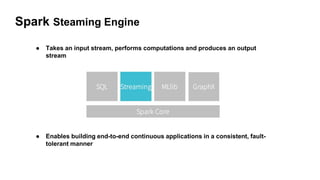
Spark Streaming Engine
● Enables building end-to-end continuous applications in a consistent, fault-
tolerant manner
● Takes an input stream, performs computations and produces an output
stream
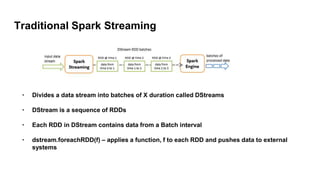
Traditional Spark Streaming
• Divides a data stream into batches of X duration called DStreams
• DStream is a sequence of RDDs
• Each RDD in DStream contains data from a Batch interval
• dstream.foreachRDD(f) – applies a function, f to each RDD and pushes data to external
systems
Structured Streaming: Introduction
5
• Stream processing on Spark SQL Engine
• Introduced in Spark 2.0, marked production ready in Spark 2.2.0
• Work with streaming DataFrames and Datasets rather than RDDs
• Potential to simplify streaming application development
• Code reuse between batch and streaming
• Potential to increase performance substantially (Catalyst SQL optimizer and DataFrame
optimizations)
• Windowing and late out-of-order data handling is much easier
• Traditional Spark Streaming to be considered obsolete going forward.
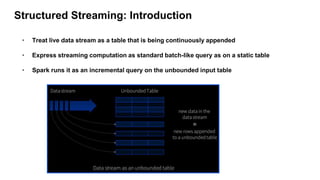
Structured Streaming: Introduction
6
• Treat live data stream as a table that is being continuously appended
• Express streaming computation as standard batch-like query as on a static table
• Spark runs it as an incremental query on the unbounded input table
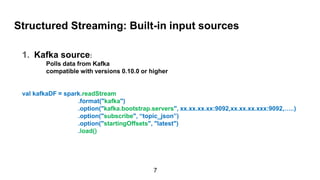
Structured Streaming: Built-in input sources
1. Kafka source:
Polls data from Kafka
compatible with versions 0.10.0 or higher
val kafkaDF = spark.readStream
.format("kafka")
.option("kafka.bootstrap.servers", xx.xx.xx.xx:9092,xx.xx.xx.xxx:9092,…..)
.option("subscribe", “topic_json”)
.option("startingOffsets", "latest")
.load()
7
Structured Streaming: Built-in input sources
2. File source:
Reads files as stream of data
val fileDF = spark.readStream
.format(“json”)
.schema(userSchema)
.load(“path/to/directory”)
8
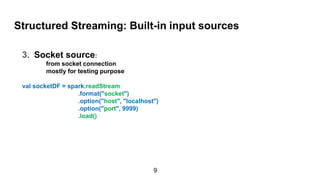
Structured Streaming: Built-in input sources
3. Socket source:
from socket connection
mostly for testing purpose
val socketDF = spark.readStream
.format("socket")
.option("host", "localhost")
.option("port", 9999)
.load()
9
Transformations
• Using DataFrames, Datasets and/or SQL
val kafkaDF = spark.readStream
.format("kafka")
.option("kafka.bootstrap.servers", xx.xx.xx.xx:9092,xx.xx.xx.xxx:9092)
.option("subscribe", “topic_json”)
.load()
.select(get_json_object(($"value").cast("string"), "$.country").alias("Country"))
.groupBy($"Country")
.count()
10
Output Sinks
• File sink - Stores the output to a directory (can be “orc”, “json”, “csv”, “parquet” etc)
• Foreach sink - Runs arbitrary computation on the records in the output.
• Console sink (for debugging) - Prints the output to the console / stdout every time there is a
trigger.
• Memory sink (for debugging) - The output is stored in memory as an in-memory table.
• Kafka sink – introduced in spark 2.2
11
File Output sinks example
val kafkaDF = spark
.readStream
.format("kafka")
.option("kafka.bootstrap.servers", xx.xx.xx.xx:9092,xx.xx.xx.xxx:9092)
.option("subscribe", “topic_json”)
.load()
.select(get_json_object(($"value").cast("string"), "$.country").alias("Country"))
.groupBy($"Country")
.count()
.writeStream
.format("json")
.option("path", ‘path/to/dir’) [can be S3, Hdfs etc]
12
Trigger and output mode
Trigger
• Batch duration implemented using “Trigger”
• Fetches data from the data source at the Trigger interval
• No Trigger means fetch as fast as possible
Output mode
• Append (default) – Output only the new rows since the last trigger
• Complete – Output the whole result to sink after every trigger
• Update – Output only the changed rows since the last trigger
13
Trigger and output mode example
val kafkaDF = spark
.readStream
.format("kafka")
.option("kafka.bootstrap.servers", xx.xx.xx.xx:9092,xx.xx.xx.xxx:9092)
.option("subscribe", “topic_json”)
.load()
.select(get_json_object(($"value").cast("string"), "$.country").alias("Country"))
.groupBy($"Country")
.count()
.writeStream
.format("json")
.option("path", ‘path/to/dir’)
.trigger(“5 minutes”)
.outputMode(”complete")
14
Checkpoint
• Used to restart the streaming if there is a failure
• Tracks the progress of streaming query in persistent storage
val kafkaDF = spark
.readStream
.format("kafka")
.option("kafka.bootstrap.servers", xx.xx.xx.xx:9092,xx.xx.xx.xxx:9092)
.option("subscribe", “topic_json”)
.load()
.select(get_json_object(($"value").cast("string"), "$.country").alias("Country"))
.groupBy($"Country")
.count()
.writeStream
.format("json")
.option("path", ‘path/to/dir’)
.trigger(“5 minutes”)
.outputMode("append")
.option("checkpointLocation", CheckPointLocationData)
.start()
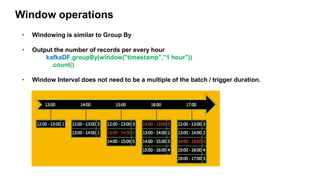
Window operations
• Windowing is similar to Group By
• Output the number of records per every hour
kafkaDF.groupBy(window("timestamp",”1 hour"))
.count()
• Window Interval does not need to be a multiple of the batch / trigger duration.
Watermarking
• Threshold of how late data is expected to be and when to drop old state
• Data older than watermark is "too late" and dropped
• Useful only in stateful operations
kafkaDF
.withWatermark("timestamp", "10 minutes")
.groupBy(window("timestamp",”1 hour"))
.count()
17
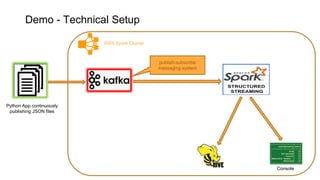
Demo - Technical Setup
Console
AWS Spark Cluster
Python App continuously
publishing JSON files
publish-subscribe
messaging system
Demo - code walk through
19
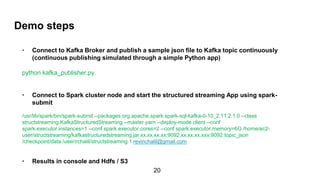
Demo steps
• Connect to Kafka Broker and publish a sample json file to Kafka topic continuously
(continuous publishing simulated through a simple Python app)
python kafka_publisher.py
• Connect to Spark cluster node and start the structured streaming App using spark-
submit
• /usr/lib/spark/bin/spark-submit --packages org.apache.spark:spark-sql-kafka-0-10_2.11:2.1.0 --class
structstreaming.KafkaStructuredStreaming --master yarn --deploy-mode client --conf
spark.executor.instances=1 --conf spark.executor.cores=2 --conf spark.executor.memory=6G /home/ec2-
user/structstreaming/kafkastructuredstreaming.jar 10.31.18.89:9092,10.31.19.232:9092 topic_json
/checkpoint/data /user/rchalil/structstreaming 1 revinchalil@gmail.com
• Results in console and Hdfs / S3
20
Q&A
21
References:
1. Structured Streaming Programming Guid
2. Spark Streaming Programming Guide
3. Spark: The Definitive Guide
4. Spark structured streaming book
revinchalil@gmail.com
https://www.linkedin.com/in/revin

Spark Structured Streaming

  • 1.
    Spark Structured Streaming: Introductionand Internals Seattle Data Science And Data Engineering Meetup Revin Chalil 09/20/2017 revinchalil@gmail.com https://www.linkedin.com/in/revin/
  • 2.
    Agenda • Traditional SparkStreaming concepts • Introduction to Spark Structured Streaming • Built-in Input sources • Transformations • Output sinks and Output Modes • Trigger • Checkpointing • Windowing and Watermarking • Demo – Spark Structured Streaming with Kafka on AWS
  • 3.
    Spark Streaming Engine ●Enables building end-to-end continuous applications in a consistent, fault- tolerant manner ● Takes an input stream, performs computations and produces an output stream
  • 4.
    Traditional Spark Streaming •Divides a data stream into batches of X duration called DStreams • DStream is a sequence of RDDs • Each RDD in DStream contains data from a Batch interval • dstream.foreachRDD(f) – applies a function, f to each RDD and pushes data to external systems
  • 5.
    Structured Streaming: Introduction 5 •Stream processing on Spark SQL Engine • Introduced in Spark 2.0, marked production ready in Spark 2.2.0 • Work with streaming DataFrames and Datasets rather than RDDs • Potential to simplify streaming application development • Code reuse between batch and streaming • Potential to increase performance substantially (Catalyst SQL optimizer and DataFrame optimizations) • Windowing and late out-of-order data handling is much easier • Traditional Spark Streaming to be considered obsolete going forward.
  • 6.
    Structured Streaming: Introduction 6 •Treat live data stream as a table that is being continuously appended • Express streaming computation as standard batch-like query as on a static table • Spark runs it as an incremental query on the unbounded input table
  • 7.
    Structured Streaming: Built-ininput sources 1. Kafka source: Polls data from Kafka compatible with versions 0.10.0 or higher val kafkaDF = spark.readStream .format("kafka") .option("kafka.bootstrap.servers", xx.xx.xx.xx:9092,xx.xx.xx.xxx:9092,…..) .option("subscribe", “topic_json”) .option("startingOffsets", "latest") .load() 7
  • 8.
    Structured Streaming: Built-ininput sources 2. File source: Reads files as stream of data val fileDF = spark.readStream .format(“json”) .schema(userSchema) .load(“path/to/directory”) 8
  • 9.
    Structured Streaming: Built-ininput sources 3. Socket source: from socket connection mostly for testing purpose val socketDF = spark.readStream .format("socket") .option("host", "localhost") .option("port", 9999) .load() 9
  • 10.
    Transformations • Using DataFrames,Datasets and/or SQL val kafkaDF = spark.readStream .format("kafka") .option("kafka.bootstrap.servers", xx.xx.xx.xx:9092,xx.xx.xx.xxx:9092) .option("subscribe", “topic_json”) .load() .select(get_json_object(($"value").cast("string"), "$.country").alias("Country")) .groupBy($"Country") .count() 10
  • 11.
    Output Sinks • Filesink - Stores the output to a directory (can be “orc”, “json”, “csv”, “parquet” etc) • Foreach sink - Runs arbitrary computation on the records in the output. • Console sink (for debugging) - Prints the output to the console / stdout every time there is a trigger. • Memory sink (for debugging) - The output is stored in memory as an in-memory table. • Kafka sink – introduced in spark 2.2 11
  • 12.
    File Output sinksexample val kafkaDF = spark .readStream .format("kafka") .option("kafka.bootstrap.servers", xx.xx.xx.xx:9092,xx.xx.xx.xxx:9092) .option("subscribe", “topic_json”) .load() .select(get_json_object(($"value").cast("string"), "$.country").alias("Country")) .groupBy($"Country") .count() .writeStream .format("json") .option("path", ‘path/to/dir’) [can be S3, Hdfs etc] 12
  • 13.
    Trigger and outputmode Trigger • Batch duration implemented using “Trigger” • Fetches data from the data source at the Trigger interval • No Trigger means fetch as fast as possible Output mode • Append (default) – Output only the new rows since the last trigger • Complete – Output the whole result to sink after every trigger • Update – Output only the changed rows since the last trigger 13
  • 14.
    Trigger and outputmode example val kafkaDF = spark .readStream .format("kafka") .option("kafka.bootstrap.servers", xx.xx.xx.xx:9092,xx.xx.xx.xxx:9092) .option("subscribe", “topic_json”) .load() .select(get_json_object(($"value").cast("string"), "$.country").alias("Country")) .groupBy($"Country") .count() .writeStream .format("json") .option("path", ‘path/to/dir’) .trigger(“5 minutes”) .outputMode(”complete") 14
  • 15.
    Checkpoint • Used torestart the streaming if there is a failure • Tracks the progress of streaming query in persistent storage val kafkaDF = spark .readStream .format("kafka") .option("kafka.bootstrap.servers", xx.xx.xx.xx:9092,xx.xx.xx.xxx:9092) .option("subscribe", “topic_json”) .load() .select(get_json_object(($"value").cast("string"), "$.country").alias("Country")) .groupBy($"Country") .count() .writeStream .format("json") .option("path", ‘path/to/dir’) .trigger(“5 minutes”) .outputMode("append") .option("checkpointLocation", CheckPointLocationData) .start()
  • 16.
    Window operations • Windowingis similar to Group By • Output the number of records per every hour kafkaDF.groupBy(window("timestamp",”1 hour")) .count() • Window Interval does not need to be a multiple of the batch / trigger duration.
  • 17.
    Watermarking • Threshold ofhow late data is expected to be and when to drop old state • Data older than watermark is "too late" and dropped • Useful only in stateful operations kafkaDF .withWatermark("timestamp", "10 minutes") .groupBy(window("timestamp",”1 hour")) .count() 17
  • 18.
    Demo - TechnicalSetup Console AWS Spark Cluster Python App continuously publishing JSON files publish-subscribe messaging system
  • 19.
    Demo - codewalk through 19
  • 20.
    Demo steps • Connectto Kafka Broker and publish a sample json file to Kafka topic continuously (continuous publishing simulated through a simple Python app) python kafka_publisher.py • Connect to Spark cluster node and start the structured streaming App using spark- submit • /usr/lib/spark/bin/spark-submit --packages org.apache.spark:spark-sql-kafka-0-10_2.11:2.1.0 --class structstreaming.KafkaStructuredStreaming --master yarn --deploy-mode client --conf spark.executor.instances=1 --conf spark.executor.cores=2 --conf spark.executor.memory=6G /home/ec2- user/structstreaming/kafkastructuredstreaming.jar 10.31.18.89:9092,10.31.19.232:9092 topic_json /checkpoint/data /user/rchalil/structstreaming 1 revinchalil@gmail.com • Results in console and Hdfs / S3 20
  • 21.
    Q&A 21 References: 1. Structured StreamingProgramming Guid 2. Spark Streaming Programming Guide 3. Spark: The Definitive Guide 4. Spark structured streaming book revinchalil@gmail.com https://www.linkedin.com/in/revin