Department for Education Innovation
Academic Induction Programme 2015
Senior Instructional Designers
Dr Marius Pienaar (VET)
Ms Adriana Botha (EBIT & ASELPH)
9 July 2015
e-Learning
In this session
• “Warm-up: Red flag shout”
• Theoretical overview & Terminology
• “Getting ready: Green flag shout”
• Augmenting clickUP and teaching and learning
• “Cut & Polish”
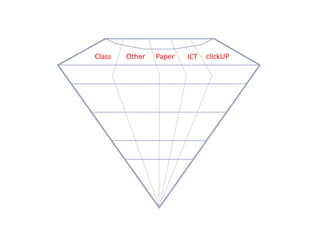
• Diamond Metaphor
• “Let your diamond module sparkle”
• Housekeeping
e-Learning
Activity 1
“4 min Warm-up: Red flag shout”
• Think of any words you can associate with the 3
terminologies:
1. eLearning
2. Hybrid Learning
3. Blended Learning
• Raise your red flag – say the number above
• Say the word
• Scribe will write it down
e-Learning
e-Learning
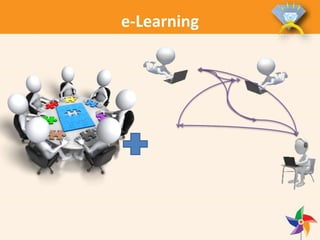
What is e-learning?
• The use of technology to enable people to learn
anywhere and anytime
• Information is made learner-friendly: apply the
principles of instructional and visual design,
then produced using authoring tools/software
e-Learning
What is e-learning?
• Made available on the LMS, Web portal or
intranet
• Covers a range of activities from learning
online, to hybrid/blended learning (combining
traditional and e-learning)
e-Learning
What is e-learning?
Learning accomplished with the use of electronic
media
e-Learning
What is NOT e-learning?
• “Putting documents behind glass”
• Adding narration to PowerPoint slides and
publishing them
• Uploading a course on to a LMS without
activities and interaction
e-Learning
Advantages of e-learning
• Different learning styles are addressed
• Development of computer and Internet skills
• Builds self-knowledge and self-confidence
• Encourages students to take responsibility for
their learning
• Adds to the classroom environment.
e-Learning
Advantages of e-learning
• Less expensive to produce
• Self-paced
• Progresses up to 50 percent faster than
traditional courses
• Eliminates the problems associated with
different lecturers teaching slightly different
material on the same subject
• Any location and any time
e-Learning
Advantages of e-learning
• Updated easily and quickly
• Can lead to increased retention and a stronger
grasp on the subject
• Ability to revisit or replay sections of the
training that might not have been clear the first
time around
• It can be easily managed for large groups of
students
e-Learning
Danger of e-learning
Concentrating on the ‘e' and forgetting the all
important ‘learning‘
• Whatever the technology, learning is the vital
element
• Therefore, the students have to undertake
activities which actively engage them and they
require feedback on the activities they
undertake
e-Learning
Disadvantages of e-learning
• Unmotivated students or those with poor study
habits may fall behind
• Lack of familiar structure and routine may take
getting used to
• Students may feel isolated or miss social
interaction
e-Learning
Disadvantages of e-learning
• Lecturer may not always be available on
demand
• Slow or unreliable Internet connections can be
frustrating
• Traditional hands-on courses can be difficult to
simulate
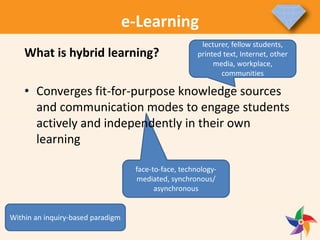
face-to-face, technology-
mediated, synchronous/
asynchronous
What is hybrid learning?
• Converges fit-for-purpose knowledge sources
and communication modes to engage students
actively and independently in their own
learning
lecturer, fellow students,
printed text, Internet, other
media, workplace,
communities
e-Learning
Within an inquiry-based paradigm
e-Learning
What is hybrid learning?
• Different modes of delivery
• Promotes a mix of:
• face-to-face teaching and learning
environment
• distributed teaching and learning environment
• different frequencies of interaction
• on campus, in the workplace, at community
sites of learning, at a distance and online
e-Learning
What is blended learning?
• Blended learning involves face-to-face on-
campus teaching and learning enhanced by
appropriate educational technologies to
support student engagement inside and outside
the contact sessions in most modules.
e-Learning
Blended learning
Web enhanced – content + support
– Some online resources & discussion groups
to supplement classroom-based teaching
Web enabled – ‘wrap-around’ model
– E-learning materials combined with existing
resources to create a ‘blended’ model
– Includes online discussions, e-tivities, group
work
Web dependent – integrated model
– Entirely online learning community
– Collaborative working, peer support, lecturer
as facilitator
e-Learning
Pros and Cons of blended learning
• Pro
– Flexibility
– Accesibility
– Best of both worlds
– Can save time
– Self-reliant learning
• Con
– Can lead to a lack of
face-to-face
communication
– The clicking monkey
– Design choices more
difficult
– Self-reliant learning
much needed
Important: design!
e-Learning
5minutes
Activity 2
“5 min Getting ready: Green flag shout”
• Think of more words for:
1. eLearning
2. Hybrid Learning
3. Blended Learning
• Raise your Green flag – say number
• Say the word
• Scribe will write it down
e-Learning
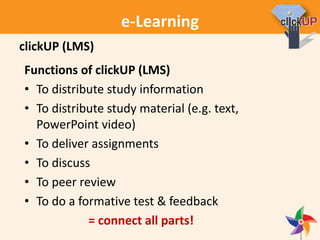
Functions of clickUP (LMS)
• To distribute study information
• To distribute study material (e.g. text,
PowerPoint video)
• To deliver assignments
• To discuss
• To peer review
• To do a formative test & feedback
= connect all parts!
clickUP (LMS)
e-Learning
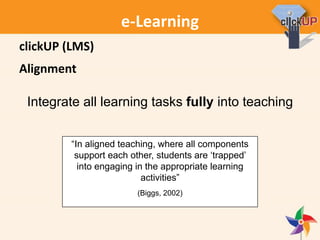
Alignment
“In aligned teaching, where all components
support each other, students are ‘trapped’
into engaging in the appropriate learning
activities”
(Biggs, 2002)
Integrate all learning tasks fully into teaching
clickUP (LMS)
e-Learning
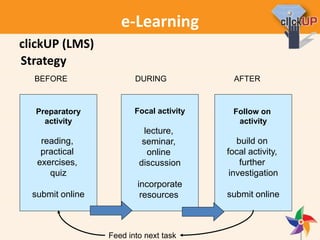
Strategy
Preparatory
activity
reading,
practical
exercises,
quiz
submit online
BEFORE
Focal activity
lecture,
seminar,
online
discussion
incorporate
resources
DURING
Follow on
activity
build on
focal activity,
further
investigation
submit online
AFTER
Feed into next task
clickUP (LMS)
e-Learning
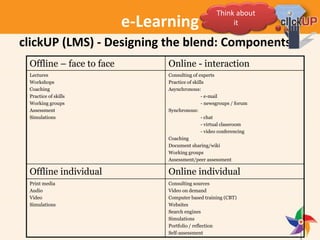
Designing the blend
• Which of the components do you think can be
offline, which can be online?
• Apply this to your course/situation
Later we will link this to description of learning
tasks
clickUP (LMS)
Think about
it
e-Learning
clickUP (LMS) - Designing the blend: Components
Offline – face to face Online - interaction
Lectures
Workshops
Coaching
Practice of skills
Working groups
Assessment
Simulations
Consulting of experts
Practice of skills
Asynchronous:
- e-mail
- newsgroups / forum
Synchronous:
- chat
- virtual classroom
- video conferencing
Coaching
Document sharing/wiki
Working groups
Assessment/peer assessment
Offline individual Online individual
Print media
Audio
Video
Simulations
Consulting sources
Video on demand
Computer based training (CBT)
Websites
Search engines
Simulations
Portfolio / reflection
Self-assessment
Think about
it
e-Learning
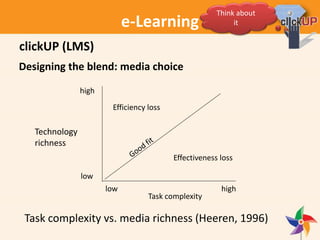
Designing the blend: media choice
Task complexity vs. media richness (Heeren, 1996)
Technology
richness
high
low
highlow
Task complexity
Effectiveness loss
Efficiency loss
clickUP (LMS)
Think about
it
e-Learning
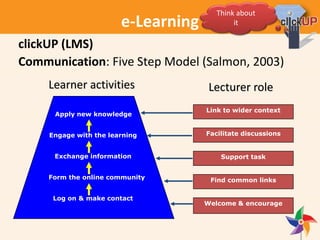
Communication: Five Step Model (Salmon, 2003)
Log on & make contact
Form the online community
Exchange information
Engage with the learning
Apply new knowledge
Learner activities
Welcome & encourage
Find common links
Support task
Facilitate discussions
Link to wider context
Lecturer role
clickUP (LMS)
Think about
it
e-Learning
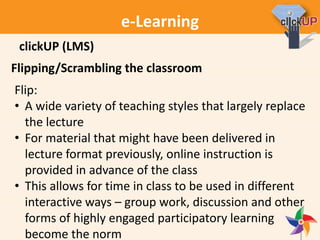
Flipping/Scrambling the classroom
Flip:
• A wide variety of teaching styles that largely replace
the lecture
• For material that might have been delivered in
lecture format previously, online instruction is
provided in advance of the class
• This allows for time in class to be used in different
interactive ways – group work, discussion and other
forms of highly engaged participatory learning
become the norm
clickUP (LMS)
e-Learning
Flipping/Scrambling the classroom
Scramble:
• With the blended learning approach, the material
delivered in a lecture format, is scrambled/mixed
with online instruction (hybrid)
• Allows for time in class for traditional teaching and
learning, and for interactive teaching and learning
Replacing official contact time with e-tivities
clickUP (LMS)
e-Learning
Augmenting teaching and learning
Various tools:
• Mashups: streaming video (YouTube), presentations
(SlideShare) and images (Flickr) in the course
• Built-in wiki: students can collaborate on a web page
inside our LMS. Students share ideas and resources,
present topics to each other, and critique each other’s
work
• Built-in discussion board: create discussion forums for
topic related discussions
clickUP (LMS)
e-Learning
Augmenting teaching and learning
Various tools:
• Built-in blog: a medium for reflective learning.
Students display research, analytical, and
communication skills through a series of commentaries
meant for consumption and comment in a course
• Built-in journal: a personal space for private
communication between student and lecturer
Can be used as a self-reflective tool (opinions, ideas,
and concerns about the course)
Can be used to discuss and analyse course related
materials
clickUP (LMS)
e-Learning
Augmenting teaching and learning
Various tools:
• Built-in virtual classroom: a medium for reflective
learning.
Teaching and learning at a distance
• Collaborate: built-in video-conferencing and
collaboration tool
Teaching and learning at a distance
• Online assessment tasks and activities
Quick and effective feedback
clickUP (LMS)
e-Learning
Re-design of your course for blended
learning: ADDIE
•Analysis
•Design
•Development
•Implementation
•Evaluation
clickUP (LMS)
e-Learning
• Analysis
• Decide on: Goals, entry
knowledge, content
• Relate these three to each other
• Generate first idea of tasks
• Design
• Design framework for tasks
• Design general formulation of
tasks
• Decide on task support and
communication
clickUP (LMS)
e-Learning
• Development
• Prepare materials
• Use the checklist for
preparation of tasks
• Think of reuse
• Note recommendations on
reading online
• Convert materials
clickUP (LMS)
e-Learning
• Implementation
• Place materials in clickUP and/or OER
• Use support and communication tools
• Engage learners
• Evaluation
• Measure if learning outcomes have been
reached
• Measure if the learning process was effective
• Gather data, act upon during course, or
improve for next version
clickUP (LMS)
AD-Break
e-Learning
Activity 3
“Cut and Polish”
1. Each Faculty group will receive a “mode of delivery”
2. Draw a mind-map:
• What are the affordances/possibilities/prospects?
• How can it add value in a unique way to
student learning and contribute to success?
• What are the impediments?
3. Paste on flipchart boards
e-Learning
e-Learning
e-Learning
Activity 3
“Cut and Polish”
15minutes
1. Each Faculty group will receive a “mode of delivery”
2. Draw a mind-map:
• What are the affordances/possibilities/prospects?
• How can it add value in a unique way to
student learning and contribute to success?
• What are the impediments?
3. Paste on flipchart boards

e-Learning
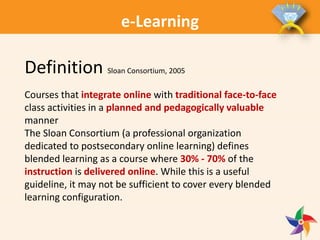
Definition Sloan Consortium, 2005
Courses that integrate online with traditional face‐to‐face
class activities in a planned and pedagogically valuable
manner
The Sloan Consortium (a professional organization
dedicated to postsecondary online learning) defines
blended learning as a course where 30% - 70% of the
instruction is delivered online. While this is a useful
guideline, it may not be sufficient to cover every blended
learning configuration.
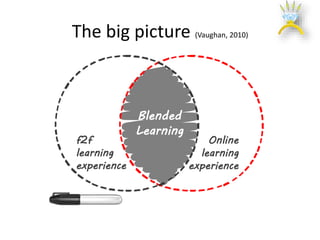
f2f
learning
experience
Blended
Learning
Online
learning
experience
The big picture (Vaughan, 2010)
e-Learning
e-Learning
Diamond Education
• Valuable
• Each unique
o Settings differ
o Polished differently
• Add value
• Each unique
o Disciplines, outcomes,
students & lecturers
philosophy
o ICT feasibility
Diamond metaphor concept
e-Learning
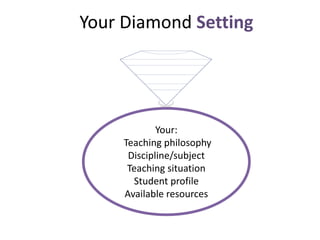
Your:
Teaching philosophy
Discipline/subject
Teaching situation
Student profile
Available resources
Your Diamond Setting
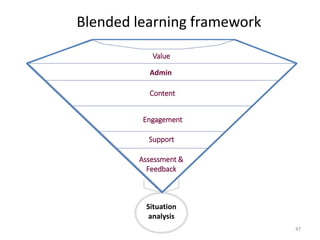
Blended learning framework
47
Assessment &
Feedback
Value
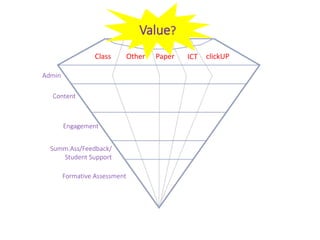
Admin
Content
Engagement
Support
Situation
analysis
Other ICT clickUPPaperClass
Other ICT
Value?
Admin
Content
Engagement
Summ.Ass/Feedback/
Student Support
Formative Assessment
clickUPPaperClass
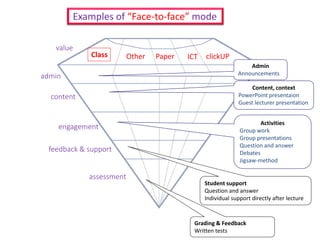
Other ICT
value
admin
content
engagement
feedback & support
assessment
Student support
Question and answer
Individual support directly after lecture
Activities
Group work
Group presentations
Question and answer
Debates
Jigsaw-method
Content, context
PowerPoint presentaion
Guest lecturer presentation
Admin
Announcements
Examples of “Face-to-face” mode
clickUP
Grading & Feedback
Written tests
Class Paper
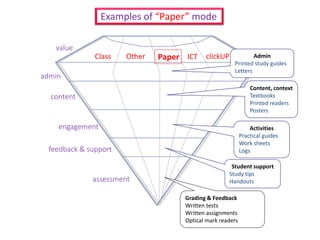
Class Other ICTPaper
value
admin
content
engagement
feedback & support
assessment
Grading & Feedback
Written tests
Written assignments
Optical mark readers
Activities
Practical guides
Work sheets
Logs
Content, context
Textbooks
Printed readers
Posters
Admin
Printed study guides
Letters
Examples of “Paper” mode
Student support
Study tips
Handouts
clickUP
Class Other ICTPaper
value
admin
content
engagement
feedback & support
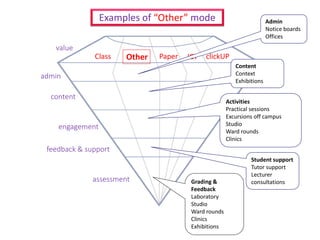
assessment Grading &
Feedback
Laboratory
Studio
Ward rounds
Clinics
Exhibitions
Activities
Practical sessions
Excursions off campus
Studio
Ward rounds
Clinics
Content
Context
Exhibitions
Admin
Notice boards
Offices
Examples of “Other” mode
Student support
Tutor support
Lecturer
consultations
clickUP
Class Other ICTPaper
value
admin
content
engagement
feedback & support
assessment
Grading &
Feedback
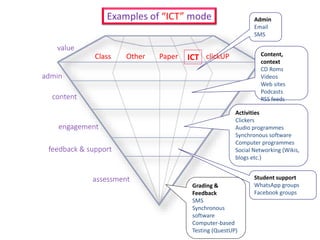
SMS
Synchronous
software
Computer-based
Testing (QuestUP)
Activities
Clickers
Audio programmes
Synchronous software
Computer programmes
Social Networking (Wikis,
blogs etc.)
Content,
context
CD Roms
Videos
Web sites
Podcasts
RSS feeds
Admin
Email
SMS
Examples of “ICT” mode
Student support
WhatsApp groups
Facebook groups
clickUP
Class Other Paper
value
admin
content
engagement
feedback & support
assessment
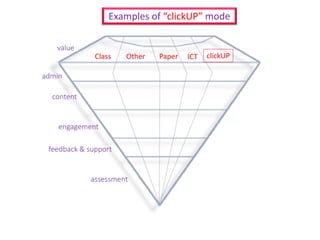
Examples of “clickUP” mode
clickUPICT
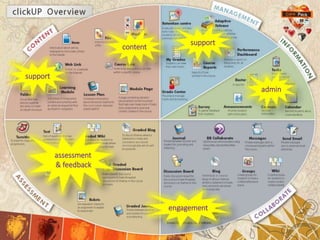
content
engagement
support
support
assessment
& feedback
admin
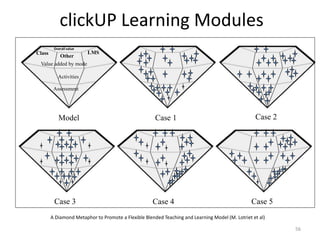
clickUP Learning Modules
56
Model Case 1 Case 2
Case 3 Case 4 Case 5
Activities
Assessment
Value added by mode
LMSClass
Other
Overall value
A Diamond Metaphor to Promote a Flexible Blended Teaching and Learning Model (M. Lotriet et al)
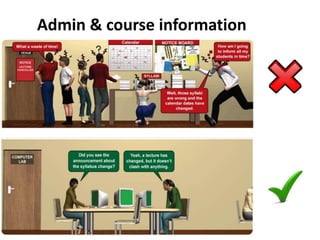
Admin & course information
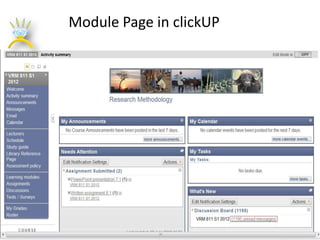
Module Page in clickUP
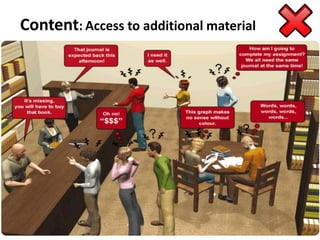
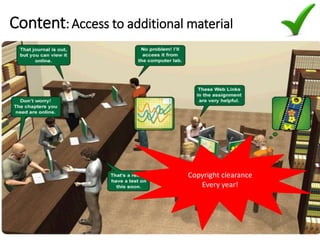
Content: Access to additional material
Copyright clearance
Every year!
Content: Access to additional material
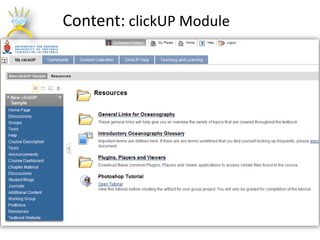
Content: clickUP Module
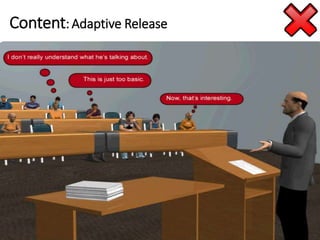
Content: Adaptive Release
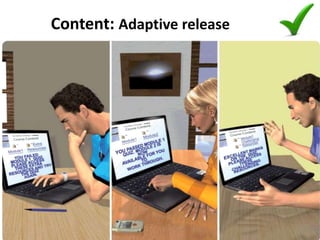
Content: Adaptive release
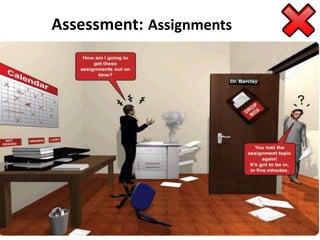
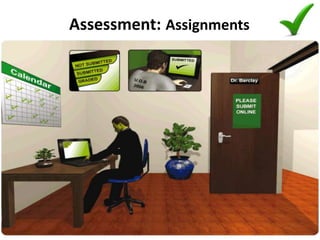
Assessment: Assignments
Cultivate: Turnitin
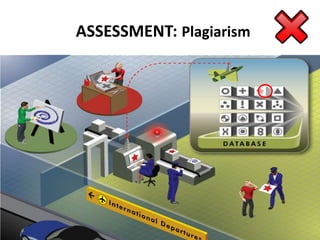
ASSESSMENT: Plagiarism
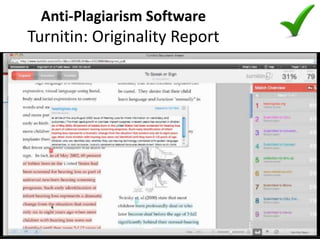
Anti-Plagiarism Software
Turnitin: Originality Report
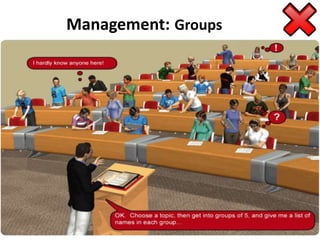
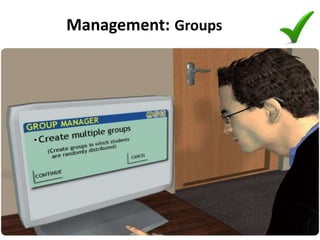
Management: Groups
Management: Groups
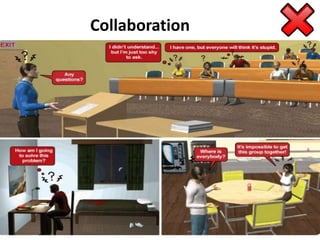
Collaboration
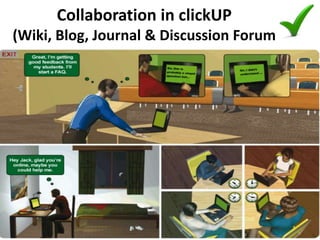
Collaboration in clickUP
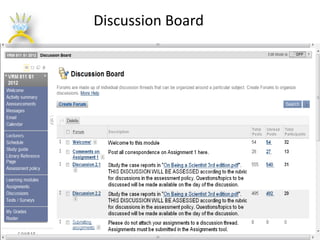
(Wiki, Blog, Journal & Discussion Forum
Discussion Board
e-Learning
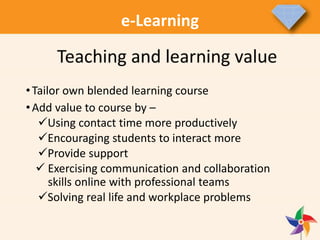
•Tailor own blended learning course
•Add value to course by –
Using contact time more productively
Encouraging students to interact more
Provide support
 Exercising communication and collaboration
skills online with professional teams
Solving real life and workplace problems
e-Learning
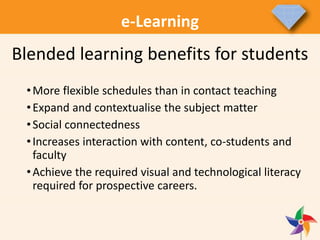
•More flexible schedules than in contact teaching
•Expand and contextualise the subject matter
•Social connectedness
•Increases interaction with content, co-students and
faculty
•Achieve the required visual and technological literacy
required for prospective careers.
Blended learning benefits for students
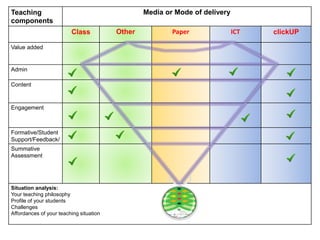
Teaching
components
Media or Mode of delivery
Class Other Paper ICT clickUP
Value added
Admin
Content
Engagement
Formative/Student
Support/Feedback/
Summative
Assessment
Situation analysis:
Your teaching philosophy
Profile of your students
Challenges
Affordances of your teaching situation
e-Learning
Activity 4
Start designing and let your diamond
module sparkle
25minutes
4 & 5 November 2015
Registration: CE@UP
e-Learning
E learning: blended learning

E learning: blended learning

  • 1.
    Department for EducationInnovation Academic Induction Programme 2015 Senior Instructional Designers Dr Marius Pienaar (VET) Ms Adriana Botha (EBIT & ASELPH) 9 July 2015 e-Learning
  • 2.
    In this session •“Warm-up: Red flag shout” • Theoretical overview & Terminology • “Getting ready: Green flag shout” • Augmenting clickUP and teaching and learning • “Cut & Polish” • Diamond Metaphor • “Let your diamond module sparkle” • Housekeeping e-Learning
  • 3.
    Activity 1 “4 minWarm-up: Red flag shout” • Think of any words you can associate with the 3 terminologies: 1. eLearning 2. Hybrid Learning 3. Blended Learning • Raise your red flag – say the number above • Say the word • Scribe will write it down e-Learning
  • 4.
    e-Learning What is e-learning? •The use of technology to enable people to learn anywhere and anytime • Information is made learner-friendly: apply the principles of instructional and visual design, then produced using authoring tools/software
  • 5.
    e-Learning What is e-learning? •Made available on the LMS, Web portal or intranet • Covers a range of activities from learning online, to hybrid/blended learning (combining traditional and e-learning)
  • 6.
    e-Learning What is e-learning? Learningaccomplished with the use of electronic media
  • 7.
    e-Learning What is NOTe-learning? • “Putting documents behind glass” • Adding narration to PowerPoint slides and publishing them • Uploading a course on to a LMS without activities and interaction
  • 8.
    e-Learning Advantages of e-learning •Different learning styles are addressed • Development of computer and Internet skills • Builds self-knowledge and self-confidence • Encourages students to take responsibility for their learning • Adds to the classroom environment.
  • 9.
    e-Learning Advantages of e-learning •Less expensive to produce • Self-paced • Progresses up to 50 percent faster than traditional courses • Eliminates the problems associated with different lecturers teaching slightly different material on the same subject • Any location and any time
  • 10.
    e-Learning Advantages of e-learning •Updated easily and quickly • Can lead to increased retention and a stronger grasp on the subject • Ability to revisit or replay sections of the training that might not have been clear the first time around • It can be easily managed for large groups of students
  • 11.
    e-Learning Danger of e-learning Concentratingon the ‘e' and forgetting the all important ‘learning‘ • Whatever the technology, learning is the vital element • Therefore, the students have to undertake activities which actively engage them and they require feedback on the activities they undertake
  • 12.
    e-Learning Disadvantages of e-learning •Unmotivated students or those with poor study habits may fall behind • Lack of familiar structure and routine may take getting used to • Students may feel isolated or miss social interaction
  • 13.
    e-Learning Disadvantages of e-learning •Lecturer may not always be available on demand • Slow or unreliable Internet connections can be frustrating • Traditional hands-on courses can be difficult to simulate
  • 14.
    face-to-face, technology- mediated, synchronous/ asynchronous Whatis hybrid learning? • Converges fit-for-purpose knowledge sources and communication modes to engage students actively and independently in their own learning lecturer, fellow students, printed text, Internet, other media, workplace, communities e-Learning Within an inquiry-based paradigm
  • 15.
    e-Learning What is hybridlearning? • Different modes of delivery • Promotes a mix of: • face-to-face teaching and learning environment • distributed teaching and learning environment • different frequencies of interaction • on campus, in the workplace, at community sites of learning, at a distance and online
  • 16.
    e-Learning What is blendedlearning? • Blended learning involves face-to-face on- campus teaching and learning enhanced by appropriate educational technologies to support student engagement inside and outside the contact sessions in most modules.
  • 17.
    e-Learning Blended learning Web enhanced– content + support – Some online resources & discussion groups to supplement classroom-based teaching Web enabled – ‘wrap-around’ model – E-learning materials combined with existing resources to create a ‘blended’ model – Includes online discussions, e-tivities, group work Web dependent – integrated model – Entirely online learning community – Collaborative working, peer support, lecturer as facilitator
  • 18.
    e-Learning Pros and Consof blended learning • Pro – Flexibility – Accesibility – Best of both worlds – Can save time – Self-reliant learning • Con – Can lead to a lack of face-to-face communication – The clicking monkey – Design choices more difficult – Self-reliant learning much needed Important: design!
  • 19.
    e-Learning 5minutes Activity 2 “5 minGetting ready: Green flag shout” • Think of more words for: 1. eLearning 2. Hybrid Learning 3. Blended Learning • Raise your Green flag – say number • Say the word • Scribe will write it down
  • 20.
    e-Learning Functions of clickUP(LMS) • To distribute study information • To distribute study material (e.g. text, PowerPoint video) • To deliver assignments • To discuss • To peer review • To do a formative test & feedback = connect all parts! clickUP (LMS)
  • 21.
    e-Learning Alignment “In aligned teaching,where all components support each other, students are ‘trapped’ into engaging in the appropriate learning activities” (Biggs, 2002) Integrate all learning tasks fully into teaching clickUP (LMS)
  • 22.
  • 23.
    e-Learning Designing the blend •Which of the components do you think can be offline, which can be online? • Apply this to your course/situation Later we will link this to description of learning tasks clickUP (LMS) Think about it
  • 24.
    e-Learning clickUP (LMS) -Designing the blend: Components Offline – face to face Online - interaction Lectures Workshops Coaching Practice of skills Working groups Assessment Simulations Consulting of experts Practice of skills Asynchronous: - e-mail - newsgroups / forum Synchronous: - chat - virtual classroom - video conferencing Coaching Document sharing/wiki Working groups Assessment/peer assessment Offline individual Online individual Print media Audio Video Simulations Consulting sources Video on demand Computer based training (CBT) Websites Search engines Simulations Portfolio / reflection Self-assessment Think about it
  • 25.
    e-Learning Designing the blend:media choice Task complexity vs. media richness (Heeren, 1996) Technology richness high low highlow Task complexity Effectiveness loss Efficiency loss clickUP (LMS) Think about it
  • 26.
    e-Learning Communication: Five StepModel (Salmon, 2003) Log on & make contact Form the online community Exchange information Engage with the learning Apply new knowledge Learner activities Welcome & encourage Find common links Support task Facilitate discussions Link to wider context Lecturer role clickUP (LMS) Think about it
  • 27.
    e-Learning Flipping/Scrambling the classroom Flip: •A wide variety of teaching styles that largely replace the lecture • For material that might have been delivered in lecture format previously, online instruction is provided in advance of the class • This allows for time in class to be used in different interactive ways – group work, discussion and other forms of highly engaged participatory learning become the norm clickUP (LMS)
  • 28.
    e-Learning Flipping/Scrambling the classroom Scramble: •With the blended learning approach, the material delivered in a lecture format, is scrambled/mixed with online instruction (hybrid) • Allows for time in class for traditional teaching and learning, and for interactive teaching and learning Replacing official contact time with e-tivities clickUP (LMS)
  • 29.
    e-Learning Augmenting teaching andlearning Various tools: • Mashups: streaming video (YouTube), presentations (SlideShare) and images (Flickr) in the course • Built-in wiki: students can collaborate on a web page inside our LMS. Students share ideas and resources, present topics to each other, and critique each other’s work • Built-in discussion board: create discussion forums for topic related discussions clickUP (LMS)
  • 30.
    e-Learning Augmenting teaching andlearning Various tools: • Built-in blog: a medium for reflective learning. Students display research, analytical, and communication skills through a series of commentaries meant for consumption and comment in a course • Built-in journal: a personal space for private communication between student and lecturer Can be used as a self-reflective tool (opinions, ideas, and concerns about the course) Can be used to discuss and analyse course related materials clickUP (LMS)
  • 31.
    e-Learning Augmenting teaching andlearning Various tools: • Built-in virtual classroom: a medium for reflective learning. Teaching and learning at a distance • Collaborate: built-in video-conferencing and collaboration tool Teaching and learning at a distance • Online assessment tasks and activities Quick and effective feedback clickUP (LMS)
  • 32.
    e-Learning Re-design of yourcourse for blended learning: ADDIE •Analysis •Design •Development •Implementation •Evaluation clickUP (LMS)
  • 33.
    e-Learning • Analysis • Decideon: Goals, entry knowledge, content • Relate these three to each other • Generate first idea of tasks • Design • Design framework for tasks • Design general formulation of tasks • Decide on task support and communication clickUP (LMS)
  • 34.
    e-Learning • Development • Preparematerials • Use the checklist for preparation of tasks • Think of reuse • Note recommendations on reading online • Convert materials clickUP (LMS)
  • 35.
    e-Learning • Implementation • Placematerials in clickUP and/or OER • Use support and communication tools • Engage learners • Evaluation • Measure if learning outcomes have been reached • Measure if the learning process was effective • Gather data, act upon during course, or improve for next version clickUP (LMS)
  • 36.
  • 37.
    e-Learning Activity 3 “Cut andPolish” 1. Each Faculty group will receive a “mode of delivery” 2. Draw a mind-map: • What are the affordances/possibilities/prospects? • How can it add value in a unique way to student learning and contribute to success? • What are the impediments? 3. Paste on flipchart boards
  • 38.
  • 40.
  • 41.
    e-Learning Activity 3 “Cut andPolish” 15minutes 1. Each Faculty group will receive a “mode of delivery” 2. Draw a mind-map: • What are the affordances/possibilities/prospects? • How can it add value in a unique way to student learning and contribute to success? • What are the impediments? 3. Paste on flipchart boards
  • 42.
    e-Learning Definition Sloan Consortium,2005 Courses that integrate online with traditional face‐to‐face class activities in a planned and pedagogically valuable manner The Sloan Consortium (a professional organization dedicated to postsecondary online learning) defines blended learning as a course where 30% - 70% of the instruction is delivered online. While this is a useful guideline, it may not be sufficient to cover every blended learning configuration.
  • 43.
  • 44.
  • 45.
    e-Learning Diamond Education • Valuable •Each unique o Settings differ o Polished differently • Add value • Each unique o Disciplines, outcomes, students & lecturers philosophy o ICT feasibility Diamond metaphor concept
  • 46.
  • 47.
    Blended learning framework 47 Assessment& Feedback Value Admin Content Engagement Support Situation analysis
  • 48.
  • 49.
  • 50.
    Other ICT value admin content engagement feedback &support assessment Student support Question and answer Individual support directly after lecture Activities Group work Group presentations Question and answer Debates Jigsaw-method Content, context PowerPoint presentaion Guest lecturer presentation Admin Announcements Examples of “Face-to-face” mode clickUP Grading & Feedback Written tests Class Paper
  • 51.
    Class Other ICTPaper value admin content engagement feedback& support assessment Grading & Feedback Written tests Written assignments Optical mark readers Activities Practical guides Work sheets Logs Content, context Textbooks Printed readers Posters Admin Printed study guides Letters Examples of “Paper” mode Student support Study tips Handouts clickUP
  • 52.
    Class Other ICTPaper value admin content engagement feedback& support assessment Grading & Feedback Laboratory Studio Ward rounds Clinics Exhibitions Activities Practical sessions Excursions off campus Studio Ward rounds Clinics Content Context Exhibitions Admin Notice boards Offices Examples of “Other” mode Student support Tutor support Lecturer consultations clickUP
  • 53.
    Class Other ICTPaper value admin content engagement feedback& support assessment Grading & Feedback SMS Synchronous software Computer-based Testing (QuestUP) Activities Clickers Audio programmes Synchronous software Computer programmes Social Networking (Wikis, blogs etc.) Content, context CD Roms Videos Web sites Podcasts RSS feeds Admin Email SMS Examples of “ICT” mode Student support WhatsApp groups Facebook groups clickUP
  • 54.
    Class Other Paper value admin content engagement feedback& support assessment Examples of “clickUP” mode clickUPICT
  • 55.
  • 56.
    clickUP Learning Modules 56 ModelCase 1 Case 2 Case 3 Case 4 Case 5 Activities Assessment Value added by mode LMSClass Other Overall value A Diamond Metaphor to Promote a Flexible Blended Teaching and Learning Model (M. Lotriet et al)
  • 57.
    Admin & courseinformation
  • 58.
  • 59.
    Content: Access toadditional material
  • 60.
    Copyright clearance Every year! Content:Access to additional material
  • 61.
  • 62.
  • 63.
  • 64.
  • 65.
  • 66.
  • 67.
  • 68.
  • 69.
  • 70.
  • 71.
    Collaboration in clickUP (Wiki,Blog, Journal & Discussion Forum
  • 72.
  • 73.
    e-Learning •Tailor own blendedlearning course •Add value to course by – Using contact time more productively Encouraging students to interact more Provide support  Exercising communication and collaboration skills online with professional teams Solving real life and workplace problems
  • 74.
    e-Learning •More flexible schedulesthan in contact teaching •Expand and contextualise the subject matter •Social connectedness •Increases interaction with content, co-students and faculty •Achieve the required visual and technological literacy required for prospective careers. Blended learning benefits for students
  • 75.
    Teaching components Media or Modeof delivery Class Other Paper ICT clickUP Value added Admin Content Engagement Formative/Student Support/Feedback/ Summative Assessment Situation analysis: Your teaching philosophy Profile of your students Challenges Affordances of your teaching situation
  • 76.
    e-Learning Activity 4 Start designingand let your diamond module sparkle 25minutes
  • 77.
    4 & 5November 2015 Registration: CE@UP
  • 78.