DEAR STUDENTS
Welcome to the final part of
e-learning.
Here we are going to view the
slides about the impact of
e-learning in education , some of
e-learning tools , adv and disadv ,
and what is blended learning.
THANK U FOR UR
CO-OPERATION.
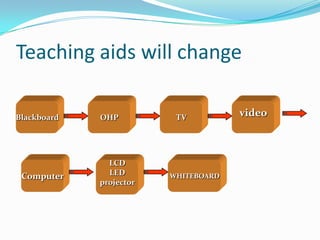
Teaching aids will change

Blackboard   OHP          TV          video


               LCD
 Computer      LED       WHITEBOARD
             projector
Impact of e-learning on teaching learning process
 Computer based networking system has
  provided the present day teacher with a
  choice of modern tools to deliver the goods
  in the classroom and end the instructional
  boundaries.
 Information and communication
  technology in which e-learning, e-teaching,
  e-teachers are built in components has some
  impacts on teaching learning process
Impacts on teaching learning
process
 Improves efficiency both in learning and teaching
 Increases motivation
 Deepens understanding
 Promotes collaborate learning
 Gives new approach to learning and working
 Provides new ways interacting
 Paves way for personality development
 Increases social skills
 Creates interest in learning
Impacts on teaching learning process


 Helpful for self-evaluation
 Wide reach and consistent
 User convenient
 Flexible and rich medium for students
 Useful tool to address students with different
  learning and cognitive styles
 Self-pacing for slow and quick learners, reduces
  stress and increases satisfaction.
E-learning tools: scope of
                  E-mail
 Every teacher & student should have an e-mail
  account
 Communicate with students
 Communicate with parents
 Students can submit assignment
 Can have attachments
 Create a paperless environment
 Simple but effective
 Efficient and cost effective
E-learning tools: Audio Chat
 Synchronous communication tool
 Communicate with students
 Communicate with parents
 More students participate
 Collaborative learning
E-learning tools: Online Forum
 Asynchronous discussion forum
 Teacher can create discussion groups
 Teacher could post a question and request
    students to comment
   Students can post their comments
   Can encourage community participation
   Collaborative learning can be fostered
   Feedback from diverse culture
E-learning Tools: Web

 Wide range of materials available
 Teacher will need to narrow down
 It is a resource centre
 Sharing of resources
 Supported by images, audio,
 simulation and multimedia
E-learning tools: Video Conference

 Can conduct a live lecture
 Communication with students
 Communication with parents
 Support by audio, chat and whiteboard
 Support sharing of applications
 Can be recorded and later be used for on
  demand lectures
 Demo…
Tools: Learning Management System
                (LMS)
 Management of content
 Tracking students
 Administrative features
 Integration with various tools such as
  chat, forum, e-mail, etc.
 Reporting
 Demo... of Multimedia Learning System
  (MMLS)
Open source e-learning
applications

Open source refers to a program in
which the source code (programming
language) is available to the general
public for use and /or modification
from its original and redistribution.
Open source software: eFront
A. eFront:
             It is an open source eLearning platform to
   assist with the creation of online learning
   communities while offering various opportunities for
   collaboration and interaction through an icon-based
   user interface. The platform offers tools for content
   creation, tests building, assignments management,
   reporting, internal messaging, forum, chat, surveys
   etc
Moodle
Moodle:
            Modular Object-Oriented Dynamic
 Learning Environment is a free source e-learning
 software platform and modular design allowing any
 developer to create additional modules and features.
 Many universities and colleges use it in their daily
 teaching and learning. It is a free source software (ie)
 the developer can make modification based on their
 needs.
Dokeos
Dokeos:
        Dokeos is an open source
 online learning software. It
 provides all the features needed for
 e-learning and blended learning
 management : From Authoring to
 Reporting.
Claroline
Claroline:
         Claroline is an open source of
 elearning and eWorking platform
 allowing teachers to build effective
 online courses and to manage learning
 and collaborative activities on the web.
ILIAS learning management
ILIAS:
      ILIAS is a powerful Open Source Learning
 Management System for developing and realizing web-
 based e-learning. The software was developed to
 reduce the cost of new media in education and further
 training and to ensure the maximum level of customer
 influence in the implementation of the software.
SAKAI project
SAKAI project:
                  The Sakai CLE is a free, community
 source, educational software platform distributed
 under the Educational Community License (a type of
 open source license). The Sakai CLE is used for
 teaching, research and collaboration.
OLAT
OLAT:
    OLAT is free software and is open
 source Learning Management System
 that supports any kind of online
 learning, teaching, and tutoring with
 few educational restrictions.
ADVANTAGES OF e-learning
 Class work can be scheduled around personal and professional work
 Reduces travel cost and time to and from school
 Learners may have the option to select learning materials that meets
    their level of knowledge and interest
   Learners can study wherever they have access to a computer and
    Internet
   Self-paced learning modules allow learners to work at their own pace
   Flexibility to join discussions in the bulletin board threaded discussion
    areas at any hour, or visit with classmates and instructors remotely in
    chat rooms
   Different learning styles are addressed and facilitation of learning
    occurs through varied activities
   Development of computer and Internet skills that are transferable to
    other facets of learner's lives
   Successfully completing online or computer-based courses builds self-
    knowledge and self-confidence and encourages students to take
    responsibility for their learning
Disadvantages of e-learning
 Unmotivated learners or those with poor study habits may
    fall behind
   Lack of familiar structure and routine may take getting
    used to
   Students may feel isolated or miss social interaction
   Instructor may not always be available on demand
   Slow or unreliable Internet connections can be frustrating
   Managing learning software can involve a learning curve
   Some courses such as traditional hands-on courses can be
    difficult to simulate
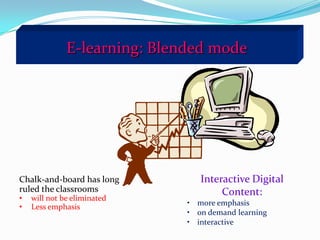
E-learning: Blended mode


Chalk-and-board has long         Interactive Digital
ruled the classrooms                  Content:
•   will not be eliminated
•   Less emphasis             • more emphasis
                              • on demand learning
                              • interactive
Blended learning
 Blended learning combines e-learning tools with
  traditional classroom learning to ensure maximum
  effectiveness.
 It offers
  1.Face to face interaction thereby leading to social benefits.
  2. Personalized system of instruction which requires
  minimum interaction.
  3. Improved retention and reinforcement through follow-
  up mechanism on the web.
  4. Highly flexible based on the learning style and the level
  of audience.
Resume
   E-Learning
       It is not a cup of web pages! It is a complex learning
        environment!
       We need a possibility professionally to create our
        learning materials.
       We need a professional LMS system, which is
        compliment with all e-learning relevant standards.
       We need money and peoples!

       And lot of optimism   
THANK YOU
  DEAR
STUDENTS.

E learning part3

  • 1.
    DEAR STUDENTS Welcome tothe final part of e-learning. Here we are going to view the slides about the impact of e-learning in education , some of e-learning tools , adv and disadv , and what is blended learning. THANK U FOR UR CO-OPERATION.
  • 2.
    Teaching aids willchange Blackboard OHP TV video LCD Computer LED WHITEBOARD projector
  • 3.
    Impact of e-learningon teaching learning process  Computer based networking system has provided the present day teacher with a choice of modern tools to deliver the goods in the classroom and end the instructional boundaries.  Information and communication technology in which e-learning, e-teaching, e-teachers are built in components has some impacts on teaching learning process
  • 4.
    Impacts on teachinglearning process  Improves efficiency both in learning and teaching  Increases motivation  Deepens understanding  Promotes collaborate learning  Gives new approach to learning and working  Provides new ways interacting  Paves way for personality development  Increases social skills  Creates interest in learning
  • 5.
    Impacts on teachinglearning process  Helpful for self-evaluation  Wide reach and consistent  User convenient  Flexible and rich medium for students  Useful tool to address students with different learning and cognitive styles  Self-pacing for slow and quick learners, reduces stress and increases satisfaction.
  • 6.
    E-learning tools: scopeof E-mail  Every teacher & student should have an e-mail account  Communicate with students  Communicate with parents  Students can submit assignment  Can have attachments  Create a paperless environment  Simple but effective  Efficient and cost effective
  • 7.
    E-learning tools: AudioChat  Synchronous communication tool  Communicate with students  Communicate with parents  More students participate  Collaborative learning
  • 8.
    E-learning tools: OnlineForum  Asynchronous discussion forum  Teacher can create discussion groups  Teacher could post a question and request students to comment  Students can post their comments  Can encourage community participation  Collaborative learning can be fostered  Feedback from diverse culture
  • 9.
    E-learning Tools: Web Wide range of materials available  Teacher will need to narrow down  It is a resource centre  Sharing of resources  Supported by images, audio, simulation and multimedia
  • 10.
    E-learning tools: VideoConference  Can conduct a live lecture  Communication with students  Communication with parents  Support by audio, chat and whiteboard  Support sharing of applications  Can be recorded and later be used for on demand lectures  Demo…
  • 11.
    Tools: Learning ManagementSystem (LMS)  Management of content  Tracking students  Administrative features  Integration with various tools such as chat, forum, e-mail, etc.  Reporting  Demo... of Multimedia Learning System (MMLS)
  • 12.
    Open source e-learning applications Opensource refers to a program in which the source code (programming language) is available to the general public for use and /or modification from its original and redistribution.
  • 13.
    Open source software:eFront A. eFront: It is an open source eLearning platform to assist with the creation of online learning communities while offering various opportunities for collaboration and interaction through an icon-based user interface. The platform offers tools for content creation, tests building, assignments management, reporting, internal messaging, forum, chat, surveys etc
  • 14.
    Moodle Moodle: Modular Object-Oriented Dynamic Learning Environment is a free source e-learning software platform and modular design allowing any developer to create additional modules and features. Many universities and colleges use it in their daily teaching and learning. It is a free source software (ie) the developer can make modification based on their needs.
  • 15.
    Dokeos Dokeos: Dokeos is an open source online learning software. It provides all the features needed for e-learning and blended learning management : From Authoring to Reporting.
  • 16.
    Claroline Claroline: Claroline is an open source of elearning and eWorking platform allowing teachers to build effective online courses and to manage learning and collaborative activities on the web.
  • 17.
    ILIAS learning management ILIAS: ILIAS is a powerful Open Source Learning Management System for developing and realizing web- based e-learning. The software was developed to reduce the cost of new media in education and further training and to ensure the maximum level of customer influence in the implementation of the software.
  • 18.
    SAKAI project SAKAI project: The Sakai CLE is a free, community source, educational software platform distributed under the Educational Community License (a type of open source license). The Sakai CLE is used for teaching, research and collaboration.
  • 19.
    OLAT OLAT: OLAT is free software and is open source Learning Management System that supports any kind of online learning, teaching, and tutoring with few educational restrictions.
  • 20.
    ADVANTAGES OF e-learning Class work can be scheduled around personal and professional work  Reduces travel cost and time to and from school  Learners may have the option to select learning materials that meets their level of knowledge and interest  Learners can study wherever they have access to a computer and Internet  Self-paced learning modules allow learners to work at their own pace  Flexibility to join discussions in the bulletin board threaded discussion areas at any hour, or visit with classmates and instructors remotely in chat rooms  Different learning styles are addressed and facilitation of learning occurs through varied activities  Development of computer and Internet skills that are transferable to other facets of learner's lives  Successfully completing online or computer-based courses builds self- knowledge and self-confidence and encourages students to take responsibility for their learning
  • 21.
    Disadvantages of e-learning Unmotivated learners or those with poor study habits may fall behind  Lack of familiar structure and routine may take getting used to  Students may feel isolated or miss social interaction  Instructor may not always be available on demand  Slow or unreliable Internet connections can be frustrating  Managing learning software can involve a learning curve  Some courses such as traditional hands-on courses can be difficult to simulate
  • 22.
    E-learning: Blended mode Chalk-and-boardhas long Interactive Digital ruled the classrooms Content: • will not be eliminated • Less emphasis • more emphasis • on demand learning • interactive
  • 23.
    Blended learning  Blendedlearning combines e-learning tools with traditional classroom learning to ensure maximum effectiveness.  It offers 1.Face to face interaction thereby leading to social benefits. 2. Personalized system of instruction which requires minimum interaction. 3. Improved retention and reinforcement through follow- up mechanism on the web. 4. Highly flexible based on the learning style and the level of audience.
  • 24.
    Resume  E-Learning  It is not a cup of web pages! It is a complex learning environment!  We need a possibility professionally to create our learning materials.  We need a professional LMS system, which is compliment with all e-learning relevant standards.  We need money and peoples!  And lot of optimism 
  • 25.
    THANK YOU DEAR STUDENTS.