Live your life. Create your destiny.
Using Blogs, Journals and Wikis – an introduction
Live your life. Create your destiny.
Maximizing Classroom Collaboration
Using Web 2.0 Technology (Future
Technology)
Specifically, using Blogs, Journals
and Wikis
Live your life. Create your destiny.
Examples of Web 2.0 Technologies
Emphasize online collaboration & sharing among users
Wikipedia’s description of Web 2.0:
http://en.wikipedia.org/wiki/Web_2.0
Wikis – Wikipedia, TikiWiki
Blogs – Blogger, WordPress
Social Bookmarking Sites – del.icio.us, BlinkList
Web-based applications – ThinkFree, BaseCamp
Google Docs and Spreadsheets
Live your life. Create your destiny.
Session objectives
By completing this session, you will be able to:
• Describe benefits & obstacles to collaboration. Whether among
students, among faculty, or between students & faculty.
• Identify online tools that support collaborative work. Particularly
collaborative work on a shared document.
• List examples of specific uses to support collaborative teaching
& learning. Identify examples from your classes or work where a
collaborative environment such as this is useful.
• Determine how to evaluate whether or not to use Blogs, Journals
and Wikis for certain educational situations. Dependent on your
instructional goals or context and characteristics of students or
lecturers, etc…
Live your life. Create your destiny.
Definition
Collaboration - the act of collaborating. Working together for a
common end.
Latin roots: “to labour together.”
Live your life. Create your destiny.
What do we collaborate on?
Manuscripts
Grant proposals
Presentations
Classes
Group projects
Papers
Other things
Live your life. Create your destiny.
How do we collaborate?
In the past, more slowly & at
more expense:
Postal mail documents
Telephone calls
21st century collaborators
often use:
Emailed documents
Skype or other VoiP
service
Live your life. Create your destiny.
Now you!
What are some strategies that you’ve used
Collaborate with
Colleagues & Other
Professionals
Collaborate with Students
Live your life. Create your destiny.
Now you!
Rate how well your collaboration strategies have worked (overall
or specifically)
Live your life. Create your destiny.
Why don’t our standard collaboration strategies work well?
Multiple people
Multiple versions of material
Retaining material
Limited access to most current material
Live your life. Create your destiny.
What students want in collaborative projects…
Anytime access to the most
current version
Ability to use programs they
already know
Ability to retain all versions, in
case of the need to add material
back in
Automatic saving, just in case they
forget that important step
Ability for faculty to identify
contributions of the various group
members
Live your life. Create your destiny.
Now you!
What collaborative activities do you use in classes?
Papers?
Presentations?
Other things? (describe)
Consider how well these collaborative activities work – for you as lecturer in your
faculty
Live your life. Create your destiny.
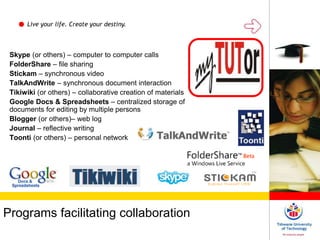
Programs facilitating collaboration
Skype (or others) – computer to computer calls
FolderShare – file sharing
Stickam – synchronous video
TalkAndWrite – synchronous document interaction
Tikiwiki (or others) – collaborative creation of materials
Google Docs & Spreadsheets – centralized storage of
documents for editing by multiple persons
Blogger (or others)– web log
Journal – reflective writing
Toonti (or others) – personal network
Live your life. Create your destiny.
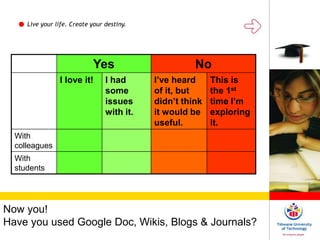
Now you!
Have you used Google Doc, Wikis, Blogs & Journals?
Yes No
I love it! I had
some
issues
with it.
I’ve heard
of it, but
didn’t think
it would be
useful.
This is
the 1st
time I’m
exploring
it.
With
colleagues
With
students

Using blogs, journals and wikis: an introduction

  • 1.
    Live your life.Create your destiny. Using Blogs, Journals and Wikis – an introduction
  • 2.
    Live your life.Create your destiny. Maximizing Classroom Collaboration Using Web 2.0 Technology (Future Technology) Specifically, using Blogs, Journals and Wikis
  • 3.
    Live your life.Create your destiny. Examples of Web 2.0 Technologies Emphasize online collaboration & sharing among users Wikipedia’s description of Web 2.0: http://en.wikipedia.org/wiki/Web_2.0 Wikis – Wikipedia, TikiWiki Blogs – Blogger, WordPress Social Bookmarking Sites – del.icio.us, BlinkList Web-based applications – ThinkFree, BaseCamp Google Docs and Spreadsheets
  • 4.
    Live your life.Create your destiny. Session objectives By completing this session, you will be able to: • Describe benefits & obstacles to collaboration. Whether among students, among faculty, or between students & faculty. • Identify online tools that support collaborative work. Particularly collaborative work on a shared document. • List examples of specific uses to support collaborative teaching & learning. Identify examples from your classes or work where a collaborative environment such as this is useful. • Determine how to evaluate whether or not to use Blogs, Journals and Wikis for certain educational situations. Dependent on your instructional goals or context and characteristics of students or lecturers, etc…
  • 5.
    Live your life.Create your destiny. Definition Collaboration - the act of collaborating. Working together for a common end. Latin roots: “to labour together.”
  • 6.
    Live your life.Create your destiny. What do we collaborate on? Manuscripts Grant proposals Presentations Classes Group projects Papers Other things
  • 7.
    Live your life.Create your destiny. How do we collaborate? In the past, more slowly & at more expense: Postal mail documents Telephone calls 21st century collaborators often use: Emailed documents Skype or other VoiP service
  • 8.
    Live your life.Create your destiny. Now you! What are some strategies that you’ve used Collaborate with Colleagues & Other Professionals Collaborate with Students
  • 9.
    Live your life.Create your destiny. Now you! Rate how well your collaboration strategies have worked (overall or specifically)
  • 10.
    Live your life.Create your destiny. Why don’t our standard collaboration strategies work well? Multiple people Multiple versions of material Retaining material Limited access to most current material
  • 11.
    Live your life.Create your destiny. What students want in collaborative projects… Anytime access to the most current version Ability to use programs they already know Ability to retain all versions, in case of the need to add material back in Automatic saving, just in case they forget that important step Ability for faculty to identify contributions of the various group members
  • 12.
    Live your life.Create your destiny. Now you! What collaborative activities do you use in classes? Papers? Presentations? Other things? (describe) Consider how well these collaborative activities work – for you as lecturer in your faculty
  • 13.
    Live your life.Create your destiny. Programs facilitating collaboration Skype (or others) – computer to computer calls FolderShare – file sharing Stickam – synchronous video TalkAndWrite – synchronous document interaction Tikiwiki (or others) – collaborative creation of materials Google Docs & Spreadsheets – centralized storage of documents for editing by multiple persons Blogger (or others)– web log Journal – reflective writing Toonti (or others) – personal network
  • 14.
    Live your life.Create your destiny. Now you! Have you used Google Doc, Wikis, Blogs & Journals? Yes No I love it! I had some issues with it. I’ve heard of it, but didn’t think it would be useful. This is the 1st time I’m exploring it. With colleagues With students