Step-by-Step Guide
to Generate Leads
with Facebook Ads
What’s Inside!
01
Creating Facebook Ad Campaigns: Prerequisites 02
Different Types of Lead Generation Facebook Ads 19
How to Create Facebook Lead Generation Ads 23
Facebook Ad Manager Reports 32
Best Practices of Running Facebook Ads 34
Creating Facebook
Ad Campaigns:
Prerequisites
CHAPTER 01
04
Chapter 01- Creating Facebook Ad Campaign: Prerequisites
1
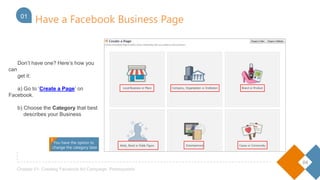
Don’t have one? Here’s how you can
get it:
a) Go to ‘Create a Page’ on Facebook.
b) Choose the Category that best
describes your Business
You have the option to
change the category later
Have a Facebook Business Page01
!
1
05
Chapter 01- Creating Facebook Ad Campaign: Prerequisites
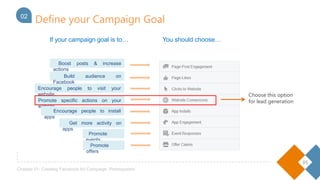
If your campaign goal is to… You should choose…
Encourage people to visit your website
Promote specific actions on your website
Boost posts & increase actions
Build audience on Facebook
Encourage people to install apps
Get more activity on apps
Promote events
Define your Campaign Goal02
Promote offers
Choose this option
for lead generation
06
Chapter 01- Creating Facebook Ad Campaign: Prerequisites
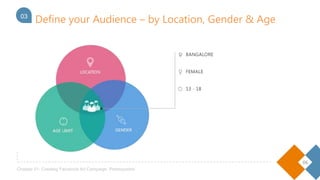
Define your Audience – by Location, Gender & Age03
07
Chapter 01- Creating Facebook Ad Campaign: Prerequisites
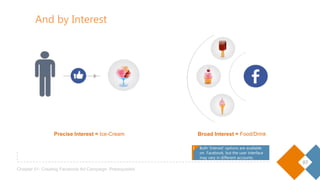
Broad Interest = Food/Drink
And by Interest
Precise Interest = Ice-Cream
Both ‘Interest’ options are available
on Facebook, but the user interface
may vary in different accounts.
! !
08
Chapter 01- Creating Facebook Ad Campaign: Prerequisites
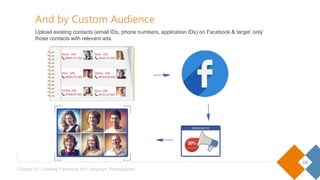
Upload existing contacts (email IDs, phone numbers, application IDs) on Facebook & target ‘only’
those contacts with relevant ads.
And by Custom Audience
09
Chapter 01- Creating Facebook Ad Campaign: Prerequisites
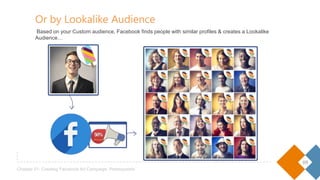
Or by Lookalike Audience
Based on your Custom audience, Facebook finds people with similar profiles & creates a Lookalike Audience…
10
Chapter 01- Creating Facebook Ad Campaign: Prerequisites
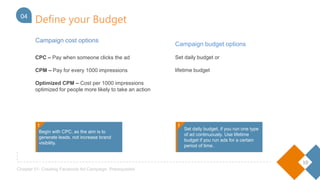
Campaign cost options
CPC – Pay when someone clicks the ad
CPM – Pay for every 1000 impressions
Optimized CPM – Cost per 1000 impressions
optimized for people more likely to take an action
Campaign budget options
Set daily budget or
lifetime budget
Define your Budget04
Begin with CPC, as the aim is to generate
leads, not increase brand visibility.
!
Set daily budget, if you run one type
of ad continuously. Use lifetime
budget if you run ads for a certain
period of time.
!
11
Chapter 01- Creating Facebook Ad Campaign: Prerequisites
Create Ad Images05
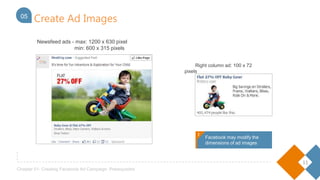
Right column ad: 100 x 72 pixels
Newsfeed ads - max: 1200 x 630 pixel
min: 600 x 315 pixels
!
Facebook may modify the
dimensions of ad images
!
12
Chapter 01- Creating Facebook Ad Campaign: Prerequisites
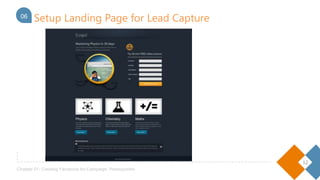
0406 Setup Landing Page for Lead Capture
13
Chapter 01- Creating Facebook Ad Campaign: Prerequisites
04
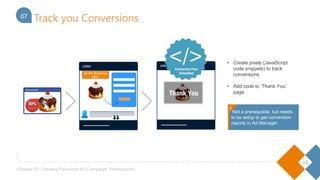
• Create pixels (JavaScript code
snippets) to track conversions
• Add code to ‘Thank You’
page
07 Track you Conversions
Not a prerequisite, but needs to
be setup to get conversion
reports in Ad Manager!
!
14
Chapter 01- Creating Facebook Ad Campaign: Prerequisites
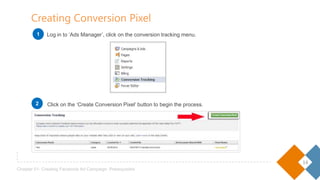
Log in to ‘Ads Manager’, click on the conversion tracking menu.
Click on the ‘Create Conversion Pixel’ button to begin the process.
Creating Conversion Pixel
1
2
15
Chapter 01- Creating Facebook Ad Campaign: Prerequisites
Creating Conversion Pixel
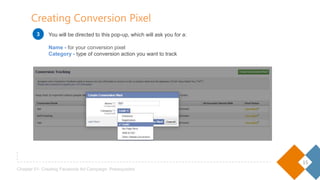
You will be directed to this pop-up, which will ask you for a:
Name - for your conversion pixel
Category - type of conversion action you want to track
3
16
Chapter 01- Creating Facebook Ad Campaign: Prerequisites
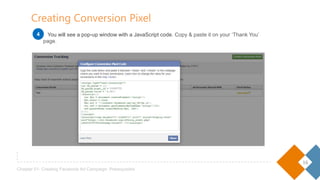
Creating Conversion Pixel
You will see a pop-up window with a JavaScript code. Copy & paste it on your ‘Thank You’ page.4
17
Chapter 01- Creating Facebook Ad Campaign: Prerequisites
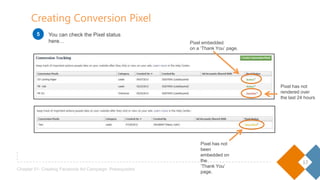
Pixel has not been
embedded on the
‘Thank You’ page.
You can check the Pixel status here…
Creating Conversion Pixel
Pixel embedded
on a ‘Thank You’ page.
Pixel has not
rendered over
the last 24 hours
5
18
Chapter 01- Creating Facebook Ad Campaign: Prerequisites
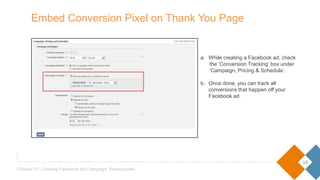
a. While creating a Facebook ad, check
the ‘Conversion Tracking’ box under
‘Campaign, Pricing & Schedule’.
b. Once done, you can track all
conversions that happen off your
Facebook ad.
Embed Conversion Pixel on Thank You Page
Different Types of
Lead Generation Ads
on Facebook
CHAPTER 02
20
Chapter 02- Different Types of Lead Generation Facebook Ads
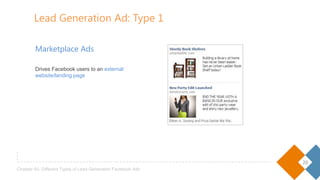
Marketplace Ads
Drives Facebook users to an external
website/landing page
Lead Generation Ad: Type 1
21
Chapter 02- Different Types of Lead Generation Facebook Ads
1
1
2
3
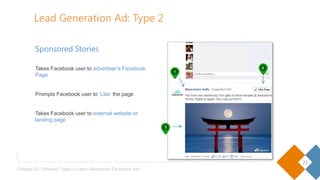
Sponsored Stories
Takes Facebook user to advertiser’s Facebook
Page
Prompts Facebook user to ‘Like’ the page
Takes Facebook user to external website or landing
page
Lead Generation Ad: Type 2
22
Chapter 02- Different Types of Lead Generation Facebook Ads
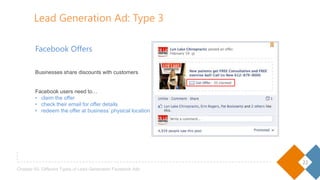
Facebook Offers
Businesses share discounts with customers
Facebook users need to…
• claim the offer
• check their email for offer details
• redeem the offer at business’ physical location
Lead Generation Ad: Type 3
Steps to Create
Facebook Lead
Generation Ads
CHAPTER 03
24
Chapter 03- How to Create Facebook Lead Generation Ads
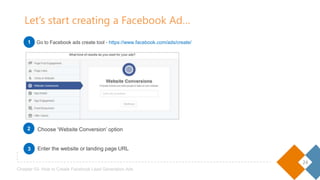
Choose ‘Website Conversion’ option
Enter the website or landing page URL
Let’s start creating a Facebook Ad…
Go to Facebook ads create tool - https://www.facebook.com/ads/create/1
2
3
25
Chapter 03- How to Create Facebook Lead Generation Ads
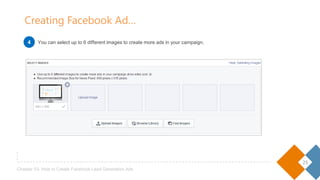
You can select up to 6 different images to create more ads in your campaign.
Creating Facebook Ad…
4
26
Chapter 03- How to Create Facebook Lead Generation Ads
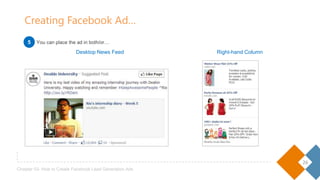
Desktop News Feed Right-hand Column
Creating Facebook Ad…
You can place the ad in both/or…5
27
Chapter 03- How to Create Facebook Lead Generation Ads
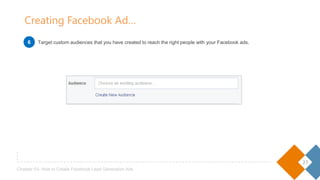
Target custom audiences that you have created to reach the right people with your Facebook ads.
Creating Facebook Ad…
6
28
Chapter 03- How to Create Facebook Lead Generation Ads
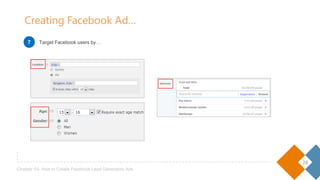
Target Facebook users by…
Creating Facebook Ad…
7
29
Chapter 03- How to Create Facebook Lead Generation Ads
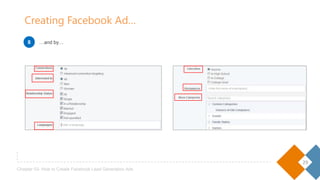
…and by…
Creating Facebook Ad…
8
30
Chapter 03- How to Create Facebook Lead Generation Ads
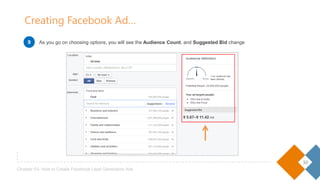
As you go on choosing options, you will see the Audience Count, and Suggested Bid change
Creating Facebook Ad…
9
31
Chapter 03- How to Create Facebook Lead Generation Ads
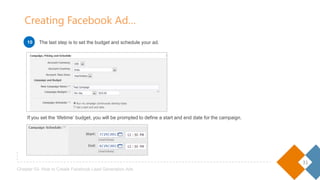
If you set the ‘lifetime’ budget, you will be prompted to define a start and end date for the campaign.
Creating Facebook Ad…
The last step is to set the budget and schedule your ad.1010
Facebook Ad
Manager
Reports
CHAPTER 04
33
Chapter 04- Facebook Ad Manager Reports
Facebook Ad Manager Basics
2
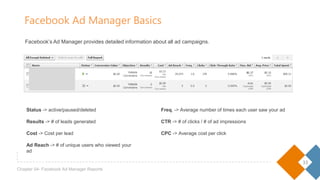
Status -> active/paused/deleted
Results -> # of leads generated
Cost -> Cost per lead
Ad Reach -> # of unique users who viewed your ad
Freq. -> Average number of times each user saw your ad
CTR -> # of clicks / # of ad impressions
CPC -> Average cost per click
Facebook’s Ad Manager provides detailed information about all ad campaigns.
Best Practices
of Running
Facebook Ads
CHAPTER 05
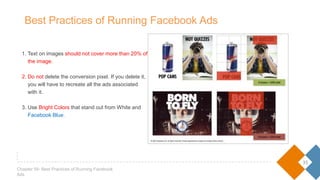
1. Text on images should not cover more than 20% of
the image.
2. Do not delete the conversion pixel. If you delete it,
you will have to recreate all the ads associated
with it.
3. Use Bright Colors that stand out from White and
Facebook Blue.
35
Chapter 05- Best Practices of Running Facebook Ads
Best Practices of Running Facebook Ads
• Your daily bid has to be twice the amount you choose per click. For instance, if you choose $2 / click, your daily
budget must be at least $4.
• Best practice is to bid within the amount suggested by Facebook.
36
Chapter 05- Best Practices of Running Facebook Ads
Minimum Budget Requirements
LeadSquared marketing software helps businesses capture and engage all
their online leads till they convert
Liked this EBook? Share it with others
Sign up for LeadSquared Trial

[E book] Step-by-Step Guide to Lead Generation Using Facebook Ads

  • 1.
    Step-by-Step Guide to GenerateLeads with Facebook Ads
  • 2.
    What’s Inside! 01 Creating FacebookAd Campaigns: Prerequisites 02 Different Types of Lead Generation Facebook Ads 19 How to Create Facebook Lead Generation Ads 23 Facebook Ad Manager Reports 32 Best Practices of Running Facebook Ads 34
  • 3.
  • 4.
    04 Chapter 01- CreatingFacebook Ad Campaign: Prerequisites 1 Don’t have one? Here’s how you can get it: a) Go to ‘Create a Page’ on Facebook. b) Choose the Category that best describes your Business You have the option to change the category later Have a Facebook Business Page01 !
  • 5.
    1 05 Chapter 01- CreatingFacebook Ad Campaign: Prerequisites If your campaign goal is to… You should choose… Encourage people to visit your website Promote specific actions on your website Boost posts & increase actions Build audience on Facebook Encourage people to install apps Get more activity on apps Promote events Define your Campaign Goal02 Promote offers Choose this option for lead generation
  • 6.
    06 Chapter 01- CreatingFacebook Ad Campaign: Prerequisites Define your Audience – by Location, Gender & Age03
  • 7.
    07 Chapter 01- CreatingFacebook Ad Campaign: Prerequisites Broad Interest = Food/Drink And by Interest Precise Interest = Ice-Cream Both ‘Interest’ options are available on Facebook, but the user interface may vary in different accounts. ! !
  • 8.
    08 Chapter 01- CreatingFacebook Ad Campaign: Prerequisites Upload existing contacts (email IDs, phone numbers, application IDs) on Facebook & target ‘only’ those contacts with relevant ads. And by Custom Audience
  • 9.
    09 Chapter 01- CreatingFacebook Ad Campaign: Prerequisites Or by Lookalike Audience Based on your Custom audience, Facebook finds people with similar profiles & creates a Lookalike Audience…
  • 10.
    10 Chapter 01- CreatingFacebook Ad Campaign: Prerequisites Campaign cost options CPC – Pay when someone clicks the ad CPM – Pay for every 1000 impressions Optimized CPM – Cost per 1000 impressions optimized for people more likely to take an action Campaign budget options Set daily budget or lifetime budget Define your Budget04 Begin with CPC, as the aim is to generate leads, not increase brand visibility. ! Set daily budget, if you run one type of ad continuously. Use lifetime budget if you run ads for a certain period of time. !
  • 11.
    11 Chapter 01- CreatingFacebook Ad Campaign: Prerequisites Create Ad Images05 Right column ad: 100 x 72 pixels Newsfeed ads - max: 1200 x 630 pixel min: 600 x 315 pixels ! Facebook may modify the dimensions of ad images !
  • 12.
    12 Chapter 01- CreatingFacebook Ad Campaign: Prerequisites 0406 Setup Landing Page for Lead Capture
  • 13.
    13 Chapter 01- CreatingFacebook Ad Campaign: Prerequisites 04 • Create pixels (JavaScript code snippets) to track conversions • Add code to ‘Thank You’ page 07 Track you Conversions Not a prerequisite, but needs to be setup to get conversion reports in Ad Manager! !
  • 14.
    14 Chapter 01- CreatingFacebook Ad Campaign: Prerequisites Log in to ‘Ads Manager’, click on the conversion tracking menu. Click on the ‘Create Conversion Pixel’ button to begin the process. Creating Conversion Pixel 1 2
  • 15.
    15 Chapter 01- CreatingFacebook Ad Campaign: Prerequisites Creating Conversion Pixel You will be directed to this pop-up, which will ask you for a: Name - for your conversion pixel Category - type of conversion action you want to track 3
  • 16.
    16 Chapter 01- CreatingFacebook Ad Campaign: Prerequisites Creating Conversion Pixel You will see a pop-up window with a JavaScript code. Copy & paste it on your ‘Thank You’ page.4
  • 17.
    17 Chapter 01- CreatingFacebook Ad Campaign: Prerequisites Pixel has not been embedded on the ‘Thank You’ page. You can check the Pixel status here… Creating Conversion Pixel Pixel embedded on a ‘Thank You’ page. Pixel has not rendered over the last 24 hours 5
  • 18.
    18 Chapter 01- CreatingFacebook Ad Campaign: Prerequisites a. While creating a Facebook ad, check the ‘Conversion Tracking’ box under ‘Campaign, Pricing & Schedule’. b. Once done, you can track all conversions that happen off your Facebook ad. Embed Conversion Pixel on Thank You Page
  • 19.
    Different Types of LeadGeneration Ads on Facebook CHAPTER 02
  • 20.
    20 Chapter 02- DifferentTypes of Lead Generation Facebook Ads Marketplace Ads Drives Facebook users to an external website/landing page Lead Generation Ad: Type 1
  • 21.
    21 Chapter 02- DifferentTypes of Lead Generation Facebook Ads 1 1 2 3 Sponsored Stories Takes Facebook user to advertiser’s Facebook Page Prompts Facebook user to ‘Like’ the page Takes Facebook user to external website or landing page Lead Generation Ad: Type 2
  • 22.
    22 Chapter 02- DifferentTypes of Lead Generation Facebook Ads Facebook Offers Businesses share discounts with customers Facebook users need to… • claim the offer • check their email for offer details • redeem the offer at business’ physical location Lead Generation Ad: Type 3
  • 23.
    Steps to Create FacebookLead Generation Ads CHAPTER 03
  • 24.
    24 Chapter 03- Howto Create Facebook Lead Generation Ads Choose ‘Website Conversion’ option Enter the website or landing page URL Let’s start creating a Facebook Ad… Go to Facebook ads create tool - https://www.facebook.com/ads/create/1 2 3
  • 25.
    25 Chapter 03- Howto Create Facebook Lead Generation Ads You can select up to 6 different images to create more ads in your campaign. Creating Facebook Ad… 4
  • 26.
    26 Chapter 03- Howto Create Facebook Lead Generation Ads Desktop News Feed Right-hand Column Creating Facebook Ad… You can place the ad in both/or…5
  • 27.
    27 Chapter 03- Howto Create Facebook Lead Generation Ads Target custom audiences that you have created to reach the right people with your Facebook ads. Creating Facebook Ad… 6
  • 28.
    28 Chapter 03- Howto Create Facebook Lead Generation Ads Target Facebook users by… Creating Facebook Ad… 7
  • 29.
    29 Chapter 03- Howto Create Facebook Lead Generation Ads …and by… Creating Facebook Ad… 8
  • 30.
    30 Chapter 03- Howto Create Facebook Lead Generation Ads As you go on choosing options, you will see the Audience Count, and Suggested Bid change Creating Facebook Ad… 9
  • 31.
    31 Chapter 03- Howto Create Facebook Lead Generation Ads If you set the ‘lifetime’ budget, you will be prompted to define a start and end date for the campaign. Creating Facebook Ad… The last step is to set the budget and schedule your ad.1010
  • 32.
  • 33.
    33 Chapter 04- FacebookAd Manager Reports Facebook Ad Manager Basics 2 Status -> active/paused/deleted Results -> # of leads generated Cost -> Cost per lead Ad Reach -> # of unique users who viewed your ad Freq. -> Average number of times each user saw your ad CTR -> # of clicks / # of ad impressions CPC -> Average cost per click Facebook’s Ad Manager provides detailed information about all ad campaigns.
  • 34.
  • 35.
    1. Text onimages should not cover more than 20% of the image. 2. Do not delete the conversion pixel. If you delete it, you will have to recreate all the ads associated with it. 3. Use Bright Colors that stand out from White and Facebook Blue. 35 Chapter 05- Best Practices of Running Facebook Ads Best Practices of Running Facebook Ads
  • 36.
    • Your dailybid has to be twice the amount you choose per click. For instance, if you choose $2 / click, your daily budget must be at least $4. • Best practice is to bid within the amount suggested by Facebook. 36 Chapter 05- Best Practices of Running Facebook Ads Minimum Budget Requirements
  • 37.
    LeadSquared marketing softwarehelps businesses capture and engage all their online leads till they convert Liked this EBook? Share it with others Sign up for LeadSquared Trial