Evolution & AMPlification
of Mobile Search Marketing
Driving Traffic & Conversions in 2017
Quick Intro
A digital marketer & Assistant Vice President at AdLift, a global
digital marketing company
AdLift was named as India’s 8th fastest growing mid-size
company by INC 500 in 2013 & SEO Agency by IDMA in 2014
I am responsible for driving global growth through organic and
paid search marketing channels, including paid search, display,
social media, content marketing & SEO for all clients
@
in/abhishekmehta9
abhishek.mehta@adlift.com
Agenda
• Mobile SEO - Importance, Type
• Mobile SEO - Ranking Factors
• Mobile SEO UX
• Mobile Going Local
• AMP Introduction
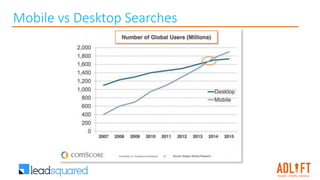
Mobile vs Desktop Searches
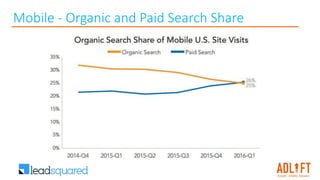
Mobile - Organic and Paid Search Share
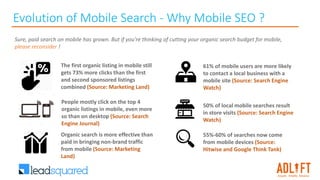
Evolution of Mobile Search - Why Mobile SEO ?
The first organic listing in mobile still
gets 73% more clicks than the first
and second sponsored listings
combined (Source: Marketing Land)
Sure, paid search on mobile has grown. But if you're thinking of cutting your organic search budget for mobile,
please reconsider !
People mostly click on the top 4
organic listings in mobile, even more
so than on desktop (Source: Search
Engine Journal)
Organic search is more effective than
paid in bringing non-brand traffic
from mobile (Source: Marketing
Land)
61% of mobile users are more likely
to contact a local business with a
mobile site (Source: Search Engine
Watch)
50% of local mobile searches result
in store visits (Source: Search Engine
Watch)
55%-60% of searches now come
from mobile devices (Source:
Hitwise and Google Think Tank)
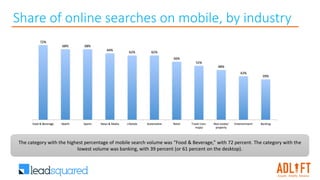
Share of online searches on mobile, by industry
The category with the highest percentage of mobile search volume was “Food & Beverage,” with 72 percent. The category with the
lowest volume was banking, with 39 percent (or 61 percent on the desktop).
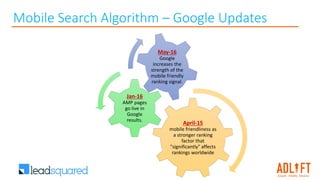
Mobile Search Algorithm – Google Updates
April-15
mobile friendliness as
a stronger ranking
factor that
"significantly" affects
rankings worldwide
Jan-16
AMP pages
go live in
Google
results.
May-16
Google
increases the
strength of the
mobile friendly
ranking signal.
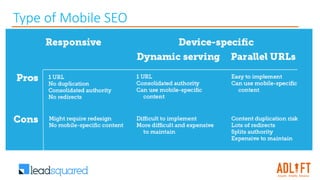
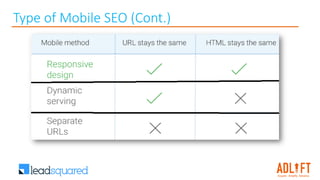
Type of Mobile SEO
Type of Mobile SEO (Cont.)
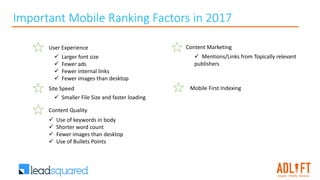
User Experience
 Larger font size
 Fewer ads
 Fewer internal links
 Fewer images than desktop
Site Speed
 Smaller File Size and faster loading
Content Marketing
 Mentions/Links from Topically relevant
publishers
Content Quality
 Use of keywords in body
 Shorter word count
 Fewer images than desktop
 Use of Bullets Points
Important Mobile Ranking Factors in 2017
Mobile First Indexing
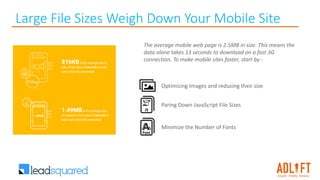
Large File Sizes Weigh Down Your Mobile Site
The average mobile web page is 2.5MB in size. This means the
data alone takes 13 seconds to download on a fast 3G
connection. To make mobile sites faster, start by -
Minimize the Number of Fonts
Optimizing Images and reducing their size
Paring Down JavaScript File Sizes
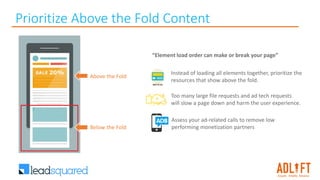
Prioritize Above the Fold Content
Above the Fold
Below the Fold
“Element load order can make or break your page”
Instead of loading all elements together, prioritize the
resources that show above the fold.
Too many large file requests and ad tech requests
will slow a page down and harm the user experience.
Assess your ad-related calls to remove low
performing monetization partners
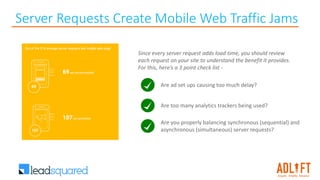
Server Requests Create Mobile Web Traffic Jams
Since every server request adds load time, you should review
each request on your site to understand the benefit it provides.
For this, here’s a 3 point check list -
Are you properly balancing synchronous (sequential) and
asynchronous (simultaneous) server requests?
Are ad set ups causing too much delay?
Are too many analytics trackers being used?
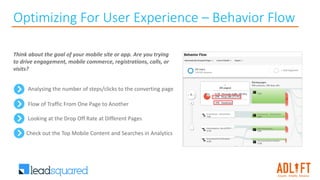
Optimizing For User Experience – Behavior Flow
Analysing the number of steps/clicks to the converting page
Think about the goal of your mobile site or app. Are you trying
to drive engagement, mobile commerce, registrations, calls, or
visits?
Flow of Traffic From One Page to Another
Looking at the Drop Off Rate at Different Pages
Check out the Top Mobile Content and Searches in Analytics
Optimize Mobile User Experience
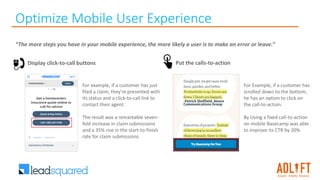
“The more steps you have in your mobile experience, the more likely a user is to make an error or leave.”
For example, if a customer has just
filed a claim, they're presented with
its status and a click-to-call link to
contact their agent.
The result was a remarkable seven-
fold increase in claim submissions
and a 35% rise in the start-to-finish
rate for claim submissions
Display click-to-call buttons Put the calls-to-action
For Example, if a customer has
scrolled down to the bottom,
he has an option to click on
the call-to-action.
By Using a fixed call-to-action
on mobile Basecamp was able
to improve its CTR by 20%
Optimize Mobile User Experience Contd..
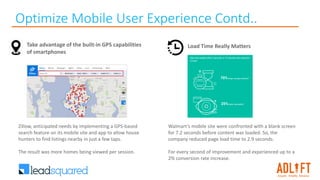
Take advantage of the built-in GPS capabilities
of smartphones
Zillow, anticipated needs by implementing a GPS-based
search feature on its mobile site and app to allow house
hunters to find listings nearby in just a few taps.
The result was more homes being viewed per session.
Load Time Really Matters
Walmart’s mobile site were confronted with a blank screen
for 7.2 seconds before content was loaded. So, the
company reduced page load time to 2.9 seconds.
For every second of improvement and experienced up to a
2% conversion rate increase.
Optimize Mobile User Experience – Other Points
Use Schema.org structured data
Because of the limited screen space, a search result with rich snippets is even more likely to stand out
than on a desktop.
Optimize titles and meta descriptions
Remember that you're working with less screen space when a user searches using a mobile device. To show off
your best work in SERPS, be as concise as possible
Design for the fat finger
Touch screen navigation can lead to accidental clicks if your buttons are too big, too small, or in the path
of a finger that's trying to get the page to scroll.
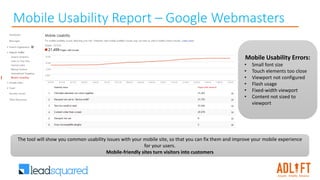
Mobile Usability Report – Google Webmasters
Mobile Usability Errors:
• Small font size
• Touch elements too close
• Viewport not configured
• Flash usage
• Fixed-width viewport
• Content not sized to
viewport
The tool will show you common usability issues with your mobile site, so that you can fix them and improve your mobile experience
for your users.
Mobile-friendly sites turn visitors into customers
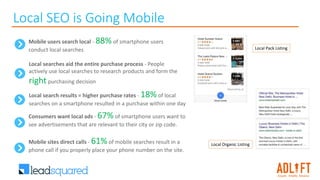
Local SEO is Going Mobile
Mobile users search local - 88% of smartphone users
conduct local searches
Local searches aid the entire purchase process - People
actively use local searches to research products and form the
right purchasing decision
Local search results = higher purchase rates - 18% of local
searches on a smartphone resulted in a purchase within one day
Consumers want local ads - 67% of smartphone users want to
see advertisements that are relevant to their city or zip code.
Mobile sites direct calls - 61% of mobile searches result in a
phone call if you properly place your phone number on the site.
Local Pack Listing
Local Organic Listing
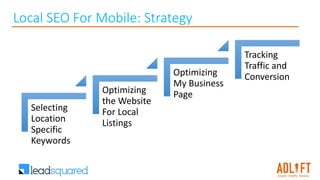
Local SEO For Mobile: Strategy
Selecting
Location
Specific
Keywords
Optimizing
the Website
For Local
Listings
Optimizing
My Business
Page
Tracking
Traffic and
Conversion
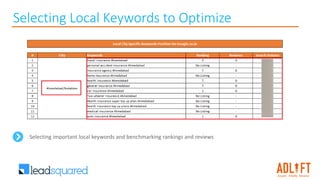
Selecting Local Keywords to Optimize
Selecting important local keywords and benchmarking rankings and reviews
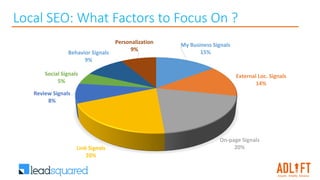
Local SEO: What Factors to Focus On ?
My Business Signals
15%
External Loc. Signals
14%
On-page Signals
20%Link Signals
20%
Review Signals
8%
Social Signals
5%
Behavior Signals
9%
Personalization
9%
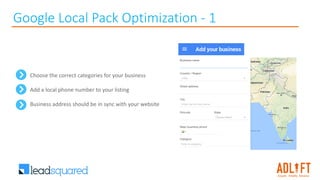
Google Local Pack Optimization - 1
Choose the correct categories for your business
Add a local phone number to your listing
Business address should be in sync with your website
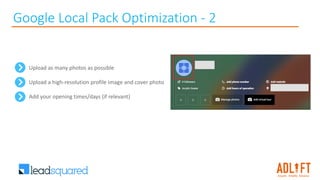
Google Local Pack Optimization - 2
Upload as many photos as possible
Upload a high-resolution profile image and cover photo
Add your opening times/days (if relevant)
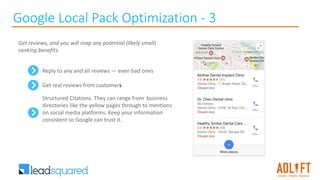
Google Local Pack Optimization - 3
Reply to any and all reviews — even bad ones
Get real reviews from customers
Structured Citations. They can range from business
directories like the yellow pages through to mentions
on social media platforms. Keep your information
consistent so Google can trust it.
Get reviews, and you will reap any potential (likely small)
ranking benefits.
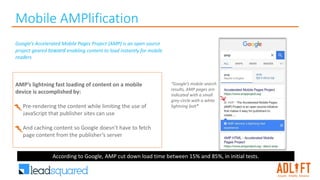
Mobile AMPlification
“Google’s mobile search
results, AMP pages are
indicated with a small
grey circle with a white
lightning bolt”
Google’s Accelerated Mobile Pages Project (AMP) is an open source
project geared toward enabling content to load instantly for mobile
readers
AMP’s lightning fast loading of content on a mobile
device is accomplished by:
• Pre-rendering the content while limiting the use of
JavaScript that publisher sites can use
• And caching content so Google doesn’t have to fetch
page content from the publisher’s server
According to Google, AMP cut down load time between 15% and 85%, in initial tests.
Why AMP ?
Faster Loading Pages for
Mobile Users
Increased Visibility/CTR
for Publishers & Sites
Improvement in
Rankings
AMP improves mobile friendliness. Thus, it
is highly likely that an AMP site will be
ranked higher than slower/Non AMP sites.
Click through rates improve for AMP
pages as search results will stand out &
users will seek quicker loading times.
Businesses that adopt AMP could help to
drive mobile abandonment rates down and
increase conversions.
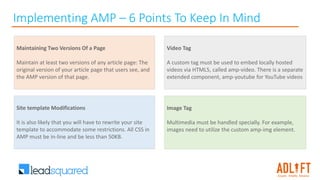
Implementing AMP – 6 Points To Keep In Mind
Maintaining Two Versions Of a Page
Maintain at least two versions of any article page: The
original version of your article page that users see, and
the AMP version of that page.
Site template Modifications
It is also likely that you will have to rewrite your site
template to accommodate some restrictions. All CSS in
AMP must be in-line and be less than 50KB.
Image Tag
Multimedia must be handled specially. For example,
images need to utilize the custom amp-img element.
Video Tag
A custom tag must be used to embed locally hosted
videos via HTML5, called amp-video. There is a separate
extended component, amp-youtube for YouTube videos
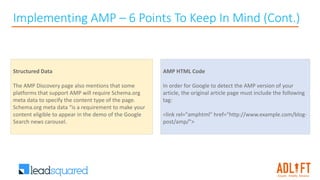
Implementing AMP – 6 Points To Keep In Mind (Cont.)
AMP HTML Code
In order for Google to detect the AMP version of your
article, the original article page must include the following
tag:
<link rel="amphtml" href="http://www.example.com/blog-
post/amp/">
Structured Data
The AMP Discovery page also mentions that some
platforms that support AMP will require Schema.org
meta data to specify the content type of the page.
Schema.org meta data “is a requirement to make your
content eligible to appear in the demo of the Google
Search news carousel.
To remain competitive in mobile marketing, brands need to be able to measure how well they are helping
prospects complete their desired actions.
AMP-enabled content can help brands meet customers during “micro-moments”
Implementing AMP
I want-to-buy moments
I-want-to-go moments
I-want-to-do moments
AMP in Search
“I want to do” moments “I want to go” moments“I want to shop” moments
AMP For E-Commerce – User Journey: Step-1
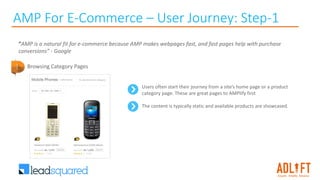
“AMP is a natural fit for e-commerce because AMP makes webpages fast, and fast pages help with purchase
conversions” - Google
Users often start their journey from a site’s home page or a product
category page. These are great pages to AMPlify first
The content is typically static and available products are showcased.
Browsing Category Pages
AMP For E-Commerce – User Journey: Step-2
Landing On Category Page
User arrives at an AMP’ed product page after clicking on an item from a
featured listing on our e-commerce site’s home page.
AMP can help you create a rich beautiful page to showcase your product.
Add bold hero images and videos using the <amp-carousel> and <amp-
video> elements.
For sections with more detailed requirements or extended descriptions, use
the <amp-accordion> tag. In addition, enable users to share product links
with the <amp-social-share> element.
AMP For E-Commerce – User Journey: Step-3
Exploring Related Products & Converting
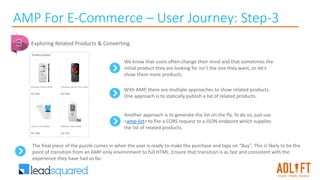
We know that users often change their mind and that sometimes the
initial product they are looking for isn’t the one they want, so let’s
show them more products.
With AMP, there are multiple approaches to show related products.
One approach is to statically publish a list of related products.
Another approach is to generate the list on the fly. To do so, just use
<amp-list> to fire a CORS request to a JSON endpoint which supplies
the list of related products.
The final piece of the puzzle comes in when the user is ready to make the purchase and taps on “Buy”. This is likely to be the
point of transition from an AMP-only environment to full HTML. Ensure that transition is as fast and consistent with the
experience they have had so far.
Few More Points AMP
• With AMP, you have to use a streamlined version of CSS.
• You are only permitted to use the JavaScript library that AMP provides – since you’re not
in control, you may experience lazy loading. This might be the only downside to AMP.
• For AMP sites to work every time, they must be properly validated
• No forms are allowed on AMP pages.
• For better experience, custom fonts have to be specially loaded.
• To avoid quirky-looking images, make sure to declare height and width.
• Use AMP-approved extensions if you want to have videos on your page.
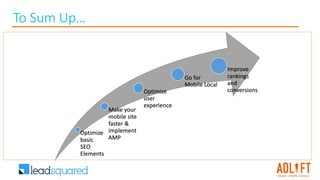
To Sum Up…
Optimize
basic
SEO
Elements
Make your
mobile site
faster &
implement
AMP
Optimize
user
experience
Go for
Mobile Local
Improve
rankings
and
conversions
Resources
1. https://www.thinkwithgoogle.com/articles/mobile-page-speed-load-time.html
2. https://www.doubleclickbygoogle.com/articles/mobile-speed-matters/
3. https://www.thinkwithgoogle.com/articles/speed-is-key-optimize-your-mobile-experience.html
4. https://moz.com/local-search-ranking-factors
5. https://www.semrush.com/blog/local-seo-is-going-mobile-start-here/
6. http://searchengineland.com/get-started-accelerated-mobile-pages-amp-240688
7. http://neilpatel.com/2016/04/27/the-definitive-guide-to-accelerated-mobile-pages-amp/
8. https://support.google.com/webmasters/answer/6340290?hl=en
9. https://amphtml.wordpress.com/2016/08/22/getting-started-with-amp-for-e-commerce/
10. http://www.smartinsights.com/mobile-marketing/mobile-marketing-analytics/mobile-marketing-statistics/
Questions?
Thank You!

Evolution & AMPlification of Mobile Search Marketing [Driving Traffic & Conversions in 2017]

  • 1.
    Evolution & AMPlification ofMobile Search Marketing Driving Traffic & Conversions in 2017
  • 2.
    Quick Intro A digitalmarketer & Assistant Vice President at AdLift, a global digital marketing company AdLift was named as India’s 8th fastest growing mid-size company by INC 500 in 2013 & SEO Agency by IDMA in 2014 I am responsible for driving global growth through organic and paid search marketing channels, including paid search, display, social media, content marketing & SEO for all clients @ in/abhishekmehta9 abhishek.mehta@adlift.com
  • 3.
    Agenda • Mobile SEO- Importance, Type • Mobile SEO - Ranking Factors • Mobile SEO UX • Mobile Going Local • AMP Introduction
  • 4.
  • 5.
    Mobile - Organicand Paid Search Share
  • 6.
    Evolution of MobileSearch - Why Mobile SEO ? The first organic listing in mobile still gets 73% more clicks than the first and second sponsored listings combined (Source: Marketing Land) Sure, paid search on mobile has grown. But if you're thinking of cutting your organic search budget for mobile, please reconsider ! People mostly click on the top 4 organic listings in mobile, even more so than on desktop (Source: Search Engine Journal) Organic search is more effective than paid in bringing non-brand traffic from mobile (Source: Marketing Land) 61% of mobile users are more likely to contact a local business with a mobile site (Source: Search Engine Watch) 50% of local mobile searches result in store visits (Source: Search Engine Watch) 55%-60% of searches now come from mobile devices (Source: Hitwise and Google Think Tank)
  • 7.
    Share of onlinesearches on mobile, by industry The category with the highest percentage of mobile search volume was “Food & Beverage,” with 72 percent. The category with the lowest volume was banking, with 39 percent (or 61 percent on the desktop).
  • 8.
    Mobile Search Algorithm– Google Updates April-15 mobile friendliness as a stronger ranking factor that "significantly" affects rankings worldwide Jan-16 AMP pages go live in Google results. May-16 Google increases the strength of the mobile friendly ranking signal.
  • 9.
  • 10.
    Type of MobileSEO (Cont.)
  • 11.
    User Experience  Largerfont size  Fewer ads  Fewer internal links  Fewer images than desktop Site Speed  Smaller File Size and faster loading Content Marketing  Mentions/Links from Topically relevant publishers Content Quality  Use of keywords in body  Shorter word count  Fewer images than desktop  Use of Bullets Points Important Mobile Ranking Factors in 2017 Mobile First Indexing
  • 12.
    Large File SizesWeigh Down Your Mobile Site The average mobile web page is 2.5MB in size. This means the data alone takes 13 seconds to download on a fast 3G connection. To make mobile sites faster, start by - Minimize the Number of Fonts Optimizing Images and reducing their size Paring Down JavaScript File Sizes
  • 13.
    Prioritize Above theFold Content Above the Fold Below the Fold “Element load order can make or break your page” Instead of loading all elements together, prioritize the resources that show above the fold. Too many large file requests and ad tech requests will slow a page down and harm the user experience. Assess your ad-related calls to remove low performing monetization partners
  • 14.
    Server Requests CreateMobile Web Traffic Jams Since every server request adds load time, you should review each request on your site to understand the benefit it provides. For this, here’s a 3 point check list - Are you properly balancing synchronous (sequential) and asynchronous (simultaneous) server requests? Are ad set ups causing too much delay? Are too many analytics trackers being used?
  • 15.
    Optimizing For UserExperience – Behavior Flow Analysing the number of steps/clicks to the converting page Think about the goal of your mobile site or app. Are you trying to drive engagement, mobile commerce, registrations, calls, or visits? Flow of Traffic From One Page to Another Looking at the Drop Off Rate at Different Pages Check out the Top Mobile Content and Searches in Analytics
  • 16.
    Optimize Mobile UserExperience “The more steps you have in your mobile experience, the more likely a user is to make an error or leave.” For example, if a customer has just filed a claim, they're presented with its status and a click-to-call link to contact their agent. The result was a remarkable seven- fold increase in claim submissions and a 35% rise in the start-to-finish rate for claim submissions Display click-to-call buttons Put the calls-to-action For Example, if a customer has scrolled down to the bottom, he has an option to click on the call-to-action. By Using a fixed call-to-action on mobile Basecamp was able to improve its CTR by 20%
  • 17.
    Optimize Mobile UserExperience Contd.. Take advantage of the built-in GPS capabilities of smartphones Zillow, anticipated needs by implementing a GPS-based search feature on its mobile site and app to allow house hunters to find listings nearby in just a few taps. The result was more homes being viewed per session. Load Time Really Matters Walmart’s mobile site were confronted with a blank screen for 7.2 seconds before content was loaded. So, the company reduced page load time to 2.9 seconds. For every second of improvement and experienced up to a 2% conversion rate increase.
  • 18.
    Optimize Mobile UserExperience – Other Points Use Schema.org structured data Because of the limited screen space, a search result with rich snippets is even more likely to stand out than on a desktop. Optimize titles and meta descriptions Remember that you're working with less screen space when a user searches using a mobile device. To show off your best work in SERPS, be as concise as possible Design for the fat finger Touch screen navigation can lead to accidental clicks if your buttons are too big, too small, or in the path of a finger that's trying to get the page to scroll.
  • 19.
    Mobile Usability Report– Google Webmasters Mobile Usability Errors: • Small font size • Touch elements too close • Viewport not configured • Flash usage • Fixed-width viewport • Content not sized to viewport The tool will show you common usability issues with your mobile site, so that you can fix them and improve your mobile experience for your users. Mobile-friendly sites turn visitors into customers
  • 20.
    Local SEO isGoing Mobile Mobile users search local - 88% of smartphone users conduct local searches Local searches aid the entire purchase process - People actively use local searches to research products and form the right purchasing decision Local search results = higher purchase rates - 18% of local searches on a smartphone resulted in a purchase within one day Consumers want local ads - 67% of smartphone users want to see advertisements that are relevant to their city or zip code. Mobile sites direct calls - 61% of mobile searches result in a phone call if you properly place your phone number on the site. Local Pack Listing Local Organic Listing
  • 21.
    Local SEO ForMobile: Strategy Selecting Location Specific Keywords Optimizing the Website For Local Listings Optimizing My Business Page Tracking Traffic and Conversion
  • 22.
    Selecting Local Keywordsto Optimize Selecting important local keywords and benchmarking rankings and reviews
  • 23.
    Local SEO: WhatFactors to Focus On ? My Business Signals 15% External Loc. Signals 14% On-page Signals 20%Link Signals 20% Review Signals 8% Social Signals 5% Behavior Signals 9% Personalization 9%
  • 24.
    Google Local PackOptimization - 1 Choose the correct categories for your business Add a local phone number to your listing Business address should be in sync with your website
  • 25.
    Google Local PackOptimization - 2 Upload as many photos as possible Upload a high-resolution profile image and cover photo Add your opening times/days (if relevant)
  • 26.
    Google Local PackOptimization - 3 Reply to any and all reviews — even bad ones Get real reviews from customers Structured Citations. They can range from business directories like the yellow pages through to mentions on social media platforms. Keep your information consistent so Google can trust it. Get reviews, and you will reap any potential (likely small) ranking benefits.
  • 27.
    Mobile AMPlification “Google’s mobilesearch results, AMP pages are indicated with a small grey circle with a white lightning bolt” Google’s Accelerated Mobile Pages Project (AMP) is an open source project geared toward enabling content to load instantly for mobile readers AMP’s lightning fast loading of content on a mobile device is accomplished by: • Pre-rendering the content while limiting the use of JavaScript that publisher sites can use • And caching content so Google doesn’t have to fetch page content from the publisher’s server According to Google, AMP cut down load time between 15% and 85%, in initial tests.
  • 28.
    Why AMP ? FasterLoading Pages for Mobile Users Increased Visibility/CTR for Publishers & Sites Improvement in Rankings AMP improves mobile friendliness. Thus, it is highly likely that an AMP site will be ranked higher than slower/Non AMP sites. Click through rates improve for AMP pages as search results will stand out & users will seek quicker loading times. Businesses that adopt AMP could help to drive mobile abandonment rates down and increase conversions.
  • 29.
    Implementing AMP –6 Points To Keep In Mind Maintaining Two Versions Of a Page Maintain at least two versions of any article page: The original version of your article page that users see, and the AMP version of that page. Site template Modifications It is also likely that you will have to rewrite your site template to accommodate some restrictions. All CSS in AMP must be in-line and be less than 50KB. Image Tag Multimedia must be handled specially. For example, images need to utilize the custom amp-img element. Video Tag A custom tag must be used to embed locally hosted videos via HTML5, called amp-video. There is a separate extended component, amp-youtube for YouTube videos
  • 30.
    Implementing AMP –6 Points To Keep In Mind (Cont.) AMP HTML Code In order for Google to detect the AMP version of your article, the original article page must include the following tag: <link rel="amphtml" href="http://www.example.com/blog- post/amp/"> Structured Data The AMP Discovery page also mentions that some platforms that support AMP will require Schema.org meta data to specify the content type of the page. Schema.org meta data “is a requirement to make your content eligible to appear in the demo of the Google Search news carousel.
  • 31.
    To remain competitivein mobile marketing, brands need to be able to measure how well they are helping prospects complete their desired actions. AMP-enabled content can help brands meet customers during “micro-moments” Implementing AMP I want-to-buy moments I-want-to-go moments I-want-to-do moments
  • 32.
    AMP in Search “Iwant to do” moments “I want to go” moments“I want to shop” moments
  • 33.
    AMP For E-Commerce– User Journey: Step-1 “AMP is a natural fit for e-commerce because AMP makes webpages fast, and fast pages help with purchase conversions” - Google Users often start their journey from a site’s home page or a product category page. These are great pages to AMPlify first The content is typically static and available products are showcased. Browsing Category Pages
  • 34.
    AMP For E-Commerce– User Journey: Step-2 Landing On Category Page User arrives at an AMP’ed product page after clicking on an item from a featured listing on our e-commerce site’s home page. AMP can help you create a rich beautiful page to showcase your product. Add bold hero images and videos using the <amp-carousel> and <amp- video> elements. For sections with more detailed requirements or extended descriptions, use the <amp-accordion> tag. In addition, enable users to share product links with the <amp-social-share> element.
  • 35.
    AMP For E-Commerce– User Journey: Step-3 Exploring Related Products & Converting We know that users often change their mind and that sometimes the initial product they are looking for isn’t the one they want, so let’s show them more products. With AMP, there are multiple approaches to show related products. One approach is to statically publish a list of related products. Another approach is to generate the list on the fly. To do so, just use <amp-list> to fire a CORS request to a JSON endpoint which supplies the list of related products. The final piece of the puzzle comes in when the user is ready to make the purchase and taps on “Buy”. This is likely to be the point of transition from an AMP-only environment to full HTML. Ensure that transition is as fast and consistent with the experience they have had so far.
  • 36.
    Few More PointsAMP • With AMP, you have to use a streamlined version of CSS. • You are only permitted to use the JavaScript library that AMP provides – since you’re not in control, you may experience lazy loading. This might be the only downside to AMP. • For AMP sites to work every time, they must be properly validated • No forms are allowed on AMP pages. • For better experience, custom fonts have to be specially loaded. • To avoid quirky-looking images, make sure to declare height and width. • Use AMP-approved extensions if you want to have videos on your page.
  • 37.
    To Sum Up… Optimize basic SEO Elements Makeyour mobile site faster & implement AMP Optimize user experience Go for Mobile Local Improve rankings and conversions
  • 38.
    Resources 1. https://www.thinkwithgoogle.com/articles/mobile-page-speed-load-time.html 2. https://www.doubleclickbygoogle.com/articles/mobile-speed-matters/ 3.https://www.thinkwithgoogle.com/articles/speed-is-key-optimize-your-mobile-experience.html 4. https://moz.com/local-search-ranking-factors 5. https://www.semrush.com/blog/local-seo-is-going-mobile-start-here/ 6. http://searchengineland.com/get-started-accelerated-mobile-pages-amp-240688 7. http://neilpatel.com/2016/04/27/the-definitive-guide-to-accelerated-mobile-pages-amp/ 8. https://support.google.com/webmasters/answer/6340290?hl=en 9. https://amphtml.wordpress.com/2016/08/22/getting-started-with-amp-for-e-commerce/ 10. http://www.smartinsights.com/mobile-marketing/mobile-marketing-analytics/mobile-marketing-statistics/
  • 39.
  • 40.