© 2010 Pearson Addison-Wesley. All rights reserved.
Addison Wesley
is an imprint of
Designing the User Interface:
Strategies for Effective Human-Computer Interaction
Fifth Edition
Ben Shneiderman & Catherine Plaisant
in collaboration with
Maxine S. Cohen and Steven M. Jacobs
CHAPTER 3:
Managing Design Processes
1-3
© 2010 Pearson Addison-Wesley. All rights reserved.
Organizational Design and
Support Usability
• Design is inherently creative and unpredictable.
Interactive system designers must blend
knowledge of technical feasibility with a mystical
esthetic sense of what attracts users. hared
language
• Carroll and Rosson design characterization:
– Design is a process, not a state.
– The design process is nonhierarchical.
– The process is radically transformational.
– Design intrinsically involves the discovery of new
goals.
3-3
1-4
© 2010 Pearson Addison-Wesley. All rights reserved.
Organizational Design and
Support Usability (cont.)
• “Usability engineering” has evolved into a recognized
discipline with maturing practices and a growing set of
standards
• Usability engineers and user-interface architects,
sometimes called the user experience (UX) team are
gaining experience in organizational change
• There are numerous papers and reporting addressing
return on investment (ROI) for usability testing
• The Usability Professional's Association (UPA) holds
annual meetings called the “World Usability Day”
3-4
1-5
© 2010 Pearson Addison-Wesley. All rights reserved.
The Four Pillars of Design
3-5
1-6
© 2010 Pearson Addison-Wesley. All rights reserved.
The Four Pillars of Design
• User Interface Requirements
– Soliciting and clearly specifying user requirements is a
major key to success in any development activity
– Laying out the user-interface requirements is part of
the overall requirements development and
management process
– User interface requirements describe system behavior
• Ethnographic Observation
– Identifying and observing the user community in action
– Discussed later
3-6
1-7
© 2010 Pearson Addison-Wesley. All rights reserved.
The Four Pillars of Design
• Guidelines documents and processes
Each project has different needs, but guidelines should
be considered for:
• Words, icons, and graphics
– Terminology (objects and actions), abbreviations, and
capitalization
– Character set, fonts, font sizes, and styles (bold, italic,
underline)
– Icons, graphics, line thickness, and
– Use of color, backgrounds, highlighting, and blinking
3-7
1-8
© 2010 Pearson Addison-Wesley. All rights reserved.
The Four Pillars of Design (cont.)
• Screen-layout issues
– Menu selection, form fill-in, and dialog-box formats
– Wording of prompts, feedback, and error messages
– Justification, white space, and margins
– Data entry and display formats for items and lists
– Use and contents of headers and footers
• Input and output devices
– Keyboard, display, cursor control, and pointing
devices
– Audible sounds, voice feedback, touch input, and
other special devices
– Response time for a variety of tasks
3-8
1-9
© 2010 Pearson Addison-Wesley. All rights reserved.
The Four Pillars of Design (cont.)
• Action sequences
– Direct-manipulation clicking, dragging, dropping, and
gestures
– Command syntax, semantics, and sequences
– Programmed function keys
– Error handling and recovery procedures
• Training
– Online help and tutorials
– Training and reference materials
– Command syntax, semantics, and sequences
3-9
1-10
© 2010 Pearson Addison-Wesley. All rights reserved.
The Four Pillars of Design (cont.)
Guidelines creation should be a social process within an organization
to help it gain visibility and build support
3-10
1-11
© 2010 Pearson Addison-Wesley. All rights reserved.
Developmental Methodologies
IBM’s Ease of Use development methodology
specifies activities by roles and phases
3-11
1-12
© 2010 Pearson Addison-Wesley. All rights reserved.
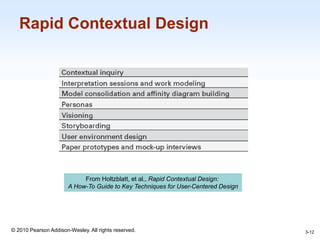
Rapid Contextual Design
From Holtzblatt, et al., Rapid Contextual Design:
A How-To Guide to Key Techniques for User-Centered Design
3-12
1-13
© 2010 Pearson Addison-Wesley. All rights reserved.
Ethnographic Observation
• Preparation
– Understand organization policies and work culture.
– Familiarize yourself with the system and its history.
– Set initial goals and prepare questions.
– Gain access and permission to observe/interview.
• Field Study
– Establish rapport with managers and users.
– Observe/interview users in their workplace and collect
subjective/objective quantitative/qualitative data.
– Follow any leads that emerge from the visits.
3-13
1-14
© 2010 Pearson Addison-Wesley. All rights reserved.
Ethnographic Observation (cont.)
• Analysis
– Compile the collected data in numerical, textual, and
multimedia databases.
– Quantify data and compile statistics.
– Reduce and interpret the data.
– Refine the goals and the process used.
• Reporting
– Consider multiple audiences and goals.
– Prepare a report and present the findings.
3-14
1-15
© 2010 Pearson Addison-Wesley. All rights reserved.
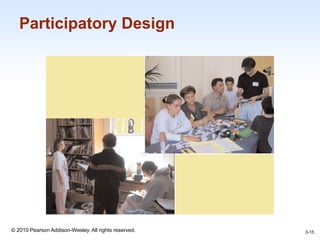
Participatory Design
3-15
1-16
© 2010 Pearson Addison-Wesley. All rights reserved.
Participatory Design (cont.)
Controversial
• More user involvement brings:
– more accurate information about tasks
– more opportunity for users to influence design
decisions
– a sense of participation that builds users' ego
investment in successful implementation
– potential for increased user acceptance of final
system
3-16
1-17
© 2010 Pearson Addison-Wesley. All rights reserved.
Participatory Design (cont.)
• On the negative side, extensive user involvement may:
– be more costly
– lengthen the implementation period
– build antagonism with people not involved or whose
suggestions rejected
– force designers to compromise their design to satisfy
incompetent participants
– build opposition to implementation
– exacerbate personality conflicts between design-
team members and users
– show that organizational politics and preferences of
certain individuals are more important than technical
issues
3-17
1-18
© 2010 Pearson Addison-Wesley. All rights reserved.
Participatory Design (cont.)
3-18
1-19
© 2010 Pearson Addison-Wesley. All rights reserved.
Scenario Development
Day-in-the-life scenarios:
• characterize what happens when users perform typical
tasks
• can be acted out as a form of walkthrough
• may be used as basis for videotape
• useful tools
– table of user communities across top, tasks listed
down the side
– table of task sequences
– flowchart or transition diagram
3-19
1-20
© 2010 Pearson Addison-Wesley. All rights reserved.
Social Impact Statement for
Early Design Review
Describe the new system and its benefits
• Convey the high level goals of the new system.
• Identify the stakeholders.
• Identify specific benefits
3-20
1-21
© 2010 Pearson Addison-Wesley. All rights reserved.
Social Impact Statement for
Early Design Review (cont.)
Address concerns and potential barriers
• Anticipate changes in job functions and potential layoffs.
• Address security and privacy issues.
• Discuss accountability and responsibility for system
misuse and failure.
• Avoid potential biases.
• Weigh individual rights vs. societal benefits.
• Assess trade-offs between centralization and
decentralization.
• Preserve democratic principles.
• Ensure diverse access.
• promote simplicity and preserve what works.
3-21
1-22
© 2010 Pearson Addison-Wesley. All rights reserved.
Social Impact Statement for Early
Design Review (cont.)
Outline the development process
• Present and estimated project schedule.
• Propose process for making decisions.
• Discuss expectations of how stakeholders will
be involved.
• Recognize needs for more staff, training, and
hardware.
• Propose plan for backups of data and
equipment.
• Outline plan for migrating to the new system.
3-22
1-23
© 2010 Pearson Addison-Wesley. All rights reserved.
Legal Issues
Potential Controversies
• What material is eligible for copyright?
• Are copyrights or patents more appropriate for user
interfaces?
• What constitutes copyright infringement?
• Should user interfaces be copyrighted?
• Evolving public policies related to:
– Privacy
– Liability related to system safety/reliability
– Freedom of speech
3-23

Chap03

  • 1.
    © 2010 PearsonAddison-Wesley. All rights reserved. Addison Wesley is an imprint of Designing the User Interface: Strategies for Effective Human-Computer Interaction Fifth Edition Ben Shneiderman & Catherine Plaisant in collaboration with Maxine S. Cohen and Steven M. Jacobs CHAPTER 3: Managing Design Processes
  • 2.
    1-3 © 2010 PearsonAddison-Wesley. All rights reserved. Organizational Design and Support Usability • Design is inherently creative and unpredictable. Interactive system designers must blend knowledge of technical feasibility with a mystical esthetic sense of what attracts users. hared language • Carroll and Rosson design characterization: – Design is a process, not a state. – The design process is nonhierarchical. – The process is radically transformational. – Design intrinsically involves the discovery of new goals. 3-3
  • 3.
    1-4 © 2010 PearsonAddison-Wesley. All rights reserved. Organizational Design and Support Usability (cont.) • “Usability engineering” has evolved into a recognized discipline with maturing practices and a growing set of standards • Usability engineers and user-interface architects, sometimes called the user experience (UX) team are gaining experience in organizational change • There are numerous papers and reporting addressing return on investment (ROI) for usability testing • The Usability Professional's Association (UPA) holds annual meetings called the “World Usability Day” 3-4
  • 4.
    1-5 © 2010 PearsonAddison-Wesley. All rights reserved. The Four Pillars of Design 3-5
  • 5.
    1-6 © 2010 PearsonAddison-Wesley. All rights reserved. The Four Pillars of Design • User Interface Requirements – Soliciting and clearly specifying user requirements is a major key to success in any development activity – Laying out the user-interface requirements is part of the overall requirements development and management process – User interface requirements describe system behavior • Ethnographic Observation – Identifying and observing the user community in action – Discussed later 3-6
  • 6.
    1-7 © 2010 PearsonAddison-Wesley. All rights reserved. The Four Pillars of Design • Guidelines documents and processes Each project has different needs, but guidelines should be considered for: • Words, icons, and graphics – Terminology (objects and actions), abbreviations, and capitalization – Character set, fonts, font sizes, and styles (bold, italic, underline) – Icons, graphics, line thickness, and – Use of color, backgrounds, highlighting, and blinking 3-7
  • 7.
    1-8 © 2010 PearsonAddison-Wesley. All rights reserved. The Four Pillars of Design (cont.) • Screen-layout issues – Menu selection, form fill-in, and dialog-box formats – Wording of prompts, feedback, and error messages – Justification, white space, and margins – Data entry and display formats for items and lists – Use and contents of headers and footers • Input and output devices – Keyboard, display, cursor control, and pointing devices – Audible sounds, voice feedback, touch input, and other special devices – Response time for a variety of tasks 3-8
  • 8.
    1-9 © 2010 PearsonAddison-Wesley. All rights reserved. The Four Pillars of Design (cont.) • Action sequences – Direct-manipulation clicking, dragging, dropping, and gestures – Command syntax, semantics, and sequences – Programmed function keys – Error handling and recovery procedures • Training – Online help and tutorials – Training and reference materials – Command syntax, semantics, and sequences 3-9
  • 9.
    1-10 © 2010 PearsonAddison-Wesley. All rights reserved. The Four Pillars of Design (cont.) Guidelines creation should be a social process within an organization to help it gain visibility and build support 3-10
  • 10.
    1-11 © 2010 PearsonAddison-Wesley. All rights reserved. Developmental Methodologies IBM’s Ease of Use development methodology specifies activities by roles and phases 3-11
  • 11.
    1-12 © 2010 PearsonAddison-Wesley. All rights reserved. Rapid Contextual Design From Holtzblatt, et al., Rapid Contextual Design: A How-To Guide to Key Techniques for User-Centered Design 3-12
  • 12.
    1-13 © 2010 PearsonAddison-Wesley. All rights reserved. Ethnographic Observation • Preparation – Understand organization policies and work culture. – Familiarize yourself with the system and its history. – Set initial goals and prepare questions. – Gain access and permission to observe/interview. • Field Study – Establish rapport with managers and users. – Observe/interview users in their workplace and collect subjective/objective quantitative/qualitative data. – Follow any leads that emerge from the visits. 3-13
  • 13.
    1-14 © 2010 PearsonAddison-Wesley. All rights reserved. Ethnographic Observation (cont.) • Analysis – Compile the collected data in numerical, textual, and multimedia databases. – Quantify data and compile statistics. – Reduce and interpret the data. – Refine the goals and the process used. • Reporting – Consider multiple audiences and goals. – Prepare a report and present the findings. 3-14
  • 14.
    1-15 © 2010 PearsonAddison-Wesley. All rights reserved. Participatory Design 3-15
  • 15.
    1-16 © 2010 PearsonAddison-Wesley. All rights reserved. Participatory Design (cont.) Controversial • More user involvement brings: – more accurate information about tasks – more opportunity for users to influence design decisions – a sense of participation that builds users' ego investment in successful implementation – potential for increased user acceptance of final system 3-16
  • 16.
    1-17 © 2010 PearsonAddison-Wesley. All rights reserved. Participatory Design (cont.) • On the negative side, extensive user involvement may: – be more costly – lengthen the implementation period – build antagonism with people not involved or whose suggestions rejected – force designers to compromise their design to satisfy incompetent participants – build opposition to implementation – exacerbate personality conflicts between design- team members and users – show that organizational politics and preferences of certain individuals are more important than technical issues 3-17
  • 17.
    1-18 © 2010 PearsonAddison-Wesley. All rights reserved. Participatory Design (cont.) 3-18
  • 18.
    1-19 © 2010 PearsonAddison-Wesley. All rights reserved. Scenario Development Day-in-the-life scenarios: • characterize what happens when users perform typical tasks • can be acted out as a form of walkthrough • may be used as basis for videotape • useful tools – table of user communities across top, tasks listed down the side – table of task sequences – flowchart or transition diagram 3-19
  • 19.
    1-20 © 2010 PearsonAddison-Wesley. All rights reserved. Social Impact Statement for Early Design Review Describe the new system and its benefits • Convey the high level goals of the new system. • Identify the stakeholders. • Identify specific benefits 3-20
  • 20.
    1-21 © 2010 PearsonAddison-Wesley. All rights reserved. Social Impact Statement for Early Design Review (cont.) Address concerns and potential barriers • Anticipate changes in job functions and potential layoffs. • Address security and privacy issues. • Discuss accountability and responsibility for system misuse and failure. • Avoid potential biases. • Weigh individual rights vs. societal benefits. • Assess trade-offs between centralization and decentralization. • Preserve democratic principles. • Ensure diverse access. • promote simplicity and preserve what works. 3-21
  • 21.
    1-22 © 2010 PearsonAddison-Wesley. All rights reserved. Social Impact Statement for Early Design Review (cont.) Outline the development process • Present and estimated project schedule. • Propose process for making decisions. • Discuss expectations of how stakeholders will be involved. • Recognize needs for more staff, training, and hardware. • Propose plan for backups of data and equipment. • Outline plan for migrating to the new system. 3-22
  • 22.
    1-23 © 2010 PearsonAddison-Wesley. All rights reserved. Legal Issues Potential Controversies • What material is eligible for copyright? • Are copyrights or patents more appropriate for user interfaces? • What constitutes copyright infringement? • Should user interfaces be copyrighted? • Evolving public policies related to: – Privacy – Liability related to system safety/reliability – Freedom of speech 3-23