© 2010 Pearson Addison-Wesley. All rights reserved.
Addison Wesley
is an imprint of
Designing the User Interface:
Strategies for Effective Human-Computer Interaction
Fifth Edition
Ben Shneiderman & Catherine Plaisant
in collaboration with
Maxine S. Cohen and Steven M. Jacobs
CHAPTER 4:
Evaluating interface Designs
1-3
© 2010 Pearson Addison-Wesley. All rights reserved.
Introduction
• Designers can become so entranced with their creations that they
may fail to evaluate them adequately.
• Experienced designers have attained the wisdom and humility to
know that extensive testing is a necessity.
• The determinants of the evaluation plan include:
– stage of design (early, middle, late)
– novelty of project (well defined vs. exploratory)
– number of expected users
– criticality of the interface (life-critical medical system vs. museum
exhibit support)
– costs of product and finances allocated for testing
– time available
– experience of the design and evaluation team
4-3
1-4
© 2010 Pearson Addison-Wesley. All rights reserved.
Introduction (cont.)
• Usability evaluators must broaden their methods and be open to non-
empirical methods, such as user sketches, consideration of design
alternatives, and ethnographic studies.
• Recommendations needs to be based on observational findings
• The design team needs to be involved with research on the current
system design drawbacks
• Tools and techniques are evolving
• The range of evaluation plans might be anywhere from an ambitious
two-year test with multiple phases for a new national air-traffic–
control system to a three-day test with six users for a small internal
web site
• The range of costs might be from 20% of a project down to 5%.
• Usability testing has become an established and accepted part of the
design process
4-4
1-5
© 2010 Pearson Addison-Wesley. All rights reserved.
Expert Reviews
• While informal demos to colleagues or customers can
provide some useful feedback, more formal expert
reviews have proven to be effective
• Expert reviews entail one-half day to one week effort,
although a lengthy training period may sometimes be
required to explain the task domain or operational
procedures
• There are a variety of expert review methods to chose
from:
– Heuristic evaluation
– Guidelines review
– Consistency inspection
– Cognitive walkthrough
– Metaphors of human thinking
– Formal usability inspection
4-5
1-6
© 2010 Pearson Addison-Wesley. All rights reserved.
Expert Reviews (cont.)
• Expert reviews can be scheduled at several points in the
development process when experts are available and
when the design team is ready for feedback.
• Different experts tend to find different problems in an
interface, so 3-5 expert reviewers can be highly
productive, as can complementary usability testing.
• The dangers with expert reviews are that the experts may
not have an adequate understanding of the task domain
or user communities.
• Even experienced expert reviewers have great difficulty
knowing how typical users, especially first-time users will
really behave.
4-6
1-7
© 2010 Pearson Addison-Wesley. All rights reserved.
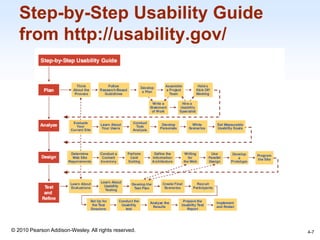
Step-by-Step Usability Guide
from http://usability.gov/
4-7
1-8
© 2010 Pearson Addison-Wesley. All rights reserved.
Usability Testing and
Laboratories
4-8
1-9
© 2010 Pearson Addison-Wesley. All rights reserved.
Usability Testing and
Laboratories (cont.)
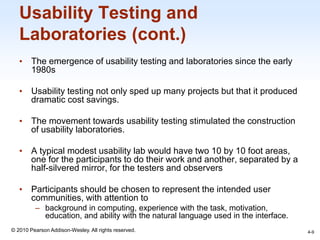
• The emergence of usability testing and laboratories since the early
1980s
• Usability testing not only sped up many projects but that it produced
dramatic cost savings.
• The movement towards usability testing stimulated the construction
of usability laboratories.
• A typical modest usability lab would have two 10 by 10 foot areas,
one for the participants to do their work and another, separated by a
half-silvered mirror, for the testers and observers
• Participants should be chosen to represent the intended user
communities, with attention to
– background in computing, experience with the task, motivation,
education, and ability with the natural language used in the interface.
4-9
1-10
© 2010 Pearson Addison-Wesley. All rights reserved.
Usability Testing and
Laboratories (cont.)
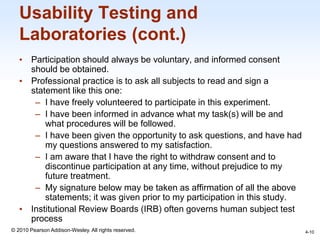
• Participation should always be voluntary, and informed consent
should be obtained.
• Professional practice is to ask all subjects to read and sign a
statement like this one:
– I have freely volunteered to participate in this experiment.
– I have been informed in advance what my task(s) will be and
what procedures will be followed.
– I have been given the opportunity to ask questions, and have had
my questions answered to my satisfaction.
– I am aware that I have the right to withdraw consent and to
discontinue participation at any time, without prejudice to my
future treatment.
– My signature below may be taken as affirmation of all the above
statements; it was given prior to my participation in this study.
• Institutional Review Boards (IRB) often governs human subject test
process
4-10
1-11
© 2010 Pearson Addison-Wesley. All rights reserved.
Usability Testing and
Laboratories (cont.)
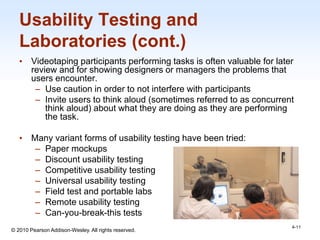
• Videotaping participants performing tasks is often valuable for later
review and for showing designers or managers the problems that
users encounter.
– Use caution in order to not interfere with participants
– Invite users to think aloud (sometimes referred to as concurrent
think aloud) about what they are doing as they are performing
the task.
• Many variant forms of usability testing have been tried:
– Paper mockups
– Discount usability testing
– Competitive usability testing
– Universal usability testing
– Field test and portable labs
– Remote usability testing
– Can-you-break-this tests
4-11
1-12
© 2010 Pearson Addison-Wesley. All rights reserved.
Usability Testing and
Laboratories (cont.)
4-12
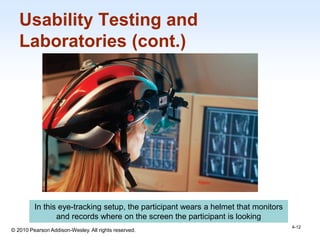
In this eye-tracking setup, the participant wears a helmet that monitors
and records where on the screen the participant is looking
1-13
© 2010 Pearson Addison-Wesley. All rights reserved.
Usability Testing and
Laboratories (cont.)
4-13
More portable eye-tracking devices
1-14
© 2010 Pearson Addison-Wesley. All rights reserved.
Survey Instruments
• Written user surveys are a familiar, inexpensive and generally
acceptable companion for usability tests and expert reviews.
• Keys to successful surveys
– Clear goals in advance
– Development of focused items that help attain the goals.
• Survey goals can be tied to the components of the Objects and
Action Interface model of interface design.
• Users could be asked for their subjective impressions about
specific aspects of the interface such as the representation of:
– task domain objects and actions
– syntax of inputs and design of displays.
4-14
1-15
© 2010 Pearson Addison-Wesley. All rights reserved.
Survey Instruments (cont.)
• Other goals would be to ascertain
– users background (age, gender, origins, education, income)
– experience with computers (specific applications or software
packages, length of time, depth of knowledge)
– job responsibilities (decision-making influence, managerial
roles, motivation)
– personality style (introvert vs. extrovert, risk taking vs. risk
aversive, early vs. late adopter, systematic vs. opportunistic)
– reasons for not using an interface (inadequate services, too
complex, too slow)
– familiarity with features (printing, macros, shortcuts, tutorials)
– their feeling state after using an interface (confused vs. clear,
frustrated vs. in-control, bored vs. excited).
4-15
1-16
© 2010 Pearson Addison-Wesley. All rights reserved.
Surveys (cont.)
• Online surveys avoid the cost of printing and the extra
effort needed for distribution and collection of paper
forms.
• Many people prefer to answer a brief survey displayed
on a screen, instead of filling in and returning a printed
form,
– although there is a potential bias in the sample.
• A survey example is the Questionnaire for User
Interaction Satisfaction (QUIS).
– http://lap.umd.edu/quis/
4-16
1-17
© 2010 Pearson Addison-Wesley. All rights reserved.
Acceptance Test
• For large implementation projects, the customer or manager
usually sets objective and measurable goals for hardware and
software performance.
• If the completed product fails to meet these acceptance criteria,
the system must be reworked until success is demonstrated.
• Rather than the vague and misleading criterion of "user friendly,"
measurable criteria for the user interface can be established for
the following:
– Time to learn specific functions
– Speed of task performance
– Rate of errors by users
– Human retention of commands over time
– Subjective user satisfaction
4-17
1-18
© 2010 Pearson Addison-Wesley. All rights reserved.
Acceptance Test (cont.)
• In a large system, there may be eight or 10 such tests to carry out on
different components of the interface and with different user
communities.
• Once acceptance testing has been successful, there may be a period
of field testing before national or international distribution..
4-18
1-19
© 2010 Pearson Addison-Wesley. All rights reserved.
Evaluation During Active Use
• Successful active use requires constant attention from dedicated
managers, user-services personnel, and maintenance staff.
• Perfection is not attainable, but percentage improvements are
possible.
• Interviews and focus group discussions
– Interviews with individual users can be productive because the
interviewer can pursue specific issues of concern.
– Group discussions are valuable to ascertain the universality of
comments.
4-19
1-20
© 2010 Pearson Addison-Wesley. All rights reserved.
Evaluation During Active Use
(cont.)
• Continuous user-performance data logging
– The software architecture should make it easy for system
managers to collect data about
– The patterns of system usage
– Speed of user performance
– Rate of errors
– Frequency of request for online assistance
– A major benefit is guidance to system maintainers in optimizing
performance and reducing costs for all participants.
• Online or telephone consultants, e-mail, and online suggestion
boxes
– Many users feel reassured if they know there is a human
assistance available
– On some network systems, the consultants can monitor the
user's computer and see the same displays that the user sees
4-20
1-21
© 2010 Pearson Addison-Wesley. All rights reserved.
Evaluation During Active Use
(cont.)
• Online suggestion box or e-mail trouble reporting
– Electronic mail to the maintainers or designers.
– For some users, writing a letter may be seen as requiring too
much effort.
• Discussion groups, wiki’s and newsgroups
– Permit postings of open messages and questions
– Some are independent, e.g. America Online and Yahoo!
– Topic list
– Sometimes moderators
– Social systems
– Comments and suggestions should be encouraged.
4-21
1-22
© 2010 Pearson Addison-Wesley. All rights reserved.
Evaluation During Active Use
(cont.)
4-22
Bug report using Google’s Chrome browser (http://www.google.com/chrome/)
1-23
© 2010 Pearson Addison-Wesley. All rights reserved.
Controlled Psychologically-
oriented Experiments
• Scientific and engineering progress is often stimulated by improved
techniques for precise measurement.
• Rapid progress in the designs of interfaces will be stimulated as
researchers and practitioners evolve suitable human-performance
measures and techniques.
4-23
1-24
© 2010 Pearson Addison-Wesley. All rights reserved.
Controlled Psychologically-
oriented Experiments (cont.)
• The outline of the scientific method as applied to human-computer
interaction might comprise these tasks:
– Deal with a practical problem and consider the theoretical
framework
– State a lucid and testable hypothesis
– Identify a small number of independent variables that are to be
manipulated
– Carefully choose the dependent variables that will be measured
– Judiciously select subjects and carefully or randomly assign
subjects to groups
– Control for biasing factors (non-representative sample of subjects
or selection of tasks, inconsistent testing procedures)
– Apply statistical methods to data analysis
– Resolve the practical problem, refine the theory, and give advice
to future researchers
4-24
1-25
© 2010 Pearson Addison-Wesley. All rights reserved.
Controlled Psychologically-
oriented Experiments (cont.)
• Controlled experiments can help fine tuning the human-computer
interface of actively used systems.
• Performance could be compared with the control group.
• Dependent measures could include performance times, user-
subjective satisfaction, error rates, and user retention over time.
4-25

Chap04

  • 1.
    © 2010 PearsonAddison-Wesley. All rights reserved. Addison Wesley is an imprint of Designing the User Interface: Strategies for Effective Human-Computer Interaction Fifth Edition Ben Shneiderman & Catherine Plaisant in collaboration with Maxine S. Cohen and Steven M. Jacobs CHAPTER 4: Evaluating interface Designs
  • 2.
    1-3 © 2010 PearsonAddison-Wesley. All rights reserved. Introduction • Designers can become so entranced with their creations that they may fail to evaluate them adequately. • Experienced designers have attained the wisdom and humility to know that extensive testing is a necessity. • The determinants of the evaluation plan include: – stage of design (early, middle, late) – novelty of project (well defined vs. exploratory) – number of expected users – criticality of the interface (life-critical medical system vs. museum exhibit support) – costs of product and finances allocated for testing – time available – experience of the design and evaluation team 4-3
  • 3.
    1-4 © 2010 PearsonAddison-Wesley. All rights reserved. Introduction (cont.) • Usability evaluators must broaden their methods and be open to non- empirical methods, such as user sketches, consideration of design alternatives, and ethnographic studies. • Recommendations needs to be based on observational findings • The design team needs to be involved with research on the current system design drawbacks • Tools and techniques are evolving • The range of evaluation plans might be anywhere from an ambitious two-year test with multiple phases for a new national air-traffic– control system to a three-day test with six users for a small internal web site • The range of costs might be from 20% of a project down to 5%. • Usability testing has become an established and accepted part of the design process 4-4
  • 4.
    1-5 © 2010 PearsonAddison-Wesley. All rights reserved. Expert Reviews • While informal demos to colleagues or customers can provide some useful feedback, more formal expert reviews have proven to be effective • Expert reviews entail one-half day to one week effort, although a lengthy training period may sometimes be required to explain the task domain or operational procedures • There are a variety of expert review methods to chose from: – Heuristic evaluation – Guidelines review – Consistency inspection – Cognitive walkthrough – Metaphors of human thinking – Formal usability inspection 4-5
  • 5.
    1-6 © 2010 PearsonAddison-Wesley. All rights reserved. Expert Reviews (cont.) • Expert reviews can be scheduled at several points in the development process when experts are available and when the design team is ready for feedback. • Different experts tend to find different problems in an interface, so 3-5 expert reviewers can be highly productive, as can complementary usability testing. • The dangers with expert reviews are that the experts may not have an adequate understanding of the task domain or user communities. • Even experienced expert reviewers have great difficulty knowing how typical users, especially first-time users will really behave. 4-6
  • 6.
    1-7 © 2010 PearsonAddison-Wesley. All rights reserved. Step-by-Step Usability Guide from http://usability.gov/ 4-7
  • 7.
    1-8 © 2010 PearsonAddison-Wesley. All rights reserved. Usability Testing and Laboratories 4-8
  • 8.
    1-9 © 2010 PearsonAddison-Wesley. All rights reserved. Usability Testing and Laboratories (cont.) • The emergence of usability testing and laboratories since the early 1980s • Usability testing not only sped up many projects but that it produced dramatic cost savings. • The movement towards usability testing stimulated the construction of usability laboratories. • A typical modest usability lab would have two 10 by 10 foot areas, one for the participants to do their work and another, separated by a half-silvered mirror, for the testers and observers • Participants should be chosen to represent the intended user communities, with attention to – background in computing, experience with the task, motivation, education, and ability with the natural language used in the interface. 4-9
  • 9.
    1-10 © 2010 PearsonAddison-Wesley. All rights reserved. Usability Testing and Laboratories (cont.) • Participation should always be voluntary, and informed consent should be obtained. • Professional practice is to ask all subjects to read and sign a statement like this one: – I have freely volunteered to participate in this experiment. – I have been informed in advance what my task(s) will be and what procedures will be followed. – I have been given the opportunity to ask questions, and have had my questions answered to my satisfaction. – I am aware that I have the right to withdraw consent and to discontinue participation at any time, without prejudice to my future treatment. – My signature below may be taken as affirmation of all the above statements; it was given prior to my participation in this study. • Institutional Review Boards (IRB) often governs human subject test process 4-10
  • 10.
    1-11 © 2010 PearsonAddison-Wesley. All rights reserved. Usability Testing and Laboratories (cont.) • Videotaping participants performing tasks is often valuable for later review and for showing designers or managers the problems that users encounter. – Use caution in order to not interfere with participants – Invite users to think aloud (sometimes referred to as concurrent think aloud) about what they are doing as they are performing the task. • Many variant forms of usability testing have been tried: – Paper mockups – Discount usability testing – Competitive usability testing – Universal usability testing – Field test and portable labs – Remote usability testing – Can-you-break-this tests 4-11
  • 11.
    1-12 © 2010 PearsonAddison-Wesley. All rights reserved. Usability Testing and Laboratories (cont.) 4-12 In this eye-tracking setup, the participant wears a helmet that monitors and records where on the screen the participant is looking
  • 12.
    1-13 © 2010 PearsonAddison-Wesley. All rights reserved. Usability Testing and Laboratories (cont.) 4-13 More portable eye-tracking devices
  • 13.
    1-14 © 2010 PearsonAddison-Wesley. All rights reserved. Survey Instruments • Written user surveys are a familiar, inexpensive and generally acceptable companion for usability tests and expert reviews. • Keys to successful surveys – Clear goals in advance – Development of focused items that help attain the goals. • Survey goals can be tied to the components of the Objects and Action Interface model of interface design. • Users could be asked for their subjective impressions about specific aspects of the interface such as the representation of: – task domain objects and actions – syntax of inputs and design of displays. 4-14
  • 14.
    1-15 © 2010 PearsonAddison-Wesley. All rights reserved. Survey Instruments (cont.) • Other goals would be to ascertain – users background (age, gender, origins, education, income) – experience with computers (specific applications or software packages, length of time, depth of knowledge) – job responsibilities (decision-making influence, managerial roles, motivation) – personality style (introvert vs. extrovert, risk taking vs. risk aversive, early vs. late adopter, systematic vs. opportunistic) – reasons for not using an interface (inadequate services, too complex, too slow) – familiarity with features (printing, macros, shortcuts, tutorials) – their feeling state after using an interface (confused vs. clear, frustrated vs. in-control, bored vs. excited). 4-15
  • 15.
    1-16 © 2010 PearsonAddison-Wesley. All rights reserved. Surveys (cont.) • Online surveys avoid the cost of printing and the extra effort needed for distribution and collection of paper forms. • Many people prefer to answer a brief survey displayed on a screen, instead of filling in and returning a printed form, – although there is a potential bias in the sample. • A survey example is the Questionnaire for User Interaction Satisfaction (QUIS). – http://lap.umd.edu/quis/ 4-16
  • 16.
    1-17 © 2010 PearsonAddison-Wesley. All rights reserved. Acceptance Test • For large implementation projects, the customer or manager usually sets objective and measurable goals for hardware and software performance. • If the completed product fails to meet these acceptance criteria, the system must be reworked until success is demonstrated. • Rather than the vague and misleading criterion of "user friendly," measurable criteria for the user interface can be established for the following: – Time to learn specific functions – Speed of task performance – Rate of errors by users – Human retention of commands over time – Subjective user satisfaction 4-17
  • 17.
    1-18 © 2010 PearsonAddison-Wesley. All rights reserved. Acceptance Test (cont.) • In a large system, there may be eight or 10 such tests to carry out on different components of the interface and with different user communities. • Once acceptance testing has been successful, there may be a period of field testing before national or international distribution.. 4-18
  • 18.
    1-19 © 2010 PearsonAddison-Wesley. All rights reserved. Evaluation During Active Use • Successful active use requires constant attention from dedicated managers, user-services personnel, and maintenance staff. • Perfection is not attainable, but percentage improvements are possible. • Interviews and focus group discussions – Interviews with individual users can be productive because the interviewer can pursue specific issues of concern. – Group discussions are valuable to ascertain the universality of comments. 4-19
  • 19.
    1-20 © 2010 PearsonAddison-Wesley. All rights reserved. Evaluation During Active Use (cont.) • Continuous user-performance data logging – The software architecture should make it easy for system managers to collect data about – The patterns of system usage – Speed of user performance – Rate of errors – Frequency of request for online assistance – A major benefit is guidance to system maintainers in optimizing performance and reducing costs for all participants. • Online or telephone consultants, e-mail, and online suggestion boxes – Many users feel reassured if they know there is a human assistance available – On some network systems, the consultants can monitor the user's computer and see the same displays that the user sees 4-20
  • 20.
    1-21 © 2010 PearsonAddison-Wesley. All rights reserved. Evaluation During Active Use (cont.) • Online suggestion box or e-mail trouble reporting – Electronic mail to the maintainers or designers. – For some users, writing a letter may be seen as requiring too much effort. • Discussion groups, wiki’s and newsgroups – Permit postings of open messages and questions – Some are independent, e.g. America Online and Yahoo! – Topic list – Sometimes moderators – Social systems – Comments and suggestions should be encouraged. 4-21
  • 21.
    1-22 © 2010 PearsonAddison-Wesley. All rights reserved. Evaluation During Active Use (cont.) 4-22 Bug report using Google’s Chrome browser (http://www.google.com/chrome/)
  • 22.
    1-23 © 2010 PearsonAddison-Wesley. All rights reserved. Controlled Psychologically- oriented Experiments • Scientific and engineering progress is often stimulated by improved techniques for precise measurement. • Rapid progress in the designs of interfaces will be stimulated as researchers and practitioners evolve suitable human-performance measures and techniques. 4-23
  • 23.
    1-24 © 2010 PearsonAddison-Wesley. All rights reserved. Controlled Psychologically- oriented Experiments (cont.) • The outline of the scientific method as applied to human-computer interaction might comprise these tasks: – Deal with a practical problem and consider the theoretical framework – State a lucid and testable hypothesis – Identify a small number of independent variables that are to be manipulated – Carefully choose the dependent variables that will be measured – Judiciously select subjects and carefully or randomly assign subjects to groups – Control for biasing factors (non-representative sample of subjects or selection of tasks, inconsistent testing procedures) – Apply statistical methods to data analysis – Resolve the practical problem, refine the theory, and give advice to future researchers 4-24
  • 24.
    1-25 © 2010 PearsonAddison-Wesley. All rights reserved. Controlled Psychologically- oriented Experiments (cont.) • Controlled experiments can help fine tuning the human-computer interface of actively used systems. • Performance could be compared with the control group. • Dependent measures could include performance times, user- subjective satisfaction, error rates, and user retention over time. 4-25