Multimedia Technology
Digital Audio
Submitted by,
M. Kavitha,
M. Sc(CS&IT),
Nadar Saraswathi College of
Arts and Science, Theni.
Contents :
1. Characteristics of Sound and Digital Audio
1.1 Voice and Music
1.2 Digitizing Sound
1.3 Calculating Audio Data Size
2. Digital Audio System
2.1 Digital Audio Software Support
2.2 Editing Digital Audio
2.3 Sound Controls
3. MIDI
4. Audio File Formats
4.1 Audio Files
4.2 MIDI Files
5. Using Audio in Multimedia Applications
5.1 Audio Quality
5.2 Audio for Managing Software Function 1
2
1.Characteristics of Sound and Digital
Audio
* Sound comprises the spoken word, voices,
music and even noise.
* It is a complex relationship involving:
1. a vibrating object (sound source)
2. a transmission medium (usually air)
3. a receiver (ear) and
4. a preceptor (brain).
3
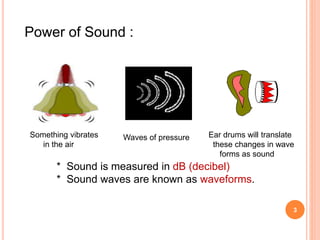
Power of Sound :
* Sound is measured in dB (decibel)
* Sound waves are known as waveforms.
Something vibrates
in the air
Waves of pressure Ear drums will translate
these changes in wave
forms as sound
4
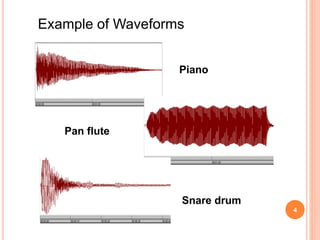
Example of Waveforms
Piano
Pan flute
Snare drum
5
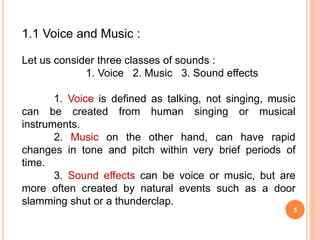
1.1 Voice and Music :
Let us consider three classes of sounds :
1. Voice 2. Music 3. Sound effects
1. Voice is defined as talking, not singing, music
can be created from human singing or musical
instruments.
2. Music on the other hand, can have rapid
changes in tone and pitch within very brief periods of
time.
3. Sound effects can be voice or music, but are
more often created by natural events such as a door
slamming shut or a thunderclap.
6
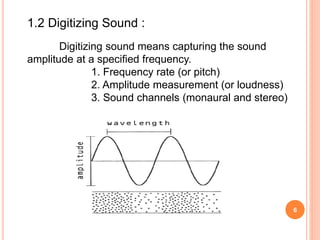
1.2 Digitizing Sound :
Digitizing sound means capturing the sound
amplitude at a specified frequency.
1. Frequency rate (or pitch)
2. Amplitude measurement (or loudness)
3. Sound channels (monaural and stereo)
7
1.3 Calculating Audio Data Size :
The three characteristics for calculating audio file
sizes, amplitude, sound channels and frequency rates.
c = number of channels (mono -1 channel,
stereo -2 channel)
s = sampling rate in Hertz (cycles per
second)
t = time (seconds)
b = bytes (1 for 8 bits, 2 for 16 bits)
File size = c * s * t * b
8
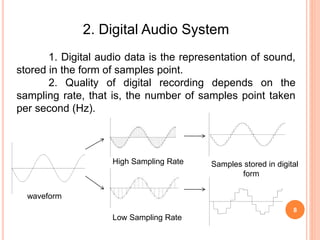
2. Digital Audio System
1. Digital audio data is the representation of sound,
stored in the form of samples point.
2. Quality of digital recording depends on the
sampling rate, that is, the number of samples point taken
per second (Hz).
waveform
High Sampling Rate Samples stored in digital
form
Low Sampling Rate
9
2.1 Digital Audio Software Support :
The digital audio software that provides a number of
user and software support function :
Playback : translate the audio data into sound.
Record : capture audio data from an external analog
source.
Stop : halt playback
Fast Forward : move to a later point in the data
stream.
Reverse : move to a prior point in the data stream.
Rewind : move to the beginning of the data stream.
10
2.2 Editing Digital Audio :
Digital audio editing consists of capturing and
modifying an audio data file. Number of editing techniques
such as :
1. Trimming
2. Splicing and assembly
3. Volume adjustments
4. Format conversion
5. Resampling or downsampling
6. Fade-ins and fade-outs
7. Equalization
8. Time-stretching
9. Digital signal processing
10. Reversing sounds
11
2.3 Sound Controls :
Multimedia computers usually have software that
acts as a control for the computer’s sound playback and
recording.
1. Selection of components
(microphone, speakers, line-in, line-out)
2. Volume level , both monaural and stereo.
3. Recording input level
4. Bass and treble controls
12
3. MIDI
* The Musical Instrument Digital Interface (MIDI) is
an encoding scheme for recording and playing musical
instruments on a computer.
* It use of mp3 and high bandwidth network, MIDI
format audio is popular when an audio is required to be
put on a website.
* Provides a standardized and efficient means of
conveying musical performance information as electronic
data.
13
* It provided we have knowledge of musical
instrument and composing.
* It is the form of music score and not samples or
recording.
MIDI Audio Requirement :
1. Midi keyboard / Midi keyboard software
2. Sequencer software
3. Sound synthesizer (built-in in to sound card)
14
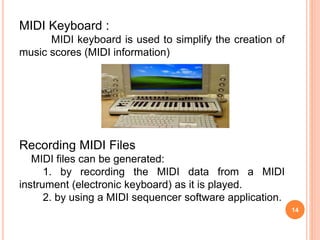
MIDI Keyboard :
MIDI keyboard is used to simplify the creation of
music scores (MIDI information)
Recording MIDI Files
MIDI files can be generated:
1. by recording the MIDI data from a MIDI
instrument (electronic keyboard) as it is played.
2. by using a MIDI sequencer software application.
15
4. Audio File Formats
Digital audio, depending on the platform, uses a
variety of file formats to encode data files.
There are two general categories of digital audio files :
1. Sound audio files and 2. MIDI
4.1 Audio Files :
* Digital format high level of capture quality to the
broadest range of sounds from human voice to music.
* Audio files can be compressed to reduce
storage space and can also be exchanged between
computer system.
1. Apple
2. Microsoft
3. CD - Audio
16
Apple :
* The Audio Interchange File Format (AIFF) is used
across a number of platforms and environment.
* AIFF files contain a header information about the
audio sampling frequency, data size, number of channels,
file size and other information audio data.
Microsoft :
* Waveform or wave file are commonly used in the
Intel-based computer world.
* It is a Microsoft Resource Interchange File Format
(RIFF).
* RIFF files are chunks of information including file
type, audio sampling frequency, data size and number of
channels and the audio data.
17
CD – Audio :
* Red Book Audio standard : used for CD audio
format is called Linear Pulse Code Modulation.
* To provides 50 to 60 minutes of high fidelity
stereo music capture to 16 bit, 44.1 KHz data.
4.2 MIDI Files :
* MIDI files offer the advantage of quite small
compared to captured audio files.
* MIDI files are composed of chunks for a header
and one or more tracks.
* Header chunk provides identification of the data,
arrangement of the data tracks and timing.
18
Audio File Format :
MIDI :
*.MID *.KAR
*.MIDI *.SMF
Audio Digital :
1. Windows *.WAV
2. Macintosh *.AIFF
3. Unix *.AU
4. Realaudio *.RA
5. MPEG3 *.MP3
19
5. Using Audio in Multimedia Applications
Advantages
1. Ensure important information is noticed.
2. Add interest.
3. Can communicate more directly than other media.
Disadvantages
1. Easily overused.
2. Requires special equipment for quality production.
3. Not as memorable as visual media.
20
5.1 Audio Quality :
* The quality of the original audio source.
*The quality of the capture device and
supporting hardware
*The characteristics used for capture (frequency,
data rate, and number of channels)
* The capability of the playback environment.
5.2 Audio for Managing Software Function :
1. Using Audio to Enhance Other Content
2. Audio for Content Delivery
Thank You

Digital Audio

  • 1.
    Multimedia Technology Digital Audio Submittedby, M. Kavitha, M. Sc(CS&IT), Nadar Saraswathi College of Arts and Science, Theni.
  • 2.
    Contents : 1. Characteristicsof Sound and Digital Audio 1.1 Voice and Music 1.2 Digitizing Sound 1.3 Calculating Audio Data Size 2. Digital Audio System 2.1 Digital Audio Software Support 2.2 Editing Digital Audio 2.3 Sound Controls 3. MIDI 4. Audio File Formats 4.1 Audio Files 4.2 MIDI Files 5. Using Audio in Multimedia Applications 5.1 Audio Quality 5.2 Audio for Managing Software Function 1
  • 3.
    2 1.Characteristics of Soundand Digital Audio * Sound comprises the spoken word, voices, music and even noise. * It is a complex relationship involving: 1. a vibrating object (sound source) 2. a transmission medium (usually air) 3. a receiver (ear) and 4. a preceptor (brain).
  • 4.
    3 Power of Sound: * Sound is measured in dB (decibel) * Sound waves are known as waveforms. Something vibrates in the air Waves of pressure Ear drums will translate these changes in wave forms as sound
  • 5.
  • 6.
    5 1.1 Voice andMusic : Let us consider three classes of sounds : 1. Voice 2. Music 3. Sound effects 1. Voice is defined as talking, not singing, music can be created from human singing or musical instruments. 2. Music on the other hand, can have rapid changes in tone and pitch within very brief periods of time. 3. Sound effects can be voice or music, but are more often created by natural events such as a door slamming shut or a thunderclap.
  • 7.
    6 1.2 Digitizing Sound: Digitizing sound means capturing the sound amplitude at a specified frequency. 1. Frequency rate (or pitch) 2. Amplitude measurement (or loudness) 3. Sound channels (monaural and stereo)
  • 8.
    7 1.3 Calculating AudioData Size : The three characteristics for calculating audio file sizes, amplitude, sound channels and frequency rates. c = number of channels (mono -1 channel, stereo -2 channel) s = sampling rate in Hertz (cycles per second) t = time (seconds) b = bytes (1 for 8 bits, 2 for 16 bits) File size = c * s * t * b
  • 9.
    8 2. Digital AudioSystem 1. Digital audio data is the representation of sound, stored in the form of samples point. 2. Quality of digital recording depends on the sampling rate, that is, the number of samples point taken per second (Hz). waveform High Sampling Rate Samples stored in digital form Low Sampling Rate
  • 10.
    9 2.1 Digital AudioSoftware Support : The digital audio software that provides a number of user and software support function : Playback : translate the audio data into sound. Record : capture audio data from an external analog source. Stop : halt playback Fast Forward : move to a later point in the data stream. Reverse : move to a prior point in the data stream. Rewind : move to the beginning of the data stream.
  • 11.
    10 2.2 Editing DigitalAudio : Digital audio editing consists of capturing and modifying an audio data file. Number of editing techniques such as : 1. Trimming 2. Splicing and assembly 3. Volume adjustments 4. Format conversion 5. Resampling or downsampling 6. Fade-ins and fade-outs 7. Equalization 8. Time-stretching 9. Digital signal processing 10. Reversing sounds
  • 12.
    11 2.3 Sound Controls: Multimedia computers usually have software that acts as a control for the computer’s sound playback and recording. 1. Selection of components (microphone, speakers, line-in, line-out) 2. Volume level , both monaural and stereo. 3. Recording input level 4. Bass and treble controls
  • 13.
    12 3. MIDI * TheMusical Instrument Digital Interface (MIDI) is an encoding scheme for recording and playing musical instruments on a computer. * It use of mp3 and high bandwidth network, MIDI format audio is popular when an audio is required to be put on a website. * Provides a standardized and efficient means of conveying musical performance information as electronic data.
  • 14.
    13 * It providedwe have knowledge of musical instrument and composing. * It is the form of music score and not samples or recording. MIDI Audio Requirement : 1. Midi keyboard / Midi keyboard software 2. Sequencer software 3. Sound synthesizer (built-in in to sound card)
  • 15.
    14 MIDI Keyboard : MIDIkeyboard is used to simplify the creation of music scores (MIDI information) Recording MIDI Files MIDI files can be generated: 1. by recording the MIDI data from a MIDI instrument (electronic keyboard) as it is played. 2. by using a MIDI sequencer software application.
  • 16.
    15 4. Audio FileFormats Digital audio, depending on the platform, uses a variety of file formats to encode data files. There are two general categories of digital audio files : 1. Sound audio files and 2. MIDI 4.1 Audio Files : * Digital format high level of capture quality to the broadest range of sounds from human voice to music. * Audio files can be compressed to reduce storage space and can also be exchanged between computer system. 1. Apple 2. Microsoft 3. CD - Audio
  • 17.
    16 Apple : * TheAudio Interchange File Format (AIFF) is used across a number of platforms and environment. * AIFF files contain a header information about the audio sampling frequency, data size, number of channels, file size and other information audio data. Microsoft : * Waveform or wave file are commonly used in the Intel-based computer world. * It is a Microsoft Resource Interchange File Format (RIFF). * RIFF files are chunks of information including file type, audio sampling frequency, data size and number of channels and the audio data.
  • 18.
    17 CD – Audio: * Red Book Audio standard : used for CD audio format is called Linear Pulse Code Modulation. * To provides 50 to 60 minutes of high fidelity stereo music capture to 16 bit, 44.1 KHz data. 4.2 MIDI Files : * MIDI files offer the advantage of quite small compared to captured audio files. * MIDI files are composed of chunks for a header and one or more tracks. * Header chunk provides identification of the data, arrangement of the data tracks and timing.
  • 19.
    18 Audio File Format: MIDI : *.MID *.KAR *.MIDI *.SMF Audio Digital : 1. Windows *.WAV 2. Macintosh *.AIFF 3. Unix *.AU 4. Realaudio *.RA 5. MPEG3 *.MP3
  • 20.
    19 5. Using Audioin Multimedia Applications Advantages 1. Ensure important information is noticed. 2. Add interest. 3. Can communicate more directly than other media. Disadvantages 1. Easily overused. 2. Requires special equipment for quality production. 3. Not as memorable as visual media.
  • 21.
    20 5.1 Audio Quality: * The quality of the original audio source. *The quality of the capture device and supporting hardware *The characteristics used for capture (frequency, data rate, and number of channels) * The capability of the playback environment. 5.2 Audio for Managing Software Function : 1. Using Audio to Enhance Other Content 2. Audio for Content Delivery
  • 22.