4/28/2023
 Introduction to sound.
 Multimedia system sound.
 Digital audio.
 MIDI audio.
 Audio file formats.
 MIDI versus digital audio.
 Adding sound to multimedia project.
 Professional sound.
 Production tips.
 Vibrations in the air create waves of
pressure that are perceived as sound.
 Sound waves vary in sound pressure level
(amplitude) and in frequency or pitch.
 ‘Acoustics’ is the branch of physics that
studies sound.
 Sound pressure levels (loudness or volume)
are measured in decibels (dB).
 Humans hear sound over a very broad
range
 Sound is energy, caused by molecules vibrating
 Too much volume can permanently damage your
ears and hearing
 The perception of loudness depend on the
frequency or pitch
 Harmonics cause the same note played on a cello
to sound different from one played on a piano.
 Every sound wave is composed of two
components:
◦ Amplitude. The height of the wave. Amplitude relates to
the sound’s volume (the higher the amplitude the louder
the sound).
◦ Frequency. The speed at which the sound wave moves.
Frequency relates to sound pitch (high frequencies have
high pitches).
 You need to know
◦ How to make sounds
◦ How to record and edit sounds on the computer
◦ How to incorporate sounds into your multimedia
project
◦ Categories of Sound
 Content sound
 Ambient sound
Content sounds include narrations, such as a teacher
explaining a concept, and instructions that clarify
animation. Ambient sounds are sound effects (e.g.,
thunder) and background music that can be used to
provide feedback for the user.
 System sounds are assigned to various
system events such as startup and
warnings, among others.
 Macintosh provides several system sound
options such as glass, indigo, laugh.
 In Windows, available system sounds
include start.wav, chimes.wav, and
chord.wav.
 Multimedia sound is either digitally
recorded audio or MIDI (Musical
Instrumental Digital Interface) music.
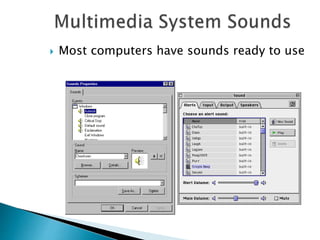
 Most computers have sounds ready to use
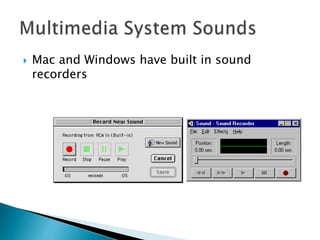
 Mac and Windows have built in sound
recorders
 Windows system sounds are .WAV files in the
WindowsMedia directory
 MS Office includes additional sounds
 You can add your own sounds by including
them in the WindowsMedia directory and
selecting them from the Sound Control Panel
 We use two sound technologies:
◦ Analog sound (tape, CD, radio)
◦ Digital sound (DVD, computer, multimedia)
 MIDI is a series of musical instructions
Click to play
 MIDI ( Musical Instrument Digital Interface) is
a communications standard developed in the
1980’s for electronic instruments and
computers.
 It allows instruments from different
manufacturers to communicate.
 MIDI data is NOT digitized sound- it is
music stored in numeric format
 Digital audio is a recording, which depend
on your sound system
 MIDI is a score and depends on both the
quality of the instruments and the sound
system
 Quality depends on end user’s device rather
than on the MIDI device and is device
dependent.
 Creating a MIDI score requires:
◦ Knowledge of music and some talent
◦ Ability to play a musical instrument
◦ Sequencer software
◦ Sound synthesizer
 Built into PC board
 Add-on for MAC
 MIDI can synthesize over 100 instruments
You will need:
 Sequencer Software (Smart Score)
 A Sound synthesizer ( built into PC sound
board, an add on for MAC)
 MIDI keyboard or device
 Ability to play the piano and music theory
background
 or a hired “expert”
 A MIDI file is a list of commands that are
recordings of musical actions, that when sent
to a MIDI player results in sound
 MIDI data is device dependent
 MIDI represents musical instruments and is
not easily used to playback spoken dialog
 MIDI is a shorthand representation of music
stored in numeric form.
 Since they are small, MIDI files embedded in
web pages load and play promptly.
 Length of a MIDI file can be changed
without affecting the pitch of the music or
degrading audio quality.
 Working with MIDI requires knowledge of
music theory.
 Digital audio is a representation of the original
sound
 Digital audio is created when characteristics of a
sound wave represented using numbers.
 Digitized sound is sampled sound and stored as
digital information in bits & bytes.
 Sampling rate is measured in kilohertz (kHz)
Click to play
 Digital audio represents a sound stored in
thousands of numbers or samples.
 Digital data represents the loudness at
discrete slices of time.
 It is NOT device dependent and should
sound the same each time it is played
 It is used for music CD’s
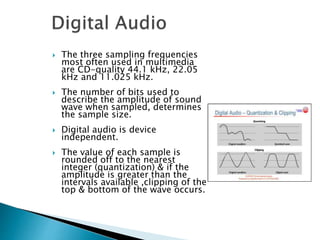
 The three sampling frequencies
most often used in multimedia
are CD-quality 44.1 kHz, 22.05
kHz and 11.025 kHz.
 The number of bits used to
describe the amplitude of sound
wave when sampled, determines
the sample size.
 Digital audio is device
independent.
 The value of each sample is
rounded off to the nearest
integer (quantization) & if the
amplitude is greater than the
intervals available ,clipping of the
top & bottom of the wave occurs.
 Balance file size versus quality
 Set recording levels
 Edit the recording
 Balance file size versus quality
 To calculate file size in bytes:
Mono: sampling rate  duration of recording in seconds  (bit
resolution  8)  1
Stereo: sampling rate  duration of recording in seconds  (bit
resolution  8)  2
Sample rate is the number of samples of audio carried per
second, measured in Hz or kHz (one kHz being 1 000 Hz). For
example, 44 100 samples per second can be expressed as either
44 100 Hz, or 44.1 kHz. Bandwidth is the difference between the
highest and lowest frequencies carried in an audio stream.
 Once a recording had been completed, it almost
always needs to be edited.
 Basic sound editing operations include:
trimming, splicing and assembly, volume
adjustments and working on multiple tracks.
 Trimming : removing of dead air or blank
space form the front of a recording and any
extra time off the end.
◦ Commands: Cut,Clear,Erase or Silence.
 Splicing & Assembly: removing extraneous
noise & cutting and pasting of shorter ones
to create longer recordings.
 Volume Adjustments: To provide the
consistent volume, use normalize option and
set on a particular level say 80 percent to 90
percent of maximum(without clipping)
 Format conversion
 Resampling or Downsampling,if recorded audio & audio in use
have different sampling rates and resolutions.
 Fade-ins and Fade-outs(smoothed out the very beginning and
the very end of a sound file)
 Equalization(DE):to modify the recordings frequency content so
that it sounds brighter(more higher frequencies) or darker(low,
ominous rumbles)
 Time Stretching: to alter the length(in time) of a sound file
without changing its pitch.
 Digital Signal Processing
 Reversing Sounds
 Multiple Tracks
 File Size vs. Quality
 Using more bits for the sample size yields a recording that
sounds more like its original.
Additional available sound editing operations
include format conversion, resampling or down
sampling, fade-ins and fade-outs, equalization,
time stretching, digital signal processing, and
reversing sounds.
 MIDI data and digital audio are like vector and
bitmapped graphics:
 Digital audio like bitmapped image – samples
original to create a copy
 MIDI – like vector graphic- stores numeric
data to recreate sound
 MIDI data is device dependent; digital audio is
not
 MIDI sounds (like vector graphics) are
different on different devices;
 Digital sounds are identical even on different
computers or devices.
 MIDI file are much more compact and take
up less memory and system resources
 MIDI files embedded in web pages load and
play much faster than digital
 You can change the length of a MIDI file by
varying its tempo
 With high quality MIDI devices, MIDI files
may actually sound better than digital
 MIDI represents musical instruments not
sounds and will be accurate only if your
playback device is identical to the production
device
 MIDI sound is inconsistent
 MIDI cannot be easily used to reproduce
speech
 Digital audio sound is consistent and device
independent
 A wide selection of software support is
available for both MAC and PC
 A knowledge of music theory is not required
for creating digital audio, but usually is
needed for MIDI production
 If you don’t have enough RAM memory, or
bandwidth for digital audio
 If you have a high quality sound source
 If you have complete control over the
playback hardware
 If you don’t need spoken dialog
 If you don’t have control over the playback
hardware
 If you have the computing resources and
bandwidth to handle the larger digital files
 If you need spoken dialog
 You can digitize sound from a microphone,
synthesizer, tape recording TV broadcast, or
CD’s.
 Digitized sound is sampled every nth of a
second. The more often you take the sample,
the better the sound.
 Sample sizes are either 8 or 16 bits and
common frequencies are11.025, 22.05, and
44.1 kHz
 To prepare digital audio from analog media,
record it from a device, like a tape recorder,
into your computer using digitizing software.
 Balance the sound quality with your available
RAM
 Set proper recording levels for a good clear
recording
 Audio resolution determines the accuracy
with which a sound is digitized. (More bits
in the sample size produces better quality
and larger files)
 Stereo recordings are more realistic and
require twice as much storage space and
playback time.
 Mono files tend to sound “flat”
 Apple’s QuickTime Player Pro provides for
primitive playback and editing
 Sonic Foundry’s Sound Forge is a more
serious sound editor
 These can be used to trim, splice, volume
adjustment and format conversion as well as
special effects
 A sound file’s format is a recognized
methodology for organizing data bits of
digitized sound into a data file.
 On the Macintosh, digitized sounds may
be stored as data files, resources, or
applications such as AIFF or AIFC.
 In Windows, digitized sounds are usually
stored as WAV files.
 Both can use MIDI files (.mid)
 WAV (Waveform Audio File Format) The most popular
audio file format used mainly in windows for storing
uncompressed sound files. It can be converted to
other file formats like MP3to reduce the file size.
 MP3 (MPEG Layer-3 Format) MPEG Layer-3 format is
the most popular format downloading and storing
music. The MP3 files are compressed to roughly one-
tenth the size of an equivalent WAV file.
 OGG A free, open source container format that can be
compared to MP3 files in terms of quality.
 AU It is a standard audio file format used by Sun,
Unix and Java. The audio in AU file format can be
compressed.
 AIFF (Audio Interchange File Format) A standard audio
file format used by Apple which is like a WAV file for
the Mac.
 WMA (Windows Media Audio) It is a popular windows
media audio format owned by Microsoft and designed
with Digital Right Management (DRM) abilities for
copy protection.
 RA (Real Audio Format) Real Audio format is designed
for streaming audio over the Internet. The digital
audio resources are usually stored as a computer file
in computer‟s hard drive or CD-Rom or DVD.
There are multitudes of audio file formats, but the
most common formats are wave files (.WAV) and MPEG
Layer-3 files (.MP3), WMA and RA.
 CD-ROM/XA (Extended Architecture) format
enabled several recording sessions to be
placed on a single CD-R (recordable) disc.
 Linear Pulse Code Modulation is used for Red
Book Audio data files on consumer-grade
music CDs.
 To play MIDI sound on the web
◦ wait for the entire file to download and play it
with a helper application
◦ stream the file, storing it in the buffer and playing
it while it downloads
 Streaming is dependent on the connection
speed
 Decide what sounds you will need and
include them in the story board.
 Decide whether to use MIDI or digital audio
 Acquire source material (record/buy)
 Edit the sounds
 Test the sounds to be sure they are timed
properly
 CD- quality audio
Standard is ISO 10149, a.k.a. the “Red Book Standard”
Sample size is 16-bit
Sample rate is 44.1 kHz
11 seconds of audio uses 1.94 MB of space
 The Red Book Standard- ISO 10149
◦ ( 16 bits at 44.1 kHz) allows accurate reproduction
of all sounds humans can hear
◦ Software such as Toast and CD-Creator can
translate digital files from CD’s directly into a
digital sound editing file or decompress mp3 files
into CD-Audio.
 Compression techniques reduce space but
reliability suffers.
 Space can be conserved by downsampling or
reducing the number of sample slices taken
per second.
 Bit-Depth: It describes the number of bits of
information recorded for each sample. Bit
depth directly corresponds to the resolution
of each sample in a set of digital audio data.
 File Size in Disk = (Length in seconds) ×
(sample rate) × (bit depth/8 bits per byte)
 A method for converting analog waveforms into digital signals for more accurate
transmission over phone lines. If an analog signal were band-limited (i.e., had no
frequencies higher than a specific band), it could be captured and transmitted in
digital values and then recreated in an analog form on the receiving end. The
concept of sampling amplitudes at a specific rate. Most importantly, the sampling
rate would need to be at least twice the highest frequency to be reproduced.
 According to the sampling theorem (Shannon, 1949), to reconstruct a one-
dimensional signal from a set of samples, the sampling rate must be equal to or
greater than twice the highest frequency in the signal.
 Following Claude Shannon's mathematical proof in 1948, it became known as
the Nyquist Theorem or the Nyquist-Shannon Theorem.
 According to this theorem, the highest reproducible frequency of a digital system
will be less than one-half the sampling rate. From the opposite point of view, the
sampling rate must be greater than twice the highest frequency we wish to
reproduce.* This frequency, half the sampling rate, is often called the Nyquist
frequency.
 A hypothetical system sampling a waveform at 20,000 samples per second cannot
reproduce frequencies above 10,000 Hz. It is important to note that this
means all component frequencies, including higher partials of lower tones.
Additionally, nasty things happen when a sampled frequency is exactly at the
Nyquist frequency: often a zero amplitude signal will result. This is called
the critical frequency.
 Scripting Languages such as Open Script
(Toolbook), LINGO(Director), or Action Script
provide better control over audio playback
 Requires some programming knowledge
 Vaughn’s Law of Minimums - there is an
acceptable level of adequacy that will satisfy
the audience;
 If your handheld microphone is good enough
to satisfy you and your audience, conserve
your money and energy.
 Recording on inexpensive media rather
than directly to disk prevents the hard
disk from being overloaded with
unnecessary data.
 The equipment and standards used for
the project must be in accordance with
the requirements.
 Sound and image synchronization must
be tested at regular intervals
 Audio recording - use CD’s or DAT ( digital
audio tape) tapes
 Create a good database to organize your
sounds, noting the counter and content
 Testing and Evaluating
 Copyright Issues
 Securing permission for the use of sounds
and music is the same as for images
 Can buy royalty-free digitized sound clips
 DO NOT use someone’s original work without
permission!
 Vibrations in air create waves of pressure
that are perceived as sound.
 Multimedia system sound is digitally
recorded audio or MIDI (Musical
Instrumental Digital Interface) music.
 Digital audio data is the actual
representation of a sound, stored in the
form of samples.
 MIDI is a shorthand representation of
music stored in numeric form.
 Digital audio provides consistent
playback quality.
 MIDI files are much smaller than digitized
audio.
 MIDI is device dependent digital audio is
not.
 MIDI files sound better than digital audio
files when played on high-quality MIDI
device.

Sound.pptx

  • 1.
  • 2.
     Introduction tosound.  Multimedia system sound.  Digital audio.  MIDI audio.  Audio file formats.
  • 3.
     MIDI versusdigital audio.  Adding sound to multimedia project.  Professional sound.  Production tips.
  • 4.
     Vibrations inthe air create waves of pressure that are perceived as sound.  Sound waves vary in sound pressure level (amplitude) and in frequency or pitch.  ‘Acoustics’ is the branch of physics that studies sound.  Sound pressure levels (loudness or volume) are measured in decibels (dB).  Humans hear sound over a very broad range
  • 5.
     Sound isenergy, caused by molecules vibrating  Too much volume can permanently damage your ears and hearing  The perception of loudness depend on the frequency or pitch  Harmonics cause the same note played on a cello to sound different from one played on a piano.  Every sound wave is composed of two components: ◦ Amplitude. The height of the wave. Amplitude relates to the sound’s volume (the higher the amplitude the louder the sound). ◦ Frequency. The speed at which the sound wave moves. Frequency relates to sound pitch (high frequencies have high pitches).
  • 6.
     You needto know ◦ How to make sounds ◦ How to record and edit sounds on the computer ◦ How to incorporate sounds into your multimedia project ◦ Categories of Sound  Content sound  Ambient sound Content sounds include narrations, such as a teacher explaining a concept, and instructions that clarify animation. Ambient sounds are sound effects (e.g., thunder) and background music that can be used to provide feedback for the user.
  • 7.
     System soundsare assigned to various system events such as startup and warnings, among others.  Macintosh provides several system sound options such as glass, indigo, laugh.  In Windows, available system sounds include start.wav, chimes.wav, and chord.wav.  Multimedia sound is either digitally recorded audio or MIDI (Musical Instrumental Digital Interface) music.
  • 8.
     Most computershave sounds ready to use
  • 9.
     Mac andWindows have built in sound recorders
  • 10.
     Windows systemsounds are .WAV files in the WindowsMedia directory  MS Office includes additional sounds  You can add your own sounds by including them in the WindowsMedia directory and selecting them from the Sound Control Panel
  • 11.
     We usetwo sound technologies: ◦ Analog sound (tape, CD, radio) ◦ Digital sound (DVD, computer, multimedia)
  • 12.
     MIDI isa series of musical instructions Click to play
  • 13.
     MIDI (Musical Instrument Digital Interface) is a communications standard developed in the 1980’s for electronic instruments and computers.  It allows instruments from different manufacturers to communicate.
  • 14.
     MIDI datais NOT digitized sound- it is music stored in numeric format  Digital audio is a recording, which depend on your sound system  MIDI is a score and depends on both the quality of the instruments and the sound system  Quality depends on end user’s device rather than on the MIDI device and is device dependent.
  • 15.
     Creating aMIDI score requires: ◦ Knowledge of music and some talent ◦ Ability to play a musical instrument ◦ Sequencer software ◦ Sound synthesizer  Built into PC board  Add-on for MAC  MIDI can synthesize over 100 instruments
  • 16.
    You will need: Sequencer Software (Smart Score)  A Sound synthesizer ( built into PC sound board, an add on for MAC)  MIDI keyboard or device  Ability to play the piano and music theory background  or a hired “expert”
  • 17.
     A MIDIfile is a list of commands that are recordings of musical actions, that when sent to a MIDI player results in sound  MIDI data is device dependent  MIDI represents musical instruments and is not easily used to playback spoken dialog
  • 18.
     MIDI isa shorthand representation of music stored in numeric form.  Since they are small, MIDI files embedded in web pages load and play promptly.  Length of a MIDI file can be changed without affecting the pitch of the music or degrading audio quality.  Working with MIDI requires knowledge of music theory.
  • 19.
     Digital audiois a representation of the original sound  Digital audio is created when characteristics of a sound wave represented using numbers.  Digitized sound is sampled sound and stored as digital information in bits & bytes.  Sampling rate is measured in kilohertz (kHz) Click to play
  • 20.
     Digital audiorepresents a sound stored in thousands of numbers or samples.  Digital data represents the loudness at discrete slices of time.  It is NOT device dependent and should sound the same each time it is played  It is used for music CD’s
  • 21.
     The threesampling frequencies most often used in multimedia are CD-quality 44.1 kHz, 22.05 kHz and 11.025 kHz.  The number of bits used to describe the amplitude of sound wave when sampled, determines the sample size.  Digital audio is device independent.  The value of each sample is rounded off to the nearest integer (quantization) & if the amplitude is greater than the intervals available ,clipping of the top & bottom of the wave occurs.
  • 22.
     Balance filesize versus quality  Set recording levels  Edit the recording
  • 23.
     Balance filesize versus quality  To calculate file size in bytes: Mono: sampling rate  duration of recording in seconds  (bit resolution  8)  1 Stereo: sampling rate  duration of recording in seconds  (bit resolution  8)  2 Sample rate is the number of samples of audio carried per second, measured in Hz or kHz (one kHz being 1 000 Hz). For example, 44 100 samples per second can be expressed as either 44 100 Hz, or 44.1 kHz. Bandwidth is the difference between the highest and lowest frequencies carried in an audio stream.
  • 24.
     Once arecording had been completed, it almost always needs to be edited.  Basic sound editing operations include: trimming, splicing and assembly, volume adjustments and working on multiple tracks.
  • 25.
     Trimming :removing of dead air or blank space form the front of a recording and any extra time off the end. ◦ Commands: Cut,Clear,Erase or Silence.  Splicing & Assembly: removing extraneous noise & cutting and pasting of shorter ones to create longer recordings.  Volume Adjustments: To provide the consistent volume, use normalize option and set on a particular level say 80 percent to 90 percent of maximum(without clipping)
  • 26.
     Format conversion Resampling or Downsampling,if recorded audio & audio in use have different sampling rates and resolutions.  Fade-ins and Fade-outs(smoothed out the very beginning and the very end of a sound file)  Equalization(DE):to modify the recordings frequency content so that it sounds brighter(more higher frequencies) or darker(low, ominous rumbles)  Time Stretching: to alter the length(in time) of a sound file without changing its pitch.  Digital Signal Processing  Reversing Sounds  Multiple Tracks  File Size vs. Quality  Using more bits for the sample size yields a recording that sounds more like its original.
  • 27.
    Additional available soundediting operations include format conversion, resampling or down sampling, fade-ins and fade-outs, equalization, time stretching, digital signal processing, and reversing sounds.
  • 28.
     MIDI dataand digital audio are like vector and bitmapped graphics:  Digital audio like bitmapped image – samples original to create a copy  MIDI – like vector graphic- stores numeric data to recreate sound
  • 29.
     MIDI datais device dependent; digital audio is not  MIDI sounds (like vector graphics) are different on different devices;  Digital sounds are identical even on different computers or devices.
  • 30.
     MIDI fileare much more compact and take up less memory and system resources  MIDI files embedded in web pages load and play much faster than digital  You can change the length of a MIDI file by varying its tempo  With high quality MIDI devices, MIDI files may actually sound better than digital
  • 31.
     MIDI representsmusical instruments not sounds and will be accurate only if your playback device is identical to the production device  MIDI sound is inconsistent  MIDI cannot be easily used to reproduce speech
  • 32.
     Digital audiosound is consistent and device independent  A wide selection of software support is available for both MAC and PC  A knowledge of music theory is not required for creating digital audio, but usually is needed for MIDI production
  • 33.
     If youdon’t have enough RAM memory, or bandwidth for digital audio  If you have a high quality sound source  If you have complete control over the playback hardware  If you don’t need spoken dialog
  • 34.
     If youdon’t have control over the playback hardware  If you have the computing resources and bandwidth to handle the larger digital files  If you need spoken dialog
  • 35.
     You candigitize sound from a microphone, synthesizer, tape recording TV broadcast, or CD’s.  Digitized sound is sampled every nth of a second. The more often you take the sample, the better the sound.  Sample sizes are either 8 or 16 bits and common frequencies are11.025, 22.05, and 44.1 kHz
  • 36.
     To preparedigital audio from analog media, record it from a device, like a tape recorder, into your computer using digitizing software.  Balance the sound quality with your available RAM  Set proper recording levels for a good clear recording
  • 37.
     Audio resolutiondetermines the accuracy with which a sound is digitized. (More bits in the sample size produces better quality and larger files)  Stereo recordings are more realistic and require twice as much storage space and playback time.  Mono files tend to sound “flat”
  • 38.
     Apple’s QuickTimePlayer Pro provides for primitive playback and editing  Sonic Foundry’s Sound Forge is a more serious sound editor  These can be used to trim, splice, volume adjustment and format conversion as well as special effects
  • 39.
     A soundfile’s format is a recognized methodology for organizing data bits of digitized sound into a data file.  On the Macintosh, digitized sounds may be stored as data files, resources, or applications such as AIFF or AIFC.  In Windows, digitized sounds are usually stored as WAV files.  Both can use MIDI files (.mid)
  • 40.
     WAV (WaveformAudio File Format) The most popular audio file format used mainly in windows for storing uncompressed sound files. It can be converted to other file formats like MP3to reduce the file size.  MP3 (MPEG Layer-3 Format) MPEG Layer-3 format is the most popular format downloading and storing music. The MP3 files are compressed to roughly one- tenth the size of an equivalent WAV file.  OGG A free, open source container format that can be compared to MP3 files in terms of quality.  AU It is a standard audio file format used by Sun, Unix and Java. The audio in AU file format can be compressed.
  • 41.
     AIFF (AudioInterchange File Format) A standard audio file format used by Apple which is like a WAV file for the Mac.  WMA (Windows Media Audio) It is a popular windows media audio format owned by Microsoft and designed with Digital Right Management (DRM) abilities for copy protection.  RA (Real Audio Format) Real Audio format is designed for streaming audio over the Internet. The digital audio resources are usually stored as a computer file in computer‟s hard drive or CD-Rom or DVD. There are multitudes of audio file formats, but the most common formats are wave files (.WAV) and MPEG Layer-3 files (.MP3), WMA and RA.
  • 42.
     CD-ROM/XA (ExtendedArchitecture) format enabled several recording sessions to be placed on a single CD-R (recordable) disc.  Linear Pulse Code Modulation is used for Red Book Audio data files on consumer-grade music CDs.
  • 43.
     To playMIDI sound on the web ◦ wait for the entire file to download and play it with a helper application ◦ stream the file, storing it in the buffer and playing it while it downloads  Streaming is dependent on the connection speed
  • 44.
     Decide whatsounds you will need and include them in the story board.  Decide whether to use MIDI or digital audio  Acquire source material (record/buy)  Edit the sounds  Test the sounds to be sure they are timed properly
  • 45.
     CD- qualityaudio Standard is ISO 10149, a.k.a. the “Red Book Standard” Sample size is 16-bit Sample rate is 44.1 kHz 11 seconds of audio uses 1.94 MB of space
  • 46.
     The RedBook Standard- ISO 10149 ◦ ( 16 bits at 44.1 kHz) allows accurate reproduction of all sounds humans can hear ◦ Software such as Toast and CD-Creator can translate digital files from CD’s directly into a digital sound editing file or decompress mp3 files into CD-Audio.
  • 47.
     Compression techniquesreduce space but reliability suffers.  Space can be conserved by downsampling or reducing the number of sample slices taken per second.  Bit-Depth: It describes the number of bits of information recorded for each sample. Bit depth directly corresponds to the resolution of each sample in a set of digital audio data.  File Size in Disk = (Length in seconds) × (sample rate) × (bit depth/8 bits per byte)
  • 48.
     A methodfor converting analog waveforms into digital signals for more accurate transmission over phone lines. If an analog signal were band-limited (i.e., had no frequencies higher than a specific band), it could be captured and transmitted in digital values and then recreated in an analog form on the receiving end. The concept of sampling amplitudes at a specific rate. Most importantly, the sampling rate would need to be at least twice the highest frequency to be reproduced.  According to the sampling theorem (Shannon, 1949), to reconstruct a one- dimensional signal from a set of samples, the sampling rate must be equal to or greater than twice the highest frequency in the signal.  Following Claude Shannon's mathematical proof in 1948, it became known as the Nyquist Theorem or the Nyquist-Shannon Theorem.  According to this theorem, the highest reproducible frequency of a digital system will be less than one-half the sampling rate. From the opposite point of view, the sampling rate must be greater than twice the highest frequency we wish to reproduce.* This frequency, half the sampling rate, is often called the Nyquist frequency.  A hypothetical system sampling a waveform at 20,000 samples per second cannot reproduce frequencies above 10,000 Hz. It is important to note that this means all component frequencies, including higher partials of lower tones. Additionally, nasty things happen when a sampled frequency is exactly at the Nyquist frequency: often a zero amplitude signal will result. This is called the critical frequency.
  • 49.
     Scripting Languagessuch as Open Script (Toolbook), LINGO(Director), or Action Script provide better control over audio playback  Requires some programming knowledge
  • 50.
     Vaughn’s Lawof Minimums - there is an acceptable level of adequacy that will satisfy the audience;  If your handheld microphone is good enough to satisfy you and your audience, conserve your money and energy.
  • 51.
     Recording oninexpensive media rather than directly to disk prevents the hard disk from being overloaded with unnecessary data.  The equipment and standards used for the project must be in accordance with the requirements.  Sound and image synchronization must be tested at regular intervals
  • 52.
     Audio recording- use CD’s or DAT ( digital audio tape) tapes  Create a good database to organize your sounds, noting the counter and content  Testing and Evaluating
  • 53.
     Copyright Issues Securing permission for the use of sounds and music is the same as for images  Can buy royalty-free digitized sound clips  DO NOT use someone’s original work without permission!
  • 54.
     Vibrations inair create waves of pressure that are perceived as sound.  Multimedia system sound is digitally recorded audio or MIDI (Musical Instrumental Digital Interface) music.  Digital audio data is the actual representation of a sound, stored in the form of samples.
  • 55.
     MIDI isa shorthand representation of music stored in numeric form.  Digital audio provides consistent playback quality.  MIDI files are much smaller than digitized audio.  MIDI is device dependent digital audio is not.  MIDI files sound better than digital audio files when played on high-quality MIDI device.