DIFFERENCE BETWEEN
HUB, BRIDGE, SWITCH AND
ROUTER
COMMON NETWORK
ENVIRONMENTS,
CONNECTIVITY AND
SECURITY ISSUES
07/01/2015 AKMALCIKMAT
HUB
Hub is known as the most simplest amongst these device
In general, hub is the central part of a wheel where the spokes come
together.
It cannot filter data. Data packets are sent to all connected devices,
and there is no intelligence to find out the best path for data packet
which then leads to inefficiencies and wastage.
As a network product, a hub may include a group of
Modem-cards : for dial-in user
a gateway card : for connections to a local area network (LAN) and a connection to
a line
Hubs are used on a small networks where data transmission is not
very high.07/01/2015 AKMALCIKMAT
SUMMARY
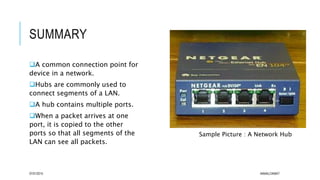
A common connection point for
device in a network.
Hubs are commonly used to
connect segments of a LAN.
A hub contains multiple ports.
When a packet arrives at one
port, it is copied to the other
ports so that all segments of the
LAN can see all packets.
07/01/2015 AKMALCIKMAT
Sample Picture : A Network Hub
BRIDGE
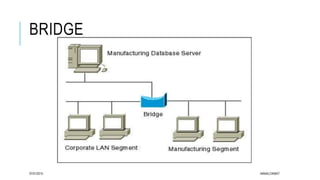
In a telecommunication networks, a bridge is a product that
connects a local area network (LAN) to another LAN that uses the
same protocol.
Has a single incoming and outgoing port
Filters traffic on the LAN by looking at the Media Access Control
(MAC) address, thus a bridge is more complex than a hub
A bridge looks at the destination of the packet before forwarding
unlike a hub.
It restricts transmission on other LAN segment if the destination is
not found.
A bridge works at the data-link (physical network) level of a
network, copying a data frame from one network to the next network07/01/2015 AKMALCIKMAT
BRIDGE
07/01/2015 AKMALCIKMAT
SWITCH
When compared to bridge, a switch has multiple ports.
Switches can perform error checking before forwarding data, which
are very efficient by not forwarding packets that error-end out or
forwarding good packets selectively to correct devices only.
Switches can support both layer 2 (based on MAC address) and layer
3 (based on IP address) depending on the type of switch.
Usually, large networks use switches instead of hubs to connect
computers within the same subset
07/01/2015 AKMALCIKMAT
SUMMARY
 In networks, a device
that filters and
forwards packets between LAN
segments.
 Switches operate at the data link
layer (layer 2) and sometimes
the network layer (layer 3) of
the OSI Reference Model and
therefore support any packet
protocol.
 LANs that use switches to
join segments are called switched
LANs or, in the case of Ethernet
networks, switched Ethernet LANs.07/01/2015 AKMALCIKMAT
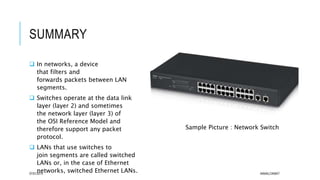
Sample Picture : Network Switch
ROUTER
Router forwards packets based on address just like a switch.
Routers usually use the IP address to forward packets, which allow
the network to go across different protocols.
Routers forward packets based on software while a switch forwards
using hardware.
Eg: Layer 3 uses a hardware called ASIC (Application Specific Integrated Circuits)
Routers support different Wide Area Network (WAN) technologies but
switches do not.
Wireless routers have access point built in. The most common home
use for routers is to share a broadband internet connection.
As the router has a public IP address which is shared with the
network, when data comes through the router, it is forwarded to the
correct computer.07/01/2015 AKMALCIKMAT
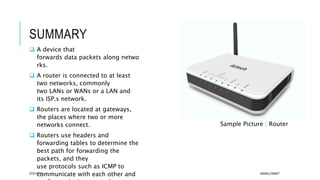
SUMMARY
 A device that
forwards data packets along netwo
rks.
 A router is connected to at least
two networks, commonly
two LANs or WANs or a LAN and
its ISP.s network.
 Routers are located at gateways,
the places where two or more
networks connect.
 Routers use headers and
forwarding tables to determine the
best path for forwarding the
packets, and they
use protocols such as ICMP to
communicate with each other and07/01/2015 AKMALCIKMAT
Sample Picture : Router
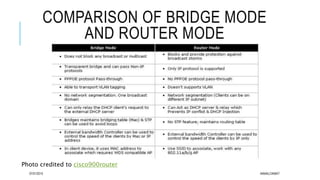
COMPARISON OF BRIDGE MODE
AND ROUTER MODE
Photo credited to cisco900router
07/01/2015 AKMALCIKMAT

difference between hub, bridge, switch and router

  • 1.
    DIFFERENCE BETWEEN HUB, BRIDGE,SWITCH AND ROUTER COMMON NETWORK ENVIRONMENTS, CONNECTIVITY AND SECURITY ISSUES 07/01/2015 AKMALCIKMAT
  • 2.
    HUB Hub is knownas the most simplest amongst these device In general, hub is the central part of a wheel where the spokes come together. It cannot filter data. Data packets are sent to all connected devices, and there is no intelligence to find out the best path for data packet which then leads to inefficiencies and wastage. As a network product, a hub may include a group of Modem-cards : for dial-in user a gateway card : for connections to a local area network (LAN) and a connection to a line Hubs are used on a small networks where data transmission is not very high.07/01/2015 AKMALCIKMAT
  • 3.
    SUMMARY A common connectionpoint for device in a network. Hubs are commonly used to connect segments of a LAN. A hub contains multiple ports. When a packet arrives at one port, it is copied to the other ports so that all segments of the LAN can see all packets. 07/01/2015 AKMALCIKMAT Sample Picture : A Network Hub
  • 4.
    BRIDGE In a telecommunicationnetworks, a bridge is a product that connects a local area network (LAN) to another LAN that uses the same protocol. Has a single incoming and outgoing port Filters traffic on the LAN by looking at the Media Access Control (MAC) address, thus a bridge is more complex than a hub A bridge looks at the destination of the packet before forwarding unlike a hub. It restricts transmission on other LAN segment if the destination is not found. A bridge works at the data-link (physical network) level of a network, copying a data frame from one network to the next network07/01/2015 AKMALCIKMAT
  • 5.
  • 6.
    SWITCH When compared tobridge, a switch has multiple ports. Switches can perform error checking before forwarding data, which are very efficient by not forwarding packets that error-end out or forwarding good packets selectively to correct devices only. Switches can support both layer 2 (based on MAC address) and layer 3 (based on IP address) depending on the type of switch. Usually, large networks use switches instead of hubs to connect computers within the same subset 07/01/2015 AKMALCIKMAT
  • 7.
    SUMMARY  In networks,a device that filters and forwards packets between LAN segments.  Switches operate at the data link layer (layer 2) and sometimes the network layer (layer 3) of the OSI Reference Model and therefore support any packet protocol.  LANs that use switches to join segments are called switched LANs or, in the case of Ethernet networks, switched Ethernet LANs.07/01/2015 AKMALCIKMAT Sample Picture : Network Switch
  • 8.
    ROUTER Router forwards packetsbased on address just like a switch. Routers usually use the IP address to forward packets, which allow the network to go across different protocols. Routers forward packets based on software while a switch forwards using hardware. Eg: Layer 3 uses a hardware called ASIC (Application Specific Integrated Circuits) Routers support different Wide Area Network (WAN) technologies but switches do not. Wireless routers have access point built in. The most common home use for routers is to share a broadband internet connection. As the router has a public IP address which is shared with the network, when data comes through the router, it is forwarded to the correct computer.07/01/2015 AKMALCIKMAT
  • 9.
    SUMMARY  A devicethat forwards data packets along netwo rks.  A router is connected to at least two networks, commonly two LANs or WANs or a LAN and its ISP.s network.  Routers are located at gateways, the places where two or more networks connect.  Routers use headers and forwarding tables to determine the best path for forwarding the packets, and they use protocols such as ICMP to communicate with each other and07/01/2015 AKMALCIKMAT Sample Picture : Router
  • 10.
    COMPARISON OF BRIDGEMODE AND ROUTER MODE Photo credited to cisco900router 07/01/2015 AKMALCIKMAT