Communication
Networks
Ethernet
– IEEE 802.3
Overview of Module - 2
• Framing
• What is Framing
• Types of Framing
• Methods for identifying the
boundaries
• Flow Control
• What is flow control
• Types of flow control
• Access Control
• What is access control
• Types of access control
• Ethernet – IEEE 802.3
• Evolution of Ethernet
• Frame Format of Ethernet
• Access Control for Ethernet
• Performance Evaluation of Ethernet
• WLAN – IEEE 802.11
• Architecture
• Bluetooth
• WIFI
• Zigbee
• 6LowPan
• Network Layer Services
• IPv4
• Packet switching
• Network Layer Protocols
Visit www.youtube.com/GURUKULA for Lecture Videos
In this session:
EVOLUTION FRAME FORMAT
ADDRESSING ACCESS METHOD EFFICIENCY
Visit www.youtube.com/GURUKULA for Lecture Videos
Ethernet – Evolution
• The Ethernet LAN was developed in the 1970s by Robert Metcalfe
and David Boggs. Since then, it has gone through four generations:
Visit www.youtube.com/GURUKULA for Lecture Videos
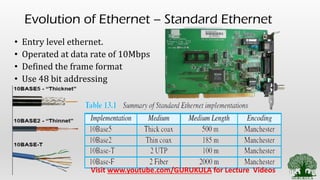
Evolution of Ethernet – Standard Ethernet
• Entry level ethernet.
• Operated at data rate of 10Mbps
• Defined the frame format
• Use 48 bit addressing
Visit www.youtube.com/GURUKULA for Lecture Videos
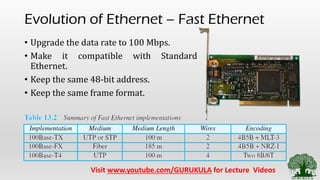
Evolution of Ethernet – Fast Ethernet
• Upgrade the data rate to 100 Mbps.
• Make it compatible with Standard
Ethernet.
• Keep the same 48-bit address.
• Keep the same frame format.
Visit www.youtube.com/GURUKULA for Lecture Videos
Evolution of Ethernet – Gigabit Ethernet
• Upgrade the data rate to 1 Gbps.
• Make it compatible with Standard or Fast Ethernet.
• Use the same 48-bit address.
• Use the same frame format.
• Keep the same minimum and maximum frame
lengths.
• Support auto negotiation as defined in Fast Ethernet.
Visit www.youtube.com/GURUKULA for Lecture Videos
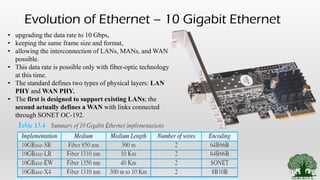
Evolution of Ethernet – 10 Gigabit Ethernet
• upgrading the data rate to 10 Gbps,
• keeping the same frame size and format,
• allowing the interconnection of LANs, MANs, and WAN
possible.
• This data rate is possible only with fiber-optic technology
at this time.
• The standard defines two types of physical layers: LAN
PHY and WAN PHY.
• The first is designed to support existing LANs; the
second actually defines a WAN with links connected
through SONET OC-192.
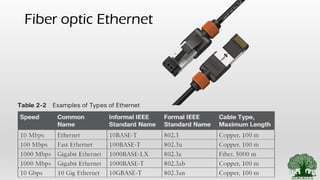
Fiber optic Ethernet
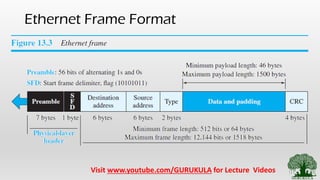
Ethernet Frame Format
Visit www.youtube.com/GURUKULA for Lecture Videos
PREAMBLE:
• 7 BYTES containing alternate 0’s and 1’s
• This alerts the receiving system about the
incoming frame and helps in synchronization
• This is added at physical layer. Not a part of
frame.
SFD (Start Frame Delimiter):
• This segment is 1 byte long.
• This indicates the start of the frame.
• The last 2 bits (11) alerts the receiver that the
next field is destination address.
Destination Address (DA):
• It is of 6 bytes.
• Contains the physical address of the
destination host or stations.
Source Address (SA):
• It is of 6 bytes.
• Contains the physical address of the Source host
or stations.
Length or Type:
• Used for 2 purpose
• Ethernet (Type) – To define the upper layer
protocol.
• IEEE (Length) – To specify the number of bytes in
the data field.
Data & Padding:
• It can be a minimum size from 46 bytes to
maximum of 1500 bytes.
• It carries data encapsulated from the upper
layer
Cyclic Redundancy Check :
• This field contains Error Detection Information.
Ethernet - Addressing
• Already Discussed in previous sections
• Ethernet uses MAC Address. Refer to Physical Addressing topic we
studied already
Visit www.youtube.com/GURUKULA for Lecture Videos
Ethernet – Access Mechanism - CSMA CD
Visit www.youtube.com/GURUKULA for Lecture Videos
Efficiency of Standard Ethernet
• The efficiency of the Ethernet is defined as the ratio of the time used by a
station to send data to the time the medium is occupied by this station.
The practical efficiency of standard Ethernet has been measured to be
Efficiency = 1 / (1 + 6.4 * a)
• in which the parameter “a” is the number of frames that can fit on the
medium.
• It can be calculated as a = (propagation delay)/(transmission delay).
• Note that as the value of parameter a decreases, the efficiency increases.
• This means that if the length of the media is shorter or the frame size longer,
the efficiency increases.
• In the ideal case, a = 0 and the efficiency is 1.
Visit www.youtube.com/GURUKULA for Lecture Videos
Session Summary
Ethernet Concepts
• Evolution of Ethernet
• Standard Ethernet and their variations
• Fast Ethernet and their variations
• Gigabit Ethernet and their variations
• 10 Gigabit Ethernet and their variations
• Frame Format of Ethernet
• Access Control for Ethernet – [CSMA – CD]
• Performance Evaluation of Ethernet
References:
• Behrouz A. Forouzan, ―Data communication and Networking, Fifth
Edition, Tata McGraw – Hill, 2013
• Larry L. Peterson, Bruce S. Davie, ―Computer Networks: A Systems
Approach, Fifth Edition, Morgan Kaufmann Publishers, 2011.
• Few online References (Will be Mentioned in the description Section)
Thank You…

2.6 ethernet ieee 802.3

  • 1.
  • 2.
    Overview of Module- 2 • Framing • What is Framing • Types of Framing • Methods for identifying the boundaries • Flow Control • What is flow control • Types of flow control • Access Control • What is access control • Types of access control • Ethernet – IEEE 802.3 • Evolution of Ethernet • Frame Format of Ethernet • Access Control for Ethernet • Performance Evaluation of Ethernet • WLAN – IEEE 802.11 • Architecture • Bluetooth • WIFI • Zigbee • 6LowPan • Network Layer Services • IPv4 • Packet switching • Network Layer Protocols Visit www.youtube.com/GURUKULA for Lecture Videos
  • 3.
    In this session: EVOLUTIONFRAME FORMAT ADDRESSING ACCESS METHOD EFFICIENCY Visit www.youtube.com/GURUKULA for Lecture Videos
  • 4.
    Ethernet – Evolution •The Ethernet LAN was developed in the 1970s by Robert Metcalfe and David Boggs. Since then, it has gone through four generations: Visit www.youtube.com/GURUKULA for Lecture Videos
  • 5.
    Evolution of Ethernet– Standard Ethernet • Entry level ethernet. • Operated at data rate of 10Mbps • Defined the frame format • Use 48 bit addressing Visit www.youtube.com/GURUKULA for Lecture Videos
  • 6.
    Evolution of Ethernet– Fast Ethernet • Upgrade the data rate to 100 Mbps. • Make it compatible with Standard Ethernet. • Keep the same 48-bit address. • Keep the same frame format. Visit www.youtube.com/GURUKULA for Lecture Videos
  • 7.
    Evolution of Ethernet– Gigabit Ethernet • Upgrade the data rate to 1 Gbps. • Make it compatible with Standard or Fast Ethernet. • Use the same 48-bit address. • Use the same frame format. • Keep the same minimum and maximum frame lengths. • Support auto negotiation as defined in Fast Ethernet. Visit www.youtube.com/GURUKULA for Lecture Videos
  • 8.
    Evolution of Ethernet– 10 Gigabit Ethernet • upgrading the data rate to 10 Gbps, • keeping the same frame size and format, • allowing the interconnection of LANs, MANs, and WAN possible. • This data rate is possible only with fiber-optic technology at this time. • The standard defines two types of physical layers: LAN PHY and WAN PHY. • The first is designed to support existing LANs; the second actually defines a WAN with links connected through SONET OC-192.
  • 9.
  • 10.
    Ethernet Frame Format Visitwww.youtube.com/GURUKULA for Lecture Videos
  • 11.
    PREAMBLE: • 7 BYTEScontaining alternate 0’s and 1’s • This alerts the receiving system about the incoming frame and helps in synchronization • This is added at physical layer. Not a part of frame. SFD (Start Frame Delimiter): • This segment is 1 byte long. • This indicates the start of the frame. • The last 2 bits (11) alerts the receiver that the next field is destination address. Destination Address (DA): • It is of 6 bytes. • Contains the physical address of the destination host or stations. Source Address (SA): • It is of 6 bytes. • Contains the physical address of the Source host or stations. Length or Type: • Used for 2 purpose • Ethernet (Type) – To define the upper layer protocol. • IEEE (Length) – To specify the number of bytes in the data field. Data & Padding: • It can be a minimum size from 46 bytes to maximum of 1500 bytes. • It carries data encapsulated from the upper layer Cyclic Redundancy Check : • This field contains Error Detection Information.
  • 12.
    Ethernet - Addressing •Already Discussed in previous sections • Ethernet uses MAC Address. Refer to Physical Addressing topic we studied already Visit www.youtube.com/GURUKULA for Lecture Videos
  • 13.
    Ethernet – AccessMechanism - CSMA CD Visit www.youtube.com/GURUKULA for Lecture Videos
  • 14.
    Efficiency of StandardEthernet • The efficiency of the Ethernet is defined as the ratio of the time used by a station to send data to the time the medium is occupied by this station. The practical efficiency of standard Ethernet has been measured to be Efficiency = 1 / (1 + 6.4 * a) • in which the parameter “a” is the number of frames that can fit on the medium. • It can be calculated as a = (propagation delay)/(transmission delay). • Note that as the value of parameter a decreases, the efficiency increases. • This means that if the length of the media is shorter or the frame size longer, the efficiency increases. • In the ideal case, a = 0 and the efficiency is 1. Visit www.youtube.com/GURUKULA for Lecture Videos
  • 15.
    Session Summary Ethernet Concepts •Evolution of Ethernet • Standard Ethernet and their variations • Fast Ethernet and their variations • Gigabit Ethernet and their variations • 10 Gigabit Ethernet and their variations • Frame Format of Ethernet • Access Control for Ethernet – [CSMA – CD] • Performance Evaluation of Ethernet
  • 16.
    References: • Behrouz A.Forouzan, ―Data communication and Networking, Fifth Edition, Tata McGraw – Hill, 2013 • Larry L. Peterson, Bruce S. Davie, ―Computer Networks: A Systems Approach, Fifth Edition, Morgan Kaufmann Publishers, 2011. • Few online References (Will be Mentioned in the description Section) Thank You…